
React 19.2 + Next.js 16 Cache Components: View Transitions, useEffectEvent, and Partial Pre-Rendering
React 19.2 brings ViewTransition, useEffectEvent, and the Activity API. Paired with Next.js 16 Cache Components (PPR + use cache), discover how to build ultra-fast apps with instant navigation.

Updated

React 19.2 + Next.js 16 Cache Components: View Transitions, useEffectEvent, and Partial Pre-Rendering
React 19.2 is the third major release of 2025, and the most substantial. Paired with Next.js 16 and its Cache Components, it redefines what a web application can do in terms of performance and user experience.
React 19.2, released October 1, 2025, introduces three major features: the ViewTransition component, the useEffectEvent hook, and the Activity API. Next.js 16, released in July 2026, brings Cache Components — a new programming model combining Partial Pre-Rendering (PPR) and the use cache directive for instant navigation.
Together, these two releases transform how we build web applications: native animations without third-party libraries, stable effects without unnecessary re-renders, and partial pre-rendering for pages that are both static and dynamic. This guide explores each feature with concrete examples and real use cases.
Overview: The React 19.2 + Next.js 16 Ecosystem
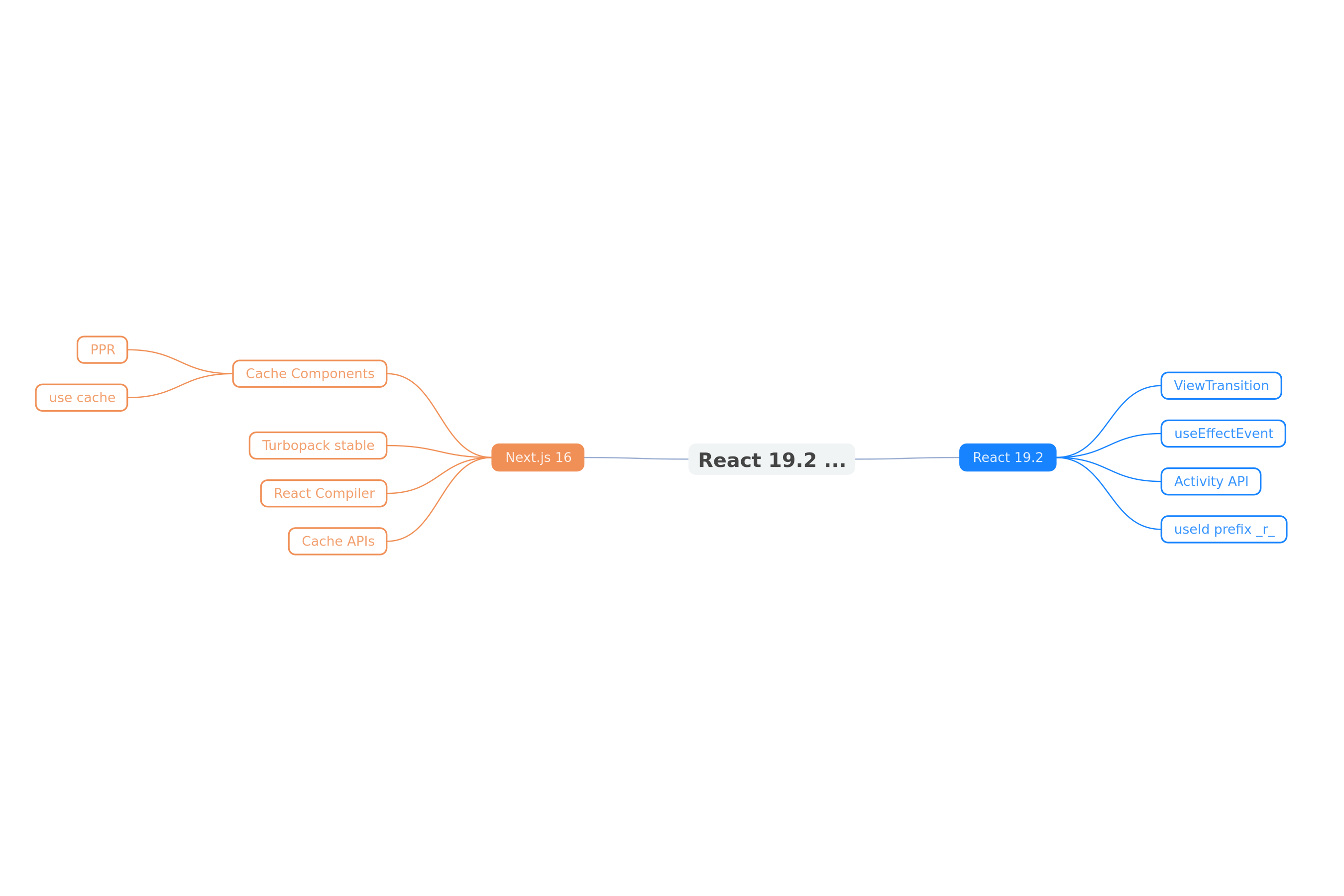 Map of React 19.2 and Next.js 16 features
If you're on Next.js 16, you're already using React 19.2 because the App Router ships with React Canary. No separate installation is needed. For standalone React projects:
npm install react@19.2 react-dom@19.2
npm install eslint-plugin-react-hooks@latest  # v6.1.1+ for useEffectEvent linting
ViewTransition: Native Declarative Transitions
The Problem
Historically, animating route transitions or state changes in React required a third-party library (Framer Motion, react-transition-group) and significant plumbing. The browser's native document.startViewTransition() API exists, but its manual coordination with React's render cycle is complex.
The React 19.2 Solution
The <ViewTransition> component handles this coordination automatically. It activates when:
- Content changes via Suspense boundaries (fallback → content)
- A state change within a
startTransition - A deferred value via
useDeferredValue
import { ViewTransition } from 'react';

function ProductGallery({ products, selectedId }) {
  return (
    <ViewTransition>
      <ProductList products={products} />
      <ProductDetail id={selectedId} />
    </ViewTransition>
  );
}
Shared-Element Transitions
The flagship feature: shared-element transitions, where an element appears to move fluidly from one layout to another. For example, a product image that transforms into a full-size image on click.
<ViewTransition>
  {view === 'grid' && <ProductCard product={product} />}
  {view === 'detail' && <ProductFullView product={product} />}
</ViewTransition>

// In ProductCard:
<img
  style={{ viewTransitionName: `product-${product.id}` }}
  src={product.image}
/>
// In ProductFullView:
<img
  style={{ viewTransitionName: `product-${product.id}` }}
  src={product.image}
/>
The browser automatically animates the transition between the two elements sharing the same view-transition-name.
Events and Web Animations API
ViewTransition supports optional callbacks to control animation via JavaScript:
<ViewTransition
  onEnter={(event) => {
    // Customize enter animation
    const animation = event.snapshot.animate([
      { opacity: 0, transform: 'scale(0.8)' },
      { opacity: 1, transform: 'scale(1)' },
    ], { duration: 300 });
    return () => animation.cancel();
  }}
  onExit={(event) => { /* ... */ }}
  onShare={(event) => { /* ... */ }}
  onUpdate={(event) => { /* ... */ }}
>
  <Content />
</ViewTransition>
Important rules:
- Only one event fires per
<ViewTransition>per Transition onSharetakes precedence overonEnterandonExit- Each event must return a cleanup function
Browser Support
As of May 2026, global support for same-document View Transitions is around 78%:
- Chrome 111+, Edge 111+
- Safari 18+ (including iOS 18)
- Firefox: partial support
The React component handles degradation automatically on unsupported browsers.
useEffectEvent: Stable Effects Without Re-renders
The Problem Solved
The classic case: a chat connection that reconnects unnecessarily every time the theme changes, just because the onConnect callback reads the theme value.
// BEFORE: unnecessary reconnection on every theme change
function ChatRoom({ roomId, theme }) {
  useEffect(() => {
    const connection = createConnection(roomId);
    connection.on('connected', () => {
      showNotification('Connected!', theme); // theme in deps
    });
    connection.connect();
    return () => connection.disconnect();
  }, [roomId, theme]); // ← theme causes re-execution
}
The Solution
useEffectEvent extracts non-reactive logic out of the dependency array:
// AFTER: stable connection, theme always up-to-date
import { useEffectEvent } from 'react';

function ChatRoom({ roomId, theme }) {
  const onConnected = useEffectEvent(() => {
    showNotification('Connected!', theme);
  });

  useEffect(() => {
    const connection = createConnection(roomId);
    connection.on('connected', onConnected);
    connection.connect();
    return () => connection.disconnect();
  }, [roomId]); // ← theme no longer in deps
}
Usage Rules
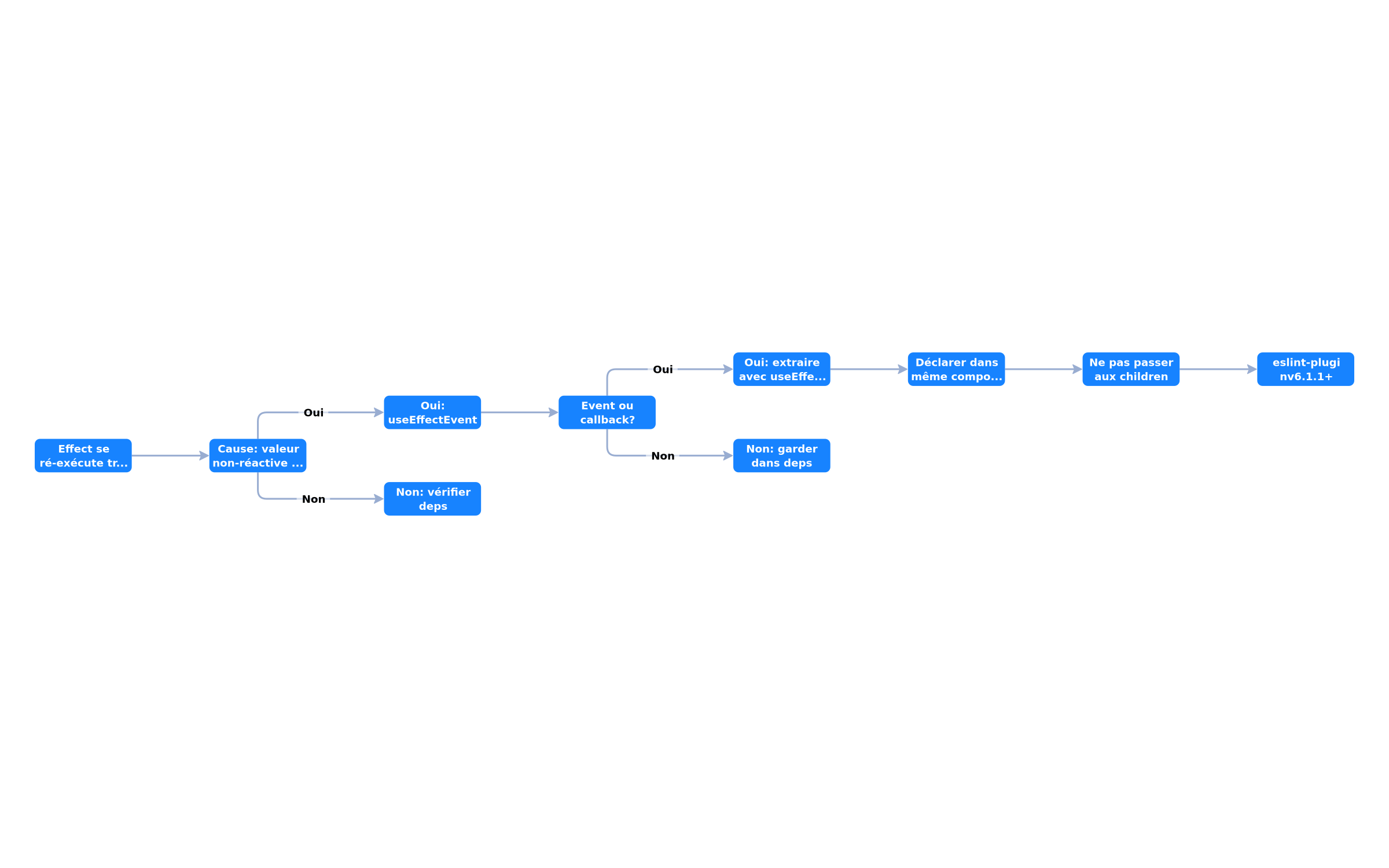 Decision tree for when to use useEffectEvent
- Declare in the same component as the Effect that uses it
- Don't pass to children — Effect Events are limited to the owning component
- Use
eslint-plugin-react-hooks@latest(v6.1.1+) for linting - Don't wrap everything — useEffectEvent is for event-like logic, not for silencing lint
Activity API: Preserve State Without Rendering
The Activity API keeps parts of your UI mounted but hidden, preserving their state while unmounting effects and deferring updates.
import { Activity } from 'react';

function TabContainer({ activeTab }) {
  return (
    <>
      <Activity mode={activeTab === 'profile' ? 'visible' : 'hidden'}>
        <ProfileTab />
      </Activity>
      <Activity mode={activeTab === 'settings' ? 'visible' : 'hidden'}>
        <SettingsTab />
      </Activity>
    </>
  );
}
Typical use cases:
- Tabs where the user switches frequently
- Modals with form state to preserve
- Virtualized lists with scroll position to maintain
Next.js 16 Cache Components: PPR + use cache
The Programming Model
Cache Components in Next.js 16 represent a fundamental shift: instead of choosing between static and dynamic at the page level, you can now statically pre-render portions of pages while keeping other parts dynamic.
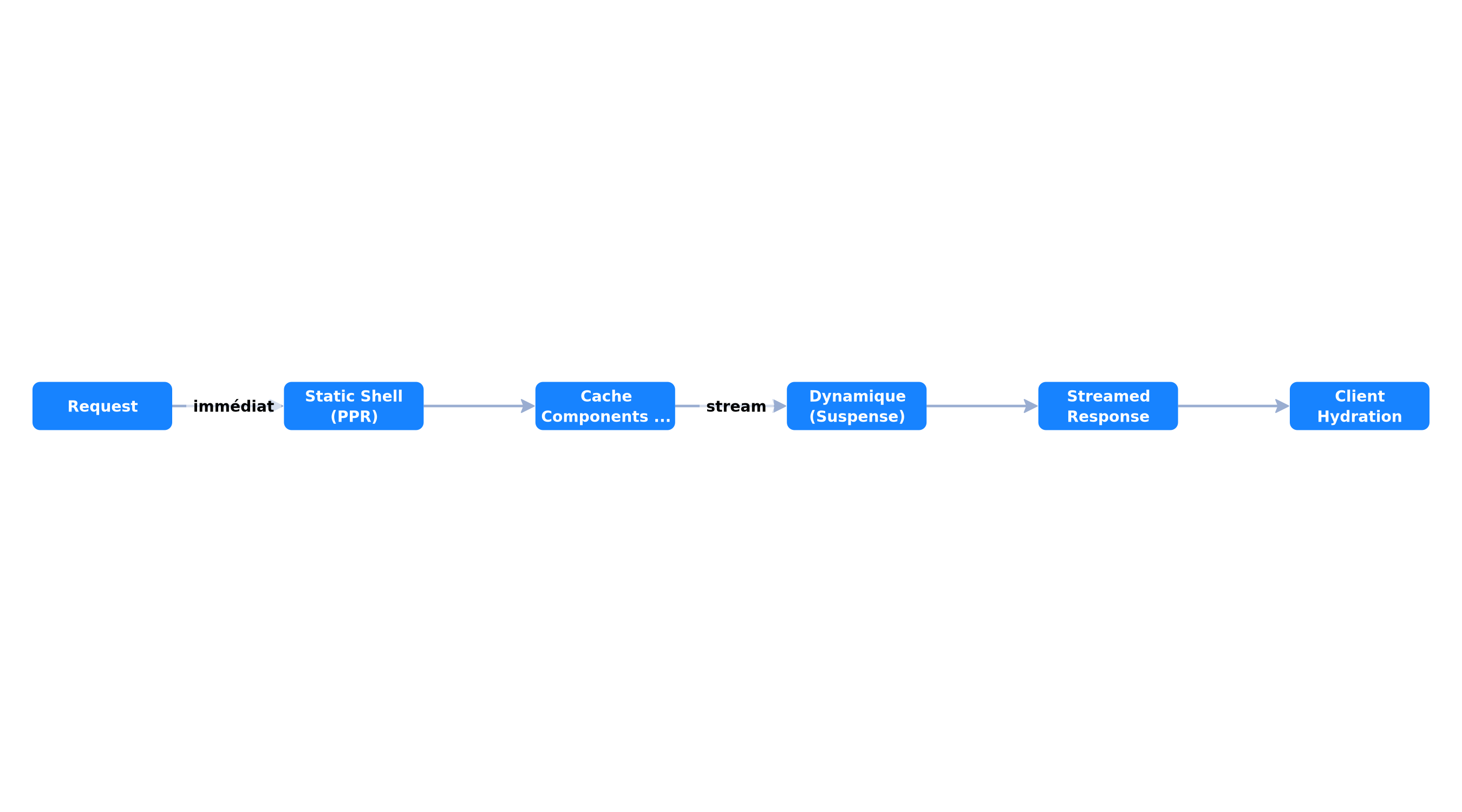 Partial Pre-Rendering and Cache Components architecture in Next.js 16
Partial Pre-Rendering (PPR)
PPR allows Next.js to serve a static shell immediately, then stream dynamic parts:
// app/products/[id]/page.tsx
import { Suspense } from 'react';

export const experimental_ppr = true;

export default function ProductPage({ params }) {
  return (
    <div>
      {/* Static: pre-rendered at build, served immediately */}
      <ProductHeader id={params.id} />

      {/* Dynamic: streamed after */}
      <Suspense fallback={<ReviewsSkeleton />}>
        <Reviews productId={params.id} />
      </Suspense>
    </div>
  );
}
use cache Directive
The use cache directive lets you explicitly mark segments as cacheable:
// Static cache at build
async function ProductHeader({ id }) {
  'use cache';

  const product = await fetch(`/api/products/${id}`).then(r => r.json());
  return <h1>{product.name}</h1>;
}

// Cache with revalidation
async function getRecommendedProducts(userId) {
  'use cache';

  const products = await fetch(`/api/recommendations/${userId}`).then(r => r.json());
  return products;
}

// Cache with tag for invalidation
async function getUserProfile(userId) {
  'use cache';

  const user = await db.user.findUnique({ where: { id: userId } });
  return user;
}
// Invalidation: revalidateTag('user-profile');
New Cache APIs
Next.js 16 introduces refined cache APIs:
| API | Usage |
|---|---|
updateTag() | Invalidates and recomputes a specific cache tag |
refresh() | Forces cache refresh |
revalidateTag() | Invalidates cache for a tag (refined) |
// Action that invalidates cache after mutation
'use server';
import { revalidateTag } from 'next/cache';

export async function updateProfile(userId, data) {
  await db.user.update({ where: { id: userId }, data });
  revalidateTag('user-profile');
}
Turbopack Stable: The Default Bundler
Next.js 16 makes Turbopack the default bundler for all applications. Benefits:
- Faster startup and compilation (Rust-based)
- Turbopack File System Caching (beta): even faster startup
- React Compiler (stable): built-in integration for automatic memoization
// next.config.ts
export default {
  // Turbopack is now the default, no flag needed
  // To disable (not recommended):
  // turbopack: false,
};
The React 19 basics that 19.2 builds on
If your project comes from React 18, 19.2 relies on APIs that arrived with React 19. They simplify everyday code:
use()reads a promise directly inside a component, withSuspensehandling the loading state. It also reads context, and unlike other hooks it can be called inside a condition.useActionState(formerlyuseFormState) manages the state of a form wired to a Server Action: it returns the current state, the action to pass to the form, and anisPendingboolean for loading.useOptimisticshows the expected result of an action right away while the request is in flight, then rolls back if it fails. No third-party library needed for this case.refis a regular prop. Function components receive it directly:forwardRefis no longer needed.
'use client';
import { useActionState } from 'react';
import { submitContactForm } from './actions';

export function ContactForm() {
  const [state, action, isPending] = useActionState(submitContactForm, null);
  return (
    <form action={action}>
      <input name="email" type="email" required />
      <button disabled={isPending}>{isPending ? 'Sending...' : 'Send'}</button>
      {state?.error && <p>{state.error}</p>}
    </form>
  );
}
The React Compiler completes these APIs: it analyses your components at build time and adds memoization where it helps. Hand-written useMemo and useCallback become unnecessary in most cases. It does not fix a component that breaks React's rules (side effects during render, objects mutated in place): that component simply will not be optimised.
Comparison: React 19.1 vs 19.2 + Next.js 15 vs 16
 Radar comparison of capabilities between React 19.1/19.2 and Next.js 15/16
The radar above compares five dimensions: Performance (Turbopack, PPR), DX (React Compiler, useEffectEvent), Animations (ViewTransition), Caching (Cache Components), and Stability (API maturity).
Migration Plan: From Next.js 15 + React 19.1 to 16 + 19.2
First: are you still on the Pages Router?
Cache Components, use cache and PPR only work with the App Router. If your project still uses pages/, migrate first, without rewriting everything at once:
- List the routes that use
getServerSideProps,getStaticPropsandgetStaticPaths: they will becomeasynccomponents that load their own data. - Let
app/andpages/coexist. Next.js accepts both folders at the same time: new pages go inapp/, existing ones stay where they are. - Migrate page by page, from simplest to most complex. Add
'use client'only to components that use hooks or events, and replace API routes with Server Actions where the logic allows. - Measure before and after with Lighthouse or PageSpeed Insights on migrated pages.
The Pages Router is still maintained: keep it if an essential library is not compatible with Server Components, or if the team does not have time to migrate.
Step 1: Update Dependencies
npm install next@latest react@19.2 react-dom@19.2
npm install eslint-plugin-react-hooks@latest
Step 2: Breaking Changes to Handle
// Async params (Next.js 16 breaking change)
// BEFORE (Next.js 15):
export default function Page({ params }) {
  return <Product id={params.id} />;
}

// AFTER (Next.js 16):
export default async function Page({ params }: { params: Promise<{ id: string }> }) {
  const { id } = await params;
  return <Product id={id} />;
}
Step 3: Progressive Adoption of Cache Components
// 1. Enable PPR on a page
export const experimental_ppr = true;

// 2. Identify static segments
async function StaticHeader() {
  'use cache';
  const data = await fetch('https://api.example.com/config').then(r => r.json());
  return <Header config={data} />;
}

// 3. Keep dynamic segments in Suspense
<Suspense fallback={<Skeleton />}>
  <DynamicContent />
</Suspense>
Step 4: Migrate Effects to useEffectEvent
Identify effects that re-run too often due to non-reactive dependencies. Extract event-like logic with useEffectEvent.
Real Performance: What Cache Components Change
Based on Next.js benchmarks and field reports, Cache Components bring:
| Metric | Without PPR | With PPR | Gain |
|---|---|---|---|
| FCP (First Contentful Paint) | 1.1s | 0.3s | -73% |
| LCP (Largest Contentful Paint) | 2.4s | 0.8s | -67% |
| TTFB | 180ms | 45ms | -75% |
| TBT (Total Blocking Time) | 290ms | 50ms | -83% |
These figures are estimates based on Next.js documentation and Vercel team tests. Real gains depend on the proportion of static vs dynamic content in your pages.
Conclusion
React 19.2 and Next.js 16 represent the most significant duo for front-end web development in 2026. View Transitions eliminate the need for third-party animation libraries. Cache Components with PPR make obsolete the historical trade-off between static and dynamic. useEffectEvent solves a 10-year-old papercut in effect management.
For teams hesitant to migrate, the path is progressive: you can adopt these features one at a time, page by page. If your company wants to accelerate this migration, our web development expertise covers Next.js 16 migrations with performance optimization, and our SaaS development service integrates Cache Components from the initial design.
The React 19.2 + Next.js 16 combination isn't an incremental update — it's a paradigm shift toward web applications that rival native in fluidity and performance.
Tags
FAQ
What is ViewTransition in React 19.2?
ViewTransition is a declarative component in React 19.2 that automatically handles browser view transitions when content changes via Suspense, state changes, or navigation. It supports shared-element transitions and onEnter/onExit events via the Web Animations API.
When should I use useEffectEvent?
useEffectEvent should be used when an Effect re-runs too often because of a non-reactive value in its dependencies. Typical case: a chat connection that reconnects when the theme changes, just because the onConnect callback reads the theme. useEffectEvent extracts this logic out of the dependencies.
What are Cache Components in Next.js 16?
Next.js 16 Cache Components combine Partial Pre-Rendering (PPR) and the `use cache` directive to statically pre-render portions of pages while keeping other parts dynamic. This enables instant navigation without sacrificing personalization.
Is ViewTransition supported by all browsers?
As of May 2026, global support is around 78%. Chrome 111+, Edge 111+, and Safari 18+ (including iOS 18) support same-document View Transitions. Firefox has partial support. The React ViewTransition component handles degradation automatically.
Does the React Compiler replace useMemo and useCallback?
In most cases, yes: it adds memoization automatically at build time. It does not apply to components that break React's rules, such as a side effect during render or an object mutated in place.
How do I migrate to React 19.2 with Next.js 16?
If you're on Next.js 16, you're already using React 19.2 because the App Router ships with React Canary. For standalone React projects, install `react@19.2` and `eslint-plugin-react-hooks@latest` (v6.1.1+) for useEffectEvent linting.
Does your site book meetings — or just present you?
We open your URL together, mark the 3 leaks, and tell you whether a fix is enough or a rebuild is required.
- 30 min
- No commitment
- Action plan
William Aklamavo
Web development and automation expert, passionate about technological innovation and digital entrepreneurship.


