
SME 2026: website, mobile app or both?
In 2026, does an SME need a website, a mobile app or both? Price ranges, use cases, decision criteria and when the mobile app becomes a profitable choice.

SME 2026: website, mobile app or both?
A website is discovered. A mobile app is downloaded. These are two different strategies, with different budgets, channels and ROIs.
Every SME asks the same question in 2026: should I invest in a website, a mobile app, or both? The wrong answer costs money: a site that does not convert, or an app nobody downloads.
What you will learn: 2026 price ranges (our public grids), typical use cases, the 4-question decision method, and when "both" becomes rational. With documented cases: Tontineo (app + web + admin), PANIGASPI (app) and FocusLock (app).
The two strategies do not answer the same need
Before talking price, the real divide must be stated: a website and a mobile app have neither the same acquisition channel, nor the same relationship to the user, nor the same lifecycle.
The website is a public space. It opens from any browser, shares by link, is found on Google, reads on mobile, tablet or desktop. Its lifecycle: discovery → information → action (purchase, appointment, contact). Its value is measured in visits, conversion and SEO.
The mobile app is a private space. It installs on the phone, asks permissions, sends notifications, keeps the user logged in. Its lifecycle: download → installation → repeated use → retention. Its value is measured in downloads, retention and usage frequency.
This is not a "better" question — it is an objective question: do you want to be found, or do you want to be used?
The website: the findable front door
A website is found. On Google, from social media, by word of mouth. It is the foundation of your presence: brand, services, pricing, contact. Without it, a mobile app loses its main acquisition channel.
Our public s2 (SaaS / web) 2026 grid:
| Offer | Price | Scope | Timeline |
|---|---|---|---|
| SaaS MVP | 2,000 € | Next.js up to 6 screens | 3–4 weeks |
| SaaS Standard | 3,500 € | up to 15 screens + Stripe | 5–7 weeks |
| SaaS Premium | 5,000 € | 30+ multi-tenant screens | 8–12 weeks |
Documented case: the e-learning platform (id 33) and the pro photo albums platform (id 35) — two Next.js web deliveries.
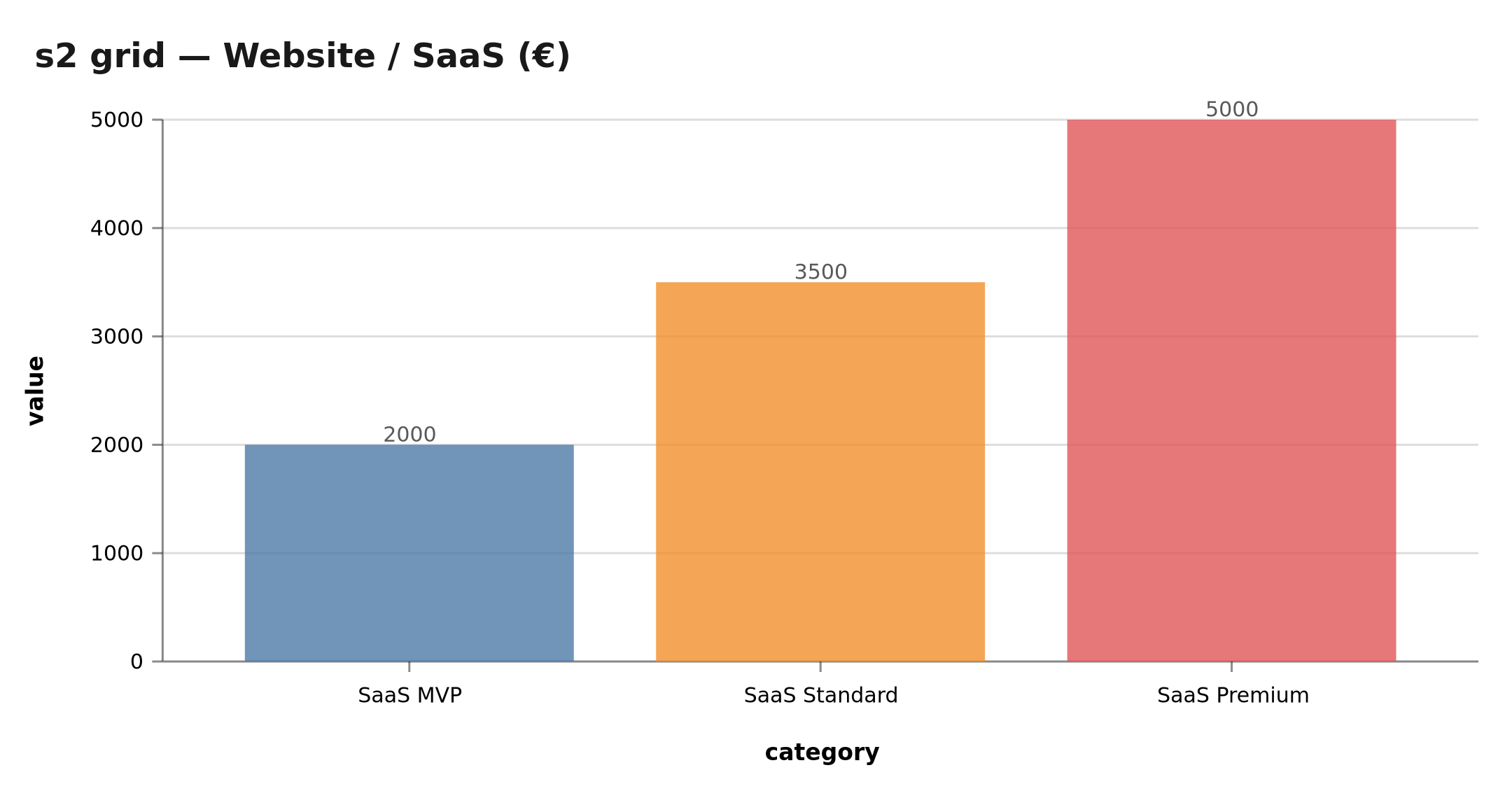 s2 offers: 2,000, 3,500 and 5,000 € for web — public commercial grid, not a median of quotes
What the website delivers concretely
The website is the trust infrastructure: this is where the client verifies before buying. Three roles no app can replace:
- The proof role: before downloading your app or contacting you, the prospect looks for your site, your reviews, your references. A missing or outdated site kills conversion even when the app is excellent.
- The SEO role: on business queries ("physiotherapist Nantes", "Flutter developer"), the site appears on Google, not the app. It is the cheapest acquisition channel when well built (content, internal links, performance).
- The standard role: pricing, hours, terms, legal notices — the site hosts stable information, shared in one link, indexed, updated.
And a decisive economic asset: a website is updated continuously without store validation. Fixing a price, adding a service, publishing an article: everything goes live in minutes, with no Apple or Google review period.
The mobile app: the repeated-use tool
A mobile app is installed. It creates permanent presence on the user's phone: notifications, shortcut, authentication. It does not appear in Google (or barely). You must sell it another way: store, QR code, recommendations.
Our public s3 (Flutter) 2026 grid:
| Offer | Price | Scope | Timeline |
|---|---|---|---|
| Ecosystem MVP | 2,000 € | 10 iOS+Android screens | 4–5 weeks |
| Ecosystem Standard | 3,500 € | 20 screens + admin + stores | 6–9 weeks |
| Ecosystem Premium | 5,000 € | 40+ screens | 10–14 weeks |
Documented cases: PANIGASPI (id 7), FocusLock (id 28) and Tontineo (id 30) in Flutter. The Flutter vs React Native model details the technical choice.
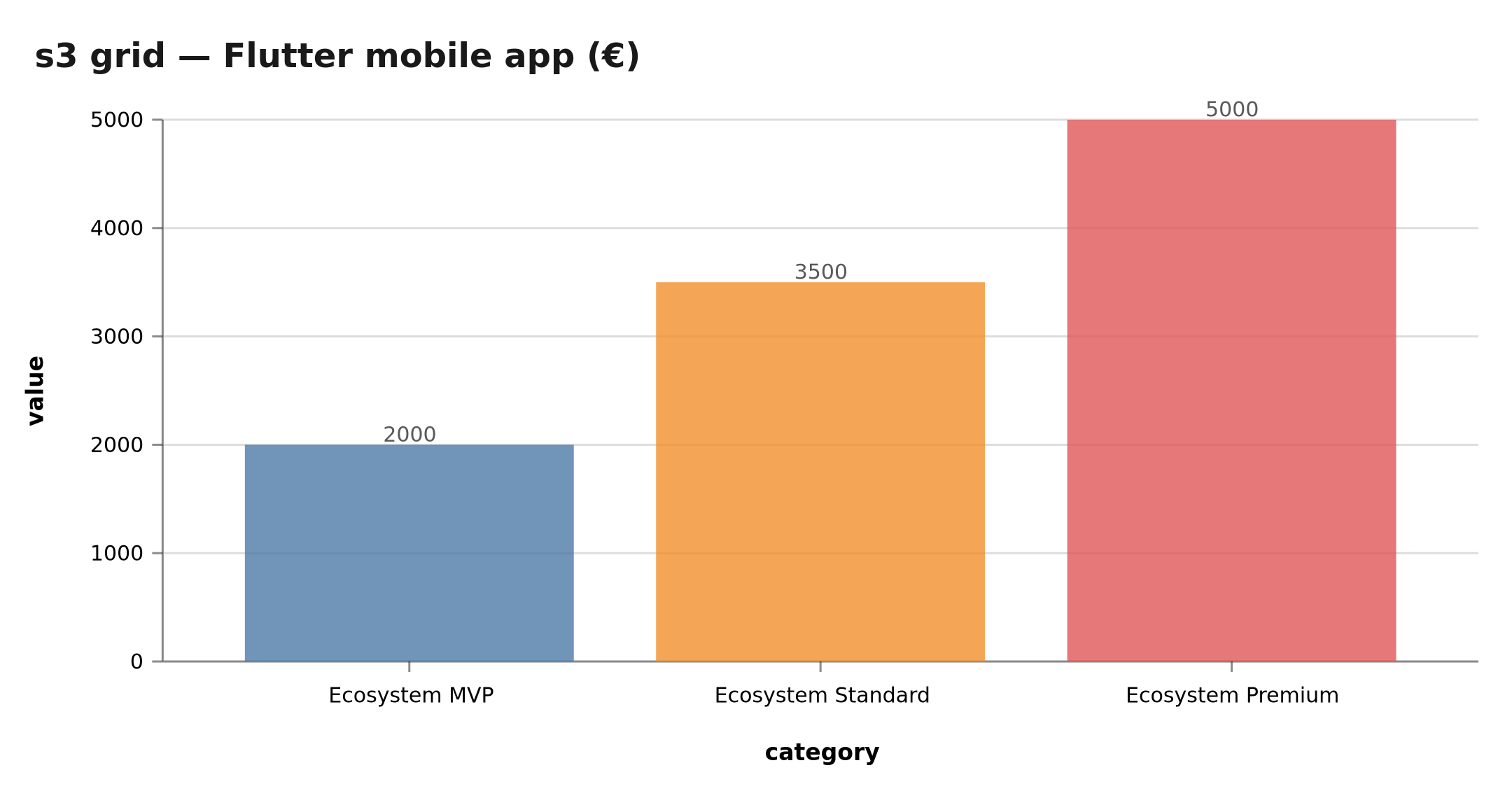 s3 offers: 2,000, 3,500 and 5,000 € for mobile Flutter — public commercial grid
What the app delivers concretely
The app excels where the web is weak: recurrence. Four unique capabilities:
- Push notifications: a tontine reminder, a delivery in progress, a rescheduled session — the app reaches the user even with the screen off. The web cannot do this (web notifications exist but struggle to convince users to enable them).
- Persistent authentication: logged in once, the user stays logged in. Frictions disappear — this is the lever of repeated transactional uses (pay, book, order).
- Native capabilities: camera (QR scan, ID photo), GPS (delivery geolocation), sensors, mobile payment. The web approaches these capabilities without equaling them.
- The permanent shortcut: the home-screen icon turns a channel into a habit. Retention is structurally better.
But the app has an invisible cost: the acquisition cost. Nobody downloads an app by chance. You need a store (to be found), a QR code (to be scanned), a campaign (to be incentivized). Every download has a price — to include in the business case.
The special case of internal business apps
A mobile app for your employees (sites, deliveries, rounds, inventories) changes the game: the acquisition cost disappears (your team installs the app, period), usage is mandatory, and native capabilities (GPS, camera, offline) have real business value. This is today the most profitable app case for an SME — our file id 28 (FocusLock) and our article on why apps cost 5x more to maintain set the frame.
The 4-question decision method
flowchart TD
    A[SME digital project] --> B{Found or used?}
    B -->|Found / SEO / showcase| C[Website]
    B -->|Repeated use / notif / scan| D[Mobile app]
    C --> E{Budget < 2,000 €?}
    E -->|Yes| F[Simple showcase site]
    E -->|No| G[SaaS Standard to Premium]
    D --> H{Will users download?}
    H -->|Yes / already decided| I[Flutter MVP to Premium]
    H -->|Unsure| J[Start with site + PWA]
    I --> K[Plan admin + stores + analytics]
    J --> K
(Decision tree rendered by the Mermaid MCP — the embedded version is the image below.)
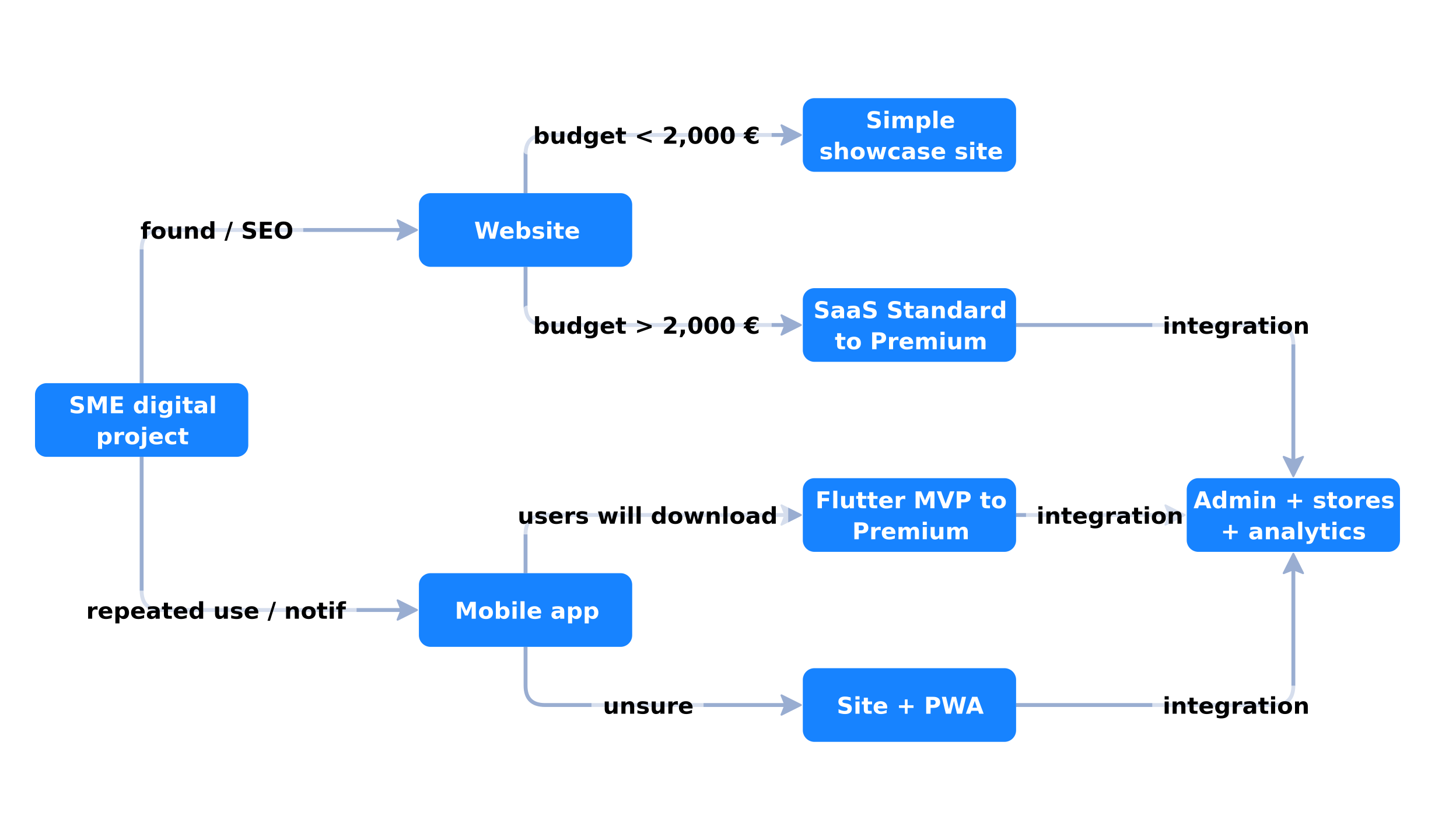 4 questions: findable vs used, budget, download, scope
Question 1: found or used?
- Findable: website. This is where Google, LinkedIn or an ad brings a stranger.
- Used: mobile app. It lives on the phone, users come back.
The question is not rhetorical: the answer determines everything else. A services SME (plumbing, accounting, hairdressing) answers "found": clients come occasionally, on need. A product or subscription SME (tontine, delivery, coaching) answers "used": the client comes back every week.
Both answers are not mutually exclusive — but the order matters: the findable almost always precedes the used.
Question 2: what convertible budget?
Under 2,000 €, a well-built showcase site beats a badly built app. Beyond that, the s2/s3 grid gives clear ranges. Our articles website pricing and Flutter app pricing detail them.
Beware of a grid-reading trap: 2,000 € of app and 2,000 € of site do not cover the same scope. The s2 MVP site is a functional showcase (up to 6 screens, SEO). The s3 MVP app is an installable product (10 iOS+Android screens) — but without the ecosystem (admin, stores, notifications, analytics), the app remains a shell. The full cost of a "usable" app starts at the Standard offer (3,500 €), often more with store fees (99 $/year Apple, 25 $ one-off Google).
Question 3: will the user download it?
This is THE question that kills most app projects. If use is occasional (checking hours), a PWA suffices. If use repeats and benefits from notifications (tontine, cart, coaching), the app becomes rational.
The honest test: "Would I myself download this app?" If the answer is "to try it once", the project is dead. If it is "to open it every day", it is alive. Apps that survive have proven daily or weekly usage — not "from time to time" usage.
The PWA (Progressive Web App) is the bridge: installable on the home screen, web notifications, works partially offline — all without a store. It is the right first step when uncertainty dominates, and it can turn into a native app later if usage confirms the need.
Question 4: is there an admin to plan?
Every serious app needs a back-office: managing users, content, transactions. The Tontineo case (ids 30, 31, 32) shows the three bricks: mobile app, web landing page, and web admin.
Underestimating the admin is mistake #1 of first app projects: you price the app, you forget that every user action (registration, payment, moderation) produces data to manage. The admin often represents 20 to 30 % of the total budget of a mobile ecosystem.
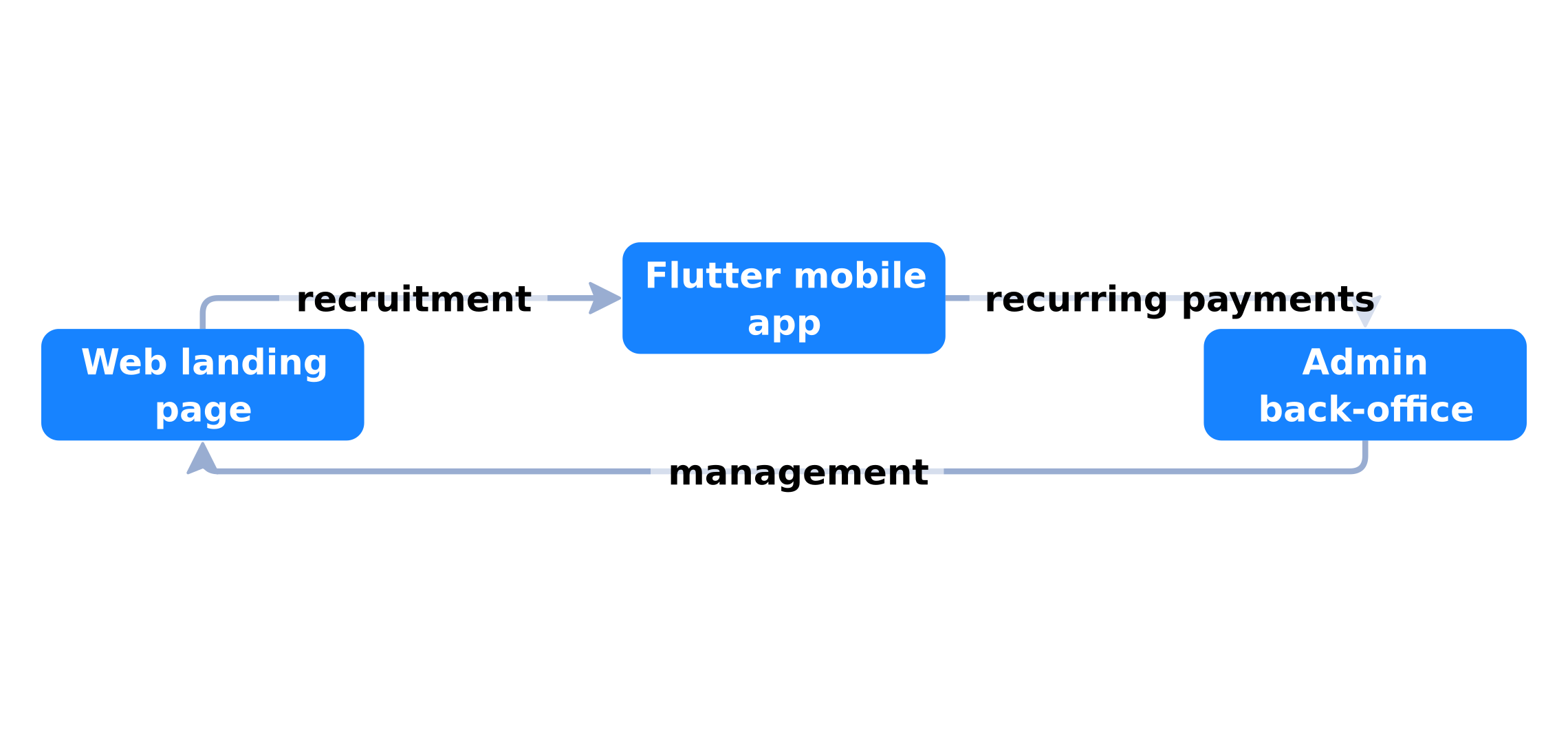 Mobile app (Flutter) + web landing + admin: the Tontineo model documented in files 30, 31, 32
When "both" is rational
Combining site + app is rational in two cases:
- A high-repetition ecosystem: tontine (id 30) needs the landing to recruit, the app for recurring payments, the admin to manage. Three bricks, three grids.
- A freemium or mobile-first SaaS: the web serves SEO, the app serves retention and notifications.
The rule: the web comes first, unless repeated use already proves the app need. Nobody downloads an app for a one-off purchase.
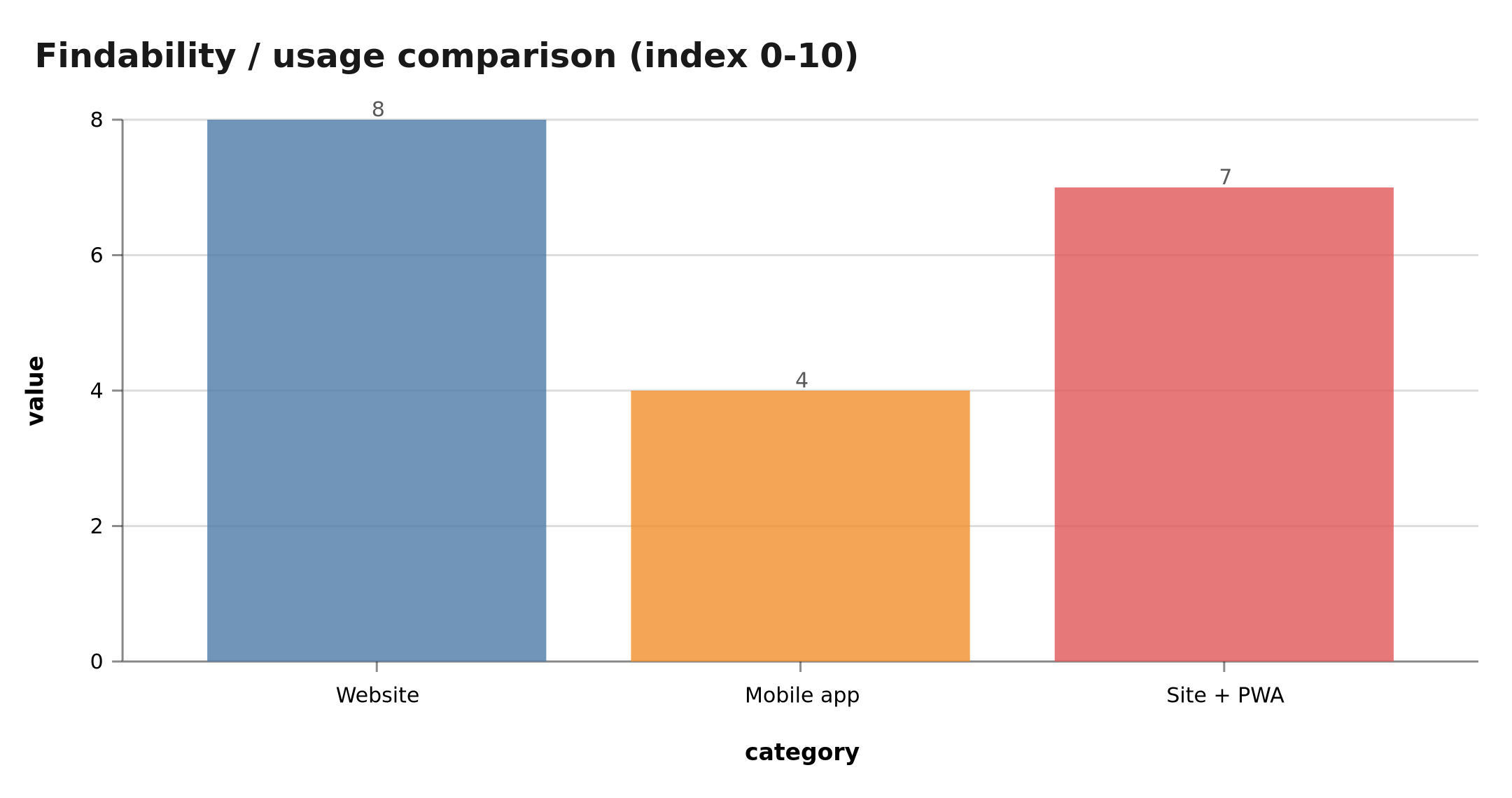 Website: findable, SEO, low cost. App: retention, notifications, store, acquisition cost
The three typical combinations
"Both" is not the only option. Three architectures cover most SME cases:
- Site only: showcase + content + booking. For 80 % of services SMEs, this is enough. Acquisition goes through Google and reviews.
- Site + PWA: the site enriched with an installable version. For repeated uses that do not yet justify a native app. This is the reasonable transition path.
- Site + Native app + Admin: the complete ecosystem. For recurring transactional models (tontine, subscription, delivery, coaching). The Tontineo model (ids 30, 31, 32).
The full annual budget: not just the build
The build price is only the beginning. The annual cost of a site or an app includes:
| Item | Website (s2) | Mobile app (s3) |
|---|---|---|
| Build (MVP → Premium) | 2,000 – 5,000 € | 2,000 – 5,000 € |
| Hosting + domain | 10 – 80 €/month | 10 – 80 €/month (API + server) |
| Maintenance / updates | 100 – 300 €/month | 150 – 400 €/month |
| Stores (Apple + Google) | — | 99 $/year + 25 $ one-off |
| User acquisition | SEO (content cost) | campaigns + store ASO |
| Year 1 total | ~3,500 – 8,500 € | ~4,500 – 12,000 € |
The items that really differentiate: maintenance (iOS/Android apps require more frequent compatibility updates) and acquisition (SEO is free once built, stores and campaigns are paid continuously). See also our analysis of app maintenance costs.
The 8 detailed comparison criteria
To decide between site and app, compare both options on the 8 dimensions that really determine the choice:
| Criterion | Website | Mobile app |
|---|---|---|
| Discoverability | Excellent (SEO, link sharing) | Low (store, QR code, campaigns) |
| Acquisition cost | SEO built = almost free | Permanent (ASO, campaigns, incentives) |
| Retention | Low (visitor leaves) | Strong (icon, notifications, session) |
| Notifications | Web (rarely enabled) | Push (powerful) |
| Native capabilities | Limited (camera via browser) | Complete (GPS, camera, offline) |
| Build cost | 2,000 – 5,000 € | 2,000 – 5,000 € + stores |
| Maintenance cost | 100 – 300 €/month | 150 – 400 €/month |
| Update cycle | Immediate | Store validation (days) |
This table is the working tool: fill it for your case (volumes, basket, frequency), not for "SMEs in general". The decisive criterion is never a single item — it is your model's stage: acquiring (the site wins), retaining (the app wins), or both.
Classic mobile acquisition mistakes
The acquisition cost is the most misjudged item of app projects. Three errors recur systematically:
- "We'll put a QR code on the window": the QR code is not enough. A user scanning a QR code on a window needs a strong reason to install — a discount, an exclusive service, an immediate gain. Without incentive, the install rate rarely exceeds a few percent.
- "We'll be on the stores, so we'll be found": being on the App Store and Google Play guarantees no visibility. ASO (store listing optimization) is a profession of its own, competitive, and the store favors high-volume apps — not small newcomers.
- "Our clients will install because they love us": affection does not survive download friction. The post-install retention rate is the real arbiter: an app not opened 30 days after installation is a failure, whatever the installation reason.
Best practice: build the app business case with an acquisition cost per active user (downloads × retention rate), not a cost per download. This is the only figure that matches the website comparison.
SEO: the invisible (and profitable) website advantage
The website has an advantage app budgets ignore: SEO keeps working after construction. Three specific 2026 dynamics:
- Long-form content: guides, comparisons and FAQs (like this article) attract visitors on business queries, months after publication. This is free recurring acquisition — the store has no equivalent.
- Internal linking: each page links to others, strengthening domain authority. The site becomes a ranking machine, not just a showcase.
- Local and AI search: engines and assistants (Google, Bing, ChatGPT) increasingly cite trusted web sources. A well-structured site (structured data, factual content) is cited; an app is never cited.
In practice: a well-built site generates an incoming request flow with a marginal cost near zero after construction. An app generates acquisition costs as long as it lives. This is the structural reason why the web comes first — unless repeated use is proven.
Questions to ask your agency before signing
Whether you go with a site, an app or both, ask these 6 questions to the provider:
- What exact scope? Screens, integrations, admin, stores — ask for the line breakdown, not a vague package.
- Who owns the code? Does the complete deliverable (repo, database, config) belong to you at delivery?
- What SEO performance? Is the site built with SEO in mind (SSR, metadata, structured data) or as an empty SPA for Google?
- What maintenance cost? Monthly rate, included evolution hours, response SLA?
- What recurring fees? Hosting, stores, third-party services (payments, notifications) — line by line.
- How do we move from site to app later? Is the stack (Next.js, API) designed to reuse business logic in the future Flutter app?
Our articles on choosing a mobile development agency and custom website pricing deepen each question.
The complete ecosystem example: Tontineo
The Tontineo model (files ids 30, 31, 32) illustrates what "both" means concretely for an SME:
- The web landing (id 31): the recruiting channel. SEO, service presentation, FAQ, download CTA. It brings new members continuously.
- The Flutter app (id 30): the product. Recurring contributions, reminder notifications, tontine cycle tracking, payment history. It retains.
- The web admin (id 32): the back-office. Member, cycle, payment and dispute management. It makes the model operational.
Each brick answers a distinct need — and the three are economically justified because the tontine is a weekly or monthly recurring use. Without this recurrence, the app brick would make no sense.
The same reasoning applies to delivery (order tracking + slot choice), coaching (program + reminders + payment), subscription (content + renewal + notifications). Spot the repeated use: it decides the app brick.
The recommended deployment schedule
The recommended build order for a "site + app" project over 12 months:
| Month | Step | Deliverable |
|---|---|---|
| M1–M2 | Audit usage and count volumes | Documented decision (site only vs site+app) |
| M2–M4 | Build the site (s2 MVP or Standard) | Site live, SEO positioned |
| M4–M8 | Validate real on-the-ground usage | Conversion data, repeated requests |
| M8–M10 | Build the app (s3 MVP then Standard) | App on stores + admin |
| M10–M12 | Measure retention and adjust | Usage dashboard, iterations |
This schedule avoids the most expensive mistake: developing the app before proving usage with the site. During M4–M8, the site serves as a probe: if repeated requests do not appear in real usage, the app would not have survived either — but it would have cost 3,500 € more.
Often forgotten: annual store and service fees
SME budgets and stores do not mix well when forgotten. Summary of the recurring fees that appear after 12 months:
- Apple Developer Program: 99 $/year — mandatory to publish on the App Store.
- Google Play: 25 $ one-off — modest, but to plan.
- Push notifications and third-party services: 0 – 100 €/month (Firebase, OneSignal, provider) depending on volume.
- API hosting + app database: 10 – 80 €/month depending on volume.
- Developer account renewal: annual, easy to forget after year one.
Cumulated, these items often represent 300 – 1,500 €/year depending on the ecosystem — to include in the business case before the decision, not after year one of surprise. Our s3 Standard grid includes store submission, but not these fees: they remain yours, per our mobile offer terms.
When the app becomes profitable: the decision thresholds
The economic decision between site and app can be summarized in three thresholds, based on the grids and documented cases above:
- One-off or occasional use (a service call, a product check, a one-time purchase): the site (or PWA) wins alone. The acquisition cost of an app cannot be amortized over one visit.
- Repeated use 1–3 times per month (booking, newsletter, simple transaction): a site + PWA wins. Notifications and persistence bring marginal value; the full app cost is not yet justified. The tontine model only becomes rational at higher frequency.
- Recurring use every week or more, with transactions or reminders (tontine, subscription, delivery, coaching): the full ecosystem (site + app + admin) becomes profitable. Each additional usage cycle amortizes the app build.
The honest way to find your threshold: the recurrence test. Measure over one month how many customers come back voluntarily (without campaign) and how many actions they perform per visit. Above roughly three recurrent actions per user per month on the existing channel, the app test is worth running. Below, the site remains the right investment.
This threshold logic is also why our s3 mobile grid starts at the same price as the s2 web grid: the app is not intrinsically more expensive to build — it is intrinsically more expensive to operate and acquire, and that difference only pays off with recurrence. Combined with the annual budget table above, these thresholds give an SME the complete financial picture before the first quote request.
Figures from our files
Our public files (September 13, 2026 register) document:
- Web: Next.js 15 e-learning platform (id 33), pro photo albums (id 35), WordPress plugin (id 16).
- Flutter mobile: PANIGASPI (id 7), FocusLock (id 28), Tontineo (id 30).
Below the 5-file threshold per segment, no pricing aggregate is published — only the public commercial grid applies. This transparency rule is our answer to "how much do your real projects cost?": beyond documented cases, we publish grids, not invented averages.
Sources
- Public grids:
src/data/servicesData.ts(s2 web, s3 mobile), 2026. - Portfolio files: ids 7, 16, 28, 30, 31, 32, 33, 35.
- BOVO register:
docs/seo/data-evidence/register.json.
Conclusion
For an SME in 2026, the answer is almost never "app first". Start with a findable website (2,000 to 5,000 €), validate usage, then add a Flutter app (2,000 to 5,000 €) as soon as repetition and notifications justify the download. An app is not a budget — it is the consequence of proven usage.
In summary: website alone if you want to be found, site + PWA if usage is emerging, complete ecosystem (site + app + admin) if usage is already proven. And in every case: count the annual cost (maintenance, acquisition, stores), not just the build.
Next: custom website pricing, Flutter mobile app pricing, or choosing a mobile development agency.
Tags
FAQ
How much does a website cost for an SME in 2026?
Our public s2 (SaaS) grid: MVP 2,000 €, Standard 3,500 €, Premium 5,000 €. A simple showcase site can cost less, depending on scope. The price depends on screen count and integrations.
How much does a mobile app cost in 2026?
Our s3 (Flutter) grid: MVP 2,000 € (10 screens, iOS+Android), Standard 3,500 € (20 screens + admin + stores), Premium 5,000 € (40+ screens). SEO does not apply to an app; you must budget user acquisition.
Do I need a website or a mobile app for my SME?
Start with a website: it is findable on Google, serves as the base for everything else and costs less. Move to a Flutter app when the use repeats (booking, tontine, delivery) and customers are ready to download.
Does your s3 grid include store publishing?
Yes, the Standard offer (3,500 €) includes 20 screens + admin + store submission. Apple Developer (99 $/year) and Google Play (25 $ one-off) registration fees remain yours.
Does your site book meetings — or just present you?
We open your URL together, mark the 3 leaks, and tell you whether a fix is enough or a rebuild is required.
- 30 min
- No commitment
- Action plan

Vicentia Bonou
Full Stack Developer & Web/Mobile Specialist. Committed to transforming your ideas into intuitive applications and custom websites.


