
Docker Sandboxes: securing AI agents in production
Docker Sandboxes isolate Claude Code, Copilot CLI and Codex in microVMs. An SMB guide covering YOLO mode, a security checklist and n8n agency delivery.

Docker Sandboxes: securing AI agents in production
Give agents autonomy without handing them the keys to the host: that is exactly the problem Docker Sandboxes solves for teams shipping with Claude Code, Copilot CLI, or Codex.
Docker Sandboxes change the security posture of coding agents. Instead of choosing between speed (permissive mode) and caution (manual approval on every command), you isolate the agent in a disposable microVM. Your laptop, host Docker daemon, and local network stay out of reach — except what you explicitly mount.
For an SMB or an automation agency, this is not theoretical. Agents write code, touch n8n workflows, install dependencies, and call APIs. This article covers what Docker ships (facts from the product page and official docs), how to install sbx, which checklist to run before YOLO mode, and how to connect this isolation to n8n agent governance in agency delivery.
The problem: agents too useful to run without walls
Claude Code, Copilot CLI, Codex, OpenCode, Kiro, and Gemini CLI can run commands, edit configs, and start containers. That is their value. It is also their risk surface.
Without isolation:
- a misaimed
rmhits the host disk; - a compromised package lands in your daily environment;
- host Docker socket access exposes every local container;
- secrets in the shell or untracked files become readable.
Docker’s docs state the need plainly: agents do their best work with freedom, but freedom without a boundary does not scale for teams. Docker Sandboxes answers with a hard boundary — the microVM — rather than an endless Allow / Deny prompt loop.
On the product page, Gavriel Cohen (creator of NanoClaw) frames it this way: you do not trust agents with security; you build walls around them. Ben Navetta (Engineering Lead, Warp) makes the productivity case: sandboxes let agents run long tasks without compromising safety, with a consistent environment whether agents run locally or in the cloud.
What Docker Sandboxes are (product facts)
From docker.com/products/docker-sandboxes and docs.docker.com/ai/sandboxes:
- Disposable, isolated sandboxes for coding agents.
- Supported agents: Claude Code, Copilot CLI, Codex, OpenCode, Kiro, Gemini CLI (plus custom agents).
- microVM isolation: hard host boundary; each sandbox gets its own filesystem, network, and Docker daemon.
- Real autonomy inside: install packages, modify configs, run Docker inside the sandbox.
- YOLO /
--dangerously-skip-permissions: permissive mode by default inside the sandbox — safe because it is confined. - No Docker Desktop required for sandboxes.
- Docker AI Governance (separate offering) for org-wide network, filesystem, and MCP policies.
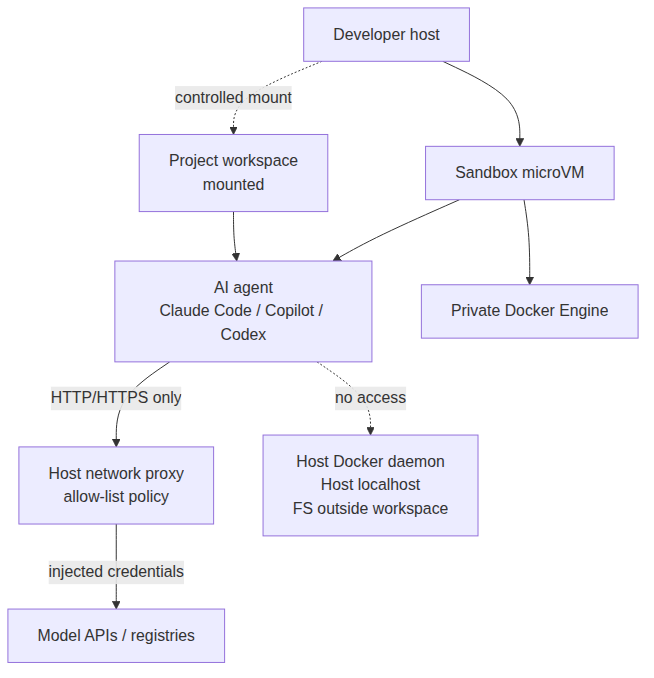 The agent works inside a microVM: mounted workspace, network proxy, private Docker Engine — the host stays out of scope
Isolation layers worth knowing
Docker’s security docs describe several layers. For an SMB, focus on these:
| Layer | Practical effect |
|---|---|
| Hypervisor / microVM | Agent has sudo inside the VM, not on the host |
| Network | HTTP/HTTPS via host proxy; deny-by-default available |
| Private Docker Engine | docker build / Compose without touching the host daemon |
| Workspace | Project directory mounted; optional clone mode (host tree read-only) |
| Credentials | API keys can be injected by the proxy without entering the VM in cleartext |
Documented caveat: even in clone mode, the repository can remain readable (including untracked files). A local .env is not magically invisible. Treat secrets as a separate concern (sbx secret, vault, CI variables).
Quick install (macOS, Windows, Linux)
Commands below match the Docker Sandboxes product page. Adapt to your OS.
macOS (Apple silicon, Sonoma+ per get-started docs):
brew trust docker/tap
brew install docker/tap/sbx
sbx login
Windows 11 (x86_64, Hypervisor Platform enabled):
winget install Docker.sbx
# or: winget install -h Docker.sbx
sbx login
Ubuntu Linux (24.04+, KVM required):
curl -fsSL https://get.docker.com | sudo REPO_ONLY=1 sh
sudo apt-get install docker-sbx
sbx login
sbx login opens Docker OAuth. The sbx CLI is described as free to use, including commercial work; organization governance is a separate subscription.
First run
cd ~/my-project
sbx run --name my-sandbox claude
On first launch, Docker prompts for a network preset:
- Open — all traffic allowed;
- Balanced — default deny + common dev sites (good starting point);
- Locked Down — everything blocked unless you allow it.
Then:
sbx ls
sbx policy ls
sbx policy allow network registry.npmjs.org
sbx stop my-sandbox
sbx rm my-sandbox
Removing a sandbox deletes packages, images, and internal state. Host working-tree files are not deleted by sbx rm.
Checklist before enabling YOLO mode
YOLO mode speeds up long sessions. It does not replace team discipline. Use this checklist before you standardize --dangerously-skip-permissions (or the sandbox default that enables it).
 Four guardrails: clean workspace, network policy, secrets via sbx, Git review before merge
Operational checklist
- Secret inventory — no production
.envin the mounted workspace, or switch to clone mode. - Network policy — prefer Balanced or Locked Down; add required hosts (
sbx policy allow network …). - Agent secrets — use
sbx secret set(e.g. GitHub token) instead of exporting keys into the VM. - Git boundary — dedicated branch, atomic commits, mandatory PR; the agent writes, a human merges.
- No host Docker socket — confirm builds use the sandbox’s own Docker Engine.
- Client data — dumps, CRM exports, n8n exports: outside the workspace or anonymized.
- Lifecycle — disposable sandbox per ticket / feature;
sbx rmat the end. - Team alignment — for multiple machines: document the network preset and, if needed, Docker AI Governance.
Without these eight points, YOLO stays fast — and your risk debt grows every session.
SMB angle: why this is not “too enterprise”
Competing tutorials often stop at “install sbx and launch Claude”. For an SMB, the useful question is: what residual risk do we accept to accelerate delivery?
Three concrete cases:
1. Refactoring a sensitive n8n workflow.
The agent can edit workflow JSON, install CLIs, and run tests. The sandbox limits blast radius if a script goes wrong. Production still goes through your pipeline and n8n governance.
2. Client technical spike (48 hours).
Mount only the spike repo. No client VPN, no prod secrets. At the end: sbx rm, Git diff, demo. The consultant laptop stays clean for the next client.
3. Junior onboarding + agent.
The junior enables YOLO inside the sandbox, not on the bare machine. You cut supervision cost without opening the whole fleet.
Docker AI Governance becomes relevant once you standardize rules across 3+ machines (network, filesystem, MCP). It is not required to start; it is the “team” step after the first individual win.
Connecting Docker Sandboxes and n8n agents in agency delivery
Local isolation does not replace runtime governance for business agents. At BOVO Digital we treat two distinct — and complementary — planes.
 From isolated coding agents to n8n workflows with HITL, guardrails, and RBAC
Plane A — Development (Docker Sandboxes)
- Claude Code / Copilot CLI inside
sbx; - generate and fix workflows, scripts, tests;
- confined YOLO + PR review.
Plane B — Production (n8n AI Agent Governance)
- RBAC, human-in-the-loop, runtime guardrails, output sanitization, observability;
- governance decisions inside the workflow, not only in a policy PDF.
Our deep dive on n8n AI Agent Governance in production covers the five pillars. Docker Sandboxes sits upstream: secure how the team builds agents and workflows. n8n sits downstream: secure how they run for the client.
For an SMB automation engagement or delivery through our n8n automation agency, a typical chain is:
- Scope allowed data and MCP tools.
- Develop the agent / workflow under a sandbox.
- Human review + tests (n8n Evaluations for autonomous agents).
- Deploy with HITL on high-impact actions (payments, bulk email, CRM writes).
- Monitor and run incident retros.
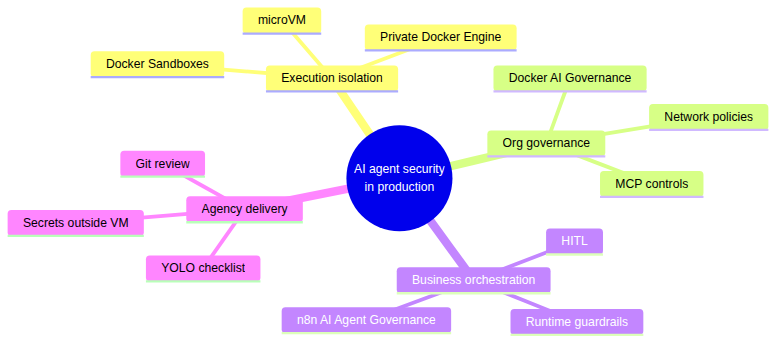 Four complementary pillars for an SMB or agency shipping AI agents
Limits and pitfalls
Be precise about what sandboxes do not do:
- They do not stop an agent from editing the mounted workspace in direct mode (that is intentional).
- They do not replace code review or tests.
- They do not magically encrypt secrets already in the repo.
- They alone do not govern business MCP tools on n8n / the client cloud.
- Nested virtualization is required if you run
sbxinside a VM (VDI) — otherwise startup fails (get-started docs).
No invented CVE numbers here: follow Docker advisories and those of your agents (Claude Code, Copilot, etc.) through official channels.
Conclusion — a concrete boundary so you can move faster without naivety
Docker Sandboxes deliver a clear infrastructure answer: microVM + controlled workspace + network proxy + private Docker Engine. YOLO mode becomes a productivity lever, not a bet on the agent’s judgment.
For SMBs and agencies shipping with Claude Code and n8n, the logical path is two-step: isolate the coding agent locally, govern the business agent in production. If you want to structure that chain across your machines and client workflows, reach out via Automation or n8n automation agency.
Concrete action this week: install sbx, run an agent on a non-critical repo with the Balanced preset, apply the YOLO checklist, then compare the Git diff to an unsandboxed session. You will see immediately what isolation changes — and what it does not replace.
Tags
FAQ
What are Docker Sandboxes for AI agents?
Docker Sandboxes provide disposable, isolated microVM environments for coding agents such as Claude Code, Copilot CLI, Codex, OpenCode, Kiro, and Gemini CLI. Agents can install packages and run Docker inside the sandbox without touching the host system.
Is YOLO mode actually safe with Docker Sandboxes?
YOLO mode (--dangerously-skip-permissions) skips approval prompts. On a bare host that is risky. Inside a microVM sandbox, Docker treats it as the recommended default: autonomy stays confined to the VM and the mounted workspace.
Do I need Docker Desktop to use sandboxes?
No. According to the Docker Sandboxes product FAQ, Docker Desktop is not required. On Ubuntu Linux you install via apt (docker-sbx); on macOS via Homebrew; on Windows via winget.
How do Docker Sandboxes complement n8n AI Agent Governance?
Sandboxes secure local coding-agent execution (development, refactors, tests). n8n AI Agent Governance secures business agents in production (HITL, guardrails, RBAC). Together they cover the agency chain: isolated code, then governed workflows.
What does Docker AI Governance add for SMB teams?
Docker AI Governance adds centralized network, filesystem, and MCP policies enforced across the organization. It becomes useful once an SMB or agency aligns multiple developer machines on the same guardrails.
Stuck on a step? We take it to production
Tutorials stop where production starts: secrets, GDPR, no-shows, CRM. A 30-min call to scope the delivery.
- 30 min
- Scoped delivery
- No commitment

William Aklamavo
Web development and automation expert, passionate about technological innovation and digital entrepreneurship.


