
Unsloth Studio & GLM-5.2: How to Run a 744B Local LLM (2026 Tutorial)
Unsloth Studio brings a web UI to local AI. GLM-5.2 (744B params, 1M context) runs as dynamic GGUF from 223 GB RAM. Install guide, quants, Thinking modes, and n8n integration explained.

Updated

Unsloth Studio & GLM-5.2: How to Run a 744B Local LLM (2026 Tutorial)
Local AI is no longer limited to 7B models on a laptop. In June 2026, Unsloth Studio lets you run GLM-5.2 — 744 billion parameters — on your own hardware.
Unsloth Studio changes the game for local AI. Until now, running a frontier LLM locally meant juggling Ollama, llama.cpp, Hugging Face, and obscure config files. Unsloth packs it into an open-source web UI: model search, GGUF downloads, optimized inference, tool calling, and code execution — on Mac, Windows, and Linux.
Meanwhile, GLM-5.2 from Z.ai ships with Unsloth Dynamic GGUFs day zero: 744B parameters, 40B active (MoE architecture), 1 million token context. Per Unsloth documentation, it competes on several published benchmarks with Claude 4.8 Opus, GPT-5.5, and Gemini 3.1 Pro — always validate on your use case.
Why host GLM-5.2 locally? (GDPR & API Costs)
For an agency or a B2B company, the question is not just technical, it's strategic. Running a frontier LLM like GLM-5.2 locally offers two massive business advantages:
- Total privacy (GDPR): You can inject sensitive client data (contracts, HR databases, medical records) without ever sending a byte to OpenAI or Anthropic servers.
- Zero inference cost: Hooked up to an autonomous n8n agent running 24/7, a classic API model would bill hundreds of dollars a month in tokens. Locally, the marginal cost is zero.
This tutorial walks you through Unsloth Studio, hardware sizing, installation, running GLM-5.2, Thinking modes, and bridging to n8n for production agents.
Unsloth Studio: the web UI that simplifies local AI
Unsloth has been known since 2024 for faster fine-tuning (up to 2× speed, 70% less VRAM per their docs). In 2026, Unsloth Studio adds a consumption layer: a web UI for local inference, not just training.
Unsloth Studio vs Ollama / LM Studio for massive models
Why not simply use Ollama or LM Studio? Ollama is fantastic for smaller models (Gemma 4, Llama 8B). But for a 744B parameter behemoth like GLM-5.2, Unsloth Studio was specifically designed to optimize Dynamic GGUFs (where some layers are heavily compressed and others are not) and automatic offloading between GPU VRAM and system RAM. The Studio UI also natively integrates Python code execution, which is crucial for modern agentic LLMs.
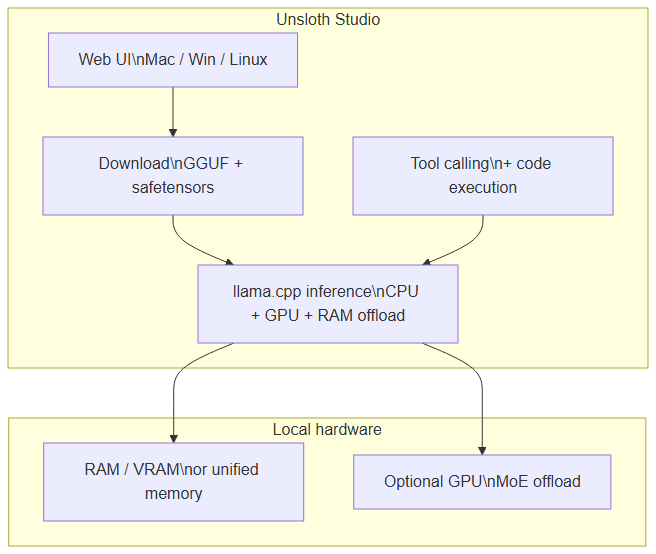 Unsloth Studio: web UI, GGUF download, llama.cpp inference with RAM/GPU offload and integrated tool calling
What Studio delivers (Unsloth docs, June 2026):
- Search, download, and run GGUF and safetensors models
- Self-healing tool calling + built-in web search
- Python and Bash code execution in the UI
- Automatic inference parameter tuning (temperature, top-p…)
- Fast CPU + GPU inference via llama.cpp
- Multi-GPU detection and automatic RAM offloading
--secureoption: free HTTPS tunnel via Cloudflare
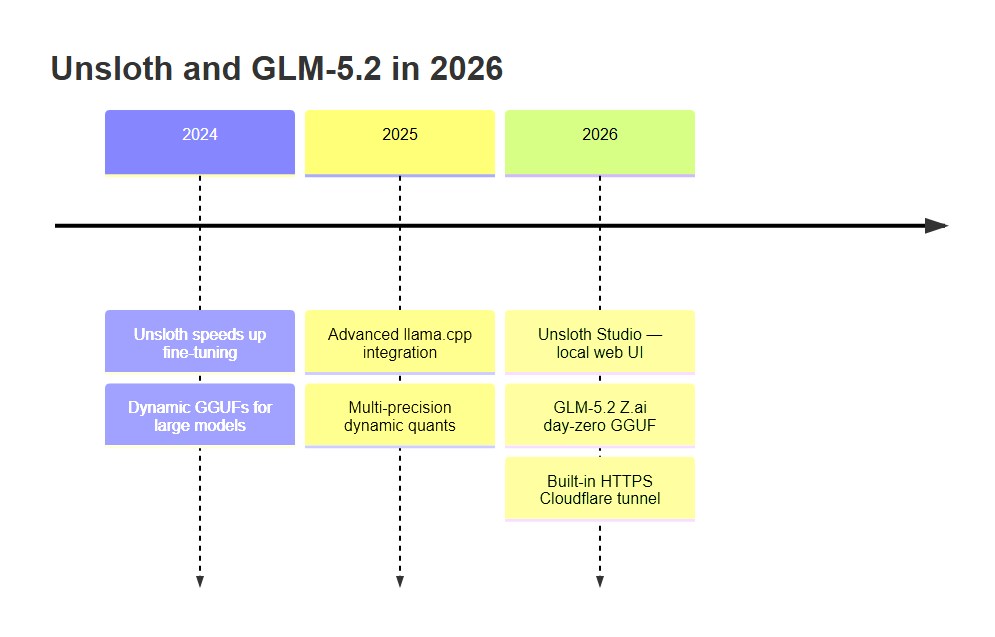 From fine-tuning acceleration (2024) to Unsloth Studio and day-zero GLM-5.2 (2026)
For teams staying on lighter models (Gemma 4, Llama), our Gemma 4 + Ollama + n8n tutorial remains the most accessible entry. GLM-5.2 targets another segment: high-end workstations and servers with 256 GB+ memory.
GLM-5.2: what to know before installing
GLM-5.2 is Z.ai's open model, tuned for long-horizon coding, reasoning, and agentic tasks. Unsloth publishes Dynamic GGUFs: some layers stay high precision, others compress aggressively — hence the size/quality trade-off.
Hardware requirements (Unsloth documentation)
Total memory depends on quantization. Unsloth publishes:
| Quant | Total memory required |
|---|---|
| 1-bit (dynamic) | ~223 GB |
| 2-bit (dynamic) | ~245 GB |
| 3-bit | ~290–360 GB |
| 4-bit | ~372–475 GB |
| 5-bit | ~570 GB |
| 8-bit | ~810 GB |
The UD-IQ2_M quant (2-bit dynamic) uses ~239 GB on disk and is presented as the best accessibility/accuracy compromise. It fits a 256 GB unified-memory Mac, or 1× 24 GB GPU + 256 GB RAM with MoE offloading.
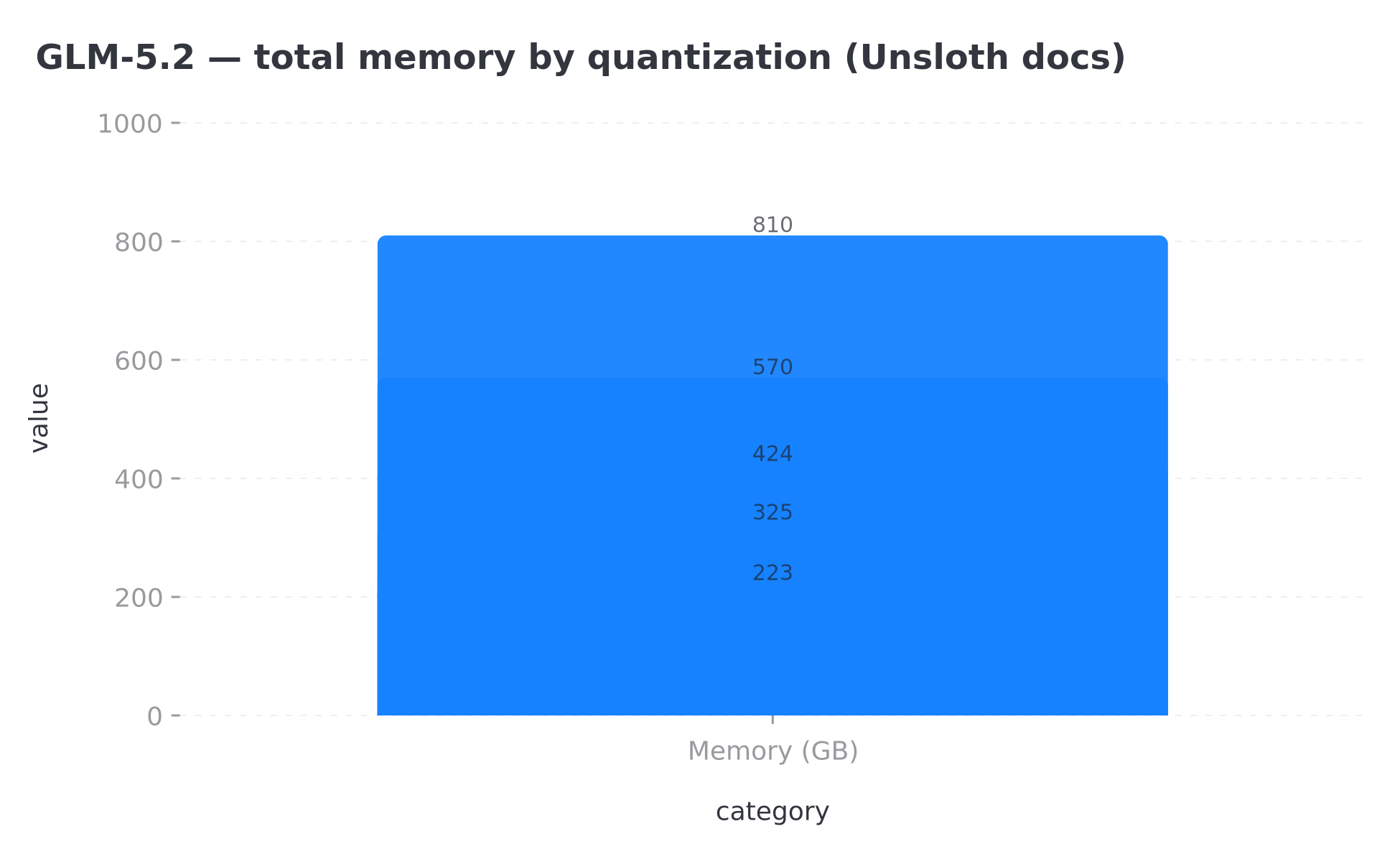 Total memory (RAM+VRAM) by GLM-5.2 quantization — Unsloth data, June 2026
Practical rule: keep comfortable headroom above the quant file size. A full disk or saturated RAM triggers swapping that kills latency.
Dynamic quants: what 1-bit really means
Unsloth measures quality via KL divergence (KLD) between the quantized model and BF16 reference. Published results:
- Dynamic 1-bit: ~76.2% top-1 accuracy, 86% smaller
- Dynamic 2-bit: ~82% top-1 accuracy, 84% smaller
- Dynamic 4-bit / 5-bit: near lossless per Unsloth
The common trap: assuming "76%" means 24% wrong answers. Unsloth stresses this reflects token distribution (filler words, phrasing), not factual correctness. "The capital of France is Paris" stays Paris — it's "I will" vs "Here is" that shifts. For extreme out-of-distribution tasks, dynamic 4-bit is safer.
Installing Unsloth Studio
 Pipeline: install, launch Studio, download GLM-5.2, local inference
Step 1 — Install Unsloth
macOS, Linux, WSL:
curl -fsSL https://unsloth.ai/install.sh | sh
Windows PowerShell:
irm https://unsloth.ai/install.ps1 | iex
Step 2 — Launch Studio
unsloth studio -H 0.0.0.0 -p 8888
Open http://127.0.0.1:8888 in your browser.
For HTTPS access (especially on team networks), Unsloth provides a built-in Cloudflare tunnel:
unsloth studio --secure
Step 3 — First launch
On first start, Studio asks you to create a password. Important: you're exposing an inference server on your machine — don't leave it unauthenticated on a shared network.
Step 4 — Download GLM-5.2
- Go to the Studio Chat tab
- Search for GLM-5.2 in the search bar
- Select your quant (recommended: UD-IQ2_M if you have ~256 GB memory)
- Start the download — verify disk space first (hundreds of GB)
Studio auto-detects multi-GPU setups and handles RAM offloading.
Inference settings and Thinking modes
GLM-5.2 offers three reasoning modes:
- No thinking — direct answers, faster
- High Thinking — moderate reasoning
- Max Thinking — complex tasks (code, planning, agents)
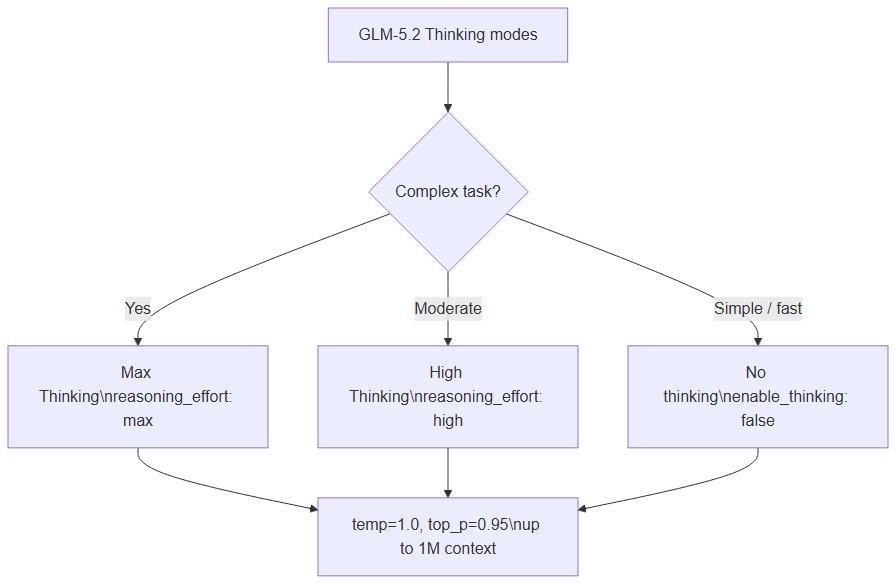 Choose Max, High, or disable thinking based on task complexity
Recommended settings (Unsloth docs)
| Parameter | General tasks | SWE-Bench Pro |
|---|---|---|
temperature | 1.0 | 1.0 |
top_p | 0.95 | 1.0 |
| Max context | 1,048,576 tokens | same |
In Unsloth Studio, these are auto-set. You can adjust manually, plus chat template and context length.
Disable or adjust thinking (llama.cpp)
GLM-5.2 reasons by default. To disable via CLI:
--chat-template-kwargs '{"enable_thinking":false}'
On PowerShell:
--chat-template-kwargs "{\"enable_thinking\":false}"
For reasoning effort:
--chat-template-kwargs '{"reasoning_effort":"max"}'
--chat-template-kwargs '{"reasoning_effort":"high"}'
Recent llama.cpp versions also support --reasoning on / --reasoning off.
CLI alternative: run GLM-5.2 with llama.cpp
If you prefer CLI over Studio, Unsloth hosts GGUFs on Hugging Face (unsloth/GLM-5.2-GGUF).
Manual download (faster than integrated pull):
pip install huggingface_hub
hf download unsloth/GLM-5.2-GGUF \
    --local-dir unsloth/GLM-5.2-GGUF \
    --include "*UD-IQ2_M*"
Conversational inference:
./llama.cpp/llama-cli \
    --model unsloth/GLM-5.2-GGUF/UD-IQ2_M/GLM-5.2-UD-IQ2_M-00001-of-00006.gguf \
    --temp 1.0 \
    --top-p 0.95 \
    --min-p 0.01
Unsloth demos a working Flappy Bird game with audio — even on 1-bit quant. Impressive for demos; for business production, stick to 2-bit or 4-bit for more headroom.
Long context: quantize the KV cache
To use the 1M window without saturating RAM, llama.cpp lets you quantize the KV cache:
./llama.cpp/llama-cli \
    --model unsloth/GLM-5.2-GGUF/UD-IQ2_M/GLM-5.2-UD-IQ2_M-00001-of-00006.gguf \
    --temp 1.0 --top-p 0.95 --min-p 0.01 \
    --cache-type-k q4_1 \
    --cache-type-v q4_1
With q4_1 (~5 bits/weight), Unsloth estimates roughly 3.2× longer context vs default f16. A model capped at 10K tokens might reach ~32K — actual gains depend on your hardware.
Benchmarks: read the numbers carefully
Unsloth publishes a comparison table: GLM-5.2 vs Claude 4.8 Opus, GPT-5.5, Gemini 3.1 Pro. Sample scores (source: Unsloth docs, June 2026):
| Benchmark | GLM-5.2 | Claude 4.8 Opus | GPT-5.5 |
|---|---|---|---|
| SWE-bench Pro | 62.1 | 69.2 | 58.6 |
| Terminal Bench 2.1 | 81.0 | 85.0 | 84.0 |
| AIME 2026 | 99.2 | 95.7 | 98.3 |
| MCP-Atlas | 76.8 | 77.8 | 75.3 |
Honest reading: GLM-5.2 is competitive — sometimes ahead of GPT-5.5 on agentic coding, sometimes behind Claude on SWE-bench Pro. These scores don't replace testing on your own data. For the broader open vs closed model landscape, see DeepSeek V4 vs GPT-5.5.
Connect local GLM-5.2 to n8n workflows
Unsloth Studio and llama.cpp don't replace an orchestrator. For production agents, the winning stack remains:
- Local GLM-5.2 (Unsloth Studio or
llama-server) for sovereign reasoning - n8n for triggers, retries, CRM/email integrations, and monitoring
- MCP to expose business tools in a standardized way
Same approach as Ollama + n8n, with much heavier hardware requirements. Expose llama-server as an OpenAI-compatible API, then point n8n's AI Agent node to http://localhost:8080/v1 (adjust port).
Further reading:
Limits and when to stay on cloud
Local GLM-5.2 isn't for everyone:
- Hardware cost: a 256 GB+ machine costs thousands of euros
- Power and noise: 24/7 inference on a large MoE consumes energy
- Updates: you manage new model versions yourself
- First-token latency: even optimized, a 744B MoE stays slower than a cloud API
Stay on cloud (Claude, GPT, Gemini) with unpredictable load spikes, no ops team, or needs under 70B parameters. Go local if data sovereignty, flat-rate volume costs, or vendor independence matter — themes we cover in the AI vendor resilience article.
Conclusion
Unsloth Studio democratizes advanced local AI: you no longer need to be a llama.cpp expert to run a frontier model. GLM-5.2 pushes the open-source ceiling toward code and agentic capabilities that rival premium APIs — provided you have the right hardware and understand dynamic quant trade-offs.
Quick checklist:
- Verify total memory (target: 256 GB+ for UD-IQ2_M)
- Install Unsloth (
curlorirmper OS) - Run
unsloth studio -p 8888(or--secureon a network) - Download GLM-5.2 UD-IQ2_M from the Chat tab
- Pick Thinking mode for your task
- Wire n8n + MCP to industrialize
BOVO Digital helps companies with hardware sizing, Unsloth/Ollama deployment, n8n integration, and secure on-prem agent rollout. Book a local AI audit · Contact · n8n agency.
Tags
FAQ
What is Unsloth Studio?
Unsloth Studio is an open-source web UI for local AI by Unsloth. It lets you search, download, and run GGUF and safetensors models with llama.cpp inference, tool calling, Python/Bash code execution, and automatic inference parameter tuning. It runs on macOS, Windows, and Linux.
What hardware do I need to run GLM-5.2 locally?
Per Unsloth documentation (June 2026), 1-bit quantization needs roughly 223 GB total memory (RAM + VRAM or unified memory), 2-bit about 245 GB, and 8-bit about 810 GB. The UD-IQ2_M quant (2-bit dynamic, ~239 GB on disk) is designed to fit a 256 GB unified-memory Mac or 1× 24 GB GPU + 256 GB RAM with MoE offloading.
What does "76% top-1 accuracy" mean for a 1-bit quant?
Unsloth clarifies this does not mean 24% wrong or gibberish outputs. It measures token distribution divergence from the BF16 reference on a sample — factual keywords often stay identical; filler words and phrasing vary. For extreme out-of-distribution tasks, Unsloth recommends dynamic 4-bit instead.
How do I disable GLM-5.2 Thinking mode?
GLM-5.2 reasons by default. In llama.cpp, pass --chat-template-kwargs '{"enable_thinking":false}'. On Windows PowerShell, escape quotes: --chat-template-kwargs "{\"enable_thinking\":false}". In Unsloth Studio, toggle it from the UI.
Can I connect local GLM-5.2 to n8n?
Yes, via llama-server exposed as an OpenAI-compatible API, or by pointing n8n to Unsloth Studio's local endpoint if exposed on the network. The approach mirrors Ollama + n8n from our Gemma 4 tutorial, with much higher hardware requirements.
Can BOVO Digital deploy an on-prem AI stack?
Yes. We size hardware, install Unsloth Studio or Ollama, connect models to n8n for agent workflows, and set up monitoring, backups, and secure access (HTTPS, tunnel, authentication).
Stuck on a step? We take it to production
Tutorials stop where production starts: secrets, GDPR, no-shows, CRM. A 30-min call to scope the delivery.
- 30 min
- Scoped delivery
- No commitment
Singbo Davy AGONMA
Fullstack Developer & AI Expert. n8n automation specialist, Laravel/Flutter development and AI agent integration. Master CS — IFRI.


