
How to Connect n8n to a Custom MCP Server for Powerful AI Agents
n8n natively supports MCP servers. By connecting your custom MCP server to an n8n AI Agent, you get an agent that accesses your proprietary data with n8n's reliability. Complete tutorial.

Updated

How to Connect n8n to a Custom MCP Server for Powerful AI Agents
Give your AI agent reliable tools, your own data, and n8n's orchestration robustness — in a single node.
Connecting n8n to an MCP server means giving an AI agent a ready-to-use toolkit that talks directly to your internal systems: CRM, database, business API, files. Instead of writing one HTTP node for every possible action, you plug a single MCP client into n8n, and the agent discovers the available tools on its own. This tutorial walks you through it end to end: a refresher on the MCP protocol, configuring the connection on the n8n side, choosing the transport, exposing tools to the agent, a concrete example, credential security, debugging, limits and real-world use cases.
The goal isn't just to make the connection "work." It's to build an integration you can run in production, with clean error handling, traceability for every action, and a controlled attack surface. Throughout the article, code snippets are simplified examples meant to illustrate the logic, not configurations to copy-paste as-is.
What Is MCP and Why Connect It to n8n?
The Model Context Protocol (MCP) is an open protocol that standardizes how a language model accesses external tools and data. Rather than every application reinventing its own way of "plugging" an LLM into a database or an API, MCP defines a common language: an MCP server exposes tools (callable functions), resources (readable data) and prompts, and any compatible MCP client can consume them.
The clearest analogy is a universal port. Just as a USB-C port lets you connect varied peripherals without a custom driver, MCP lets you connect an AI agent to heterogeneous context sources through a single interface. If you want to dig into the foundations of the protocol and its link to multi-agent architectures, the article mcp-stable-protocole-a2a-interoperabilite-agents-ia-avril-2026 explains why this standardization is a game changer.
So why plug MCP into n8n specifically? Because n8n brings what self-directed AI agents sorely lack: orchestration. n8n excels at triggering workflows on events, managing queues, chaining predictable steps, and retrying operations that failed. The AI agent, in turn, brings contextual reasoning: deciding which action to take, in what order, based on data you can't anticipate in advance.
Connecting n8n to an MCP server marries these two strengths. You get a system where n8n handles the "when" and the "overall how," while the agent handles the "what exactly" case by case. Concretely, the combination gives you four lasting benefits:
- n8n's robust orchestration: triggers, error recovery, concurrency management and native logging.
- An LLM's contextual reasoning with direct access to your proprietary data via MCP.
- Complete traceability of every action, by cross-referencing n8n logs and MCP server logs.
- Data sovereignty if you use n8n self-hosted paired with an MCP server you host yourself.
How Do You Connect n8n to an MCP Server?
In n8n, the central node for this operation is called the MCP Client Tool. It opens the connection to a remote MCP server, retrieves the list of available tools, and makes them available to an AI Agent node. The beauty of the approach is that you don't write the call logic: you declare a connection, and the agent does the rest by picking the relevant tools at execution time.
 The seven steps to connect an n8n AI Agent to your MCP server
What Do You Need Before You Start?
Before configuring anything, make sure you have three things. First, a working MCP server that exposes at least one tool. If you don't have one yet, the tutorial creer-serveur-mcp-typescript-30-minutes shows how to build one in TypeScript in under half an hour. Second, the access URL to that server and its transport mode (most often an HTTP/SSE URL). Third, an authentication secret: in the vast majority of cases, a Bearer token stored in an n8n credential, and never written in plain text in the workflow.
On the n8n side, you need a recent instance that includes the MCP Client Tool node, plus an AI Agent node connected to a model provider (OpenAI, Anthropic, Mistral, or a local model). If the AI Agent is still new ground for you, the article n8n-ai-agent-transformez-workflows-systemes-intelligents lays out the basics of this node and its sub-nodes (memory, model, tools).
Which Steps Configure the MCP Client in n8n?
Configuration follows a logical sequence. You first add an AI Agent node to your workflow. You then attach an MCP Client Tool node in the agent's tools area — this connection turns the MCP server into a toolbox for the LLM. You enter the MCP server URL, select the appropriate transport, then configure the authentication credential. Once the connection is established, n8n queries the server, discovers the tools and their input schemas, and makes them available to the agent. All that's left is to test the execution on a real case.
For an MCP server exposed over HTTP with Bearer authentication, the authentication portion looks like this (simplified example):
{
  "serverUrl": "https://your-mcp.com/mcp",
  "headers": {
    "Authorization": "Bearer YOUR_SECRET_TOKEN"
  }
}
In practice, you won't type this raw JSON: n8n offers dedicated fields for the URL and the credential. What matters is understanding the underlying mechanics — n8n sends an authorization header with each request, and it's the MCP server that validates this token before running any tool.
Which MCP Transports Does n8n Support?
A point that often confuses beginners: MCP doesn't define a single communication channel, but several transports. The transport is the "plumbing" through which client and server exchange messages. Understanding which one to use saves hours of pointless debugging.
The stdio transport has client and server communicate via a process's standard input/output streams. It's ideal when the MCP server runs on the same machine as the client and is launched as a subprocess. It's the preferred mode for local integrations, such as a desktop assistant that starts its own server.
The SSE (Server-Sent Events) transport and the HTTP Streamable transport, by contrast, have client and server communicate over the network, via HTTP. These are the relevant transports when your MCP server is hosted somewhere other than n8n — on another container, another machine, or a remote service. To connect n8n to an MCP server exposed over the Internet or on your internal network, this transport family is what you'll use most of the time.
The practical rule is simple: pick the transport your MCP server actually exposes, and align the n8n node configuration with it. A server built for SSE won't respond correctly to a client configured for HTTP Streamable, and vice versa. When in doubt, the official n8n documentation and your MCP server's docs are authoritative — this is exactly the kind of detail you don't make up and must verify at the source.
How Do You Expose Tools to Your AI Agent?
Once the MCP client is connected, the magic happens without you wiring anything. The agent doesn't need you to describe each tool: it queries the server, retrieves the names, descriptions and input schemas, then reasons to decide which ones to call. The diagram below shows the full sequence of a tool call, from the triggering event to the final response.
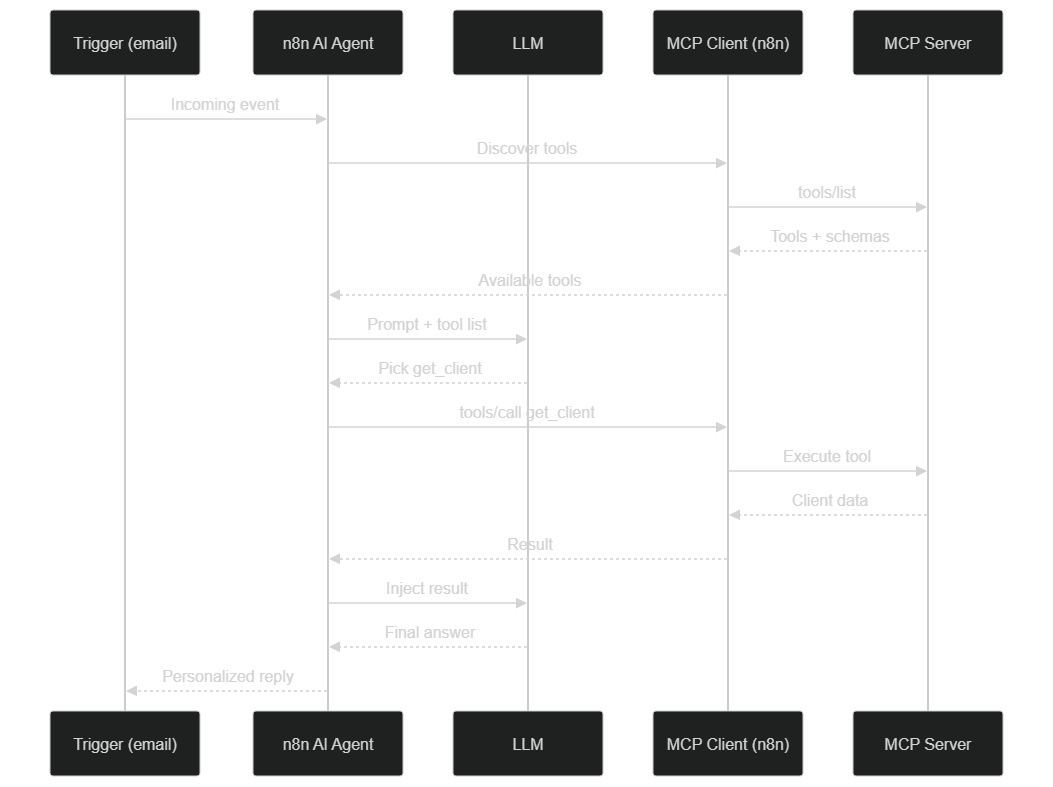 Tool discovery, LLM choice, server-side execution and response
Let's break down this flow. When an event arrives (an incoming email, for example), the AI Agent first asks the MCP client for the list of tools — that's the tools/list operation. The server responds with the tools and their schemas, which the client passes to the agent. The agent then sends the LLM the user prompt along with the tool list. The model reasons and decides, for example, to call get_client. The MCP client then runs tools/call, the server performs the real operation (a CRM query), returns the data, and the agent re-injects this result into the LLM's context. The model finally produces an actionable response that the n8n workflow can use for the next steps.
The key takeaway: each tool's description, on the MCP server side, isn't cosmetic. It's what the LLM reads to decide whether to call the tool. A vague description produces an indecisive agent; a precise description produces a reliable agent. Polish this text as much as the tool's code itself.
A Concrete Example: a Sales Agent Connected to the CRM via MCP
Let's move to a real case. Imagine an agent that automatically processes incoming prospect emails, relying on your CRM exposed via MCP. The n8n workflow reads top to bottom (simplified example):
Incoming email (Gmail trigger)
  ↓
Extract sender's email
  ↓
AI Agent (Claude Sonnet)
  Tools: [MCP Client Tool connected to your CRM]
  Instructions: "You receive an email from a prospect.
    1. Use get_client to check if this contact exists
    2. If yes, retrieve their history and pipeline status
    3. If not, note this is a new prospect
    4. Generate a personalized response based on context"
  ↓
Send response via Gmail
  ↓
MCP Client Tool: update_client (log the exchange)
What makes this workflow powerful is that you coded no conditional logic like "if the client exists, then…". You described a goal in natural language, and the agent composes the sequence of tool calls itself based on each email received. A known prospect will trigger a response contextualized by their history; an unknown one will trigger a first-contact message. The same workflow handles both cases without an extra branch.
This approach drastically reduces the time a human spends looking up information before replying. The agent has, within seconds, context that a salesperson would take several minutes to reconstruct manually. If you want a deployable end-to-end variant, the guide tutoriel-deployer-agent-ia-mcp-serveur-20-minutes details a complete deployment in about twenty minutes.
How Do You Handle Credentials and Security?
This is where many integrations that "work in a demo" fail in production. Giving an AI agent the ability to call tools on your systems is powerful — and therefore dangerous if security is treated carelessly. The diagram below summarizes the path a request must cross before a tool runs.
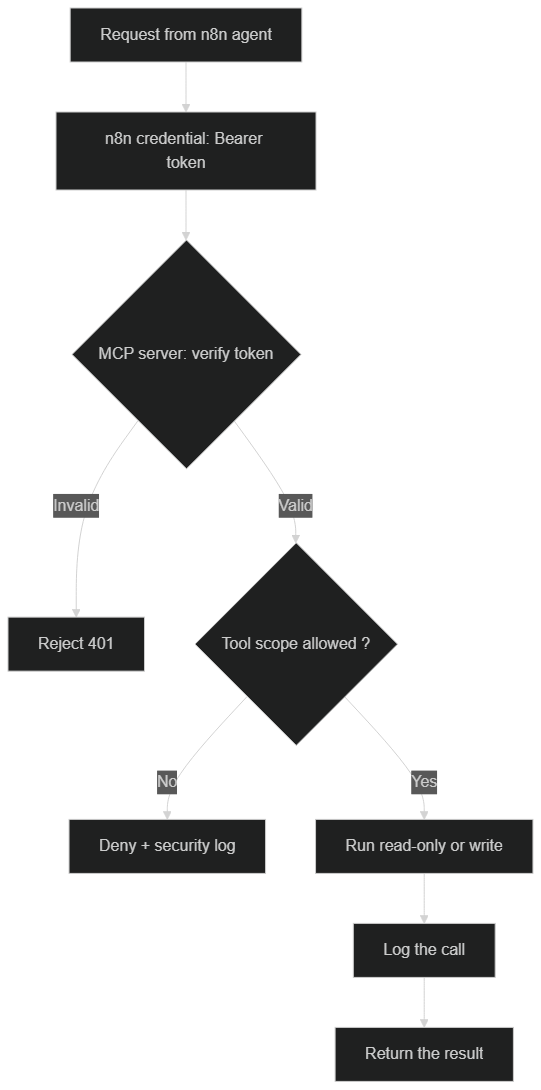 Token validation, scope check, execution then logging of every call
First absolute rule: never store a secret in plain text in a node. n8n provides an encrypted credentials system; your MCP server's Bearer token must live there, and nowhere else. The workflow references the credential but never contains the token's value. This prevents a workflow export or a screenshot from leaking your access.
Second rule: encrypt the transport. An MCP connection over plain HTTP exposes your data and tokens to anyone on the network path. Require HTTPS for any MCP server reachable outside your local machine.
Third rule: apply the principle of least privilege on the MCP server side. Expose to the agent only the tools strictly necessary for its mission. A sales agent doesn't need a delete_database tool. Better: segment tools into read-only and write, and reserve write access for agents whose reliability is proven. On the server, each call must validate the token, verify that the requested scope is allowed, then log the operation. This logging isn't optional: it's what lets you understand, after the fact, what the agent did and why.
Finally, beware of prompt injection. An agent that reads external data (an email, web content) can be manipulated by malicious text instructing it to abuse its tools. The countermeasure: limit write tools, require human validation for sensitive actions, and never grant the agent more power than the worst injection scenario would make acceptable.
How Do You Debug an n8n ↔ MCP Connection?
Even when well configured, an integration can refuse to work the first time. Here are the points to check in order, from most common to most subtle.
If no tool appears, the problem almost always comes from the connection itself: wrong URL, wrong transport, or rejected token. First test access to the MCP server outside n8n (with a test client or a manual request) to isolate the cause. A reachable server returning a 401 error signals a credential problem; an unreachable server signals a network or URL problem.
If the tools appear but the agent never calls them, the culprit is usually the tool descriptions or the agent's instructions. An LLM only calls a tool if it understands what it's for. Rephrase the description on the server side and specify, in the AI Agent's instructions, when to use each tool.
If the agent calls the wrong tool or with wrong parameters, check the input schemas. An overly permissive schema lets the model improvise; a precise schema (types, required fields, parameter descriptions) guides it toward the right call. Also enable n8n's execution logs: every tool call is traced there, letting you see exactly what the agent sent and received.
How Do You Handle Errors and Retry in Production?
An MCP server, like any network service, can become temporarily unavailable. A production system must anticipate this reality rather than suffer it. The following diagram illustrates sound recovery logic.
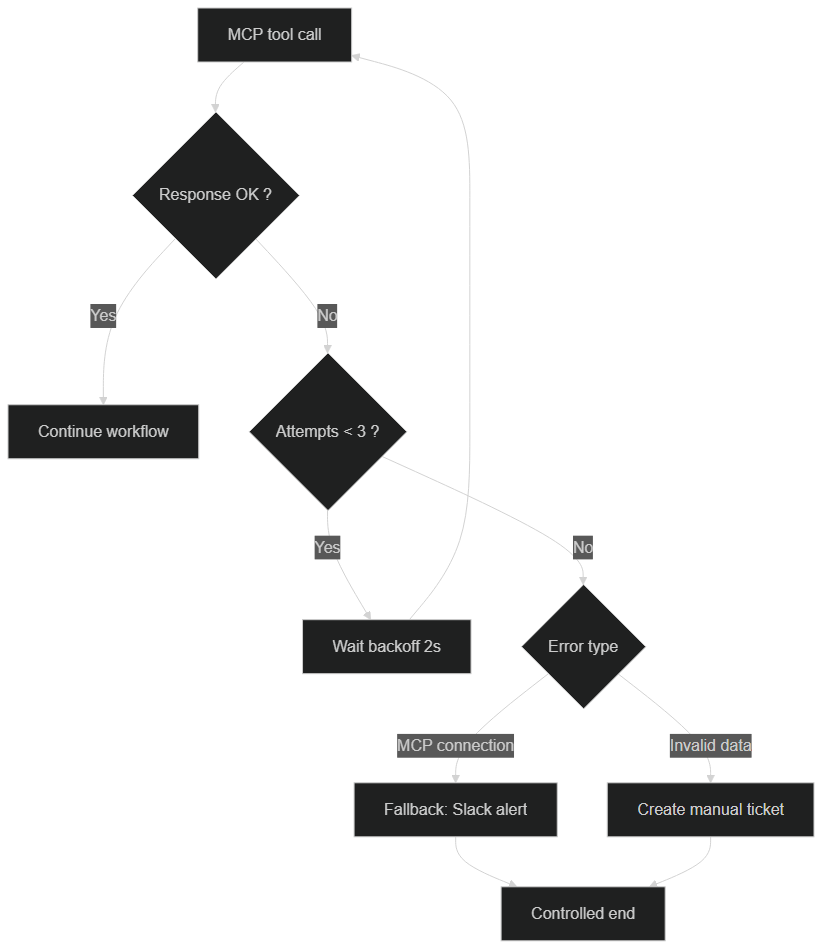 Three attempts with backoff, then switch to a Slack alert or a manual ticket
In n8n, you enable retry on error on the relevant node, set a maximum number of attempts (3 is a good starting point) and a wait time between each try (2 seconds, ideally with progressive backoff). This configuration absorbs transient failures without human intervention.
But retry isn't enough. What happens after the third failed attempt? Rather than letting the whole chain crash, add an IF node that detects a connection error and redirects to a fallback route: a Slack notification so a human takes over, or the creation of a ticket to handle manually. The guiding principle is that no MCP server failure should silently make a customer request disappear.
Advanced Pattern: an Agent with Persistent Memory
One of the limits of classic AI agents is the lack of memory between sessions. Each conversation starts from scratch. By combining n8n, MCP and a PostgreSQL database, you build an agent that remembers. The trick is to expose, on your MCP server, two tools dedicated to memory (simplified example):
// Tool 1: Save to memory
{
  name: "remember",
  description: "Saves important information for future interactions",
  inputSchema: {
    type: "object",
    properties: {
      key: { type: "string" },
      value: { type: "string" },
      context: { type: "string" }  // client email, order ID, etc.
    },
    required: ["key", "value"]
  }
}

// Tool 2: Retrieve from memory
{
  name: "recall",
  description: "Retrieves memorized information about a given context",
  inputSchema: {
    type: "object",
    properties: {
      context: { type: "string" }
    },
    required: ["context"]
  }
}
With these two tools, the agent can write an exchange summary at the end of an interaction, then read it back at the start of the next one. Context no longer evaporates between sessions: a prospect who comes back three days later is recognized, and the agent picks up the conversation where it left off. This is what separates a "disposable" agent from a durable relationship assistant.
How Do You Monitor Your MCP Server in Production?
An MCP server without monitoring is a server that will fail the day you need it most — silently. The first building block is a health endpoint on the server side (simplified example):
app.get('/health', async (req, res) => {
  const health = {
    status: 'ok',
    timestamp: new Date().toISOString(),
    uptime: process.uptime(),
    memory: process.memoryUsage(),
  };
  res.json(health);
});
The second building block is a monitoring workflow in n8n that queries this endpoint at regular intervals, for example every five minutes. If the health check fails, a Slack alert goes out immediately, before your users notice anything. This duo — health endpoint plus monitoring workflow — turns a potentially invisible failure into an incident detected within minutes.
Complete Example: Sales Agent with Memory and MCP
Assembling the previous building blocks yields a coherent architecture. The diagram below shows how the n8n AI Agent connects with the MCP server, the CRM and the memory store.
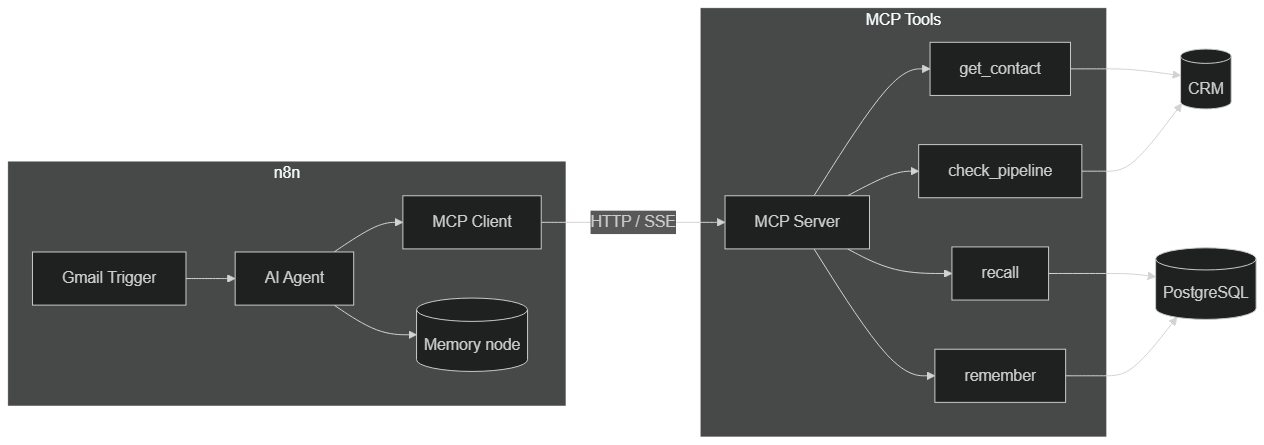 n8n AI Agent → MCP client → CRM tools and PostgreSQL memory
The flow is as follows: a prospect email arrives, the AI Agent has, via the MCP client, the tools get_contact, recall (history), check_pipeline and enrich_contact. It generates a personalized response taking into account profile, previous exchanges and funnel stage. Then it chooses the most appropriate action: direct response, demo proposal, or escalation to a human salesperson when the stakes justify it. Finally, it calls remember to record a summary of the exchange, ready to be read back at the next contact.
The benefit of this architecture is its modularity. Each tool is an independent function on the MCP server side; you can add, remove or improve one without touching the n8n workflow. The agent automatically adapts to the new palette of available tools. This is exactly what MCP standardization makes possible.
What Limits and Best Practices Should You Keep in Mind?
As appealing as it is, this approach isn't a magic wand. Several limits deserve to be known before you dive in.
First, non-determinism. An AI agent decides for itself which tools to call; two runs on similar inputs may diverge. For processes where predictability is paramount (billing, compliance), keep explicit n8n logic and reserve the agent for genuinely contextual decisions.
Next, cost and latency. Each reasoning round consumes tokens and adds latency. An agent that chains ten tool calls will be slower and more expensive than a linear workflow. Measure, and only introduce AI where it adds real value.
Finally, dependence on description quality. Everything rests on the clarity of tool descriptions and schemas. A poorly documented MCP server produces an erratic agent. Invest in this documentation work: it determines the final reliability.
On the best-practices side, remember three proven patterns. Read-only MCP first: the agent consults your data to decide, but every modification goes through n8n with optional validation. Bidirectional MCP next: the agent reads and writes, ideal when the full loop can be confidently automated. MCP as single source of truth last: instead of configuring one connection per system (HubSpot, Notion, Slack, PostgreSQL) in n8n, a single MCP server centralizes all access, and the agent has only one connection point to manage.
For Which Use Cases Does This Architecture Shine?
The best candidates share one thing: a contextual decision to make from proprietary data. Augmented customer support, where the agent reads a ticket's history before suggesting a response. Lead qualification, where the agent enriches and prioritizes an incoming prospect. The internal assistant, which queries your business databases to answer employees' questions. Or the automation of operations that are recurring but variable, such as sorting and routing heterogeneous requests.
The common denominator: these tasks are too variable for a purely linear workflow, but too sensitive for a cloud agent disconnected from your data. The n8n + MCP combination occupies precisely this middle ground, offering the context of your systems and the robustness of orchestration.
Connecting n8n to an MCP server means crossing a threshold: moving from rigid automations to agents capable of acting intelligently on your systems, with production-grade traceability and security. Start small — one server, one or two read-only tools — measure the results, then expand the scope once trust is established.
Do you want to set up this n8n + MCP architecture for your workflows? BOVO Digital designs and deploys AI agents connected to your proprietary systems.
Tags
FAQ
Does n8n self-hosted support MCP servers?
Yes. Both n8n self-hosted and n8n Cloud include the MCP Client Tool node, which lets an AI Agent connect to an external MCP server, automatically discover the exposed tools and use them in its reasoning. Check that the node is available in your version via the node panel.
What's the difference between an HTTP Request node and an MCP Client Tool node in n8n?
The HTTP Request node executes one specific API call you configure manually. The MCP Client Tool node exposes a list of tools the AI agent can choose to use based on context. The agent discovers the available tools and their schemas — you don't have to tell it what to call at each step.
Which MCP transports does n8n support?
The MCP Client Tool node connects to a remote MCP server over a network transport, mainly Server-Sent Events (SSE) and HTTP Streamable depending on your n8n version. The stdio transport mostly concerns local MCP servers launched as a process. Use the transport your server exposes and confirm it in the official n8n documentation.
How do I secure the connection between n8n and my MCP server?
Use HTTPS, Bearer token authentication stored in an n8n credential (never in plain text in the workflow), and limit the scope of exposed tools. On the MCP server side, validate every token, apply the principle of least privilege and log all tool calls to keep complete traceability.
Can BOVO Digital set up this n8n + MCP architecture for my company?
Yes. BOVO Digital designs the complete architecture: MCP server connected to your systems, n8n workflows with AI Agents, error handling and monitoring. We deliver a documented, production-ready system, usually in 2 to 3 weeks depending on complexity.
Stuck on a step? We take it to production
Tutorials stop where production starts: secrets, GDPR, no-shows, CRM. A 30-min call to scope the delivery.
- 30 min
- Scoped delivery
- No commitment
Vicentia Bonou
Full Stack Developer & Web/Mobile Specialist. Committed to transforming your ideas into intuitive applications and custom websites.


