
Make.com AI Agents vs n8n: Which to Choose for Automation in 2026?
Make.com launched its AI Agents in February 2026. n8n 2.15 responds with 400+ integrations and Ollama compatibility. The match is tight — but the answer depends on your profile. Here's the honest comparison.

Updated

Make.com AI Agents vs n8n: Which to Choose for Automation in 2026?
Two philosophies of the AI agent, one question: who owns the intelligence, and who owns the infrastructure?
The Make AI Agents vs n8n debate became, in early 2026, the most common question among teams looking to move from simple workflows to autonomous agents. In just two months, the two most widely used automation tools by digital professionals both accelerated on the agentic AI front. Make.com launched its AI Agents in February. n8n released version 2.15 in March with an enhanced native AI Agent node and full compatibility with local models via Ollama. The match is tight — and the real winner is you, as long as you understand what each platform actually does under the hood.
In this comparison, you'll learn what an AI agent really is, how Make and n8n build it differently, how they handle tools, memory and multi-step orchestration, which LLM models they support, what each approach costs, and above all: which tool fits your profile. No invented numbers — only dated orders of magnitude and capabilities verifiable in each product's official documentation.
What Is an AI Agent, and How Does It Differ From a Classic Workflow?
Before comparing the two platforms, one overused word needs clarifying: "agent". A classic automation workflow follows a path you designed in advance. You define the trigger, then each step: if the email contains "invoice", file it in this folder. The workflow decides nothing; it executes your logic, step by step. It's reliable and predictable, but rigid: every unforeseen case must be added by hand.
An AI agent flips the logic. You don't give it the path, you give it a goal and a toolbox. The agent — a language model (LLM) at its center — reasons, chooses for itself which tools to call, in what order, observes the result, then repeats until the goal is met. This is the so-called "ReAct" loop (Reasoning + Acting) underpinning most current agentic frameworks, including the LangChain framework used by n8n.
Concretely, an agent combines three building blocks: a brain (the LLM that reasons), a memory (to keep context from one step to the next) and tools (the connectors and functions that let it act on the real world: CRM, database, email, web search). This shared architecture is what Make and n8n implement, each in its own way.
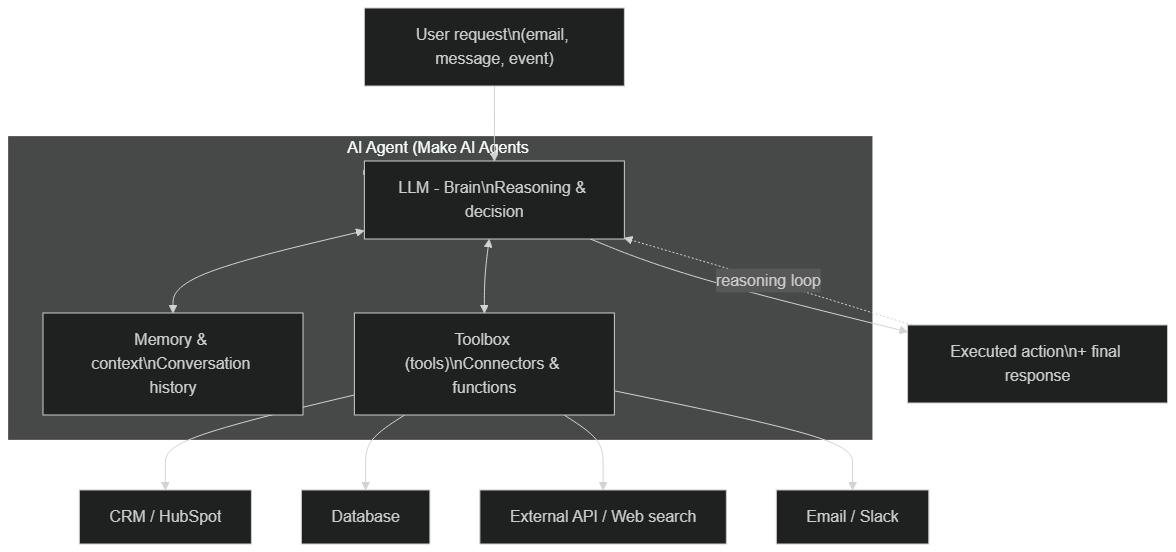 Typical AI agent architecture in Make AI Agents and n8n: the LLM reasons, relies on a memory and calls tools (CRM, database, API, email) in a reasoning loop
The difference between a workflow and an agent isn't about raw power, but about decision autonomy. A workflow does what it's told; an agent decides how to reach a result. This nuance changes everything in your tool choice — because delegating decisions to a machine requires guardrails, observability and cost control that not every platform handles the same way. To go deeper on the shift from workflow to agent, our article n8n AI Agent: transform your workflows into intelligent systems details this transition.
How Does Make AI Agents Approach Building Agents?
Make.com has always bet on accessibility. With AI Agents, the platform pushes this logic even further: instead of building scenarios with hand-connected modules, you describe a goal in natural language to an agent that orchestrates the available tools itself. The approach is deliberately "managed": Make hides the complexity of the agentic framework and exposes a simple surface — instructions, checked tools, a chosen model.
What it provides concretely:
- An agent that receives an email, understands it, decides what action to take and executes it — without you having to map every conditional case in advance
- Compatible with the major models from OpenAI, Anthropic and Google directly from the interface, without managing keys at each call
- Make's native connectors (over a thousand apps) become as many tools available to the agent
- Fast onboarding: a non-technical profile can configure a functional agent in a few hours, in the same interface as classic scenarios
The limits:
- High cost at high volume, since Make's business model remains per-operation billing
- Limited customization for truly complex cases: you stay within the frame Make exposes
- No self-hosting: the agent runs on Make's infrastructure, with no option to execute on your own servers
- More limited observability for fine-grained debugging of the agent's reasoning
Make is ideal for: SMBs, solopreneurs and non-technical teams who want to automate quickly, with little friction and moderate volume. If you want to see the agent approach of the Make ecosystem applied step by step, the Make MAIA tutorial: create an AI agent in natural language shows the concrete process.
How Does n8n Build Agents With the AI Agent Node and LangChain?
n8n took a different direction. Where Make targets turnkey accessibility, n8n bets on power, transparency and sovereignty. Its AI Agent node is built on LangChain, the reference open-source agentic framework. Instead of a "black box" agent, you visually assemble its components: a node for the language model (Chat Model), a node for memory, and one or more tool nodes the agent can call. Each sub-block is explicit and configurable.
Version 2.15 reinforces this positioning:
- Enhanced AI Agent node, with memory plugged in as a sub-node, optional confidence scoring and configurable human fallback within the flow
- Complete Ollama compatibility: your agents run on local models (Llama 3, Mistral, Phi-3) without sending a single piece of client data to external servers
- Queue Mode: production deployment with dedicated workers, retry logic and a queue to absorb high volumes
- Native JavaScript and Python in Code nodes: if no module matches, you code the tool directly, and it becomes callable by the agent
The limits:
- Steeper learning curve: you need to understand the notions of model, memory, tool and their wiring
- Self-hosting requires infrastructure (VPS, Docker) and a minimum of ops
- The interface remains less immediate than Make for a complete beginner
n8n is ideal for: technical teams, agencies and enterprises with high volumes, sensitive data that can't be externalized, or workflows that exceed standard modules. The general comparison n8n vs Make: full automation comparison 2026 places these two tools in the broader context of automation, beyond the agent angle alone.
Tools and Functions: How Does Each Platform Connect the Agent to the Real World?
An agent without tools is just a chatbot. The real value comes from its ability to act: read a database, write to a CRM, send a message, launch a search. This is where the two philosophies diverge the most.
With Make AI Agents, each native connector can be exposed as a tool for the agent. You check the allowed actions (create a HubSpot contact, send a Slack message, read a Google Sheets row) and the agent decides when to use them. The advantage is massive on the catalog side: Make has one of the largest app directories on the market, which reduces the need for custom development. The trade-off: you stay within the perimeter of actions predefined by Make.
With n8n, a tool is also a node, but the spectrum is wider. Beyond built-in connectors, you can turn an entire sub-workflow into a tool callable by the agent, write a custom tool in code (HTTP Request, JavaScript function), or plug in an MCP server (Model Context Protocol) that exposes your own internal resources. The result: if a capability doesn't exist, you build it. That's the difference between "choosing from a catalog" and "composing without limits".
A concrete example clarifies the gap. Imagine an agent that must read an internal pricing rule stored in a proprietary system, then quote a customer. With Make, you're dependent on whether a connector exists for that system; if not, you're stuck or you build a workaround. With n8n, you wrap the proprietary call in an HTTP Request tool — or expose it through an MCP server — and the agent gains a new capability in minutes. This composability is exactly why technical teams gravitate toward n8n for non-standard business logic, while Make shines when the needed actions already live in its catalog.
Memory and Context: How Do Agents Remember?
Memory is what separates an agent capable of holding a coherent conversation from an amnesiac agent that starts from scratch with every message. Both platforms handle this need, but with different levels of control.
Make AI Agents maintains a session context for a given agent: the agent keeps the thread of an exchange and the intermediate steps of a task. The management is largely automatic — convenient, but not finely configurable.
n8n exposes memory as a dedicated sub-node that you explicitly plug into the agent. You choose the type: a sliding window of the last messages (window buffer), or persistent memory stored in Postgres or Redis to survive between executions and across multiple users. This granularity lets you build, for example, a support agent that remembers a specific client's history over several days — while keeping the storage on your own database. It's a decisive advantage when memory contains sensitive data.
Multi-Step Orchestration: How Does the Agent Chain Actions?
A useful agent rarely solves a problem in a single call. It chains: read the context, enrich a piece of data, decide, act, verify, respond. This multi-step orchestration is the heart of agentic value.
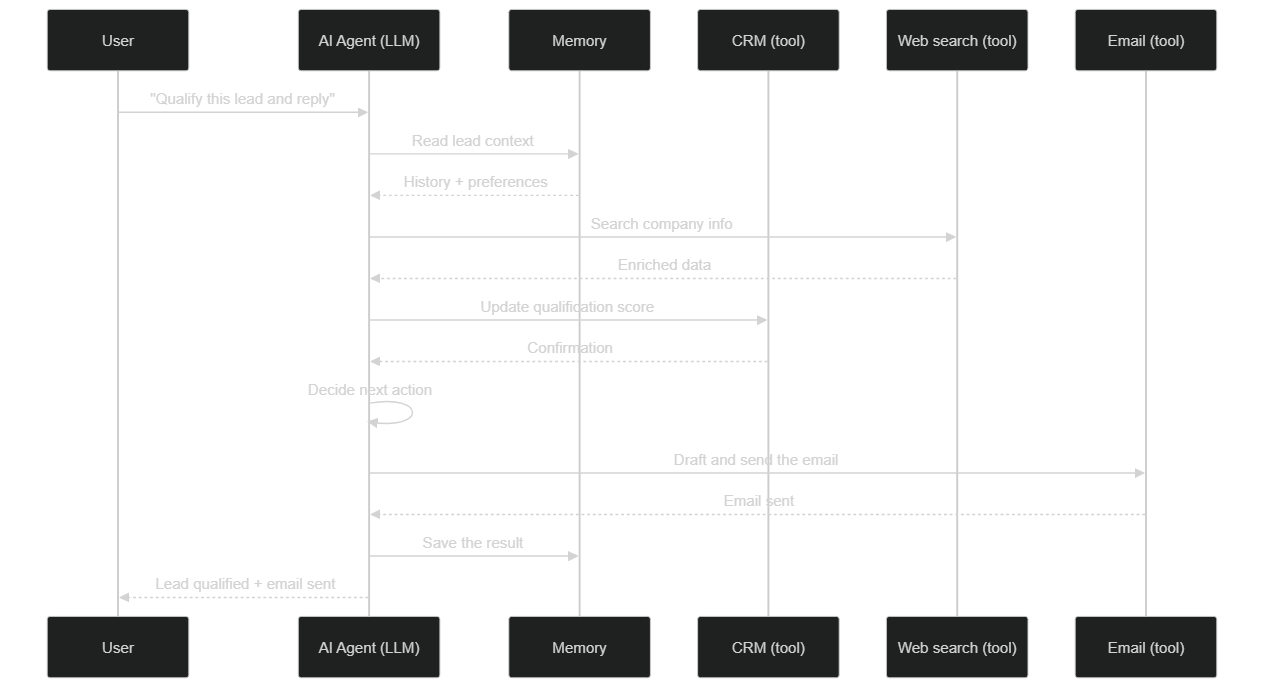 Flow of a multi-step agent call: the agent reads memory, enriches via web search, updates the CRM, decides, then sends an email before saving the result
In Make, the agent handles this reasoning loop internally: you give it the goal and the tools, it chains calls until the result. It's comfortable, but the precise flow remains partly opaque.
In n8n, you can let the agent orchestrate alone, or take back control: insert validation nodes between two steps, route conditionally, or even set up a multi-agent architecture where an "orchestrator" agent delegates to specialized agents (each with its own tools and memory). This modularity makes n8n a better playground for complex business processes — at the price of more demanding design.
The practical takeaway is about trust boundaries. The more a process touches money, contracts or customer-facing decisions, the more you'll want explicit checkpoints rather than a fully autonomous loop. Make's managed orchestration is excellent for low-stakes, high-frequency tasks. n8n's open orchestration lets you blend agentic reasoning with deterministic guardrails — an agent proposes, a human (or a rule) approves, then the workflow executes. That hybrid pattern is, in our experience, the safest way to put agents into production without losing control.
Which LLM Models Are Supported by Make and n8n?
The choice of model conditions reasoning quality, latency and cost. On this point, n8n offers more openness, but Make already covers most everyday needs.
| Model aspect | Make AI Agents | n8n (AI Agent + LangChain) |
|---|---|---|
| Major cloud providers | OpenAI, Anthropic, Google | OpenAI, Anthropic, Google, Mistral, and more |
| Local / open-source models | No | Yes (Ollama: Llama 3, Mistral, Phi-3…) |
| Switching model | In the agent interface | Interchangeable Chat Model node |
| Data to the provider | Yes (cloud) | Optional (local possible) |
n8n's ability to plug in a local model via Ollama is more than a technical detail: it's the only path to process data that must never leave your infrastructure. Make, conversely, simplifies access to cutting-edge proprietary models without you having to manage a single key at each call.
Learning Curve and Onboarding: Who Gets Up to Speed Faster?
Speed of onboarding is often the first criterion for a team discovering AI agents. The two platforms offer very different learning paths, and this isn't purely a matter of technical level.
Make AI Agents has built a near-conversational onboarding experience: you describe your need, the platform suggests tools, and you're operational within hours. The built-in tutorials, template library and drag-and-drop interface have been refined over years. For an SMB without a developer, this is a major advantage: a marketing manager can deploy a first lead qualification agent without ever touching a line of code. The average time our team observes for a functional Make agent in production: two to five days for a standard case.
n8n requires more upfront investment. Understanding the concepts of Chat Model node, memory sub-node, Tool node and how to wire them together takes time — expect one to two weeks for a technical profile not specialized in AI. The official documentation is dense but well-structured, and the Discord and forum community respond quickly to configuration questions. Once the curve is crossed, however, n8n offers a level of mastery Make simply cannot match: you know exactly what's happening in every node, and you can modify every sub-component without being constrained by the vendor's interface choices.
The practical rule: if you need a result in under a week, Make is the right choice. If you're building for six months or more, invest in n8n — the return on learning is strongly positive from the second or third workflow onward.
The Decision Table
| Criterion | Make.com AI Agents | n8n 2.15 |
|---|---|---|
| Ease of use | Excellent | Good |
| Technical power | Good | Excellent |
| High-volume cost | High | Advantageous |
| Self-hosting | No | Yes |
| Local model compatibility | No | Yes (Ollama) |
| Native connectors | 1500+ | 400+ |
| Sensitive data support | Limited | Full |
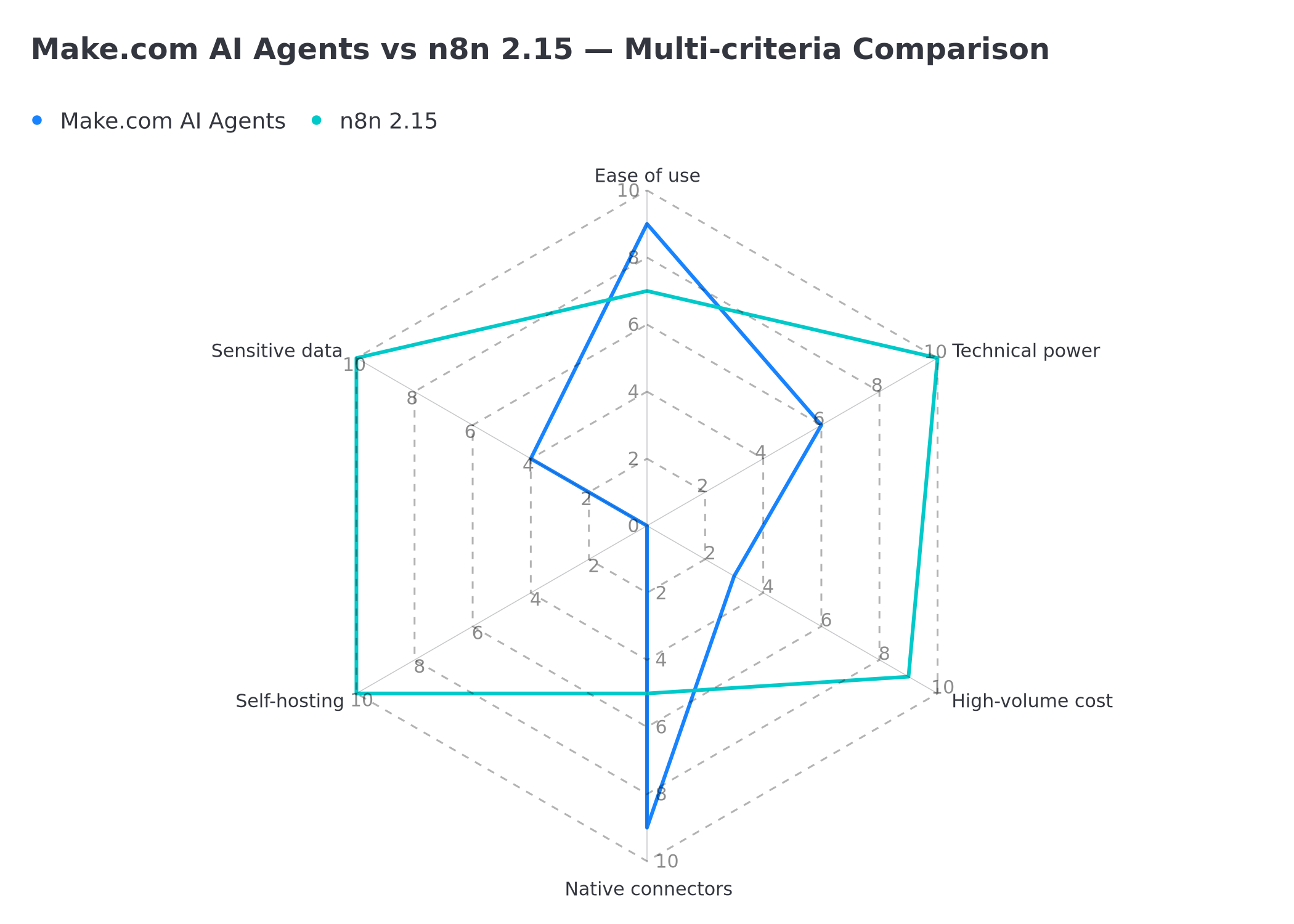 Radar comparison Make.com AI Agents vs n8n 2.15: ease of use, technical power, high-volume cost, native connectors, self-hosting, sensitive data support
Self-Hosting and Control: Who Owns the Infrastructure?
This is the clearest dividing line between the two tools. Make is a cloud-only solution: your agents run on the vendor's infrastructure, and you have no option to execute on your own servers. For many use cases, that's an advantage — no server to maintain, no updates to manage.
n8n offers both worlds: a managed cloud offering and, above all, a self-hostable edition (often deployed via Docker) that you install on your own VPS. Self-hosted, you control the version, the data, the models used and the network. Combined with Queue Mode for scaling, it's the choice of organizations that want to keep full mastery of their automation stack. The practical rule: if data sovereignty or infrastructure control are among your constraints, Make is disqualified outright, and n8n self-hosted becomes the default answer.
12-Month Cost Comparison: The Truth in Numbers
Scenario: 10,000 leads processed per month Each lead triggers: data retrieval, enrichment, AI qualification, email send, CRM update. That's approximately 6 operations per lead = 60,000 operations/month.
| Item | Make.com | n8n self-hosted |
|---|---|---|
| Subscription / hosting | €29/month (Pro plan, 10K ops) | €25/month (2 vCPU VPS) |
| Volume overage | +€220/month (50K extra ops) | €0 |
| Initial setup | €0 (interface) | €500 (one-time) |
| Monthly recurring cost | €249/month | €25/month |
| 12-month cost | €2,988 | €825 (setup included) |
The 12-month gap: €2,163 savings with n8n self-hosted.
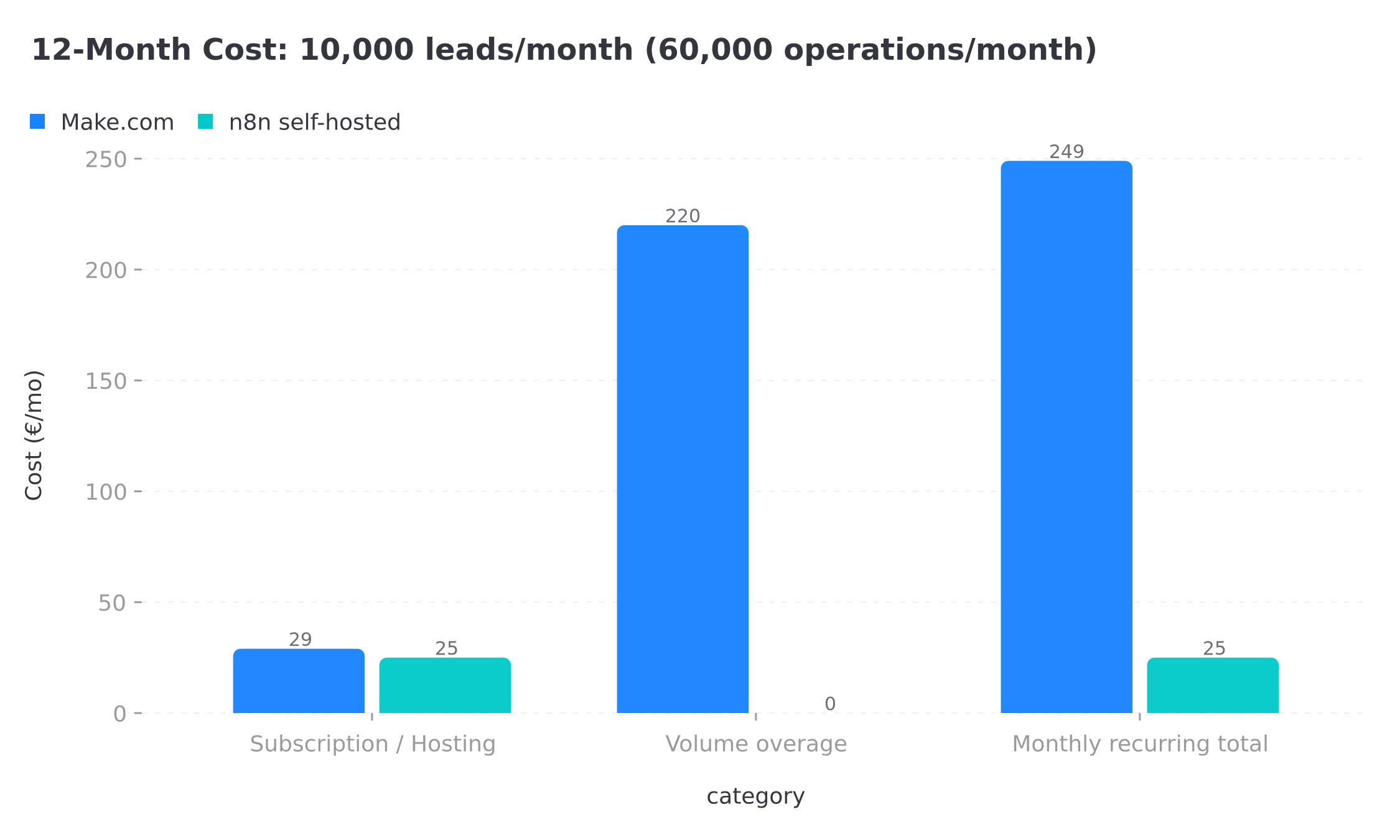 Monthly recurring cost breakdown: Make.com at €249/month vs n8n self-hosted at €25/month for 60,000 monthly operations
One item not to forget: LLM token cost. These figures cover orchestration (Make operations, n8n hosting). On top of that, in both cases, comes the cost of model calls if you use a cloud LLM (per-token billing at OpenAI, Anthropic or Google). An agent reasoning over several steps consumes more tokens than a single call: it's a real variable to model, and this is precisely where local models via Ollama on n8n can bring the inference bill down to zero. For a full view of the orders of magnitude, see our analysis of n8n and Make automation pricing in 2026. These amounts are orders of magnitude dated to 2026; always check official pricing grids before committing.
Scalability and Production: Who Holds Up Under Pressure?
A development agent is one thing. An agent that sustains 500 simultaneous executions on a busy Monday morning is quite another. Production scalability is often overlooked at the initial selection stage, yet it clearly distinguishes the two platforms.
Make scales automatically: that's the promise of managed cloud. You don't think about load, Make handles it. However, this scalability has a direct and linear cost: every additional operation is billed, and quota overages accumulate quickly on a multi-step AI pipeline where each tool call counts as an operation. An agent that makes ten calls to process a single lead consumes ten operations — which can turn an apparently reasonable Pro subscription into an unexpected invoice the moment volume grows.
n8n in Queue Mode is built for intensive production. You provision additional workers based on load (via Docker Compose or Kubernetes), and the hosting cost stays fixed regardless of execution frequency. According to the official n8n documentation, Queue Mode uses Redis as a message broker to distribute executions across multiple workers, with automatic retry and configurable dead letter queues. This is exactly the architecture used by teams processing hundreds of thousands of documents per month without the bill varying by a single euro. To go deeper on setting up autonomous n8n agents at scale, our article how to automate 40 hours of work per week with AI agents illustrates this type of architecture in real conditions.
Debugging and Observability: How to Monitor an Agent in Production?
Delegating decisions to an agent requires being able to understand why it acted that way. This is the Achilles' heel of agentic systems, and the two tools are not at the same level.
Make provides a history of the agent's executions and associated operations. That's enough to track activity, but the detail of the internal reasoning remains limited — diagnosing why an agent chose one tool over another sometimes requires interpretation.
n8n offers finer traceability: each execution is inspectable node by node, you see the inputs/outputs of every tool call, and you can add your own logging nodes or a dedicated error workflow that triggers on failure. Self-hosted, nothing prevents you from wiring observability into your usual tools. For production agents that make business-critical decisions, this debugging depth isn't a luxury: it's a condition of trust.
Community, Documentation and Available Templates
The ecosystem around a tool can make all the difference when you're stuck at 10pm debugging a stubborn agent. Community maturity is a criterion that technical comparisons often miss, yet it matters enormously in the long run.
Make benefits from a large, mature community: an active official forum, a well-populated subreddit, a template library accessible directly from the interface, and hundreds of tutorials in multiple languages on YouTube and tech blogs. The platform's stability — launched in 2012 as Integromat — has generated a body of resources that few automation tools can match. If your problem is common, there's a strong chance a solution already exists somewhere.
n8n has seen remarkable community acceleration since its AI capabilities surged: the community.n8n.io forum exceeds 60,000 registered members according to public forum data as of June 2026, with a shared workflow library covering the majority of common use cases. The community skews more technical, which translates into deeper answers to complex problems. AI agent-specific templates have multiplied since the AI Agent node reached stable release, and open-source contributions regularly enrich the available integrations.
The community verdict: Make wins on volume of resources accessible to beginners; n8n wins on the technical depth of expert-level exchanges.
5 Typical Scenarios and Which Tool to Choose
Scenario 1: Slack notifications for new Shopify orders → Make.com. The native Shopify connector is excellent, the scenario is simple and volume is low. Operational in 2 hours.
Scenario 2: AI-powered lead qualification pipeline + enrichment + HubSpot push → n8n if volume exceeds 2,000 leads/month. Complex conditional logic and volume cost tip the balance toward n8n.
Scenario 3: AI agent that answers support emails using your knowledge base → n8n with the AI Agent node and an MCP server connected to your internal documentation.
Scenario 4: Bi-weekly synchronization between two SaaS tools → Make.com. Simple, reliable, and both native connectors are excellent.
Scenario 5: Document processing (invoice PDFs → extraction → accounting) → n8n with Ollama integration for local processing of sensitive documents. Make doesn't offer local processing.
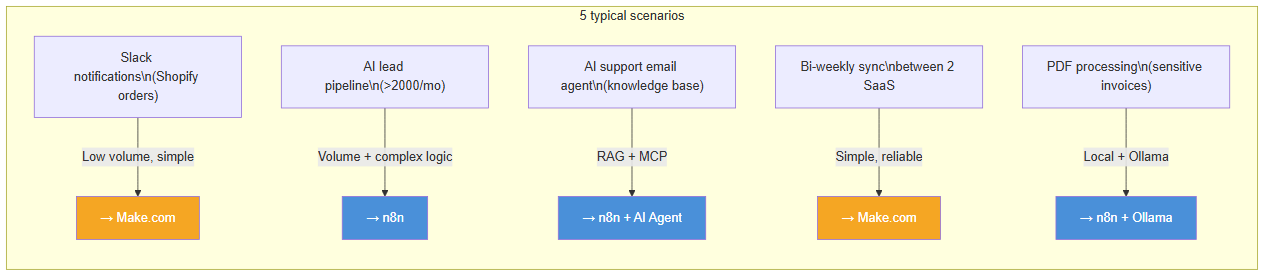 Synthetic view of 5 typical automation scenarios with the recommended tool in each case: Make.com for simple low-volume cases, n8n for complex workflows and sensitive data
Security, GDPR and Compliance
The GDPR compliance question is often the decisive factor in the choice between Make and n8n.
Make.com: Data transits through Make's servers. With the Team plan or higher, Make offers an "EU data residency" option that ensures data stays in European datacenters. However, this option doesn't protect against Make's sub-processors.
n8n self-hosted: You have complete control over the infrastructure. Hosted in France (OVH, Scaleway) or in the EU (Hetzner, DigitalOcean EU), no data leaves your infrastructure without your control. This is the strongest option for regulated sectors (healthcare, finance, HR, legal).
With local models (Ollama on n8n): You can run an LLM directly on your VPS, without sending data to OpenAI or Anthropic. The only configuration that guarantees full GDPR compliance on AI processing.
Verdict by Profile: Make AI Agents vs n8n
There's no absolute winner in the Make AI Agents vs n8n match — there's a winner for your situation. Here's our reading by profile, after deploying dozens of automation pipelines for our clients:
- Solopreneur or SMB without a technical team → Make AI Agents. You want an operational agent fast, no server to manage, on moderate volume. Make wins on time-to-launch.
- Agency or technical team → n8n. You need custom tools, multi-agent architectures and fine control of the reasoning. n8n offers the modularity.
- Regulated sector (healthcare, finance, HR, legal) → n8n self-hosted, ideally with a local model via Ollama. It's the only setup that keeps 100% of the data with you.
- High volume (> a few thousand operations/month) → n8n. The 12-month savings are too large to ignore.
- Need for a huge app catalog, simple cases → Make. The number of native connectors remains a strong argument.
Both tools can coexist. We have clients with Make for lightweight marketing automations and n8n for critical data processing pipelines — both communicating via webhooks. If you're still hesitating between tool families, the n8n vs Zapier 2026 comparison sheds light on a third contender often raised in the same discussion.
The real trap to avoid: choosing Make because "it's simpler" and then finding yourself paying several hundred euros a month in operations on a workflow that would have cost around twenty euros a month in n8n self-hosted.
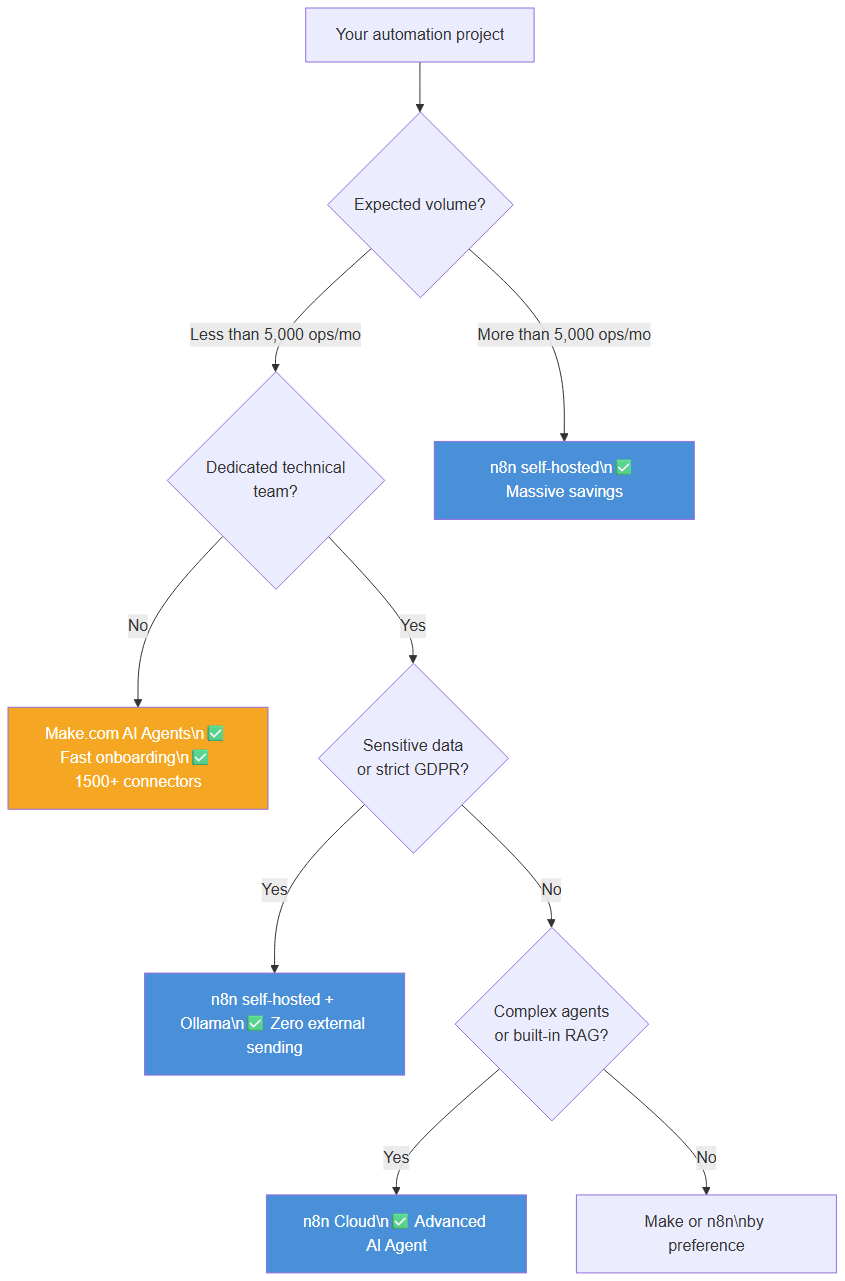 Complete decision tree to choose between Make.com AI Agents and n8n 2.15 based on volume, sensitive data and technical complexity
Not sure which to choose for your case? Describe your needs in 30 minutes and we'll tell you exactly what to use — and why.
Tags
FAQ
What's the difference between an AI agent and a classic automation workflow?
A classic workflow follows a fixed path you designed in advance: if A, then B. An AI agent receives a goal and decides for itself which tools to use, in what order, until it reaches the result. Make AI Agents and n8n's AI Agent node both enable this autonomous approach, but with different philosophies on control and self-hosting.
Make AI Agents or n8n, which is better to get started with AI agents?
For a first agent without a technical team, Make AI Agents is faster to get going: everything is configured in the interface using natural language. n8n requires more setup (memory, model and tool nodes) but offers full control and self-hosting. If your goal is to learn deeply, n8n is more instructive; if you want a quick result, Make wins.
Can you use Make.com and n8n together?
Yes, and it's often the best approach. BOVO Digital regularly deploys hybrid architectures: Make for marketing automations accessible to the client team, n8n self-hosted for critical pipelines with sensitive data. Both can trigger each other via webhooks.
How much does it cost to set up an n8n automation in production?
A production n8n self-hosted workflow typically costs €500 to €2,500 in initial development depending on complexity, plus €20 to €80/month for VPS hosting. BOVO Digital handles the full installation, configuration and production deployment.
Can BOVO Digital migrate my Make.com scenarios to n8n?
Yes. BOVO Digital performs Make-to-n8n migrations for clients whose Make operation costs have exploded. The migration includes auditing existing scenarios, rewriting in n8n and staging tests before production deployment.
We scope one workflow — not a generic demo
You describe a repeated task. We tell you what n8n would ship, the timeline, and what stays out of scope.
- 30 min
- 1 scoped workflow
- No commitment
Vicentia Bonou
Full Stack Developer & Web/Mobile Specialist. Committed to transforming your ideas into intuitive applications and custom websites.


