Automation17 min read

Automating Pinterest with n8n in 2026: The Complete Guide to 10× Your Traffic

Publish 50 Pinterest pins per day automatically from your WordPress, WooCommerce or Shopify? It's possible with n8n. Complete guide: workflows, Pinterest API, SEO hacks and ready-to-use templates.

Automating Pinterest with n8n in 2026: The Complete Guide to 10× Your Traffic

Automating Pinterest with n8n in 2026: 10× Your Traffic

Automating Pinterest with n8n turns the most underused visual search engine into a traffic machine that runs around the clock. Pinterest reports more than 500 million monthly active users (per Pinterest's 2024-2025 financial communications), strong purchase intent, and traffic that lasts weeks, even months per pin — where an Instagram post vanishes from the feed within hours.

The problem? Manually publishing 30 to 50 pins per day is impossible to sustain over time. That's exactly why many of our e-commerce clients replaced Buffer, Hootsuite and Tailwind with self-hosted n8n: an open-source workflow orchestrator that drives the Pinterest API, generates visuals and descriptions, schedules cadence and logs results — with no per-pin subscription.

In this complete guide, I'll show you how we automate Pinterest at BOVO Digital, step by step: API access, workflow architecture, AI content generation, scheduling, multi-board management, anti-spam best practices, results measurement and troubleshooting. By the end, you'll know how to build your own automation or order it turn-key from us.

Why automate Pinterest with n8n in 2026?

Before talking workflow, you need to understand why Pinterest deserves automation — and why n8n is the most rational tool for the job.

Pinterest isn't a classic social network. It's a visual search engine. Users type queries ("Christmas dinner ideas", "scandi living room decor", "wedding guest outfit") just like on Google, then save pins to their boards. Direct consequence: a well-optimized pin keeps generating clicks long after it's published, unlike an ephemeral post. This is visual SEO — and it's precisely what makes volume profitable.

But volume means repetition. Preparing a 1000×1500 visual, writing a keyword-rich title, drafting a description, picking the right board, adding a tracked link… multiplied by 30 to 50 pins per day, that's several hours of daily work. Automating Pinterest with n8n removes that load: the workflow runs the full chain on every new piece of content (product, article, planning row) while you focus on strategy.

Three concrete benefits stand out from our deployments:

  • Durable traffic: every pin is an SEO asset that works over time, with no ad budget.
  • Near-zero marginal cost: once the workflow is in place, publishing the 10th or the 500th pin barely changes the cost.
  • Editorial consistency: titles, descriptions and formats stay homogeneous because they're generated by the same rules.

Why n8n is unbeatable for Pinterest in 2026

Tailwind, Buffer and Hootsuite have a cost problem

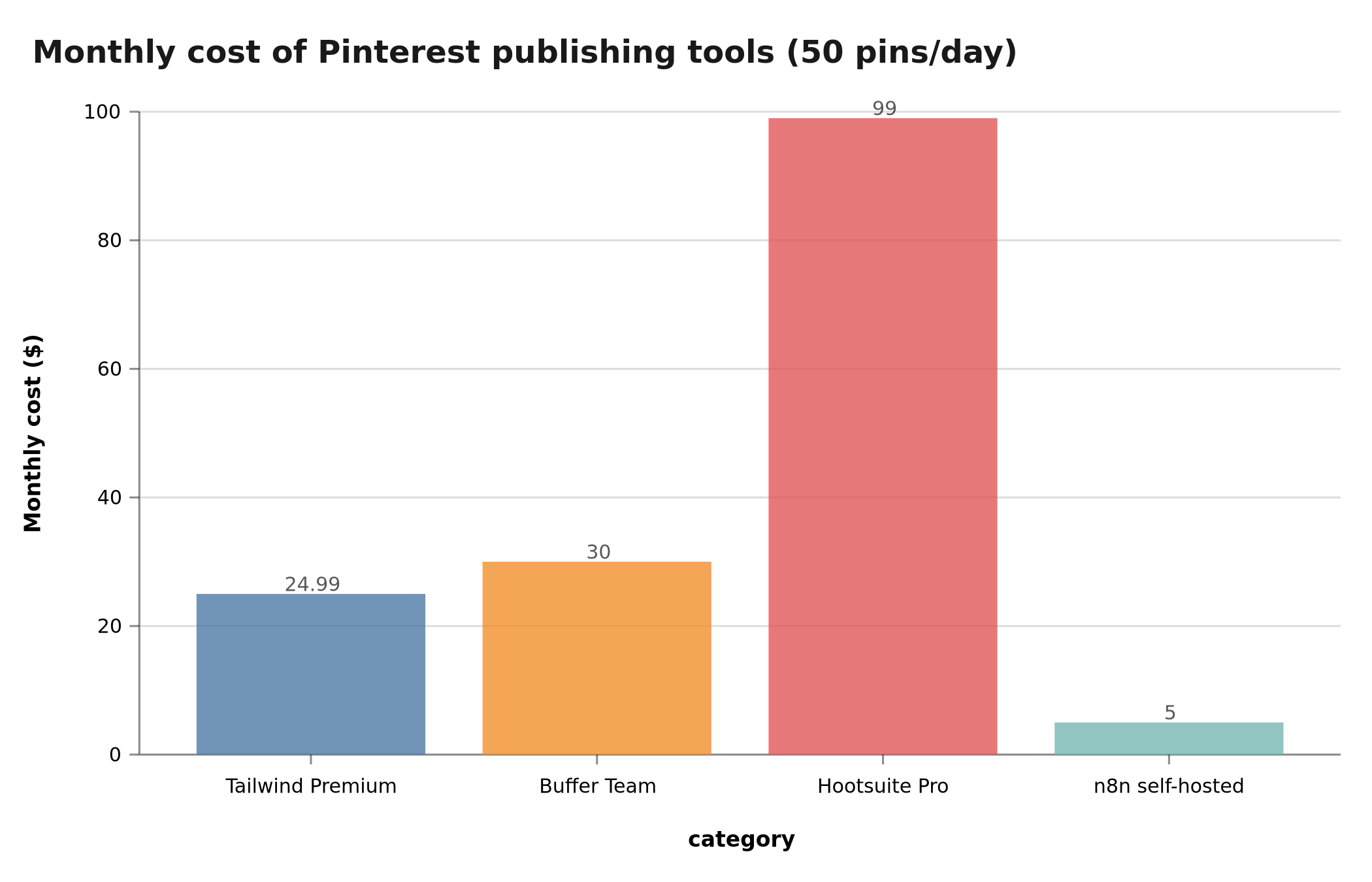
ToolCost 50 pins/dayLimit
Tailwind Premium$24.99/month400 publications/month max
Buffer Team$30/month/userNo recurring schedule
Hootsuite Pro€99/month30 scheduled publications max
n8n self-hosted€5/month (VPS)Unlimited

Over 12 months, n8n saves you €300 to €1,000 while removing publication limits.

Comparison of monthly costs for Pinterest publishing tools in 2026Monthly cost for 50 pins/day: Tailwind $24.99 vs Buffer $30 vs Hootsuite €99 vs n8n €5

n8n connects to your ENTIRE ecosystem

Pinterest alone isn't enough. The real value is chaining: new Shopify product → AI-generated image → Pinterest publication with optimized tags → tracking in Google Sheets.

n8n does this without a single line of code, where Tailwind is limited to the isolated publication cycle. If you're new to the tool, our best n8n workflow templates are a good starting point before tackling a Pinterest use case.

Automated Pinterest workflow architecture

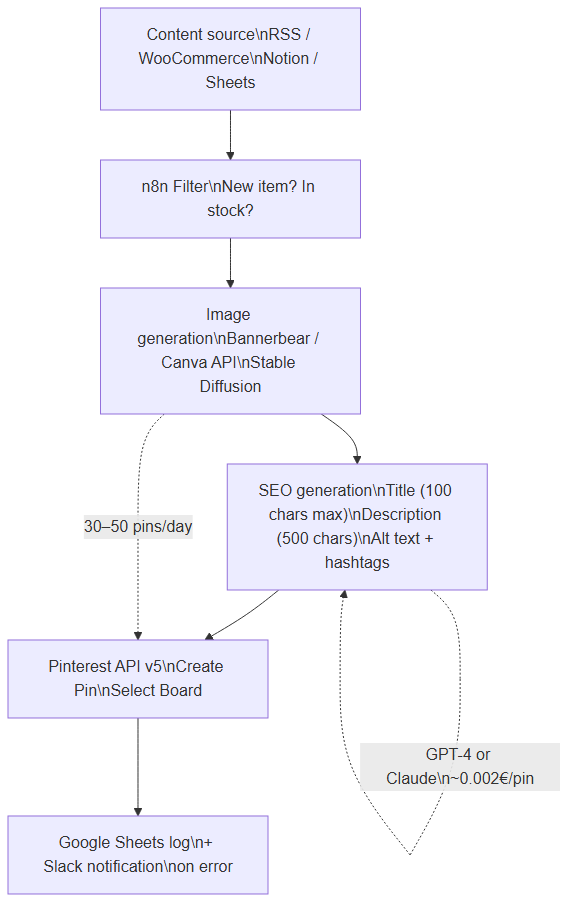
Here's the exact architecture we deploy at our e-commerce clients:

Content source (RSS, WooCommerce, Notion, Sheets)
  ↓
n8n filter (new? in stock?)
  ↓
Image generation (Bannerbear, Canva API or Stable Diffusion)
  ↓
Title + description generation (OpenAI GPT-4 or Claude)
  ↓
Pinterest API (create Pin + select Board)
  ↓
Log in Google Sheets + Slack notification

Automated Pinterest workflow architecture with n8n — from content source to publicationn8n Pinterest workflow: source → filter → image generation → SEO text generation → Pinterest API → Google Sheets log

This architecture publishes 30 to 100 pins per day without human intervention.

How do you get Pinterest API access?

Pinterest has a commonly-misunderstood point: you need a Pinterest Business account (free) and a developer app. Without that app, no automated publishing is possible. Here's the procedure we follow in 2026:

  1. Go to the developer portal developers.pinterest.com and sign in with your Business account.
  2. Create an app, then request the scopes matching your needs. The most common for publishing automation are pins:write (create pins), boards:read (list your boards) and user_accounts:read (read account info). Exact scope names can change; always check the current list in Pinterest's official documentation before configuring your credentials.
  3. Get your Client ID and Client Secret.
  4. Generate an access token via the OAuth 2.0 flow. Pinterest access tokens have a limited lifetime; keep the refresh token to automatically regenerate access without manual intervention.
  5. Identify the board ID of the target board. The GET /v5/boards endpoint returns your boards with their identifier: it's this ID, not the URL slug, that the API expects.

Then store this information in n8n via a Credentials node of type Pinterest OAuth2 API. n8n handles token refresh for you, which avoids the classic pitfall of homemade scripts that break the moment the token expires.

What does a Pinterest API call look like in n8n?

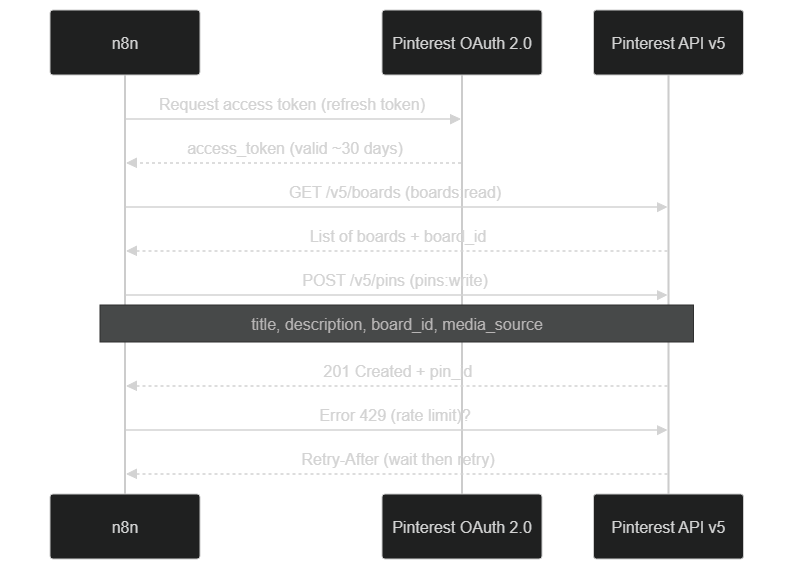
The diagram below summarizes the real sequence of calls: authentication, reading boards, creating the pin, and handling a possible quota overrun (429 Too Many Requests).

Sequence of Pinterest API calls from n8n — OAuth, reading boards, pin creation and rate-limit handlingn8n → Pinterest call flow: OAuth token retrieval, GET /v5/boards, POST /v5/pins, then handling a 429 error with Retry-After

The key point: the API returns explicit error codes. A 401 signals an invalid or expired token, a 403 a missing scope, a 429 a cadence overrun. Your workflow must handle each of these cases — more on that in the anti-spam section.

Step 2: Configure the trigger (content source)

Option A: Your WordPress blog RSS

Simplest. RSS Feed Read node with poll every 30 minutes.

URL: https://your-site.com/feed/
Schedule: Every 30 minutes

Option B: New WooCommerce products

WooCommerce native webhook → n8n.

In WooCommerce > Settings > Advanced > Webhooks:

  • Topic: Product created
  • Delivery URL: n8n webhook
  • API Version: v3

Option C: New rows in Google Sheets

For content creators who plan pins as a team. Google Sheets Trigger node on the planning sheet.

Step 3: Generate the image automatically

Pinterest penalizes recycled images. You must generate a unique image per pin.

Method 1: Bannerbear (simplest)

Bannerbear costs $49/month and exposes a REST API. Create a Pinterest template (1000×1500 px) with dynamic layers (title, product image, price).

n8n HTTP Request POST node:

{
  "template": "YOUR_TEMPLATE_ID",
  "modifications": [
    {"name": "title", "text": "{{$json.product_name}}"},
    {"name": "image", "image_url": "{{$json.product_image}}"},
    {"name": "price", "text": "{{$json.price}} €"}
  ]
}

Method 2: Self-hosted Stable Diffusion (free)

More complex but zero marginal cost. Deploy ComfyUI or Automatic1111 on a GPU VPS (Runpod $0.40/h) and call it via webhook from n8n.

Method 3: Canva API (most design-friendly)

Available since 2024 for Canva Enterprise. Lets you use your Canva templates in production via API.

Step 4: Generate SEO-optimized title and description

This is where the magic happens. Pinterest SEO works on 5 key signals:

  1. Title (max 100 chars, keywords at the start)
  2. Description (max 500 chars, hashtags included)
  3. Image alt text
  4. Properly-categorized board
  5. Destination URL

We use a GPT-4 (or Claude) prompt that generates everything in one pass:

You are a Pinterest SEO expert in 2026.
For this product/article, generate:
- Title (max 100 chars, main keyword at start)
- Description (200-300 chars, conversational tone, 3 hashtags)
- Image alt text (max 100 chars, descriptive)
- 5 keywords for the board

Product: {{$json.product_name}}
Category: {{$json.category}}
Main benefit: {{$json.benefit}}

Strict JSON format.

Cost: ~€0.002 per pin with GPT-4o-mini. 50 pins/day = €3/month.

Step 5: Post to Pinterest via API

Native n8n Pinterest node, Create Pin operation:

Board ID: {{credentials.boardId}}
Title: {{$json.title}}
Description: {{$json.description}}
Link: {{$json.product_url}}?utm_source=pinterest&utm_campaign=auto
Media Source Type: image_base64 OR image_url

UTM tip: always add ?utm_source=pinterest&utm_campaign=auto to track performance in Google Analytics 4.

Step 6: Log and monitor

Without monitoring, you'll publish broken content without knowing it. Our setup:

  1. Google Sheets: log every pin (URL, board, status, timestamp)
  2. Slack: immediate notification on Pinterest API error (4xx, 5xx)
  3. Weekly dashboard: aggregate of UTM clicks tracked in GA4

n8n workflow pinterest-monitor runs every Monday morning for the recap.

How do you schedule Pinterest publishing cadence?

Publishing 50 pins at once at 9 a.m. is the best way to get flagged as a bot. Pinterest rewards consistency, not bursts. The goal of automation isn't just to produce pins, but to spread them intelligently over time.

Two complementary approaches work well in n8n:

  • The Schedule Trigger node fires the workflow at regular intervals (for example every 20 to 30 minutes over the 8 a.m.–10 p.m. window). On each run, the workflow takes one pin from the queue and publishes it. You get smooth distribution across the day, with no suspicious spike.
  • The externalized queue (Google Sheets, Airtable or a database) acts as a buffer. The generation workflow fills the queue; the publishing workflow drains it at a controlled pace. This decoupling is valuable: if you generate 60 pins at once, they don't all go out simultaneously.

Based on our client experience, a starting cadence of 15 to 25 pins per day, ramped up gradually, beats an aggressive volume from day one. A brand-new account that suddenly publishes 100 pins/day sends a spam signal; an account that scales up over a few weeks builds its reputation. Check the frequency limits in force in Pinterest's documentation, as they can change.

Generating visuals and descriptions with AI: the full chain

The most differentiating part of automation is content generation. Pinterest penalizes recycled visuals and duplicate descriptions, so you must produce something unique every time. AI makes this industrializable.

On the visual side, three paths coexist (detailed above): a templating service like Bannerbear for graphic pins consistent with your brand, a self-hosted diffusion model (ComfyUI, Automatic1111) for zero marginal cost, or the Canva API to reuse your design templates. The right choice depends on your volume and your need for visual identity.

On the text side, a single call to a language model (GPT-4o-mini, Claude, or a local model) generates the title, description, alt text and board keywords in one pass. To go further, you can delegate this step to a true AI agent in n8n able to reason about the product context. The trick is to enforce a strict JSON output format so n8n can map each field directly to the pin's parameters. Vary the angles in your prompt (benefit, question, seasonal use) so your descriptions don't all look alike — essential to stay under the anti-duplication radar.

Also think about traceability: store the prompt and the generated output in your log. The day a pin performs particularly well, you'll know which angle produced it and can reuse it.

How do you manage multiple Pinterest boards from n8n?

A serious account doesn't publish everything to a single board. The multi-board logic routes each pin to the most relevant themed board — which improves ranking in Pinterest search and structures your catalog.

In n8n, the mechanics are simple: you maintain a mapping table between a category (or product tag) and a board_id. A Switch node or a simple expression reads the incoming item's category and dynamically selects the right board before the POST /v5/pins call. You can go further with board sections, which organize a single board into sub-themes.

This approach avoids two common traps: dumping everything into an unreadable catch-all, or conversely building a different workflow per board. One logic, one mapping table, and the automation adapts to any number of boards.

Anti-spam best practices and Pinterest API limits

This is the section too many articles skip — and it's the one that separates an account that scales from a suspended one. Pinterest actively fights spam, and the API enforces rate limits. Automating without respecting these rules is a short-term death sentence.

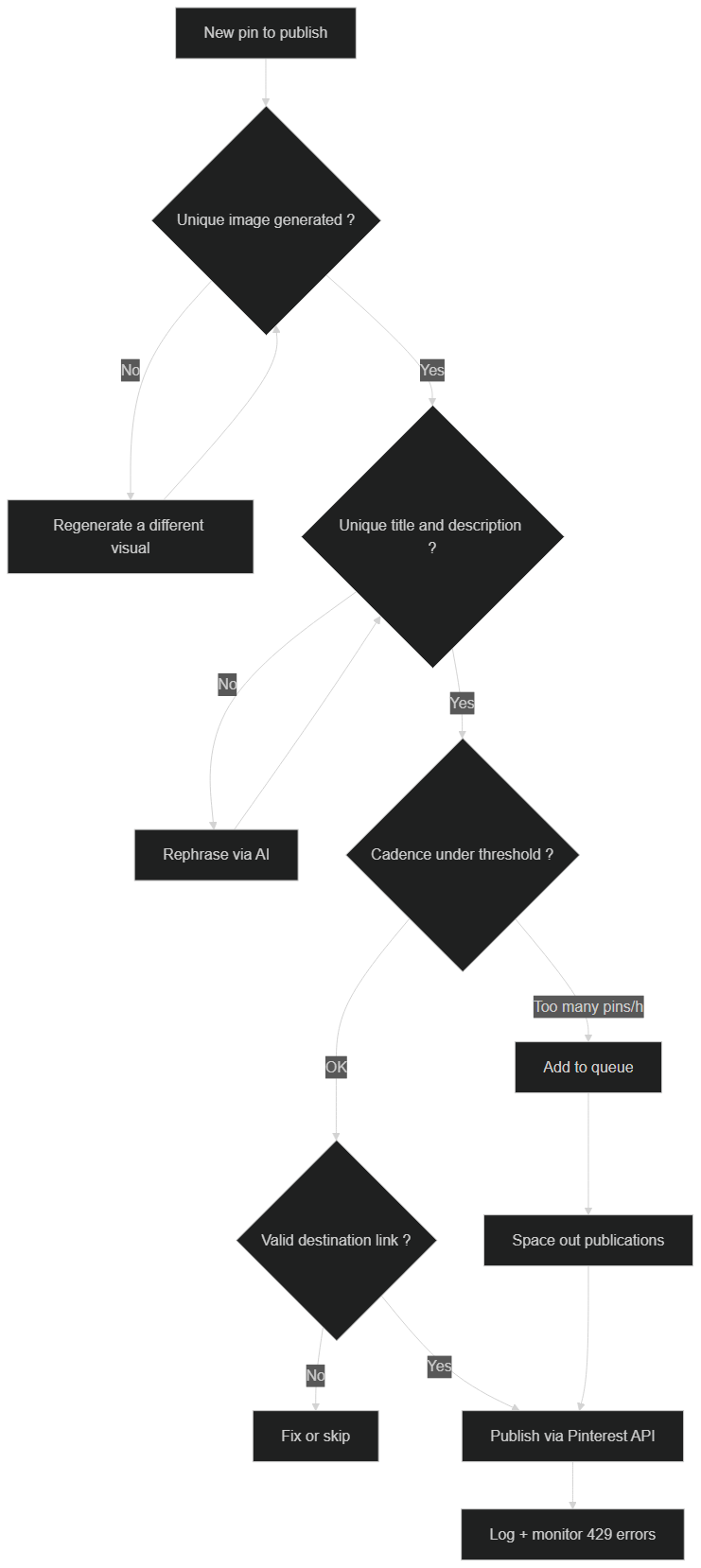
Here's the safeguard we systematically build into our workflows:

Anti-spam logic of an automated Pinterest workflow — uniqueness checks, cadence control and error handlingAnti-spam decision tree: unique image, unique title and description, cadence under threshold, valid link, then publish and monitor 429 errors

The concrete rules we apply:

  • Uniqueness above all. A different image and a different description per pin. Duplication is the number-one penalty factor.
  • Respect the rate limit. When the API answers 429 Too Many Requests, don't retry immediately. Read the Retry-After header when present, wait, then resume. n8n lets you handle this backoff cleanly.
  • Spread the cadence. See the scheduling section: prefer a steady flow over bursts.
  • Clean, valid links. A broken or suspicious destination link erodes trust. Validate URLs before publishing.
  • Handle errors without looping. A workflow that retries in a loop on a 4xx error makes things worse. Log, alert (Slack), and move to the next item.

Important: Pinterest's exact API thresholds and anti-spam policies aren't publicly detailed and evolve over time. Treat this article's cadence figures as cautious benchmarks from our experience, not guarantees. The golden rule remains: behave like a regular human publisher, not a greedy robot.

How do you measure the results of a Pinterest automation?

Automating without measuring is flying blind. Three measurement levels complement each other.

The first is operational: how many pins published, how many errors, which boards. That's the role of the Google Sheets log and Slack alerts described in step 6.

The second is Pinterest engagement: impressions, saves, outbound clicks. These metrics are available in Pinterest Analytics and, partly, via the API; they show which angles and formats resonate with your audience.

The third, most important for e-commerce, is business attribution. This is where the UTM parameters (utm_source=pinterest) added to each link come in: they let you find, in Google Analytics 4, the sessions and conversions truly coming from Pinterest. Without UTMs, Pinterest traffic dilutes into "referral" or "social" and becomes impossible to value.

A weekly dashboard that crosses these three levels is enough to steer: it reveals what to republish, which boards to invest in and when to adjust cadence.

One practical tip: don't judge a pin on its first 48 hours. Because Pinterest is a search engine, many pins only pick up traction after a few weeks, once they start ranking for their target queries. Give your automation a runway of at least 60 to 90 days before drawing conclusions, and compare cohorts of pins (by month, by board, by content angle) rather than individual pins. This long-horizon view is exactly what makes Pinterest automation compound over time instead of fizzling out like a paid campaign.

Troubleshooting: the most frequent failures

Even a well-designed workflow eventually hits incidents. Here are the most common ones and how to fix them.

The token expired (401). The big classic. Check that your n8n credentials use the OAuth2 flow with refresh token. If refresh fails, regenerate the authorization from the developer portal.

Missing scope (403). You're attempting an operation (for example creating a pin) without the matching scope. Reconfigure the app to request the missing scope, then regenerate the token.

Quota overrun (429). Your cadence is too high. Space out runs via the Schedule Trigger and implement the Retry-After backoff.

Image rejected. The format or weight is wrong. Respect the recommended ratio (close to 2:3, i.e. 1000×1500) and a reasonable file size. Validate the media URL or base64 encoding before the call.

Pin created but with no clickable link. Check that the link field is filled and the URL is absolute (https://…).

In every case, the combination of detailed log + Slack alert turns troubleshooting into routine: you know what failed, when, and why, without manual digging.

5 Pinterest SEO hacks we apply at our clients

1. Posting during heat moments

Pinterest publishes its Pinterest Predicts every December. Topics on the 2026 list (winter wellness, personal finance, scandi-revival decor) see 5 to 10× more reach than generic topics. Adapt your calendar.

2. Idea Pins > Standard Pins

Since 2024, Idea Pins (multi-image carousel) have 3.2× more reach. n8n can publish Idea Pins via the /v5/pins endpoint with media_source.source_type: multiple_image_base64.

3. Rich Pins with OpenGraph

If your WordPress/Shopify has proper OG tags (og:title, og:description, og:image, product:price:amount), Pinterest displays your price and description directly on the pin = +40% CTR.

4. Sectional boards

Don't publish everything to one "Our shop" board. Create 10 themed sections — Pinterest ranks them differently in search.

5. Republish top performers every 90 days

Pinterest rewards "freshness". An n8n cron that detects pins with 500+ views over 30 days and republishes them to another board = traffic on loop.

BOVO Digital's ready-to-use n8n template

We've built a complete WooCommerce → Pinterest n8n template that we deliver to our e-commerce clients:

  • 7 pre-configured nodes
  • Bannerbear image generation + GPT-4 text
  • Pinterest publication + Google Sheets log
  • Error handling and automatic retry
  • 12-page user documentation

This template is included in all our n8n Automation Agency packages. You get it turn-key, configured for your shop, in less than one week.

How much does it cost vs how much does it earn?

Initial investment (with BOVO Digital)

ItemCost
Full n8n workflow setup€1,000 (n8n Starter package)
VPS for self-hosted n8n€5/month
Bannerbear (image)$49/month
OpenAI API~€5/month (50 pins/day)
Total annual cost~€720 after setup

Measured ROI on 12 BOVO Digital e-commerce clients

MetricBefore n8nAfter 6 monthsVariation
Pins published/month301 500×50
Monthly Pinterest traffic240 sessions4 800 sessions×20
Attributable e-commerce conversions5/month95/month×19
Pinterest acquisition cost€0€0

Pinterest automation ROI with n8n — 12 BOVO Digital e-commerce clients over 6 monthsPinterest n8n ROI: pins ×50, traffic ×20, conversions ×19 across 12 BOVO Digital e-commerce clients

Average ROI: starting month 2, Pinterest automation pays 5× its monthly cost.

Quick FAQ

How many pins should I publish per day?

2026 sweet spot: 15 to 25 pins/day to start, 30 to 50 once the account is warmed up (3-6 months). Beyond that, Pinterest reduces reach (spam signal).

Is Pinterest Business really free?

Yes, 100%. The only paid thing on Pinterest's side is advertising. API and Business account are free.

What if Pinterest changes their API?

n8n maintains the official Pinterest node. API changes are absorbed without your intervention. That's exactly why self-hosted n8n beats a custom script.

Your next step

Want to automate Pinterest without wrestling with n8n yourself?

Pinterest is the least competitive SEO opportunity of 2026 for French-speaking e-commerces and creators. Automating now means a 2-year lead over your competitors.


Article by Vicentia Bonou, co-founder of BOVO Digital and n8n automation architect. She leads our e-commerce deployments for French DTC brands.

👉 Request a free Pinterest audit →

Tags

#Pinterest#n8n#Automation#E-commerce#SEO#2026

Share this article

LinkedInX

FAQ

What's the advantage of n8n vs Tailwind or Buffer for Pinterest?

Self-hosted n8n costs €5/month for unlimited publications, where Tailwind charges $25/month for max 400 publications and Buffer doesn't allow advanced recurring schedule. n8n also lets you chain Pinterest with your e-commerce (Shopify, WooCommerce), your generative AI (DALL-E, Stable Diffusion) and your GA4 tracking — impossible with SaaS tools.

How much does a Pinterest automation with n8n by BOVO Digital cost?

Our n8n Automation Agency Starter package at €1,000 includes a complete custom Pinterest workflow (WooCommerce or WordPress as source, automatic image generation and multi-board publication). The Business (€1,800) and Enterprise (€3,000) packages add AI agents, 24/7 monitoring and complementary workflows.

Does Pinterest really accept 50 automated publications per day?

Yes, as long as content is unique (different images, different descriptions). Pinterest only penalizes duplication. With dynamic image generation (Bannerbear or Stable Diffusion) and different GPT-4 titles, 50 pins/day are perfectly accepted.

Do I need a Pinterest Business account to use the API?

Yes, mandatory. The account is free, you just need to convert your personal account or create a new one on business.pinterest.com. Pinterest v5 API is then immediately accessible by registering a developer app (15 minutes).

How long until I see ROI on a Pinterest automation?

On our 12 e-commerce clients having deployed Pinterest automation with n8n via BOVO Digital, ROI is positive from month 2 (5× monthly cost). Organic Pinterest traffic is multiplied by 15 to 20 in 6 months, with no ad spend.

Ready to implement this?

Book a free 30-min strategy call with our experts

We'll analyze your situation and propose a concrete action plan.

Vicentia Bonou

Full Stack Developer & Web/Mobile Specialist. Committed to transforming your ideas into intuitive applications and custom websites.

Take action with BOVO Digital

This article sparked ideas? Our experts guide you from strategy to production.

Related articles