n8n Templates: The 10 Best Ready-to-Use Automation Workflows
n8n templates let you get started in a few clicks without starting from scratch. Discover the 10 most useful n8n workflows to automate your business, with concrete use cases.
n8n Templates: The 10 Best Ready-to-Use Automation Workflows
Why rebuild a workflow that thousands of others have already designed, tested and shared?
n8n workflow automation templates are pre-built models you import and then adapt in minutes, instead of building every scenario node by node. It is the fastest way to go from an idea to an automation that runs in production. The official library lists several thousand — but most business needs are covered by about twenty recurring patterns that show up from one project to the next.
In this guide, you'll learn where to find reliable templates, how to classify them by use case, which ten workflows are most worth knowing, how to adapt a model to your context without breaking it, and above all which credential, error-handling and security best practices to apply before putting anything live. The goal is not to copy-paste blindly, but to understand the mechanics so you can eventually build your own reusable library.
Where to Find n8n Templates
The first question everyone asks is also the easiest to answer. There are three main sources, ordered from most official to most community-driven.
- The official library:
n8n.io/workflowslists hundreds of workflows classified by integration and by use case. Each card shows the nodes used, a description and a direct import button. It's the source to prefer because workflows there are reviewed and categorized. - In the n8n interface: the Templates menu, accessible directly from your instance, offers a selection you can browse without leaving the editor. Handy to start a new project from an existing skeleton.
- The community: the official forum, GitHub repositories, blog posts and videos share hundreds of workflows. The richness is huge, but quality varies — exactly where security vigilance matters most, as we'll see.
An n8n template is nothing more than a JSON file describing nodes and their connections. This has an important consequence: you can copy that JSON and paste it directly into the editor (Ctrl+V) to rebuild the workflow instantly. It's also what makes templates easy to share, version and audit.
How to Spot a Good Template?
Not all models are equal. Before adopting one, ask a few simple questions. Does the workflow use standard, maintained nodes, or obscure community ones? Is the logic readable, with clearly named nodes? Does the template handle error cases, or does it assume everything will always go fine? A good template is documented, modular and predictable. A bad template is a black box you'll never truly understand — and that will eventually fail silently at the worst moment.
The other quality signal is freshness. Third-party APIs evolve, n8n nodes are regularly updated, and a workflow built two years ago may reference deprecated operations. Favor recent models, or accept that you'll need to reconnect a few nodes to the current version of each integration.
Template Categories by Use Case
Rather than memorizing hundreds of isolated workflows, it's far more effective to think in use-case families. Almost every business automation falls into six broad categories. Understanding this mental map lets you search in the right place and reuse the same building blocks across categories.
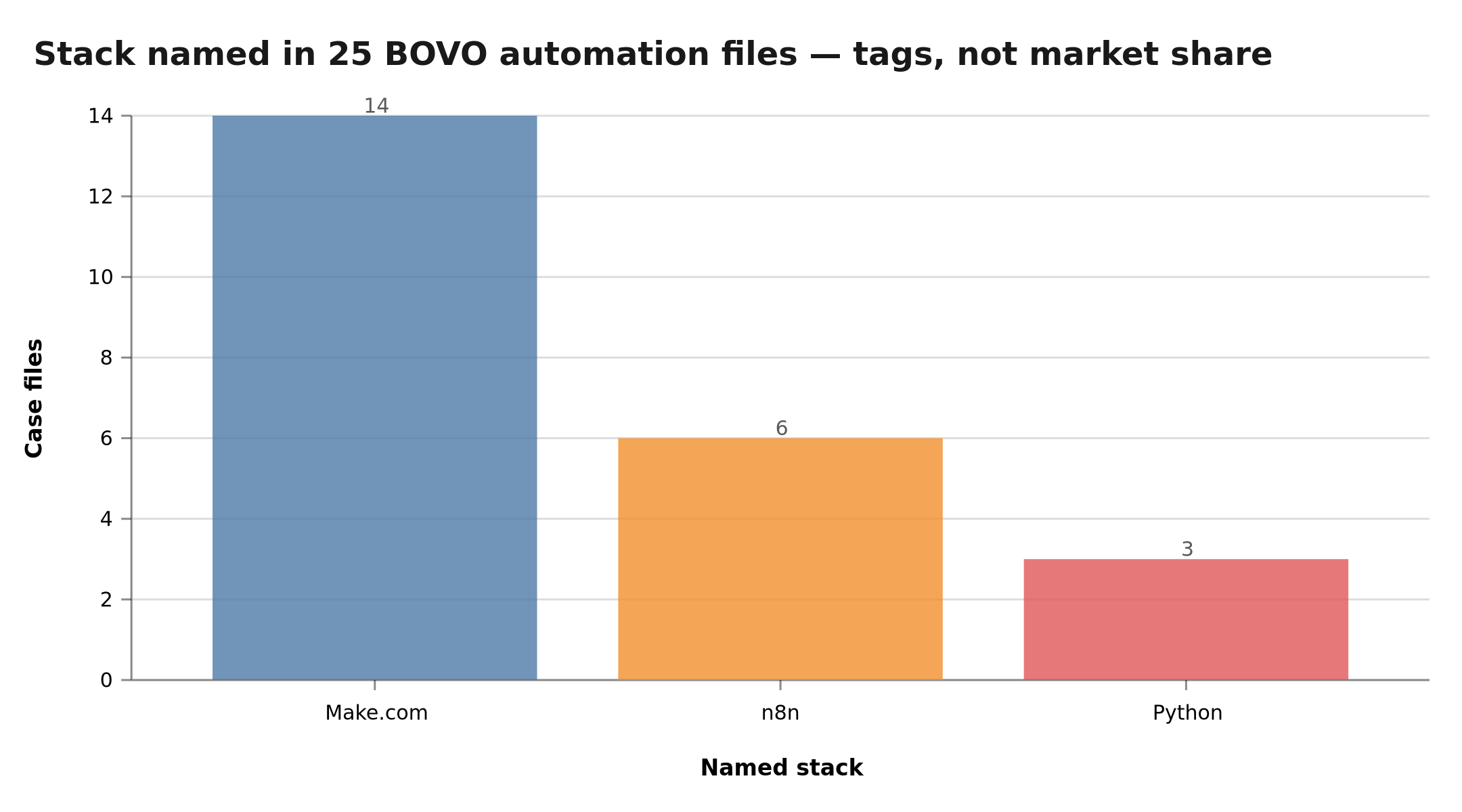
Lead, support, content, sync, notifications, scraping: the map of the major n8n template families
- Lead and prospecting: capture a form, enrich a contact, push it to a CRM, trigger a sequence. These workflows turn every visitor into a tracked opportunity. The trigger is often a Webhook or Form Trigger node.
- Customer support: triage incoming requests, answer FAQs through an AI agent, create a ticket, escalate to a human when needed. The goal is to relieve the team without degrading quality.
- Content creation: generate, reformat and publish content across multiple channels from a single source. You'll frequently wire in OpenAI or AI Agent nodes and integrations like LinkedIn, Telegram or social networks.
- Data synchronization: keep two systems consistent (Airtable, Notion, Google Sheets, SQL databases). These workflows rely on comparison and upsert to avoid duplicates.
- Notifications and alerts: tell the right person at the right moment on Slack, by email or on WhatsApp as soon as an event occurs. Simple to set up, they deliver an immediate return.
- Scraping and enrichment: fetch external data via HTTP Request, extract and structure it, then inject it into your tools. This is the category where extraction AI saves the most time.
This grid has a concrete benefit: when a need arises, you immediately know which category to search for an existing template, and which nodes you'll be handling. You stop reinventing and start composing.
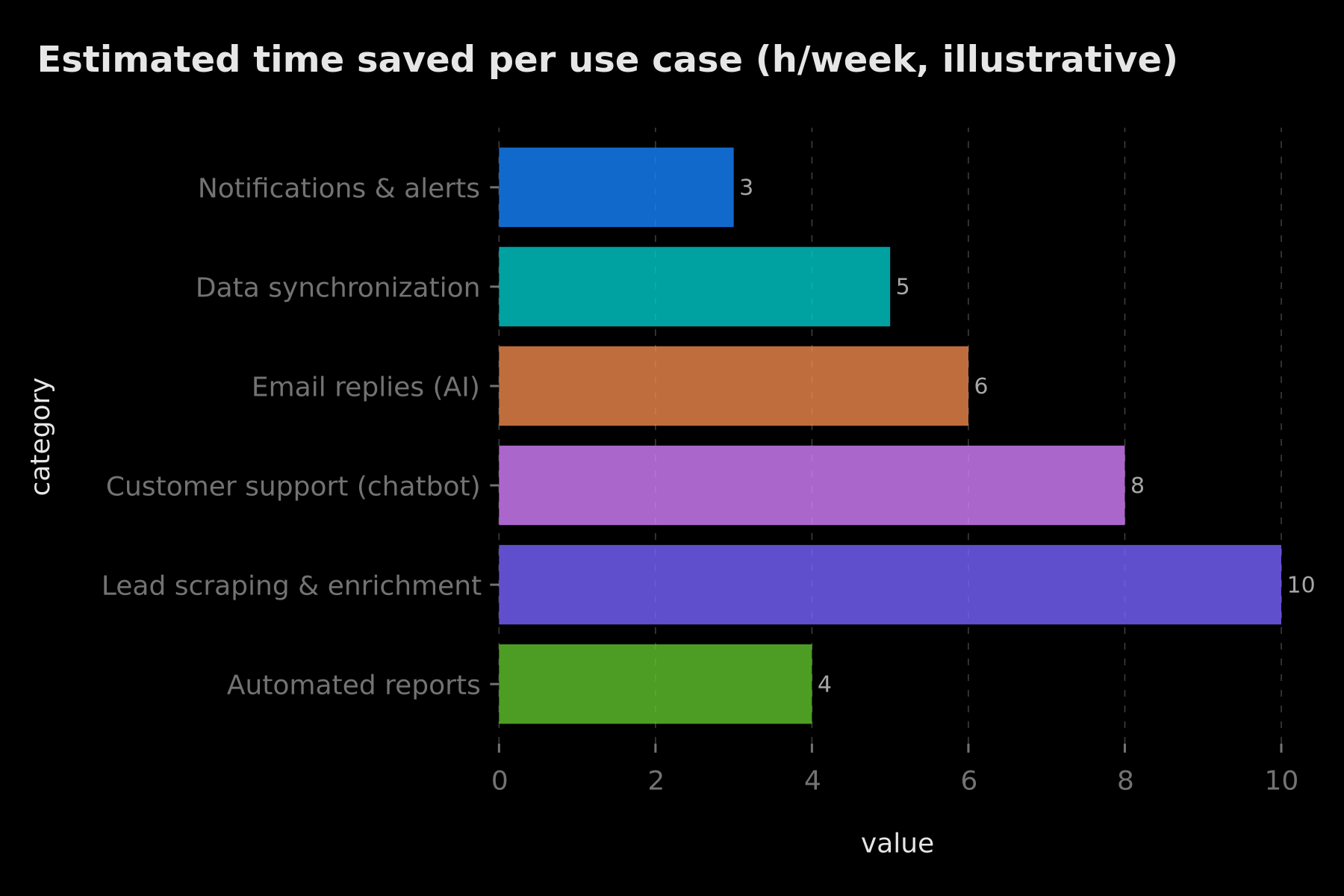
To visualize the potential impact, here is an illustrative estimate of the time each category can save over a typical week. These numbers are not guarantees: they depend on your volume, your no-code maturity and the complexity of your processes. Treat them as an order of magnitude to prioritize your projects.
Indicative order of magnitude: scraping and support workflows tend to free up the most hours per week
Template or Custom Workflow: Which to Choose?
The question comes up on every project. Should you start from an existing template or build from scratch? The answer depends on three factors: the availability of a model close to your need, the specificity of your business logic, and the level of risk you tolerate.
Start from a template when your need matches a common pattern — notify a team, sync two tools, publish content. In these cases, a model saves you most of the structuring time and spares you the classic oversights. All you have to do is wire your credentials and adjust the filters. It's the fast lane, and it's the right call in most everyday situations.
Build custom when your business logic is too singular to fit a mold, when you orchestrate complex conditional rules, or when the data you handle is sensitive enough to tolerate no grey areas. In that case, even a close template would cost you more time to fix than to rebuild cleanly. The boundary is never fixed: it's perfectly healthy to start from a template for the structure, then rewrite the critical nodes by hand. The template becomes a draft, not an endpoint.
One last criterion, often underestimated: maintainability. A workflow you understand end to end is a workflow you'll know how to fix at 11 p.m. on an incident night. An opaque third-party template, even if it works on import day, can become a burden the day it breaks. Always choose with one question in mind: who will maintain this workflow six months from now?
The 10 Essential n8n Templates
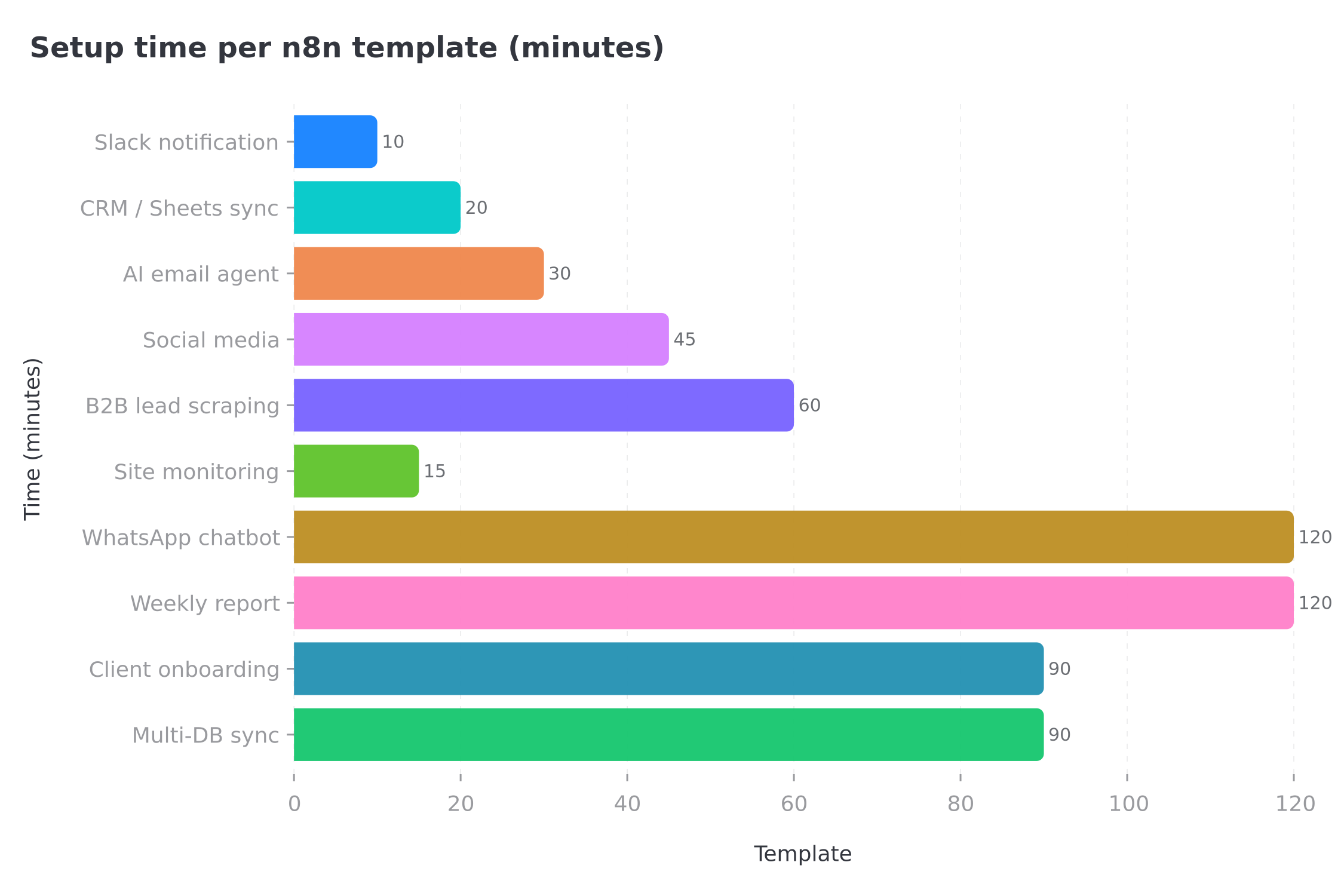
Here is a cross-cutting selection covering all six categories. For each, we give the use case, typical nodes and setup time — the latter being an average estimate, to be adjusted based on your familiarity with the tool.
From 10 minutes for a Slack notification to 2 hours for a WhatsApp AI chatbot: setup time overview per template
1. Slack Notification on New Gmail Email
Use case: alert the team in real time when an important email arrives. It's the first reflex to stop missing a critical client request buried in an inbox. Nodes: Gmail Trigger → IF (or Filter) → Slack. Setup time: 10 minutes. The filter is key: without it, you spam your Slack channel on every newsletter received.
2. CRM ↔ Google Sheets Sync
Use case: auto-export new CRM contacts (HubSpot, Pipedrive) to Google Sheets to share with a team that has no CRM access. Nodes: CRM Trigger → Edit Fields (Set) → Google Sheets. Setup time: 20 minutes. The field-transformation step prevents sending raw, unreadable data into the sheet.
3. AI Email Reply Agent
Use case: classify incoming emails and generate a draft reply. The draft waits for human validation — that safeguard is what makes the pattern usable in production. Nodes: Gmail Trigger → AI Agent → Gmail (create draft). Why it's useful: on repetitive emails, writing the first draft is the most time-consuming part. Delegating it frees up valuable time without removing final control from the human. Setup time: 30 minutes.
4. Automatic Social Media Publishing
Use case: publish approved content to multiple platforms from a single source (Google Sheets, Notion or Google Docs). Nodes: Schedule or Sheets Trigger → OpenAI (per-channel reformatting) → publishing nodes per network. Setup time: 45 minutes. Reformatting matters: the same message shouldn't look identical on LinkedIn and on a short-form channel.
5. B2B Lead Scraping and Enrichment
Use case: gather a list of target companies, enrich them (business email, sector, size) then push them to the CRM or an Airtable. Nodes: HTTP Request → Code or AI Agent (extraction) → HubSpot / Airtable. Why it's useful: it replaces hours of manual copy-paste with a reproducible flow. It's one of the highest-ROI workflows, provided you respect each source's terms of use. Setup time: 1 hour.
6. Website Monitoring with Alert
Use case: regularly check that your site responds and alert immediately on outage. Nodes: Schedule Trigger → HTTP Request → IF → Slack. Setup time: 15 minutes. A classic of the notifications category, simple but powerfully useful for responsiveness.
7. WhatsApp AI Chatbot
Use case: automatically reply to WhatsApp Business messages with a conversational agent, ideally connected to a knowledge base for answers grounded in your content. Nodes: WhatsApp Trigger → AI Agent (+ memory and tools) → WhatsApp. Why it's useful: it offers an always-on first level of support, escalating to a human only the cases that warrant it. Setup time: 2 hours.
8. Automated Weekly Report
Use case: aggregate data from several services (analytics, payments, project management) and send a summary every week. Nodes: Schedule Trigger → several HTTP Request → Merge → HTML formatting → Email. Setup time: 2 hours. The Merge node is central: it reconciles heterogeneous sources into a single report.
9. Automated Client Onboarding
Use case: trigger a welcome sequence, create an account and notify the team as soon as a client pays. Nodes: Stripe Trigger → account creation → email sequence → Slack. Setup time: 1h30. This workflow lays the foundation for a consistent onboarding experience with no manual intervention.
10. Multi-Database Synchronization
Use case: keep two databases consistent (Airtable ↔ Notion, SQL database ↔ Google Sheets) by propagating each change. Nodes: source database Trigger → comparison → upsert into the target database. Setup time: 1h30. The upsert logic (insert or update) avoids duplicates, the main pitfall of this kind of sync.
How to Adapt an n8n Template to Your Case
Importing a template is never enough: you have to make it yours. The good news is that the adaptation process is always the same, whatever the workflow. Follow these five steps in order and you'll avoid the vast majority of beginner mistakes.
From template import to production: import → credentials → filters → manual test → error alerts
- Import the template from the library or paste its JSON into the editor. First of all, read the workflow left to right to understand what each node does. Touch nothing until you have the full picture.
- Replace credentials in every node with your own. It's the most often forgotten step, and the one that causes the most authentication errors on the first run. Never reuse identifiers left lying around in a public template.
- Adapt filters and logic to your business rules. A template is generic by nature; it's by adjusting the conditions of IF, Switch and Filter nodes that you fit it to your reality.
- Test manually with real data before activating anything. Run node by node, inspect the outputs, and check that the data has the expected shape at each step.
- Configure error handling: pair an Error Trigger with a Slack or email notification. A workflow that fails silently is more dangerous than no workflow at all, because you believe the job is done.
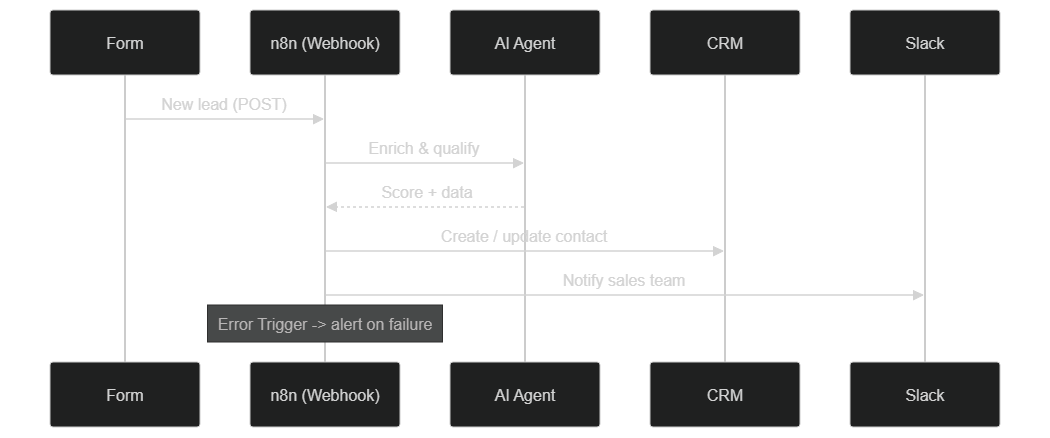
To make this adaptation concrete, here is the sequence of a lead capture and qualification workflow — a pattern found, give or take a few nodes, across a large part of sales automations.
From form to sales notification: webhook, AI enrichment, CRM and Slack, with a dedicated error branch
This sequential reading reveals an essential principle: a good workflow doesn't just chain actions, it also plans for what happens when a step fails. The error branch isn't a detail — it's what separates a toy automation from a production one.
Best Practices: Credentials and Error Handling
Adopting templates saves time, but doesn't exempt you from discipline. Two topics come up systematically the moment you move from sandbox to production: credential management and error handling.
Centralize your credentials. In n8n, identifiers are declared once and then reused across all the nodes that need them. Avoid pasting API keys in clear text into Code nodes or URLs; go through the credential manager and, where relevant, environment variables. You reduce the exposure surface and you rotate a compromised key in a single place. Also think least privilege: an integration doesn't need full access if it only reads one row.
Treat errors as a nominal case. Every critical workflow deserves a dedicated Error Trigger, in a second workflow that centralizes failure notifications. At the node level, the settings tab lets you choose error behavior: continue, retry or stop. For network calls, enable automatic retries to absorb API micro-outages. And for workflows handling money or client commitments, prefer a loud failure to a silent but wrong success.
Think idempotency. A workflow triggered twice must not create the same order twice or send the same email twice. Upsert nodes, unique keys and upstream duplicate checks are your safeguards. This is especially true for synchronizations and payments.
Finally, document inside the workflow itself. Rename nodes with explicit labels, add sticky notes to explain non-obvious choices. The you of six months from now, or the colleague who inherits the project, will thank you. A template inherited from a third party benefits enormously from being annotated while you understand it, not after you've forgotten it.
Pitfalls and Security: Auditing a Third-Party Template
This is the most neglected point, yet the most important. A community template is code you're about to run in your environment, with your access. Treating it as trusted by default would be a mistake. Here are the reflexes to adopt before activating anything.
Never activate a template without reading it. As long as a workflow isn't activated, it runs nothing: use that window to inspect it fully. Open every node, and pay special attention to two risky families.
- Code nodes: they can execute arbitrary JavaScript. Read that code line by line. Be wary of anything that calls external resources, encodes data, or manipulates environment variables in unexpected ways.
- HTTP Request nodes: check every URL being called. A malicious or careless template could exfiltrate your data to a third-party server under cover of a harmless-looking API call. If a destination is unknown to you, don't allow it until you understand why it's there.
Never reuse credentials left in a public template. Some shared models contain, through carelessness, leftover identifiers. Remove them systematically and reconfigure your own. Conversely, before sharing one of your workflows, always export it without credentials.
Control exposed webhooks. A workflow triggered by a Webhook opens a doorway onto the Internet. Protect it: authenticate the call, validate the received data, and reject anything that doesn't match the expected format. An unprotected endpoint is an invitation to abuse.
Limit scope and monitor. Give each integration the minimum access required, isolate sensitive workflows, and keep an eye on execution logs. An unexpected spike in executions is often the first sign that an automation is behaving differently than intended. If you self-host your instance, these isolation principles match those of a clean install, as detailed in our n8n Docker installation guide.
The golden rule fits in one sentence: a template saves time on building, never on verification. Those two minutes of audit are worth infinitely more than a data leak.
Building Your Own Library of Templates
Beyond public models, the real acceleration comes from your internal library. Every workflow you finish becomes a reusable asset — provided you capitalize on it properly.
Start by exporting your finished workflows as JSON and versioning them in a Git repository. You get history, the ability to roll back, and a single place where truth lives. For each internal template, document three things: the expected credentials, the variables to adapt for the next use, and the business assumptions the workflow rests on. This documentation turns a frozen workflow into a genuinely reusable pattern.
Then think modularity. Rather than one monolithic mega-workflow, split into reusable sub-workflows called via the Execute Workflow node: a lead-enrichment block, a notification block, a logging block. You then compose new automations by assembling already-tested pieces, exactly like assembling functions in code. This building-block approach is also what lets you move smoothly from simple automations to intelligent systems driven by AI agents.
Finally, standardize your conventions: a node-naming scheme, a shared error-handling strategy, a consistent notification format. The more your internal templates resemble each other, the faster they are to understand and maintain. This is what separates a collection of patched-together automations from a truly industrialized automation platform — the same logic behind projects as varied as automating Pinterest with n8n or eliminating 70% of support emails through automation.
Conclusion: Compose Rather Than Reinvent
n8n templates aren't a lazy shortcut: they're starting points that save you from reinventing proven patterns. The skill to develop isn't copying them, but reading, adapting, securing and ultimately capitalizing on them in a library that belongs to you.
Remember the trajectory: find a reliable model, identify its category, adapt it in five steps, harden credentials and error handling, audit every third-party template before activation, then version your best workflows to reuse them. Project after project, you move from template consumer to designer of your own automation catalog.
For workflows beyond standard templates, our team builds custom n8n automations tailored to your stack.
Tags
FAQ
Are n8n templates free?
Yes, all templates from the official n8n.io/workflows library are free. Some require third-party subscriptions (OpenAI API, WhatsApp Business) but the n8n workflows themselves are freely usable.
How do I import an n8n template?
From the official library, click 'Use workflow'. You'll be redirected to your n8n instance with the workflow imported. From the n8n interface, use the Templates menu in the top left, or paste the workflow JSON directly into the editor (Ctrl+V).
Can I modify an n8n template after importing it?
Yes, templates are fully editable. They serve as a starting point that you adapt to your use case without starting from scratch: add or remove nodes, change filters, branch out to other services.
Is a third-party n8n template safe to use?
A community-shared template is JSON you import into your own instance: it runs nothing until you activate it. Before activation, inspect every node, especially Code and HTTP Request nodes, check the URLs being called, and never reuse credentials left inside a public template.
How do I build my own library of n8n templates?
Export your finished workflows as JSON, version them in a Git repository, document the expected credentials and the variables to adapt, then reuse them as starting points. An internal library speeds up every new automation project.
Ready to implement this?
Book a free 30-min strategy call with our experts
We'll analyze your situation and propose a concrete action plan.

William Aklamavo
Web development and automation expert, passionate about technological innovation and digital entrepreneurship.