
How to Eliminate 70% of Support Emails with AI Automation
An e-merchant received 300 emails/day. 80% were repetitive. Discover how AI support email automation eliminates up to 70% of volume — classification, RAG, intelligent escalation, and concrete ROI.

Updated

How to Eliminate 70% of Support Emails with AI Automation
Imagine your support inbox empty on Monday morning — not because no one wrote, but because three-quarters of the questions already received accurate, personalized responses within two minutes. That is the result a properly built AI support email automation system delivers.
AI support email automation is not a guru's promise. It is a real architecture, deployed on support inboxes handling 200 to 400 messages per day, where human workload has dropped significantly within weeks. Based on our field experience, the deflection range we observe is between 60% and 75% depending on context — never universal, always conditional on implementation quality. In this article, we break down the real mechanisms behind this type of system: volume audit, automatic classification, FAQ responses, intelligent escalation, customer memory, CRM integration, deflection measurement, ROI calculation, and — crucially — the pitfalls nobody talks about.
Pre-audit: understanding your support email volume
Before automating anything, the first step is an honest audit of your support inbox. Most teams underestimate their actual volume and overestimate the complexity of their emails. The reality is that the vast majority of incoming tickets follows a very concentrated distribution: a few recurring categories account for the bulk of the volume.
Concretely, this step involves exporting the last three months of emails — or the last thirty days if you handle high volume — and tagging them manually or semi-automatically by category. What this type of audit systematically reveals is that questions related to order tracking and delivery represent a dominant share of the total, often between a third and half depending on the sector. Return and refund requests form the second cluster. FAQ questions about company policies, payment terms, and general conditions form the third.
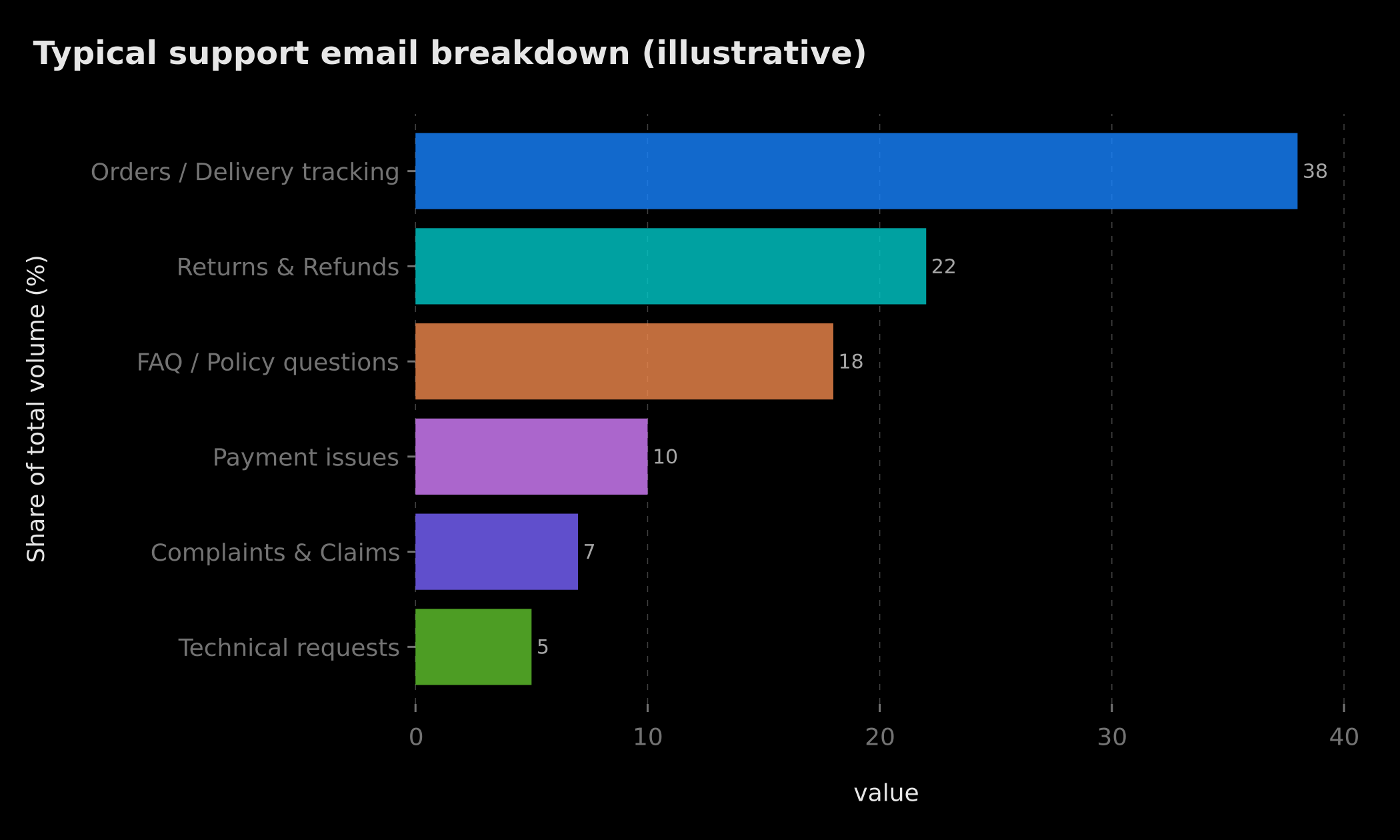 Illustrative breakdown of support email types: order tracking (~38%), returns (~22%), FAQ/policy (~18%), payment (~10%), complaints (~7%), technical (~5%)
This diagnostic matters for two reasons. First, it determines your actual deflection potential: if 80% of your volume is repetitive and structured, you can target a high automation rate. If you have many disputes, legal questions, or highly personalized requests, your ceiling will be lower — and that is fine. Second, this audit guides the construction of your RAG knowledge base, which must prioritize the most frequent categories above all.
One often overlooked element at this stage: also analyze the emotional tone of incoming emails. A question about a return can be phrased neutrally or with intense frustration. These two cases cannot receive the same automated response, and your classification system must be capable of distinguishing them from the start.
Automatic email classification: categories, intent, urgency
Classification is the heart of the system. Without it, nothing works correctly. It must operate on three simultaneous dimensions: the business category of the email (what is it about?), the customer's intent (what do they want to accomplish?), and the urgency level (is there a churn risk, a formal complaint, a deadline?).
In practice, a language model — GPT-4o, Claude, or an open-source model like Mistral hosted locally — receives the raw email content and returns a structured JSON object with these three dimensions plus a confidence score. Classification does not rely on simple keywords. An email containing the word "refund" could be a simple request, an aggressive complaint, or a preemptive question about policy. The LLM contextualizes.
What changes everything compared to traditional rule-based systems is robustness against unexpected formulations. A customer writing "my package is still stuck somewhere and I'm leaving in 3 days" will be correctly classified as urgent delivery despite typos and indirect phrasing. A keyword-based system would likely miss the urgency dimension entirely.
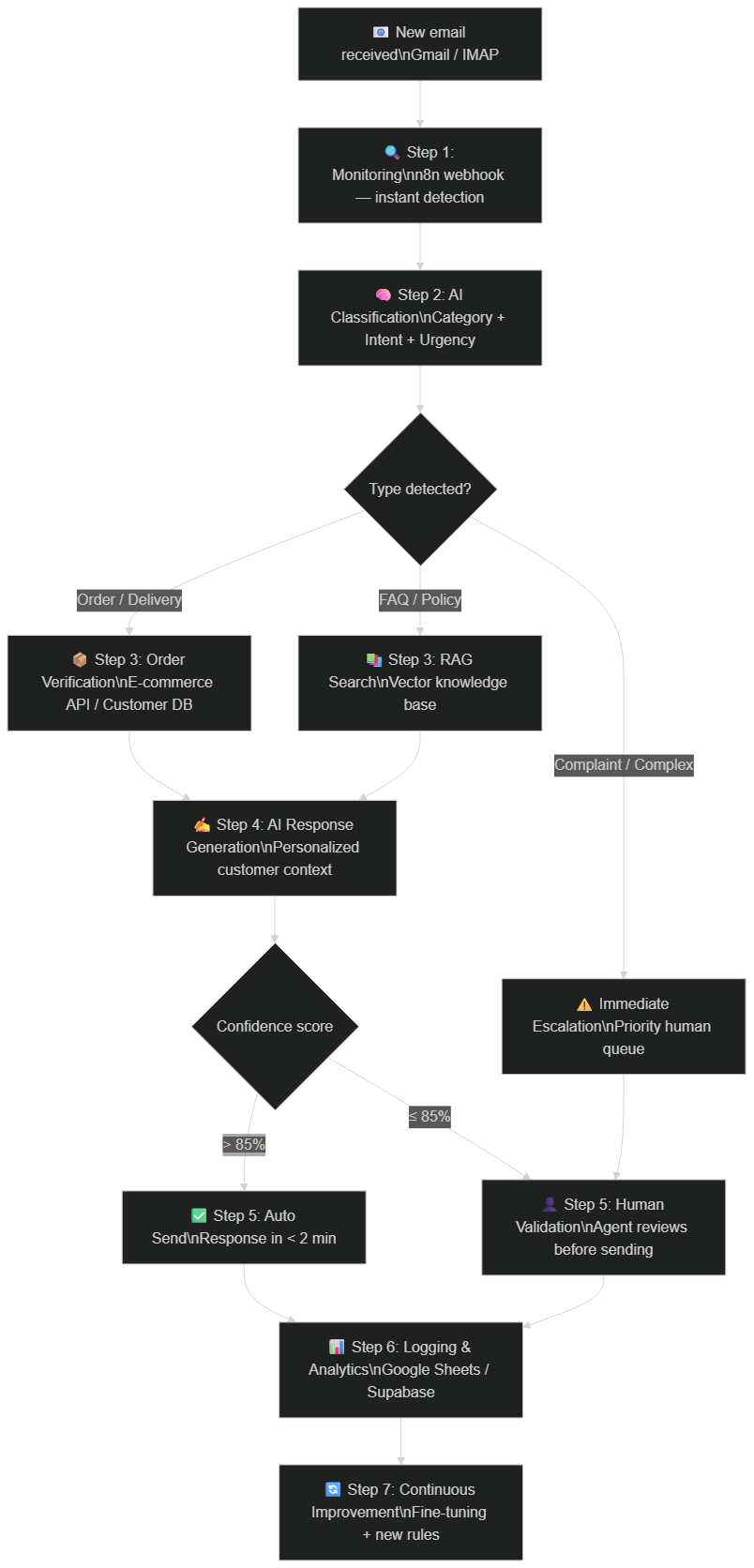 Full flow: Gmail/n8n monitoring → AI classification (category + intent + urgency) → RAG or order API → response generation → confidence score → auto send or human validation → continuous logging
Classification must also handle ambiguous cases. An email containing two distinct questions — one about order status and one about return policy — should be treated as two separate intents, each receiving its portion of the response. The most robust systems we have built include an intent decomposition step before classification: the AI first identifies whether the email is single-intent or multi-intent, then processes each block separately.
Automatic FAQ responses and customer data (the role of RAG)
Once classification is complete, the system must find a response. This is where RAG — Retrieval Augmented Generation — comes in. The principle is simple: rather than letting the LLM fabricate a response from its general memory, you provide it with precise excerpts from your own knowledge base. The AI can only respond with what you have given it, eliminating the hallucination risk.
In practice, your knowledge base can contain your FAQ, terms and conditions, return policies, product guides, and historical support scripts. These documents are chunked into small semantic blocks, vectorized, and stored in a vector database such as Pinecone, Weaviate, or pgvector on Supabase. When an email arrives, the system retrieves the three to five most relevant chunks and injects them into the LLM prompt with the instruction to respond only based on those excerpts.
For emails related to transactional data — order status, purchase history, tracking numbers — the system simultaneously queries your database or e-commerce API. The generated response is then personalized with the customer's real data, not a generic delivery policy answer. This personalization is what distinguishes a professional automation from a simple FAQ chatbot.
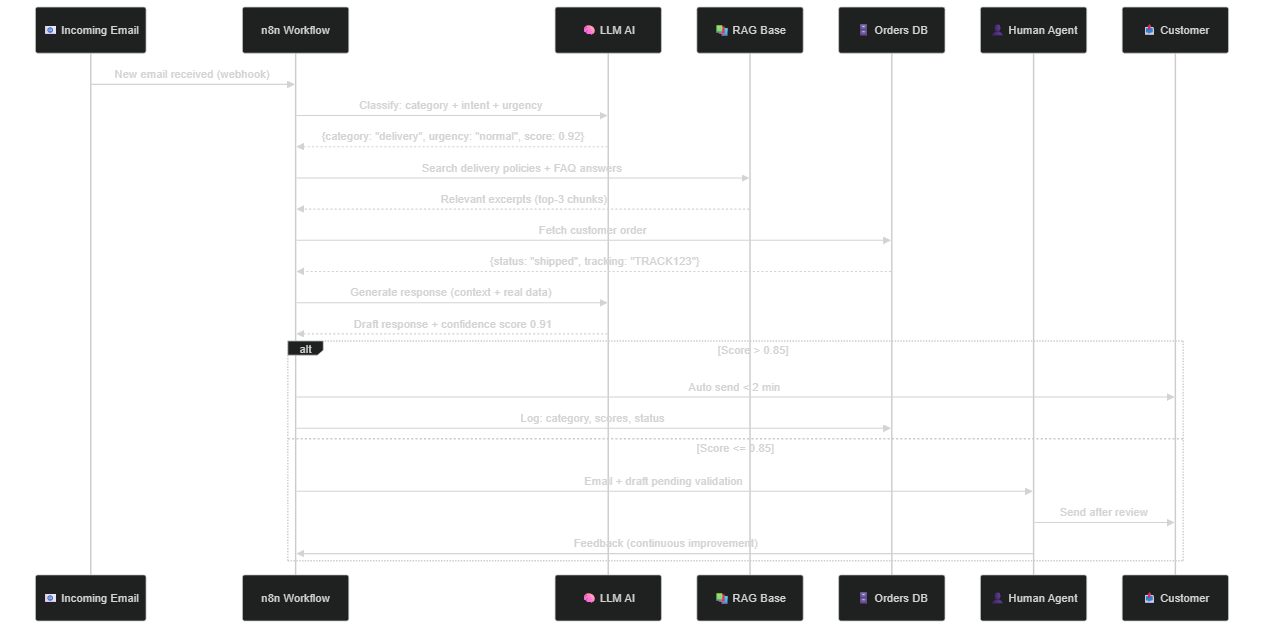 Sequence diagram: n8n webhook → LLM classification → RAG search + order API → response generation → automatic decision (score > 0.85) or human validation → logging
The quality of your RAG depends directly on the quality and freshness of your knowledge base. A two-year-old return policy document, incomplete product sheets, or FAQ entries that no longer match current offers will produce incorrect responses even with the best language model available. Planning a regular knowledge base update procedure — ideally integrating it into your product publishing workflow — is a success condition that is frequently underestimated.
Intelligent escalation: when AI knows it does not know
Escalation is the most critical feature of the system. An automated support system that does not escalate correctly can cause serious reputational damage — a distressed customer receiving a robotic, cold response, or a dispute that worsens for lack of timely human attention.
The escalation mechanism relies on several distinct triggers. The first is the confidence score: if the LLM generates a response with a score below a defined threshold (typically 85%), the email is redirected to the human queue with the draft attached. The agent can then validate, modify, and send in seconds rather than starting from scratch. The second trigger is category: certain email types — refunds above a certain amount, formal complaints, mentions of legal proceedings, cancellation requests — automatically trigger escalation regardless of confidence score. The third trigger is emotional tone: if the detected sentiment is hostile or distressed, the email moves to human priority.
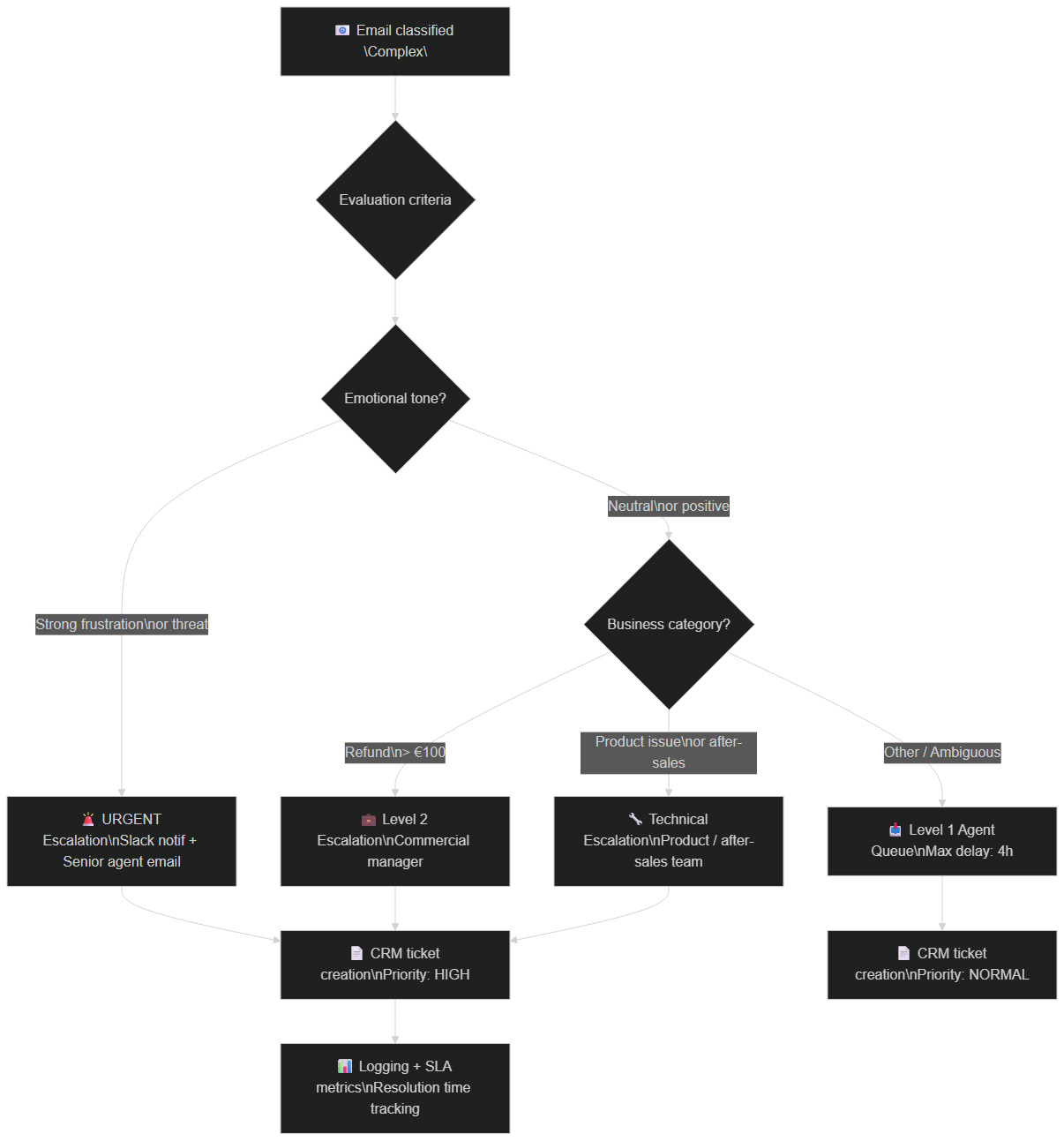 Escalation logic: emotional tone → business category → priority level → CRM ticket creation with appropriate SLA
What distinguishes well-designed escalation from poor escalation is the context transmitted to the human agent. An escalated email must not arrive raw in the agent's inbox: it should arrive with its classification, the generated response draft, the customer history extracted from the CRM, and a note explaining why the automation decided not to send. This reduces human processing time by roughly half, since the agent does not have to reconstruct context from scratch.
One final point on escalation: plan differentiated SLAs by priority level. An urgently escalated email (distressed customer, formal complaint) should generate an immediate notification — ideally on Slack or by SMS — and be handled in under an hour. A normally escalated email can wait for the next processing window. This differentiation prevents alert fatigue and allows agents to focus their attention where it is truly needed.
Customer memory and CRM / helpdesk integration
An isolated support email automation system that does not talk to your CRM produces context-free responses. The customer who has already contacted support three times about the same issue receives a first-contact response. The VIP customer with significant purchase history is treated as a stranger. These situations degrade the experience and cancel out part of the automation's benefits.
CRM integration solves this problem. When an email arrives, the system queries your CRM — HubSpot, Pipedrive, Salesforce, or even a custom Supabase setup — to retrieve the customer's full profile: previous ticket history, customer value, purchased products, communication preferences, agent notes. This information is injected into the response generation context, allowing the LLM to personalize tone, reference past interactions, and adapt priority level accordingly.
Conversational memory goes further still. If a customer replies to an automated response to provide clarification or express dissatisfaction, the system must track that conversation as a single thread rather than two independent tickets. This requires a threading mechanism based on conversation ID, which tools like n8n handle natively through Gmail IDs or ticket references.
Integration with a helpdesk such as Zendesk, Freshdesk, or Intercom is also possible and often preferable for existing support teams. Rather than bypassing the existing tool, the n8n workflow can automatically create tickets in the helpdesk, enrich them with the classification and response draft, and mark them as resolved once automatic sending is confirmed. The team continues working in its familiar tool, but its manual processing volume is significantly reduced.
Measuring the real deflection rate
The deflection rate is the key metric for a support automation system. It calculates simply: emails resolved automatically divided by total incoming volume over a given period. But this simple measure hides important nuances.
An email "resolved automatically" is only truly resolved if the customer did not reply again to express dissatisfaction or request clarification. A system that sends an automatic response but generates a follow-up in 30% of cases has a high apparent deflection rate but a much lower real deflection rate. This is why the tracking dashboard must distinguish definitive resolutions (no customer reply within 48h) from apparent resolutions (response sent but conversation resumed).
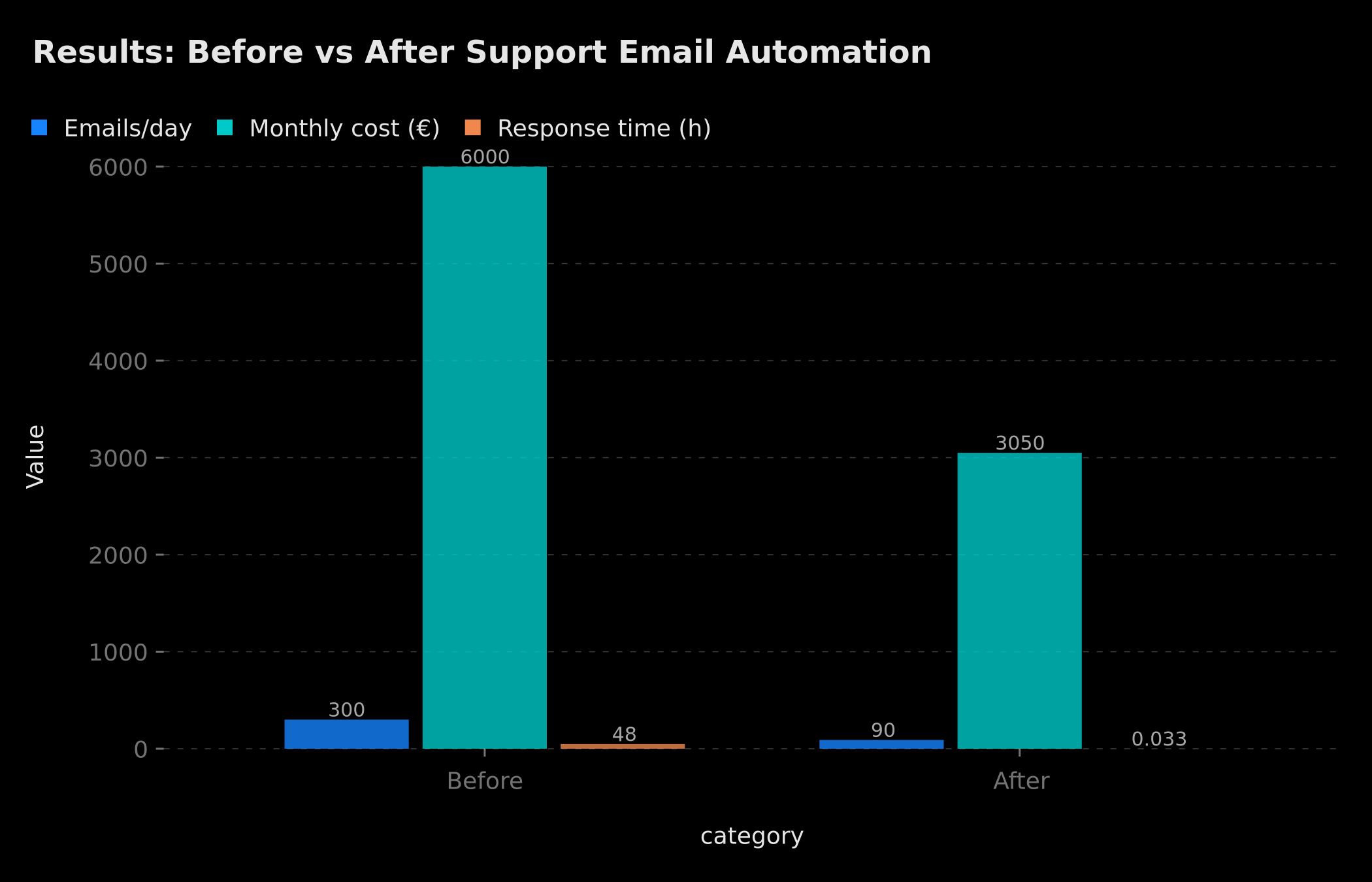 Measured results: manually processed volume reduced from 300 to ~90 emails/day, monthly cost halved, response time from 48h to under 2 minutes
Complementary metrics to track include average confidence score (which should increase over time as the RAG base is enriched), escalation rate by category (which reveals blind spots in your automation), and human correction rate on escalated drafts (which measures LLM accuracy on difficult cases). A good dashboard combines these data in a weekly view and sends an alert if the deflection rate drops more than 5 points — a sign that a change in incoming volume or a policy modification requires a RAG knowledge base update.
Concrete ROI: calculating freed time and its value
The ROI calculation for support email automation is straightforward if formalized correctly. The starting point is the current human cost: number of agents dedicated to email support, multiplied by their hourly or monthly fully-loaded cost. If two full-time agents handling 300 emails per day cost a total of €6,000/month, and the system automates 70% of volume, you mechanically free 4,200 emails per month from human processing.
In practice, this does not necessarily mean reducing headcount. Gains materialize differently: reduction of overtime hours, reallocation toward higher-value tasks (upselling, retention, management of strategic customers), improvement of response time on complex tickets. Based on our experience, teams that automate their email support see a 40% to 60% reduction in time spent on first-level support within two to three months of deployment.
To express ROI in monetary terms, the formula is simple: hours freed per month multiplied by the average daily rate of the team, divided by the monthly system cost. AI costs (LLM API + infrastructure) for a volume of 300 emails/day typically range from €30 to €100/month depending on the model used and volume. Self-hosted n8n workflow cost is marginal. Adding monthly maintenance and comparing with human time savings, the systems we have deployed typically amortize in under two months.
To go further on calculating the ROI of AI agents in production, see our detailed analysis: ROI of AI agents in production in 2026 — what the numbers actually say.
The pitfalls nobody mentions
Robotic tone — the first customer experience destroyer
The most frequent pitfall is not technical — it is editorial. An AI support email automation system that responds with a cold, generic, impersonal tone can technically answer the question while degrading the customer relationship. The response "Your order #12345 has been shipped. Tracking number: TRACK123." is accurate but lacks empathy. The same information phrased warmly and with personalization produces a very different result.
The solution is to design tone templates rather than content templates. Instead of pre-defining responses word for word, define the desired emotional register, formality level, preferred opening and closing formulas, and let the LLM build the response within that framework. This produces naturally varied responses that do not sound like copy-pastes.
Silent classification errors
A classification error does not always signal itself. If an email is classified as a "FAQ question" when it is actually an emotional complaint, the generated response will be correct on substance but inappropriate in form — and the customer may be more irritated after receiving the response than before. These silent errors accumulate and erode trust if not actively monitored.
The remedy is systematic tracking of emails where the customer replies again after automatic resolution. A follow-up within 2 hours almost always signals either an incorrect response or a response perceived as inadequate. Manually analyzing a sample of these follow-ups each week allows identification of classification error patterns and refinement of LLM instructions accordingly.
Missed escalations: the reputation risk
A missed escalation — an urgent email that remains in the automatic queue and never receives timely human attention — is the most serious risk from a customer relationship perspective. It typically occurs in three situations: when escalation rules are too permissive and the confidence threshold is set too high, when the human queue is saturated and alerts are not seen, or when a complex email bypasses filters because it is phrased in an unusual way.
The most effective protection is a time ratchet mechanism: any email that has not received a response — human or automatic — within a defined deadline (example: 4h during business hours) is automatically escalated to the next level, regardless of its initial classification. This temporal safety net compensates for the blind spots of semantic rules and guarantees that no customer is left without a response indefinitely.
Progressive implementation: how to start without breaking things
Setting up a support email automation system does not happen over a weekend. The approach that works best is progressive, in four distinct phases.
Phase 1 — Observation (2 weeks): Deploy the system in passive mode. It classifies emails, generates responses, but sends nothing automatically. All responses go through human agents. This phase validates classification accuracy, identifies missing categories, and enriches the RAG base with real cases.
Phase 2 — Supervised sending (3 to 4 weeks): Activate automatic sending only for the simplest and most confident categories — typically standard order status with a confidence score above 90%. Agents receive a notification for each automatic send and can cancel within 5 minutes (delayed send window). This creates a passive validation system that quickly reveals residual errors.
Phase 3 — Scale-up: Progressively broaden covered categories and slightly lower the confidence threshold as observed accuracy is confirmed. Integrate CRM and helpdesk if not yet done. Set up the deflection rate tracking dashboard.
Phase 4 — Continuous optimization: The system is running. Effort focuses on marginal improvement: updating the RAG base when policies change, adding new categories, fine-tuning LLM instructions on the highest-error categories. To structure this approach, the n8n AI agents framework for transforming workflows into intelligent systems offers a directly applicable methodology.
If you want to understand what 40 hours of freed work per week from this type of automation actually looks like in practice, our article on automating 40 hours of weekly work with AI agents documents the workflows in detail.
What does it actually cost?
The cost question comes up systematically, and it deserves an honest answer. The cost of a support email automation system breaks down into three components: initial development (architecture, workflows, RAG base, integrations), recurring infrastructure costs (LLM API, n8n hosting, vector database), and evolutionary maintenance (RAG base updates, business rule adjustments).
For a volume of 200 to 500 emails/day with CRM and helpdesk integration, initial development typically falls between €2,000 and €6,000 depending on integration complexity and the size of the knowledge base to build. Recurring costs are generally modest — often below €150/month for standard volume. For precise market price benchmarks in 2026, our article on n8n and Make automation pricing in 2026 details ranges by project type.
Conclusion: support automation as an infrastructure decision
AI support email automation is not a technology gadget. It is an infrastructure decision that redefines the operational model of your customer service. It frees your agents from repetitive tasks so they can focus on what truly requires human intelligence: resolving complex disputes, retaining high-value customers, and preventing churn.
The 60% to 75% deflection we observe on well-built deployments does not come from the sky. It results from a serious audit, a knowledge base kept up to date, an escalation logic without blind spots, and regular metric monitoring. The technology is accessible — the real levers are methodology and execution discipline.
If you are ready to evaluate what this type of system could represent for your specific context, the next step is an audit of your current support email volume. That is where everything starts.
FAQ — AI Support Email Automation
How many support emails can you really automate with AI?
Based on our field experience, between 60% and 75% of incoming support emails are automatable. This rate depends on the proportion of repetitive questions in your volume, the quality of your knowledge base, and the accuracy of your classification system. The remaining 25–40% — complex complaints, disputes, sensitive requests — still benefit from automation for pre-screening and draft generation.
How much does a custom n8n or Make support email automation cost?
Costs vary by workflow complexity: between €800 and €6,000 for a turnkey project depending on CRM integration level, email volume, and the size of the RAG knowledge base to build. BOVO Digital offers a free audit to accurately estimate your project before any commitment.
Do I need technical skills to automate my customer support?
No. Tools like n8n and Make offer visual interfaces accessible to non-developers. For advanced automations with AI agents and RAG, BOVO Digital handles the full architecture and deployment, with training included. You retain control over business rules.
How do you measure the real deflection rate of an automation system?
The deflection rate is calculated by dividing the number of emails resolved automatically (without human intervention) by the total incoming volume over a period. A good dashboard tracks in real time: auto resolutions, escalations, average confidence score, and correction rate. The goal is not 100% automation, but the best balance between deflection and response quality.
What are the main risks of automating support with AI?
The three major risks are: (1) misclassification that sends a cold response to an emotionally distressed customer, (2) a fabricated response if the RAG system is not properly configured, (3) a missed escalation that leaves an urgent customer without timely human attention. These risks are managed through a strict confidence score threshold, explicit escalation rules, and human oversight during the first weeks.
Tags
FAQ
How many support emails can you really automate with AI?
Based on our field experience, between 60% and 75% of incoming support emails are automatable. This rate depends on the proportion of repetitive questions in your volume, the quality of your knowledge base, and the accuracy of your classification system. The remaining 25–40% — complex complaints, disputes, sensitive requests — still benefit from automation for pre-screening and draft generation.
How much does a custom n8n or Make support email automation cost?
Costs vary by workflow complexity: between €800 and €6,000 for a turnkey project depending on CRM integration level, email volume, and the size of the RAG knowledge base to build. BOVO Digital offers a free audit to accurately estimate your project before any commitment.
Do I need technical skills to automate my customer support?
No. Tools like n8n and Make offer visual interfaces accessible to non-developers. For advanced automations with AI agents and RAG, BOVO Digital handles the full architecture and deployment, with training included. You retain control over business rules.
How do you measure the real deflection rate of an automation system?
The deflection rate is calculated by dividing the number of emails resolved automatically (without human intervention) by the total incoming volume over a period. A good dashboard tracks in real time: auto resolutions, escalations, average confidence score, and correction rate. The goal is not 100% automation, but the best balance between deflection and response quality.
What are the main risks of automating support with AI?
The three major risks are: (1) misclassification that sends a cold response to an emotionally distressed customer, (2) a fabricated response if the RAG system is not properly configured, (3) a missed escalation that leaves an urgent customer without timely human attention. These risks are managed through a strict confidence score threshold, explicit escalation rules, and human oversight during the first weeks.
We scope one workflow — not a generic demo
You describe a repeated task. We tell you what n8n would ship, the timeline, and what stays out of scope.
- 30 min
- 1 scoped workflow
- No commitment
William Aklamavo
Web development and automation expert, passionate about technological innovation and digital entrepreneurship.


