
Your AI is Dumb (And That's Normal): RAG Explained
Your AI knows everything about Napoleon but nothing about your business. Discover RAG (Retrieval Augmented Generation): the technique to make your AI intelligent on YOUR data — with examples, tools and n8n integration.

Updated

Your AI is Dumb (And That's Normal): RAG AI Explained
You install ChatGPT, Claude, or a local model. You ask it a question about your business — your pricing, your procedures, a contract signed last week — and it answers with generic information, invents figures, or produces a response that has nothing to do with your reality. It's frustrating. But it's not a bug: it's the normal behavior of an LLM not connected to your data. The solution is called RAG AI (Retrieval Augmented Generation), and that's exactly what this article is about.
Why your AI is dumb: the 3 fundamental reasons
Before understanding the solution, you need to understand the problem. Large language models suffer from three structural limitations that explain why your AI often seems so unhelpful in a professional context.
The knowledge cutoff: your AI lives in the past
Every LLM is trained on a corpus of data collected up to a specific date — called the knowledge cutoff. GPT-4o has a cutoff of early 2024. Claude 3.5 Sonnet has a cutoff of early 2025. After that date, the model knows nothing. No product updates, no new regulations, no recent case law, no updated pricing. For your SMB whose rates change every quarter, this is a dealbreaker.
This limitation is inherent to transformer architecture: training an LLM costs millions of dollars and takes months. You don't train a new model every week. Partial re-fine-tuning exists, but it is expensive, slow, and can degrade the model's overall performance — a phenomenon called catastrophic forgetting. In practice, connecting a model to fresh data via RAG is infinitely more effective than retraining it.
Private data: your business doesn't exist for AI
The second limitation is even more critical for enterprises: your internal knowledge base was never included in the training data. Your HR procedures, product sheets, customer SLAs, sales scripts, accounting reports — all the accumulated expertise that represents your competitive advantage is entirely unknown to the model.
Even if you explain your context in the prompt ("I'm the director of a 50-person industrial SMB..."), the model still has no access to your real documents. It works with generalizations. And generalizations, in a professional context, are worth nothing.
Hallucinations: when AI invents with confidence
The third limitation flows directly from the first two. Faced with a specific question to which it doesn't know the real answer, an LLM doesn't say "I don't know." It generates a plausible-sounding response by extrapolating from its training data. This response may sound right, be well-formulated, and be completely false. This is what we call a hallucination.
To understand how dangerous hallucinations can be in a professional context, see our complete guide on avoiding AI hallucinations in enterprise, where we document real cases of financial losses and legal risks generated by misconfigured AI systems.
The solution: RAG AI in detail
RAG (Retrieval Augmented Generation) is the architecture that solves all three problems simultaneously. The core idea is straightforward: instead of hoping the model already "knows" the answer, we provide it with the relevant documents at query time and ask it to generate its response only from those documents.
Think of a school exam. Without RAG, the student answers from memory — and invents if they don't know. With RAG, they're allowed to open their notes to the right page. The answer is grounded in a real, verifiable, traceable document.
This metaphor conceals a sophisticated technical architecture that we'll break down in detail.
How RAG works: the complete pipeline
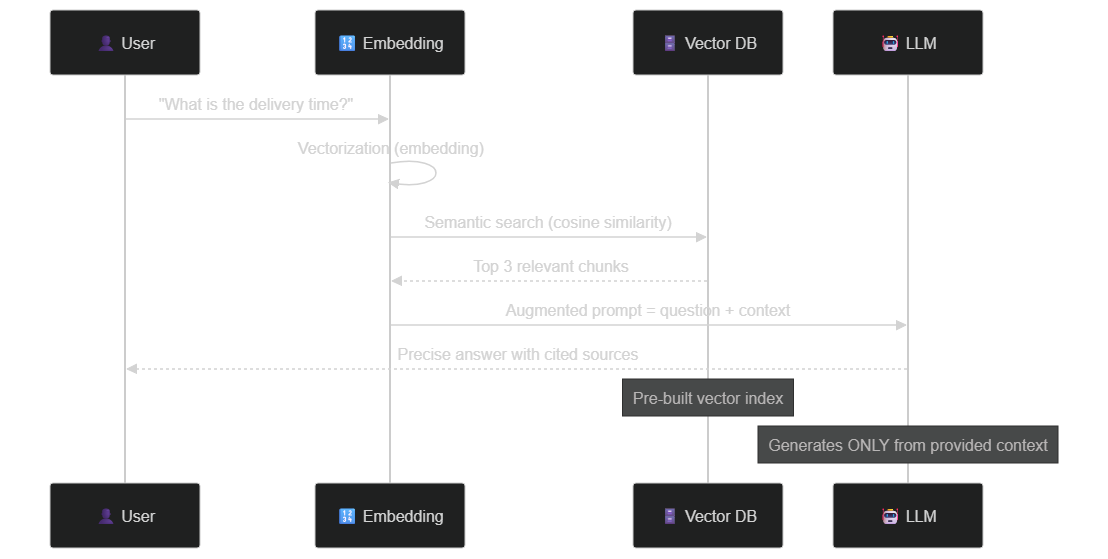 RAG pipeline — from user question to sourced answer in 5 key steps
Phase 1: Indexing — building the library
Indexing is the offline phase of RAG: it happens once, then updates as new documents arrive. Its goal is to transform your textual data into a structure that enables ultra-fast semantic search.
Splitting into chunks is the first step. Your documents — PDFs, Word files, CSVs, emails, web pages — are split into fixed-size segments, typically between 256 and 1024 tokens (roughly 200 to 800 words). Chunk size is a critical parameter: too small, and the context is insufficient; too large, and retrieval precision drops. Advanced strategies like chunk overlap (10 to 20% overlap between consecutive chunks) preserve semantic coherence at boundaries.
Embedding is the transformation step. Each chunk is converted into a high-dimensional vector — an array of floating-point numbers, typically between 768 and 3072 dimensions depending on the model. This vector represents the semantic meaning of the text in a mathematical space. Two chunks with similar meanings will have close vectors in this space, even if they share no words. Common embedding models include OpenAI's text-embedding-3-small, nomic-embed-text via Ollama for fully local setups, or mxbai-embed-large for maximum precision.
Storage in a vector database completes the indexing phase. These databases are optimized for one specific operation: quickly finding the N closest vectors to a query vector, using approximate nearest neighbor algorithms like HNSW (Hierarchical Navigable Small World). Pinecone, Weaviate, Qdrant, ChromaDB, and pgvector are the most widely used solutions in 2026.
# Simplified example — Indexing pipeline
from langchain.text_splitter import RecursiveCharacterTextSplitter
from langchain_openai import OpenAIEmbeddings
from langchain_community.vectorstores import Chroma

# Splitting with 10% overlap
splitter = RecursiveCharacterTextSplitter(
    chunk_size=500,
    chunk_overlap=50
)
chunks = splitter.split_documents(documents)

# Embedding + storage (OpenAI text-embedding-3-small)
embeddings = OpenAIEmbeddings(model="text-embedding-3-small")
vector_store = Chroma.from_documents(chunks, embeddings)
Phase 2: Retrieval — the semantic archivist
When a user asks a question, the same transformation applies: the question is converted into a vector by the same embedding model. This "query vector" is then compared against all stored vectors, and the K most similar chunks are returned.
The similarity measure used is typically cosine similarity: it measures the angle between two vectors in high-dimensional space, independently of their magnitude. A score of 1.0 means perfect identity, 0 means total orthogonality (no semantic relationship).
What distinguishes this retrieval from a simple keyword search is its semantic capability: if your knowledge base contains "shipping time: 5 business days" and a customer asks "how long until I receive my order?", RAG will find the right chunk even though no words overlap. Traditional engines (CTRL+F, keyword-based Elasticsearch) would fail here.
Advanced techniques like hybrid search (combining vector search with BM25) or re-ranking (using a second model to refine results) can further improve precision on highly specialized domains.
# Simplified example — Semantic search
query = "What is the delivery time?"
query_vector = embeddings.embed_query(query)

# Find the 5 closest chunks
results = vector_store.similarity_search_with_score(query, k=5)

# Filter by confidence threshold (cosine score > 0.75)
relevant_chunks = [doc for doc, score in results if score > 0.75]
Phase 3: Generation — the grounded writer
The final phase is prompt augmentation and generation. The retrieved chunks are injected into the LLM's context via a carefully crafted system prompt. The key instruction is to require the model to answer only from the provided documents, and to explicitly say "I don't know" if the information is not present.
This constraint is fundamental: without it, the LLM can still hallucinate by mixing the provided context with its general training knowledge. With it, responses are traceable — every statement can be tied back to a specific passage in the source document.
# Simplified example — Prompt augmentation and generation
from openai import OpenAI

client = OpenAI()

context = "\n\n".join([chunk.page_content for chunk in relevant_chunks])

prompt = f"""You are a business assistant. Answer the question using ONLY
the information from the context below.
If the answer is not in the context, respond exactly: "I cannot find this
information in our knowledge base."

CONTEXT:
{context}

QUESTION: {query}"""

response = client.chat.completions.create(
    model="gpt-4o-mini",
    messages=[{"role": "user", "content": prompt}]
)
print(response.choices[0].message.content)
Visualizing the impact: with and without RAG
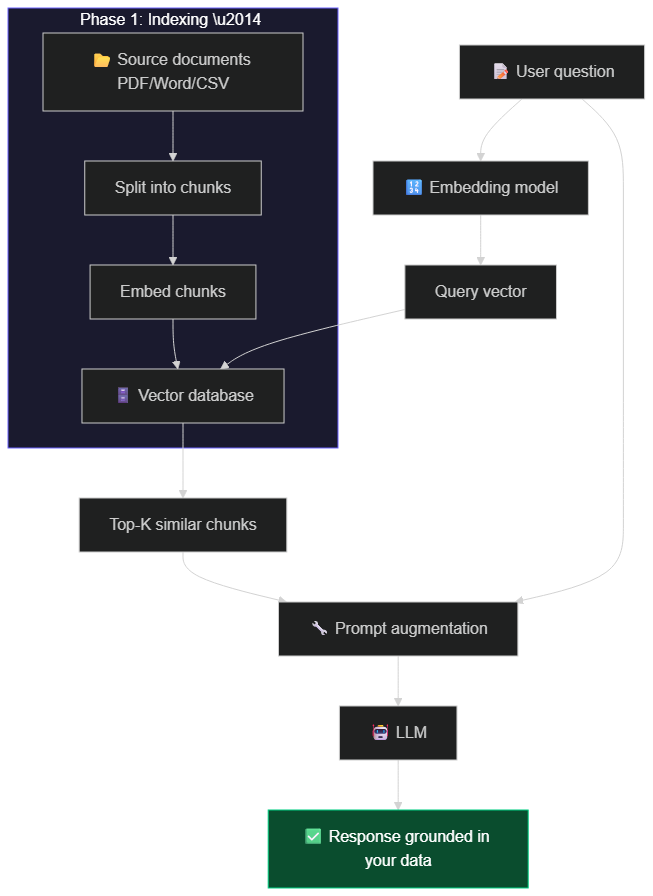 Complete RAG architecture — indexing phase (offline) and query phase (real-time)
The quality gap between a bare LLM and a well-built RAG system on domain-specific questions is dramatic. An unaugmented LLM answers with inaccurate generalities. The same LLM, augmented with a properly built RAG on your data, answers precisely, cites its sources, and knows when to acknowledge the limits of its knowledge.
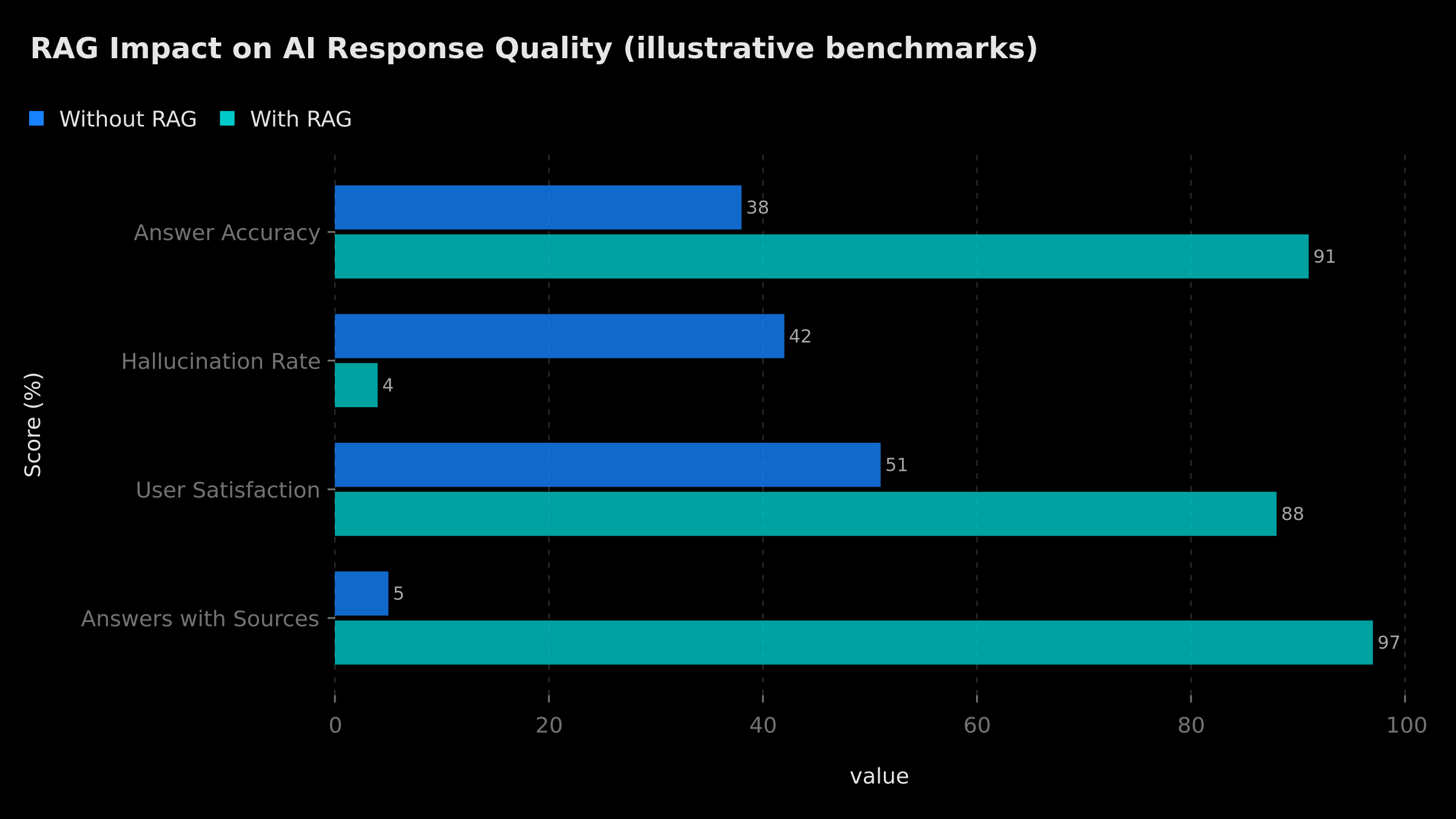 RAG impact on 4 key metrics — illustrative order of magnitude
Choosing your vector database
The choice of vector database is one of the most important architectural decisions in your RAG project. There is no universal solution: the right choice depends on your data volume, existing infrastructure, privacy constraints, and budget.
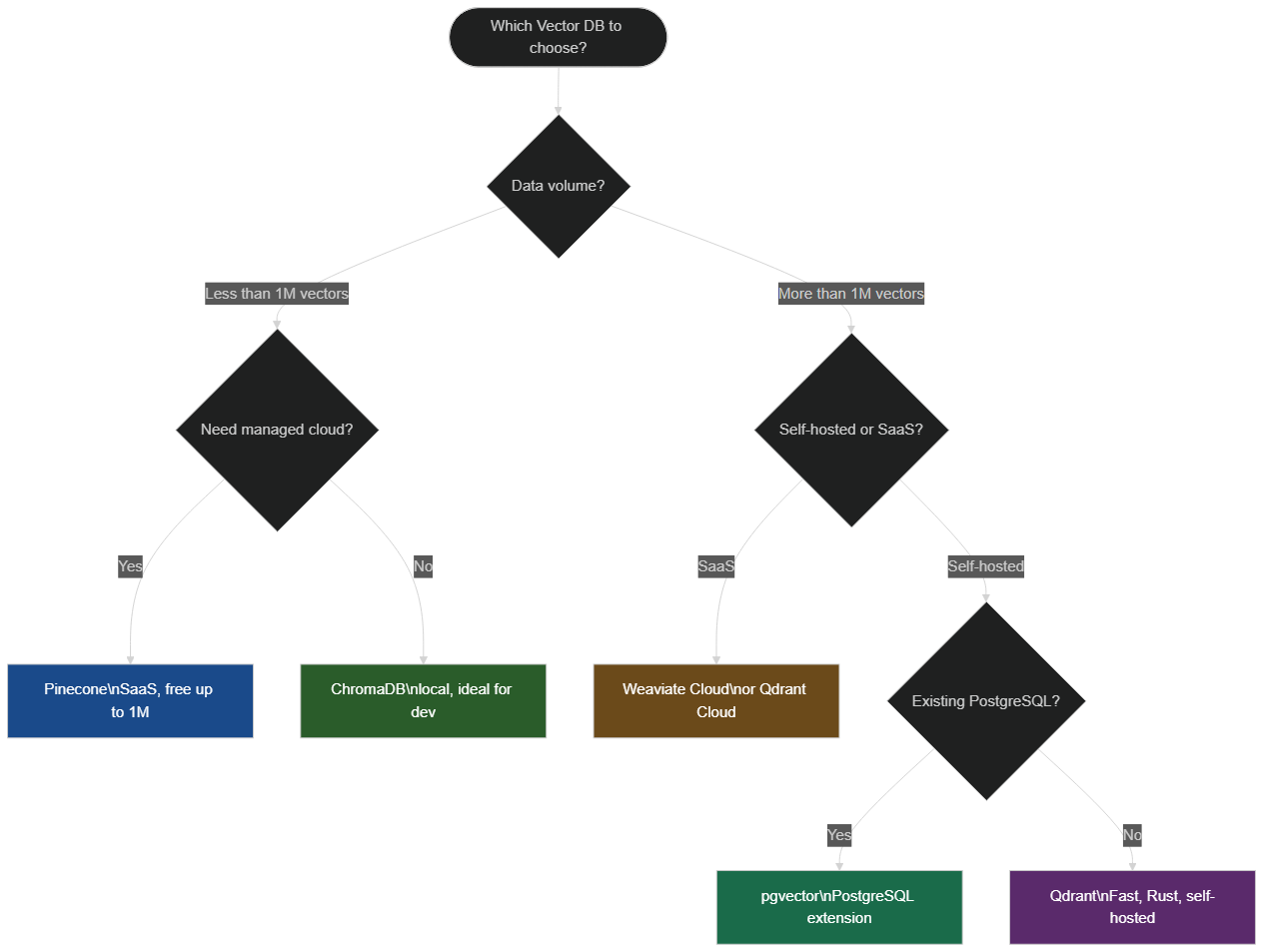 Vector database selection flowchart based on your constraints
ChromaDB is the ideal entry point for prototyping and development: open-source, serverless, installable with pip install chromadb. Performance degrades beyond a few million vectors, but for validating a concept on your data, it's unbeatable.
Pinecone is the reference choice for SaaS projects requiring a managed service without operational friction. The free tier offers an index up to approximately one million vectors at 1536 dimensions. Latency is low and the API is very clean.
pgvector deserves special attention for teams already running PostgreSQL. The extension transforms your Postgres into a vector database with no additional infrastructure. It's often the most cost-effective production solution for volumes up to tens of millions of vectors.
Qdrant is written in Rust and delivers excellent performance for large-scale self-hosted deployments. Its payload filtering (metadata) capability is particularly powerful for hybrid searches.
Weaviate stands out for its native hybrid capabilities (vector + keyword) and integrated modules that simplify the embedding workflow.
Integrating RAG into n8n: the no-code approach
One of the major shifts in the automation ecosystem in 2026 is the availability of native RAG nodes in n8n. You can build a complete RAG pipeline without writing a single line of code.
n8n offers four key nodes for RAG: the Embeddings node (compatible with OpenAI, Ollama, Cohere), the Vector Store node (Pinecone, Qdrant, Supabase pgvector, Zep), the Document Loader node (PDF, CSV, Google Drive, Notion), and the AI Agent node that orchestrates everything with conversational memory.
A typical n8n RAG workflow consists of two parallel pipelines. The indexing pipeline is triggered by a file being added (webhook, Google Drive trigger, email): it extracts text, splits into chunks, generates embeddings, and stores them in the vector database. The query pipeline is triggered by a user message (Slack, WhatsApp, email): it transforms the question into a vector, retrieves relevant chunks, builds the augmented prompt, and sends the response.
For a deep dive into n8n 2.0's memory and RAG capabilities, check out our detailed article on n8n 2.0 persistent memory, RAG and human-in-the-loop agents. You'll find complete ready-to-deploy workflows, including long-term memory management and human validation mechanisms for critical responses.
Concrete use cases and measuring impact
Internal knowledge base
This is the most common use case. An SMB with 50 employees has a hundred internal procedures scattered across SharePoint, Notion, and shared folders. A RAG assistant indexes the entire corpus. Employees ask questions in natural language ("How do we handle a partial refund for a late delivery?") and get the exact procedure with a link to the source document, within seconds.
The measurable benefit is twofold: reduction in information search time (typically from 15-30 minutes to under a minute per query) and standardization of practices (everyone follows the latest procedure version, not an outdated one printed two years ago).
Technical documentation and customer support
A law firm was losing approximately 4 hours per day searching for case law across a database of 50,000 documents. With a RAG system, semantic search returns the most relevant passages in under two seconds, with exact references (case name, page, paragraph). Each lawyer recovers a significant portion of their working time to reallocate to higher-value tasks.
For support teams, RAG radically transforms ticket management. Instead of retraining agents on every new product version, you feed the RAG base with your release notes and technical documentation. The AI agent handles routine questions based on the exact documentation and escalates complex cases to a human. Results similar to what we document on AI agent automation workflows with n8n show significant reductions in operational load.
Onboarding and training
Integrating a new employee typically mobilizes several weeks of managerial and peer time — a precious and often underestimated resource. A RAG system fed by procedures, OKRs, role descriptions, and internal FAQs allows the new hire to find answers themselves, 24/7. The manager gets back time for high-value interactions.
Measuring improvement: RAG metrics
Building a RAG system is one thing; measuring whether it's working well is another. Three fundamental metrics allow you to evaluate a RAG pipeline.
Faithfulness measures whether the generated response is grounded in the retrieved documents, without extrapolation. A high score means every statement in the response is traceable in the context. Frameworks like RAGAS or TruLens allow automating this evaluation.
Answer relevance measures whether the response actually addresses the question asked. It can be high even if the response is faithful to the context but misses the point.
Context recall measures whether the retrieved chunks actually contain the information needed to answer the question. If this score is low, the problem lies in the chunking or the embedding model, not the LLM.
In production, it's recommended to log every query with its retrieved chunks, evaluate a regular sample, and iterate on the chunking strategy and confidence thresholds.
The limits of RAG: what it can't do
RAG is not a silver bullet, and it's important to know its limitations in order to use it intelligently.
Source data quality entirely determines response quality. The old "garbage in, garbage out" principle applies fully: if your internal procedures are poorly written, incomplete, or contradictory, RAG will faithfully reproduce that mediocrity. Knowledge base quality is the first investment to make before any RAG deployment.
Complex reasoning remains a limitation. RAG excels at retrieving and synthesizing factual information, but it's less effective for tasks requiring multi-step reasoning over structured data — calculations, cross-table analysis, deep logical deductions. For these cases, a combination of RAG plus analytical tools (code interpreter, SQL engine) is more appropriate.
The context window imposes a physical limit. Modern LLMs handle contexts from 128K tokens (GPT-4o) to 1M tokens (Gemini 1.5 Pro), but injecting too many chunks degrades generation quality — models tend to "neglect" information in the middle of the context, a phenomenon called lost in the middle. In practice, 3 to 10 well-chosen chunks are more effective than 50 poorly filtered ones.
Data freshness requires a continuous ingestion strategy. A RAG system on stale data is almost as dangerous as an LLM without RAG. Planning an incremental indexing pipeline (triggered by document modifications) is essential in production.
Alternatives and complements to RAG
RAG is not the only way to connect an LLM to external data. Depending on your use case, other approaches may be more appropriate or complementary.
Fine-tuning involves retraining the model on your data. It's relevant when you want to change the model's style or tone, or teach it new skills (not facts). For injecting frequently changing business facts, RAG is systematically superior to fine-tuning, at a fraction of the cost.
Function calling / tool use allows the LLM to query APIs, SQL databases, and calculation tools in real time. This is complementary to RAG: you can have an agent that retrieves context via RAG AND queries your ERP via function calling.
Model Context Protocol (MCP) is the new standard for interconnecting LLMs and external tools, popularized by Anthropic in 2024. To build truly powerful AI agents combining RAG, tools, and memory, see our guide on connecting n8n to an MCP server for powerful AI agents.
Context stuffing (filling the context window) is a simple alternative for small corpora: inject the entire knowledge base into every prompt. This approach doesn't scale beyond a few hundred pages, but it's trivial to implement for a quick prototype.
Implementing your first RAG: the roadmap
Now that you have a complete view of the architecture, here's the practical roadmap for your first deployment.
Step 1 — Define the scope. Choose a single, limited use case: a product FAQ, a procedures manual, a corpus of standard contracts. Success in a first narrow deployment builds the trust and budget for larger projects.
Step 2 — Prepare the data. Clean and structure your source documents. Remove duplicates and outdated versions. The cleaner the base, the better the responses.
Step 3 — Choose the stack. For an MVP: Python + LangChain + ChromaDB + GPT-4o-mini (or Ollama for 100% local). For production: n8n + Qdrant + OpenAI embeddings + GPT-4o.
Step 4 — Build the indexing pipeline. Split, embed, store. Test on a subset of 20 to 30 documents before indexing your entire corpus.
Step 5 — Build the query pipeline. Start with default parameters (k=3, cosine similarity), then optimize based on quality metrics.
Step 6 — Evaluate and iterate. Build a golden dataset of 50 to 100 reference question-answer pairs. Measure faithfulness, relevance, and recall. Iterate on chunking and thresholds.
Step 7 — Deploy and monitor. In production, log all queries, measure key metrics weekly, and schedule regular knowledge base updates.
For enterprises looking to go further with complete AI agents combining RAG, memory, and autonomous decision-making, our article on transforming your workflows with n8n AI agents will guide you step by step.
The truth about RAG complexity in production
You're sold "Chat with PDF" solutions in one click. And for a 3-page document, it works in one click. But for a 10 GB enterprise database with heterogeneous formats (scanned PDFs, complex Excel files, emails, JIRA tickets), constant updates, and users asking ambiguous questions — it's a real engineering challenge.
The most common production friction points: processing scanned PDFs (which require an OCR layer), Excel tables whose semantics get lost during text extraction, questions that require cross-referencing multiple documents, and update management (when do you delete and re-index a modified document?).
These challenges are real but solvable — provided you design for production from day one, not just build a prototype that worked in a demo. That's precisely why BOVO Digital offers turnkey RAG architectures, built and battle-tested in production, not just YouTube tutorials.
Additional Resources:
🛡️ Complete Guide: AI for Everyone How to build a professional RAG system (not a toy): vector architecture, database selection, chunk optimization, production deployment. 👉 Access the Complete Guide
Would You Like Your AI to Know Your Files by Heart? 👇
Tags
FAQ
What is RAG in artificial intelligence?
RAG (Retrieval Augmented Generation) is an architecture that connects a large language model to a vector database containing your own documents. When you ask a question, the system searches for the most relevant passages in your data, injects them into the prompt, then instructs the LLM to answer only from that context. The result: precise, sourced answers grounded in your business reality.
Why doesn't my AI know my internal data?
Large language models (GPT-4, Claude, Llama) are trained on public data up to a fixed cutoff date. They know nothing about your internal procedures, your pricing, your customers, or your contracts. Without a RAG mechanism, the AI answers from its general training memory, producing generic responses or hallucinations on topics specific to your business.
Which vector database should I choose to get started?
For prototyping, ChromaDB is ideal: open-source, local, zero configuration. For a production project with fewer than one million vectors, Pinecone offers a comfortable free tier. If you already have PostgreSQL, the pgvector extension is the most cost-effective solution. For large self-hosted volumes, Qdrant (written in Rust) delivers excellent performance.
Can RAG completely eliminate AI hallucinations?
RAG drastically reduces hallucinations by grounding responses in verified documents. But it does not eliminate them 100%: if the retrieved context is insufficient, incomplete, or contradictory, the LLM can still extrapolate. Best practices — careful chunking, "answer only from context" instructions, confidence thresholds — allow near-zero hallucination rates on a well-defined domain.
How do I integrate a RAG system into n8n?
n8n has native nodes to build complete RAG pipelines: the "Embeddings OpenAI" node (or Ollama for local), the "Vector Store" node (Pinecone, Qdrant, Supabase pgvector), and the "AI Agent" node with conversational memory. You can create an indexing workflow (triggered by document upload) and a query workflow (triggered by user message) in a few hours, without writing a single line of code. BOVO Digital offers turnkey RAG architectures on n8n for SMBs.
We scope one workflow — not a generic demo
You describe a repeated task. We tell you what n8n would ship, the timeline, and what stays out of scope.
- 30 min
- 1 scoped workflow
- No commitment
Singbo Davy AGONMA
Fullstack Developer & AI Expert. n8n automation specialist, Laravel/Flutter development and AI agent integration. Master CS — IFRI.


