
n8n AI Agent: Transform Your Workflows into Intelligent Systems
Master the n8n AI Agent node: ReAct loop, memory, tools, system prompt and real costs. Full technical guide 2026 for building autonomous intelligent workflows.

Updated

n8n AI Agent: Transform Your Workflows into Intelligent Systems
Automation has long been synonymous with linear, deterministic processes: "if this happens, then do that." This paradigm was effective for repetitive and predictable tasks, but it showed its limits whenever data became ambiguous or situations unpredictable. The n8n AI Agent, available in recent versions of n8n and fully mature since 2024, definitively breaks through this ceiling. This node does not merely encapsulate an LLM call: it transforms n8n into a platform capable of running autonomous reasoning agents, managing their memory, equipping them with tools, and supervising their execution in a closed loop.
In this comprehensive technical guide, we will explore every aspect of the n8n AI Agent: the fundamental difference between a classic workflow and an autonomous agent, the detailed anatomy of the node, the ReAct reasoning loop, how to define and test tools effectively, window vs persistent memory options, writing a professional system prompt, real-world use cases in 2026, costs with concrete figures, essential safeguards, and deployment best practices. Whether you are building your first agent or architecting a production fleet, this guide gives you the technical and strategic foundation to succeed.
Agent vs Classic Workflow: Why the n8n AI Agent Changes Everything
A classic n8n workflow is a directed acyclic graph: each node receives input data, transforms it according to predefined logic, and passes it to the next node. The branching logic is entirely determined by the builder at design time. If an unexpected situation arises — an order that appears in two contradictory statuses, an email with a missing field where the workflow expected a value — the system fails or produces an inconsistent result. This total predictability is a major advantage for stable, high-volume processes: form validation, database synchronization, scheduled reminders. But it becomes a structural barrier the moment complexity enters.
The n8n AI Agent rests on a fundamentally different paradigm. You no longer define each execution step: you define an objective and a set of capabilities. The agent is free to determine the optimal sequence of actions to achieve that objective, using the tools you have provided and adapting to each intermediate observation. This freedom rests on the reasoning capability of the connected LLM, which acts as the "brain" of the agent and makes decisions at each step.
The practical rule for choosing between the two approaches is straightforward. Use a classic workflow for everything that is deterministic, high-volume, and where all branching logic is known in advance. Use an AI Agent whenever the task requires contextual understanding, interpretation of unstructured data, or the ability to adapt to unpredictable situations. The diagram below synthesizes this decision tree.
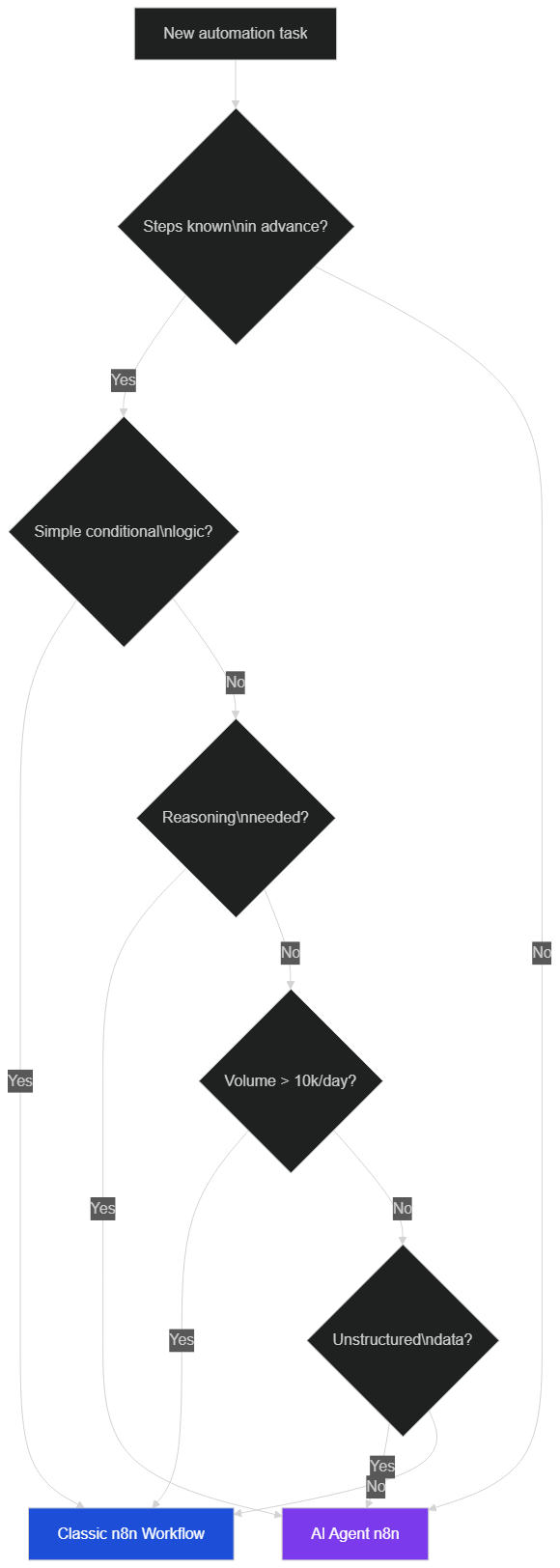 Choose AI Agent when steps are not known in advance, data is unstructured, or contextual reasoning is required
The two approaches are not mutually exclusive: in a mature architecture, you often find classic workflows handling high-volume operations and agents managing exceptions and complex tasks. An agent can even be triggered by a classic workflow, combining the performance advantages of both paradigms in a single system.
Anatomy of the AI Agent Node: LLM, Tools, and Memory
The n8n AI Agent node breaks down into three fundamental components, each configurable independently via dedicated sub-nodes in the visual interface. This modularity is what makes n8n particularly powerful: you can switch LLM providers without touching your tools, add a memory layer without rewriting your system prompt, and plug in new tools without disrupting existing behavior.
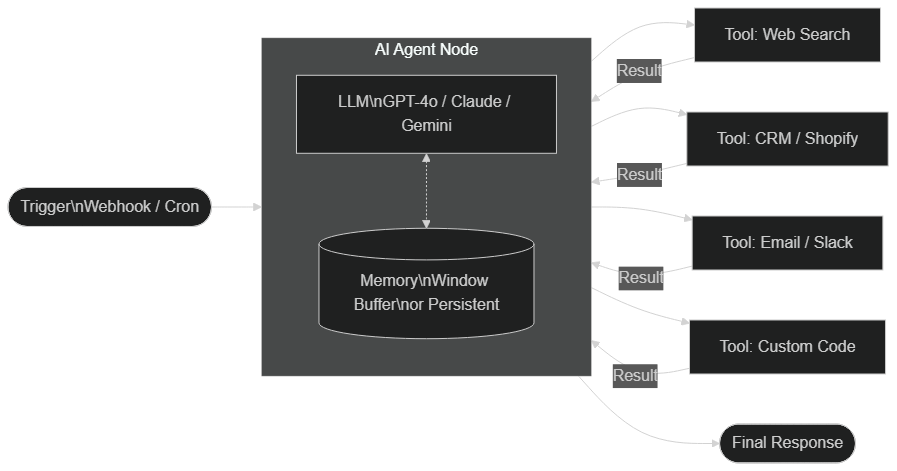 The AI Agent node orchestrates an LLM (brain), connected tools (arms), and optional memory (persistent or window buffer)
Choosing and Configuring Your LLM
The LLM is the brain of the agent: it reads the objective, decides which action to take, interprets tool results, and produces the final response. As of June 2026, n8n natively supports the following providers via dedicated sub-nodes (non-exhaustive list per the official n8n documentation): OpenAI (GPT-4o, GPT-4o-mini), Anthropic (Claude 3.5 Sonnet, Claude 3.5 Haiku, Claude 3 Opus), Google (Gemini 1.5 Pro, Gemini 1.5 Flash), Ollama for local models (Llama 3, Mistral, Qwen2…), Azure OpenAI, AWS Bedrock, Groq, and Cohere.
The choice of model is one of the most structural parameters of your agent. GPT-4o-mini offers an excellent cost-to-quality ratio for agents that make many simple tool calls or run at high frequency. Anthropic's Claude 3.5 Sonnet excels at complex reasoning tasks and reading long documents — its 200,000-token context window is particularly valuable for monitoring or analysis agents. Local models via Ollama suit architectures where data confidentiality is critical, at the cost of generally higher latency and reasoning capabilities below the best commercial models.
Two configuration parameters deserve particular attention. Temperature controls the randomness of responses: for a customer support agent that must be precise and factual, target a value between 0 and 0.3. For a creative content generation agent, 0.7 to 1.0 is more appropriate. Max Tokens controls the maximum response size per LLM call — calibrate it according to your use cases to manage costs without truncating important responses.
Defining and Testing Tools
Tools are what distinguishes a simple LLM call from a true autonomous agent. In n8n, any node can become a tool: simply connect it to the "Tools" sub-node of the AI Agent. The agent can then "call" that tool with appropriate parameters, exactly as a developer calls a function in code. The most commonly used tools in production include: the HTTP Request node (to call any external REST API), the Code node (to execute JavaScript or Python server-side), the SerpAPI or Brave Search node (for real-time web search), the Wikipedia node (for factual data enrichment), and all native n8n nodes — Postgres, MySQL, Airtable, Google Sheets, Notion, Slack, Gmail, HubSpot, Shopify, Stripe.
The most critical rule for tools is writing their description carefully. The LLM only "sees" this description to decide whether and how to call the tool. A vague description generates unexpected calls, malformed parameters, and erratic behavior. A precise description guarantees predictable and reproducible behavior. As an illustrative example:
Precise description:
"Look up a customer by email in the CRM database. Required parameter: email
(string, valid format). Returns: customer_id, name, first_name, subscription_status
(active/inactive/suspended), total_order_amount, last_order_date. Returns null if
the customer does not exist."

Insufficient description:
"Search the database."
To test your tools in isolation before integrating them into the agent, use n8n's "Test Step" mode, which lets you execute any node individually with test data. Once the agent is assembled, the Execution Log shows each tool call with its input parameters and the result observed by the LLM — your first debugging instrument.
Memory: Window Buffer vs Persistent
Memory is what distinguishes an agent capable of managing a conversation across multiple exchanges from one that starts from scratch with every message. n8n offers several memory types, each with its own trade-offs in terms of performance, cost, and configuration complexity.
Window Buffer Memory is the simplest memory option: it stores the last N messages from the conversation in RAM. By default, n8n retains the last 10 exchanges, a configurable parameter. It is fast, requires no additional storage cost, and is sufficient for agents managing short conversations of a few minutes. Its main limitation is volatility: it disappears on each workflow or n8n instance restart, and does not persist between distinct sessions.
For agents that need to remember users across sessions, n8n supports several persistent memory backends: Postgres Chat Memory (stores conversations in a PostgreSQL table — a robust and familiar solution for teams already running Postgres in production), Redis Chat Memory (ideal for high-throughput agents where read latency is critical), Zep Memory (a specialized solution for AI agents, with automatic summarization of long conversations and semantic search through history), and Motorhead Memory (an alternative to Zep, also purpose-built for agents).
n8n 2.0, released in 2025, introduced native support for RAG (Retrieval-Augmented Generation) and persistent memory directly in the visual interface. For a deep dive into these features, see our dedicated article on n8n 2.0: persistent memory, RAG, and Human-in-the-Loop. The practical production recommendation: start with Window Buffer Memory during development and testing, then migrate to Postgres Chat Memory when you need cross-session persistence. Adopt Zep or a full RAG solution when conversation history grows long (beyond 50 messages) and memory relevance is critical to response quality.
The ReAct Reasoning Loop: How the Agent Decides
The heart of agentic behavior rests on the ReAct pattern (Reasoning + Acting), described by Yao et al. in their 2022 paper "ReAct: Synergizing Reasoning and Acting in Language Models." n8n implements this under the hood via LangChain. Understanding this loop allows you to debug your agents more effectively and optimize their behavior.
The ReAct loop unfolds in four steps that repeat until convergence. First, the LLM receives the objective and produces a Thought: "I need to know the delivery status of this order. I will call the shipping verification tool." Second, the LLM triggers an Action: it invokes the appropriate tool with parameters built from its reasoning. The tool executes and returns an Observation to the LLM — the raw result of the call. Finally, the LLM evaluates whether the objective has been met. If yes, it produces a Final Answer. If not, it returns to the Thought phase with the new information.
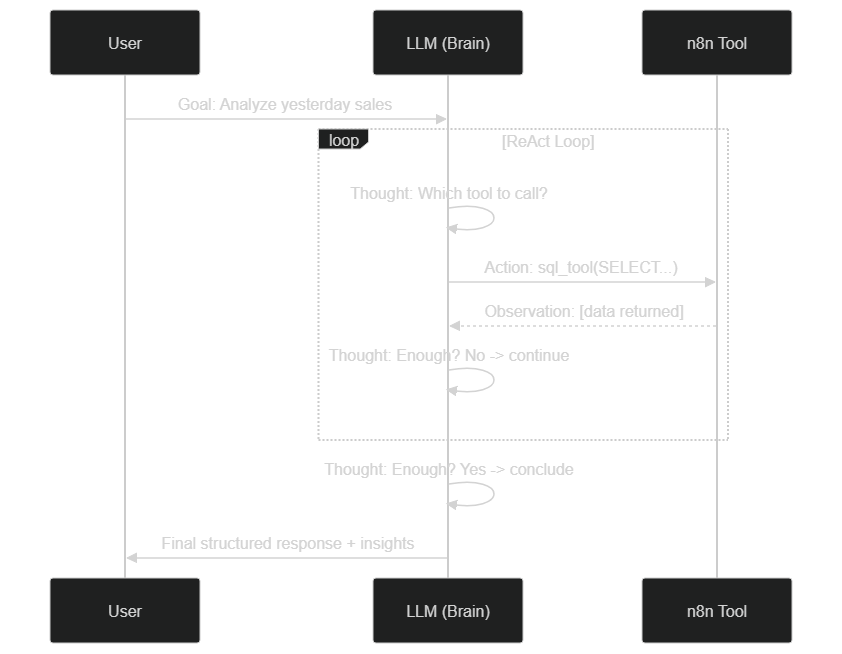 At each ReAct iteration, the LLM reasons, invokes a tool, observes the result, and decides whether to continue or conclude
The Max Iterations parameter of the AI Agent node is a critical safeguard against looping agents. Set to 10 by default in n8n, it caps the number of allowed loop cycles. For the vast majority of business use cases, 5 to 10 iterations are more than sufficient. If your agent regularly hits this limit, it is almost always a sign of an insufficiently precise system prompt — the agent does not know when to consider the objective achieved — or an objective too vague that generates endless tool calls. Revisit your prompt before raising this limit.
A practical detail: in the n8n Execution Log, each ReAct iteration is visible with the content of the Thought, the tool called, the parameters provided, and the Observation received. This is invaluable for understanding why an agent makes a particular decision or why it fails in a specific scenario.
Writing a Professional System Prompt for Your Agents
The system prompt is the initial instruction given to the LLM that defines its identity, scope of action, constraints, and general behavior. It is one of the most powerful — and most neglected by beginners — levers for controlling an agent in production. A poorly prompted agent may appear to function correctly during development, then behave erratically in production when faced with real, varied inputs.
A professional system prompt for an n8n agent must cover five dimensions. The first is role and scope: who the agent is, its domain of expertise, and critically, what it cannot do. The second is response format: structured JSON, Markdown, plain text — according to the final use case. The third covers behavior under uncertainty: "If you cannot find the information, ask for it rather than inventing or assuming." The fourth specifies language and tone according to context — formal for B2B support, warmer for a consumer community. The fifth defines operational safeguards: actions requiring confirmation, financial caps, data the agent must not access.
# Illustrative example (simplified) — adapt to your context
You are a customer support agent for [Company].
Language: English. Tone: professional and empathetic.

CAPABILITIES:
- Look up an order status (tool: get_order)
- Initiate a refund <= $100 (tool: create_refund)
- Update a shipping address (tool: update_address)

ABSOLUTE PROHIBITIONS:
- Never modify prices or grant discounts without authorization
- Never access raw payment card data
- Never process a refund > $100 without human approval

BEHAVIOR UNDER UNCERTAINTY:
- If information is missing → ask the customer, do not assume
- If the case exceeds your scope → escalate to a human agent

FORMAT: natural text. Always confirm actions taken to the customer.
A system prompt that is too short leaves too much freedom to the LLM, leading to unpredictable behavior. A system prompt that is too long can dilute the model's attention to critical instructions — some LLMs tend to "forget" constraints buried in the middle of a very long prompt. Aim for 200 to 600 tokens for most agents, placing the most critical rules at the beginning and end of the prompt.
Real-World n8n AI Agent Use Cases in 2026
Level 2 Autonomous Customer Support
Customer support is today the most mature production use case for n8n agents. An agent connected to your CRM, your e-commerce platform (Shopify, WooCommerce, PrestaShop), and your payment gateway can handle end-to-end Level 2 requests without human intervention: eligible refunds, address updates, delivery tracking, order modification, shipping deadline inquiries.
The fundamental distinction from a classic FAQ chatbot is that the agent does not recite pre-recorded answers. It queries your systems in real time, makes decisions based on current data for the specific order involved, and executes concrete actions in your production tools. The typical sequence of a refund illustrates this difference clearly.
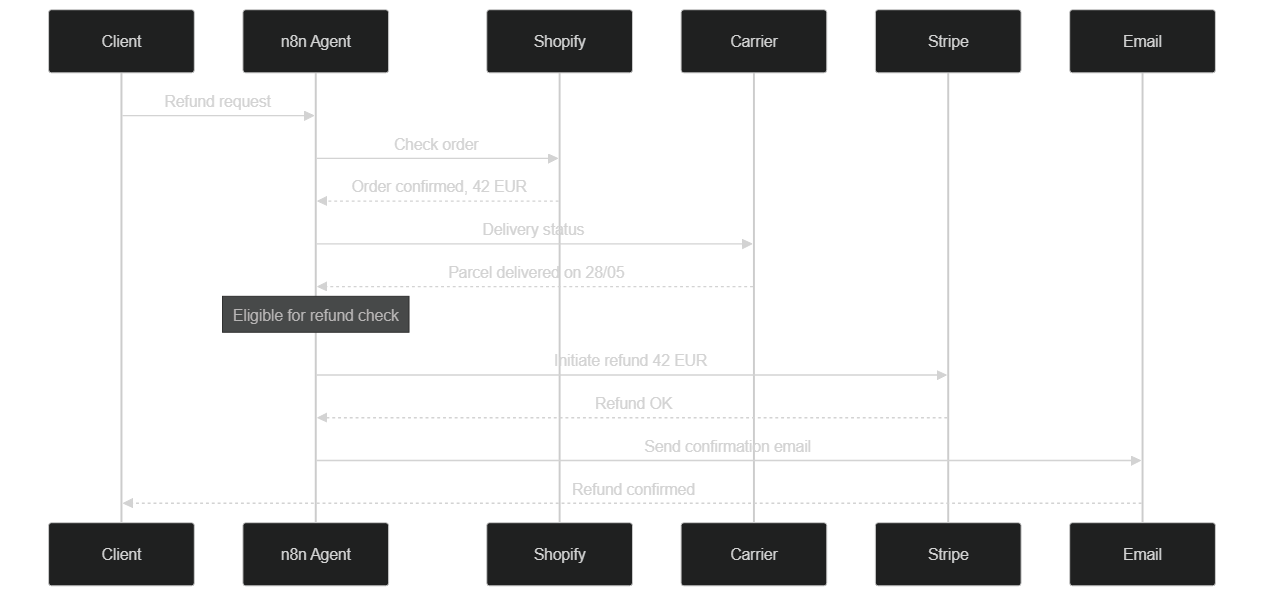 The agent queries Shopify, the carrier, then Stripe autonomously and sequentially — zero human intervention for an eligible refund
Based on our production experience, such an agent can handle 60 to 80 percent of support requests without human escalation, depending on the complexity of business rules and the rigor of the system prompt. The remaining 20 to 40 percent are escalated to a human operator via n8n's Human-in-the-Loop node, with the full conversation context already assembled.
Intelligent Marketing Analyst
An n8n agent connected to your advertising platforms (Facebook Ads, Google Ads, TikTok Ads) and your analytics tool can function as a junior analyst available 24/7. Its automated daily mission: retrieve previous day performance data, identify anomalies (cost per click doubling, click-through rate collapsing compared to the previous week, campaigns underspending), compare against your industry benchmarks stored in a Google Sheet or database, and produce a structured report with concrete budget adjustment recommendations, delivered to Slack or Notion before 8am each morning.
What the agent adds beyond a classic reporting workflow is contextual interpretation capability. It does not simply display numbers: it puts them in perspective, identifies probable causes of variations, and formulates recommendations tailored to your campaigns' context.
Automatic Lead Qualification
Connected to your CRM (HubSpot, Salesforce, Pipedrive) and your lead sources (web forms, LinkedIn imports, inbound emails), an agent can automatically qualify each new contact against your Ideal Customer Profile. The agent starts by enriching the contact with supplementary information: it searches the company website, identifies company size and industry, checks recent news via web search, and compares the profile against your ICP criteria stored in the CRM. It then calculates a qualification score, assigns the lead to the right salesperson according to your team's routing rules, and drafts a personalized brief summarizing the prospect's profile and the personalization angles to leverage in the first outreach.
This use case reduces manual qualification time — often estimated at 30 to 60 minutes per lead in B2B sales teams — to a few seconds of automated processing, allowing your salespeople to focus on relationship-building and conversion.
Content Monitoring and Creation
For marketing teams and content creators, a monitoring agent can watch daily for competitor publications, industry search trends via Google Trends or SerpAPI, brand mentions across social networks, and new posts from your reference sources (blogs, newsletters, podcasts). It compiles a structured briefing each morning in Notion or Slack with the most relevant items, organized by topic and urgency level.
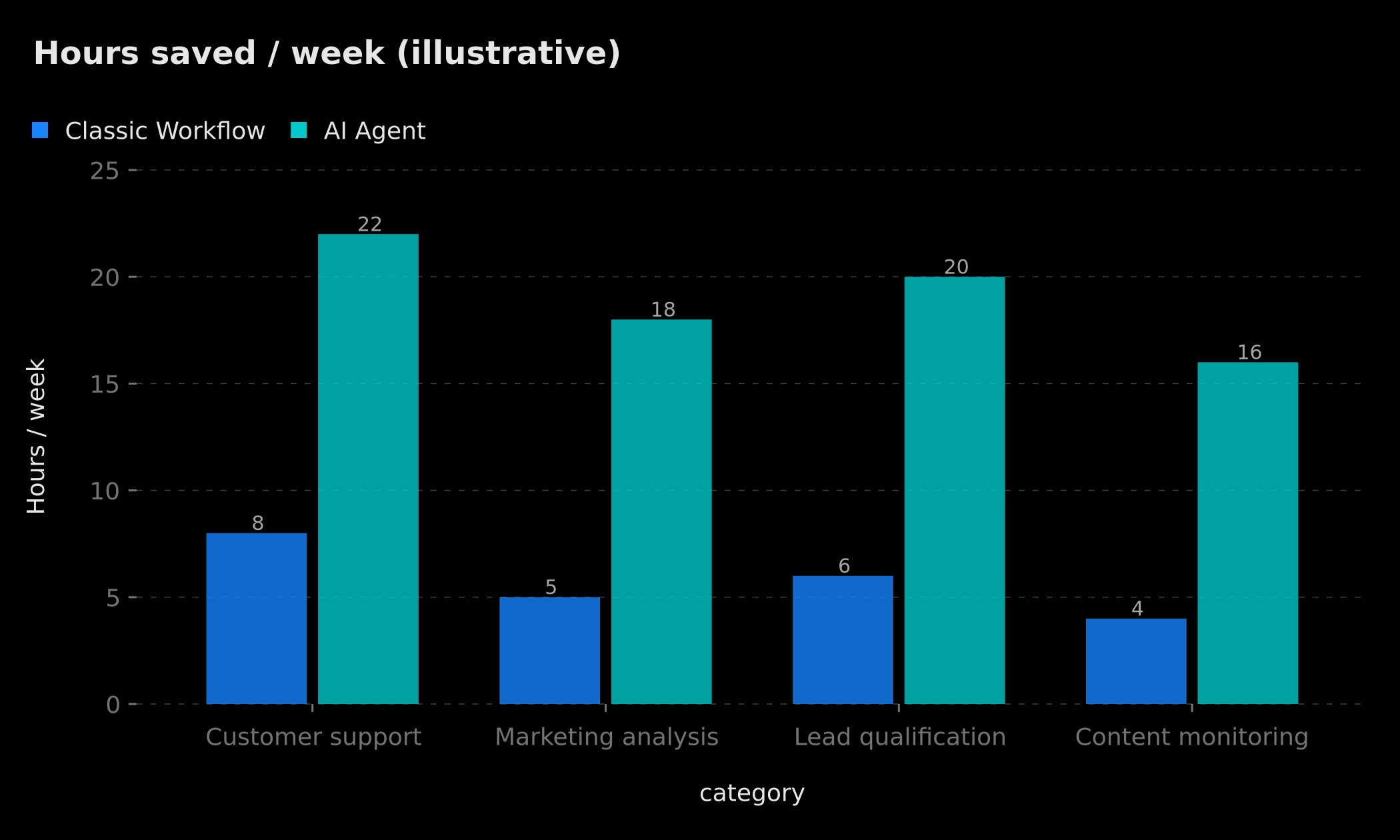 Illustrative estimates based on field experience — actual results depend on the complexity of your processes and the quality of your configuration
Testing and Observability: Never Deploy an Agent Blind
An agent in production is a complex system that can fail in unexpected ways. The LLM may call the wrong tool, construct an incorrect SQL parameter, loop on itself for lack of a sufficient Observation, or interpret an ambiguous instruction in your system prompt in a creative but unintended way. Observability is not optional: it is the prerequisite for responsible deployment.
n8n's native Execution Log is your first debugging reflex. It displays the complete execution, node by node, with input data, output data, execution time for each call, and any errors. For an agent, you will see each ReAct iteration — every Thought generated by the LLM, every tool invoked with its parameters, and every Observation returned. This is sufficient to diagnose the vast majority of issues.
For advanced production environments, n8n integrates with specialized AI agent observability solutions. LangSmith (developed by the LangChain team) offers fine-grained tracing of each LLM call with reasoning chain visualization. Langfuse (open-source, self-hostable) provides similar features with the ability to compare performance across versions of your system prompt — particularly useful for optimization iterations. Both tools let you replay a problematic session, analyze iteration count distribution, and detect regressions after prompt modifications.
A robust testing strategy covers four levels. First, unit tests for each tool in isolation with representative real inputs, to validate that each tool returns what the LLM expects. Second, end-to-end tests with complete scenarios covering the happy path and the most frequent edge cases. Third, systematic regression tests after every system prompt modification, since an apparently minor change can significantly degrade agent behavior. Fourth, monitoring of key production metrics: error rate by type, average iteration count per execution, total latency, and cost per execution.
Costs and Order of Magnitude (Mid-2026)
The cost question is unavoidable before any production deployment. It depends on three interrelated variables: the LLM model chosen, the number of ReAct loop iterations (which determines total token consumption), and the total number of monthly executions.
The table below presents orders of magnitude based on official provider pricing pages, consulted in June 2026 — these rates evolve regularly, verify current prices before building your budget:
| Model | Input (/ M tokens) | Output (/ M tokens) |
|---|---|---|
| GPT-4o (OpenAI) | ~$5 | ~$15 |
| GPT-4o-mini (OpenAI) | ~$0.15 | ~$0.60 |
| Claude 3.5 Sonnet (Anthropic) | ~$3 | ~$15 |
| Claude 3.5 Haiku (Anthropic) | ~$0.80 | ~$4 |
| Gemini 1.5 Flash (Google) | ~$0.075 | ~$0.30 |
| Ollama (self-hosted) | $0 | $0 |
To make this concrete: a customer support agent averaging 5 ReAct iterations of 800 tokens each (input + output combined) consumes approximately 4,000 tokens per execution. With GPT-4o-mini, this represents about $0.001 per execution — $1 for 1,000 handled tickets. With GPT-4o, this rises to approximately $0.06 per execution — $60 for 1,000 tickets. These figures are illustrative: actual consumption depends heavily on your system prompt length, tool response verbosity, and task complexity.
Several strategies help manage costs. Use a lightweight model (GPT-4o-mini, Gemini Flash, Claude Haiku) for high-frequency agents with well-bounded tasks, and reserve powerful models for complex or low-volume tasks. Keep Max Tokens tight. Consider self-hosting via Ollama for sensitive data or very high volumes, following our n8n Docker installation guide for a controlled infrastructure setup. Also implement caching for frequent tool results — if your agent queries the same CRM data multiple times daily for the same customer, caching these results in Redis for a few minutes can significantly reduce redundant calls.
Safeguards and Deployment: Do Not Let the Agent Decide Alone
Deploying an agent in production without adequate safeguards is a risk we strongly advise against. AI agents can behave unexpectedly in unforeseen situations: looping tool calls, misinterpretation of an ambiguous request, or in the most serious cases, execution of unwanted actions following a prompt injection embedded in processed data.
Input validation and sanitization is your first line of defense. Before sending a request to the agent, validate the format and consistency of input data. Be particularly vigilant with agents that process content from external users (emails, forms, messages): a known attack technique called "prompt injection" involves embedding LLM instructions in seemingly innocuous data, attempting to redirect the agent from its objective or trick it into executing unauthorized actions.
Human-in-the-Loop is essential for irreversible or high-financial-impact actions. n8n has offered a native "Wait for Approval" node since version 2.0 that suspends agent execution, sends a notification to a human operator (on Slack, email, or your ticketing tool), and resumes only after validation. Use it for refunds above a certain amount, data deletions, bulk email sends, or any action whose consequences are difficult to reverse.
Max Iterations set to a reasonable value protects against costly infinite loops. A dedicated Error Handling workflow should be attached to every production agent: when the agent fails or reaches its iteration limit, this workflow notifies the team, logs the error with its full context, and optionally creates a follow-up ticket. To connect your agent to external tools securely, our article on connecting n8n to an MCP server for AI agents guides you step by step.
Finally, never deploy directly to production. Always use a staging environment with sandbox data to validate behavior before going live, and implement automated regression tests on your critical scenarios.
n8n AI Agent or Make for AI Agents in 2026?
The question comes up regularly from clients comparing automation platforms. Without going into every detail — which we cover in our full comparison of Make AI Agents vs n8n — the short answer is as follows.
n8n is significantly more advanced in native AI agent integration: the AI Agent node, interchangeable LLM sub-nodes, memory options, tools, and the ReAct loop are first-class citizens in the visual interface, configurable without code. Make offers solid automation capabilities and a gentler learning curve for non-technical users, but its support for complex AI agents with reasoning loops, persistent memory, and observability remains more limited as of June 2026. If your roadmap includes autonomous agents as a pillar of your automation stack, n8n is today the most appropriate choice, particularly for its self-hosting flexibility and the maturity of its LangChain ecosystem.
Conclusion: The Era of Cognitive Automation
The n8n AI Agent is not simply an additional node in the n8n palette. It represents a fundamental shift in how you design and operate your automations. You are no longer building rigid pipelines that break in the face of the unexpected: you are architecting systems capable of reasoning, adapting, and acting autonomously in complex contexts.
Companies adopting this approach today are no longer just looking to save time on repetitive tasks. They are delegating entire decision-making processes to reliable, supervised, and progressively optimized agents. The role of the automation expert evolves accordingly: from workflow architect to agent fleet architect, with all that implies in terms of system prompt design, observability, and governance.
To get started concretely, follow our step-by-step tutorial for creating your first AI agent with n8n: in 20 minutes, you will have a functional agent connected to your tools. Start with a simple, well-bounded use case. Invest in your system prompt from day one. And put observability in place before going to production. The era of cognitive automation is already here — those who master it today will hold a durable competitive advantage.
Ready to build your first n8n AI agent? Step-by-step tutorial: Create Your First Autonomous AI Agent with n8n in 20 Minutes
Tags
FAQ
What is the difference between the AI Agent node and a simple LLM node in n8n?
The LLM node sends a prompt and receives a single text response. The AI Agent node integrates a ReAct reasoning loop: it can call tools, observe results, reason again, and adapt — all autonomously over multiple iterations without human intervention.
How much does an n8n agent cost in production?
Cost depends on the model and volume. With GPT-4o-mini (approximately $0.15/M input tokens per OpenAI pricing in June 2026), a typical execution of 5,000 tokens costs less than $0.002. With GPT-4o, expect 10 to 20x more. Using Ollama with local models, API cost is zero.
How do I prevent an n8n AI Agent from making wrong decisions?
Three key levers: a precise system prompt with explicit constraints, the Max Iterations limit to prevent infinite loops, and the Human-in-the-Loop node (available since n8n 2.0) for irreversible actions such as large refunds or bulk email sends.
Can the n8n AI Agent connect to open-source models?
Yes. Via the Ollama sub-node, you can connect any compatible locally-hosted model — Llama 3, Mistral, Qwen2, and more. This is the recommended approach for sensitive data or to eliminate API costs at very high execution volumes.
What is the difference between window memory and persistent memory in n8n?
Window Buffer Memory stores the last N messages in RAM — fast but volatile between sessions. Persistent memory (Postgres, Redis, Zep) survives restarts and lets the agent remember a user across multiple separate conversations.
We scope one workflow — not a generic demo
You describe a repeated task. We tell you what n8n would ship, the timeline, and what stays out of scope.
- 30 min
- 1 scoped workflow
- No commitment
Singbo Davy AGONMA
Fullstack Developer & AI Expert. n8n automation specialist, Laravel/Flutter development and AI agent integration. Master CS — IFRI.


