
n8n and Make Automation Cost in 2026: Tools, Quotes, Fees
n8n and Make pricing in 2026: official plans, executions versus credits, the cost of a build and recurring fees, with a comparison by volume.

Updated

n8n and Make Automation Cost in 2026: Tools, Quotes, Fees
The software is rarely the large item. What drives the bill is the number of steps, the volume and the person who maintains the system.
The price of an n8n or Make automation splits into three items: the tool subscription, the build and the recurring costs. In October 2026, the tool costs from €0 (self-hosted n8n, excluding the server) to about $180 a month for an SME running 20,000 executions. The build itself goes from €800 excl. tax for a simple workflow to more than €10,000 excl. tax for a complete system.
This guide gives you the official n8n and Make prices, taken from their pages on 13 October 2026. You will also find a comparison by volume, market ranges for a build, our own packages and the list of fees that arrive after go-live. The aim: know how much n8n or Make automation costs before you ask for a quote.
The short answer:
| Item | n8n | Make | Frequency |
|---|---|---|---|
| Tool | €0 self-hosted, or €20 to €121/month on Cloud | $0 to $182/month on the Core plan depending on credits | monthly |
| Build | €800 to €10,000 excl. tax on the market; €2,000 to €5,000 at BOVO | the same | once |
| Recurring | server €20–50/month if self-hosted, AI API, maintenance | AI API, maintenance | monthly |
How much does n8n cost in 2026?
n8n bills per execution: one complete run of a workflow counts as one execution, whether it contains 3 or 30 steps. Every plan includes unlimited users, workflows and integrations. Only the number of monthly executions changes the price.
What are the n8n Cloud plans and their prices?
| n8n Cloud plan | Annual price (per month) | Monthly price | Executions / month | Who it is for |
|---|---|---|---|---|
| Starter | €20 | €24 | 2,500 | first workflows, 5 concurrent executions |
| Pro (10,000) | €50 | €60 | 10,000 | small teams in production |
| Pro (50,000) | ≈ €121 (€1,450/year) | €145 | 50,000 | same plan, higher volume |
| Business | €667 (€8,000/year) | €800 | 40,000 | licence for a self-hosted instance: SSO, Git, environments |
| Enterprise | quoted | quoted | custom | compliance, SLA, long retention |
Source: n8n.io/pricing, checked on 13 October 2026. The free trial includes 1,000 executions, with no card required.
One point few comparisons mention: the Business plan is not hosted by n8n. It is a licence that unlocks enterprise features on your own server. If you exceed the Business quota, your workflows keep running; n8n bills overages in blocks of 300,000 executions (€4,000).
Is self-hosted n8n really free?
Yes for the licence. The Community Edition is available for free on GitHub, with no execution limit. But "free" does not mean "no cost":
- The server. A production VPS sits, as a market range, between €20 and €50 a month depending on memory, backups and bandwidth.
- Maintenance. n8n updates, tested backups, the HTTPS certificate, monitoring. Someone has to do it.
- Security. An instance exposed on the internet without updates is an open door.
Our self-hosted n8n on a VPS guide covers the install, choosing a European host and backups.
Watch a common trap: a trigger scheduled every 5 minutes generates about 8,600 to 8,900 executions a month on its own, according to n8n's pricing documentation. That single workflow exceeds the Starter plan (2,500 executions). Count your triggers before you pick a plan.
How much does Make cost in 2026?
Make bills by the credit. Since 27 August, credits have replaced the old "operations" as the billing unit. Each module action usually consumes 1 credit: reading a row, looking up a contact, writing to Google Sheets. Some AI features provided by Make consume more. Router modules and error handlers are not counted.
What are the Make plans and their prices?
| Make plan | Annual price (per month) for 10,000 credits | Monthly price for 10,000 credits | Published ceiling | What it adds |
|---|---|---|---|---|
| Free | $0 | $0 | 1,000 credits | trying it out, 15-minute minimum interval |
| Core | $9 | $10.59 | 300,000 credits | unlimited active scenarios, minute-level scheduling |
| Pro | $16 | $18.82 | 8,000,000 credits | priority execution, variables, log search |
| Teams | $29 | $34.12 | 8,000,000 credits | teams, roles, shared templates |
| Enterprise | quoted | quoted | custom | large accounts |
Source: make.com/en/pricing, checked on 13 October 2026 from France. Prices shown in dollars; visitors in the United States see higher prices (Core at $12/month on annual billing).
The price rises in credit steps. On the Core plan with annual billing: $9 for 10,000 credits, $29 for 40,000, $55 for 80,000, $99 for 150,000 and $182 for 300,000.
Two rules to know. Unused credits expire at the end of the period. And if you run out, your scenarios stop until you buy more credits; only incoming webhooks are queued. On a workflow that handles leads, a cut-off at the end of the month costs more than the next tier.
n8n execution or Make credit: what is the difference on the bill?
This is the question that decides the budget. The same workflow does not consume the same thing on the two tools.
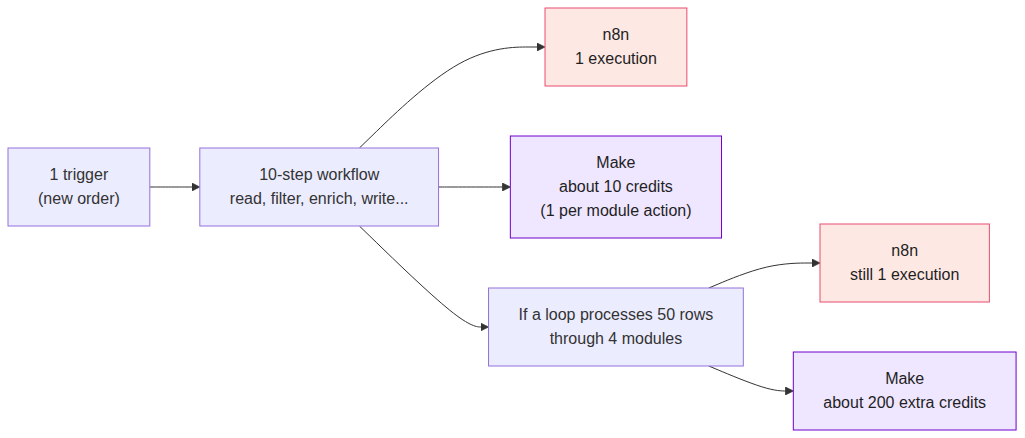 A 10-step workflow counts as 1 execution on n8n and about 10 credits on Make; a loop over 50 rows adds about 200 credits on Make and nothing on n8n
- On n8n, a 10-step workflow run once = 1 execution. If it processes 50 rows in a loop, it is still 1 execution.
- On Make, the same workflow uses about 10 credits. If a loop sends 50 rows through 4 modules, add about 200 credits.
An example from a project we delivered: a WooCommerce catalog published automatically to Pinterest, with a quota of 75 pins a day. That is about 2,250 runs a month. On n8n, that is 2,250 executions: the Starter plan is enough. On Make, if each pin goes through 5 modules, count about 11,250 credits: you pass the 10,000-credit tier.
A practical rule: Make is cheaper for short, infrequent workflows. n8n is cheaper for long workflows, loops and high volume.
n8n vs Make: what does it cost at your volume?
Calculation assumption: a workflow of 10 steps, with no loop, on annual billing. Make therefore uses about 10 credits per run.
| Runs / month | Make credits (≈) | Make Core | Make Pro | n8n Cloud | Self-hosted n8n |
|---|---|---|---|---|---|
| 1,000 | 10,000 | $9 | $16 | €20 (Starter) | €0 licence + VPS €20–50 |
| 5,000 | 50,000 | $55 (80,000 tier) | $91 (80,000 tier) | €50 (Pro 10,000) | €0 + VPS €20–50 |
| 20,000 | 200,000 | $182 (300,000 tier) | $269 (300,000 tier) | ≈ €121 (Pro 50,000) | €0 + VPS €20–50 |
| 100,000 | 1,000,000 | not offered (Core caps at 300,000) | $749 | beyond Pro: Business licence ≈ €1,438/month, or Enterprise | a larger server, to be sized |
Official prices checked on 13 October 2026. Make is billed in dollars, n8n in euros. The VPS is a market range, not a vendor price.
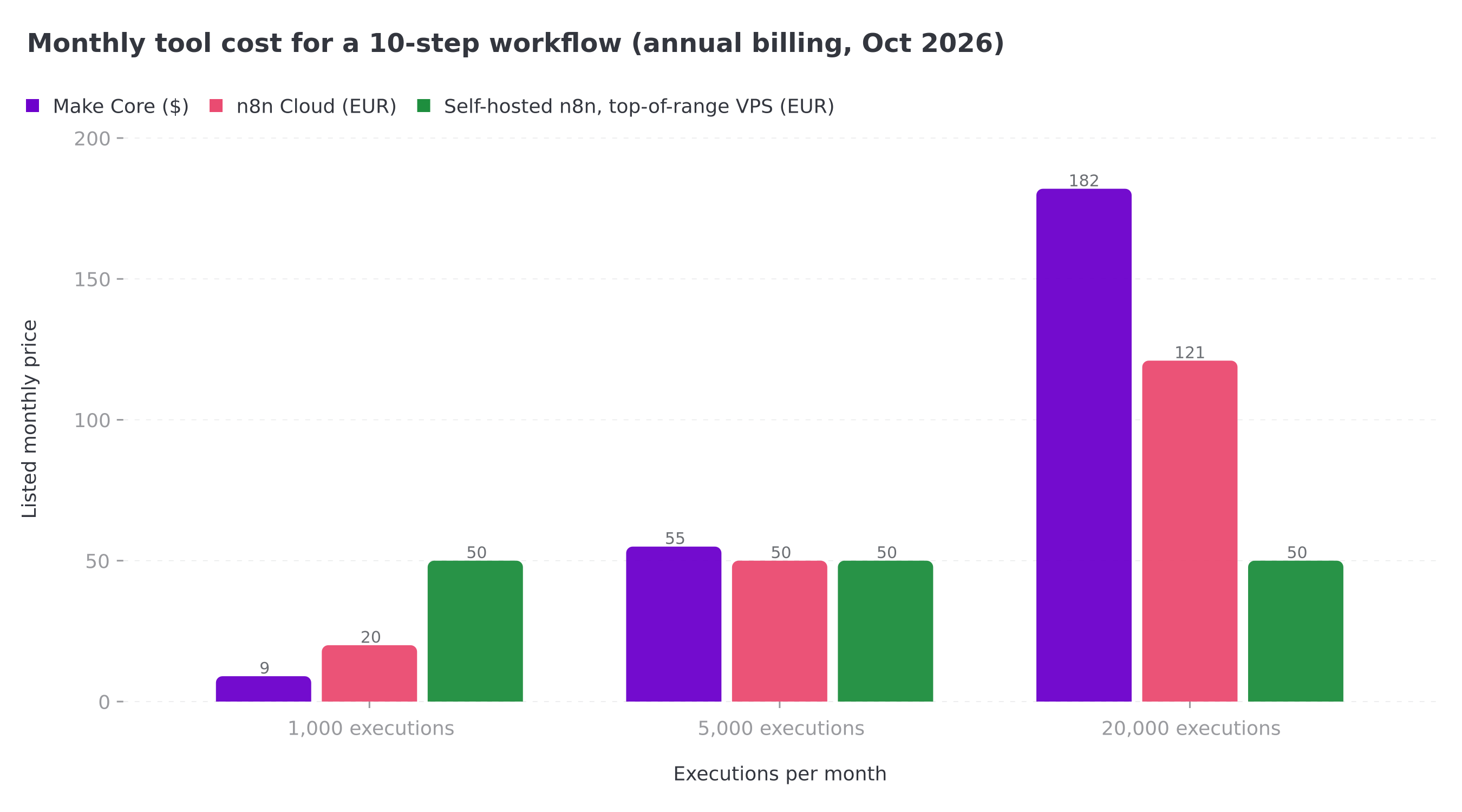 For a 10-step workflow: Make stays cheapest at 1,000 runs a month, the three options meet around 5,000, and self-hosted n8n becomes clearly cheaper at 20,000
What the table shows:
- Under 2,500 runs a month, Make Core is the cheapest. n8n Cloud Starter stays close.
- Around 5,000 runs, the three options are similar. The choice is made on other criteria: who maintains it, where the data goes.
- Above 20,000 runs, self-hosted n8n costs several times less than Make or n8n Cloud. The cost shifts to maintenance.
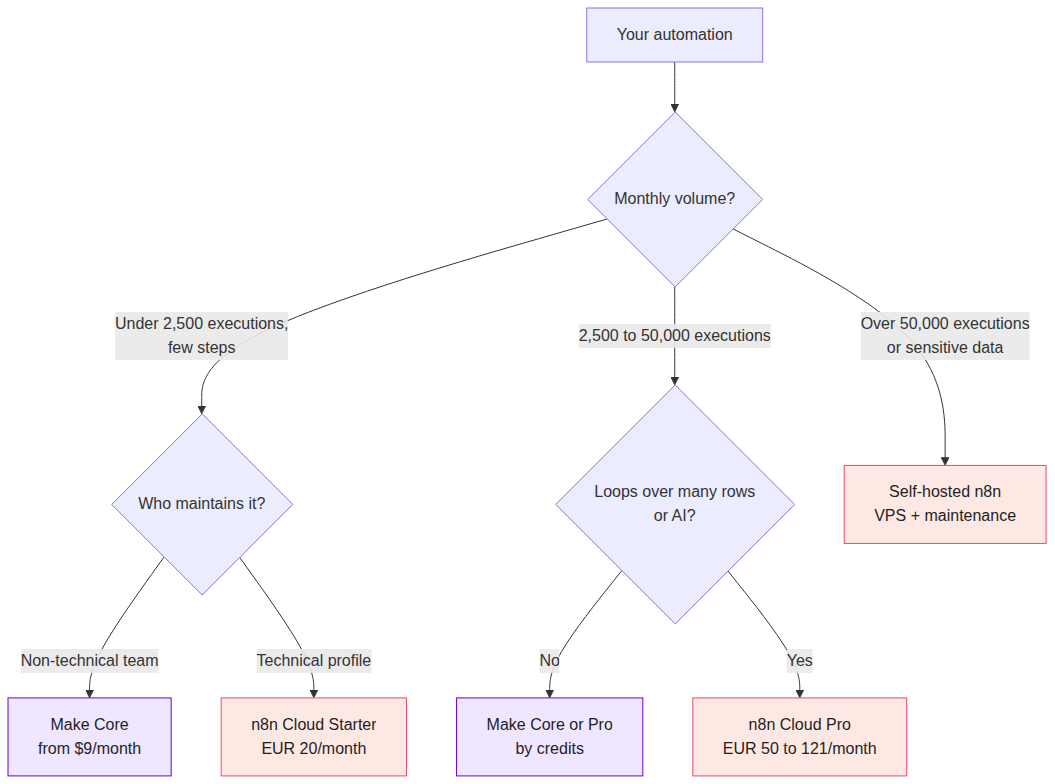 Under 2,500 executions: Make Core or n8n Starter depending on the team; from 2,500 to 50,000: Make if there are few loops, otherwise n8n Cloud Pro; above that, or for sensitive data: self-hosted n8n
Price is not the only criterion. Make stays easier to learn for a non-technical team. If that is your case, our Make.com expert page shows what we build on that tool. If you are aiming at volume, AI or hosting in Europe, see our n8n automation agency. The full n8n vs Make comparison covers the features.
How much does an n8n or Make automation build cost?
The tool is the small item. The setup is almost always most of the first-year budget.
What are the market price ranges?
French agencies that publish their prices converge on these orders of magnitude. They are market estimates, not quotes.
| Project type | Published range (excl. tax) | Example scope |
|---|---|---|
| Simple workflow | €800 to €2,000 | one flow, 2 to 3 apps |
| First project | €2,000 to €4,000 | 2 to 4 connected workflows |
| SME rollout | €4,000 to €10,000 | 5 to 10 workflows |
| Workflow with AI | €3,000 to €8,000 | n8n orchestrating an AI model |
| AI agents or a complex system integration | €8,000 to €20,000 and more | ERP, several agents, sensitive data |
Source: CZ Multimedia, checked on 13 October 2026. Other pages put a focused workflow from $400 (Mathieu Haye) and a typical scenario build around €3,500 (Genee).
What does BOVO Digital charge?
We publish fixed packages. The price is known before we start, and the scope is written down.
| Offer | Price | Scope | Timeline | Included |
|---|---|---|---|---|
| Essential System | €2,000 | 2 to 3 connected workflows (Make or n8n) | 10 to 14 days | error handling with automatic retry, email alerts, 1 AI agent, 1.5 hours of training, 30 days of support |
| Pro System | €3,500 | 5 to 8 connected workflows | 3 to 4 weeks | error queue and escalation, email / Slack / SMS alerts, 2 to 3 AI agents, 3 hours of training, 60 days of support |
| Enterprise System | €5,000 | unlimited workflows, custom architecture | 4 to 6 weeks | AI agents with memory (RAG), GDPR audit, BI dashboard, 90 days of support, 6 months of proactive maintenance |
These packages do not cover everything. An import of tens of thousands of product records, or a voice agent connected to a CRM, is priced separately after scoping.
What pushes a quote up?
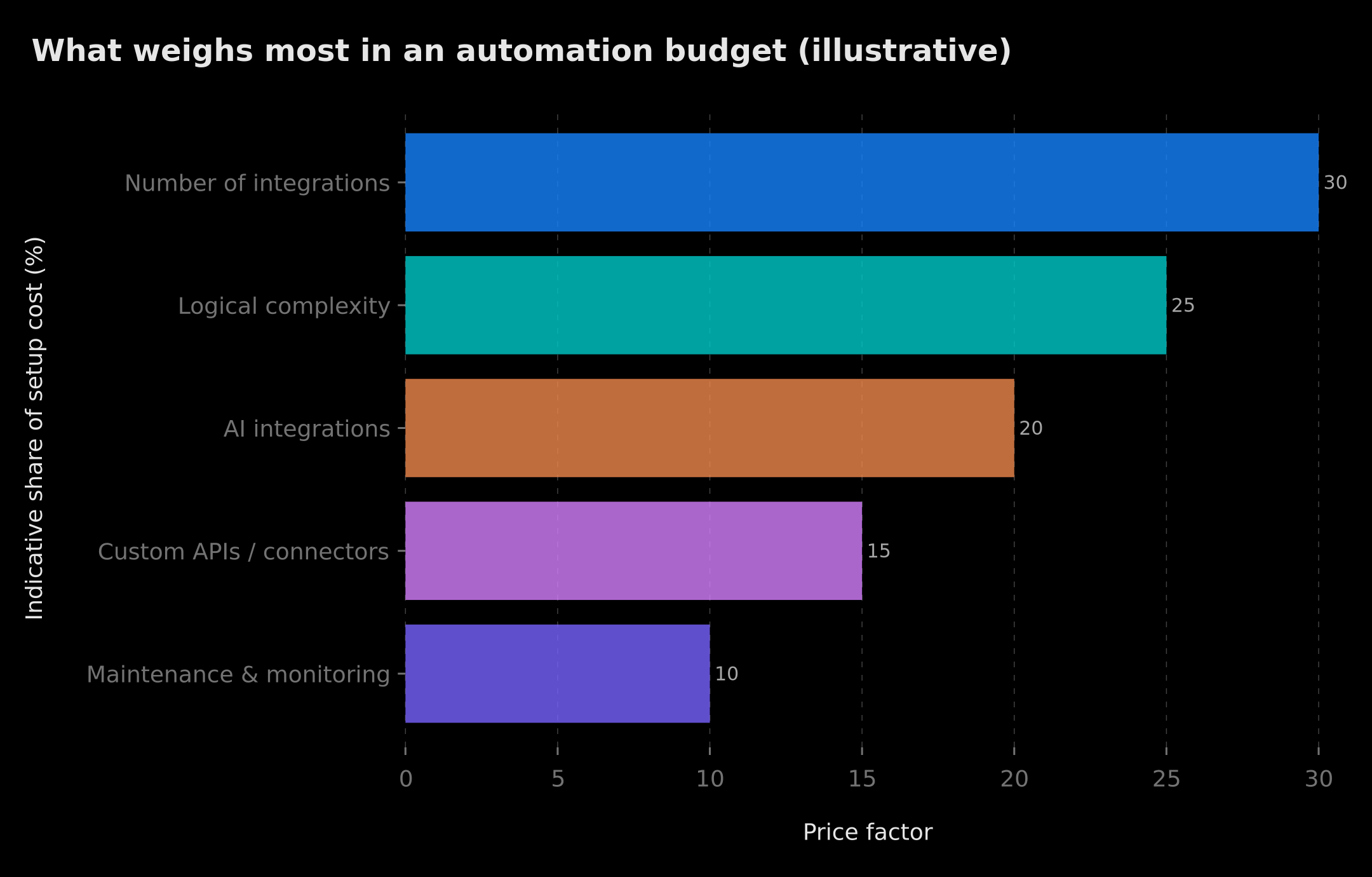 Indicative weight of the cost levers: number of integrations, logic complexity, AI, custom connectors, maintenance
- The number of apps. Each app adds a secure connection, a field mapping, errors to handle and tests. This is the first lever.
- The logic. A linear flow costs less than a flow with conditions, loops and a rollback on failure.
- The volume. 50 runs a month and 50,000 are not designed the same way: pagination, API limits, queues.
- AI. Writing the instructions, testing replies on real cases, controlling token use.
- APIs with no native connector. You have to write the call, handle authentication and document it.
What we often see in an audit: scenarios built quickly, with no alert. The day an API changes, leads disappear quietly for days. Error handling and alerts are therefore included from the Essential System.
Concrete examples of delivered projects
These cases come from our portfolio. They show why two quotes can vary by a factor of ten.
- E-commerce catalog to Pinterest. A Make scenario reads WooCommerce, avoids duplicates and respects a quota of 75 pins a day. See the WooCommerce to Pinterest project.
- One Google Doc, three channels. Make and ChatGPT produce an article, an Instagram post and a LinkedIn post in under 2 minutes. On this project, repurposing time fell by 90%. See the multi-platform content project.
- Catalog import. A Python script imported 1,400 references into PrestaShop, with translation and a 45% margin applied automatically. See the PrestaShop import.
- Prospecting funnel. Lead capture, AI qualification, WhatsApp, SMS and email follow-ups, Calendly booking. See the multi-channel funnel.
- WhatsApp assistant. Qualification, answers to frequent questions and booking outside office hours. See the WhatsApp assistant.
The first fits an Essential System. The fourth, with its multiple channels and its CRM, is closer to the Pro System.
Which recurring costs should you plan for after go-live?
An automation lives. Here are the lines to put in your annual budget.
| Recurring item | Order of magnitude | Note |
|---|---|---|
| Make or n8n Cloud subscription | $9 to $182/month (Make Core), €20 to €121/month (n8n Cloud) | depends on volume, see the table above |
| Server (self-hosted n8n) | €20 to €50/month | market range; more at very high volume |
| AI API (OpenAI, Anthropic, Mistral) | a few dozen euros a month for an SME, sometimes €100 to €300 | billed on use, check the vendor rate cards |
| Maintenance and monitoring | €150 to €250/month (monitoring), €300 to €500/month (full supervision) | ranges published by CZ Multimedia, October 2026 |
| Connected apps | variable | CRM, email tool: often already paid |
At BOVO, corrective support is included for 30 days (Essential), 60 days (Pro) or 90 days with 6 months of proactive maintenance (Enterprise). After that, maintenance becomes a choice: per ticket for a non-critical flow, on a subscription for a billing or customer-care flow.
First-year budget examples (public prices, excluding the AI API and maintenance after the included period):
| Situation | Build | Tool over 12 months | Year-1 total |
|---|---|---|---|
| 3 workflows, 1,000 runs/month, Make Core | €2,000 (Essential System) | $108 | ≈ €2,100 |
| 6 workflows, 20,000 runs/month, n8n Cloud Pro | €3,500 (Pro System) | €1,450 | €4,950 |
| Complete system, self-hosted n8n | €5,000 (Enterprise System) | €240 to €600 of server | €5,240 to €5,600 |
Fixed price, daily rate or subscription: how does an agency bill?
- A fixed price sets a scope and a price. Any change is renegotiated. This is our model for the setup.
- A daily rate bills the time spent. The 2026 market often cites €300 to €700 a day for a freelancer, more for an agency. See our analysis of an automation freelancer's daily rate.
- A subscription covers monitoring, fixes and a small volume of changes.
Projects that last often combine a setup package and a follow-up subscription.
Build it yourself or use an agency?
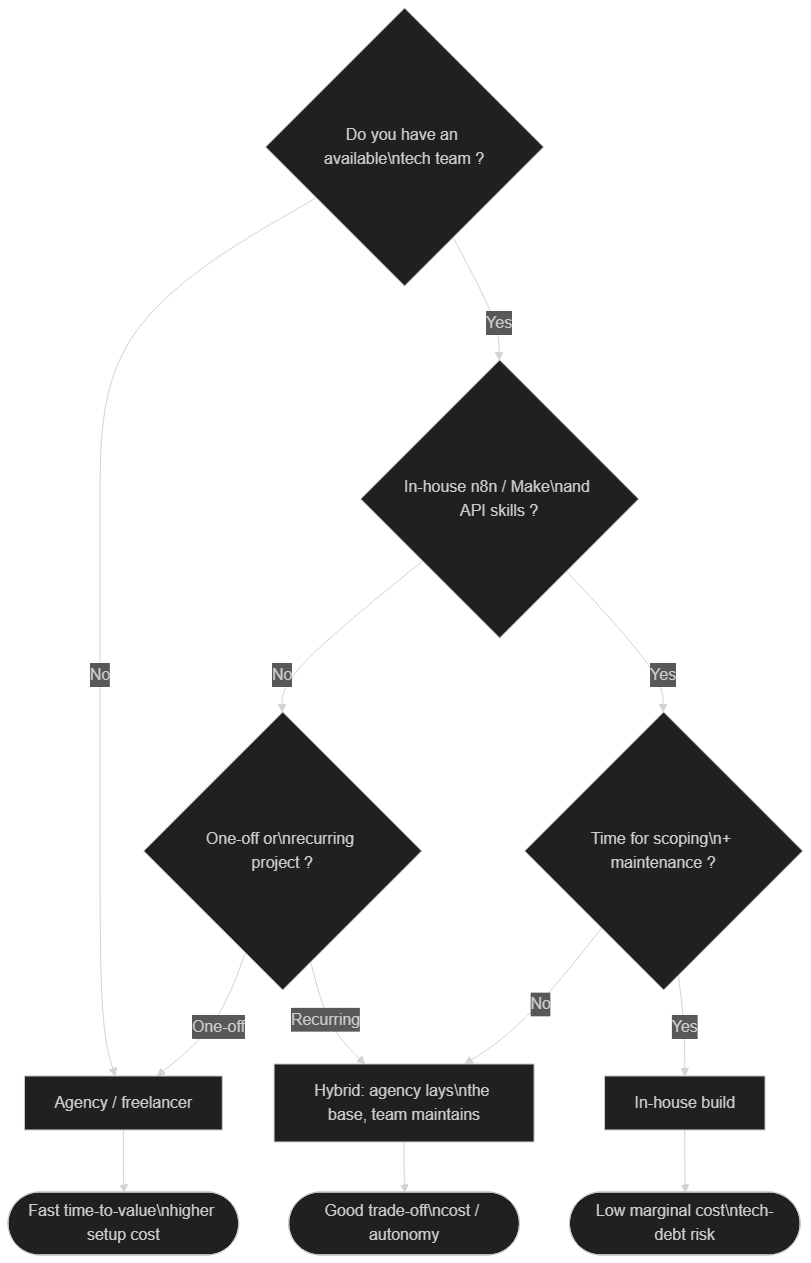 Choice between in-house, a hybrid model and an agency based on available skills and how critical the workflow is
Do it yourself if the flow is simple, not critical, and someone in-house has time to learn the APIs and document the work.
Use an agency if the workflow touches leads, invoices or customer messages. A silent failure there quickly costs more than the build.
The hybrid model works well: the agency lays the foundations and trains the team, which then takes over the small changes. To compare providers, read how to choose an n8n agency in 2026.
How do you get a precise quote for your automation?
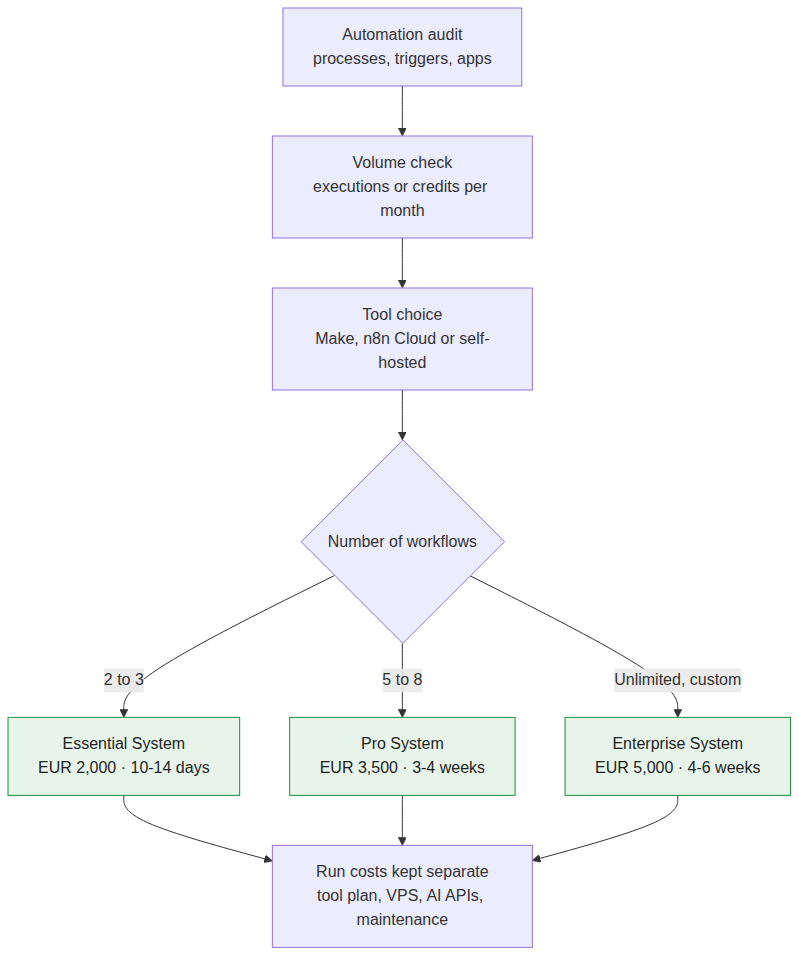 Audit, measure the volume, choose the tool, then a package based on the number of workflows: Essential, Pro or Enterprise System, with recurring costs priced separately
Prepare five pieces of information before the call:
- The process to automate, its trigger and the expected result.
- The apps involved (CRM, email, spreadsheet, online store).
- The volume: how many times a day or a month the flow runs.
- The place of AI: sorting, writing, qualification.
- Your constraints: sensitive data, hosting in Europe, who will maintain it.
With those elements, we tell you the cheapest tool for your volume and the matching package. Setup costs and recurring costs are priced separately.
Your budget in 30 minutes. Book a free review of your automation. You leave with the recommended tool (Make, n8n Cloud or self-hosted), the matching package — Essential System at €2,000, Pro System at €3,500 or Enterprise System at €5,000 — and an estimate of your monthly fees. Prefer to write? Contact us. BOVO Digital has delivered 118 projects and holds 82 five-star reviews on ComeUp.
Methodology: how we built this guide
- Tool prices: taken from the official n8n and Make pages on 13 October 2026. Make prices are those shown in dollars from France; they vary by country.
- Comparison by volume: calculated for a 10-step workflow with no loop, on annual billing. A workflow with loops uses far more Make credits.
- Build ranges: taken from agency pages that publish their prices, checked on 13 October 2026. They are estimates, not guaranteed rates.
- Sample limits: a VPS server price is a market range. The budget examples are not client invoices; they apply our public packages to the official tool prices.
Sources
- n8n Plans and Pricing, checked on 13 October 2026.
- Make, Pricing & Subscription Packages, checked on 13 October 2026.
- CZ Multimedia, Combien coûte un projet n8n en 2026, checked on 13 October 2026.
- BOVO Digital packages: n8n automation agency page, October 2026.
Conclusion
In 2026, the price of an n8n or Make automation depends less on the software than on your volume and the complexity of your flows. At low volume, Make is the cheapest. As soon as workflows get longer or run often, n8n takes the lead, especially self-hosted. The build remains the large item: budget €800 to €10,000 excl. tax on the market, or a fixed package of €2,000 to €5,000 at BOVO Digital.
The useful next step: book your free 30-minute review to know your real budget, tool and recurring fees included.
Tags
FAQ
How much does n8n automation cost?
Add three items. The tool: from €0 (self-hosted n8n, excluding the server) to €20–121/month on n8n Cloud depending on volume. The build: often €800 to €2,000 excl. tax for a simple workflow and €4,000 to €10,000 excl. tax for an SME rollout on the French market. Recurring: server, AI API and maintenance. At BOVO, the Essential System (2 to 3 workflows) is €2,000.
Is n8n free?
The n8n Community Edition is free and installs on your own server. You then pay for hosting (a market range of €20 to €50/month for a production VPS) and maintenance time: updates, backups, security. n8n Cloud is paid from €20/month on annual billing (Starter plan, 2,500 executions).
n8n or Make: which is cheaper?
At low volume, Make is often cheaper: the Core plan starts at $9/month (annual) for 10,000 credits. As soon as your workflows have many steps or loops, n8n becomes cheaper, because it bills one execution per run, whatever the number of steps. Beyond a few tens of thousands of executions, self-hosted n8n is usually the cheapest.
How much does Make cost per month?
In October 2026, Make offers a Free plan (1,000 credits/month), then Core from $9/month, Pro from $16/month and Teams from $29/month on annual billing for 10,000 credits. The price rises with the number of credits you choose. Enterprise is quoted.
How much does an n8n automation agency cost?
French agencies publish ranges from €800 to €20,000 excl. tax depending on complexity. BOVO Digital publishes fixed packages: Essential System €2,000 (2 to 3 workflows, 10 to 14 days), Pro System €3,500 (5 to 8 workflows, 3 to 4 weeks) and Enterprise System €5,000 (unlimited workflows, 4 to 6 weeks).
What happens if I exceed my execution or credit quota?
On Make, scenarios stop until you add credits; incoming webhooks are queued within your storage limit. On n8n Business, workflows keep running and an overage can be billed. In both cases, a usage alert avoids the surprise.
We scope one workflow — not a generic demo
You describe a repeated task. We tell you what n8n would ship, the timeline, and what stays out of scope.
- 30 min
- 1 scoped workflow
- No commitment
William Aklamavo
Web development and automation expert, passionate about technological innovation and digital entrepreneurship.


