
n8n vs Make: Complete Comparison to Choose Your Automation Tool (2026)
n8n or Make? 2026 tool comparison: pricing, self-host, volume, integrations. 25 documented automation cases as of 13 September 2026, not 103 projects.

Updated

n8n vs Make: Complete Comparison to Choose Your Automation Tool (2026)
Pick the tool on pricing, hosting, volume and connectors — not on an “AI agents” match covered elsewhere.
n8n vs Make is the tooling question teams ask before a first workflow. Both platforms connect apps and remove repetitive work. They do not share the same contract: self-hostable open source on one side, visual SaaS billed per operation on the other.
This page is a tool comparison. It rests on 44 public portfolio files, including 25 automation cases, collected on 13 September 2026. 14 files name Make.com, 6 name n8n: those are technologies tags, not market share. We do not have 103 delivered projects documented in the repo.
If you are mainly comparing AI agents, read Make AI Agents vs n8n: which to choose. For delivery budgets, read the n8n and Make pricing guide.
Method and sample limits
Collection date: 13 September 2026.
Source: 44 files in portfolioData.fr.ts. Filter: Automation → 25 cases.
Out of scope: CRM, prospecting CSVs, emails, named quotes, ComeUp prices.
We publish a segment aggregate only from 5 cases. Content / SEO (9) and leads / CRM / booking (7) clear that bar. E-commerce (4), customer messaging (4) and infra (1) stay illustrations, not averages.
Claims such as “40 hours/month”, “−95% errors” or “ROI in 2–3 months” appear on our marketing pages. They are not restated here as observed averages.
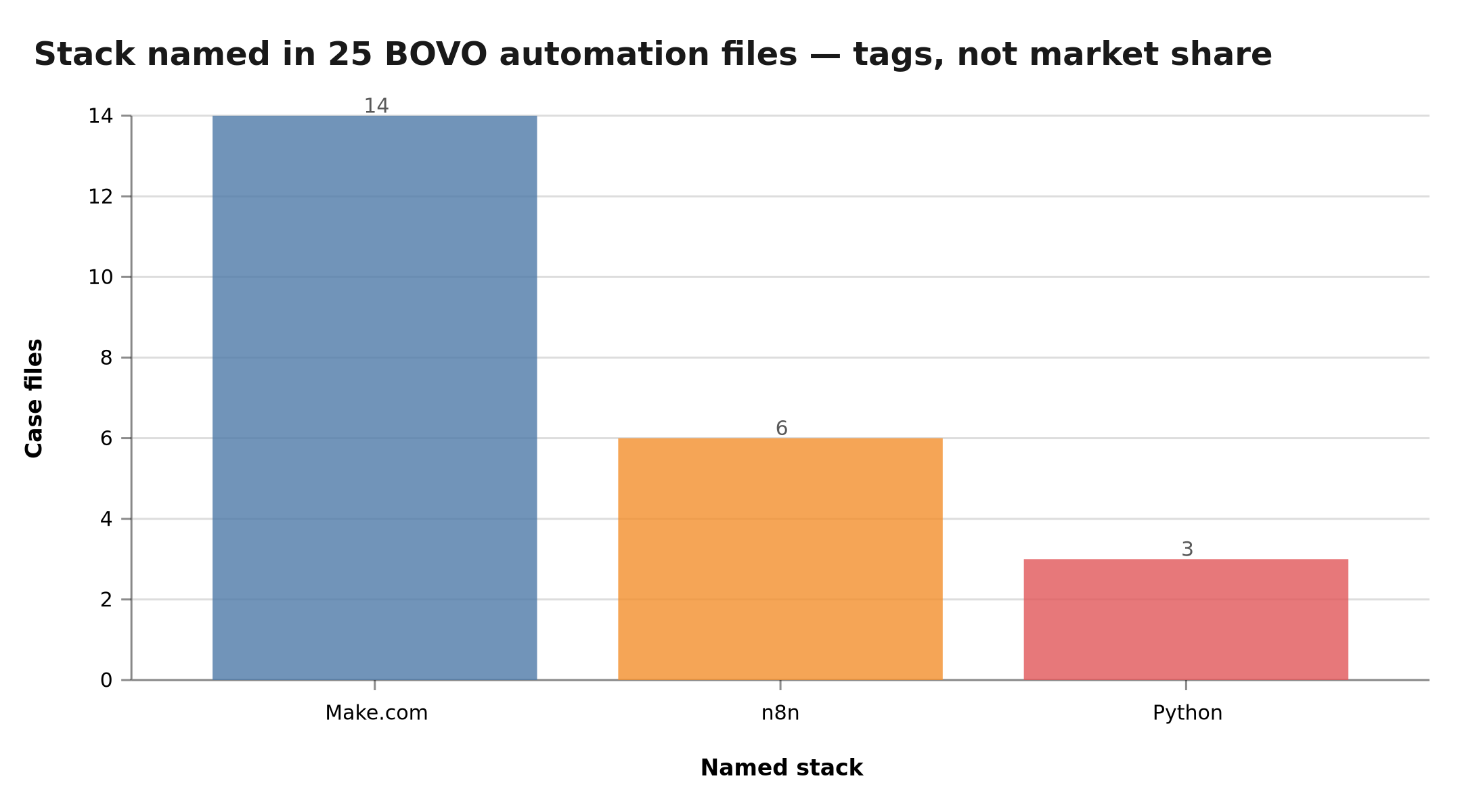 Make.com appears in 14 files, n8n in 6, Python in 3 — technology tags, not market share
Python appears on 3 files: below the threshold, that is not a publishable aggregate.
Quick overview
| Criterion | n8n | Make |
|---|---|---|
| Model | Open-source + Cloud | SaaS only |
| Price (entry) | Free when self-hosted (VPS cost) | Entry plan, billed per operation |
| Complexity | High | Moderate |
| Flexibility | JS/Python code, custom nodes | Visual canvas, custom apps |
| Best for | Tech teams, volume, sensitive data | SMBs, non-technical, mainstream apps |
| Hosting | Cloud or on-premise | Cloud only |
| Billing unit | Workflow execution / VPS | Operation (per module) |
| AI agents | See the dedicated article | See the dedicated article |
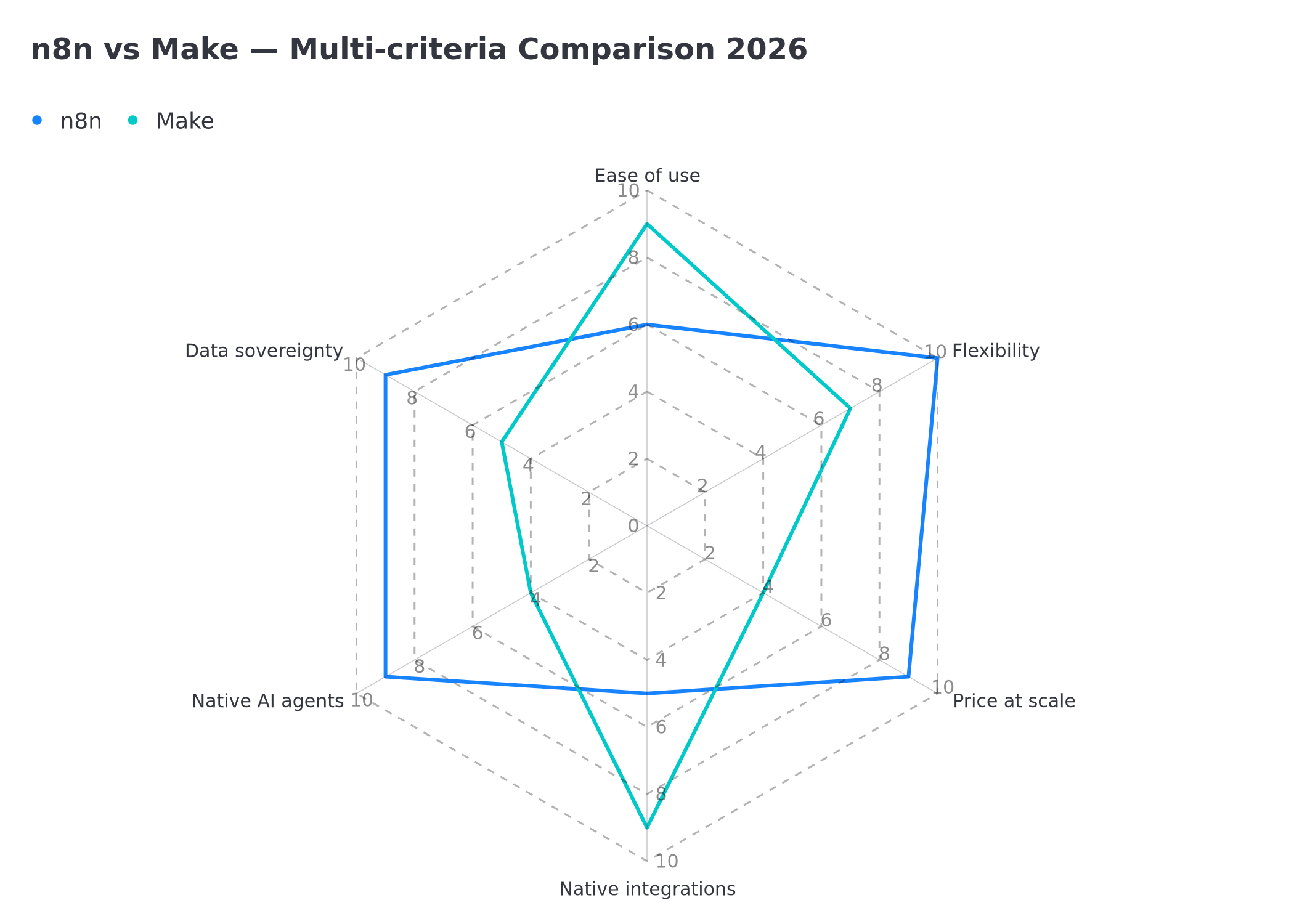 Radar comparison n8n vs Make: ease of use, flexibility, price at scale, native integrations, AI agents, data sovereignty
Two philosophies: open source vs visual SaaS
n8n is an open-source, self-hostable project. You can install it on your server, read the code, change it, and run it behind a firewall. Data stays with you if you choose so. Execution cost stops tracking volume. In return you own hosting, updates and backups.
Make is a pure SaaS built for the canvas. Nothing to install. Scenarios live in a polished graphical editor. Data flows through the vendor's infrastructure. The bill follows the operation count.
That opposition — control and a fixed cost versus simplicity and zero infra ops — explains almost every other difference.
Make — the visual reference
Strengths
Interface. Modules snap together. You watch data move from one app to the next. A non-technical team can read a scenario.
Native integrations. Make advertises more than 1,500 connected apps (vendor figure, 2026). Slack, Notion, Shopify, HubSpot: managed auth, documented actions.
Visual errors. Error paths, retries and fallbacks are configured without code.
Predictable price while volume stays low. Each module run = one operation. The meter is readable. It climbs as soon as scenarios grow.
Limits
- No on-premise hosting.
- Past a few dozen modules, readability collapses.
- The bill follows operation volume, not an infra flat fee.
Make fits best
- SMBs without an ops team
- Marketing automation (capture, nurturing, publishing)
- Fast prototypes on mainstream apps
n8n — the lever for technical teams
Strengths
Self-host. Data and secrets stay on your VPS. Guides: self-hosted n8n on a VPS and n8n Docker.
Native code. The Code node (JavaScript / Python) and expressions avoid visual workarounds.
Volume. One Cloud execution is one unit, whatever the node count. Self-hosted, the ceiling becomes the server (Redis queue mode is available).
Extensibility. Custom TypeScript nodes, sub-workflows, JSON you can version in Git.
Limits
- Steeper curve for non-developers.
- Self-host means Docker, backups, monitoring.
- Fewer one-click connectors than Make on consumer apps.
n8n fits best
- Developers and agencies
- Workflows with dense business logic
- Sensitive data (on-premise)
- High execution volume
Five Make vs n8n mini-cases, each traceable
Each case links to a portfolio file. Client names are not reused. E-commerce sits under the five-file threshold: these are illustrations, not a segment average.
1. Make — WooCommerce catalogue → Pinterest (id 2). The scenario reads WooCommerce, deduplicates via Data Store and respects a 75 pins/day quota. File: WooCommerce to Pinterest.
2. Make — one Google Doc → three channels (id 3). Make.com + ChatGPT produce a blog post, an Instagram post and a LinkedIn post in under 2 minutes. The file reports −90% repurposing time on this case, not across the book. File: multi-platform content.
3. n8n — PrestaShop product-sheet SEO (id 17). CSV export, GPT / Gemini enrichment, duplicate check, re-import. The file speaks of hundreds of sheets in a few hours. File: PrestaShop SEO n8n.
4. n8n — visuals from Notion (id 1). A Notion idea triggers Gemini then Together AI. Documented result: 3 visuals per idea. File: AI image workflow.
5. Make — multi-channel funnel (id 19). Capture, AI qualification, WhatsApp / SMS / email follow-up, Calendly (3 channels). File: multi-channel funnel.
These five files show why Make and n8n coexist in the same book: social quotas and visual funnels on one side, catalogue batches and code pipelines on the other.
How does n8n and Make pricing work?
The key is the billed unit.
Make charges per operation. Read a record, send an email, write a row: one operation. A 6-module scenario triggered 1,000 times consumes on the order of 6,000 operations.
n8n Cloud charges per workflow execution. 5 or 50 nodes: one execution = one unit.
Self-hosted n8n: neither operation nor execution. The cost is the server.
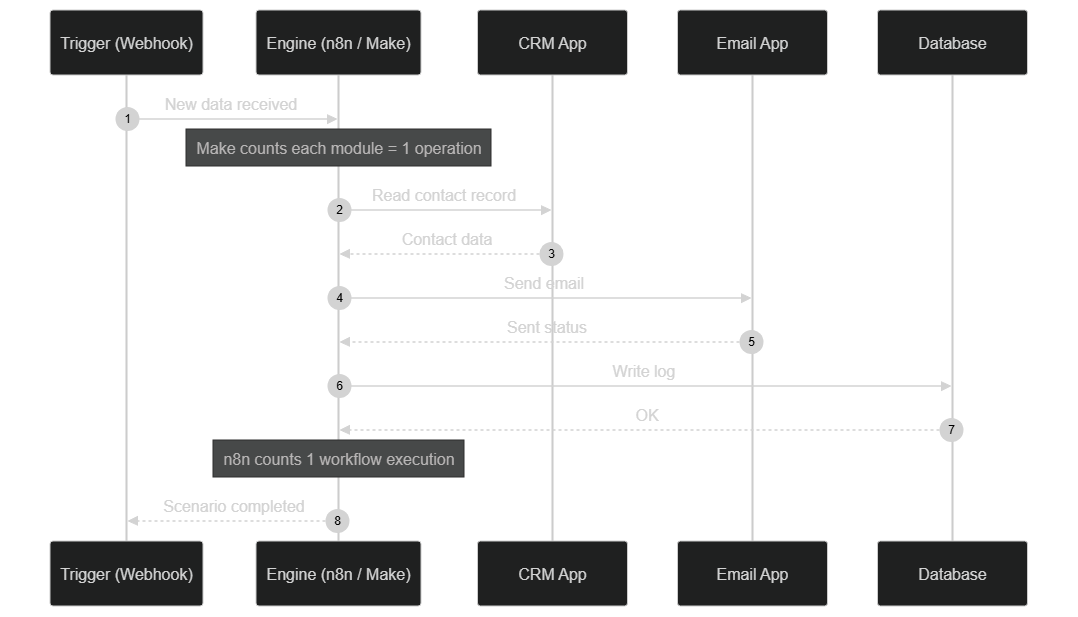 Execution flow: Make counts each module as an operation, n8n counts a single workflow execution
Orders of magnitude (illustrative, 2026)
Figures below are illustrative orders of magnitude, not BOVO quotes. Check official grids before you decide. Detail: n8n / Make automation pricing.
About 100,000 operations/month
- Make: team plan, on the order of a few tens of $/month
- n8n Cloud: Pro plan, same order of magnitude
- Self-hosted n8n: VPS cost only
About 1,000,000 operations/month
- Make: a bill counted in hundreds of $/month
- Self-hosted n8n: still the VPS (fixed cost)
Once volume becomes material, self-hosting stops tracking the meter. Below that, Make's simplicity can justify the subscription. No “2–3 month ROI” is published here as an average.
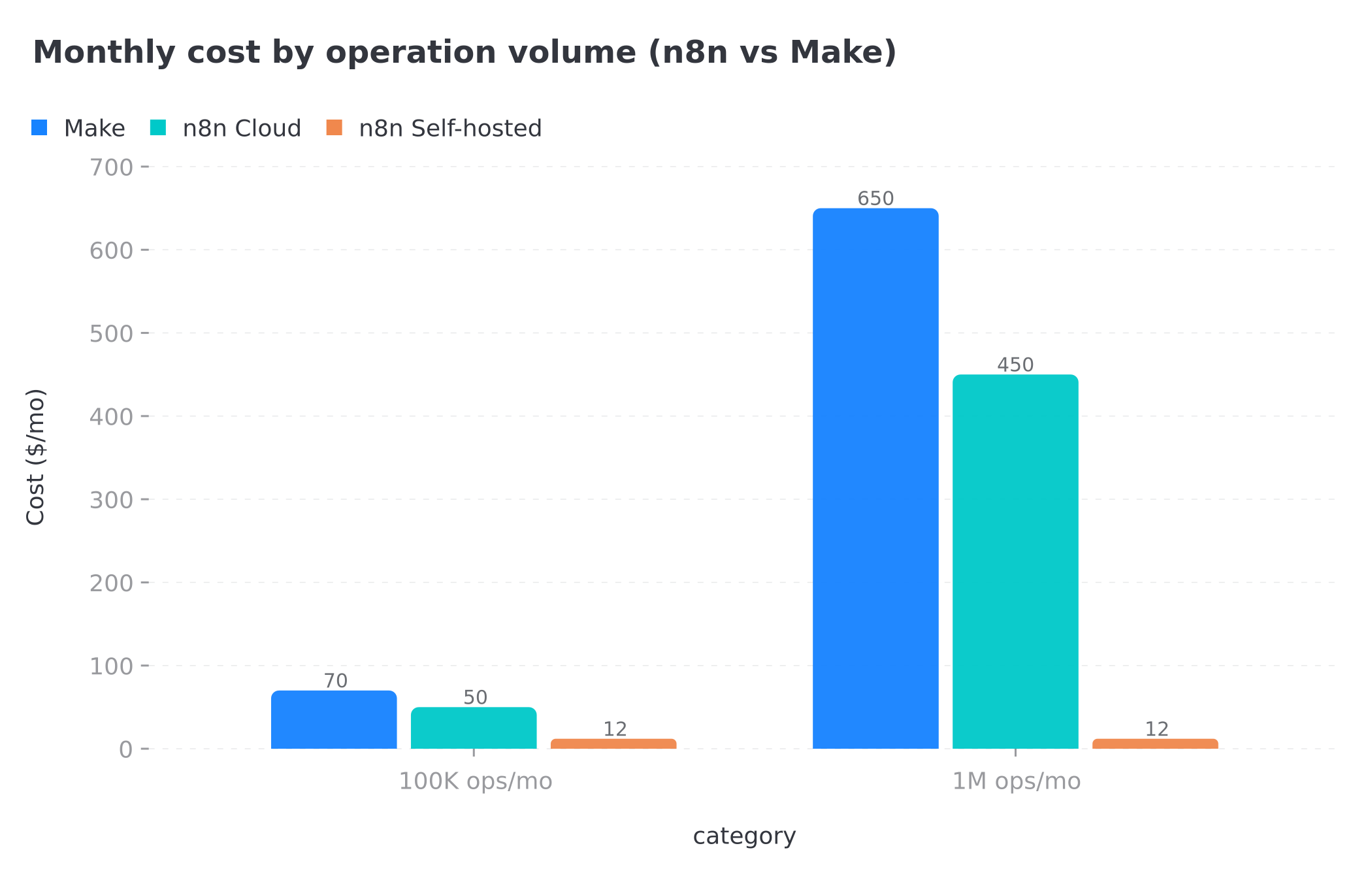 Monthly cost of Make, n8n Cloud and n8n Self-hosted at 100K and 1M operations/month — illustrative 2026 values
Self-hosting and data sovereignty
For healthcare, finance, the public sector or a sensitive customer file, the question is not only price: where the data lives.
With Make, processing runs on the vendor's infrastructure. That is fine for many marketing uses. You delegate location and logs.
With self-hosted n8n, you choose country, encryption, access and retention. API credentials stay with you.
If sovereignty is a hard constraint, self-hosting is not a bonus: it is often the only viable choice.
What is the learning curve?
Make takes the lead here. A marketing profile can assemble a first useful scenario in an afternoon: module, connection, mapping, test.
n8n asks you to read the JSON flowing between nodes, then sometimes two lines of JavaScript. The slope is steeper. Once that data logic clicks, the canvas ceilings drop.
Simple rule: nobody wants to touch code or a server → Make. A technical streak exists or must exist → n8n.
Integrations: native connectors vs HTTP
Both tools ship a generic HTTP module for any REST API. The gap is the native catalogue.
- Make: 1,500+ connectors (vendor figure 2026). Clear lead on consumer apps.
- n8n: several hundred nodes + HTTP + custom nodes. Often more flexible once an API is internal or poorly documented.
Zapier may still be on the shortlist: see n8n vs Zapier.
Integrations verdict: Make for the mainstream catalogue. n8n as soon as you leave the official connector.
Volume, performance and maintenance
Make handles common volumes well. Beyond that, cost, not the engine, becomes the limit. Very large scenarios also become hard to read.
n8n can run in queue mode (Redis) to absorb spikes. The limit becomes server sizing. An undersized VPS slows down: self-hosting shifts performance onto you.
With Make, the vendor operates the infra: no patches to apply, histories in the UI, few levers if the platform slows down.
With self-hosted n8n, you are the operator: logs, backups, update strategy. That is an advantage for a tech team. It is a real load for an SMB without DevOps.
Whatever the tool, a failure alert (email, Slack, webhook) on critical workflows avoids silent outages.
How to migrate from Make to n8n (or the other way)?
There is no magic export. Node models differ. You rebuild scenario by scenario: trigger, conditions, mappings, then you rewrite the mechanics (Code node, credentials, errors).
At BOVO we consider n8n when the Make operations bill durably exceeds a VPS, or when self-hosting / code logic becomes blocking. Until then, staying on Make avoids a premature migration.
This comparison is not the “AI agents” match
Make has AI modules and the MAIA assistant. n8n has an AI Agent node (LangChain). That is not the decision criterion on this page.
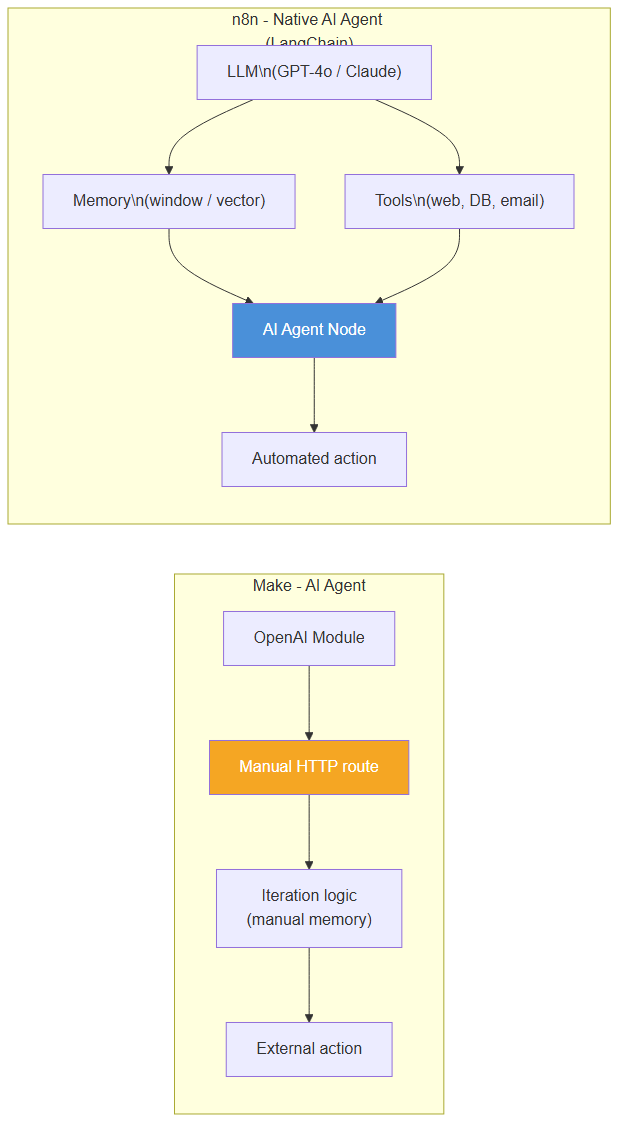 Visual reminder: Make assembles modules, n8n exposes an AI Agent node — detail in the dedicated agents article
For agentic orchestration, read Make AI Agents vs n8n. The Make MAIA tutorial remains useful if you stay on Make.
Common mistakes when choosing
Choosing on this month's price alone. Project volume 12 months out. The billed unit matters more than the entry plan.
Underestimating self-hosting. A VPS without backups or alerts is not “free”.
Forcing dense logic into a canvas. When a Make scenario grows past a few dozen modules for edge cases, n8n is often more readable.
Deciding hosting too late. On regulated data, sovereignty can eliminate Make on day one.
Treating the choice as exclusive. The 14 + 6 tags on our 25 files show both stacks in the same book.
Full comparison table
| Dimension | n8n | Make |
|---|---|---|
| Philosophy | Open-source, self-hostable | Visual SaaS |
| Hosting | Cloud or on-premise | Cloud only |
| Billing | Execution / VPS cost | Operation (per module) |
| Cost at scale | Low if self-hosted (fixed) | Rising with volume |
| Native integrations | Several hundred + HTTP | 1,500+ (vendor) |
| Code | JS/Python, custom nodes | Functions + custom apps |
| Learning curve | Steeper | Gentle |
| Sovereignty | Total when self-hosted | Managed by the vendor |
| BOVO files (tags) | 6 / 25 | 14 / 25 |
| AI agents | Dedicated article | Dedicated article |
n8n or Make: which tool for your profile?
Choose n8n if you have (or want) a technical team, data that must stay on-premise, or a volume that makes the operations meter too expensive.
Choose Make if you are starting without ops, you need mainstream connectors now, and your volume stays moderate.
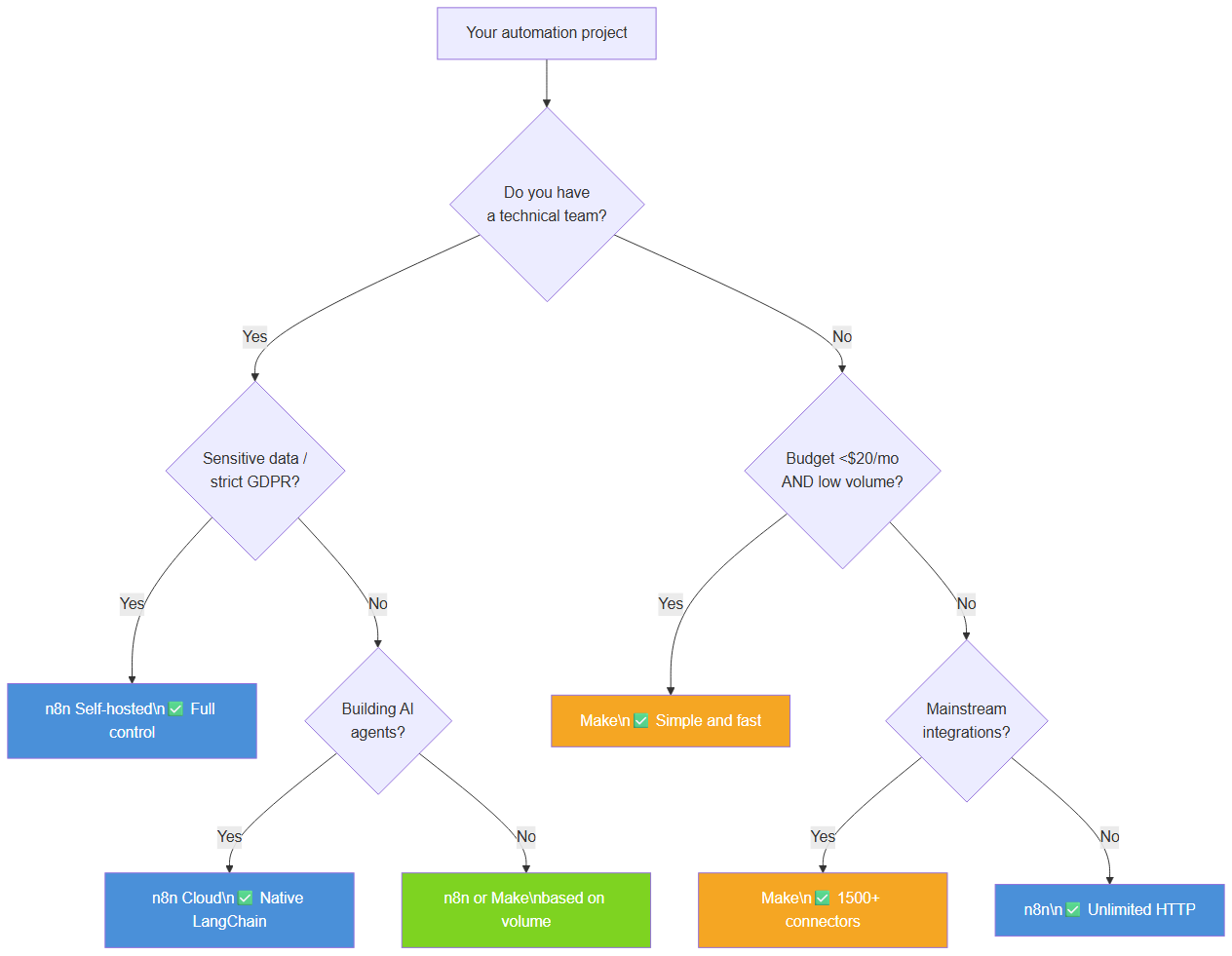 Decision tree to choose between n8n and Make based on technical constraints, budget and use case
Verdict by scenario
- Non-technical startup, first marketing automations → Make.
- Agency, high volumes, margins to protect → self-hosted n8n.
- Regulated data → self-hosted n8n.
- Need to wire 20–30 consumer SaaS apps fast → Make.
- AI agents at the core of the product → dedicated article, not this comparison.
Conclusion
Make and n8n are not a single match. Make shortens time-to-first scenario. n8n shortens the bill and the sovereignty risk once volume or the information system requires it.
Our 25 documented cases (14 Make.com tags, 6 n8n tags, collected 13 September 2026) are enough to justify a mixed stack. They are not enough to publish a market share or an average of hours saved.
To move from the table to a scoped project:
Tags
FAQ
What is the main difference between n8n and Make?
n8n is open-source and can run on your own server (data under your control, fixed infra cost). Make is SaaS only: nothing to install, billed per operation. n8n is more technical. Make is faster for non-developers.
Which is cheaper: n8n or Make?
It depends on volume and hosting, not on a single price. Make bills each module that runs. n8n Cloud bills the workflow execution. Self-hosted n8n bills the VPS, whatever the volume. Exact tiers live on the vendor pages and in our pricing guide.
n8n or Make for building AI agents?
That is not this article's angle. The agents match (LangChain AI Agent node, Make AI modules, MAIA) is covered in Make AI Agents vs n8n: which to choose (2026). Here we compare pricing, self-hosting, volume and integrations.
Is Make better than n8n for beginners?
Yes, Make is usually more accessible without code. The visual canvas, field mapping and native integration library shorten time-to-first scenario. n8n pays off once you accept expressions, the Code node and, if self-hosted, basic operations work.
Can you use Make and n8n together?
Yes. Of our 25 automation files dated 13 September 2026, 14 name Make.com and 6 name n8n: those are stack tags, not market share. Make often fits marketing and SMBs without ops. n8n fits volume, self-hosting and code-heavy logic.
Is this comparison based on 103 delivered projects?
No. Marketing copy has sometimes cited 100 or 103 deliveries. The publishable evidence as of 13 September 2026 is 44 portfolio files, 25 of them tagged Automation. We only publish a segment aggregate from 5 cases. No ComeUp prices appear here.
We scope one workflow — not a generic demo
You describe a repeated task. We tell you what n8n would ship, the timeline, and what stays out of scope.
- 30 min
- 1 scoped workflow
- No commitment
William Aklamavo
Web development and automation expert, passionate about technological innovation and digital entrepreneurship.


