
Tutorial: Create an AI Agent with Make.com Maia in Natural Language (2026)
Make.com launched Maia, its conversational AI interface that lets you build complex automation scenarios by simply describing what you want. This step-by-step tutorial shows you how to create your first agent in 20 minutes.

Updated

Make MAIA: create an AI agent in natural language, no code
In 2026, Make MAIA changes how you create an AI agent: instead of dragging and dropping modules one by one, you describe in natural language what you want to automate, and Maia — the AI assistant built into Make.com's Scenario Builder — generates the complete scenario for you. It's the shift from "I build" to "I describe."
The principle fits in one sentence: you explain your need the way you would to a colleague, and Maia translates that intent into a chain of connected modules, ready to be validated and configured. This shift drastically lowers the barrier to entry of automation, without removing the need to understand the logic of what you're building.
In this complete guide, we'll first understand what Maia really is, then learn how to talk to it effectively, see how a prompt becomes a scenario, refine that scenario through iterations, explore concrete use cases, measure its limits and costs, and finally compare it to n8n's AI agent. Along the way, we'll build a lead-processing agent end to end.
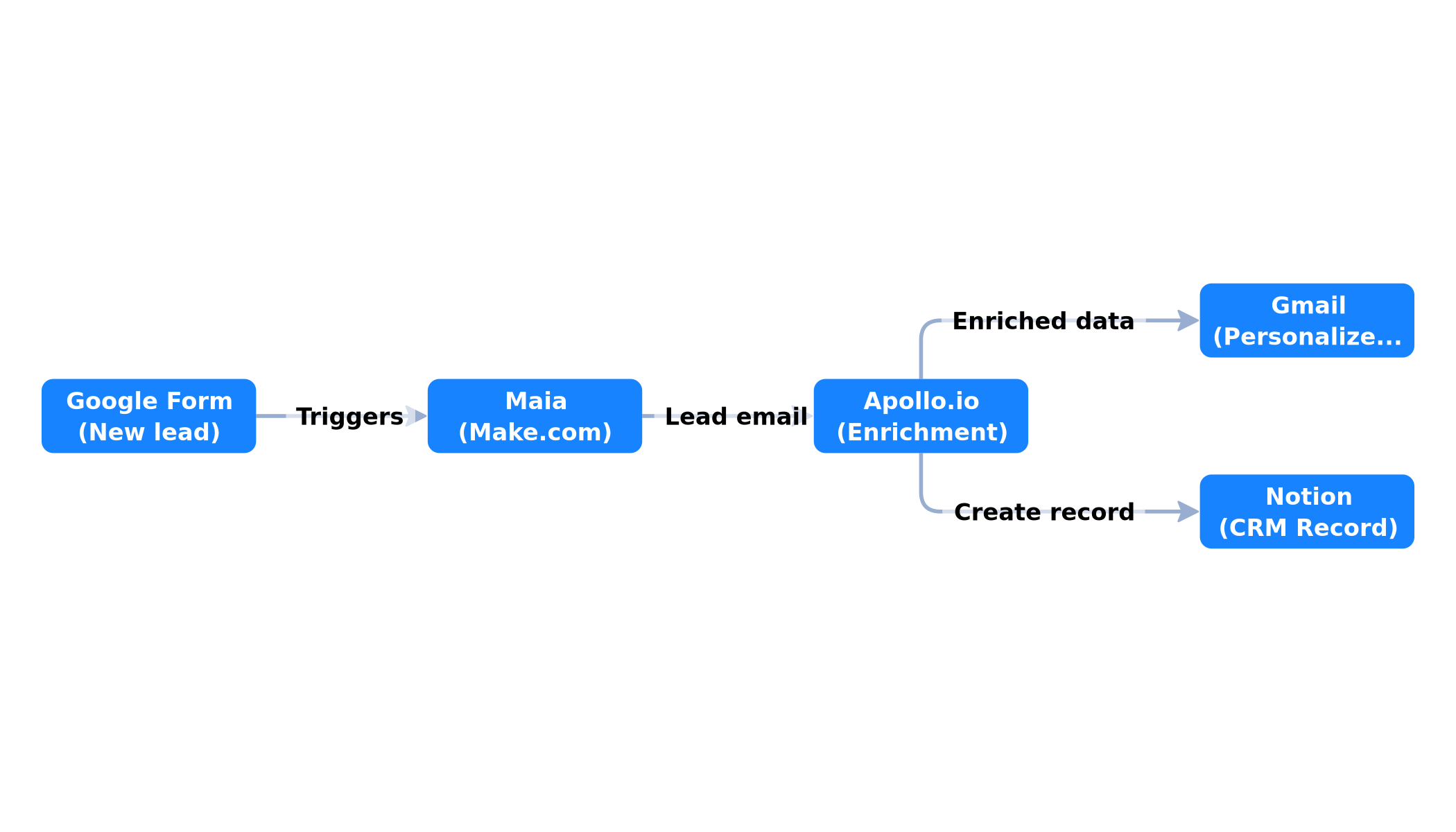 The Make scenario generated by Maia: 4 automatically connected modules to process each new lead
Hands-on tutorial duration: 20 minutes. A free Make.com account is enough to start.
What is Maia, Make.com's AI assistant?
Maia is not a simple chatbot bolted onto the interface. It's a native copilot built directly into Make's Scenario Builder. The distinction matters: a generic chatbot knows neither your connections, nor the platform's module catalog, nor the grammar of Make scenarios. Maia, by contrast, is trained to reason inside Make's universe and to produce valid scenarios, not just text suggestions.
Concretely, Maia understands three things a generic assistant doesn't. First, the app catalog of Make — an ecosystem exceeding 3,000 integrations (Google, Notion, Slack, HubSpot, Airtable, OpenAI, and more). Second, the structure of a scenario: trigger, action modules, routers, filters, aggregators, iterators. Third, the data mapping between modules, that is, how the output of one step feeds the input of the next.
Maia, a copilot and not a black box
It's important to grasp the philosophy: Maia doesn't replace your judgment, it accelerates your execution. The scenario it generates remains fully visible and editable in Make's usual canvas. You can open each module, adjust a mapping, add a filter, delete a step. Nothing is hidden. This transparency is essential: it lets you keep control, fix a wrong interpretation, and above all learn by reading what Maia produced.
This copilot posture sets Maia apart from "one-shot" generators that spit out a result you can't inspect. With Maia, the generated scenario is a negotiable starting point, not a fixed verdict. That's precisely what makes the tool usable in production: you stay responsible for what runs.
What Maia knows about your account
When generating a scenario, Maia takes your workspace context into account. It can propose connections that already exist, suggest the apps you use most, and adapt the structure to your habits. This context awareness reduces the number of round trips needed to reach a working scenario. It's also why two users describing the same need may get slightly different structures: Maia adjusts to what it "sees" of your environment.
 The full path: natural language description, intent analysis, scenario generation, automatic mapping, then iterations until satisfied
How do you describe a need in natural language to Maia?
The quality of the generated scenario depends directly on the quality of your description. It's a skill in itself, close to the "prompting" you find with language models, but applied to a very concrete goal: producing an automation flow. Good news, the rules are simple and fit in five ingredients.
The five ingredients of a good description
1. The trigger. Always start with the event that kicks off the scenario. "When a new form is submitted," "every morning at 8am," "when an email arrives in the support inbox." Without a clear trigger, Maia has to guess, and it sometimes guesses wrong.
2. The exact apps. Name the tools you want to use. "with Apollo.io," "in Notion," "via Gmail." If you stay vague ("send a message"), Maia chooses for you, and its choice won't always match your stack.
3. The order of steps. Describe the logical sequence: first fetch, then enrich, then send, then store. An explicit order prevents Maia from inverting two interdependent operations.
4. The conditions and filters. Spell out the edge cases. "only if the lead is a B2B company," "ignore personal Gmail addresses," "if the amount exceeds $500." Filters make the difference between a naive agent and a useful one.
5. The expected output format. State what you want at the end: a personalized email, a row in a database, a formatted Slack notification. The more the output is described, the less you'll iterate afterward.
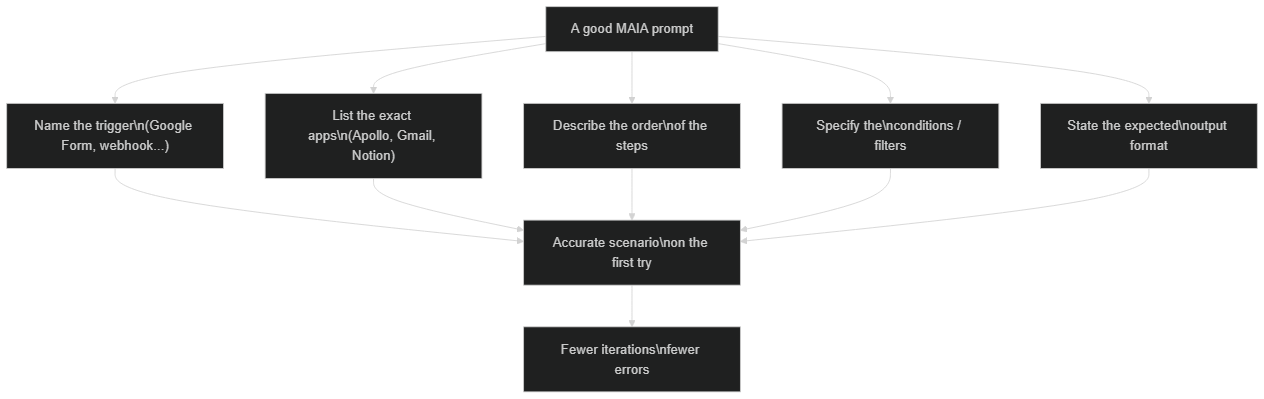 Five ingredients of an effective description: name the trigger, list the exact apps, describe the order, specify the conditions and state the output format
An example of a complete description
Let's revisit our lead-processing agent. A weak description would be: "build me something that handles my leads." A strong description gives:
"When someone fills my Google Form 'Commercial Contact', get their email, enrich with Apollo.io to get their title and company, send them a personalized welcome email from Gmail, and create a record in my Notion 'Leads CRM' database."
The second version contains the trigger (Google Form), the apps (Apollo.io, Gmail, Notion), the order (fetch → enrich → send → store) and the output format (personalized email + Notion record). Maia has almost nothing to guess.
From prompt to scenario: what happens under the hood
When you validate your description, Maia doesn't "paste" modules at random. It runs a sequence of operations worth understanding, because it explains why the result is sometimes imperfect.
First, Maia analyzes the intent: it identifies the trigger, the actions, the conditions, and the dependencies between steps. Then it selects the corresponding modules from the Make catalog — this is where it chooses, for example, Google Forms' "Watch Responses" module rather than another. Next it generates the structure of the scenario, placing modules in the right order and creating the connections. Finally, it performs the automatic variable mapping: it infers that the form email should feed the Apollo search, that the name returned by Apollo should personalize the email subject, and so on.
This automatic mapping is one of Maia's most underrated strengths. Building references between modules by hand ({{1.Email}}, {{2.organization.name}}) is one of the most tedious and error-prone tasks in Make. Maia does most of it for you, and you only need to check and fix the ambiguous cases.
The generation time for a scenario of this complexity is measured in a few seconds (on the order of 8 to 12 seconds in our experience for a 4-5 module scenario). This delay depends on the complexity described and server load; treat it as an order of magnitude, not a guarantee.
Tutorial: create your first AI agent with Make MAIA
Time to practice. We'll build the lead-processing agent described above. The goal: on each new form submission, enrich the contact, write to them, and archive them in a Notion CRM, with no manual intervention.
Prerequisites
- A Make.com account (free or paid)
- An active Google Form with at least one "email" field
- A Notion account with a "Leads" database
- Access to a Gmail account
Step 1: open Maia in Make.com
- Log in to make.com
- Click "Create a new scenario"
- Instead of the usual empty canvas, click "Ask Maia" (bottom right button, ✨ icon)
The Maia window opens. You're ready to describe your agent.
Step 2: describe your agent in natural language
In the Maia window, type the complete description seen earlier:
"When someone fills my Google Form 'Commercial Contact', get their email, enrich with Apollo.io to get their title and company, send them a personalized welcome email from Gmail, and create a record in my Notion 'Leads CRM' database."
Maia analyzes your description and generates a scenario with several pre-connected modules. Take the time to read the proposed structure before touching anything: it's the best way to spot a wrong interpretation early.
Step 3: validate and configure connections
Maia created the structure, but needs your authentications. For each module, click "Connect":
Module 1 — Google Forms (Trigger)
Connection: Your Google account
Form ID: Select your form from the list
Trigger: "New Response"
Module 2 — Apollo.io (Enrichment)
Connection: Apollo API Key (free up to 50 req/month)
Parameter: Email = {{1.Email}}  ← variable auto-mapped by Maia
Module 3 — Gmail (Email)
Connection: Your Gmail account
To: {{1.Email}}
Subject: "Welcome {{2.name}} — we received your request"
Body: Personalized with Apollo data
Module 4 — Notion (Database)
Connection: Your Notion workspace
Database: Leads CRM
Mapping:
  Name → {{2.name}}
  Email → {{1.Email}}
  Company → {{2.organization.name}}
  Title → {{2.title}}
  Date → {{now}}
Notice that most mappings ({{1.Email}}, {{2.name}}) are already in place: that's Maia's work. Your role is just to verify they point to the right fields.
Step 4: test the scenario
- Click "Run once" (play button)
- Fill your Google Form with a test email address
- In Make, watch the green bubbles light up module by module
- Check your Gmail inbox and Notion database
If everything is green: congratulations, your agent is alive. If a module turns red, click it to read the error — most often it's an unauthorized connection or a missing field on the form side.
Step 5: activate and schedule
- Click the "Scheduling" toggle (top left)
- Choose "Every 15 minutes" for near-real-time triggering
- Click "Save" then "Activate"
Your agent now runs autonomously. Each new lead is processed in less than 15 minutes, without you touching anything.
Refine and iterate: the real skill
Creating a first scenario with Maia is easy. The skill that makes the difference is refinement through iterations. Few agents come out perfect from the first prompt, and that's normal: a useful agent is born from a dialogue, not a single command.
The right reflex is to treat Maia as a teammate. You generate a first version, observe it, then ask for adjustments in natural language: "Add a filter to process only company leads," "Replace Apollo with Hunter.io," "Before the email, wait 10 minutes." Maia updates the scenario without rebuilding everything, preserving what already works.
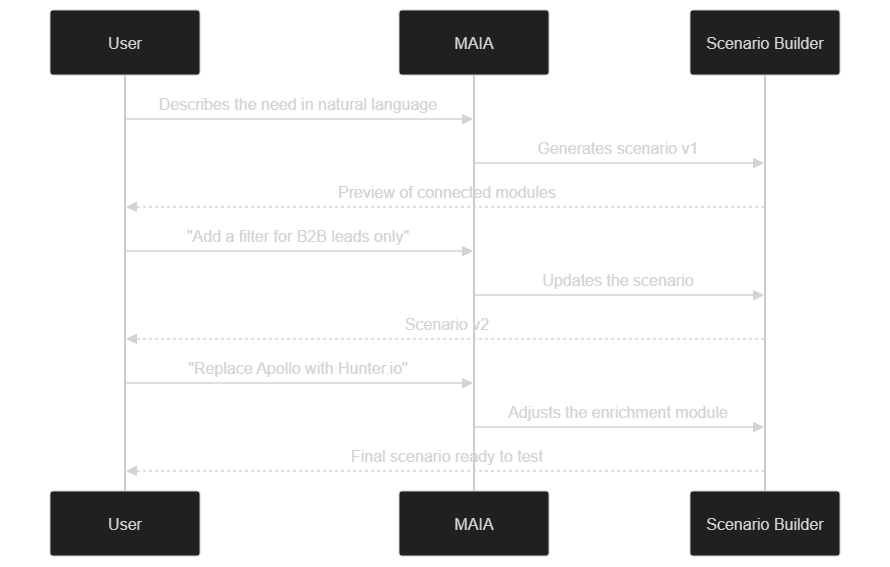 From scenario v1 to the final scenario: each natural language request refines the structure without starting over
This iterative logic has a major psychological benefit: it removes the pressure. You don't need the perfect prompt on the first try. You start with a "good enough" version, then sculpt it. This is exactly the posture that makes automation accessible to non-technical people: you learn by correcting, not by theorizing.
A concrete tip: change one thing at a time. If you ask Maia for five changes in the same message, and the result degrades, you won't know which one is responsible. One change, one check, then continue.
Make's AI modules in service of your agent
Maia is used to build the scenario, but it's the AI modules of Make that give your agent its reasoning ability at runtime. You must distinguish the two: Maia generates the automation, the AI modules make it intelligent once it runs.
Make natively integrates modules for the main providers (OpenAI, Anthropic, Google, among others) as well as orchestration building blocks. You can thus insert, into the scenario generated by Maia, a step that summarizes a text, classifies an incoming email, extracts structured information from a PDF, or drafts a personalized reply. The agent no longer just moves data: it understands and transforms it.
Make has pushed the logic further with its AI agent features capable of reasoning over multiple steps. To dig into the decision mechanics behind these agents, we detailed it in Make AI Agents vs n8n: which to choose in 2026?, which compares the two approaches to intelligent agents.
The winning combination is therefore: Maia for the build, AI modules for the processing, and scheduling for autonomy. A support agent, for example, can be generated by Maia, classify tickets with an OpenAI module, and automatically route to the right team based on the detected category.
Concrete use cases for Maia
Beyond lead processing, Maia applies to a wide variety of needs. Here are the families of scenarios we most often see working in real conditions, with an order of magnitude of the time they save. These figures are illustrative: they depend heavily on the volume and complexity of each activity.
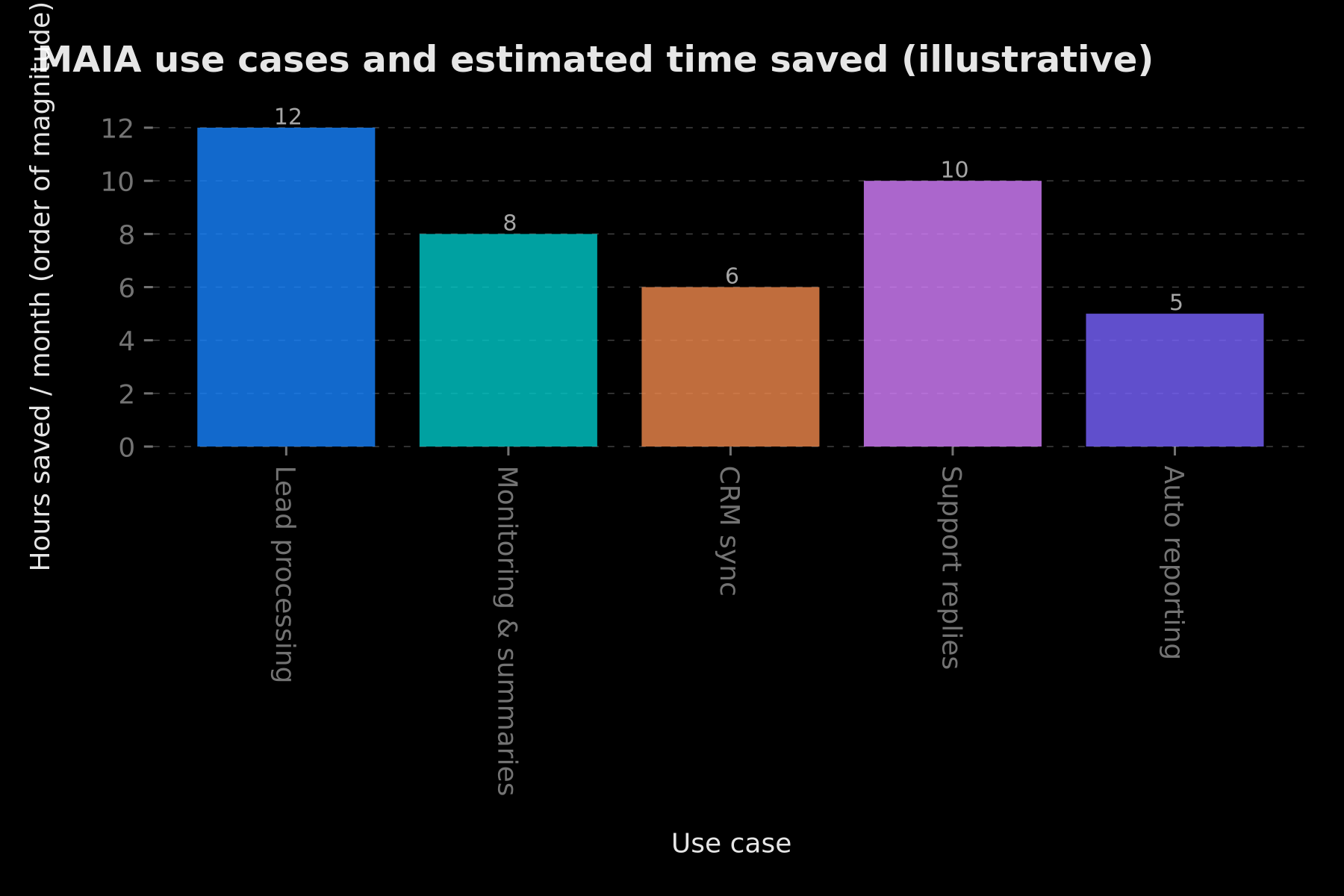 Illustrative estimate of hours saved per month depending on the type of agent created with Maia
Lead processing and qualification. This is the flagship use case, the one in this tutorial: capture, enrich, contact, archive. For a sales team receiving dozens of requests per week, automation removes manual entry and the risk of forgetting.
Monitoring and summaries. Watch sources (RSS, emails, forms), summarize content with an AI module, and publish the synthesis in Slack or Notion. Ideal for staying informed without spending an hour a day on it.
CRM synchronization. Keep several databases consistent (Notion, Airtable, HubSpot) without copy-pasting. Maia generates the synchronization scenario, you validate the field mappings.
Support replies. Classify incoming emails, generate a draft reply, and propose it to a human for validation. The agent makes the first draft; the human keeps control over sending.
Automated reporting. Aggregate data from multiple sources and produce a periodic report. The scenario runs in the morning, the report is ready when you arrive.
What all these cases have in common: they are repetitive, rule-based, high-volume tasks. The more manual and regular the task, the more profitable the agent generated by Maia.
What Maia does well — and less well
To use Maia with clarity, you need to know its real strengths and its blind spots. No tool is magic, and presenting Maia as such would serve no one.
What Maia does well
Maia excels at linear and frequent scenarios: a trigger, a few actions, popular and well-integrated apps. On this ground, it saves considerable time and produces correct structures on the first try. It's also excellent at data mapping, the most tedious part of manual work. Finally, it lowers the barrier to entry: a beginner produces in minutes what would have taken hours of tutorials.
What Maia does less well
Maia can get it wrong on complex cases: multiple routers, nested conditional logic, fine aggregations. The more sophisticated the scenario, the more you'll need to fix by hand. It depends on the quality of your description: a vague prompt produces an approximate scenario. It doesn't know your business: it ignores your implicit rules, edge cases, and regulatory constraints — it's up to you to make them explicit. Finally, it doesn't replace verification: a generated scenario still needs testing before going to production.
The common-sense rule: the more critical the scenario, the more careful your review must be. Maia accelerates, it doesn't absolve you. An agent that touches money, customer data, or external communications deserves careful human validation before activation.
Prompting best practices for Maia
Across scenarios, a few habits make the difference between a smooth experience and a frustrating series of round trips. Here are the practices that pay off.
Describe the "what" and the "why," not the "how." Let Maia choose the modules; focus on the business goal. Say "I want to alert my team when an important client writes" rather than specifying every technical setting.
Be explicit about sensitive data. If a field contains personal information, say so. Maia has no awareness of the confidential nature of a data point until you specify it.
Give examples. "The welcome email should look like: Hi [first name], thanks for your request…" An example is worth a thousand adjectives and guides Maia far better than an abstract instruction.
Iterate in small touches. One change per message, test, continue. It's the fastest method to converge on the right scenario.
Review the scenario, not just the result. Open each module at least once. That's how you learn Make and keep mastery over what you deploy.
These reflexes are not specific to Maia: they apply to any collaboration with a generative AI. But they take on special importance here, because the result isn't a text, it's a system that will run on its own.
Maia vs n8n's AI agent: which to choose?
The question comes up systematically: should you create an AI agent with Make MAIA or with n8n? Both platforms address automation, but with different philosophies.
Make and Maia bet on accessibility and visual experience. Natural language generation, the polished canvas, and the integration catalog make it an ideal choice to start fast, for non-technical profiles, and for classic "business" scenarios. The trade-off: an operations-billed model that can climb on large volumes.
n8n prioritizes control and flexibility. Open source, self-hostable, with a very open node logic and the ability to write code, it appeals to more technical profiles and cases where mastery of infrastructure and data is paramount. Its AI agent is powerful but requires more onboarding.
For a complete comparison of the two tools, we published n8n vs Make: the complete automation comparison 2026. And if budget is central to your choice, the price of n8n and Make automation in 2026 details each platform's cost models. To understand the power of n8n's AI agent, also see n8n AI Agent: transform your workflows into intelligent systems.
In short: Maia for speed and simplicity, n8n for control and sovereignty. Many teams end up using both, each for what it does best.
Security, data and costs: what to anticipate
An autonomous agent touches data and triggers real actions. Three topics deserve your attention before going to production.
Connection security. Each authenticated module gives your scenario access to a third-party service (your Gmail, your Notion, your CRM). Limit permissions to the strict minimum, don't grant admin access when read access is enough, and regularly review active connections. A compromised agent is an agent that acts in your name.
Data privacy. If your scenario passes personal information through an AI module, you must know where that data is processed and how long it's retained. For truly sensitive processing, a local AI may be preferable to the cloud — that's the approach we detail in Gemma 4 + Ollama + n8n: a local, free and private AI agent.
Costs. Make.com's Free plan offers on the order of 1,000 operations per month. For our 4-module scenario, that allows roughly 250 monthly leads before you need to move to a higher plan. The Core plan (on the order of $9 to $10 per month) goes up to about 10,000 operations. The classic trap: each executed module consumes one operation, so a multi-step scenario multiplies consumption by the number of triggers. Watch your quota as soon as volume climbs, and architect your scenarios to limit unnecessary operations. These amounts are orders of magnitude valid in early 2026; always check Make's official pricing grid, which evolves regularly.
Conclusion
Make MAIA represents a genuine qualitative leap in automation accessibility. In a few minutes, without a single line of code, you can create an AI agent for lead processing that works for you continuously. But this convenience doesn't exempt you from understanding what you're building: Maia is a remarkable copilot, not an autopilot. The value comes from combining Maia's generation speed, your ability to describe a need clearly, and your vigilance when validating.
Remember the method: describe with the five ingredients, read the generated scenario, iterate in small touches, test before activating, watch the costs. With these reflexes, Maia becomes a reliable accelerator rather than a black box. To go further on tool choice, revisit our n8n vs Make 2026 comparison.
Need more complex automations — multi-agents, sensitive data, custom integrations? The BOVO Digital team builds n8n and Make architectures on demand. Free quote in 24 hours.
Tags
FAQ
Is Make.com Maia available on the free plan?
Yes. Maia is accessible on all Make.com plans, including the Free plan. The 1,000 free operations allow you to test most simple scenarios before moving to a paid plan.
What's the difference between Maia and other AI no-code tools?
Maia is native to Make.com and understands its entire ecosystem of 3,000+ integrations. It can generate multi-module scenarios, revise existing scenarios, and accepts multimodal inputs (PDF, images, audio in beta).
Is Apollo.io required for lead enrichment?
No. Free alternatives like Clearbit (limited), Hunter.io, or LinkedIn MCP Servers can replace Apollo.io depending on your budget. Maia adapts if you specify your preferred tool in the description.
Do you need to code to use Make MAIA and create an AI agent?
No. That's the whole point of Make MAIA: creating an AI agent is done by describing the need in natural language. A logical understanding of the steps (trigger, actions, conditions) is enough. Knowing Make modules helps you refine, but it isn't a prerequisite to get started.
Can Maia modify an existing scenario or only create new ones?
Maia can also revise a scenario you already built: add a module, insert a filter, replace an app, or explain part of the flow. You describe the change you want and Maia adjusts the scenario, which makes it a useful copilot well beyond the initial creation.
Stuck on a step? We take it to production
Tutorials stop where production starts: secrets, GDPR, no-shows, CRM. A 30-min call to scope the delivery.
- 30 min
- Scoped delivery
- No commitment
Vicentia Bonou
Full Stack Developer & Web/Mobile Specialist. Committed to transforming your ideas into intuitive applications and custom websites.


