
Supabase vs Google Sheets: Why SMEs Are Migrating in 2026
Google Sheets is every beginner's favorite automation tool — and the leading cause of production disasters. Rate limits, corrupted data, zero security: here's why Supabase changes everything, and how to decide which tool to use in your context.

Updated

Supabase vs Google Sheets: Why SMEs Are Migrating in 2026
You have 50 n8n workflows writing to Google Sheets. Your client is happy. And then one day, everything breaks — in production, on a Monday morning, at peak traffic. Welcome to the most common mistake in modern automation.
Supabase vs Google Sheets: it's a decision every serious automation builder must make early — before production makes it for them.
It's a scene we've witnessed dozens of times.
A client comes to us with a Make or n8n workflow that "used to work great". Hundreds of rows in a Google Sheet. Important data — leads, orders, logs, API results. And then one day, the data is incomplete, out of order, or simply gone.
Google Sheets is not a database. It's a spreadsheet. And using a spreadsheet as data infrastructure for production automation workflows is one of the most expensive mistakes we see among beginner and intermediate automation builders.
In this article, I'll explain exactly why — with numbers and real cases — and show you how Supabase solves these problems definitively. Not to sell Supabase at all costs, but to give you an honest decision framework: when to use what, and how to migrate if you're already stuck in a Google Sheet.
Why Google Sheets Seduces Automation Builders (And That's Normal)
Let's be honest: Google Sheets is an excellent starting point. It has real advantages that no one can deny.
Zero configuration, universal interface
Nothing to install. No developer account, no schema to define, no migration to manage. You open a tab, name your columns, and start. For a prototype or MVP, it's unbeatable.
The interface is known by everyone in the company. The non-technical client can open the Sheet, see the data, edit it manually if needed. It's immediate transparency that few tools offer.
Native integration in every automation tool
n8n, Make, Zapier, Activepieces — they all offer a native Google Sheets node. Read, write, update, delete: everything works in a few clicks with no advanced setup. It's a significant development accelerator at the start. If you want to build more complex AI-powered workflows on top of this infrastructure, see our guide on n8n AI agents for transforming workflows into intelligent systems.
Free and collaborative
For a tight budget, it's hard to do better. Google Sheets is part of Google Workspace (often already paid for) and costs nothing extra. You can share the link, collaborate in real time, add formulas to visualize data.
The result: Google Sheets is perfect for quick prototypes, concept tests, low-volume workflows. The problem is that many automation builders never move to the next step. They keep Google Sheets in production as volumes explode, and that's when everything unravels.
The 5 Breaking Points Nobody Tells You About
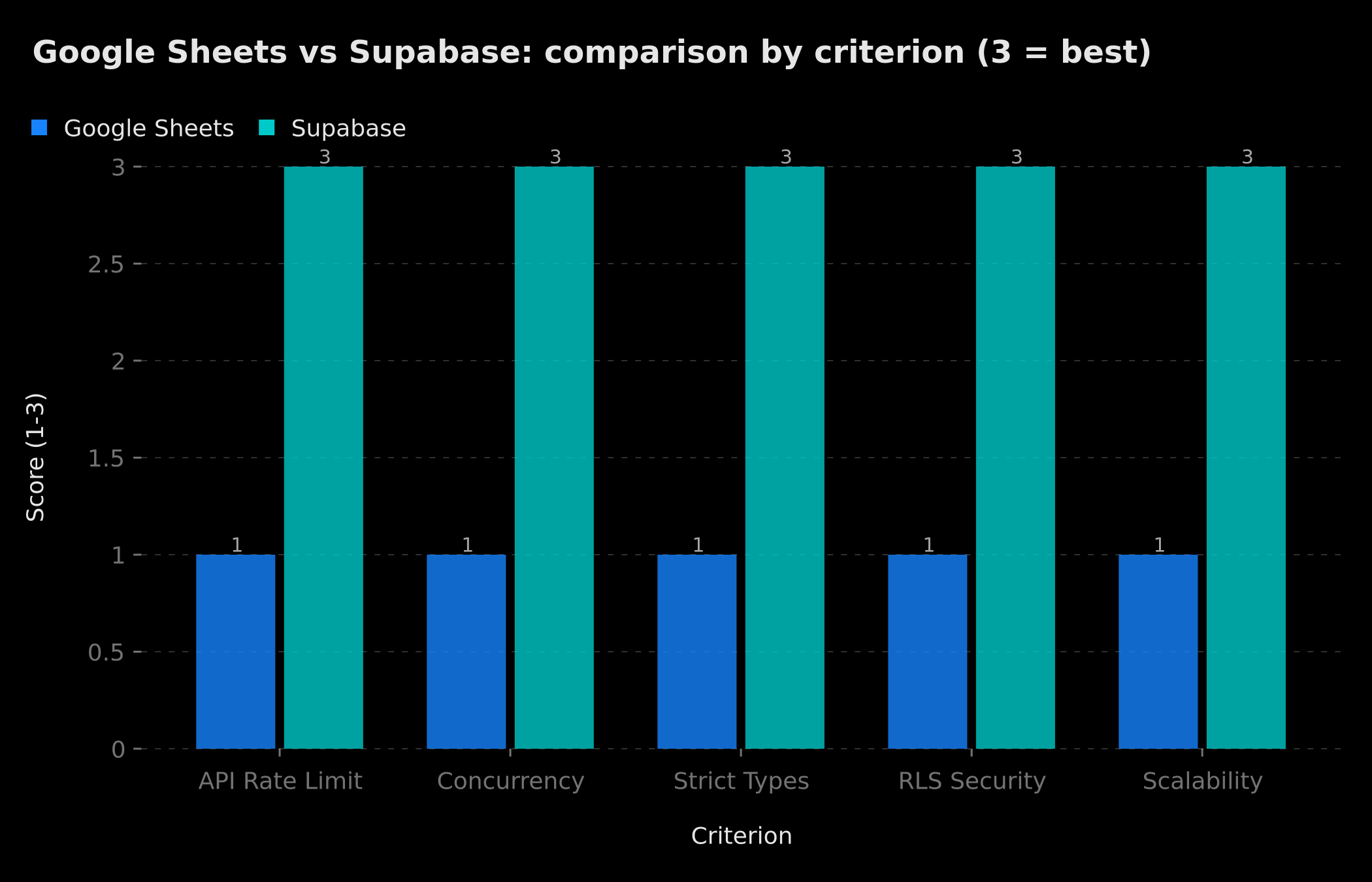 On every critical technical criterion, the gap between Google Sheets and Supabase is maximal (3 = best).
Breaking Point #1 — Google API Rate Limits
The Google Sheets API has strict limits:
- 300 requests per minute per project
- 100 requests per 100 seconds per user
- 60 write requests per minute per user
These limits seem high. They're not.
A single n8n workflow running every 30 seconds, reading 5 rows and writing 3, already consumes 16 requests per minute. Add 3 or 4 such workflows on the same project, and you're quickly approaching the limit — without even realizing it.
What happens when you hit the limit: The API returns a 429 Too Many Requests error. Depending on how your workflow handles errors, data is either lost, duplicated, or stored in an inconsistent intermediate state. n8n automatically retries, which sometimes makes the problem worse.
Real case from a client: A lead scoring workflow that ran every 15 minutes against a list of 2,000 prospects. Starting at 800 requests per day, the API began throttling. Result: 30% of leads were not scored, with no visible alert.
Breaking Point #2 — No Real Concurrency
Google Sheets is not designed to be written by multiple processes simultaneously. When two n8n workflows try to write to the same Sheet at the same time, you get one of these scenarios:
- The most recent write overwrites the previous one — data is lost with no visible error
- A conflict error — one of the two workflows silently fails
- Partially written data — one row starts being written while another finishes, creating a corrupted row
In a real database like PostgreSQL (which Supabase is built on), this problem has been solved for decades by ACID transactions — Atomicity, Consistency, Isolation, Durability. Either the write succeeds completely or it's rolled back completely. There is no intermediate state.
Classic scenario: A WooCommerce ↔ CRM sync workflow. Two orders arrive simultaneously. Both workflows want to read the order counter on row 1, increment it by 1, and write it back. Both read "47", both write "48". The counter should display "49". You've lost an order in your statistics — with no visible error.
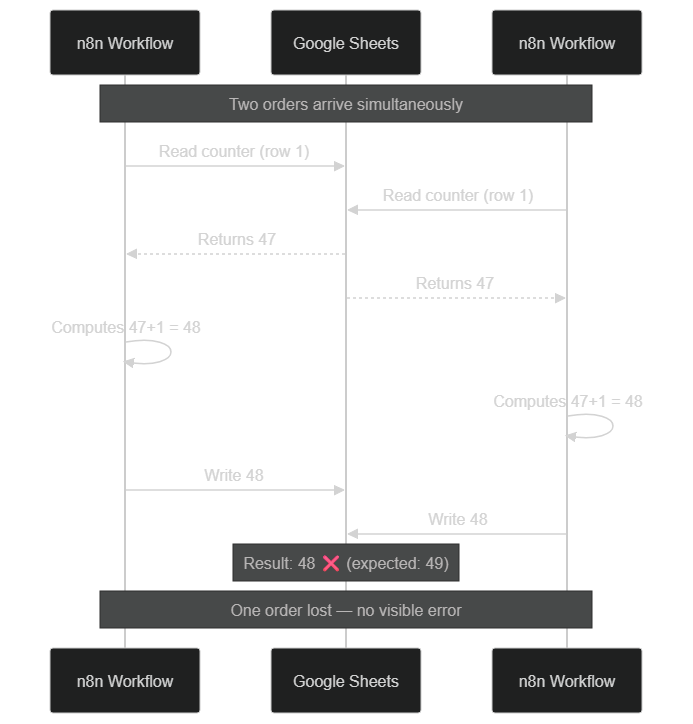 Without ACID transactions, two simultaneous writes overwrite each other: the counter shows 48 instead of 49.
Breaking Point #3 — Zero Typing, Zero Integrity
In Google Sheets, everything is a string. There is no "integer", "date", "boolean" or "UUID" type at the API level. This absence of types causes a series of insidious bugs:
- Dates change format depending on the OS, locale, or Sheet configuration. "2026-05-23" can become "23/05/2026", "May 23, 2026", or "45789" (Excel serial number). Your interval calculation formulas break without explanation.
- Numbers become strings when they contain a space or comma. Your aggregations return wrong results.
- Duplicates are invisible — there's no uniqueness constraint. Nothing prevents you from writing the same order, the same client, or the same ID twice.
- NULL values don't exist — an empty cell and a cell with a space are indistinguishable via the API.
In Supabase (PostgreSQL), you define a schema: order_id UUID PRIMARY KEY, amount DECIMAL(10,2) NOT NULL, created_at TIMESTAMPTZ DEFAULT NOW(). It is physically impossible to insert invalid data. The database refuses the operation and returns a clear error.
Breaking Point #4 — No Data Security
Google Sheets relies on an all-or-nothing sharing model. When you give access to a Sheet, the person sees all rows in that Sheet. It's impossible, natively, to restrict visibility to certain rows based on the logged-in user.
Implication for automation builders: If you manage data from multiple clients in a single Sheet (leads, orders, logs), and a client asks for read access — you either give them access to everything, or create a separate Sheet per client (which multiplies workflows and complexity).
Supabase natively includes Row Level Security (RLS) — a PostgreSQL mechanism that filters rows automatically based on caller identity. You define policies like: "A user can only read rows where client_id matches their JWT ID". Filtering is applied at the database level, not in your code.
Breaking Point #5 — Zero Scalability Past 10,000 Rows
Google Sheets has an official limit of 10 million cells per file. In practice, performance degrades well before that:
- At 10,000 rows:
VLOOKUPandQUERYformulas start to lag - At 50,000 rows: Interface loading times exceed 5 seconds
- At 100,000 rows: API operations take several seconds each, and summary formulas are often incorrect
This is not a hypothetical problem. A workflow capturing 100 leads per day reaches 36,500 rows in a year. An order tracking webhook for an average e-commerce site can generate 200,000 rows in 18 months.
PostgreSQL handles billions of rows with the right indexes. No noticeable performance degradation between 1,000 and 10 million rows, as long as the schema is well designed.
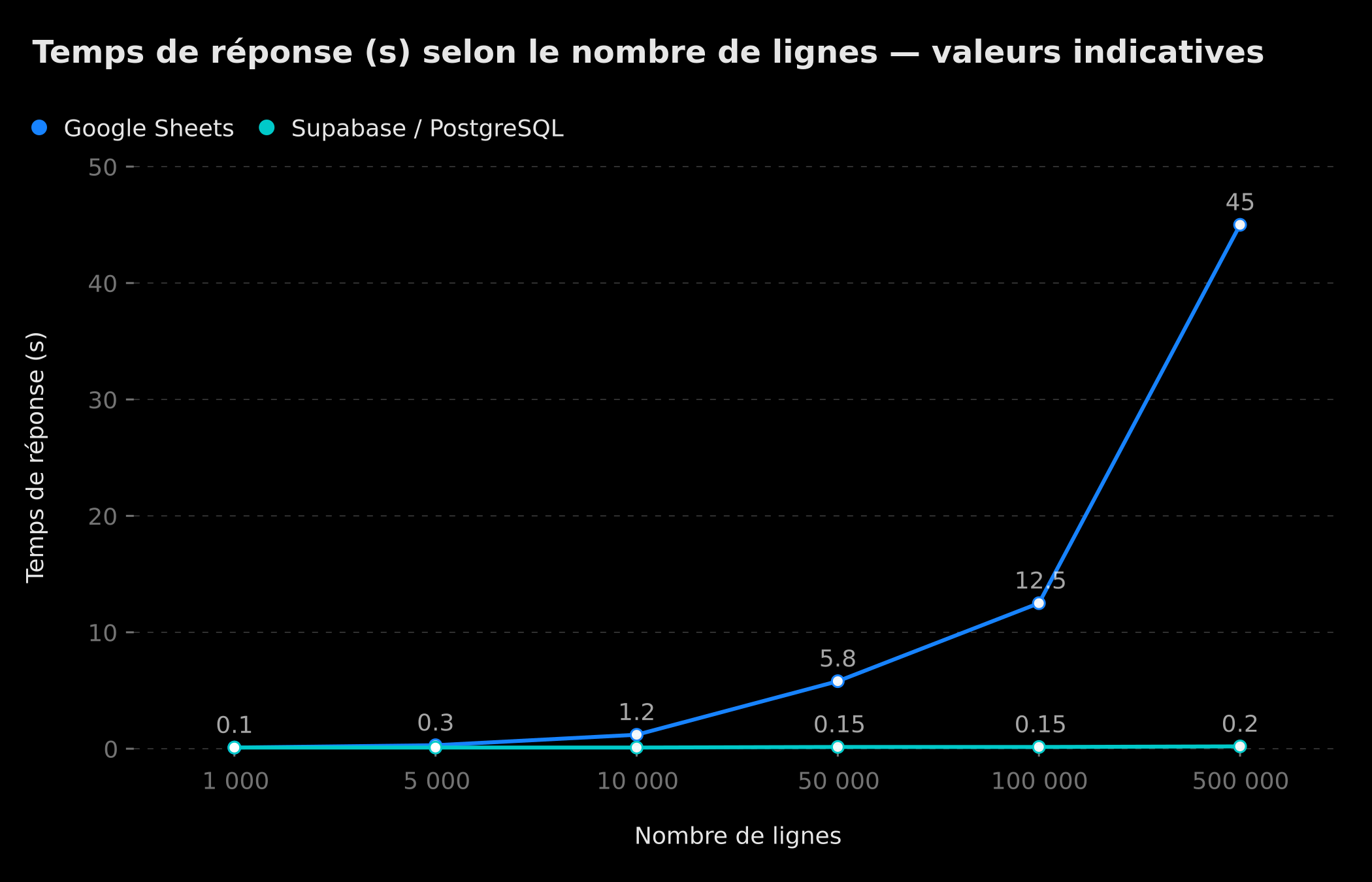 Response time per request: PostgreSQL stays flat while Google Sheets explodes (indicative values).
The Real Cost of This Mistake
The Google Sheets mistake has three types of costs that automation builders systematically underestimate.
Cost 1: Debug Time
When your data is corrupted or missing, you don't always know why. No transaction history, no native error logs, no constraints that would have blocked the invalid write. You spend hours reconstructing what happened by cross-referencing n8n logs with Sheet timestamps.
Estimate: 2 to 4 hours per incident on a production workflow. Over 12 months with a poorly sized Sheet, our clients lost an average of 18 hours of debugging.
Cost 2: Technical Debt
Every workaround you add to work around Sheets limitations — multiple tabs, deduplication logic in n8n, verification formulas, Apps Script scripts — creates technical debt. This debt accumulates until the point where refactoring takes longer than rebuilding from scratch. As we discuss in our article on automating 40 hours of work per week with AI agents, your data architecture is the foundation everything else rests on — if it's shaky, the entire automation is fragile.
Cost 3: Complete Rebuild
This is the most brutal cost. When a client wants to scale and your architecture can't keep up, you have to rebuild everything. New data schema, new mapping logic in n8n, migration tests, client retraining.
At BOVO Digital, a Google Sheets → Supabase migration represents on average 60 to 70% of what a correct architecture from the start would have cost. You pay twice.
A concrete scenario: the in-house CRM that unravels
Let's take an example that summarizes everything. A 5-person digital agency manages its prospects in a Google Sheet: name, email, deal status, amount, follow-up date. One n8n workflow sends automatic follow-up emails, another updates statuses after each call, a third imports leads from a Typeform form.
For 6 months, everything works. At 800 leads, the first incidents appear: statuses that weren't updated because two workflows wrote simultaneously, leads imported twice because the form submitted twice. The agency adds deduplication logic in n8n, an Apps Script to clean duplicates overnight, and a third "quarantine" sheet for suspicious entries.
At 2,000 leads, the interface lags, pipeline calculation formulas take 8 seconds to refresh, and one in ten leads arrives as a duplicate despite all the safeguards. The Supabase migration, which would have taken 4 hours from the start, now takes 2 full days — because 18 months of workarounds need to be untangled.
What Supabase Concretely Changes
Supabase is not "just another database". It's a platform that makes PostgreSQL accessible without DevOps.
Full PostgreSQL with All Its Guarantees
You get a real relational database: strict types, NOT NULL and UNIQUE constraints, foreign keys, ACID transactions, indexes for fast queries. Your n8n workflow writing orders can have an order_id UUID PRIMARY KEY constraint — it becomes physically impossible to insert a duplicate.
REST API + Realtime Out of the Box
Supabase automatically generates a REST API for each table, protected by your service_role key. In n8n, you use the HTTP Request node or the native Supabase node to read, write, update and delete rows — exactly like with Google Sheets, but without rate limits and with all of PostgreSQL's guarantees.
Realtime mode lets you trigger an n8n webhook as soon as a row is inserted or modified — without polling. This is the foundation of clean event-driven architectures. Instead of asking "is there anything new?" every 5 minutes (polling), your n8n workflow is notified instantly via Supabase's Realtime channels, which are based on PostgreSQL's logical replication. The result is a reactive system, less resource-intensive, and significantly more reliable.
Row Level Security Without Writing Middleware
Supabase RLS policies are defined in plain SQL and applied at the database level:
-- Each client only sees their own orders
CREATE POLICY "client_isolation" ON orders
  FOR ALL USING (client_id = auth.uid());
With this policy, a user only sees their own orders — regardless of how they access the database. No filter in your code, no risk of forgetting. You can expose the Supabase API directly from your front-end (using the anon key) without risking data leaks between clients.
Edge Functions: Business Logic Without a Separate Server
Supabase Edge Functions are serverless functions (based on Deno) that run at the edge, close to your data. For automation builders, this is a structural shift: instead of delegating all transformation logic to n8n or Make — and paying credits for each operation — you can move complex transformations directly into the database layer.
For example, an Edge Function can receive a Stripe webhook payload, validate the signature, extract the customer_id, update the subscription status in the subscriptions table, and trigger a welcome email — all in a single invocation, without network latency between steps. The savings on Make or n8n credits become significant as volumes grow. And if you're self-hosting n8n to reduce costs, our guide on n8n self-hosted on VPS explains how to combine both approaches optimally.
Supabase Storage: Files and Media Built In
An underestimated use case: file management in automation workflows. When your workflow downloads PDF invoices, product images, or CSV exports, where do you store them? Often in Google Drive (back in Google's ecosystem with its own limitations), or in S3 with a separate configuration.
Supabase Storage is a built-in object storage layer, S3-compatible, protected by the same RLS policies. From n8n, a single HTTP Request node is enough to upload a file directly to a Supabase bucket, linked to the corresponding database record. No more silos between your structured data and your files.
Real Cost Comparison
The cost comparison is often done wrong. Here's the reality:
Supabase's free tier includes 2 active projects, 500 MB storage, 50,000 active requests per month, and 1 GB bandwidth — sufficient for the startup phase of most projects. The Pro tier at $25/month includes 8 GB storage, automatic daily backups, and no active request limits on recent plans.
By comparison, Airtable at equivalent volume costs between $20 and $45 per user per month. Google Sheets is free, but every hour of debugging costs your developer time. To see the full cost of an automation infrastructure, check our detailed analysis of n8n and Make automation pricing in 2026.
No Rate Limits on Reads
Unlike the Google Sheets API, Supabase/PostgreSQL does not impose rate limits on read operations. Your workflows can query the database as often as needed without risk of throttling. The only limits are those of your server, which you control entirely.
Full Comparison Table
| Criterion | Google Sheets | Airtable | Supabase |
|---|---|---|---|
| API rate limit | 300 req/min | 5 req/s | None |
| Multi-source concurrency | No | Partial | Yes (ACID) |
| Strict data typing | No | Partial | Yes |
| Uniqueness constraints | No | Partial | Yes |
| Row Level Security | No | No | Yes (native) |
| Scalability | ~10k rows comfort | ~100k rows | Unlimited |
| Native webhooks (Realtime) | No | Yes (paid) | Yes (free) |
| Edge Functions | No | No | Yes (Deno) |
| Integrated Storage | No | Partial | Yes (S3-compat) |
| Pro tier cost | Free | ~$20/month | $25/month |
| Learning curve | Very low | Low | Moderate |
| n8n/Make compatibility | Native | Native | HTTP / native node |
| Automatic backup | No | Paid | Yes (Pro) |
| Non-technical interface | Excellent | Excellent | Limited |
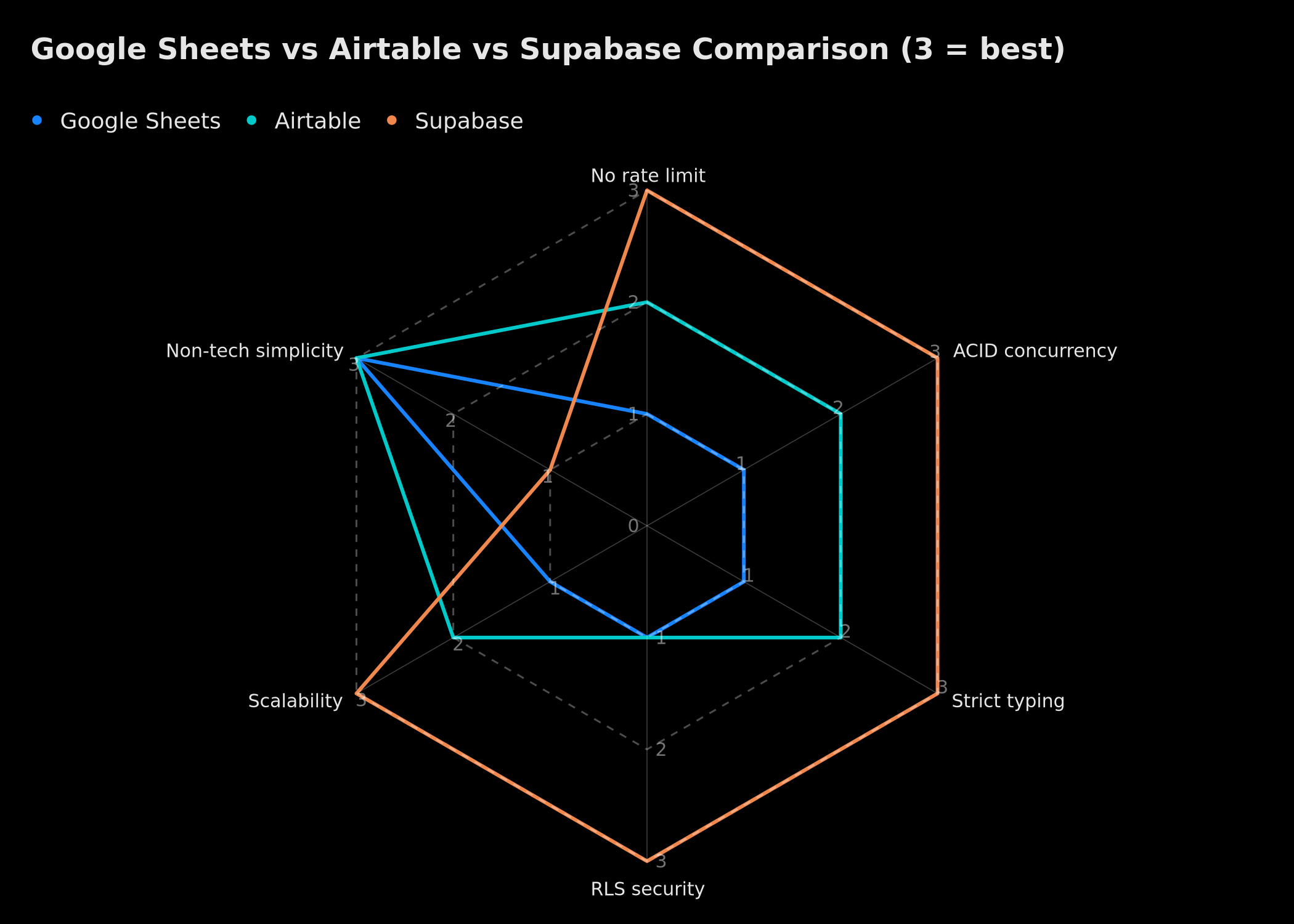 Visual comparison: Supabase wins on robustness, Sheets and Airtable on simplicity (3 = best).
Decision Framework: Which Tool for Which Context
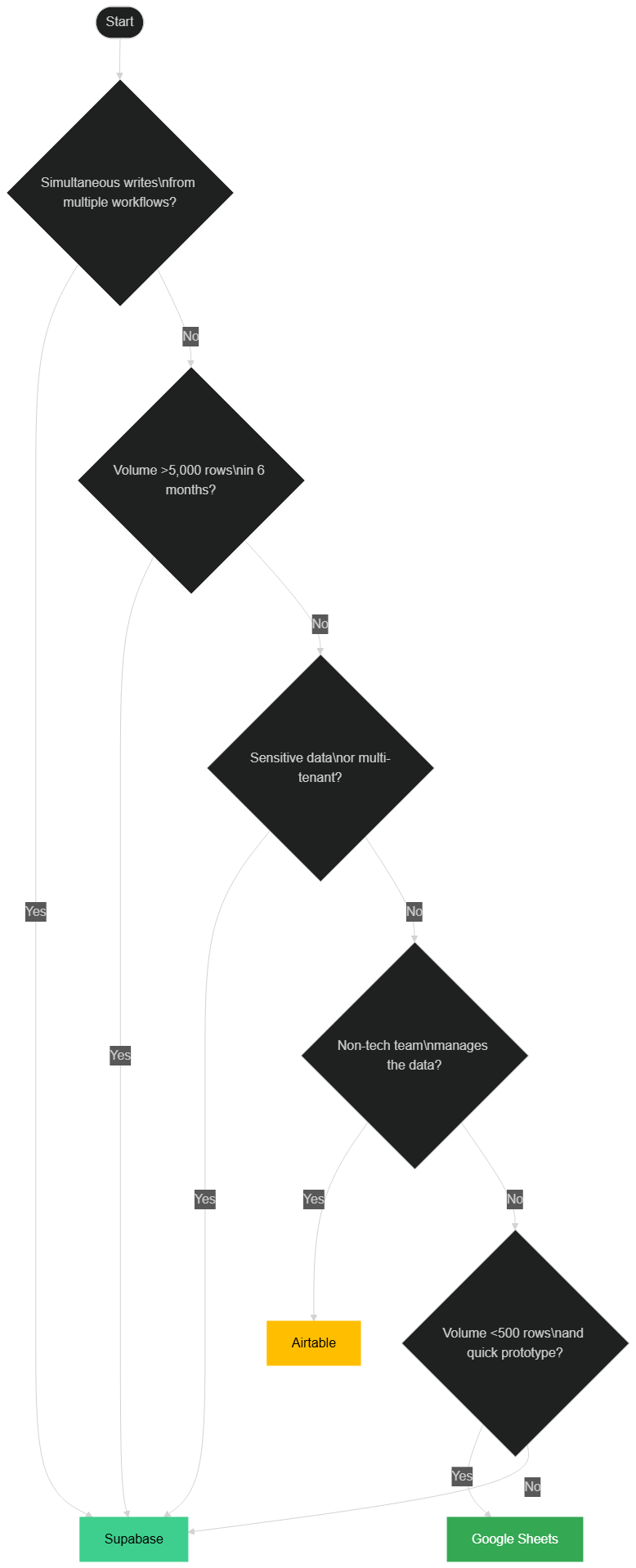 Decision tree: which storage tool for your automation context.
Use Google Sheets when:
- You're building a prototype in less than a day to validate a concept
- Data volume will never exceed 500 rows
- Data needs to be directly visible and editable by a non-tech user (client, accountant, manager)
- The use is one-time and non-critical — a weekly report, a manual export
- You have zero budget and zero need for guarantees
Use Airtable when:
- Your non-technical team actively manages the data (project management, light CRM, content base)
- You need integrated form interfaces for data entry
- Volume will stay under 50,000 rows
- Airtable's price is justified by the autonomy it gives your team
- You don't need RLS or ACID guarantees
Use Supabase when:
- Multiple workflows write simultaneously to the same data source
- Expected volume exceeds 5,000 rows in the next 6 months
- Data is sensitive (personal, financial, or medical data)
- You need to isolate data by client (multi-tenant)
- Data must be accurate and never lost — logs, orders, transactions
- You're building something that needs to scale without a rebuild
Rule of thumb: If your workflow writes to Google Sheets more than 100 times per day, start planning the migration to Supabase. You'll need it in under 6 months.
Migrating from Google Sheets to Supabase: 4 Steps
Migration sounds scary, but it's less complex than it seems.
 The Google Sheets to Supabase migration in 4 steps.
Step 1 — Analyze and clean existing data
Before migrating, export your Sheet as CSV and audit your data: look for duplicates, missing values, inconsistent date formats. This is the moment to define your target schema in SQL. Don't migrate complexity — it's an opportunity to start with a clean structure.
A simple tool: open the CSV in a code editor (VS Code with the Rainbow CSV extension), or load it into a Python notebook with pandas to quickly identify anomalies. Document your decisions: which column becomes which SQL type, which empty values you allow.
Step 2 — Create the Supabase schema
In Supabase's SQL editor, create your tables with strict types:
-- Leads table with strict constraints
CREATE TABLE leads (
  id UUID PRIMARY KEY DEFAULT gen_random_uuid(),
  email TEXT UNIQUE NOT NULL,
  first_name TEXT,
  score INTEGER DEFAULT 0 CHECK (score >= 0 AND score <= 100),
  source TEXT,
  status TEXT DEFAULT 'new' CHECK (status IN ('new','contacted','qualified','lost','won')),
  created_at TIMESTAMPTZ DEFAULT NOW(),
  updated_at TIMESTAMPTZ DEFAULT NOW()
);

-- Indexes for frequent queries
CREATE INDEX idx_leads_status ON leads(status);
CREATE INDEX idx_leads_created_at ON leads(created_at DESC);
Step 3 — Import existing data
Supabase allows you to import a CSV directly from the interface — in one click. Supabase validates types in the process and alerts you to invalid rows. If your CSV has problematic rows (which the Step 1 audit should have detected), handle them manually or with a "Code" node in n8n before importing.
For large volumes (>50,000 rows), prefer the psql \copy utility via the direct PostgreSQL connection: faster, more reliable, and better at handling complex character sets.
Step 4 — Update your n8n workflows
Replace "Google Sheets" nodes with "HTTP Request" nodes pointed at the Supabase API, or use the native Supabase node available since n8n 1.0. The logic of your workflows doesn't change — only the data destination changes.
// HTTP Request node configuration in n8n
// POST https://<project-ref>.supabase.co/rest/v1/leads
{
  "Content-Type": "application/json",
  "apikey": "{{ $credentials.supabaseKey }}",
  "Authorization": "Bearer {{ $credentials.supabaseKey }}",
  "Prefer": "return=representation"
}
Estimated migration time: 2 to 4 hours for a medium-sized project (1 to 3 tables, under 10,000 rows). Half a day for a complex project. A progressive migration is also possible: run both systems in parallel for a transition week, writing simultaneously to Sheets and Supabase, to validate consistency before switching over completely.
From Hack to Scalability: The GDPR and Business Stakes
Using Google Sheets as a database is not just a technical problem, it is a major business risk. By storing customer data (emails, phones) in a shared spreadsheet, you expose yourself to security breaches and GDPR non-compliance. An employee's handling error can erase months of CRM history. Supabase, with its strict access management (RLS) and automated backups, transforms a "no-code hack" into a true enterprise infrastructure, secure and scalable.
Migrate Your Processes to a Real Database with BOVO
Have you reached the limits of Google Sheets or Make? Are your workflows crashing regularly? At BOVO Digital, we audit your automated processes and carry out secure migrations to Supabase and n8n. We build robust, GDPR-compliant backend architectures ready to handle your growth flawlessly. Contact us to secure your data infrastructure.
Conclusion
Google Sheets is an excellent tool — for what it was designed for: collaborative spreadsheets. It is not a database, and using it as such in production automation workflows is a ticking time bomb.
The right tool isn't chosen when everything breaks. It's chosen when you design the workflow.
Supabase doesn't ask you to be a developer. It asks you to learn 10 minutes of SQL and change your habits. In exchange, you get infrastructure that won't betray you at 50,000 rows, that won't corrupt your data when two workflows run simultaneously, and that protects your clients' data by default. With Edge Functions and Storage, you have a complete platform to centralize all your automation logic — rather than a patchwork of Sheets, Apps Script scripts, and workarounds.
If you have production workflows writing to Google Sheets and you sometimes see missing data or strange behavior — that's not an n8n bug. That's the architecture.
Tags
FAQ
Can you migrate easily from Google Sheets to Supabase?
Yes. The migration follows 4 steps: audit and clean existing data, create the SQL schema in Supabase, import the CSV via the interface (one click), then update n8n or Make nodes to point to the Supabase API. For a project with 1 to 3 tables and under 10,000 rows, expect 2 to 4 hours of work.
Does n8n natively support Supabase?
Yes. Since n8n 1.0, there is a native Supabase node that allows reading, inserting, updating and deleting rows without advanced configuration. You can also use the HTTP Request node with Supabase's auto-generated REST API for more complex operations (filtered queries, joins, PostgreSQL function calls).
Do you need to know SQL to use Supabase?
The basics are enough to get started. CREATE TABLE, INSERT, SELECT with WHERE — that covers 80% of what you need. Supabase offers a visual SQL editor with autocomplete, and the documentation is very accessible. For common operations from n8n or Make, you don't even write SQL: the automatically generated REST API handles everything via JSON parameters.
Is Airtable a valid alternative to Supabase for automation?
Airtable is an excellent tool for non-technical teams who actively manage their data. But it has the same structural limitations as Google Sheets for intensive workflows: 5 req/s rate limit, no ACID transactions, no real Row Level Security. For workflows that write more than 200 times per day or sensitive multi-tenant data, Supabase remains the only solid option.
How do you secure Supabase API keys inside n8n or Make?
In n8n, store your `service_role` key in Credentials (Header Auth section), never in plain text inside a node's parameters. In Make, use Connections with the "API Key" type. The `service_role` key bypasses RLS — never expose it on the client side. For limited public access (read-only, non-sensitive data), use the `anon` key combined with strict RLS policies.
When is it better to stay on Google Sheets rather than migrate to Supabase?
Stay on Google Sheets if your workflow generates fewer than 100 writes per day, if your data has no critical value, if a non-technical user needs to edit the data directly in the interface, or if you are in the prototype phase (workflow less than a week old). In all other cases — growing volume, client data, concurrent workflows — plan the migration before the problem arises.
We scope one workflow — not a generic demo
You describe a repeated task. We tell you what n8n would ship, the timeline, and what stays out of scope.
- 30 min
- 1 scoped workflow
- No commitment
William Aklamavo
Web development and automation expert, passionate about technological innovation and digital entrepreneurship.


