
How to Automate 40 Hours of Work Per Week with AI Agents
Task audit, selection, implementation, and ROI: the complete guide to automating your work with AI agents, reclaiming 40 hours per week, and avoiding common pitfalls.

Updated

How to Automate 40 Hours of Work Per Week with AI Agents
40 hours per week. That's the amount of time you can reclaim when you learn to automate your work with AI agents methodically — not by launching ten tools simultaneously, but by advancing one task at a time.
Automating your work with AI agents is no longer a luxury reserved for large tech companies. In 2026, SMBs with 5 to 50 employees are deploying automation systems that save them between 10 and 40 hours per week on low-value tasks. This guide explains exactly how to get there: auditing your tasks, choosing where to start, implementing progressively, measuring real gains, and avoiding costly mistakes.
We are not selling dreams here. The figures presented are either drawn from our client projects (with honest ranges) or from dated public benchmarks. The goal is to give you a method you can apply starting this week.
Before Automating: Audit Your Tasks with a Simple Matrix
The first mistake almost every entrepreneur makes is choosing a tool before understanding their tasks. The result: they automate things that don't deserve to be automated, and waste time on useless configurations.
The right approach starts with a two-week audit. For fourteen days, log every repetitive task you or your team performs, associating four pieces of information with each: average time spent per occurrence, weekly frequency, standardization level of the rules (are the rules always the same?), and the format of the data involved (structured like a spreadsheet or unstructured like a free-form email?).
At the end of those two weeks, you have the raw material to build your automation matrix.
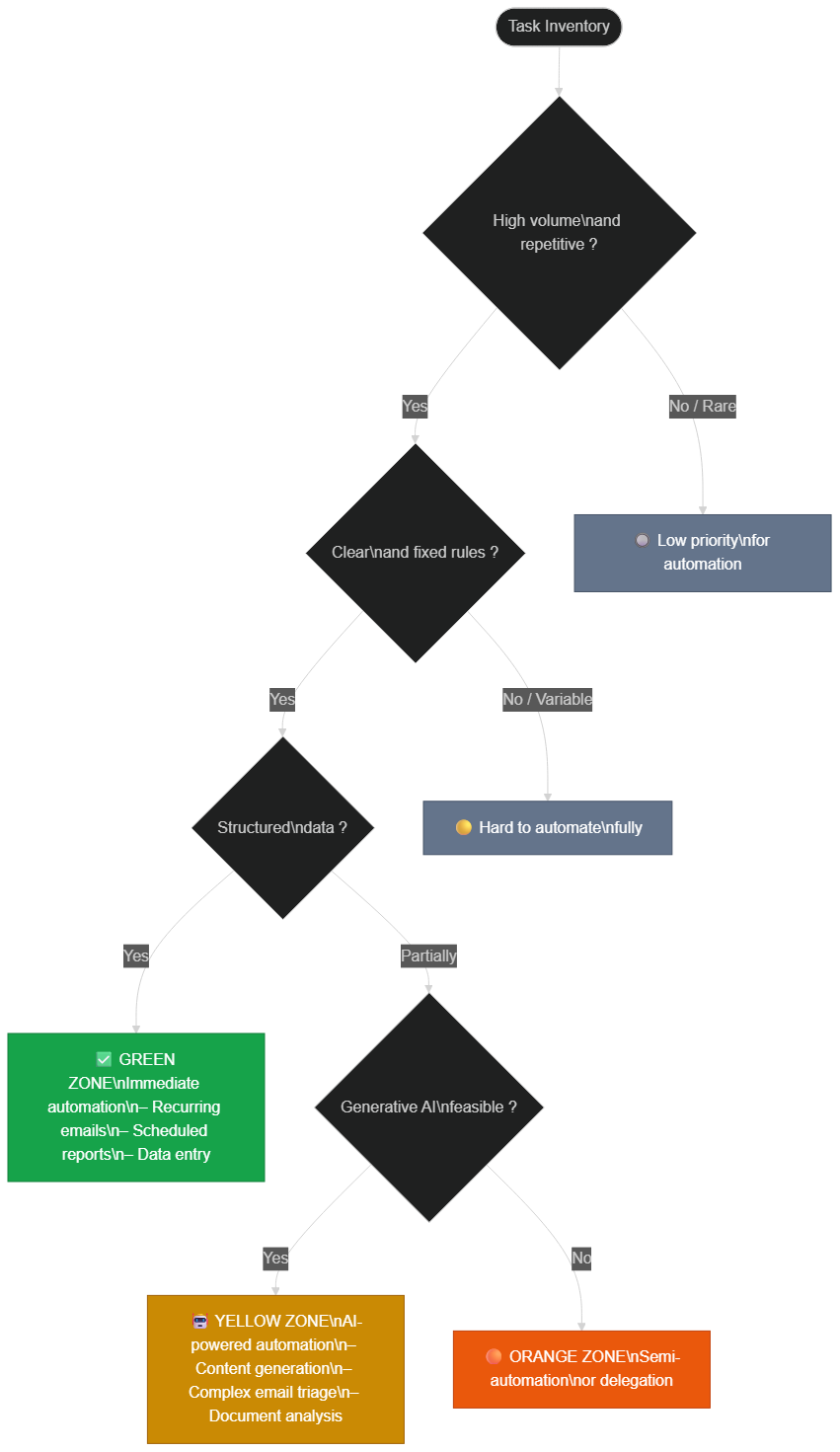 Classify each task by its volume, rules, and data structure to identify automation priorities
The Three Zones of Your Matrix
Green Zone — Immediate Automation. These tasks feature high volume (at least 3 occurrences per week), fixed and immutable rules, and structured data. Typical examples: exporting and formatting a weekly report, entering data into a CRM from a form, sending standardized follow-up emails after a meeting. These tasks are your quick wins. Always start here.
Yellow Zone — AI-Powered Automation. These tasks are repetitive but require a degree of interpretation: complex email triage, generating first-draft content, analyzing text documents. An AI agent with a LLM can handle them, but you will need a human validation loop at the outset. The main risk here is quality: the agent may produce correct outputs 90% of the time, but the remaining 10% will require review.
Orange Zone — Semi-Automation or Delegation. These tasks lack either volume or fixed rules, or both. Fully automating them is not cost-effective. The best approach is often semi-automation: the agent prepares a draft or collects information, and a human finalizes in 2 minutes instead of 20.
Which Tasks Should Never Be Prioritized for Automation?
Some tasks appear automatable but are not — or at least not first. Customer crisis management, commercial negotiations, strategic decisions, and brand-voice content creation are not tasks for AI agents, or at least not before you have secured the basics. For a deeper look at selecting agents based on your context, read our analysis on the hybrid AI agent vs. freelance model.
Which Tasks to Automate First? The Three-Criteria Rule
Once your audit is complete, you may have 20 to 30 candidate tasks. How do you choose where to begin? Apply the three-criteria rule.
Criterion 1: Impact in hours. Calculate the number of hours per week you would reclaim if this task were 100% automated. All else being equal, choose the task with the highest impact.
Criterion 2: Implementation complexity. Assess the technical complexity: a fully structured task (form → CRM → confirmation email) is far simpler to automate than a task requiring contextual interpretation. Prioritize simplicity in the early cycles.
Criterion 3: Error tolerance. Some tasks can tolerate occasional errors without serious consequences (putting a newsletter in the wrong folder); others cannot (sending an incorrect invoice). For your first projects, choose tasks that are low-risk if something goes wrong.
The final score is simple: multiply impact by simplicity divided by risk. The task with the best ratio is your starting point.
5 Concrete Examples of Tasks Automated with AI Agents
Here are five task categories that our clients automate regularly, with time-saving ranges based on our projects (these figures are ranges, not guarantees — every context is different).
1. Inbound Email Processing and Triage
An AI agent connected to your inbox can analyze every incoming email, classify it into a category (support, sales, partnership, qualified spam), extract key information, and automatically create a task in your project management tool or a record in your CRM. Based on our experience, this type of automation saves between 5 and 10 hours per week for an inbox receiving 50 to 100 emails daily. We documented this case in detail in our article on eliminating 70% of support emails.
2. Automatic Reporting and Dashboards
Report generation is one of the most time-consuming and most automatable tasks. An agent can connect to your data sources (Google Analytics, your Supabase database, your CRM), aggregate key metrics, generate a formatted report, and send it by email or publish it to a Notion/Slack channel on a defined schedule. For a team spending 3 to 4 hours per week on this type of reporting, the gain is nearly immediate. Implementation on n8n typically takes one to two development days.
3. Scraping and Competitive Intelligence
Monitoring competitor prices, new articles on your target keywords, job postings in your sector, or new customer reviews on third-party platforms: all of this is automatable with scraping agents. An agent monitors defined URLs, extracts relevant changes, and sends you a daily or weekly summary. The time saving depends on the volume of sources monitored, but for active monitoring of 20 to 50 sources, expect to reclaim between 3 and 7 hours per week.
4. On-Demand Content Generation
AI agents can generate first drafts of content — product descriptions, personalized prospecting emails, social media posts adapted to a brief — from structured data. An agent connected to your product catalog can generate 50 optimized descriptions in minutes, where a writer would take a full day. Important: these outputs require human review, especially for brand-voice content. Automation compresses creation time; it does not eliminate it.
5. Automatic CRM Updates
Every client call, every email exchanged, every recorded meeting can trigger an automatic CRM update: prospect status, conversation summary, next action scheduled, follow-up date automatically calculated. Based on our experience with sales teams of 5 to 15 people, this type of automation saves between 4 and 8 hours per week on manual data entry, while improving data quality (fewer omissions, fewer input errors).
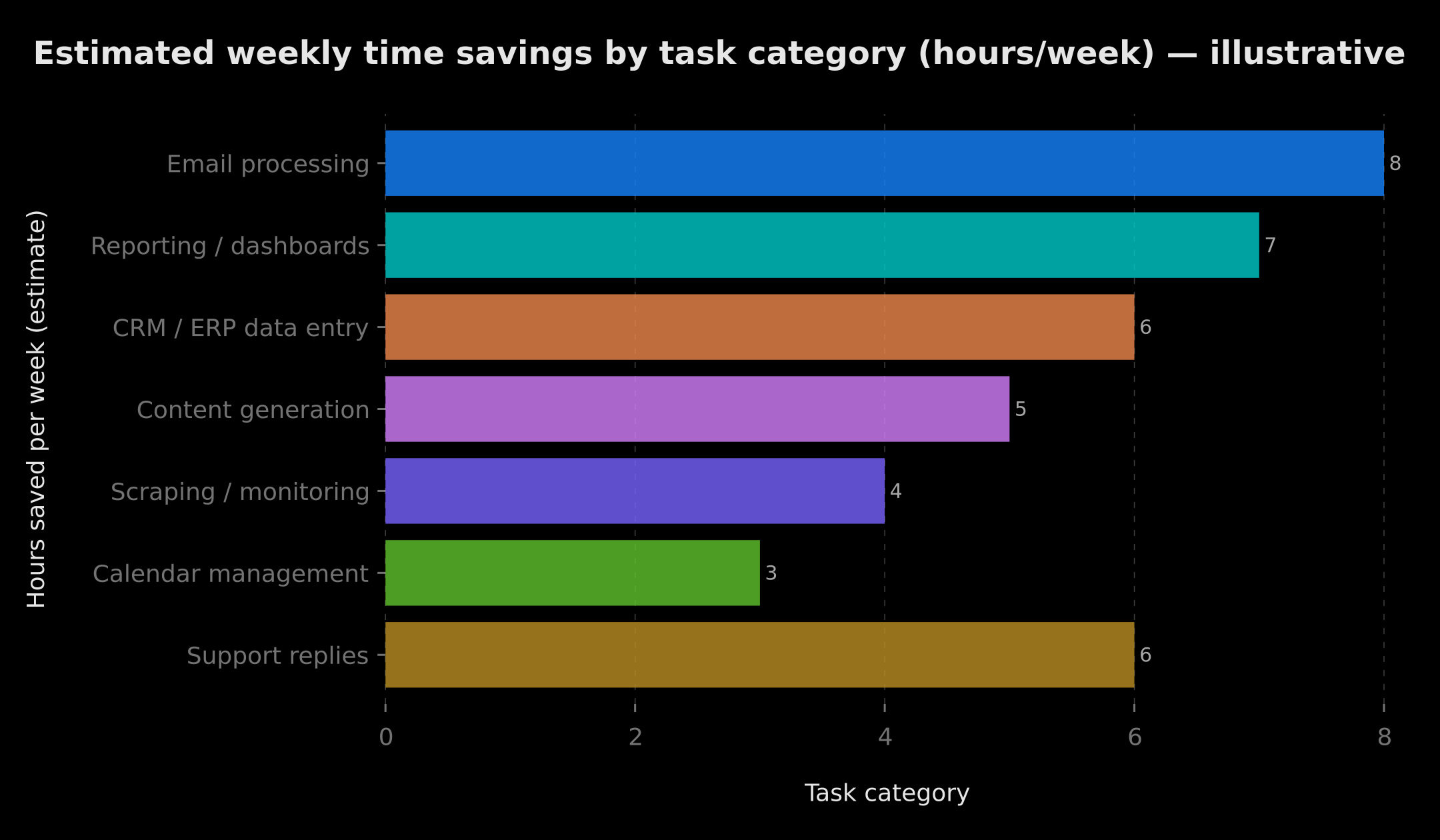 Indicative distribution of weekly gains by task category: emails and reporting often represent the largest savings pools
Real Case: 40 Hours Reclaimed with 3 Orchestrated Agents
A company contacts us: "We spend 2 hours a day manually analyzing reports. It's exhausting."
We built them a system with 3 AI agents working together according to a clear hierarchy.
Result: 3 minutes instead of 2 hours — approximately 40 hours reclaimed per week for the team involved.
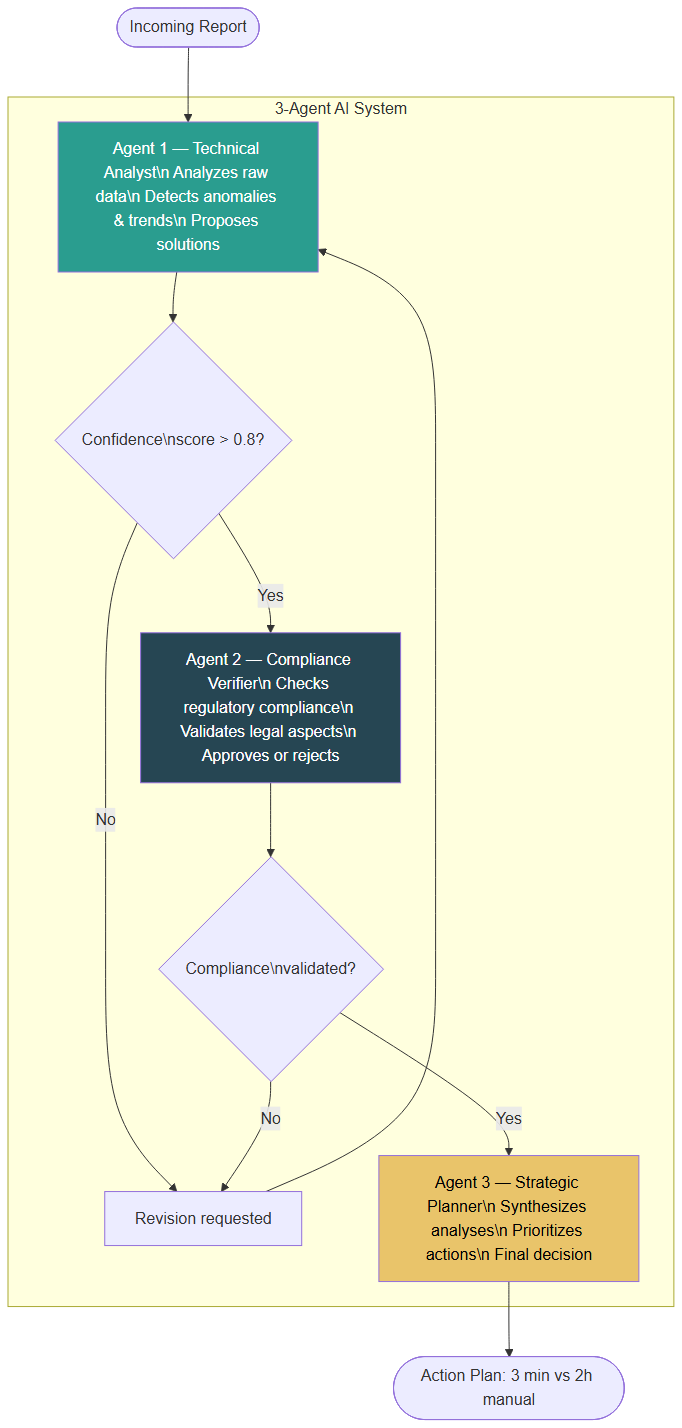 Orchestration flow with clear hierarchy: Agent 3 has the final say to avoid conflicts and infinite loops
Why "Easy" AI Agents Fail in Production
Before explaining how this system works, it is essential to understand why most naive attempts fail.
The first problem is inter-agent contradiction: when two agents have no defined hierarchy, they can contradict each other in a loop. Imagine one agent proposing a solution and another systematically rejecting it — you get an infinite conversation with no result. We observed a real case with 347 messages exchanged between two agents, producing zero output.
The second problem is uncontrolled cost. During the first test of this system, each analysis cost €347 in OpenAI API calls. Each agent was calling the model without limits or caching. A structural optimization (cheaper model for simple tasks, caching of intermediate results, 10-message limit per agent) brought this cost down to €12 per analysis.
The third problem is error handling. An agent that crashes without a recovery mechanism blocks the entire pipeline. Robustness is not optional in production.
The Three Agents and Their Roles
Agent 1 — The Technical Analyst examines raw data: it identifies demand peaks, patterns, anomalies and proposes technical solutions. Its role is purely analytical.
Agent 2 — The Compliance Verifier validates Agent 1's proposals against a fixed set of rules: regulatory compliance, internal constraints, quality criteria. It approves or rejects, without ever deciding alone.
Agent 3 — The Strategic Planner synthesizes the work of the first two, resolves disagreements, and produces a prioritized action plan. It has the final say — this is what prevents infinite loops.
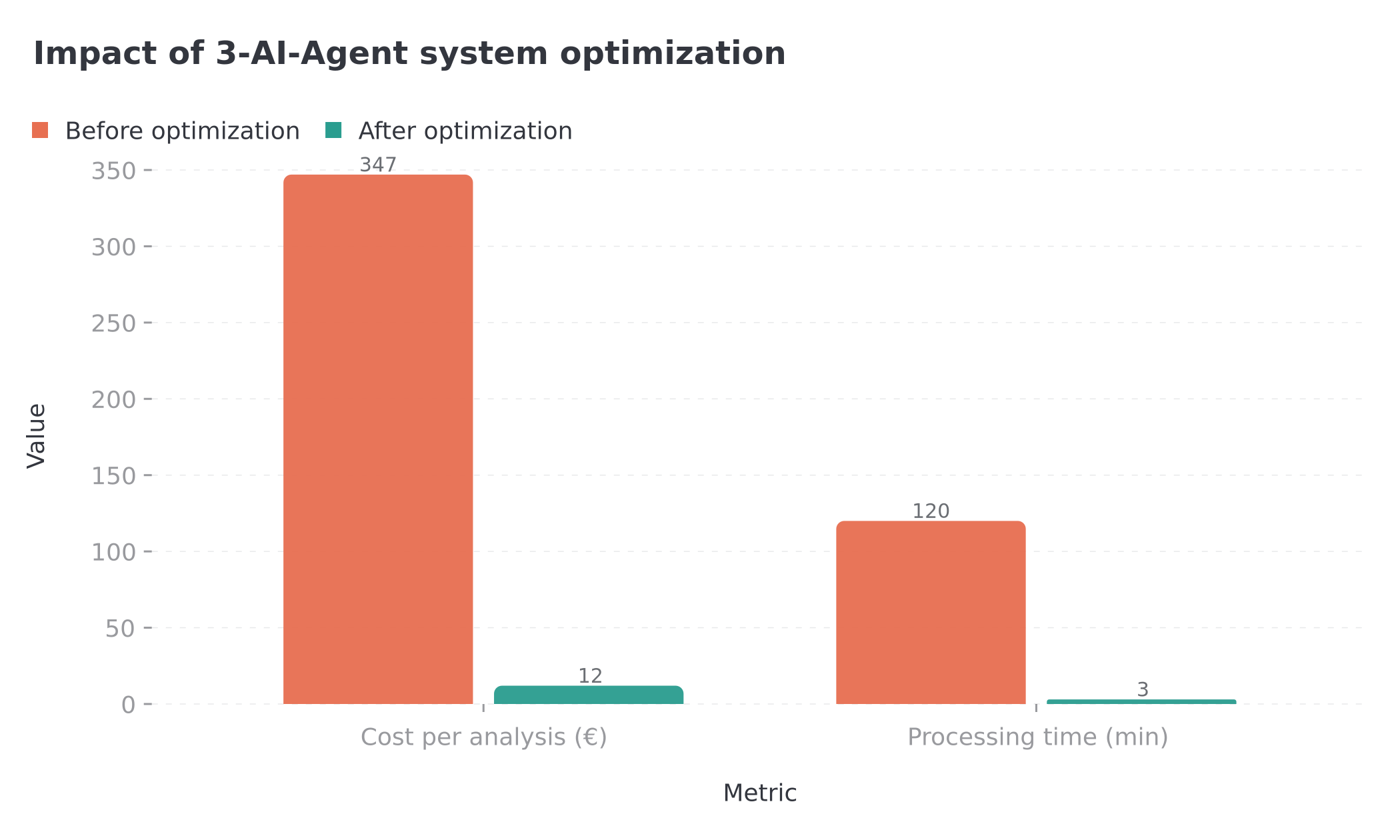 3-agent system optimization results: cost divided by 28 and processing time divided by 40
The key lies in hierarchy: each agent knows exactly what it can decide and what it must escalate. Without this, multi-agent orchestration quickly becomes expensive chaos. For advanced orchestration patterns, our article on n8n and AI agents covers them in detail.
How to Implement Progressively: The 4-Step Method
The worst mistake is trying to automate everything at once. We have seen it dozens of times: an enthusiastic entrepreneur launches 5 automations in parallel, none work correctly, and they abandon everything concluding that "AI doesn't really work." The method that actually works is radically different.
 4-step implementation cycle: choose one task, prototype, validate, measure, then iterate
Step 1: Choose a Single Task, Green Zone Only
Take your audit results and identify the task with the best score under the three-criteria rule described above. One task only. Resist the temptation to select several.
Step 2: Prototype in One Week
Build a first functional version of the automation within one week maximum. This prototype does not need to be perfect: it just needs to be testable. If you exceed one week for a first version, it is often a sign that you chose a task too complex for a first project. Go back to the previous step and choose something simpler.
Step 3: Test, Adjust, and Validate
Test the prototype for 5 to 10 days in parallel with the manual process. Compare outputs. Identify problematic cases. Adjust. When the success rate is satisfactory (ideally above 95% for high-stakes tasks, 85% for low-risk tasks), move to production.
Step 4: Measure Real Gain, Then Iterate
Once in production, measure the time actually saved over two to four weeks. Compare to your initial estimate. If the gain is confirmed, choose the next task and restart the cycle. If the gain is below expectations, analyze why before moving on.
This cycle, repeated across 4 to 8 tasks over 3 to 6 months, is the realistic path to reclaiming 40 hours per week.
Measuring Real Time Savings and Calculating ROI
Post-deployment enthusiasm is a trap. Many teams believe they have saved 10 hours per week because the automation "runs" — without ever measuring what actually happens. Here is how to measure properly.
The Two Essential Metrics
Time saved per occurrence: measure the average time spent on the task before automation, then the residual supervision time after automation (verification, correction, validation). The net difference is your real gain per occurrence.
Autonomous success rate: what percentage of occurrences execute without human intervention? An 80% rate means 20% of cases require manual correction. These 20% reduce your net gain and must be tracked.
The ROI Formula
The calculation is straightforward. Multiply the time saved per occurrence by the weekly frequency and by the autonomous success rate. You get the net gain in hours per week. Then multiply by your hourly rate (or that of the person freed up) to obtain the monthly monetary value generated. Compare this to the initial investment (development + API costs + estimated monthly maintenance).
For an automation saving 8 hours per week at a €50/h rate, the value generated is approximately €1,600 per month. A project costing €2,000 to develop is amortized in 5 to 6 weeks. Our detailed analysis of AI agent ROI in enterprise is available in the article AI agents ROI in production 2026.
Realistic Benchmarks (2026)
Based on projects we have deployed and public benchmarks available in 2026, here are realistic ranges:
- Email processing automation: 5 to 12 hours per week reclaimed for an inbox handling 50 to 150 emails/day
- Automatic reporting: 3 to 6 hours per week depending on the number of sources and dashboard complexity
- CRM data entry: 4 to 9 hours per week for a sales team of 3 to 10 people
- Assisted content generation: 3 to 8 hours per week depending on content volume
These ranges assume properly designed and maintained automations. A poor implementation can generate more work than it saves.
5 Pitfalls to Absolutely Avoid
Pitfall 1: Automating Without Supervising
An AI agent in production without human supervision is a ticking time bomb. Even the most robust systems encounter unexpected edge cases, API changes, and corrupted data. Supervision does not mean manually reviewing every output — it means having alerts in place, consultable logs, and a health dashboard that you check at least once a week.
Pitfall 2: Automating Everything at Once
We mentioned this already, but it bears repeating: simultaneous production deployment of multiple automations is a recipe for chaos. Bugs accumulate, dependencies between systems create unexpected side effects, and debugging becomes a nightmare. One task at a time.
Pitfall 3: Not Setting API Budget Caps
Language models charge per use. Without a defined budget cap in your workflow, an unexpected loop or traffic spike can generate a several-hundred-euro invoice within hours. Always define a maximum budget per execution and per month, with an alert at 80% of the threshold.
Pitfall 4: Ignoring Error Handling
An agent that fails silently is worse than one that fails loudly. If your automation fails without triggering an alert, the task is not executed but nobody knows. By the time you notice (sometimes days later), the damage is done. Systematically implement retry mechanisms, fallbacks, and failure alerts.
Pitfall 5: Confusing Automation with Skill Elimination
Automation frees up time for higher-value tasks — it does not replace domain expertise. Teams that automate successfully are not trying to "have AI do their work": they are eliminating operational friction to focus on what truly generates value. To understand the real costs of available tools, see our comparison of n8n and Make automation pricing in 2026.
AI Agent Governance: The Non-Negotiable Rules
Deploying an AI agent without governance is like hiring a team member without giving them a manager. Short-term it might seem to work. Medium-term, the drifts arrive.
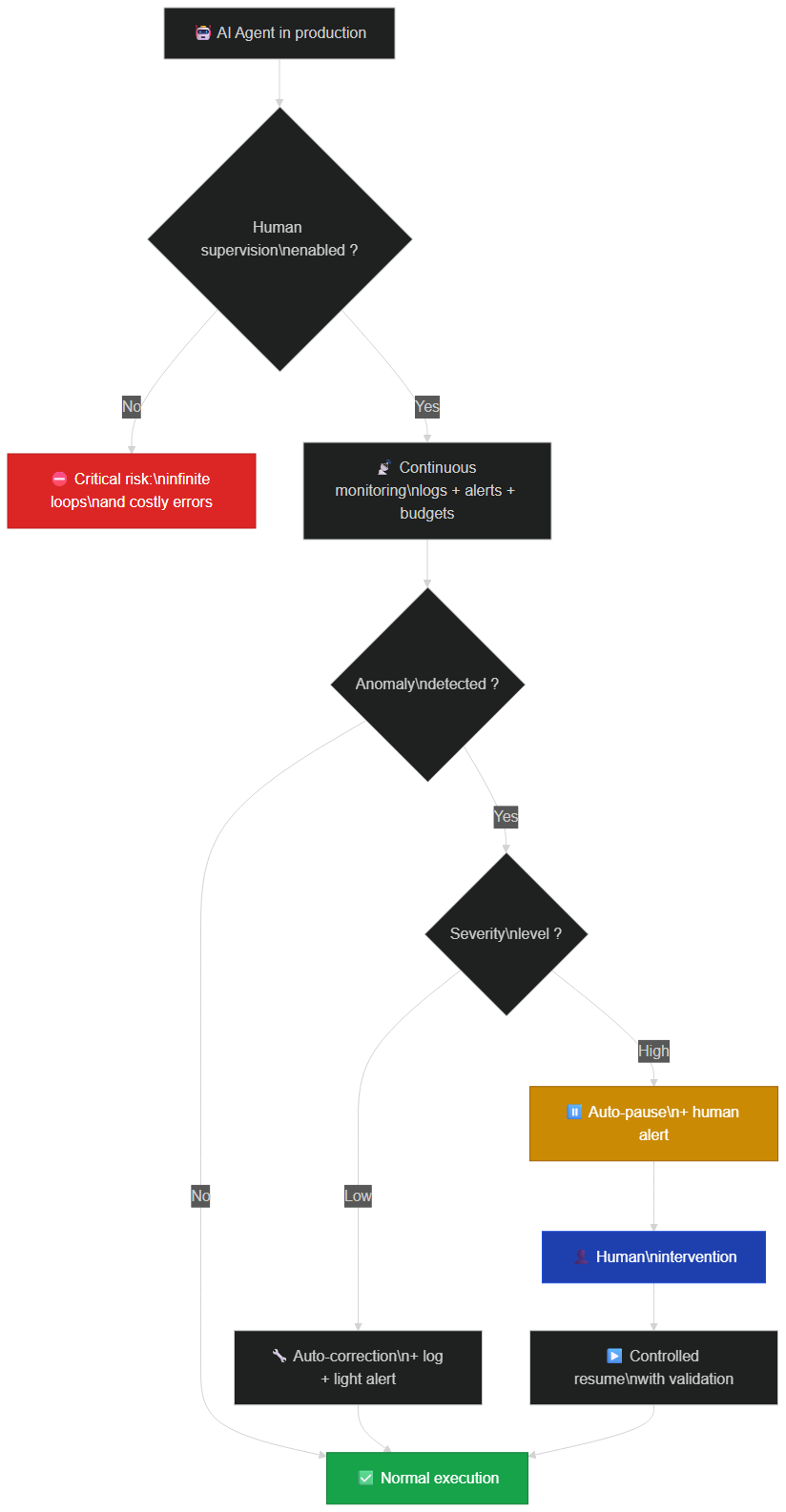 Governance cycle: each anomaly triggers either automatic correction or human intervention depending on its severity
The Four Pillars of Governance
Pillar 1 — Active Supervision. Every agent in production must have an identified human owner: a person responsible for regularly checking its outputs, costs, and behavior. Without an owner, drifts go unnoticed.
Pillar 2 — Defined Scope of Action. The agent must have a clearly delimited scope: which actions can it perform autonomously? Which require human validation? This boundary must be documented and tested, not merely imagined.
Pillar 3 — Continuous Monitoring. Execution logs, anomaly alerts, API cost dashboards, weekly success rates: these four elements form the minimum viable monitoring stack for a production agent.
Pillar 4 — Periodic Review. Schedule a monthly review of each agent: are its outputs still relevant? Is its cost justified by the gain? Are the business rules it applies still current? The environment changes (APIs evolve, data formats shift, internal rules update), and an agent frozen in its initial parameters will eventually drift out of sync.
Governance is not administrative overhead: it is what transforms a prototype AI agent into a reliable long-term asset.
What Makes This Type of System Professional
Beyond the concrete three-agent case documented above, here are the characteristics common to all durable automation systems we have deployed.
Orchestration is explicit, not implicit. Each agent has a documented role, defined inputs and outputs, and clear decision rules. No "magic" hidden in the prompt.
Cost is managed. Limits per agent, caching of intermediate results, choosing the LLM model appropriate to task complexity (a cheaper model for structured tasks, a more powerful model for interpretation tasks): these choices often make the difference between a profitable project and one that costs more than it returns.
Robustness is built in from the start. Automatic retry, fallback to a simplified version, detailed logging, failure alerts: these mechanisms are not "future improvements" — they are production prerequisites.
Improvement is continuous. A good automation system generates data about its own operation. This data allows identifying remaining friction points, uncovered edge cases, and optimization opportunities. Planning from the outset how you will analyze your automation's performance makes all the difference over 6 to 12 months.
Conclusion: Reclaiming 40 Hours Is Achievable, but It Must Be Built
Automating 40 hours of work per week with AI agents is not a get-rich-quick promise. It is an achievable goal, provided you build it methodically: honest task audit, rigorous selection of first automations, progressive implementation, measurement of real gains, and serious governance.
The fastest path to this goal is not launching ten agents simultaneously. It is choosing one green-zone task this week, prototyping it in 5 days, validating it in 10 days, measuring the real gain in 20 days — then repeating.
If you have clearly identified repetitive tasks and want to move quickly, the next step is to discuss your specific situation concretely.
Additional Resources:
🛡️ Complete Guide: AI Agents and Supervision Discover how to orchestrate AI agents effectively, avoid infinite loops, master costs, and handle errors. Complete guide with concrete examples. 👉 Access the Complete Guide
🚀 Complete Roadmap: Automation and n8n A detailed 300+ page roadmap to get you started in the world of automation and n8n. 👉 Discover the Roadmap
🤖 New to n8n AI Agents? Start here: Build your first autonomous AI agent from scratch — no Python, no prior experience needed. Step-by-step tutorial with GPT-4o and Claude integration. 👉 Tutorial: Create Your First n8n AI Agent in 20 Minutes
Do You Have Repetitive Tasks to Automate? 👇
FAQ — Frequently Asked Questions About Automating Work with AI Agents
Where do I start to automate my work with AI agents?
Start with a two-week task audit: log every repetitive task, its time, frequency, and rule consistency. Identify one single "green zone" task — high volume, clear rules, structured data — and prototype an automation in one week before iterating.
How long does it take to automate 40 hours of work per week?
Based on our experience, reclaiming 40 weekly hours typically takes 2 to 6 months of progressive iterations, starting with 5 to 8 hours saved on the first automated task. The key is iterating task by task rather than trying to automate everything at once.
Which tasks are easiest to automate with AI agents?
The easiest tasks to automate are those combining high volume, fixed rules, and structured data: recurring email processing, scheduled report generation, CRM data entry from a form, automatic notifications. These are the "low-hanging fruit" of automation — start with them.
How much does a custom n8n or Make automation cost?
Costs vary by workflow complexity: between €500 and €5,000 for a turnkey project. BOVO Digital offers a free audit to accurately estimate your project before any commitment.
How quickly can I see ROI from automation?
Most of our clients see a return on investment within 1 to 3 months. An automation saving 10 hours per week at €40/h generates €1,600/month in value — the investment is typically recouped within a few weeks.
Tags
FAQ
Where do I start to automate my work with AI agents?
Start with a two-week task audit: log every repetitive task, its time, frequency, and rule consistency. Identify one single "green zone" task (high volume, clear rules, structured data) and prototype an automation in one week before iterating.
How long does it take to automate 40 hours of work per week?
Based on our experience, reclaiming 40 weekly hours typically takes 2 to 6 months of progressive iterations, starting with 5 to 8 hours saved on the first automated task. The key is iterating task by task rather than trying to automate everything at once.
How much does a custom n8n or Make automation cost?
Costs vary by workflow complexity: between €500 and €5,000 for a turnkey project. BOVO Digital offers a free audit to accurately estimate your project before any commitment.
Do I need technical skills to automate my processes?
No. Tools like n8n and Make offer visual interfaces accessible to non-developers. For advanced automations with AI agents, BOVO Digital handles the architecture and deployment, with training included.
How quickly can I see ROI from automation?
Most of our clients see a return on investment within 1 to 3 months. An automation saving 10 hours per week at €40/h generates €1,600/month in value — the investment is typically recouped within a few weeks.
We scope one workflow — not a generic demo
You describe a repeated task. We tell you what n8n would ship, the timeline, and what stays out of scope.
- 30 min
- 1 scoped workflow
- No commitment
William Aklamavo
Web development and automation expert, passionate about technological innovation and digital entrepreneurship.


