
n8n AI Agents in Production (July 2026): Human-in-the-Loop, Checklist & Sovereignty
Security objection: n8n HITL in production, 1 JWT infra case (illustration). 25 automation cases, Make vs n8n agents link. BOVO evidence, 13 September 2026.

Updated

n8n AI Agents in Production (July 2026): Human-in-the-Loop, Checklist & Sovereignty
The objection shows up in every scoping call: “an agent that writes to the CRM or sends mail is a security risk.” HITL is the answer. Not a slogan — a pause before the tool.
In 2026 the question is no longer whether your n8n AI agents can exist. It is whether they survive messy data, irreversible actions and absent teams. The demo impresses. Production exposes. The gap is who approves what, when, and with what audit trail.
This 13 September 2026 revision anchors the security objection in the register: 1 JWT infra file (id 27), below the 5-case threshold — illustration, not a “security” average. The agents angle (tools, memory, Ollama, Make vs n8n HITL) already lives in Make AI Agents vs n8n. Here we stay on production and HITL. Scoping starts at the n8n agency.
We cover tool-call HITL (May 2026), the n8n checklist, prebuilt agents, model-agnostic design, and the SAP context as n8n communicated it ($5.2B valuation, May 2026 — vendor figure, not BOVO). Sequel to n8n 2.0 memory, RAG and HITL.
Method and sample limits
Collection date: 13 September 2026.
Source: 44 files in portfolioData.fr.ts. Automation filter → 25 cases.
Out of scope: CRM, CSVs, emails, named quotes, ComeUp prices.
Public threshold: 5 cases before an aggregate. Infra / security = 1 file (id 27): illustration only.
Lines such as “40 hours/month”, “−95% errors”, “103 projects” or a “47 emails” incident are not register averages.
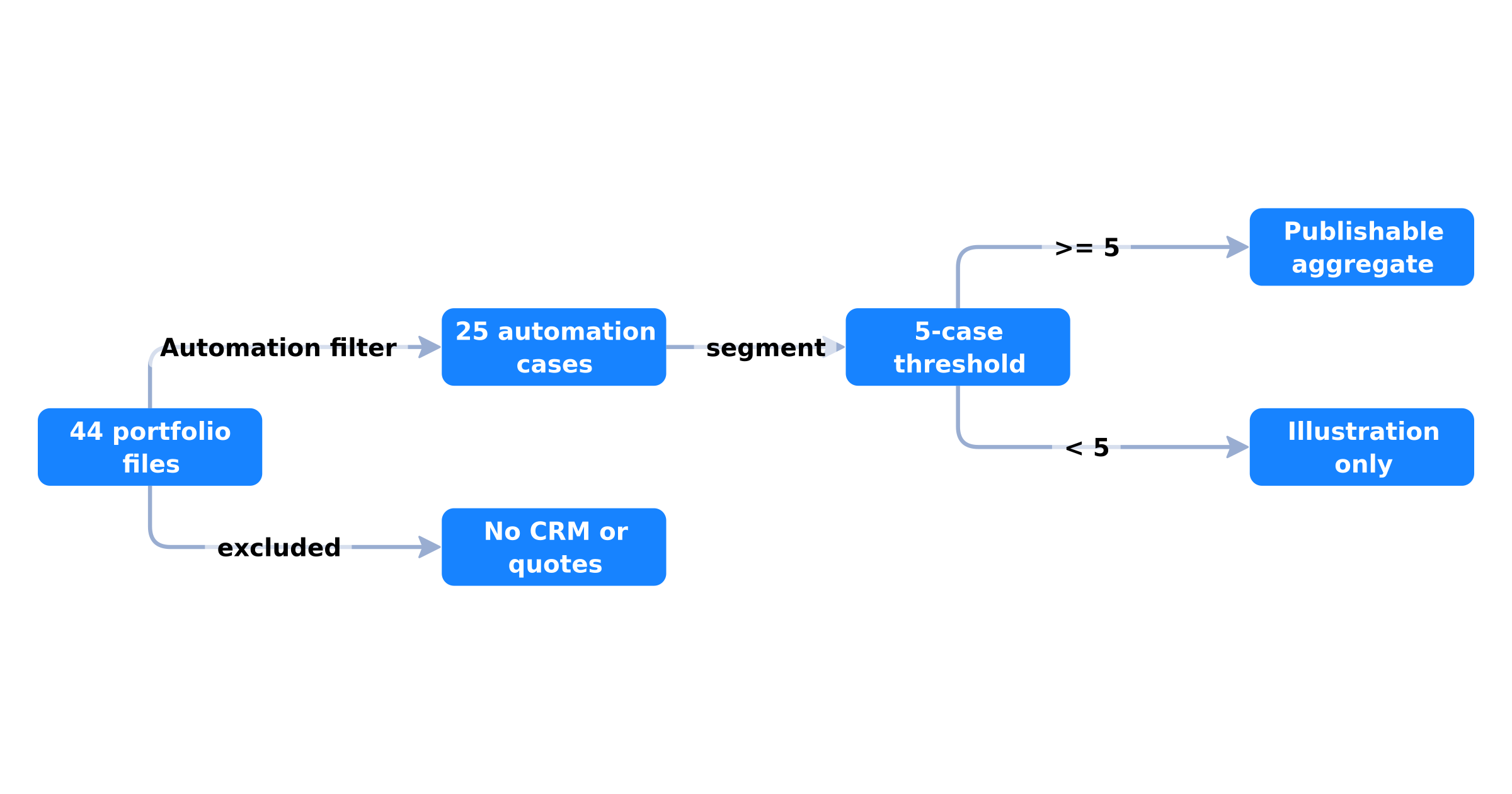 From the public portfolio to an aggregate: 44 files, 25 cases, 5-case threshold, no CRM or quotes
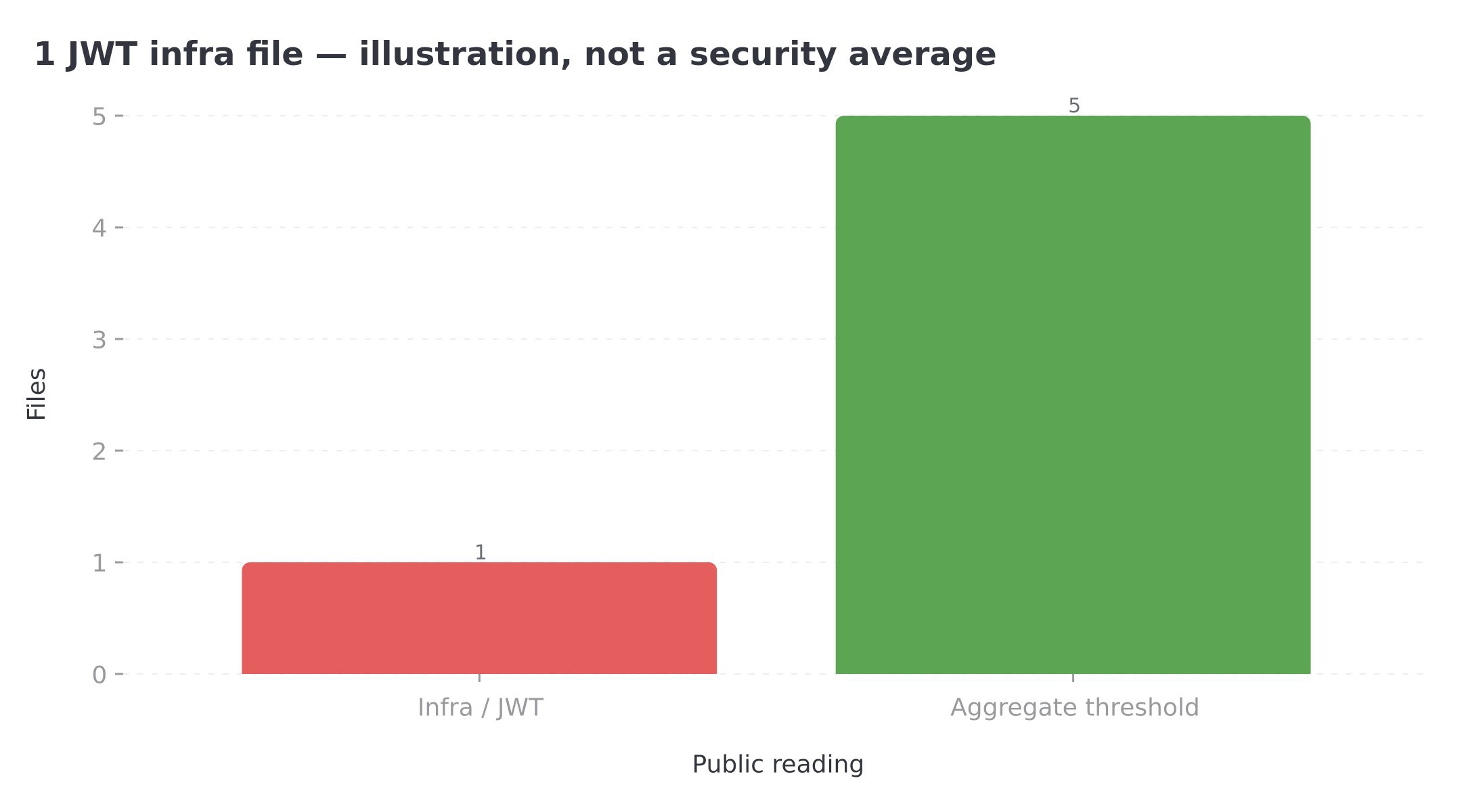 One infra/JWT file: below the five-case threshold, no publishable security aggregate
14 files name Make.com, 6 name n8n. That is not an agent ranking. See the agents comparison for tools / memory / Ollama.
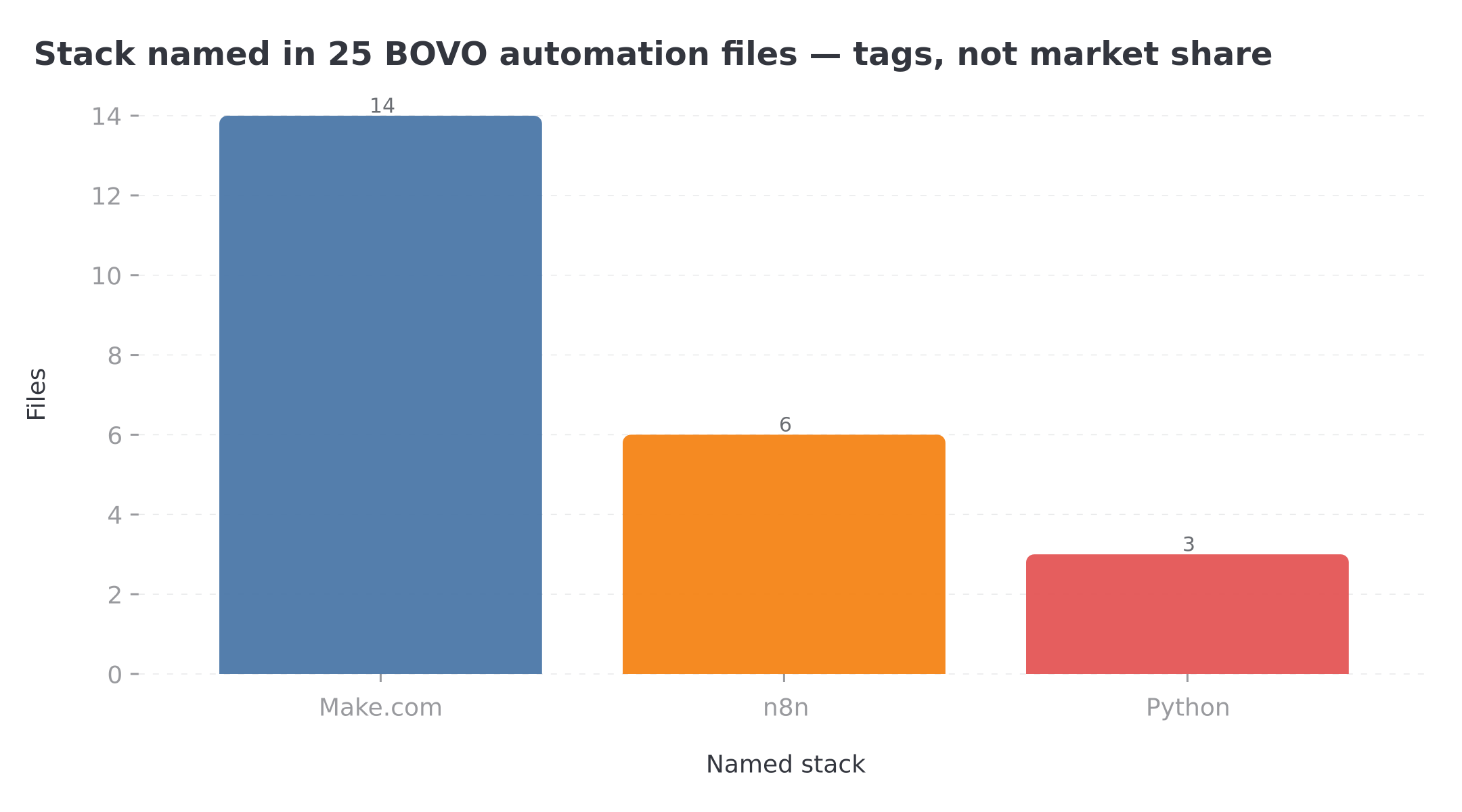 Make.com appears in 14 files, n8n in 6, Python in 3 — technology tags, not an agent ranking
One JWT infra case (illustration)
Id 27 — SaaS AI access control. n8n workflow: user credits, IP checks, JWT auth, abuse prevention on a generative SaaS. Public label: SaaS AI access control. One file, not a median “security stack”. It shows why an agent without a guardrail (quota, token, IP) exposes cost and data — the same motif as HITL on a write tool.
July 2026: why production becomes the central topic
The SAP investment and what it means (without the drama)
On May 12, 2026, SAP announced a strategic investment in n8n, valuing the platform at $5.2 billion — more than double the previous $2.5B valuation obtained less than a year earlier, according to the official press release. In parallel, the two companies signed a multi-year commercial agreement to embed n8n natively in Joule Studio, SAP's AI agent-building environment on the SAP Business AI Platform. General availability of this integration is targeted for Q3 2026.
For technical teams, this signal matters on three levels. First, enterprise legitimacy: n8n is no longer seen as a hobbyist tool, but as an orchestration layer that Europe's largest ERP vendor chooses for its agents. Second, distribution: SAP's 300,000 potential customers will discover n8n through Joule Studio, accelerating adoption without locking in SMBs already on HubSpot, Pipedrive, or Notion. Third, product stability: an investor of this size pushes n8n to invest in production reliability — monitoring, HITL, performance — rather than demo features.
n8n reports 1,400+ enterprise customers and a community of 1.7 million monthly active developers (May 2026). These figures are not a quality guarantee for your specific deployment, but they confirm the platform supports real workloads — not just weekend test workflows.
The prototype-to-production gap: the real 2026 problem
Most AI agent failures we see at BOVO Digital do not come from an insufficient LLM. They come from an architecture that treats production as an extension of the demo. In a demo, you test with clean data, low volume, and you are there to fix things live. In production, the agent runs at 3 a.m., receives ambiguous requests, and calls tools nobody thought to protect.
The n8n blog summarizes this in one sentence that guides their 2026 roadmap: closing the prototype-to-production gap for AI agents. This is not marketing fluff. It is a response to a documented failure pattern: agents hallucinating CRM parameters, workflows saturating without queue mode, human approvals bypassed because the Wait node was misconfigured, insufficient logs for post-mortem incident analysis.
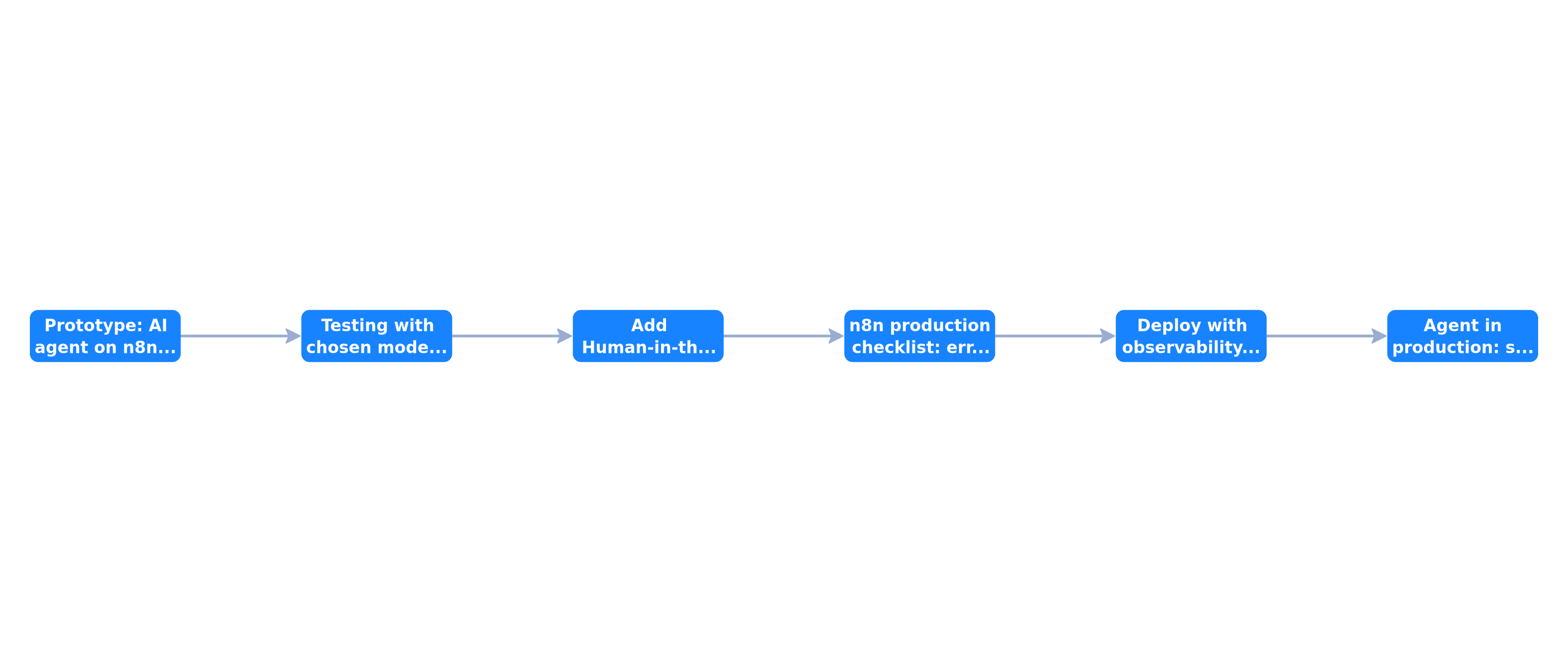 The six production deployment phases: infrastructure, development, pre-deployment, deployment, maintenance, and retirement — each with mandatory deliverables
This six-phase pipeline structures the entire article. Each section corresponds to a decision you must make before activating an agent on real data.
Human-in-the-Loop on tool calls: the paradigm shift
Why the old HITL was no longer enough
In our article on n8n 2.0, persistent memory, and RAG, we documented the Human-in-the-Loop pattern via the Wait for Approval node: the agent produces output, the workflow pauses, a human validates, and execution resumes. This pattern remains useful for reviewing generated content — a prospecting email, a meeting summary, a support response.
But it has a structural limitation in production: the irreversible action has already happened in the agent's reasoning, and sometimes in systems, before the human is asked. If the agent decides to call delete_lead with a wrong ID, the classic Wait node does not prevent it — it only validates what the agent displays after the fact.
Since the May 2026 release, n8n offers HITL at each tool connected to the AI Agent node. The official documentation describes the mechanism: when a tool has human review enabled, the workflow pauses before the tool executes. The human receives the tool name, the parameters the AI wants to pass (via $fromAI()), and chooses to approve or deny. If denied, the tool does not run and the agent is informed.
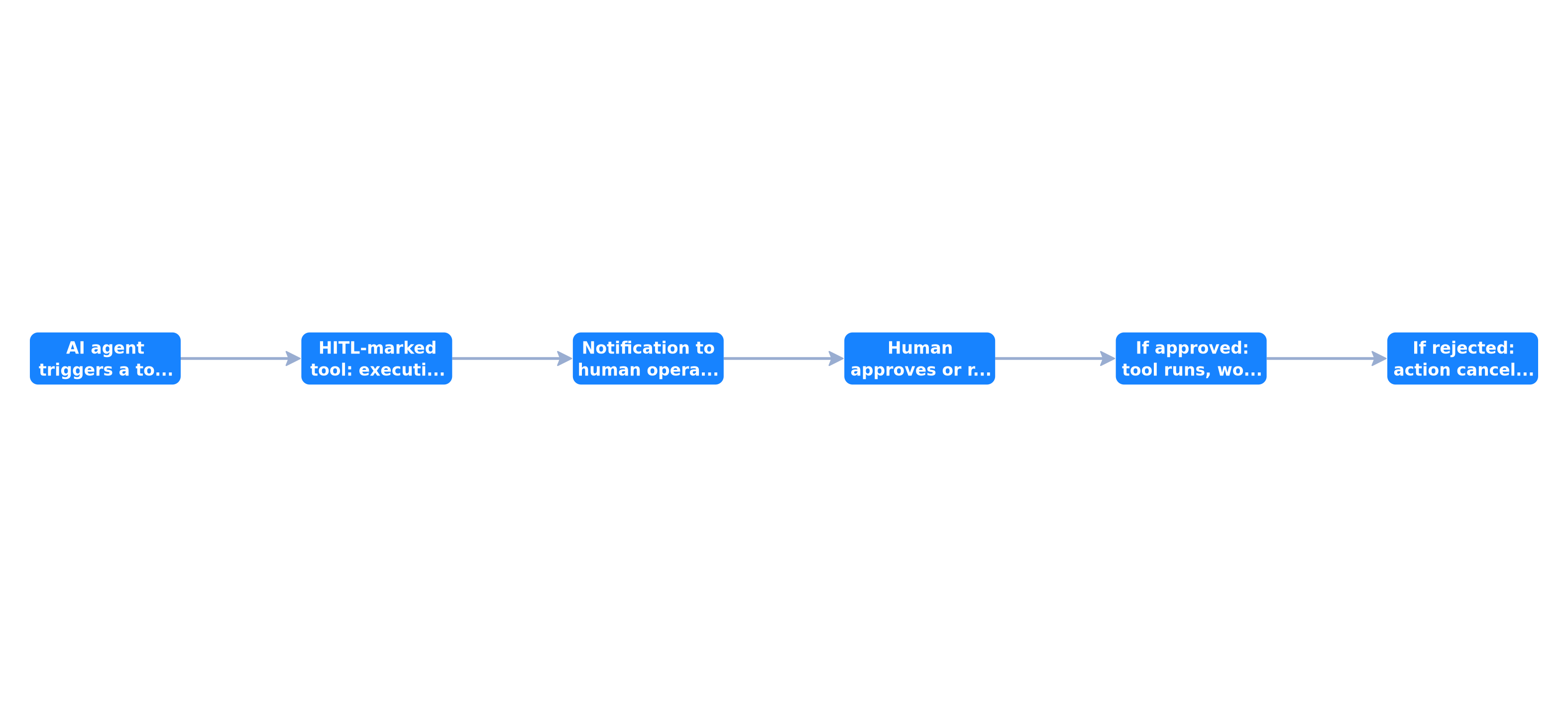 Tool-level HITL: the agent proposes a tool call, the workflow suspends, the human approves or denies via Slack/Teams/Gmail, then the tool runs or the action is cancelled
Recommended architecture: tools in three categories
In production, we systematically classify an agent's tools into three categories:
Read tools (ungated) — CRM lookup, knowledge base search, calendar read, GET API fetch. These tools modify nothing. The agent can call them without friction. Risk is limited to information leakage, managed by API permissions and credential scope.
Moderate write tools (gated with short timeout) — updating a CRM field, adding an internal note, creating an email draft. Medium risk. HITL enabled with a 2-hour timeout and automatic escalation to a backup approver via Gmail if the primary does not respond.
Critical tools (gated with double validation) — sending a client email, deleting data, financial transaction, contract modification. High risk. Mandatory HITL, 24-hour maximum timeout, Postgres log of every decision, and Slack notification with a pre-calculated risk score.
This segmentation is finer than the global HITL in the n8n 2.0 article. It keeps the agent fluid on reads while locking down high-impact actions.
Approval channels and timeouts
n8n documentation lists supported channels for human review: built-in n8n Chat, Slack, Discord, Telegram, Microsoft Teams, Gmail, WhatsApp Business Cloud, and Google Chat. In enterprise deployments, we almost always use Slack for ops teams (response in under 30 seconds) and Gmail for escalation to a manager or on-call rotation.
The most underestimated parameter is the timeout. A workflow waiting indefinitely for human approval is a workflow blocking your execution queue. The best practice documented by n8n and confirmed by our deployments: set a Limit Wait Time on every approval step, with an automatic escalation branch. A schema we commonly apply: 2 hours on Slack, then 22 hours on Gmail backup, for a 24-hour total SLA on any gated tool call.
Audit log: the non-negotiable condition
HITL without a log is HITL that will not survive a GDPR audit or security review. Every human decision — approval, denial, timeout, escalation — must be persisted in a dedicated Postgres table with: timestamp, reviewer identifier, tool name, proposed parameters, decision, response duration, and n8n execution ID.
This is not theoretical. It is what lets you answer "who authorized this send?" in under five minutes during an incident. Our five n8n workflows deployed for every SMB client systematically include this audit layer on the AI support workflow — the most exposed to model judgment errors.
The n8n production checklist: 15 practices in six phases
n8n published a 15 best practices guide in 2026 for deploying AI agents in production, organized in six phases mirroring the classic software lifecycle. We summarize them here with our field experience, without replacing reading the official documentation.
Phase 1 — Infrastructure
Queue mode is non-negotiable once you exceed a few dozen simultaneous executions. Without it, a long execution blocks others. Daily PostgreSQL backups with monthly restore tests. Environment variables for all secrets — never hardcoded API keys in nodes. HTTPS reverse proxy (Caddy or Nginx) with auto-renewed Let's Encrypt certificates.
For self-hosted deployments — our default recommendation for SMBs concerned about data sovereignty — a European VPS with 4 vCPU and 8 GB RAM covers most agent workloads we observe.
Phase 2 — Development
Version workflows via Git: JSON export, commit, review before activation. Test with 20 to 30 real cases including edge cases: empty message, off-topic request, missing data, nonexistent ID. Use Test Workflow mode with the built-in chat window, but supplement with automated tests on critical branches.
Document the system prompt and tool scope in a README next to the workflow. When the agent misbehaves in six months, this file saves you from reverse-engineering your own intentions.
Phase 3 — Pre-deployment
This is where tool-level HITL comes in. Verify every write tool has human review enabled. Configure timeouts and escalations. Define escalation rules: at what confidence threshold (if you compute one) should the agent solicit a human?
Set up a staging environment mirroring production, with credentials pointing to sandbox CRM and test mailboxes. An agent going to production without running in staging for at least a week is a bet we discourage.
Phase 4 — Deployment
Enable monitoring: error rate per workflow, average execution duration, HITL escalation rate. High escalation rates (> 15% of executions) signal a miscalibrated agent — either the prompt is too cautious, or the tools are too broad.
Configure alerts: Slack or email when error rate exceeds 5% over a rolling 24-hour window, or when an execution exceeds an abnormal timeout.
Phase 5 — Maintenance
Weekly review of execution logs. Monthly analysis of human intervention rate: is it rising? If so, the agent likely needs better context (RAG) or a refined prompt. Quarterly credential and API key rotation.
Phase 6 — Retirement
Document the deactivation procedure: which workflow takes over? What data must be archived? An obsolete active agent is an attack surface and a source of confusion.
The five prebuilt agents: accelerator, not substitute
In July 2026, n8n offers five prebuilt agents accessible directly from the AI Agent node via the "pre-built agents" option. This feature, introduced with release n8n@1.107.0 per the GitHub changelog, imports a complete workflow into the canvas with credential setup instructions.
Available templates notably include:
- Voice assistant agent — voice assistant with audio processing
- Personal AI assistant in Telegram — text and voice message handling
- Task management agent with Google Sheets — task management via spreadsheet
- Email triage agent — classification and routing of incoming emails
- RAG agent — document base interrogation
The benefit is obvious: reduce time-to-first-agent from several hours to a few minutes. Each template automatically configures node structure, tool connections, and help callouts in the editor.
But — and this is what demo videos skip — a prebuilt agent is not a production agent. Templates do not include HITL on tool calls, escalation timeouts, Postgres logging, or monitoring. They are starting points, not deliverables.
Our method at BOVO Digital: use a prebuilt agent to validate the use case internally (1-2 days), then rewrite it with the full production checklist before any client deployment. The five workflows we systematically deploy rarely start from a raw template — they include business adaptations no generic template covers.
Model-agnostic sovereignty: don't tie production to one vendor
One of n8n's architectural bets, documented in their context engineering blog, is treating the LLM model as an interchangeable node — not a structural dependency. You connect OpenAI, Anthropic, Google Gemini, Mistral, or a self-hosted model via Ollama. If the vendor changes pricing, token limits, or terms of use, you swap the LLM node without rebuilding orchestration.
In July 2026, this flexibility is no longer a comfort. It is a sovereignty requirement. Several of our francophone clients shifted part of their agents to local models (Gemma, Mistral) after regulatory turbulence around US providers. An agent whose architecture ties prompt, tool schemas, and routing logic specifically to the OpenAI API is an agent to rewrite in a hurry when context changes.
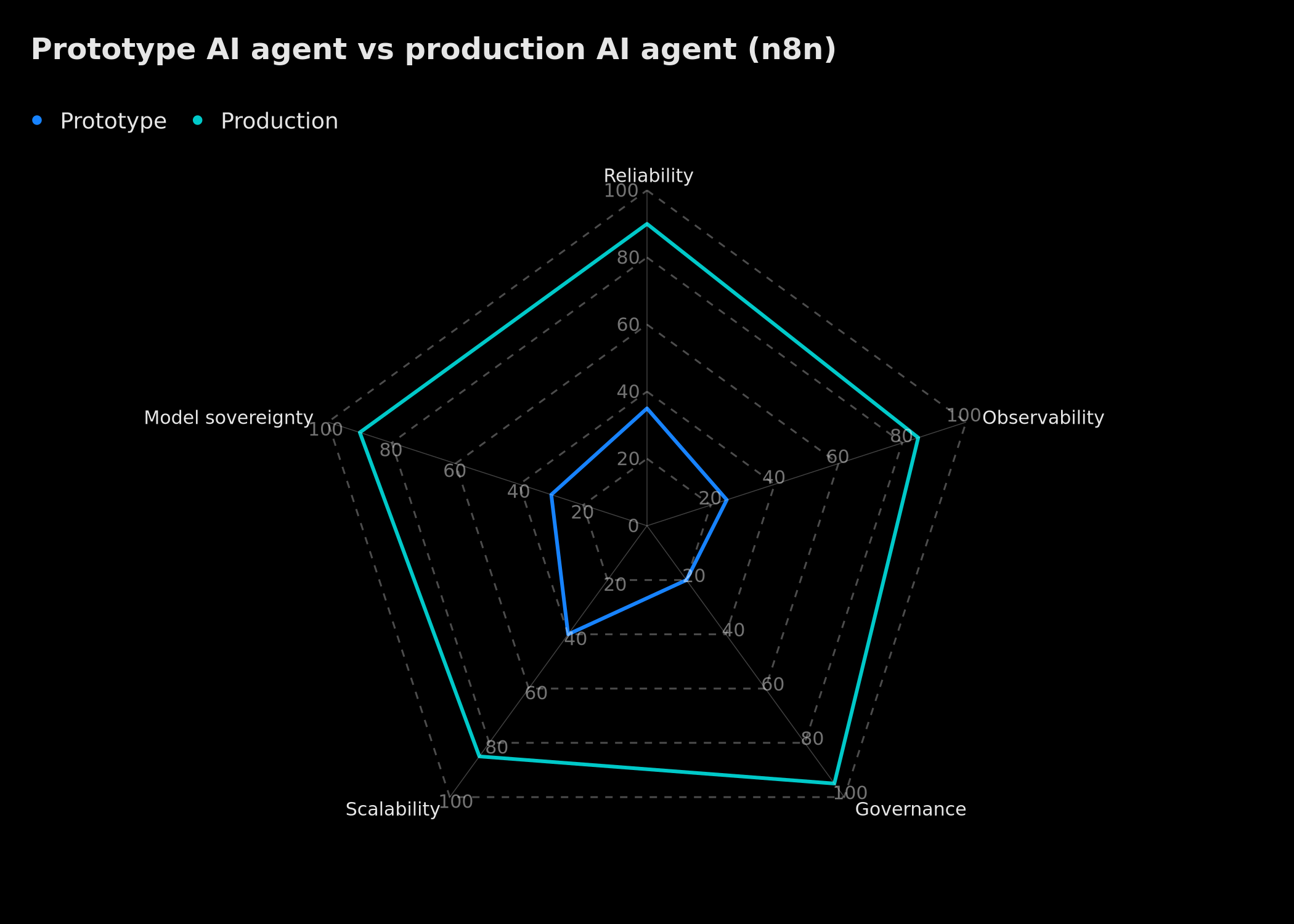 Multicriteria comparison: self-hosted n8n agent vs n8n Cloud vs proprietary SaaS solution — sovereignty, cost, time-to-production, native HITL, scalability
The radar above compares three approaches we systematically evaluate in engagements:
Self-hosted n8n leads on data sovereignty, volume cost, and HITL control. It requires more initial time (infrastructure, security).
n8n Cloud accelerates time-to-production and reduces ops load, at the cost of lower sovereignty (data hosted by n8n) and per-execution billing that can explode with "loopy" agents.
Proprietary SaaS solution (no-code chatbot, built-in CRM assistant) offers the fastest deployment, but the least control over HITL, audit, and portability.
For an SMB of 10 to 50 employees with sensitive data (CRM, accounting, HR), our default recommendation remains European self-hosted with a cloud model for non-sensitive tasks and a local model for PII data.
Real costs: beyond VPS pricing
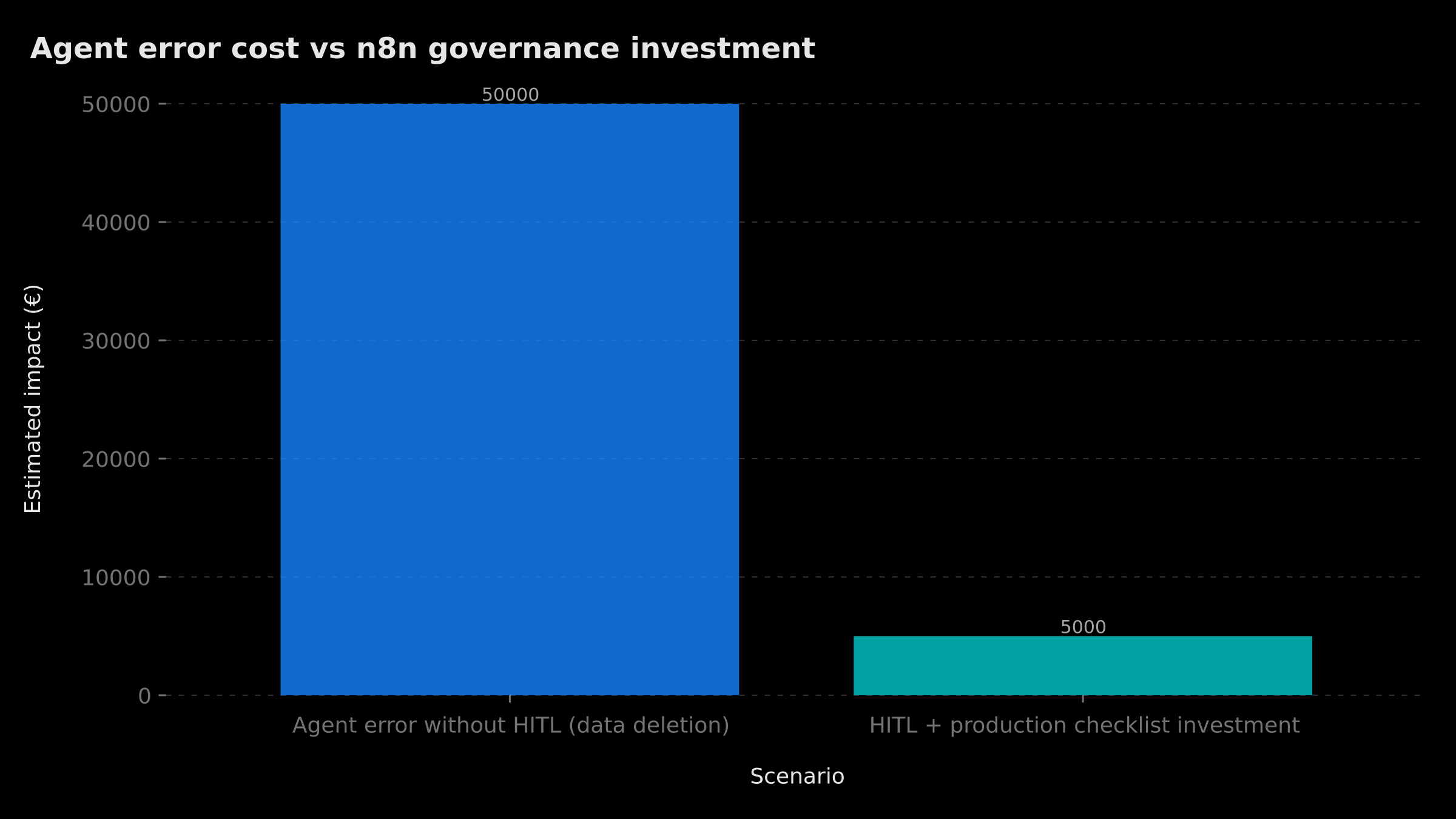 Annual orders of magnitude: cloud prototype (~€1,200), self-hosted production (~€3,500), production with HITL and audit (~€6,800), turnkey agency engagement (~€18,000)
The chart above remains an editorial order of magnitude, not a register median and not the public rate card. The BOVO card (€2,000 / €3,500 / €5,000) lives in the n8n / Make pricing guide. The ~€1,200, ~€3,500, ~€6,800 or ~€18,000 columns are not recalculated here as observed averages.
The hidden cost to budget without inventing an FTE: human HITL review time. More gated tools, more approvals. Calibrating read vs write is the lever — not a “50 requests × 2 minutes” line presented as a BOVO statistic.
Decision tree: is your agent ready for production?
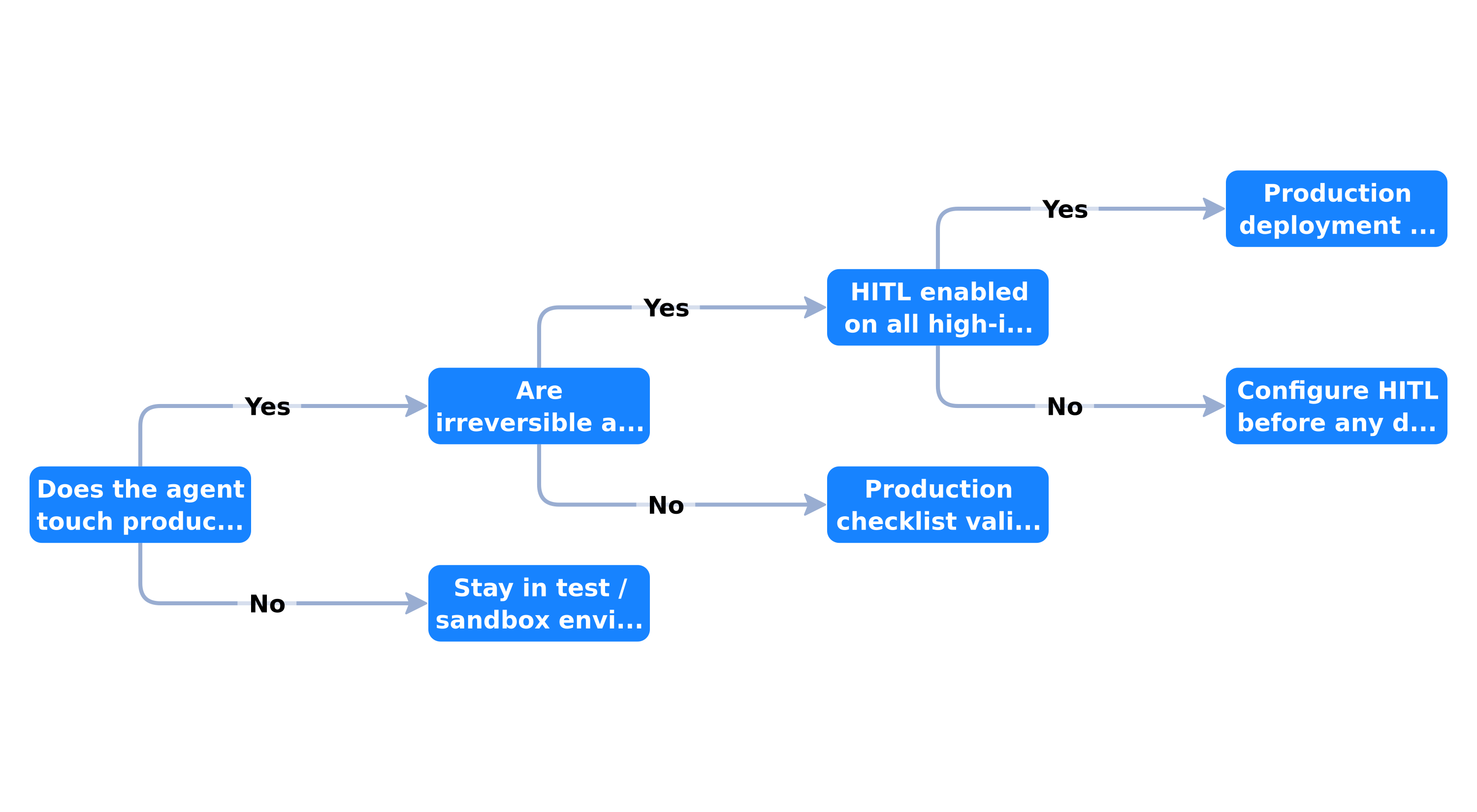 Production readiness criteria: HITL configured, tests validated, monitoring active, audit log, staging validated — otherwise return to development
Before activating an agent on real data, walk through this decision tree. Every "no" branch is a blocker, not a recommendation.
Do write tools have HITL enabled? If not, return to development. No negotiation on this point for client-facing actions.
Have you tested 20+ real cases including edge cases? An agent tested only with polite demo queries is not tested.
Is monitoring active with alerts? Without alerts, you will discover problems when a client calls.
Does the audit log persist every HITL decision? Essential for compliance and debugging.
Has the agent run in staging for at least 5 business days? Staging catches volume and concurrency issues the demo does not show.
If all branches are green, you can activate in production with reinforced monitoring the first week: daily log review, escalation rate, and HITL reviewer feedback.
What this article adds beyond n8n 2.0 memory/RAG/HITL
It is useful to clarify positioning relative to our foundational article on n8n 2.0, persistent memory, RAG, and Human-in-the-Loop. The two articles are complementary, not redundant.
| Dimension | n8n 2.0 article (April 2026) | This article (July 2026) |
|---|---|---|
| Focus | Memory, RAG, conceptual HITL | Production, reliability, governance |
| HITL | Wait for Approval node (post-result) | Tool-level HITL (pre-execution) |
| Agents | Manual configuration | Prebuilt agents + checklist |
| Context | n8n 2.0 technical capabilities | SAP investment, 1,400+ enterprise customers |
| Sovereignty | Mentioned (self-hosted) | Model-agnostic architecture detailed |
| Deliverable | Configuration patterns | 15-practice checklist, decision tree |
If you are starting out, read the n8n 2.0 article first to understand memory and RAG. If you already have a configured agent and want to put it into production without incidents, you are in the right place.
Step-by-step production rollout: the process we apply
Here is the concrete sequence we follow in engagements, from initial audit to production activation.
Week 1 — Audit and mapping. Inventory existing workflows, identify unprotected tools, map sensitive data. Deliverable: audit report with production maturity score. Our automation audit offering follows exactly this protocol.
Week 2 — Hardening. Enable HITL on risky tool calls, configure timeouts and escalations, set up Postgres logging, deploy to staging.
Week 3 — Testing and calibration. 30+ test cases, measure escalation rate, adjust system prompt and gated tool scope. Target: escalation rate < 10% on nominal cases.
Week 4 — Activation and monitoring. Production cutover with reinforced monitoring, daily log review for 5 business days, retirement procedure documentation.
This 2-to-4-week timeline corresponds to a medium-complexity agent (3-5 tools, 1-2 CRM integrations). A simple agent (email triage, read-only) can be ready in 1 week. A multi-tool agent with RAG, persistent memory, and full HITL takes 4 weeks.
Monitoring: the metrics that actually matter
Beyond global error rate, four metrics tell us whether a production agent is healthy or degrading.
HITL escalation rate — percentage of executions soliciting a human. Sudden increase: prompt, data, or tool scope problem. Decrease after a model change: possible guardrail bypass, investigate.
Median execution duration — an agent going from 8 seconds to 45 seconds median likely has an API latency or excessive ReAct loop problem.
HITL denial rate — if reviewers deny more than 20% of proposed actions, the agent is not calibrated for real context. Rework the prompt or restrict tools.
Token cost per execution — cost drift without volume increase signals growing context (misconfigured memory, overly verbose RAG).
These metrics are accessible via n8n execution logs and, if you enabled Sentry tracing (mid-2026 backend improvement), via the Sentry dashboard coupled to your instance.
Security and compliance: beyond HITL
Tool-level HITL is a governance layer, not a complete security solution. Three complementary points we systematically verify.
Credential isolation — each tool uses credentials with minimum permissions (least privilege). A support agent does not need CRM admin access.
Code node sandboxing — since 2026 supply chain incidents, we run Code nodes in sandbox mode and audit workflow npm dependencies.
Encryption in transit and at rest — mandatory HTTPS, PostgreSQL with disk encryption, no PII in n8n execution logs (use pseudonymized identifiers).
For GDPR-subject companies, the HITL log must respect retention periods defined in your processing register. An approval decision containing personal data is not kept indefinitely.
Conclusion — what to remember
In July 2026, deploying an n8n AI agent in production is no longer about activating a workflow. It is a governance exercise: who approves which tools, with what timeout, what audit trail, and what fallback when the human does not respond.
The five essential points of this article:
- Tool-level HITL (May 2026) changes the game: approve the action before it executes, not after.
- The 15-practice checklist structures the prototype-to-production move in six verifiable phases.
- The five prebuilt agents accelerate startup, but do not replace the production checklist.
- Model-agnostic architecture protects your investment against LLM vendor changes.
- SAP's $5.2B investment confirms n8n's enterprise maturity without forcing SAP on SMBs.
If the agent works in demo and the security objection blocks go-live, start at the n8n automation agency: HITL on write tools, an audit log, and if needed the infra motif from file 27. The agents angle (Make vs n8n, Ollama) stays in Make AI Agents vs n8n. An automation audit maps ungated tools. A product agent outside n8n goes through AI agent creation.
The era of AI agents that "impress in demo" is ending. The era of those that run reliably at 3 a.m. is beginning. The difference is the checklist — not the model's power.
Tags
FAQ
What is the difference between HITL on tool calls and classic HITL in n8n?
Classic HITL (Wait for Approval node) validates an agent's final output after execution. HITL on tool calls, available natively since May 2026, suspends the workflow before a specific tool runs — CRM update, email send, data deletion. The human sees the tool name, the parameters proposed by the AI, and approves or denies before any irreversible action. It is a preventive guardrail, not a reactive one.
How many prebuilt agents does n8n offer in July 2026?
n8n offers five prebuilt agents directly in the editor canvas, accessible from the AI Agent node via the "pre-built agents" option. They cover a voice assistant, a Telegram text/voice agent, a Google Sheets task management agent, an email triage agent, and a personal assistant. Each template imports the complete workflow with credential setup instructions.
Does SAP's $5.2 billion investment change anything for SMBs?
SAP's strategic investment in May 2026 (valuing n8n at $5.2B, per the official press release) confirms the platform's enterprise legitimacy, but does not force SAP on SMBs. n8n's core remains self-hostable, model-agnostic, and independent. The Joule Studio integration (general availability targeted for Q3 2026) mainly concerns existing SAP customers. SMBs can continue deploying n8n on a European VPS without ERP dependency.
What are the minimum criteria for putting an n8n agent into production?
n8n's July 2026 checklist lists 15 practices across six phases: infrastructure (queue mode, backups), development (testing, versioning), pre-deployment (HITL, timeouts, escalation), deployment (monitoring, alerts), maintenance (log review, escalation rates), and retirement (documentation). Absolute minimum: HITL on risky tools, configured timeouts, audit log, tests on 20-30 real cases, and monitoring of error and human intervention rates.
Make AI Agents or n8n for the agents angle?
That is not this article's angle. Tools, memory, Make vs n8n HITL and Ollama live in Make AI Agents vs n8n: which to choose (2026). Here we cover production and the security objection, with 1 JWT infra file (illustration).
Can BOVO Digital audit and deploy our n8n agents in production?
Yes. The audit maps workflows, ungated tools and the HITL plan. Rollout goes through the n8n agency. The public rate card lists 10 to 14 days for 2 to 3 workflows and 3 to 4 weeks for 5 to 8: that is not an observed median on agents.
We scope one workflow — not a generic demo
You describe a repeated task. We tell you what n8n would ship, the timeline, and what stays out of scope.
- 30 min
- 1 scoped workflow
- No commitment
William Aklamavo
Web development and automation expert, passionate about technological innovation and digital entrepreneurship.


