
Tutorial: Gemini Managed Agents — Background, Remote MCP and Credentials (July 2026)
Step-by-step guide to deploy an Antigravity agent via the GA Interactions API: background=true, remote MCP server, requires_action custom functions, and credential refresh via environment_id. Python 3.10+ and google-genai SDK.

Tutorial: Gemini Managed Agents — Background, Remote MCP and Credentials (July 2026)
An agent that stops when you close the terminal is not a production agent. Gemini Managed Agents change that equation.
On July 7, 2026, Google announced a major extension to Gemini Managed Agents via the Interactions API, now Generally Available since June 2026. Four production-ready capabilities ship together: background execution (background=true with store=true), remote MCP server integration, custom function calling with requires_action status, and credential refresh via environment_id. The default agent remains Antigravity (antigravity-preview-05-2026), a managed Linux sandbox powered by Gemini 3.5 Flash.
This tutorial targets developers and product teams moving from prototype to reliable agents. We use only the google-genai SDK on Python 3.10+, with testable examples aligned with the official Antigravity documentation and the Managed Agents quickstart. If you already deploy MCP servers, cross-read our MCP 2026-07-28 stateless spec analysis and our 20-minute MCP deployment tutorial.
Why Managed Agents change agent architecture
Before the Interactions API GA, building an autonomous agent meant assembling your own: a tool-use loop orchestrator, a code execution sandbox, conversational state management, an async job queue, and an observability layer. Every team reinvented that runtime.
Managed Agents move the runtime to Google. A single client.interactions.create() call provisions an isolated Linux sandbox, runs the agentic loop (reason → tool → observe → repeat), and returns an Interaction object with output_text, steps, environment_id, and status. You focus on the what (input, tools, instructions) rather than the how (low-level orchestration).
The July 7, 2026 update closes the gaps that blocked production:
| Capability | Problem solved | Key parameter |
|---|---|---|
| Background execution | Multi-minute tasks without blocking the HTTP client | background=true + store=true |
| Remote MCP | Reuse existing tool servers without rewriting each integration | tools: [{type: "mcp_server", ...}] |
| Custom functions | Connect internal APIs Google cannot execute in the sandbox | status: requires_action |
| Credential refresh | Expired tokens without a sandbox cold restart | environment_id + network |
This maturity brings Gemini closer to enterprise expectations: traceable jobs, standardized tools via MCP, refreshable secrets without losing workspace state.
Prerequisites: Python 3.10+, API key, and google-genai SDK
Python environment
The google-genai SDK requires Python 3.10 minimum. On Ubuntu or Debian:
python3 --version   # must show 3.10, 3.11, or 3.12
python3 -m venv .venv
source .venv/bin/activate
pip install --upgrade google-genai requests
Gemini API key
Create a key on Google AI Studio. Export it:
export GEMINI_API_KEY="your-api-key"
Never commit this key. In production, use a secrets manager (Vault, GCP Secret Manager, encrypted CI variables).
First client
from google import genai

client = genai.Client()  # reads GEMINI_API_KEY automatically
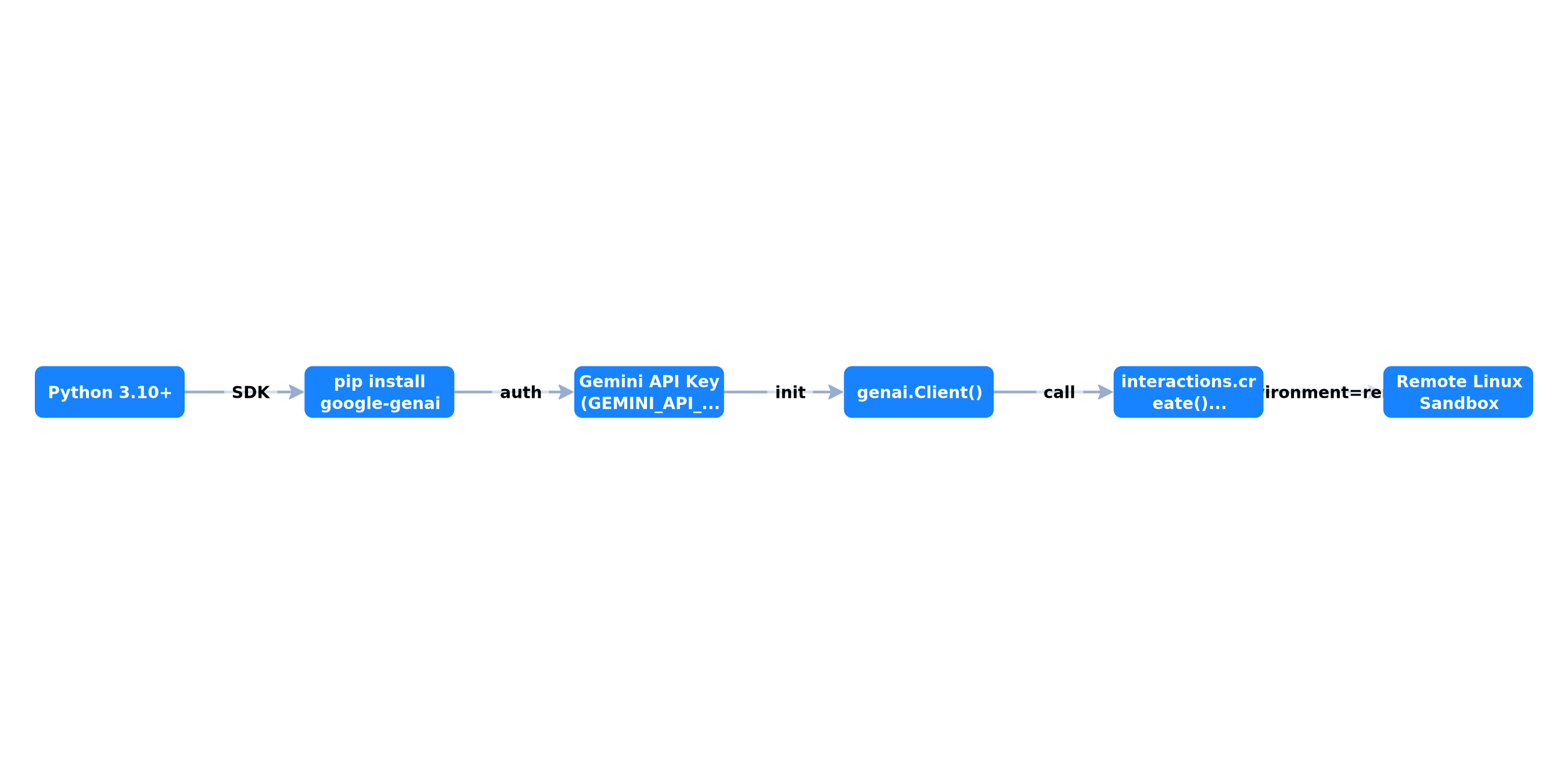 From Python 3.10+ to remote Linux sandbox via google-genai SDK and antigravity-preview-05-2026 agent
Step 1: your first Antigravity interaction
Start with a simple synchronous interaction. Three parameters suffice:
agent="antigravity-preview-05-2026"— current Antigravity preview versionenvironment="remote"— provisions a fresh Linux sandboxinput— natural language instruction
from google import genai

client = genai.Client()

interaction = client.interactions.create(
    agent="antigravity-preview-05-2026",
    input=(
        "Write a Python script that generates the first 20 Fibonacci numbers, "
        "save them to fibonacci.txt, then print the file contents."
    ),
    environment="remote",
)

print(f"Interaction ID: {interaction.id}")
print(f"Environment ID: {interaction.environment_id}")
print(f"Status: {interaction.status}")
print(f"Output:\n{interaction.output_text}")
The response contains an Interaction object. Always persist interaction.id (conversational context via previous_interaction_id) and interaction.environment_id (sandbox state: files, installed packages).
Multi-turn: conversation + sandbox
The API manages two independent state dimensions:
- Conversational context — history, reasoning, tool calls →
previous_interaction_id - Sandbox state — files, dependencies, cloned repos →
environment_id
interaction_2 = client.interactions.create(
    agent="antigravity-preview-05-2026",
    previous_interaction_id=interaction.id,
    environment=interaction.environment_id,
    input="Plot the Fibonacci sequence as a line chart and save chart.png.",
)

print(interaction_2.output_text)
The fibonacci.txt file from turn 1 is still present. The agent also retains conversational context. Automatic compaction (~135k tokens) prevents "context rot" on long sessions per the Managed Agents documentation.
Download sandbox files
When the agent creates artifacts (PDF, CSV, images), retrieve them via the Files API:
import os
import requests
import tarfile

env_id = interaction_2.environment_id
api_key = os.environ["GEMINI_API_KEY"]

response = requests.get(
    f"https://generativelanguage.googleapis.com/v1beta/files/environment-{env_id}:download",
    params={"alt": "media"},
    headers={"x-goog-api-key": api_key},
    allow_redirects=True,
    timeout=120,
)

with open("snapshot.tar", "wb") as f:
    f.write(response.content)

with tarfile.open("snapshot.tar") as tar:
    tar.extractall(path="extracted_snapshot")
Step 2: background execution (background=true + store=true)
Agentic tasks — cloning a repo, running tests, generating a report — can take several minutes. Synchronous mode blocks your Python process and risks HTTP timeouts.
The solution: background=True. The API returns immediately with status: in_progress. You then poll until completed or failed.
import time
from google import genai

client = genai.Client()

interaction = client.interactions.create(
    agent="antigravity-preview-05-2026",
    input="Clone the google/generative-ai-python repo and run its tests.",
    environment="remote",
    background=True,
)

print(f"Task started: {interaction.id} — status: {interaction.status}")

while interaction.status == "in_progress":
    time.sleep(5)
    interaction = client.interactions.get(id=interaction.id)
    print(f"  Polling… status = {interaction.status}")

if interaction.status == "completed":
    print(interaction.output_text)
elif interaction.status == "requires_action":
    print("Action required — see custom functions section.")
else:
    print(f"Finished with status: {interaction.status}")
The store=true rule
background=True requires store=True, which is the default. If you explicitly pass store=False, background execution fails. store=False also disables previous_interaction_id and step observability — reserved for cases where you persist no server-side state.
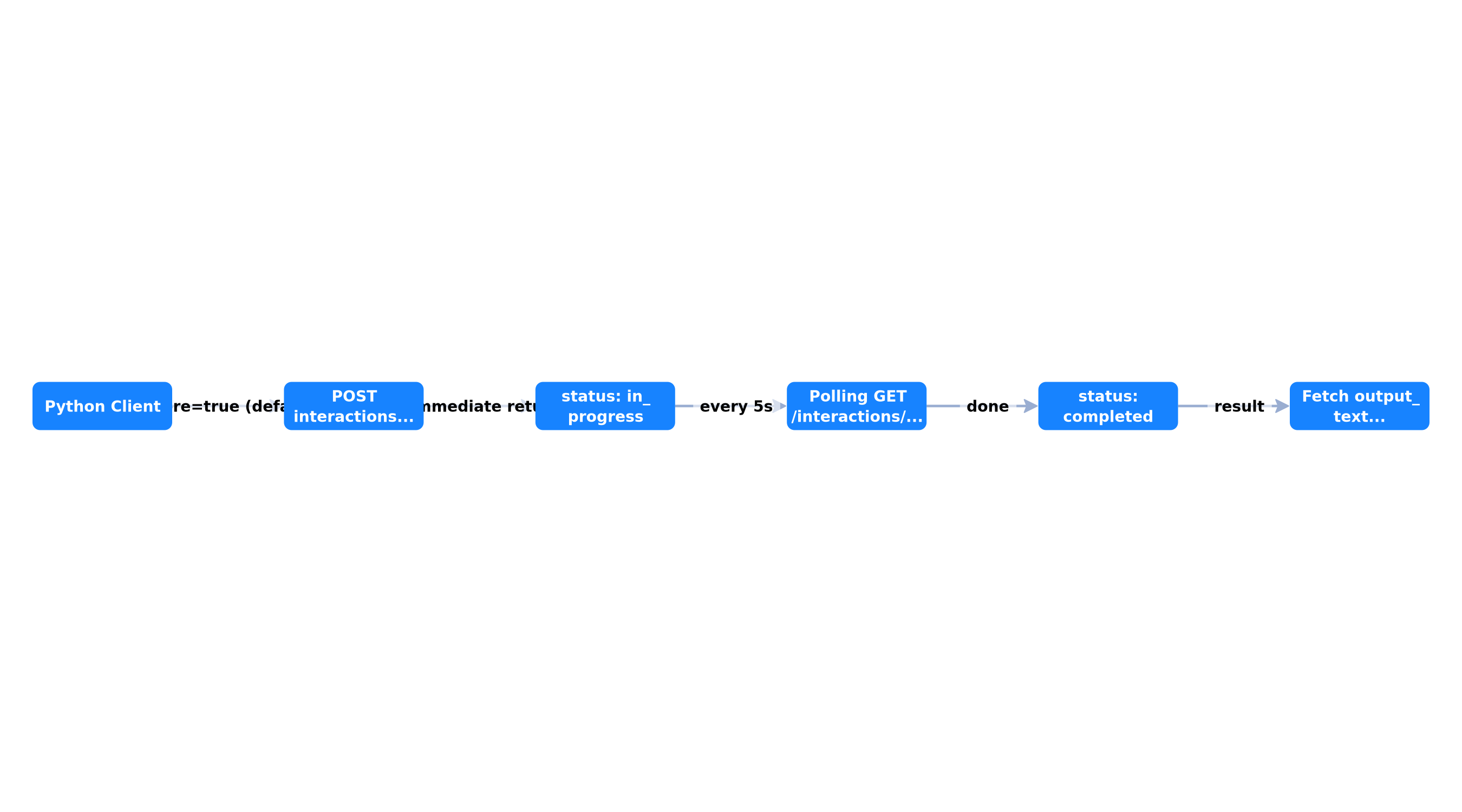 Async creation, GET polling every 5 seconds, result and environment_id retrieval
Production pattern: BackgroundRunner class
Encapsulate polling in a reusable helper:
import time
from dataclasses import dataclass
from typing import Optional
from google import genai

@dataclass
class BackgroundResult:
    interaction_id: str
    environment_id: Optional[str]
    output_text: str
    status: str
    steps_count: int

def run_background(
    client: genai.Client,
    input_text: str,
    *,
    poll_interval: float = 5.0,
    max_wait: float = 1800.0,
    environment: str = "remote",
    tools: Optional[list] = None,
) -> BackgroundResult:
    kwargs = {
        "agent": "antigravity-preview-05-2026",
        "input": input_text,
        "environment": environment,
        "background": True,
    }
    if tools:
        kwargs["tools"] = tools

    interaction = client.interactions.create(**kwargs)
    elapsed = 0.0

    while interaction.status == "in_progress" and elapsed < max_wait:
        time.sleep(poll_interval)
        elapsed += poll_interval
        interaction = client.interactions.get(id=interaction.id)

    return BackgroundResult(
        interaction_id=interaction.id,
        environment_id=getattr(interaction, "environment_id", None),
        output_text=getattr(interaction, "output_text", "") or "",
        status=interaction.status,
        steps_count=len(getattr(interaction, "steps", []) or []),
    )
Cancellation and streaming
To cancel a stuck task:
client.interactions.cancel(id=interaction.id)
For real-time progress during a background job, combine background=True with stream=True — see the Interactions API Streaming guide. Background streaming emits step deltas (reasoning, tool calls) useful for a monitoring UI.
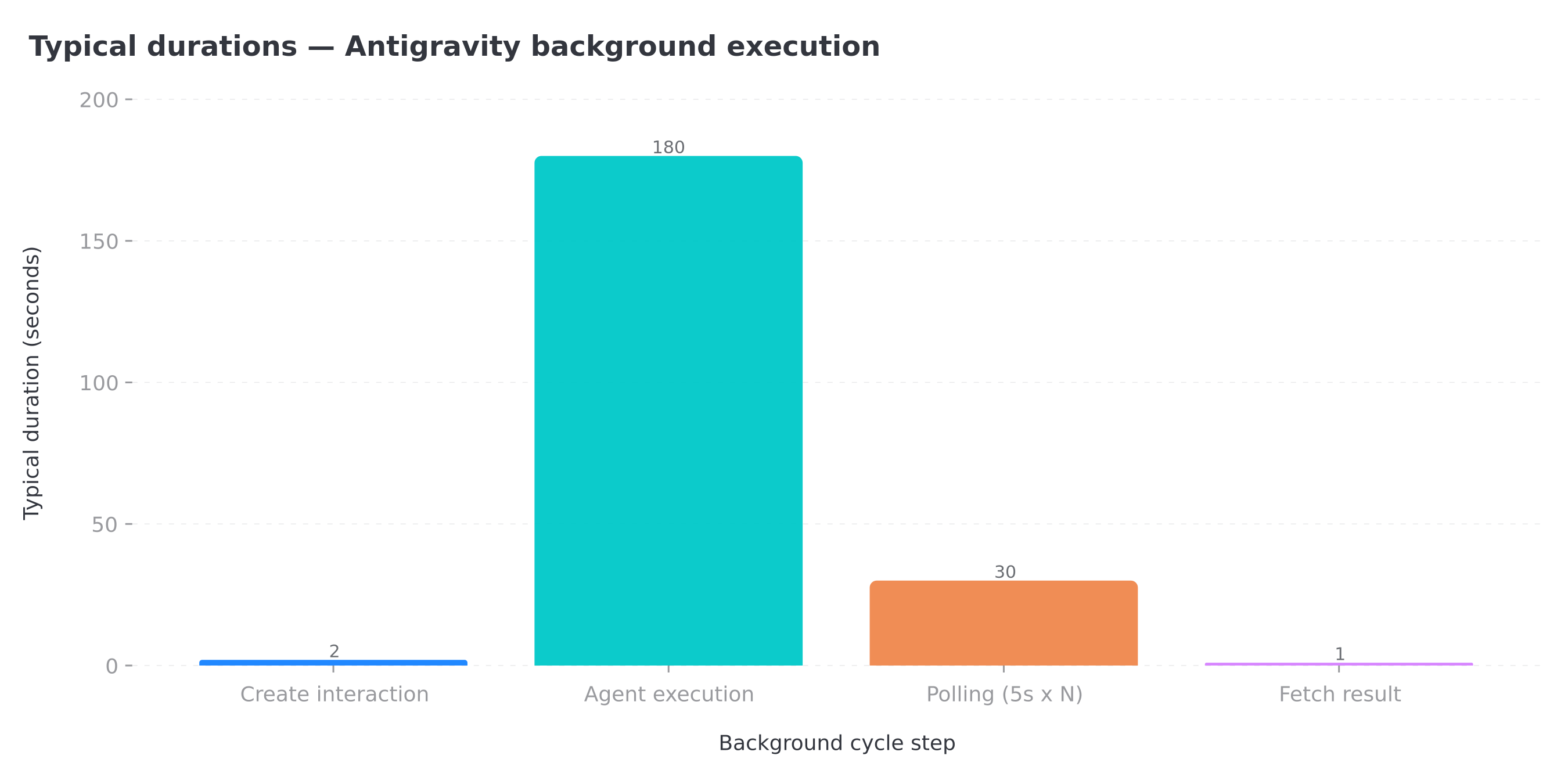 Fast creation, long agent execution, regular polling, near-instant retrieval
Documented pitfall: environment_id and background
If a background run creates its own sandbox without a prior environment_id, the field may return null on completion — making the sandbox inaccessible for follow-up turns. Recommended pattern: seed the sandbox with a foreground turn, capture environment_id, then chain background turns passing that ID. We validate this behavior in real conditions during agent audits at BOVO Digital.
Step 3: connect a remote MCP server
The July 7, 2026 update lets you register remote MCP servers as Antigravity tools. The agent discovers tools via tools/list and invokes them via tools/call — exactly like Claude or n8n, but orchestrated by Google.
Minimal configuration
from google import genai

client = genai.Client()

interaction = client.interactions.create(
    agent="antigravity-preview-05-2026",
    input="Query the weather server and give the current temperature in Tokyo.",
    environment="remote",
    tools=[{
        "type": "mcp_server",
        "name": "weather",  # REQUIRED: lowercase alphanumeric
        "url": "https://gemini-api-demos.uc.r.appspot.com/mcp",
    }],
)

print(interaction.output_text)
| Field | Required | Description |
|---|---|---|
type | Yes | "mcp_server" |
name | Yes | Unique identifier, regex ^[a-z0-9_-]+$ |
url | Yes | MCP server Streamable HTTP endpoint |
headers | No | Authentication (Bearer, API key) |
allowed_tools | No | Tool name allowlist |
Authenticated MCP server
interaction = client.interactions.create(
    agent="antigravity-preview-05-2026",
    input="List the 5 latest CRM deals and summarize the pipeline.",
    environment="remote",
    tools=[{
        "type": "mcp_server",
        "name": "bovo_crm",
        "url": "https://mcp.your-domain.com/mcp",
        "headers": {"Authorization": "Bearer YOUR_MCP_TOKEN"},
        "allowed_tools": ["list_deals", "get_deal", "list_contacts"],
    }],
    background=True,
)
Official limitations: SSE transport is not supported (Streamable HTTP only). An uppercase name triggers a generic 400 error. These constraints align with the stateless direction of the MCP 2026-07-28 spec — each MCP request must be autonomous behind a load balancer.
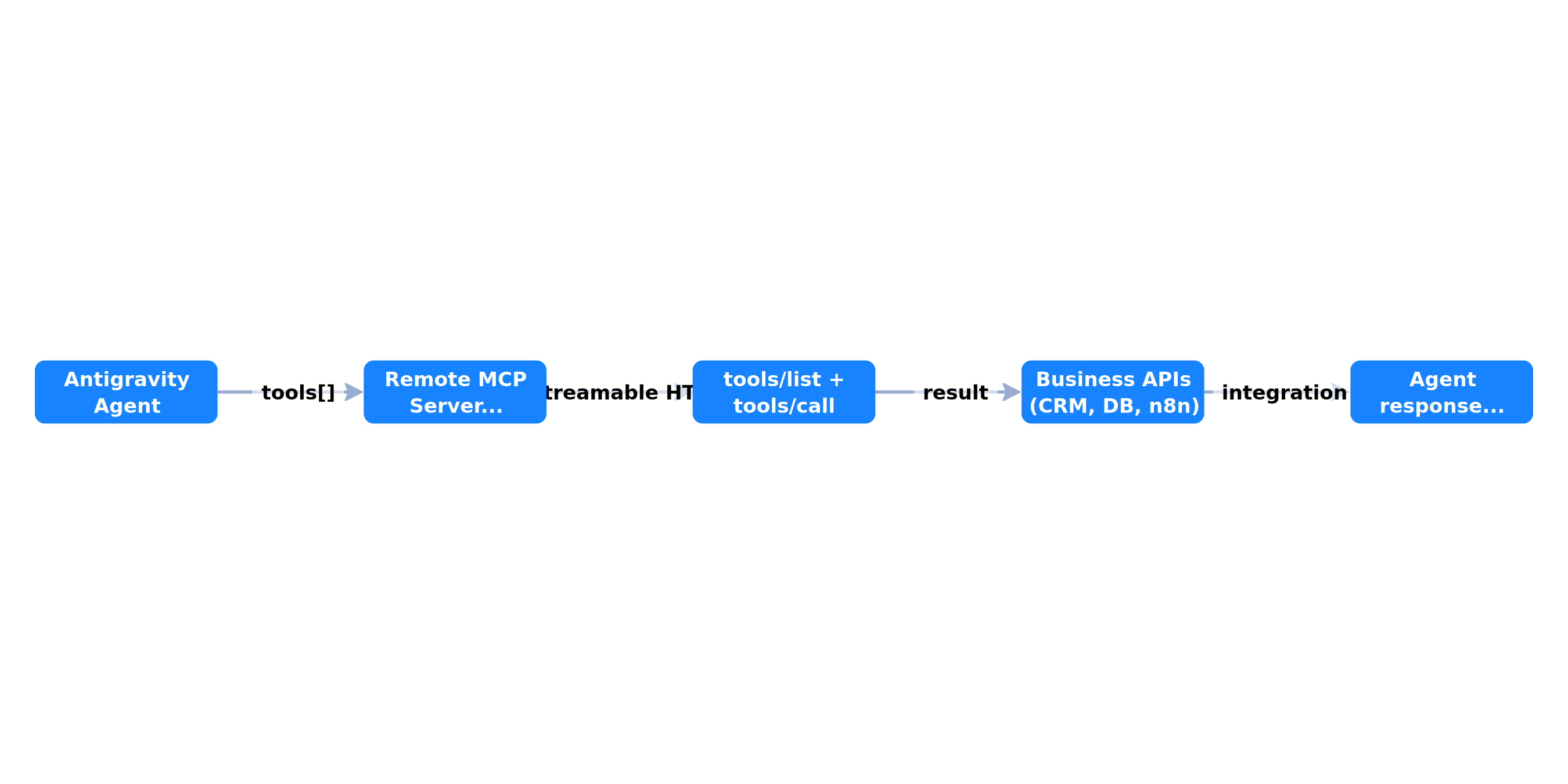 Antigravity agent invokes a Streamable HTTP MCP server exposing your business APIs
Combine MCP + background + multi-turn
import time
from google import genai

client = genai.Client()
MCP_TOOLS = [{
    "type": "mcp_server",
    "name": "n8n_ops",
    "url": "https://n8n.your-domain.com/mcp-server/http",
    "headers": {"Authorization": "Bearer N8N_MCP_TOKEN"},
    "allowed_tools": ["search_workflows", "execute_workflow"],
}]

# Turn 1: background analysis
job = client.interactions.create(
    agent="antigravity-preview-05-2026",
    input="Via MCP, list n8n workflows tagged 'production' and export a CSV.",
    environment="remote",
    tools=MCP_TOOLS,
    background=True,
)

while job.status == "in_progress":
    time.sleep(5)
    job = client.interactions.get(id=job.id)

# Turn 2: same sandbox, new instruction
followup = client.interactions.create(
    agent="antigravity-preview-05-2026",
    previous_interaction_id=job.id,
    environment=job.environment_id,
    input="Generate a chart from the CSV and save report.png.",
    tools=MCP_TOOLS,
    background=True,
)

while followup.status == "in_progress":
    time.sleep(5)
    followup = client.interactions.get(id=followup.id)

print(followup.output_text)
To connect n8n specifically, our connect n8n to an MCP server guide details the orchestrator-side architecture. Here, Antigravity becomes the brain and your MCP server the arm reaching business systems.
Step 4: custom functions and requires_action status
Not every API can go through MCP. For internal systems (legacy ERP, proprietary REST API, on-prem database), define custom functions that you execute client-side when the agent returns requires_action.
Define the tool
get_weather_tool = {
    "type": "function",
    "name": "get_weather",
    "description": "Returns current weather for a given city.",
    "parameters": {
        "type": "object",
        "properties": {
            "location": {
                "type": "string",
                "description": "City and country, e.g. Paris, France",
            }
        },
        "required": ["location"],
    },
}
Turn 1: agent requests execution
from google import genai

client = genai.Client()

interaction = client.interactions.create(
    agent="antigravity-preview-05-2026",
    input="What is the weather in Tokyo?",
    environment="remote",
    tools=[
        {"type": "code_execution"},
        get_weather_tool,
    ],
)

print(f"Status after turn 1: {interaction.status}")
Turn 2: execute locally and return result
def handle_requires_action(client, interaction):
    if interaction.status != "requires_action":
        return interaction

    executed = {s.call_id for s in interaction.steps if s.type == "function_result"}
    pending = [
        s for s in interaction.steps
        if s.type == "function_call" and s.id not in executed
    ]

    if not pending:
        return interaction

    fc = pending[0]
    print(f"Function requested: {fc.name} — args: {fc.arguments}")

    # Run YOUR business logic here
    if fc.name == "get_weather":
        result = {"temperature": 23, "unit": "celsius", "condition": "cloudy"}
    else:
        result = {"error": f"Unknown function: {fc.name}"}

    return client.interactions.create(
        agent="antigravity-preview-05-2026",
        previous_interaction_id=interaction.id,
        environment=interaction.environment_id,
        input=[{
            "type": "function_result",
            "name": fc.name,
            "call_id": fc.id,
            "result": result,
        }],
    )

final = handle_requires_action(client, interaction)
print(final.output_text)
Critical point: Antigravity function calling is stateful only. You must use previous_interaction_id — manually reconstructing history (stateless mode) is not supported per official limitations.
Full loop with multiple function calls
def run_until_complete(client, interaction, max_rounds=10):
    current = interaction
    for _ in range(max_rounds):
        if current.status == "completed":
            return current
        if current.status != "requires_action":
            break
        current = handle_requires_action(client, current)
    return current
Sandbox filesystem tools (write_file, read_file) also appear as function_call in steps, but are executed automatically by the environment — filter them via call_id / function_result comparison.
Step 5: credential refresh via environment_id
Long-running agents hit a classic problem: tokens expire while the sandbox already contains installed packages, generated files, and useful context. The July 7, 2026 update introduces network credential refresh: pass the existing environment_id with a new network configuration, and network rules are replaced without touching the filesystem.
First access with credentials
from google import genai

client = genai.Client()

first = client.interactions.create(
    agent="antigravity-preview-05-2026",
    input="List objects in the GCS bucket reports/ via the API.",
    environment={
        "type": "remote",
        "network": {
            "allowlist": [{
                "domain": "storage.googleapis.com",
                "transform": {
                    "Authorization": "Bearer INITIAL_TOKEN"
                },
            }],
        },
    },
)

print(f"Environment ID to keep: {first.environment_id}")
Refresh without cold restart
refreshed = client.interactions.create(
    agent="antigravity-preview-05-2026",
    input="Download reports/q1.csv and compute descriptive statistics.",
    environment={
        "type": "remote",
        "environment_id": first.environment_id,
        "network": {
            "allowlist": [{
                "domain": "storage.googleapis.com",
                "transform": {
                    "Authorization": "Bearer REFRESHED_TOKEN"
                },
            }],
        },
    },
)

print(refreshed.output_text)
Packages installed in turn 1 remain available. Only network rules change. In production, integrate this pattern into your secrets manager: when the token rotates, automatically trigger the next interaction with the new Bearer.
Security best practices
- Minimal scope: each allowlist covers only domains required for the current task
- Short tokens: prefer 15–60 minute tokens with automatic refresh
- Never in logs: redact Authorization headers in application logs
- MCP vs network separation: MCP headers (
tools[].headers) and network transforms are two distinct channels — do not duplicate secrets
Decision tree: which mode to choose?
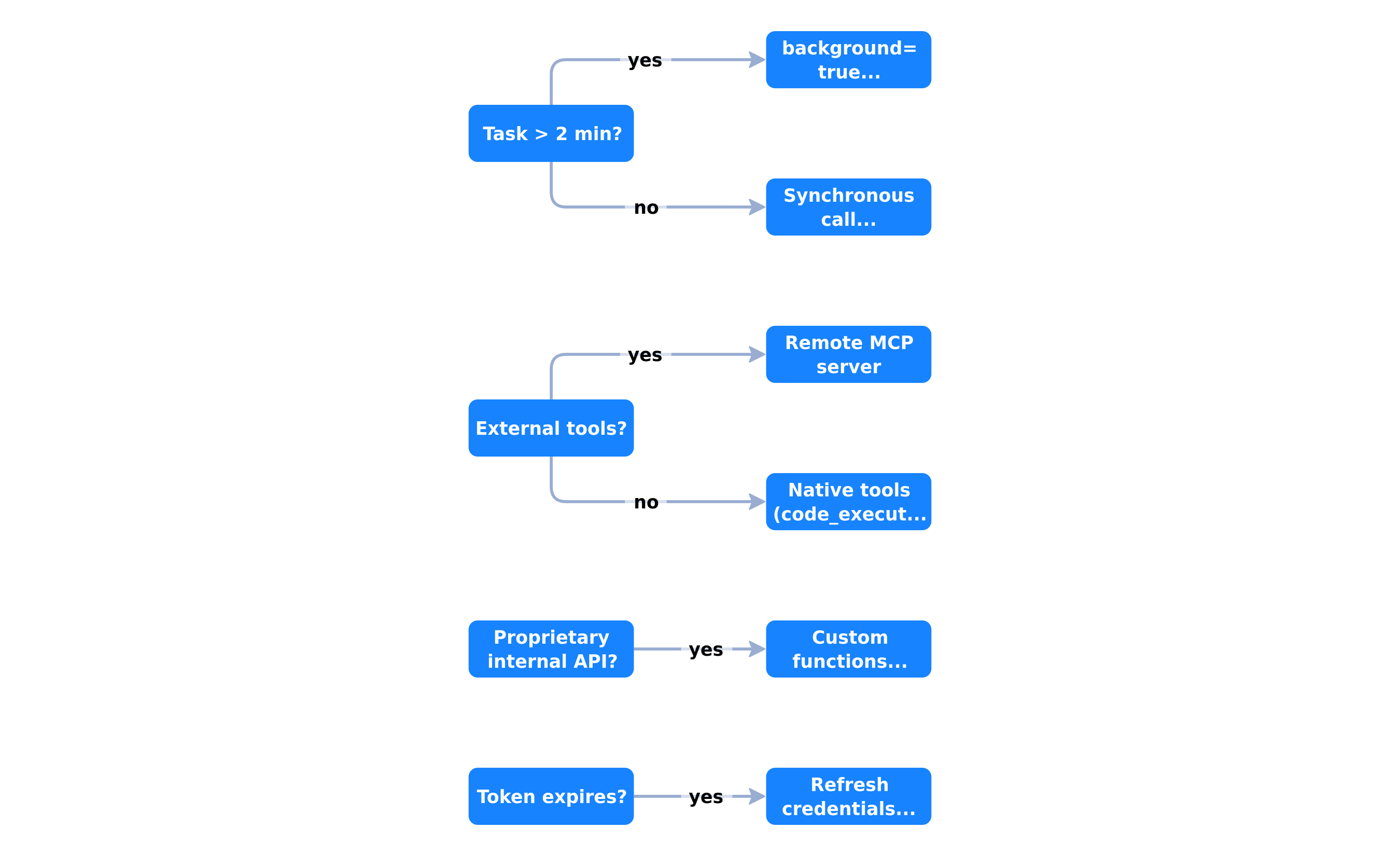 Background vs synchronous, MCP vs native tools, custom functions vs credential refresh
| Scenario | Recommended configuration |
|---|---|
| Quick question, single answer | Synchronous, native tools (google_search, code_execution) |
| Repo analysis (>5 min) | background=True, 5s polling, store=True |
| CRM / ERP / n8n access | mcp_server + allowed_tools + auth headers |
| Internal API without MCP server | Custom function + requires_action loop |
| Multi-hour session | Reused environment_id + periodic credential refresh |
| Real-time UI | stream=True (alone or combined with background) |
Observability, costs, and preview limitations
Inspect steps
Each Interaction exposes steps: reasoning, tool calls, code executions. Use them for debugging and UI:
for i, step in enumerate(interaction.steps or []):
    print(f"[{i}] type={step.type} name={getattr(step, 'name', '—')}")
Cost estimation
Per the Antigravity documentation, an agentic interaction consumes significantly more tokens than a simple chat — up to 3–5 million tokens on complex workflows (~$5). Monitor via streaming and interactions.cancel() if the agent diverges.
Known limitations (July 2026)
- Agent and Interactions API in preview — schemas may evolve
- No
temperature,top_p,max_output_tokens— 400 error if passed - No structured output on Antigravity
- Multimodal inputs: text and image only (no audio/video/document)
file_search,computer_use,google_mapsunavailable- Sandbox compute not billed during preview
Integration in a typical BOVO Digital stack
Here is the architecture we recommend to SMB and agency clients:
- Custom MCP server — exposes CRM, business DB, tickets (20-minute tutorial)
- Antigravity Managed Agent — reasoning, code, web, MCP orchestration
- n8n — business triggers, alerts, human-in-the-loop (n8n + MCP guide)
- Credential vault — automatic rotation toward
environment_idrefresh
The Antigravity agent does not replace n8n: it complements visual orchestration for heavy agentic tasks (analysis, code generation, research) while n8n handles deterministic workflows (webhooks, SLAs, notifications).
Step 6: save a custom managed agent
Once your configuration stabilizes (instructions, skills, sources, network rules), persist it as a managed agent reusable by ID. You avoid repeating configuration on every interaction.
agent = client.agents.create(
    id="bovo-data-analyst",
    base_agent="antigravity-preview-05-2026",
    system_instruction=(
        "You are a data analysis agent. Always generate a summary table "
        "and a chart. Export results as CSV and PNG."
    ),
    base_environment={
        "type": "remote",
        "sources": [
            {
                "type": "inline",
                "target": ".agents/AGENTS.md",
                "content": "Priority: reproducibility and calculation traceability.",
            },
            {
                "type": "repository",
                "source": "https://github.com/your-org/analysis-skills",
                "target": ".agents/skills",
            },
        ],
    },
)

print(f"Saved agent: {agent.id}")
Then invoke it by identifier — each run forks base_environment for a clean state while keeping your instructions and skills:
result = client.interactions.create(
    agent="bovo-data-analyst",
    input="Analyze the sales_q2.csv dataset and produce an executive report.",
    environment="remote",
    background=True,
)
This pattern is especially useful when multiple teams share the same agent profile (support, ops, data) with identical guardrails. At BOVO Digital, we version these definitions in Git and deploy via CI, exactly like an MCP server.
Streaming in production
For a UI that displays progress, prefer synchronous streaming or background streaming documented in the Interactions API:
stream = client.interactions.create(
    agent="antigravity-preview-05-2026",
    input="Analyze the 10 latest blog posts and propose an editorial plan.",
    environment="remote",
    stream=True,
)

for event in stream:
    if hasattr(event, "delta") and event.delta:
        print(event.delta, end="", flush=True)
Streaming exposes reasoning tokens and tool updates in real time — essential for debugging and user acceptance. Combine it with background=True when the task exceeds a standard HTTP session duration but users still need to see progress.
Error handling patterns
Production agents must handle transient failures gracefully:
import time
from google import genai

def create_with_retry(client, max_retries=3, **kwargs):
    for attempt in range(max_retries):
        try:
            return client.interactions.create(**kwargs)
        except Exception as exc:
            if attempt == max_retries - 1:
                raise
            wait = 2 ** attempt
            print(f"Retry {attempt + 1}/{max_retries} after {wait}s: {exc}")
            time.sleep(wait)
Wrap MCP calls and requires_action loops with explicit timeouts. Log interaction.id on every failure — Google support and your own post-mortems depend on that identifier.
Production readiness checklist
- Python 3.10+ and up-to-date
google-genai -
GEMINI_API_KEYin a secrets manager, never in plain text -
store=Truefor any background or multi-turn usage - Polling with max timeout and alert if
in_progressexceeds threshold -
environment_idpersisted in database to resume sandboxes - MCP server on Streamable HTTP, not SSE
- Restrictive
allowed_toolson eachmcp_server -
requires_actionloop tested for every custom function - Automated credential refresh before token expiration
-
stepslogs without secrets or PII
Conclusion: from demo to production agent
The GA Interactions API and the July 7, 2026 Managed Agents update turn Gemini into a credible agentic runtime. background=true frees your workers from HTTP timeouts. Remote MCP servers reuse the investment you already made in the protocol. requires_action connects systems MCP does not yet cover. Refresh via environment_id solves expired tokens without sacrificing sandbox state.
Start small: one synchronous interaction, then a background job, then an MCP server, then a custom function. Each layer adds without rewriting the previous one.
Want an Antigravity agent connected to your business tools from the POC? Our AI agent creation offering starts with technical scoping (MCP, credentials, observability) before any production commitment.
Already orchestrating with n8n? Our n8n automation agency integrates Antigravity as a heavy agentic layer above your existing workflows — without replacing what already works.
Unsure between Google Managed Agents, a custom agent, or a hybrid stack? Request an automation audit: we evaluate your MCP maturity, sovereignty constraints, and real Antigravity ROI on your use cases.
Tags
FAQ
Should I use background=true for every Antigravity interaction?
No. Reserve background=true for long-running tasks (repo analysis, report generation, multi-step pipelines) that exceed a few minutes. Short requests work synchronously with stream=True for real-time progress. background=true requires store=true (enabled by default); store=false is incompatible with async execution per Google's official documentation (June 2026).
How do I connect an existing MCP server to the Antigravity agent?
Add a mcp_server object in the tools array with name (lowercase alphanumeric), url (Streamable HTTP endpoint), and optional headers for authentication. allowed_tools restricts exposed tools. SSE transport is not supported — use Streamable HTTP per the MCP spec. If you already host an MCP server, our 20-minute deployment tutorial covers the server side; this article covers the Gemini client connection.
What does requires_action status mean and how do I handle it?
requires_action means the agent is waiting for a client-side custom function execution. Read interaction.steps to find function_call entries without a matching function_result, run your local logic, then send a function_result via previous_interaction_id and environment_id. Antigravity function calling is stateful only — you cannot reconstruct history manually in stateless mode.
How do I refresh expired credentials without losing the sandbox?
Pass the existing environment_id with a new network configuration (allowlist + transform to inject a refreshed Bearer token). Network rules replace the previous ones; filesystem, installed packages, and files persist. This feature is documented in the July 7, 2026 Managed Agents update and Google's Environments guide.
Is Python 3.10+ really required for google-genai?
Yes. The google-genai SDK requires Python 3.10 minimum for modern union types and async features used by the Interactions API. On older environments, migrate to Python 3.11 or 3.12 in a container before integrating Antigravity in production. Node.js 18+ is the equivalent for @google/genai if you prefer JavaScript.
Stuck on a step? We take it to production
Tutorials stop where production starts: secrets, GDPR, no-shows, CRM. A 30-min call to scope the delivery.
- 30 min
- Scoped delivery
- No commitment

William Aklamavo
Web development and automation expert, passionate about technological innovation and digital entrepreneurship.


