
Tutorial: Self-Hosting the n8n AI Assistant in Docker (Daytona Sandbox, BYOK LLM, Brave Search)
Step-by-step guide to configuring the n8n AI Assistant on your self-hosted instance. Docker Compose, Daytona sandbox, BYOK LLM (Anthropic/OpenAI), Brave Search, troubleshooting. Requires n8n v2.29.7+.

Tutorial: Self-Hosting the n8n AI Assistant in Docker (Daytona Sandbox, BYOK LLM, Brave Search)
The n8n AI Assistant has been available for self-hosting since July 9, 2026. This step-by-step guide covers Docker Compose, the Daytona sandbox, BYOK configuration, and troubleshooting common issues.
The n8n AI Assistant, launched on July 9, 2026, lets you build workflows in natural language. While the cloud version is plug-and-play, self-hosting requires manual configuration with several components: a LLM provider (BYOK), a sandbox (Daytona recommended), and optionally a search provider (Brave Search).
This tutorial covers the complete installation from A to Z with Docker Compose, environment variables, and troubleshooting common issues.
Prerequisites
What You Need
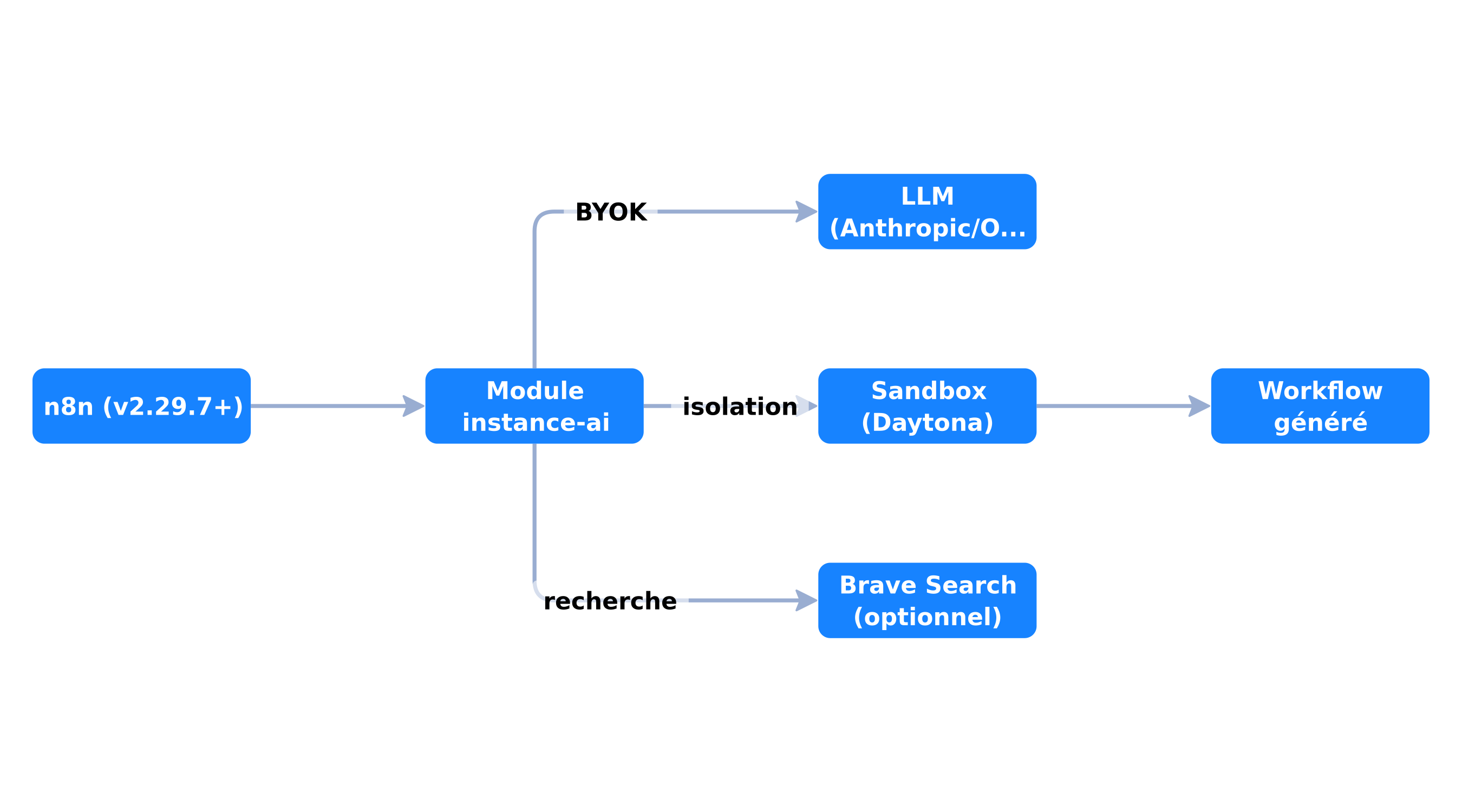 Complete architecture of the self-hosted n8n AI Assistant with Daytona and Brave Search
| Component | Required | Detail |
|---|---|---|
| n8n | Yes | Version 2.29.7+ |
| LLM API key | Yes | Anthropic, OpenAI, or OpenRouter (BYOK) |
| Sandbox provider | Yes | Daytona (recommended) or n8n Sandbox Service |
| Brave Search | No | Recommended for web search |
| Docker + Docker Compose | Yes | Latest stable version |
Getting API Keys
- Anthropic: console.anthropic.com → API Keys → Create Key
- Daytona: app.daytona.io → Settings → API Keys → Create (starts with
dtn_) - Brave Search: brave.com/search/api → Free plan (2,000 queries/month)
Step 1: Base Docker Compose
The docker-compose.yml file
version: '3.8'

services:
  n8n:
    image: docker.n8n.io/n8nio/n8n:latest
    restart: unless-stopped
    ports:
      - "5678:5678"
    environment:
      # --- Base n8n configuration ---
      N8N_HOST: 0.0.0.0
      N8N_PORT: 5678
      N8N_PROTOCOL: http
      NODE_ENV: production
      GENERIC_TIMEZONE: Europe/Paris
      WEBHOOK_URL: https://n8n.your-domain.com

      # --- AI Assistant module ---
      N8N_ENABLED_MODULES: instance-ai

      # --- LLM (BYOK) ---
      N8N_INSTANCE_AI_MODEL: anthropic/claude-opus-4-8
      N8N_INSTANCE_AI_MODEL_API_KEY: sk-ant-api03-xxxxxxxxxxxxx

      # --- Sandbox (Daytona) ---
      N8N_INSTANCE_AI_SANDBOX_ENABLED: 'true'
      N8N_INSTANCE_AI_SANDBOX_PROVIDER: daytona
      N8N_INSTANCE_AI_SANDBOX_IMAGE: daytonaio/sandbox:0.5.3-slim
      DAYTONA_API_URL: https://app.daytona.io/api
      DAYTONA_API_KEY: dtn_xxxxxxxxxxxxx

      # --- Web search (optional) ---
      INSTANCE_AI_BRAVE_SEARCH_API_KEY: BSA-xxxxxxxxxxxxx

    volumes:
      - n8n_data:/home/node/.n8n

volumes:
  n8n_data:
Starting
# Clone or create the project
mkdir n8n-ai-assistant && cd n8n-ai-assistant
# Create docker-compose.yml above

# Start
docker compose up -d

# Check logs
docker compose logs -f n8n
Step 2: Sandbox Configuration
Why Daytona
The sandbox is required: the AI Assistant generates and executes code in an isolated environment to protect your n8n instance. Daytona is recommended because it's what n8n uses on the cloud.
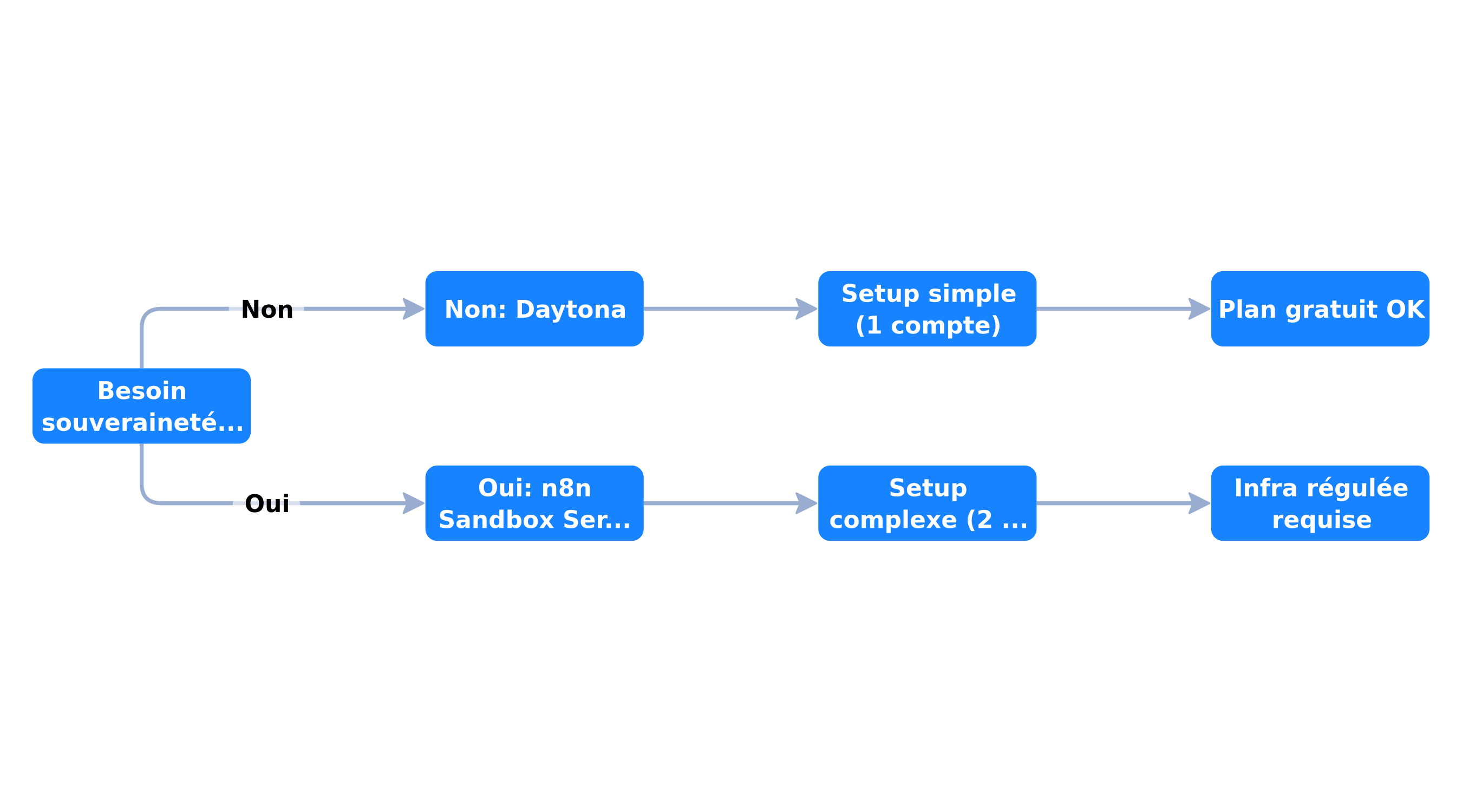 Decision tree for choosing between Daytona and n8n Sandbox Service
| Option | Setup | Sovereignty | Recommended for |
|---|---|---|---|
| Daytona | Simple (account + key) | Data on Daytona | Most setups |
| n8n Sandbox Service | Complex (2 containers) | All on your infra | Regulated environments |
Option B: n8n Sandbox Service (self-hosted)
If you want to keep everything on your infrastructure:
# Add to docker-compose.yml
  n8n-sandbox:
    image: docker.n8n.io/n8nio/n8n-sandbox:latest
    restart: unless-stopped
    environment:
      N8N_SANDBOX_SERVICE_API_KEY: your-secret-key

# Modify n8n:
  n8n:
    environment:
      N8N_INSTANCE_AI_SANDBOX_PROVIDER: n8n-sandbox
      N8N_SANDBOX_SERVICE_URL: http://n8n-sandbox:8000
      N8N_SANDBOX_SERVICE_API_KEY: your-secret-key
Step 3: LLM Configuration
Anthropic (Claude)
N8N_INSTANCE_AI_MODEL: anthropic/claude-opus-4-8
N8N_INSTANCE_AI_MODEL_API_KEY: sk-ant-api03-xxxxx
OpenAI (GPT)
N8N_INSTANCE_AI_MODEL: openai/gpt-4o
N8N_INSTANCE_AI_MODEL_API_KEY: sk-proj-xxxxx
OpenRouter (multi-model)
N8N_INSTANCE_AI_MODEL: openrouter/anthropic/claude-opus-4-8
N8N_INSTANCE_AI_MODEL_API_KEY: sk-or-v1-xxxxx
OpenAI-compatible endpoint (local)
N8N_INSTANCE_AI_MODEL: openai/gpt-4o
N8N_INSTANCE_AI_MODEL_API_KEY: dummy
N8N_INSTANCE_AI_MODEL_URL: http://localhost:1234/v1
Step 4: Verification and First Test
Verify the Module Is Loaded
# Check startup logs
docker compose logs n8n | grep -i "instance-ai"

# You should see:
# [instance-ai] Module enabled
# [instance-ai] Sandbox provider: daytona
# [instance-ai] Model: anthropic/claude-opus-4-8
Enable the Feature Flag
If the AI Assistant icon doesn't appear in the UI, enable the feature flag manually:
- Open n8n in your browser
- Developer console (F12)
- Run:
featureFlags.override('083_canvas_nodes_grouping', true)
// Reload the page
First Test
- Create a new workflow
- Click the AI Assistant icon (bottom right)
- Describe a simple workflow:
"Create a workflow that triggers every hour and sends a Slack message 'Hello from AI Assistant'" - The assistant should plan, build, and test the workflow
Troubleshooting Common Issues
Issue 1: "No results found" or generic error
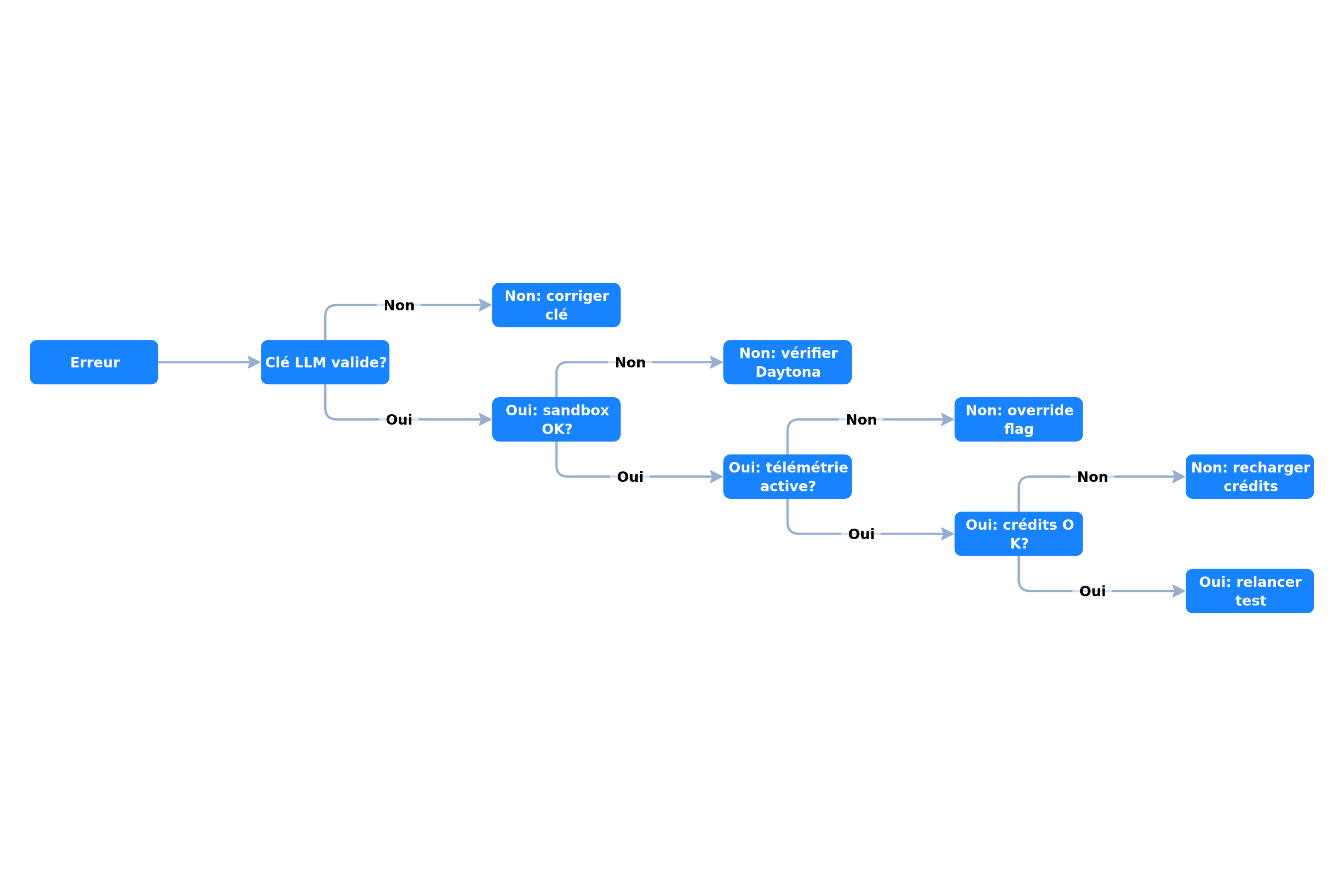 Decision tree for troubleshooting the self-hosted n8n AI Assistant
Likely cause: LLM credits exhausted or invalid API key.
# Test Anthropic API key
curl https://api.anthropic.com/v1/messages \
  -H "x-api-key: $ANTHROPIC_API_KEY" \
  -H "anthropic-version: 2023-06-01" \
  -H "content-type: application/json" \
  -d '{"model":"claude-opus-4-8","max_tokens":10,"messages":[{"role":"user","content":"Hello"}]}'
Issue 2: "Sandbox connection failed"
# Verify Daytona connection
curl -H "Authorization: Bearer $DAYTONA_API_KEY" \
  https://app.daytona.io/api/health

# Check variables in the container
docker compose exec n8n env | grep -i "sandbox\|daytona"
Issue 3: Telemetry disabled = feature disabled
The AI Assistant feature flag is linked to telemetry. If you've disabled telemetry, the feature won't display.
# If you have N8N_DIAGNOSTICS_ENABLED=false,
# you need to override the flag manually (see Step 4)
Issue 4: "Out of credits" error
In preview (July 2026), the error message for exhausted credits is generic instead of specific (n8n is working on a fix). If you see a vague error, check your LLM credit balance.
Costs and Budget
Cost Estimation per Session
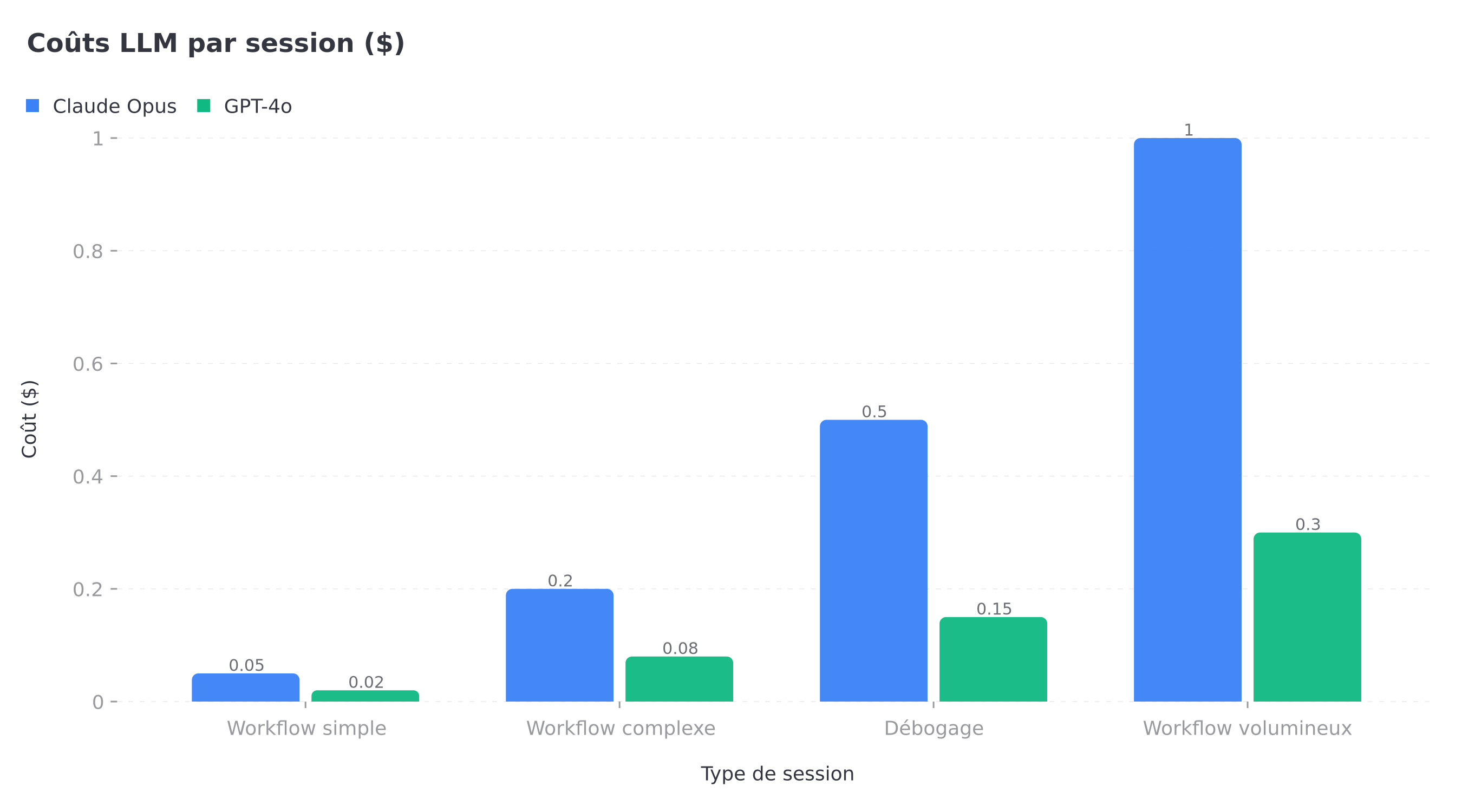 LLM cost estimation per AI Assistant session type
| Session type | Tokens | Claude Opus cost | GPT-4o cost |
|---|---|---|---|
| Simple workflow (3-4 nodes) | ~2K | ~$0.05 | ~$0.02 |
| Complex workflow (8-10 nodes) | ~8K | ~$0.20 | ~$0.08 |
| Debugging (5 iterations) | ~15K | ~$0.50 | ~$0.15 |
| Large workflow + long conversation | ~30K+ | ~$1.00+ | ~$0.30+ |
Cost Optimization
- Use a cheaper model for simple workflows:
anthropic/claude-sonnet-4instead of Opus - Limit conversation length: restart a session after 5 iterations
- Brave Search: the free plan (2,000 queries/month) is enough for testing
- Daytona: the free plan is enough for individual use
Final Checklist
- n8n v2.29.7+ installed
- Docker Compose configured with all variables
- Valid LLM API key (tested via curl)
- Daytona configured (connection tested)
- Brave Search configured (optional but recommended)
- Feature flag enabled if telemetry disabled
- First workflow creation test successful
- Logs verified at startup
Conclusion
Self-hosting the n8n AI Assistant in July 2026 takes work — the setup is manual and the preview has its limitations. But once configured, you get an AI agent that builds your workflows in natural language, on your own infrastructure, with your own LLM keys.
For teams that want to go further, our n8n automation service covers complete deployment and configuration, and our automation audit identifies priority workflows to automate with the AI Assistant. If you're new to n8n, first check our n8n AI Assistant overview to understand the capabilities before the technical configuration.
Tags
FAQ
What n8n version is needed for the self-hosted AI Assistant?
n8n version 2.29.7 or later is required to run the AI Assistant on a self-hosted instance. The feature is in preview and setup is manual.
What is the Daytona sandbox and why is it required?
Daytona is a sandbox provider that creates disposable, isolated containers where the AI Assistant generates and executes code. It's required because it protects your n8n instance from any AI-generated code.
Can I use OpenAI instead of Anthropic as the LLM?
Yes. The n8n AI Assistant supports Anthropic, OpenAI, and OpenRouter with the BYOK model. Change the N8N_INSTANCE_AI_MODEL variable and the corresponding API key.
How do I get a Daytona API key?
Create an account on app.daytona.io, then generate an API key from settings. The key starts with 'dtn_'. The free plan is sufficient for testing.
Does the self-hosted AI Assistant consume n8n credits?
No. When self-hosted, you pay the LLM provider (Anthropic, OpenAI) directly through your own API key. There's no n8n credit system.
Stuck on a step? We take it to production
Tutorials stop where production starts: secrets, GDPR, no-shows, CRM. A 30-min call to scope the delivery.
- 30 min
- Scoped delivery
- No commitment

Singbo Davy AGONMA
Fullstack Developer & AI Expert. n8n automation specialist, Laravel/Flutter development and AI agent integration. Master CS — IFRI.


