
n8n AI Assistant: The Agent That Builds Your Workflows in Natural Language
Launched July 9, 2026, the n8n AI Assistant is a chat agent that creates, edits, and debugs workflows from natural language. Available in preview on cloud (v2.29.9+) and self-hosted. Full analysis.

n8n AI Assistant: The Agent That Builds Your Workflows in Natural Language
On July 9, 2026, n8n launched the AI Assistant: a chat agent integrated directly into n8n that builds, edits, and debugs workflows from a simple description. The end of manual drag-and-drop?
The n8n AI Assistant, announced on July 9, 2026, marks a turning point for no-code automation. This conversational agent, integrated directly into the n8n interface, can create, edit, test, and debug workflows from natural language. It replaces the old AI Workflow Builder with significantly expanded capabilities.
Available in preview on n8n Cloud starting from version 2.29.9, and with configuration instructions for self-hosting, the AI Assistant transforms how teams build automations. This article breaks down its capabilities, limitations, and impact for SMBs.
Evolution: From AI Workflow Builder to AI Assistant
 Timeline of n8n's AI automation evolution
n8n had already introduced an AI Workflow Builder, but the AI Assistant goes much further:
| Capability | AI Workflow Builder | AI Assistant (July 2026) |
|---|---|---|
| Workflow creation | Yes | Yes |
| Editing existing workflow | No | Yes |
| Workflow testing | No | Yes |
| Error debugging | No | Yes |
| Iterative conversation | Limited | Yes, full |
The AI Assistant doesn't just generate a workflow from a single prompt: it maintains an iterative conversation where you can refine, correct, and iterate.
How It Works: The AI Assistant Workflow
The 4-Step Process
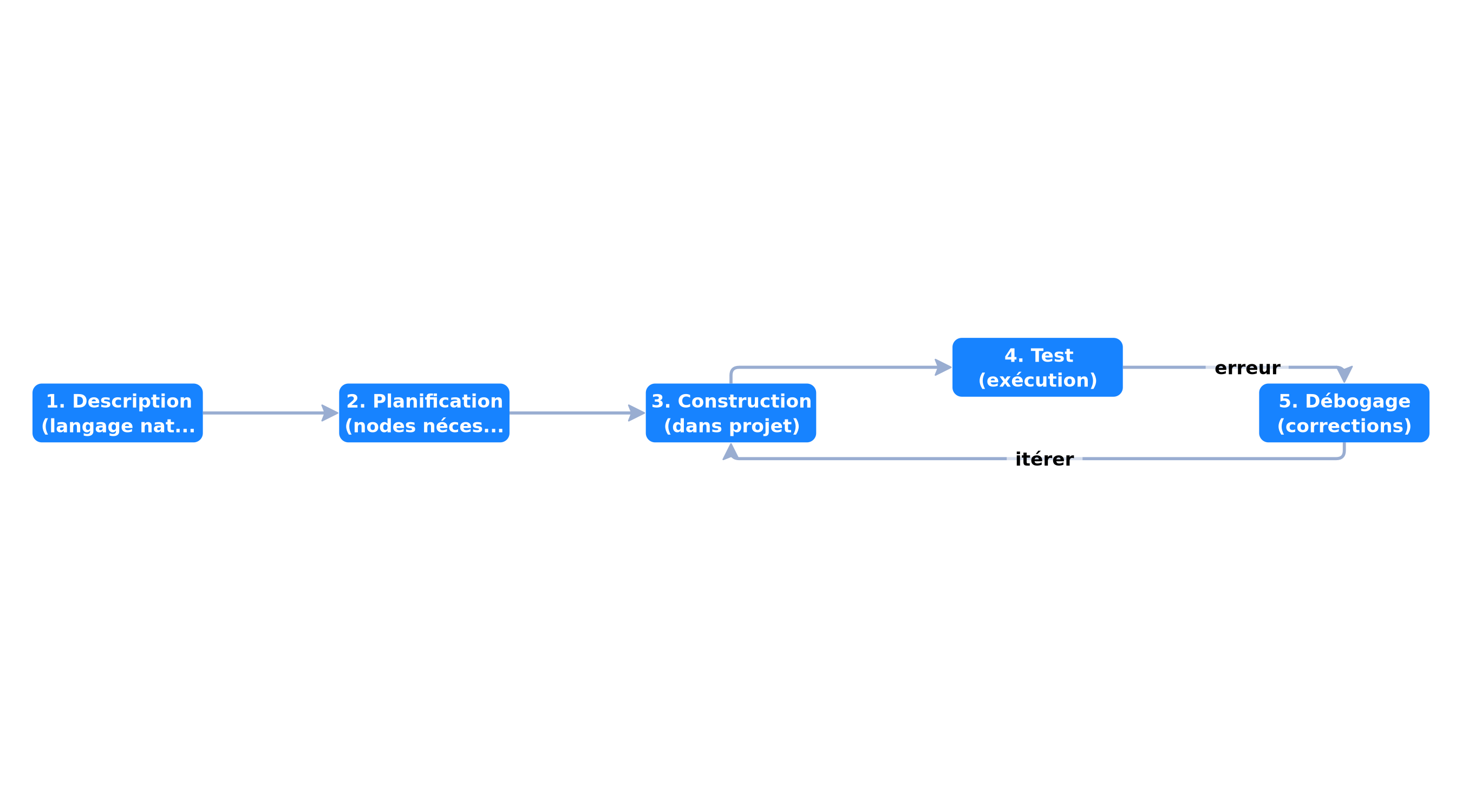 AI Assistant workflow: description → planning → building → testing
- Description: you describe in natural language what you want to automate
- Planning: the assistant plans the workflow, identifies necessary nodes
- Building: it builds the workflow in your selected project
- Testing and correction: it tests the workflow and helps fix errors
The result is a standard n8n workflow — that you can open, edit, and publish like any other workflow.
Example Conversation
You: "I want to fetch new Gmail emails, extract attachments,
      store them in Google Drive, and send a Slack notification."

Assistant: "I'll create this workflow with 4 nodes:
  1. Gmail Trigger (new email)
  2. Code node (extract attachments)
  3. Google Drive (upload)
  4. Slack (notification)

  Do you want me to add a sender filter?"

You: "Yes, ignore emails from newsletter@*"

Assistant: "Adding an IF node before Drive storage.
  Workflow ready. Launching test..."
Technical Architecture of the AI Assistant
The Sandbox: Isolation and Security
The AI Assistant doesn't run directly on your n8n instance. It uses an isolated sandbox — a disposable, locked-down container where the AI generates and executes code, completely separate from your n8n instance and your data.
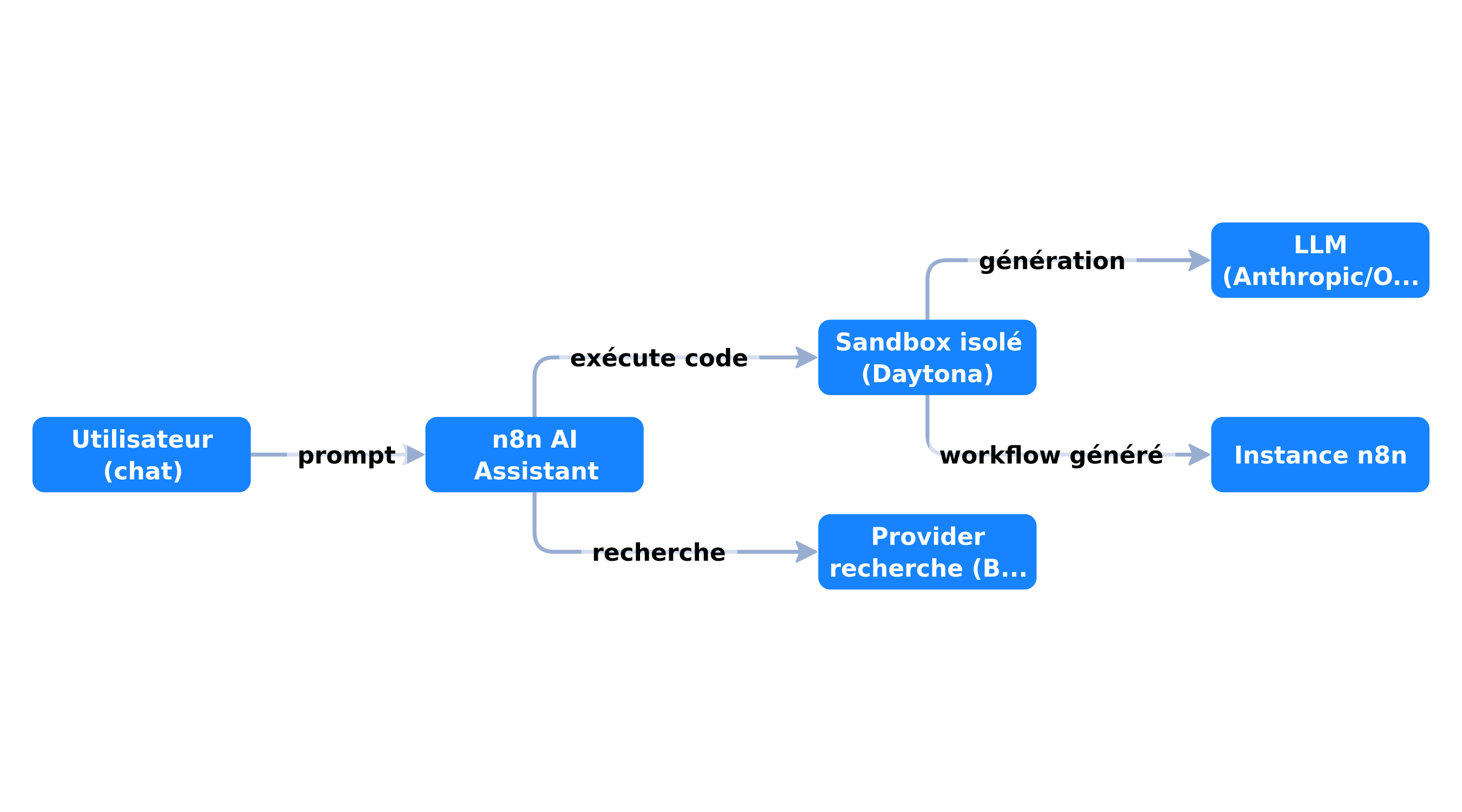 Isolation sandbox architecture of the n8n AI Assistant
This architecture ensures that:
- AI-generated code cannot affect your instance
- Your instance's credentials remain inaccessible to the sandbox
- Each session starts in a clean environment
Supported Providers
LLM (Bring Your Own Key):
- Anthropic (Claude)
- OpenAI (GPT)
- OpenRouter (multi-model access)
Sandbox:
- Daytona (recommended, used by n8n Cloud)
- n8n Sandbox Service (self-hosted, more complex)
Web Search (optional):
- Brave Search
- SearXNG
Availability and Configurations
n8n Cloud (Preview)
The AI Assistant is available in preview on n8n Cloud starting from v2.29.9. Direct activation from the interface, no technical configuration needed.
| Characteristic | Detail |
|---|---|
| Minimum version | 2.29.9 |
| Availability | Preview |
| Credits | Based on tokens consumed |
| Enterprise plans | Not available currently |
Self-Hosted (Early Access)
For self-hosting, detailed instructions were published on July 9, 2026. Requirements:
- n8n v2.29.7+
- API key from an LLM provider (BYOK)
- Sandbox provider (Daytona recommended)
- Search provider (optional)
Configuration via environment variables:
# docker-compose.yml
services:
  n8n:
    image: docker.n8n.io/n8nio/n8n
    environment:
      N8N_ENABLED_MODULES: instance-ai
      N8N_INSTANCE_AI_MODEL: anthropic/claude-opus-4-8
      N8N_INSTANCE_AI_MODEL_API_KEY: sk-ant-xxx
      N8N_INSTANCE_AI_SANDBOX_ENABLED: 'true'
      N8N_INSTANCE_AI_SANDBOX_PROVIDER: daytona
      N8N_INSTANCE_AI_SANDBOX_IMAGE: daytonaio/sandbox:0.5.3-slim
      DAYTONA_API_URL: https://app.daytona.io/api
      DAYTONA_API_KEY: dtn_xxx
      INSTANCE_AI_BRAVE_SEARCH_API_KEY: BSA-xxx
Concrete Use Cases for SMBs
1. Accelerated Onboarding
A new n8n user can describe their need and get a functional workflow in minutes, without knowing the 400+ available integrations.
2. Collaborative Debugging
When a workflow fails, the AI Assistant analyzes logs, identifies the cause, and proposes a fix — directly in the conversation.
3. Migration from Zapier/Make
Users coming from other platforms can describe their existing workflows and the AI Assistant rebuilds the n8n equivalent.
 Radar of AI Assistant use cases by user profile
Current Preview Limitations
Technical Limitations
- No parallelization: the assistant builds sequentially
- No versioning: no history of generated versions
- Credit errors: generic error message instead of a specific one (fix in progress, update July 10, 2026)
- Telemetry required: the feature is gated behind a feature flag linked to telemetry
Commercial Limitations
- Not available on Enterprise for now
- Limited credits in preview: long conversations and large workflows consume many tokens
- No additional credit purchase without plan upgrade (in development)
What to Watch
- Stability: the preview may change behavior
- Costs: the BYOK model on self-hosted means you pay LLM tokens directly to your provider
- Quality: generated workflows must be reviewed before production
The BYOK Model and Costs
On n8n Cloud
Credits are included in your plan. Beyond that, you need to upgrade. The calculation:
| Action | Estimated tokens | Credits |
|---|---|---|
| Simple workflow (3-4 nodes) | ~2K | Low |
| Complex workflow (8-10 nodes) | ~8K | Medium |
| Debug iteration (5 rounds) | ~15K | High |
| Large workflow + long conversation | ~30K+ | Very high |
Self-Hosted
You pay the LLM provider directly. With Claude Opus 4.8 at $5/$25 per million tokens, a typical 10K-token session costs about $0.30. With cheaper models like GPT-4o-mini, the cost can be 10x lower.
Impact on the Automation Ecosystem
The AI Assistant significantly lowers n8n's barrier to entry. The question is no longer "do you know n8n?" but "can you describe what you want to automate?".
For agencies like BOVO Digital that offer n8n automation services, the AI Assistant changes the profession:
- Faster prototyping: an MVP workflow in minutes instead of hours
- Focus on architecture: less time on drag-and-drop, more on business logic
- Democratization: clients can iterate on simple adjustments themselves
Conclusion
The July 2026 n8n AI Assistant is not an incremental improvement — it's a paradigm shift for automation. By enabling workflow building in natural language, n8n eliminates the last technical barrier between an automation idea and its realization.
The preview has its limitations (credits, stability, Enterprise), but the direction is clear: automation is becoming conversational. For SMBs that want to explore these capabilities, our automation audit identifies priority workflows to build with the AI Assistant, and our AI agent creation service covers full integration.
If you want to configure the AI Assistant on your own n8n instance, check out our complete self-hosting guide for the technical step-by-step.
Tags
FAQ
What is the n8n AI Assistant?
The n8n AI Assistant is a conversational agent integrated into n8n that builds, edits, tests, and debugs workflows from natural language. Launched July 9, 2026 in preview, it replaces the old AI Workflow Builder.
Is the n8n AI Assistant available on self-hosted instances?
Yes, configuration instructions for self-hosting have been available since July 9, 2026. Setup is manual and requires n8n v2.29.7+, an LLM API key (Anthropic, OpenAI, or OpenRouter), a sandbox provider (Daytona recommended), and optionally a search provider (Brave Search).
How does the n8n AI Assistant handle security?
The AI Assistant runs in an isolated sandbox (disposable container) to protect the n8n instance from any generated code. LLM keys are BYOK (Bring Your Own Key). Credits depend on tokens consumed.
What's the difference between the AI Assistant and the old AI Workflow Builder?
The AI Assistant replaces the AI Workflow Builder with additional capabilities: it can not only create workflows, but also edit them, test them, and help fix errors, all in natural conversation.
Does the n8n AI Assistant consume credits?
Yes. The AI Assistant uses credits based on tokens processed. Longer conversations, larger workflows, and repeated iterations consume more credits. In preview, you can upgrade your plan to get more credits.
We scope one workflow — not a generic demo
You describe a repeated task. We tell you what n8n would ship, the timeline, and what stays out of scope.
- 30 min
- 1 scoped workflow
- No commitment

William Aklamavo
Web development and automation expert, passionate about technological innovation and digital entrepreneurship.


