
Connect Cal.com to n8n: from request to confirmed booking
Cal.com already runs on bovo-digital.tech. n8n webhook, HMAC, 3 Calendly calendar cases (distinct tools). BOVO method and evidence, 13 September 2026.

Updated

Connect Cal.com to n8n: from request to confirmed booking
A booked slot is not a process. It is an event. It still has to arrive in the right place, signed, with a human who knows what to do next.
n8n Cal.com booking is the first workflow almost every services SME describes to us. Qualiopi coach, small agency, consultant: the visitor picks a slot, you get an email, someone copies the name into a sheet. Cal.com closes the slot. n8n is supposed to do the rest.
Cal.com is already in production on bovo-digital.tech: the scoping button opens cal.com/wakam/30min. That is not a demo. It is also not Calendly.
This 13 September 2026 revision keeps the two tools apart. Three portfolio files (ids 19, 22, 23) illustrate a calendar — they name Calendly. Calendly is not Cal.com: same intent (slot, reminder, chase), different webhooks and payloads. Three cases < 5: illustrations, not a “calendar tool” aggregate.
The tutorial stays operational: Cal.com Trigger (n8n 2.34.0, 4 August 2026) or generic webhook, BOOKING_CREATED, HMAC, minimum workflow, then the wall. If the site has no calendar, start with brochure site vs a site that books meetings.
At the end: contact and a Cal.com 30-min slot. We open both consoles.
Method and sample limits
Collection date: 13 September 2026.
Source: 44 files in portfolioData.fr.ts. Automation filter → 25 cases.
Out of scope: CRM, CSVs, emails, named quotes, ComeUp prices.
Public threshold: 5 cases before a segment aggregate.
The 7 leads / CRM / booking files clear the bar. The 3 Calendly files (19, 22, 23) do not form a “Cal.com” sub-segment. We do not merge the tools.
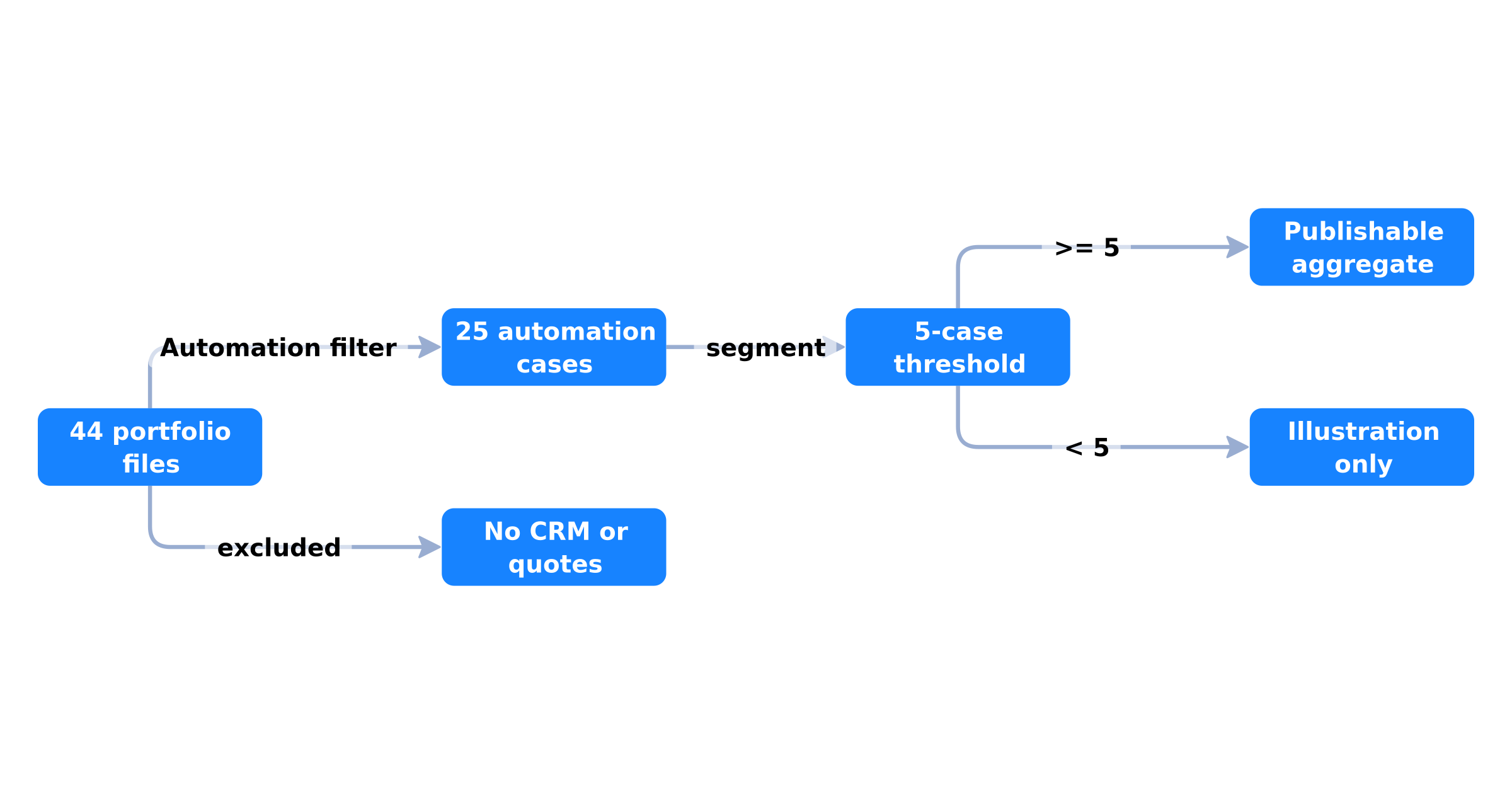 From the public portfolio to an aggregate: 44 files, 25 cases, 5-case threshold, no CRM or quotes
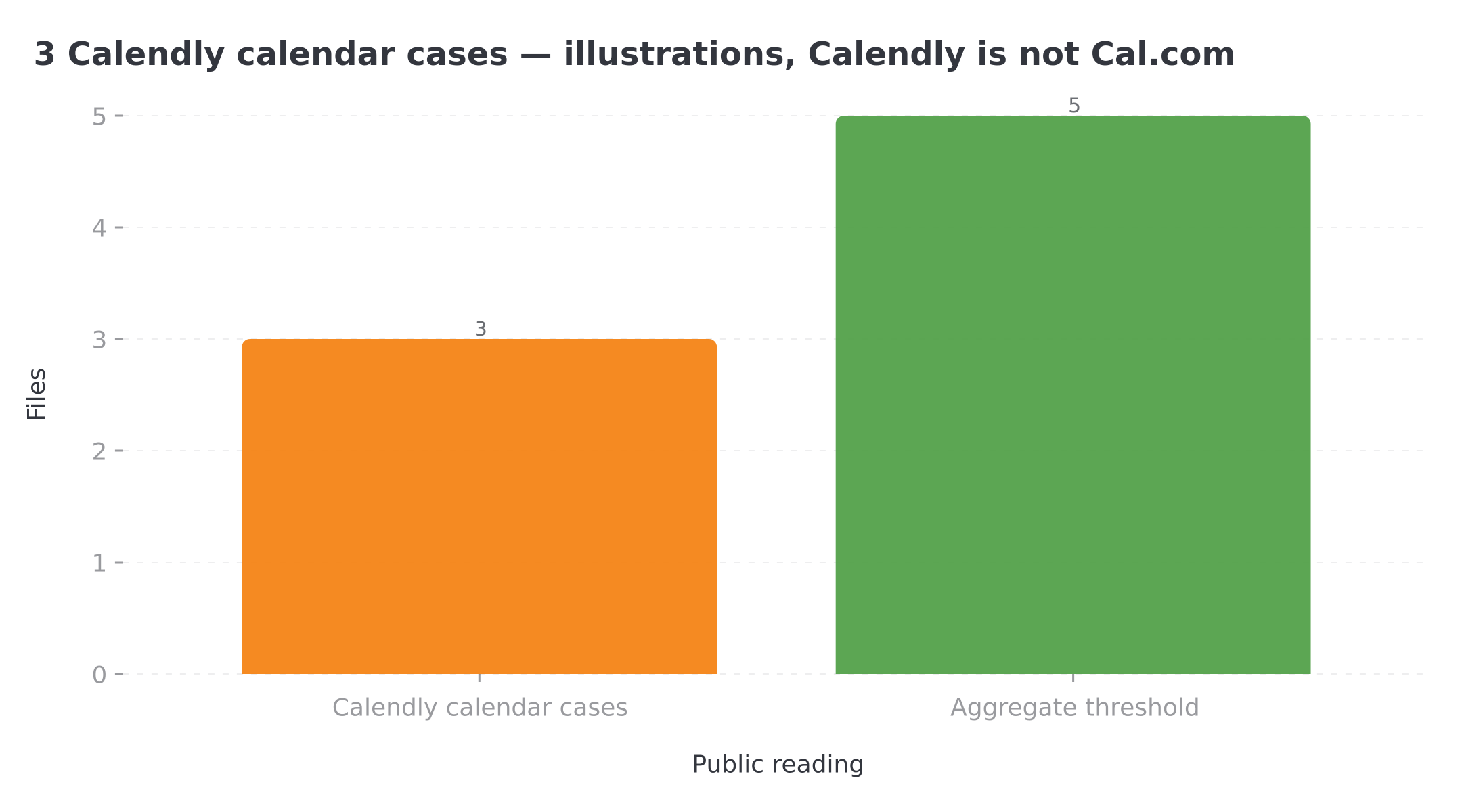 Three files name Calendly: below the five-case threshold, calendar illustrations only
On the stack, 14 files name Make.com, 6 name n8n. Zapier is not in this text. The three calendar cases run on Make.com + Calendly: they show clocks, not a Cal.com connector.
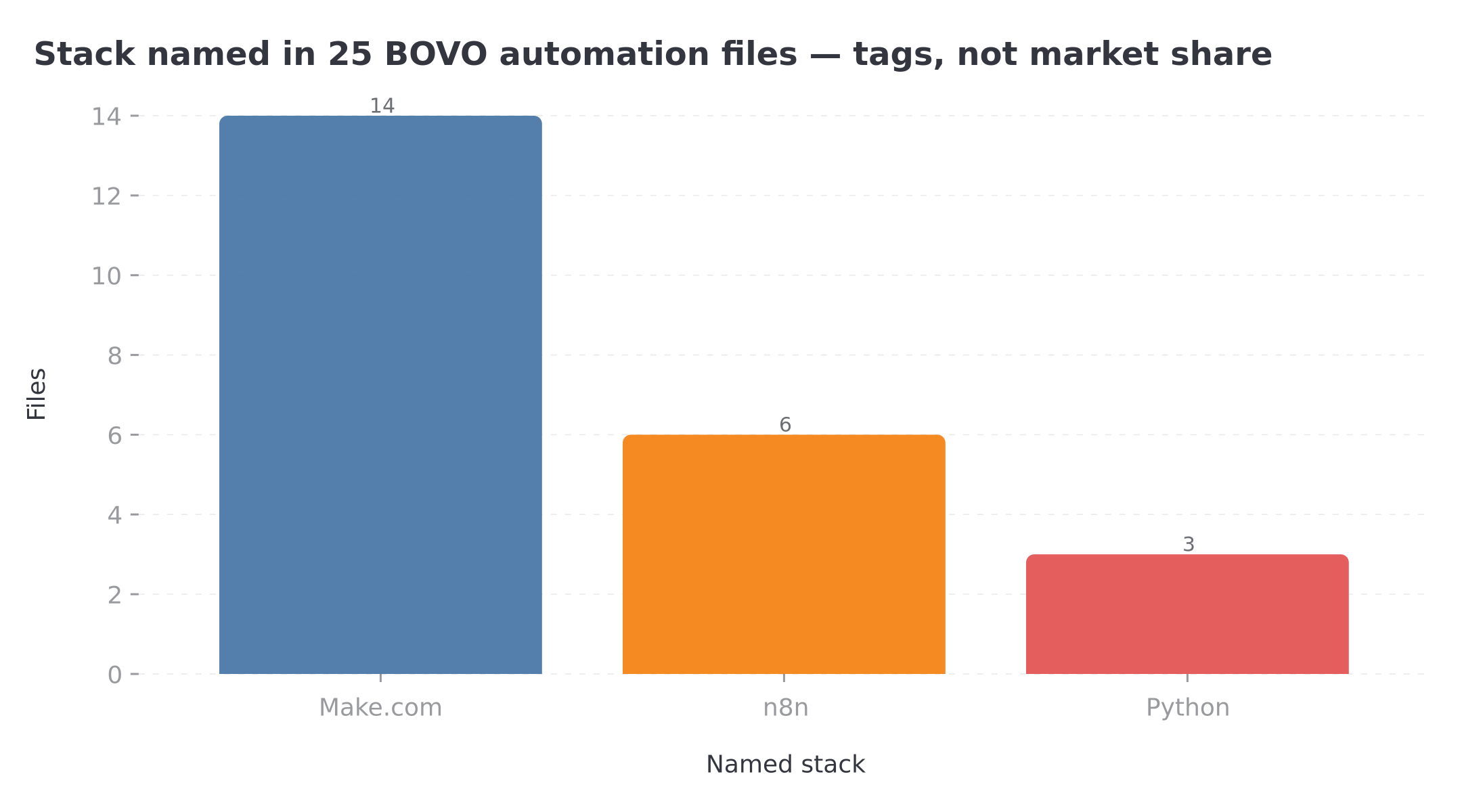 Make.com appears in 14 files, n8n in 6, Python in 3 — technology tags, not market share
Three calendar illustrations (Calendly ≠ Cal.com)
1. Funnel + calendar (id 19). AI qualification, three channels, a Calendly link. File: multichannel funnel.
2. Booking reminders (id 22). Calendly + Twilio: 24 h, 6 h and 15 min before. File: booking reminders.
3. Unclicked links (id 23). Chase at 24 h then 48 h. File: Calendly follow-up.
On bovo-digital.tech, the same role (book a slot, confirm, remind) is held by Cal.com. The webhook, x-cal-signature-256 and BOOKING_* events are Cal.com’s, not Calendly’s.
What the SERP says — and what it skips
Search “n8n Cal.com booking” in August 2026. You get Cal.com product pages, the ElevenLabs voice template on n8n.io, a Calendly tutorial (not Cal.com), and “how to connect Cal Com to n8n” sheets that still list the Cal.com Trigger as if 2026 had not broken anything.
What broke is documented. On 24 July 2026 a self-hosted user (n8n 2.31.6) opened issue n8n#34934: Cal.com credentials and node, even set to “v2.0 onwards”, still hit API v1. Cal.com replies: API v1 has been decommissioned. Please migrate to API v2. The n8n forum (May 2026 thread) says the same on n8n Cloud. Moderators’ workaround: Webhook POST node, production URL, manual registration in Cal.com.
On 31 July, PR n8n#35055 merged a real Cal.com Trigger v2 (CalTriggerV2.node.ts). It shipped in n8n 2.34.0, published 4 August 2026. Old node versions were kept so nothing broke by accident. n8n docs were not all updated on day one (the PR left “Docs updated” unchecked).
So: if your n8n is < 2.34.0, do not follow a tutorial that says “drop in the Cal.com node”. If you are current, the native trigger works for four events (n8n docs): Booking created, cancelled, rescheduled, Meeting ended. No-show, payment, Cal.com forms are not on that list. They are on Cal.com’s webhook list.
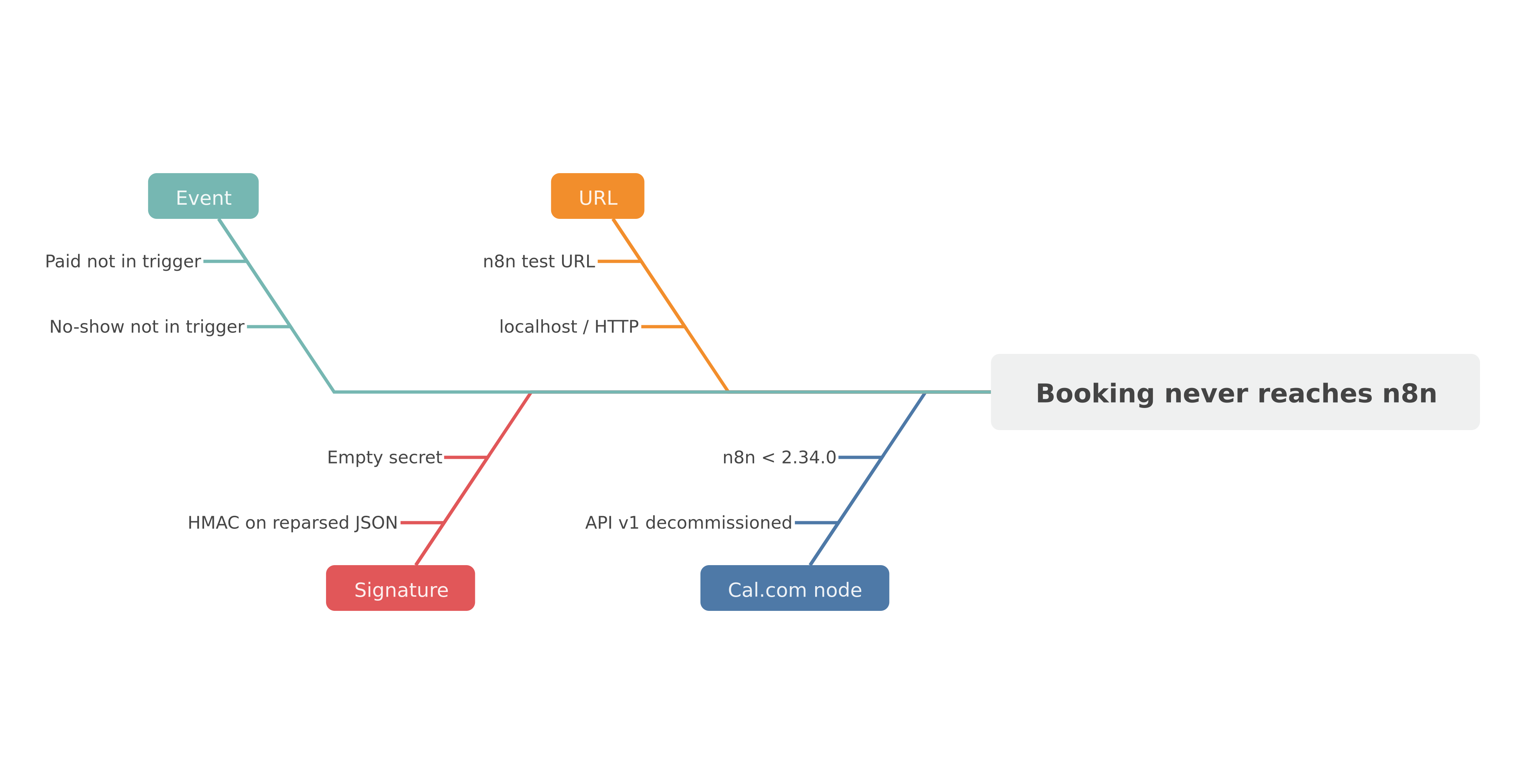 Four common causes: node still on API v1, localhost URL, missing HMAC secret, event outside the native trigger.
Prerequisites (30 minutes before the first node)
You need four things. Not an “AI agent” stack.
- A Cal.com event type that already takes bookings (duration, Google / Outlook calendar, short qualification questions). If the link 404s or demands a Google account from the visitor, fix that before n8n.
- n8n reachable on public HTTPS. n8n Cloud: the webhook production URL. Self-host: a reverse proxy, not
http://localhost:5678. Cal.com SaaS rejects HTTP, localhost and private IPs. Self-hosted Cal.com allows HTTP and LAN — documented on the Webhooks page. - A webhook secret. A long string, stored in n8n credentials, never in a workflow JSON posted on a forum.
- A proof channel. Slack, email, or a Notion database. The first workflow does not write to the CRM. It proves the event arrives.
Activate (publish) the workflow before you paste the URL into Cal.com. The n8n test URL changes. The production URL does not.
Path A — Cal.com Trigger (n8n ≥ 2.34.0)
From 2.34.0, the Cal Trigger node can create the webhook on Cal.com again. Credentials: API key as Authorization: Bearer, plus the cal-api-version header the v2 API expects (Cal.com’s migration docs show 2024-08-13 on https://api.cal.com/v2/). The old ?apiKey= query auth is v1. It is dead.
Steps, no theatre:
- Cal.com credentials. Test them. If the test fails with the v1 message, you are not on 2.34.0.
- Cal Trigger node. Event: Booking created.
- Optional filter: Event Type name or ID, if you have several calendars (audit vs coaching vs interview).
- Activate the workflow. Book yourself. Check the execution.
PR 35055 also allows a payload template. Useful to shrink JSON. Dangerous if you drop attendees or startTime the rest of the graph needs. Start with no template.
Write this in your runbook: this node does not replace Settings → Developer → Webhooks for Booking No-show Updated or Booking Paid. n8n docs list four events. Cal.com lists more than fifteen.
Path B — Generic webhook (all versions, all events)
This is the path the n8n forum recommended during the v1 outage. It remains the most predictable.
- Webhook node, POST, path such as
cal-booking. - In options: collect the raw body (required for HMAC).
- Activate. Copy the production URL.
- Cal.com → Settings → Developer → Webhooks → New. Subscriber URL = that URL. Triggers: at least Booking Created. Add Booking Cancelled, Booking Rescheduled, Meeting Ended, Booking No-show Updated if you will chase absences.
- Secret: the same string as in n8n.
- Save. Book a real slot (not only “Test webhook” if you want the full payload).
You can associate a webhook with a user or an event type. A training body with three call types (discovery, module, follow-up) should filter on eventTypeId in n8n, or create one webhook per type.
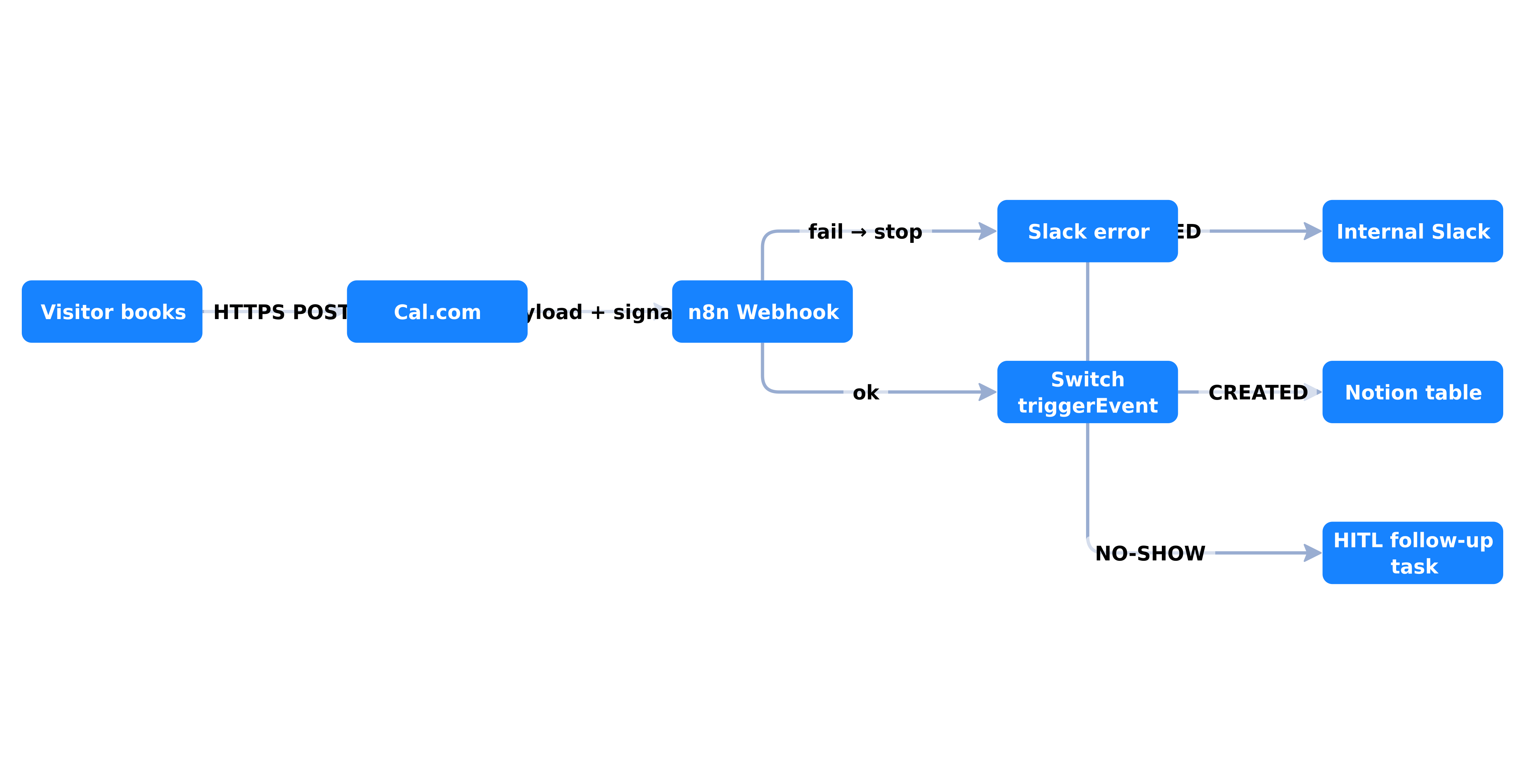 Visitor books → Cal.com HTTPS POST → n8n verifies HMAC → branch created / cancelled / no-show → Slack and table. Nothing goes to the client before that check.
Read BOOKING_CREATED without picking the wrong field
Cal.com versions payloads. The x-cal-webhook-version header is e.g. 2021-10-20. Most events are wrapped:
{
  "triggerEvent": "BOOKING_CREATED",
  "createdAt": "2024-01-01T00:00:00.000Z",
  "payload": {
    "title": "Strategy Session between Organizer and Guest",
    "startTime": "2024-01-01T10:00:00Z",
    "endTime": "2024-01-01T10:15:00Z",
    "eventTypeId": 123,
    "organizer": { "name": "Organizer Name", "email": "organizer@example.com" },
    "attendees": [
      {
        "email": "guest@example.com",
        "name": "Guest User",
        "timeZone": "UTC"
      }
    ]
  }
}
MEETING_STARTED and MEETING_ENDED are flat: booking fields sit next to triggerEvent, with no payload wrapper. If your Set node reads payload.attendees.0.email on Meeting Ended, it will be empty. That is in the docs, not a forum rumour.
For seated event types, attendees contains only the person on the seat that fired the webhook, not the whole room. Do not build a “mail everyone” on that array without rereading it.
Fields we almost always map in audits:
| Use | Typical path (BOOKING_CREATED) |
|---|---|
| Booker email | payload.attendees[0].email |
| Name | payload.attendees[0].name |
| Start (UTC) | payload.startTime |
| Title | payload.title |
| Event type | payload.eventTypeId |
| Notes / answers | payload.additionalNotes + booking responses |
| Guest timezone | payload.attendees[0].timeZone |
Times are ISO UTC. Convert to Europe/Paris inside n8n (Date & Time node), not in your head. A coach who sends “10 a.m.” to a client in Guadeloupe has already lost the meeting.
Verify HMAC, or accept fake bookings
Cal.com: you set a secret. On receipt you compute HMAC-SHA256 of the raw body with that secret. You compare it to x-cal-signature-256. If they differ, the POST is not trustworthy.
Illustrative example (Code node, Node.js crypto). Adapt to your Webhook item names. This is not a “certified production” paste:
const crypto = require('crypto');
const secret = $credentials.calWebhookSecret; // wire via credentials, not hardcoded
const raw = $input.first().json.bodyRaw || $input.first().json.body;
const expected = crypto
  .createHmac('sha256', secret)
  .update(typeof raw === 'string' ? raw : JSON.stringify(raw))
  .digest('hex');
const received = $input.first().json.headers['x-cal-signature-256'];
if (expected !== received) {
  throw new Error('Cal.com signature mismatch');
}
return $input.all();
n8n pitfall: if the Webhook node parses JSON before you get the raw body, HMAC breaks (whitespace, key order). Hence the raw-body option. If you cannot match, do not “turn the secret off to move forward”. Fix the raw body. An unsigned webhook on the internet is a public form that creates CRM rows.
Self-host: you control the network. Cal.com SaaS → n8n Cloud: HTTPS + HMAC, both.
The minimum workflow (the one that must run tonight)
Goal: one created booking produces (1) an internal Slack / email, (2) a row in a table (Notion, Airtable or Google Sheets), (3) nothing else to the client. Cal.com already sends the booker confirmation. Duplicating that mail from n8n is the fastest way to get two contradictory confirmations.
Graph:
- Webhook (or Cal Trigger) → HMAC.
- Switch on
triggerEvent. BOOKING_CREATEDbranch: Set (email, name, startTime Europe/Paris, eventTypeId, Cal.com URL if present).- Slack (
#bookings): one readable line. Not a JSON dump. - Notion / Sheets: a
Newrow, statusTo prep. BOOKING_CANCELLEDbranch: same table, statusCancelled. Shorter Slack.- Error Workflow: if Slack or Notion dies, you know. Otherwise you believe “n8n worked” because the webhook returned 200.
Deliberately thin. An independent consultant finishes it in an evening. An 8-person agency too, if someone owns n8n.
Do not add Claude “to summarise the brief” until HMAC and the table survive a week. An LLM on an unsigned payload is a spam summary.
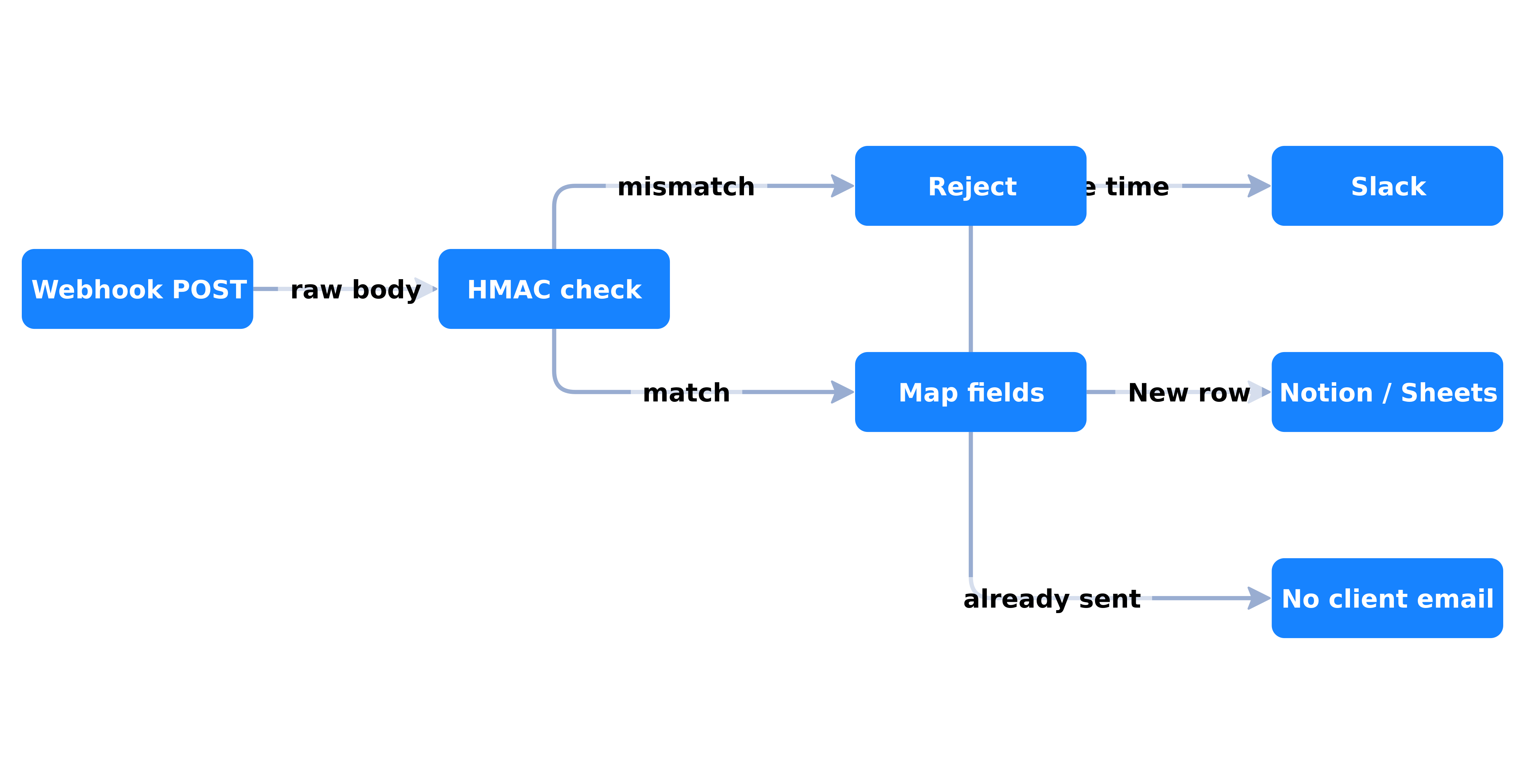 HMAC first, mapping next, Slack and table in parallel. The client already has the Cal.com confirmation: n8n preps the human, it does not restate the slot.
Three situations, three mappings
Same stack. Not the same eventTypeId.
Coach / training body: discovery vs module
Two Cal.com types. Discovery 30 min, module 90 min. One webhook arrives. The n8n Switch reads eventTypeId. Discovery: Slack + Notion “Pipeline” row. Module: “Session” row + “convening D-2” task. You do not put an AI agent on a Qualiopi convening letter. A node that fills a document template, yes. ChatGPT Work, no — we settled that in Work at $20 vs n8n.
The prospect brief (three Cal.com questions: topic, headcount, already Qualiopi) goes into Notion, fixed fields. Not a generated paragraph.
Small agency: onboarding after kickoff
The “30-min scoping” booking (the one on this site, Cal.com) should create: a Drive folder or client Notion page, a “recap D+1” task, a Slack ping to sales. Deposit payment, if it exists, is not this webhook. It is Stripe, or Booking Paid if you collect inside Cal.com. Mix both in the same Set node, and you will mark as “paid” people who only booked.
n8n’s 70 MCP servers can help an agent find the client’s Notion page. They do not replace the node that creates the row with frozen fields.
Consultant: prep pack, not an invented CRM
An independent at €800–2,000/day does not need HubSpot the evening of the first webhook. They need: name, company (Cal.com question), video link, startTime, and a reminder to themselves 2 hours before (Schedule / Wait until startTime - 2h, or a second cron workflow that reads the table). CRM comes when the pipeline has more than twenty open opportunities, not before.
D-1 reminders and no-shows: where the native trigger is not enough
Cal.com already sends emails. Many SMEs stop there. Then they measure no-shows.
The documented Cal.com event is Booking No-show Updated. It is not in the four-event Cal Trigger list. Path B, then: manual webhook, trigger checked.
What we put in production on Cal.com, practice order, not an average of the 3 Calendly files:
- D-1: email or SMS “tomorrow at {local time}, link {url}”. Frozen template. No AI.
- D-0 − 2 h: internal ping if the booking is still
accepted. - File 22 documents a 24 h / 6 h / 15 min clock on Calendly: we can reproduce it on Cal.com; we do not merge the Calendly connector into it.
- No-show: table status
No-show, “chase D+1” task, not a second mail in the same minute. A human confirms. HITL, even without an agent.
WhatsApp for the reminder: another article, another wall (opt-in, Meta templates, 24 h). The WhatsApp chatbot n8n + Claude tutorial sets the channel. It does not set CNIL opt-in — separate topic. Do not stack WhatsApp on this workflow until the D-1 email is reliable.
Meeting Ended (flat, remember) is for creating the recap task, not for “transcribe with AI” by default. Transcription is a project. Recap due D+1 is a boolean.
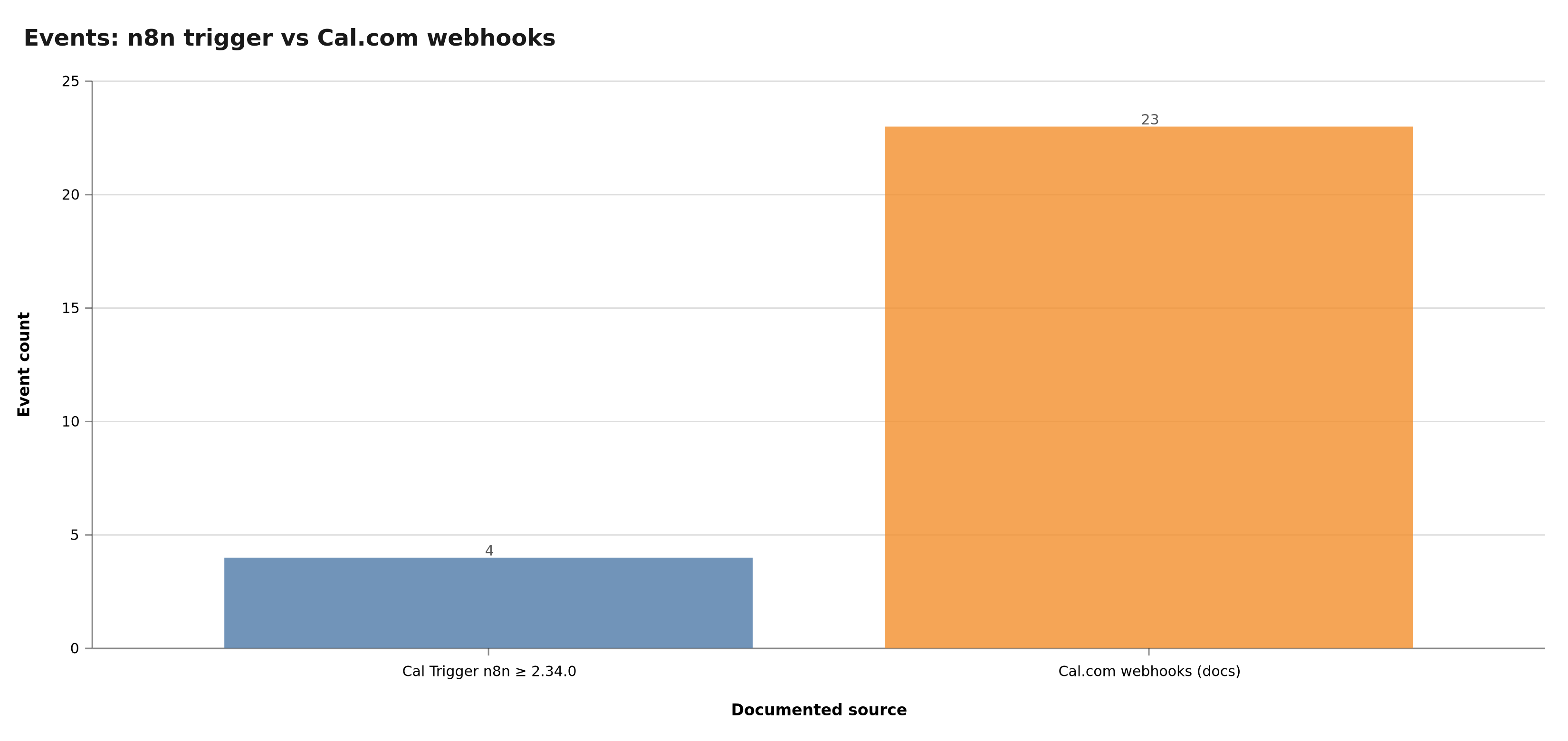 The native trigger (n8n ≥ 2.34.0) covers four events. Cal.com documents many more. No-show and payment go through the generic webhook.
v2 API calls (create a booking, list types)
The trigger receives. Sometimes you must write: create a booking from a homemade form, list event types. API v1 (/v1/bookings?apiKey=) is decommissioned. Cal.com’s migration shows:
curl https://api.cal.com/v2/bookings \
  -H "Authorization: Bearer cal_live_xxxxxx" \
  -H "cal-api-version: 2024-08-13"
In n8n: HTTP Request node, not the old Cal.com action node if it is still stuck on v1 on your version. Bearer, version header, JSON. Test first in a manual workflow. Do not build an “agent that books on its own” until you have a quota and HITL. A double booking is a lost client, not a log.
Self-hosted Cal.com: the base URL is not api.cal.com. It is yours. The version header is the one your instance expects. Read your docs, not a 2024 gist.
What it costs (order of magnitude)
Cal.com: cloud plan or self-host. n8n: Cloud per execution, or a VPS. A webhook + Slack + Notion workflow is hundreds of executions a month for an SME that books 20 meetings, not millions of tokens. Setup ranges (scoping, nodes, HITL) sit in n8n / Make 2026 pricing — practice orders of magnitude, not a public rate card.
The hidden cost is not n8n. It is manual recopy that continues “just in case”, and the homemade confirmation email that contradicts Cal.com. If after two weeks someone still copies Slack into Excel, the workflow is not adopted. That is a team issue, not a node issue.
GDPR, very short, because a calendar is personal data. Legal basis (often pre-contractual B2B steps — have counsel confirm). Processor: Cal.com Cloud vs self-host, n8n Cloud vs EU VPS. Log: who received the payload. This is not legal advice. It is the checklist an HR firm or a coach asks before go-live.
The wall: where DIY stops
You can, tonight, ship path B + Slack + a sheet. That is already better than Cal.com email alone.
You do not ship, tonight:
- WhatsApp. Opt-in, templates, 24 h, Meta bans. Not a “Send message” node.
- Cascaded no-shows (SMS + email + task + reschedule offer) without HITL.
- Two-way CRM. HubSpot / Pipedrive overwriting the booking, or the reverse. ID mapping, not a “create contact” Zap.
- Several calendars, several brands, one n8n.
eventTypeIdfilters, separate secrets. - Payment.
Booking Paidor Stripe. Never inferred fromBOOKING_CREATED. - HMAC + raw body on a badly proxied n8n (re-serialised body).
- n8n < 2.34.0 plus stubborn use of the Cal Trigger. Upgrade, or stay on webhook.
- A site with no booking button. n8n does not convert a brochure. See the site audit.
That is the perimeter of the n8n agency and the automation audit: a named workflow, an owner, Slack errors, a one-page doc. Not an ElevenLabs demo.
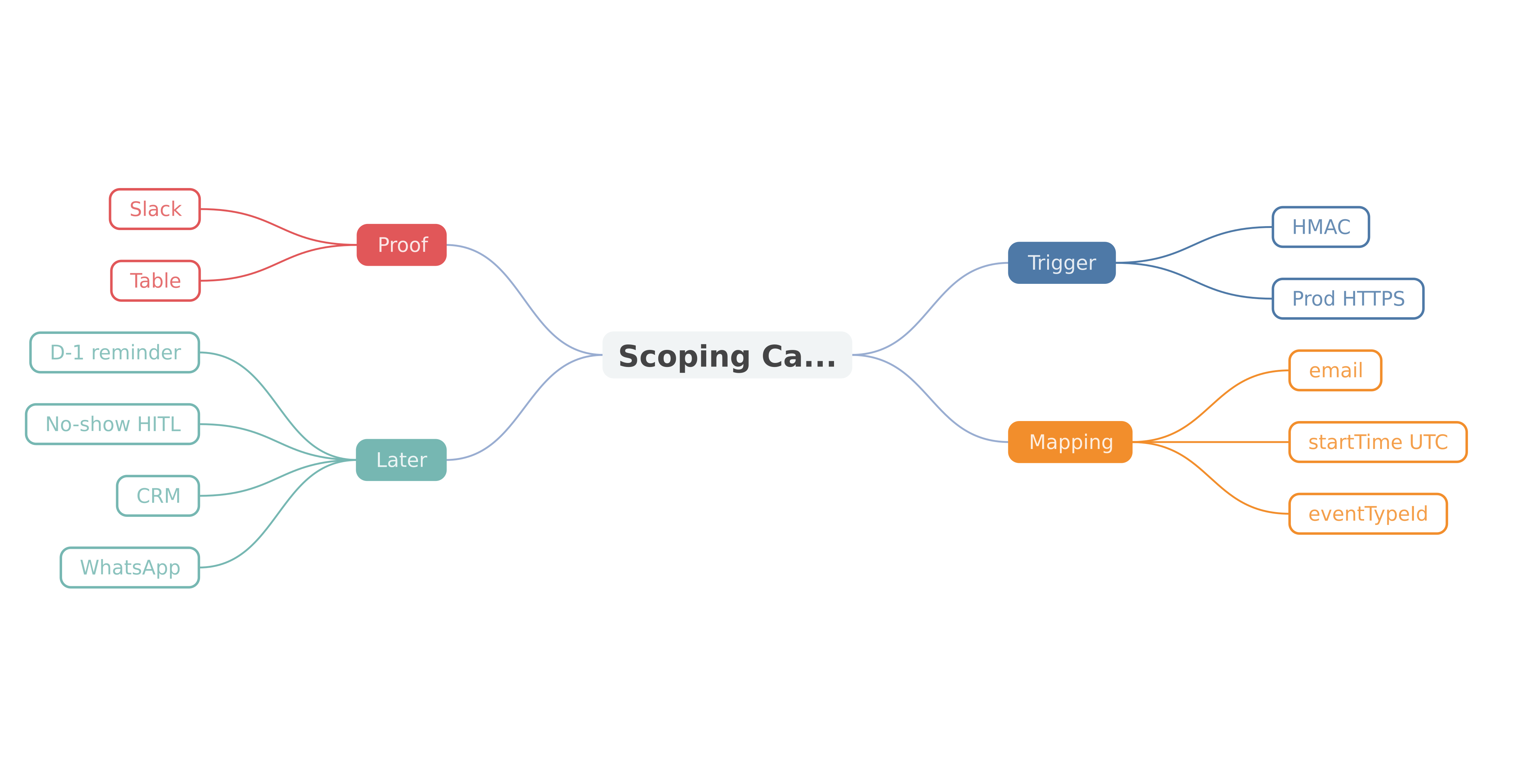 Trigger, HMAC, mapping, internal channel, table, then only reminders, no-shows, CRM, WhatsApp. The order is not negotiable.
30-minute checklist, before you “automate everything”
- Which n8n version? If < 2.34.0, path B only for the native trigger.
- Is the URL in Cal.com the production HTTPS URL?
- Is a secret set, and HMAC tested with a real booking?
- Does
BOOKING_CREATEDmap email, name, startTime, eventTypeId — and nothing invented? - Is Slack (or internal email) readable in 5 seconds?
- One table, one status, one human owner?
- Does Cal.com already send the client confirmation? Then n8n does not duplicate it.
- Do you need no-show? If yes, manual webhook, not only the Cal Trigger.
- How many event types? One Switch, or several webhooks.
- Does the site have a single CTA to the calendar? Otherwise the workflow runs in a vacuum.
- Error workflow: who is pinged at 11 p.m. if Notion 500s?
- If the Switch sticks: write to us or book 30 minutes. We open both consoles.
Conclusion
Connecting Cal.com to n8n is not “drop the Cal.com node” as in 2025. API v1 is dead. n8n 2.34.0 (4 August 2026) repairs the trigger for four events. The generic webhook + Settings → Developer → Webhooks remains the complete path, especially for no-shows. HMAC on the raw body. UTC → client timezone mapping. Slack and a table before WhatsApp and the CRM.
SEO pages still sell a magic connection, or Calendly as if it were Cal.com. On bovo-digital.tech, Cal.com is already in production. Files 19, 22 and 23 stay calendar illustrations.
Next action: one test booking, one green n8n execution, one Slack line. Then contact or Cal.com 30 min for D-1, no-show and CRM without glue.
Tags
FAQ
Does the n8n Cal.com Trigger node still work in 2026?
It depends on the version. Cal.com decommissioned API v1. On n8n 2.31.x the node and credentials returned “API v1 has been decommissioned” (GitHub issue n8n#34934, 24 July 2026). The fix (PR n8n#35055) merged on 31 July and shipped in n8n 2.34.0 on 4 August 2026. Below 2.34.0, use a generic Webhook node. Above it, the native trigger is fine for Booking created / cancelled / rescheduled and Meeting ended.
Should I use the Cal.com node or a generic webhook?
The Cal.com Trigger (n8n ≥ 2.34.0) registers the webhook for you. Per n8n docs it only covers four events. Cal.com docs list many more: Booking No-show Updated, Meeting Started, Form Submitted, Booking Paid, and so on. For no-shows or payments, a Webhook node plus Cal.com Settings → Developer → Webhooks is the documented path. Both can coexist.
Why does Cal.com reject my webhook URL?
On Cal.com SaaS, only public HTTPS URLs are accepted. HTTP, localhost, and private IPs (10.x, 192.168.x, 127.0.0.1) are blocked. On self-hosted Cal.com, HTTP and private IPs are allowed for internal webhooks. Cloud metadata endpoints (169.254.169.254) and non-HTTP protocols are always rejected. Activate the n8n workflow before pasting the production URL, not the test URL.
How do I verify the payload actually comes from Cal.com?
In Settings → Developer → Webhooks, set a secret. Cal.com sends an x-cal-signature-256 header. You compute HMAC-SHA256 of the raw body with that secret, then compare. If they differ, drop the POST. Cal.com docs describe that comparison. With no secret, anyone who knows the URL can inject a fake booking.
Can Cal.com and Calendly be merged in BOVO evidence?
No. Cal.com already runs on bovo-digital.tech. Three files (19, 22, 23) name Calendly as calendar illustrations. Calendly is not Cal.com: different webhooks and payloads. Three cases stay below the 5-case bar.
Where does Cal.com + n8n DIY stop?
BOOKING_CREATED plus an email plus a Notion row is an evening job for a freelancer. The wall is WhatsApp (opt-in, Meta templates), cascaded no-shows, a two-way CRM, and GDPR (legal basis, processor, log). That is the perimeter we scope in 30 minutes, not a node demo.
Stuck on a step? We take it to production
Tutorials stop where production starts: secrets, GDPR, no-shows, CRM. A 30-min call to scope the delivery.
- 30 min
- Scoped delivery
- No commitment
William Aklamavo
Web development and automation expert, passionate about technological innovation and digital entrepreneurship.


