
Tutorial: Build a WhatsApp Chatbot with n8n and Claude in 30 Minutes
WhatsApp chatbot tutorial with n8n and Claude: webhook, memory, escalation. Case id 25 plus the 2,000 / 3,500 / 5,000 € offer, not a median. Audit 30 min.

Updated

Tutorial: Build a WhatsApp Chatbot with n8n and Claude in 30 Minutes
An assistant that replies to your customers instantly on the messaging app they already use — no native app required.
Building a chatbot WhatsApp n8n is now within reach of any technical team: you simply orchestrate three building blocks — Meta's WhatsApp Business API, the n8n 2.0 automation engine, and Anthropic's Claude language model. WhatsApp claims more than 2 billion active users (figures reported by Meta), making it one of the most universal conversational channels in the world. In this tutorial, you'll assemble a chatbot that understands a request in natural language, remembers the thread of the conversation, escalates to a human when needed, and respects WhatsApp's anti-ban rules.
By the end of this guide, you'll know how to: configure the inbound webhook, correctly parse Meta's message format, wire a Claude AI agent with a professional system prompt, choose the right memory strategy, handle human escalation, and read the public rate card (an offer, not a median). The tutorial stays. The evidence is added.
Before the first marketing message, read the CNIL-compliant WhatsApp opt-in. Without consent, the technical workflow is not enough.
Method and sample limits
Collection date: 13 September 2026. Source: 44 portfolio files. Filter: customer messaging / WhatsApp / chatbot / voice → 4 cases (ids 24, 25, 26, 44). Out of scope: CRM, named quotes, prospecting CSVs, ComeUp prices. Public threshold: 5 cases before a segment aggregate.
We do not publish an average resolution rate. Claims such as “40 hours/month”, “−95% errors” or “ROI in 2–3 months” remain marketing copy.
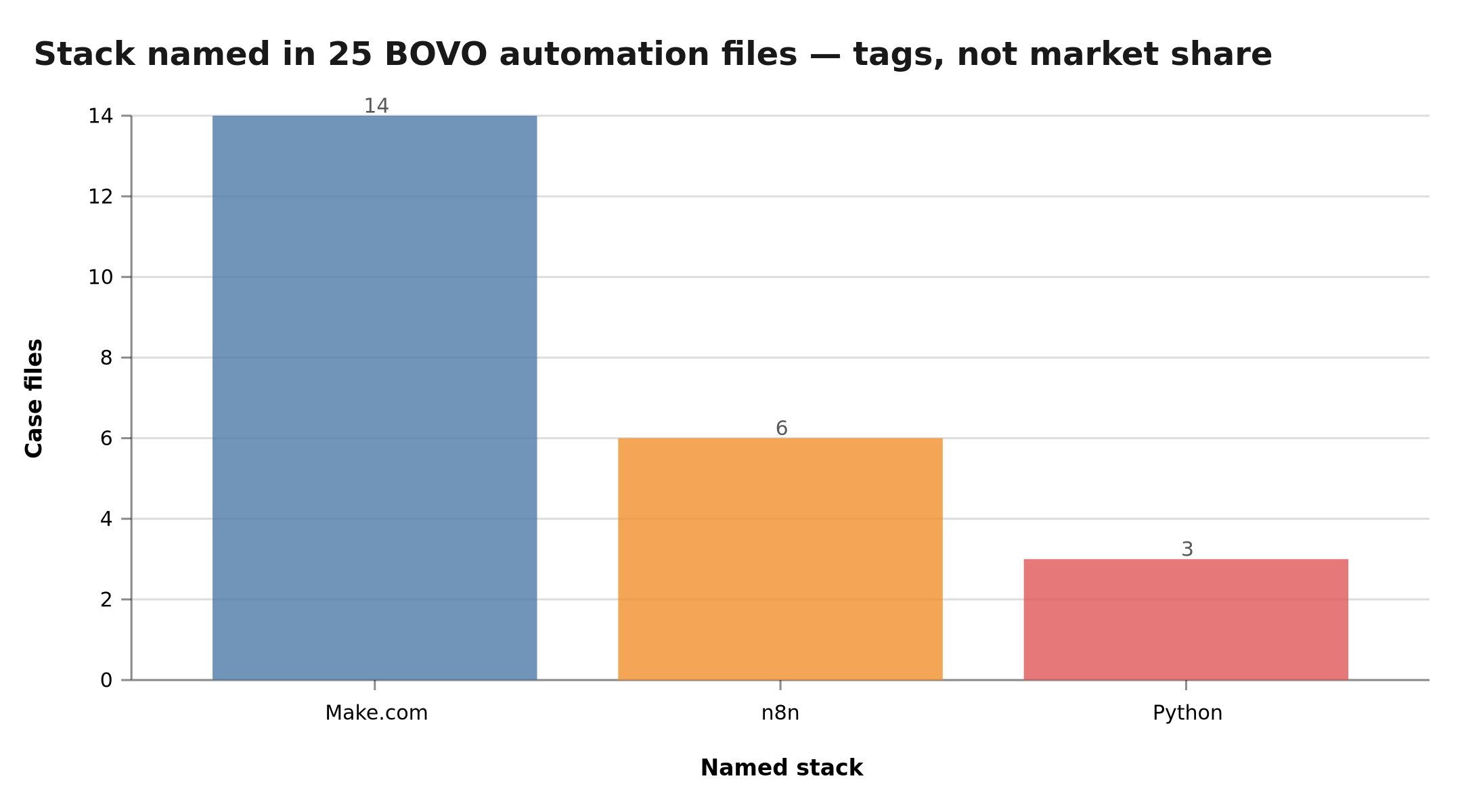 Make.com 14, n8n 6, Python 3 — technology tags. WhatsApp file id 25 names the WhatsApp API, not n8n
Documented case: WhatsApp assistant (id 25)
The 24/7 WhatsApp assistant file describes an assistant that qualifies, answers FAQs and books outside office hours. Stack named: WhatsApp API (not n8n on that file). Confidence: medium. Consent: public portfolio.
Three other illustrations in the same segment (under the threshold, not an average):
- id 24 — internal n8n chatbot, booking + FAQ. File: BOVO chatbot.
- id 26 — WhatsApp campaigns (Gemini, Evolution API). Illustration only.
- id 19 — Make.com funnel + WhatsApp + Calendly, 3 channels. Leads / CRM family (7 files, aggregate allowed). File: multi-channel funnel.
The tutorial below shows how to wire n8n + Claude. File id 25 shows one documented delivery. They are not the same object.
Chatbot rate card (offer, not a median)
Published on the AI chatbot agency page, not computed from the CRM:
| Offer | Public price | Scope | Stated delivery |
|---|---|---|---|
| Chatbot Essentiel | €2,000 | 1 channel, RAG up to 50 answers | 2–3 weeks |
| Conversationnel Pro | €3,500 | multi-channel + advanced RAG | scoped |
| Vocal + Chatbot Enterprise | €5,000 | omnichannel + voicebot | 6–8 weeks |
This is not a median of signed quotes. An agent wired to an ERP sits outside these packages. Detail: custom AI chatbot pricing.
Why build a WhatsApp chatbot with n8n and Claude?
The n8n + Claude pairing answers a very concrete business need: absorbing repetitive questions (opening hours, order tracking, FAQ, lead qualification) without tying up a human agent for every message. A few recurring use cases from our clients:
- Tier-1 customer support: the bot answers FAQs 24/7 and only forwards complex cases.
- Lead qualification: the chatbot asks the right questions, captures the need and budget, then creates a record in the CRM.
- Appointment booking: slot checks, confirmations, and automatic reminders.
- Logistics follow-up: contextual answers based on an order number.
A chatbot does not replace the team. It filters repetitive questions so humans keep the cases that need a human. We do not publish an 80/20 split as an observed average.
Why n8n rather than coding from scratch? Because n8n already provides the connectors (WhatsApp, HTTP, databases), a native AI Agent node, and a visual interface that keeps the workflow readable and maintainable. Instead of stitching together SDKs, OAuth flows, and queue logic by hand, you wire boxes and arrows — which means a non-specialist on your team can later read, audit, and tweak the automation. To dive deeper into that central node, we break it down in our complete guide to the n8n AI Agent.
What architecture for a WhatsApp chatbot with n8n and Claude?
The architecture stays deliberately simple: WhatsApp pushes incoming messages to n8n through a webhook, n8n hands reasoning to Claude (with memory and tools), then sends the reply back to WhatsApp.
WhatsApp Business API
      ↓ webhook
    n8n 2.0
      ├── Receive message
      ├── AI Agent (Claude)
      │   ├── Memory (Redis/Supabase)
      │   └── Tools (CRM, FAQ)
      └── Send response
      ↓
WhatsApp (user)
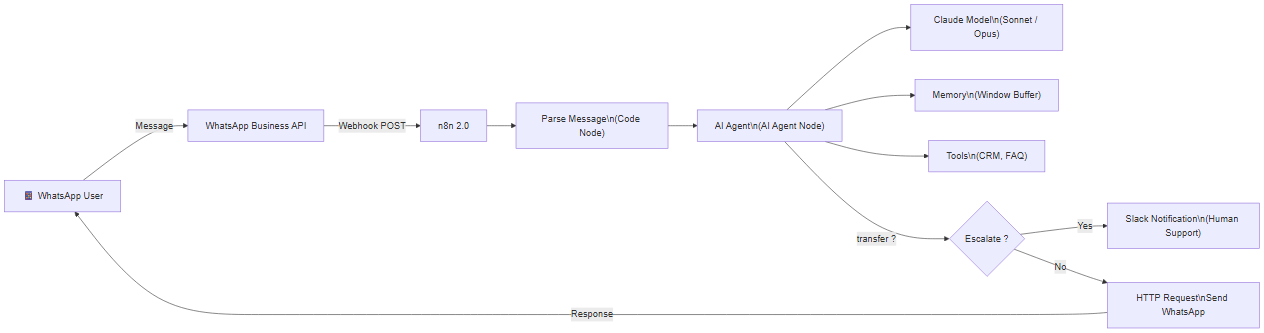 WhatsApp chatbot architecture: from webhook reception to response delivery or escalation to human support
Each arrow maps to an n8n node. This modularity is valuable: you can add a knowledge-base node (RAG) or a ticket-creation node without rewriting everything.
What are the prerequisites and how do you get them?
Before touching n8n, put these four pieces in place.
n8n 2.0: cloud or self-hosted?
- n8n Cloud: instant start, no server to manage, ideal to validate the concept. The webhook ships with a ready-to-use public HTTPS URL.
- Self-hosted n8n (Docker): full control, your data stays with you, controlled infrastructure cost. Locally, expose your instance through an HTTPS tunnel (Meta requires a public HTTPS URL for the webhook).
For a production WhatsApp chatbot handling sensitive data, self-hosting is often preferable. For a first test, cloud is faster.
WhatsApp Business API account (Meta)
This is the most administrative step. You'll need a Meta Business account, an app in the Meta for Developers dashboard with the WhatsApp product enabled, a dedicated phone number (not tied to the consumer WhatsApp app), and an access token. Meta provides a free test number for development, which lets you validate everything before moving to a verified production number.
Anthropic (Claude) API key
Create an account on the Anthropic console and generate an API key. This is the key n8n's "Anthropic Chat Model" node will use. Billing is usage-based (per token); keep the key secret and store it in n8n credentials, never in plain text inside a node.
(Optional) Persistent memory
To move beyond the prototype, plan for Redis or a Postgres/Supabase database. n8n offers dedicated memory nodes for these backends. More on that below.
How does a message flow, end to end?
Before configuring each node, let's visualize a full message journey. The user writes, Meta delivers the webhook, n8n parses and queries Claude (which reads memory), and the reply travels back to WhatsApp.
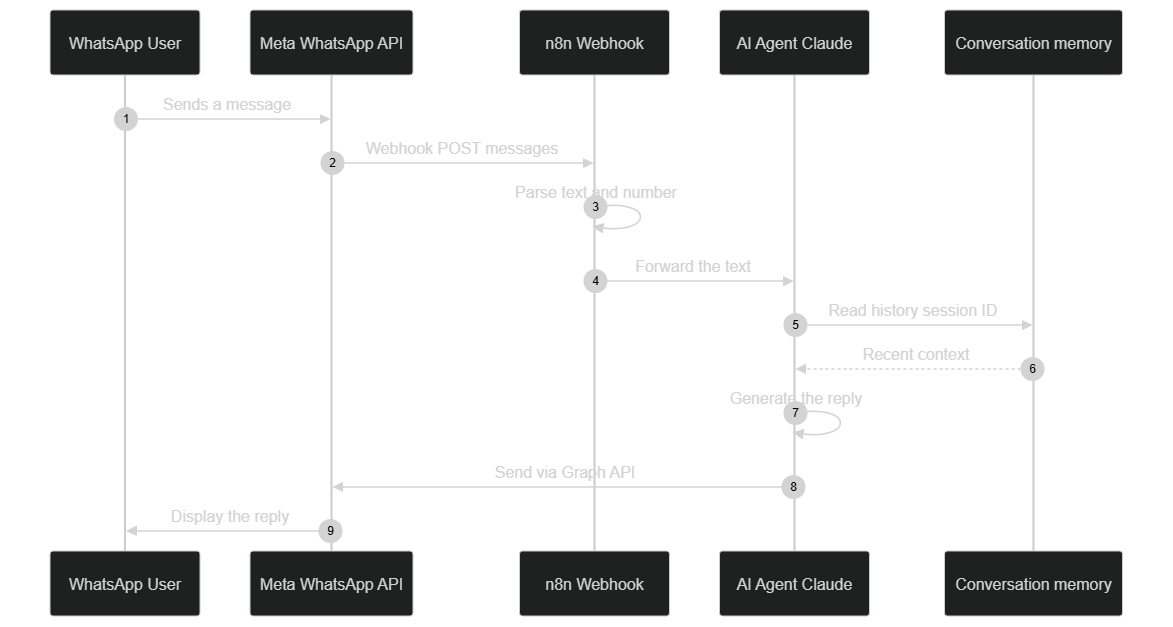 Detailed sequence: webhook reception, parsing, conversation-memory read, Claude generation, and reply delivery via the Graph API
This sequence view helps diagnose failures: if nothing shows up on the user's side, the issue is in the last link (sending via the Graph API); if Claude replies out of context, look at memory and the Session ID.
Step 1: how do you configure the WhatsApp webhook in n8n?
The webhook is the entry point. Meta calls it on every incoming message.
- Create a new n8n workflow.
- Add a "Webhook" node using the POST method.
- Copy the production webhook URL (HTTPS).
- In Meta Business Platform > WhatsApp > Configuration, paste that URL and set a verify token (a secret string of your choice).
- Subscribe to the
messagesandmessage_statusevents.
Common pitfall: Meta first sends a GET verification request (with hub.challenge) before activating the webhook. Your endpoint must return that challenge as-is. In n8n, handle this either with a Webhook node configured to respond or with a dedicated verification branch. As long as this handshake fails, no message arrives.
Step 2: how do you parse the incoming message?
Meta's format is deeply nested. A Code node isolates the useful fields. Here's a commented example (simplified — adapt the handling of non-text types):
// The raw body sent by Meta arrives in $input
const body = $input.first().json.body;

// The useful message is deeply nested: entry > changes > value > messages
const message = body.entry?.[0]?.changes?.[0]?.value?.messages?.[0];

// Return a flat object, easier to use in downstream nodes
return [{
  json: {
    from: message?.from,            // sender number (used as Session ID)
    text: message?.text?.body,      // text content of the message
    type: message?.type,            // 'text', 'image', 'audio', etc.
    messageId: message?.id          // unique id, useful for idempotency
  }
}];
Good habit: not every webhook contains a message (message_status events notify read/delivery receipts). Filter out requests where message is missing upstream, otherwise the AI agent is called — and billed — for nothing. Also handle the type !== 'text' case (image, audio, document) to avoid sending empty content to Claude.
Step 3: how do you wire the Claude AI agent?
This is the brain of the chatbot.
- Add an "AI Agent" node.
- Connect an "Anthropic Chat Model" and pick the right Claude model (a fast model like Haiku for simple support, a more capable model like Sonnet or Opus for complex reasoning).
- Set your Anthropic key via n8n credentials.
- Wire the parsed text (
{{ $json.text }}) into the agent's input.
What does a good system prompt for the chatbot look like?
The system prompt is what turns a generic model into your brand's assistant. It sets the role, tone, limits, and escalation procedure. Here's a complete example to adapt:
You are the virtual assistant of [COMPANY_NAME], reachable on WhatsApp.

ROLE
- Answer customer questions about our products, hours, and orders.
- Be warm, clear, and concise (2 to 4 sentences maximum per message).

LIMITS
- Never promise a discount, refund, or deadline you cannot be sure to keep.
- If you don't have the information, say so honestly and offer escalation.
- Never invent a product reference, a price, or a policy.

ESCALATION
- If the customer asks for a human, is unhappy, or the request is out of scope,
  end your reply with the marker [HUMAN_ESCALATION].

STYLE
- Match the customer's language and register.
- No excessive emojis, no unnecessary technical jargon.
The [HUMAN_ESCALATION] marker is intentional: it's easy to detect in a downstream node to trigger the handoff. It's a simple, robust convention.
Step 4: which conversation memory should you choose?
Without memory, the bot forgets everything on each message — no real conversation is possible. n8n offers several options.
Window Buffer Memory: to get started
- Add a "Window Buffer Memory" node.
- Session ID: the WhatsApp number (
{{ $json.from }}), to isolate each conversation. - Window Size: for example 10 rolling messages.
This memory keeps the latest exchanges in volatile memory. Simple and free, but volatile: an n8n restart wipes everything, and the history isn't shared across instances.
Redis or Postgres/Supabase: for production
When the bot gets serious, move to persistent memory. n8n provides memory nodes for Redis and for Postgres (Supabase-compatible).
| Criterion | Window Buffer | Redis | Postgres / Supabase |
|---|---|---|---|
| Persistence | No (volatile) | Yes | Yes |
| Setup | Instant | Simple | Moderate |
| Best for | Prototype | Fast sessions, TTL | Durable, queryable history |
| Survives restart | No | Yes | Yes |
Rule of thumb: prototype → Window Buffer; real traffic and continuity needs → Redis for speed, Postgres/Supabase if you also want to query the history (analytics, compliance). If you're unsure which data backend to use for your agents, this tutorial on connecting n8n to an MCP server shows how to extend the agent's capabilities cleanly.
Step 5: how do you send the reply back to the user?
Once Claude's reply is generated, an HTTP Request node sends it back to WhatsApp via Meta's Graph API (simplified example):
{
  "method": "POST",
  "url": "https://graph.facebook.com/v18.0/PHONE_ID/messages",
  "headers": {
    "Authorization": "Bearer YOUR_TOKEN",
    "Content-Type": "application/json"
  },
  "body": {
    "messaging_product": "whatsapp",
    "to": "{{ $json.from }}",
    "type": "text",
    "text": { "body": "{{ $json.output }}" }
  }
}
Replace PHONE_ID with your WhatsApp number ID and YOUR_TOKEN with a token stored in credentials (never hard-coded). The API version (v18.0 here) evolves: check the current version in Meta's documentation and adjust the URL.
Step 6: how do you handle escalation to a human?
A good chatbot knows its limits. Escalation prevents frustration and protects your brand image.
- Marker detection: if Claude's reply contains
[HUMAN_ESCALATION], switch to a team notification. - Keyword detection: "talk to a human", "complaint", "refund", "lawyer"… trigger escalation.
- Sentiment detection: a very negative message can be routed with priority (a sentiment-analysis node or a simple instruction in the system prompt is enough to start).
- Slack handoff: a Slack node notifies the support channel with the customer's number, their last message, and a link to the conversation.
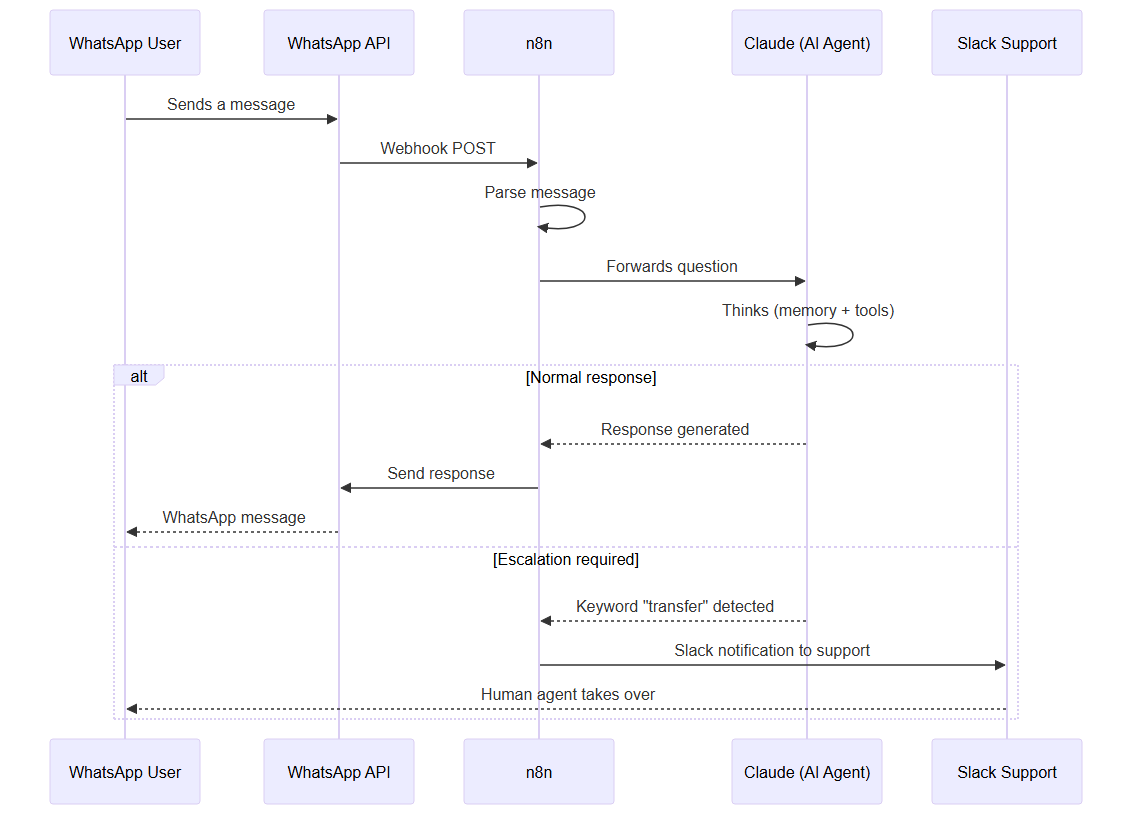 Sequence diagram: how the chatbot detects a transfer request and notifies the support team via Slack
Best practice: when you escalate, tell the user ("I'm forwarding your request to an advisor, who will get back to you"). And mark the conversation as "human-handled" so the bot doesn't reply over the agent.
How do you respect WhatsApp's anti-ban rules?
WhatsApp protects its users against spam, and poorly controlled sending can get your number suspended. Three factors are documented by Meta and should guide your implementation:
- The 24-hour window: you can only send "free-form" messages within the 24 hours following the customer's last message. Beyond that, only message templates approved by Meta are allowed.
- Mandatory opt-in: you must have the user's consent to contact them. No bulk sending to numbers that never asked for anything. The n8n consent, double opt-in and STOP workflow is in WhatsApp opt-in + n8n CNIL-compliant.
- Quality: Meta monitors your number's block and report rate. A poor quality score can lower your sending limits or even suspend the number.
On the implementation side, add safeguards: a slight delay between messages to stay natural, a reasonable sending cap, and logic that sends an out-of-window message only through a template. These numeric settings (exact delay, throughput) depend on your WhatsApp tier: always refer to the official WhatsApp Business policy and limits in force rather than to fixed values.
WhatsApp Business API
  24h window open? ── yes ──▶ free-form message allowed
            │
            └── no ──▶ approved template required
How much does a WhatsApp chatbot with n8n and Claude cost?
Three cost items add up. Let's give cautious orders of magnitude (at the time of writing, mid-2026) — exact prices change often, always check the official rate cards.
- n8n: free when self-hosted (excluding server cost); monthly subscription in the cloud depending on the number of executions.
- Claude (Anthropic): billing is per token (input + output). The lighter models (Haiku range) cost noticeably less than the high-end models (Opus range), with the Sonnet range sitting in between. For a support chatbot with short messages, the cost per conversation generally stays low, but it depends directly on the length of history injected on each call — hence the importance of a controlled memory window.
- WhatsApp Business (Meta): Meta charges for business messaging, with a model that has evolved (historically per 24-hour conversation, with a shift toward per-message billing announced by Meta). Rates vary by country and message category (utility, marketing, service). Check Meta's official rate card for your market.
The chart below illustrates, for purely indicative purposes, how a volume of conversations splits between automatic handling and escalation — a useful projection to estimate residual human workload (the values are fictional and serve as an example).
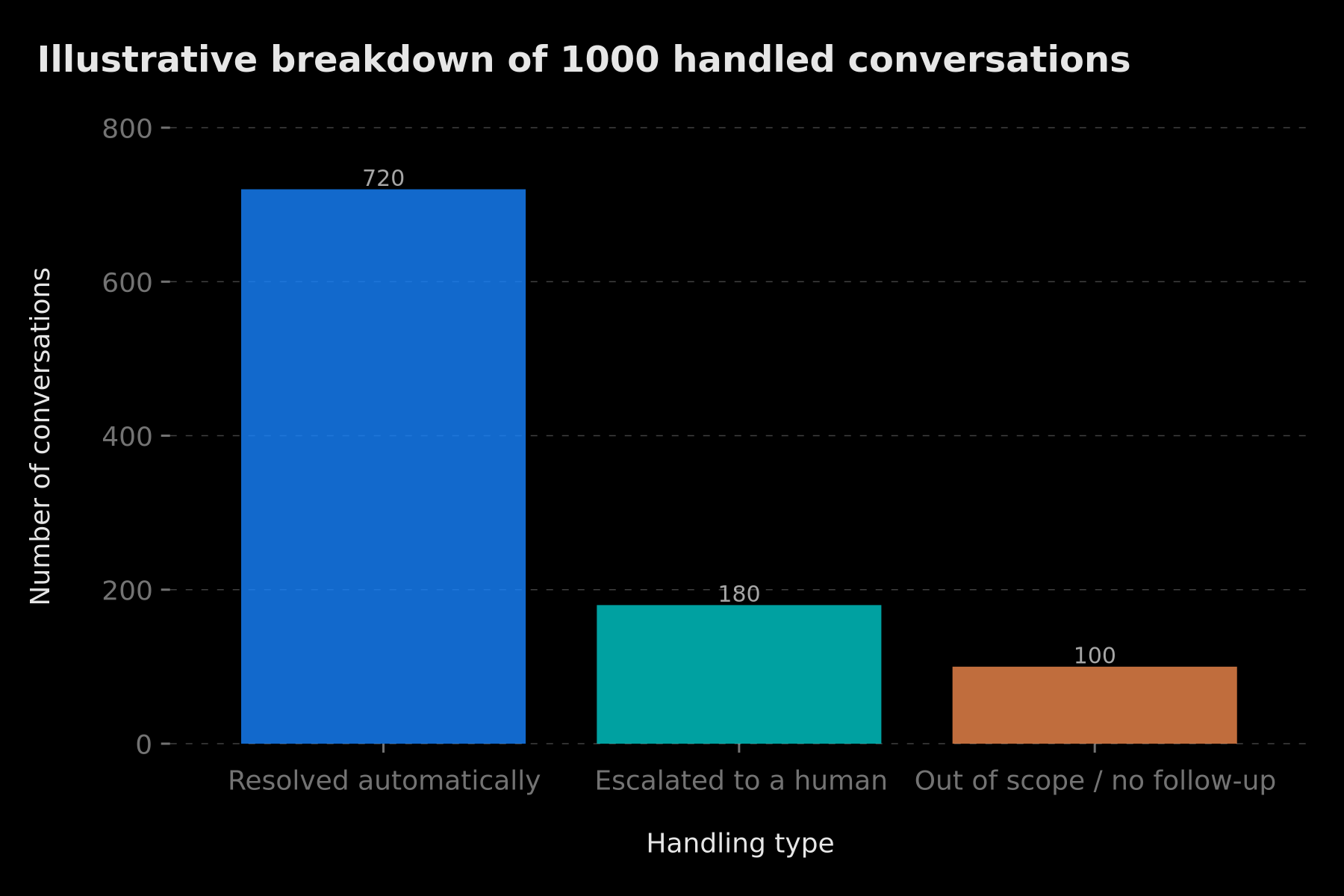 Illustrative example of how 1000 conversations split: share automated by the bot, share escalated to a human, and share out of scope
For a figure tailored to your case, our dedicated articles detail the method: the price of a custom AI chatbot in 2026 and how to quote an AI chatbot project.
How do you test the chatbot before going live?
Never deploy straight to your customer number. n8n and Meta offer several safety nets to validate the workflow cold.
- Meta's test number: it lets you send and receive real WhatsApp messages to an allow-list of numbers, with no production billing. It's the ideal environment for your first conversations.
- Manual execution in n8n: trigger the workflow node by node and inspect each output. You see exactly what the agent receives and what it returns.
- Data pinning: n8n lets you pin a node's output (for example a fake inbound webhook) to replay the workflow without calling Meta on every test. You iterate on the system prompt without burning quota.
- Conversational test sets: prepare a dozen typical messages (simple question, out-of-scope request, unhappy customer, non-text message) and check that the bot reacts correctly, escalation included.
A good habit is to log every exchange (inbound message, Claude's reply, escalation decision) from the testing phase onward. That's how you spot weak answers or hallucinations before a real customer hits them. To go deeper on agent reliability, our complete n8n AI Agent guide details validation best practices.
How do you secure and monitor the chatbot in production?
A WhatsApp chatbot handles personal data (numbers, conversation content). A few essential safeguards:
- Verify webhook signatures: Meta signs every inbound request (the
X-Hub-Signature-256header). Validate that signature in n8n to reject forged calls. It's a Meta-documented protection against fraudulent requests. - Store secrets in credentials: WhatsApp tokens, Anthropic key, database credentials — everything goes through n8n's credentials manager, never in plain text inside a node or a commit.
- Limit data retention: keep history only as long as useful. A Postgres/Supabase memory lets you apply a clear expiration policy, helpful for compliance (GDPR).
- Monitor quality: watch the escalation rate, response time, and your number's quality score on Meta's side. A drift (a sudden rise in escalations) often signals a system-prompt regression or a new, uncovered request type.
- Plan a kill switch: a global toggle (environment variable or guard node) to turn the bot off during an incident, rather than risking hundreds of wrong replies.
Chatbot security isn't just about code: it also depends on the trust placed in external components. Before integrating a workflow found online, keep in mind the risks detailed in this article on template security.
Troubleshooting: the most common failures
Even with a deliberately simple architecture, a handful of recurring pitfalls eat up time during early implementations. Here are the seven most common errors — diagnosed in order, from the network layer down to application logic — with the checks to run at each step.
The webhook won't activate. The initial Meta handshake fails if your n8n endpoint doesn't return the hub.challenge parameter with an HTTP 200 status within a few seconds. If n8n replies with anything else — or doesn't reply at all — Meta marks the URL as invalid and stops delivering messages. Check in order: the URL is public HTTPS (an ngrok tunnel or equivalent works fine in development), the verify token entered in the Meta console matches exactly what's configured in n8n (it is case-sensitive), and the Webhook node is in "Respond to Webhook" mode. The n8n execution logs display the incoming GET request and confirm exactly what your node returned.
No reply reaches the customer. Three primary suspects: the temporary WhatsApp development token has expired (Meta development tokens have a 24-hour lifetime), the PHONE_ID in the Graph API URL is wrong, or the message is sent outside the 24-hour window without using an approved template. In the last case, Meta returns error 131047 — read the HTTP response body in the HTTP Request node's logs to identify the exact cause without mixing up the three scenarios.
Claude replies out of context or "restarts" the conversation. The culprit is almost always the Session ID. If two different phone numbers share the same Session ID (a hard-coded static value, for instance), their histories become interleaved. The correct value is {{ $json.from }} — the sender's number parsed in Step 2. Also verify that the chosen memory (Window Buffer, Redis, or Postgres) is wired as a sub-node of the AI Agent and not sitting isolated elsewhere in the workflow.
Duplicated replies on the customer's side. Meta may resend a webhook if your endpoint takes too long to respond and exceeds the delivery timeout. The two-step fix: return a 200 immediately upon webhook receipt (asynchronous mode), then process the business logic in the background. For residual duplicates, store each processed messageId (a Redis key or a simple Postgres table is enough) and drop any webhook carrying an ID already seen.
Costs creeping up without explanation. The agent is likely being called on message_status requests (read receipts and delivery notifications) or on non-text messages (images, audio, documents) whose text field is empty or missing. An upstream Switch node — filtering on the presence of the messages array in the payload and on type === 'text' — eliminates these wasted calls in one move and cuts the bill noticeably without touching the agent logic.
Anthropic 401 or 403 error. The API key is missing from n8n credentials, has been revoked, or your account has exhausted its credit quota. In the Anthropic console, check the key status under "API Keys" and the available balance under "Billing". Set up budget alerts to prevent silent production outages — the kind you sometimes only discover by reading customer complaints.
The bot replies in the wrong language. Without an explicit instruction, Claude may choose a language different from the one the customer wrote in, especially if the system prompt is written in English. Add a clear rule: "Always reply in the language used by the customer." Claude handles multilingual conversations very well once instructed; without that instruction, it tends to mirror the dominant language of the system context, creating a disorienting experience for the user.
Before deploying a workflow found online, a word of caution on security: why a free template can cost a fortune.
Conclusion: a WhatsApp chatbot ready to grow
You now have a complete WhatsApp chatbot with n8n: inbound webhook, robust parsing, a Claude agent driven by a clear system prompt, suitable conversation memory, human escalation, and anti-ban safeguards. The strength of this approach is its modularity: each block is a node you can improve independently — add a knowledge base (RAG), connect your CRM, or plug in business tools.
Start small (Meta test number, Window Buffer, a light Claude model), validate the experience on a few conversations, then harden it: persistent memory, approved templates, cost and quality monitoring. A realistic rollout path looks like this: week one, get the webhook handshake and a basic reply working on the test number; week two, refine the system prompt and add escalation; week three, switch to persistent memory and a verified production number; from there, iterate on the knowledge base and integrations. Treat the prompt and the escalation rules as living assets — they improve every time you review a real conversation that didn't go as planned.
Want a delivered WhatsApp chatbot, not only a tutorial? The public rate card starts at €2,000 (Chatbot Essentiel, 1 channel) — an offer, not a median. AI chatbot offer · CNIL opt-in · 30-min call · contact.
Tags
FAQ
Do I need a paid account to follow this tutorial?
You can build and test the n8n workflow for free (n8n is open-source and self-hostable). However, Meta's WhatsApp Business API and Anthropic's Claude API are usage-billed services. An Anthropic key and a WhatsApp Business number are therefore required for a real production rollout, even though the testing phase stays very low-cost.
How long does it take to build this n8n WhatsApp chatbot?
Expect around 30 minutes for a working workflow if your WhatsApp Business API and Anthropic accounts already exist. Verifying your WhatsApp number on Meta's side (business verification) can itself take from a few hours to several days depending on your situation.
Which memory should I choose for a WhatsApp chatbot with n8n?
For a prototype, n8n's Window Buffer Memory is enough: it keeps the latest messages in volatile memory. For production, prefer persistent memory (Redis or Postgres/Supabase) so the history survives restarts and is shared across executions or instances.
How do I avoid getting banned by WhatsApp?
Follow Meta's rules: only send free-form messages within the 24-hour window after the customer's last message, use approved message templates outside that window, contact only users who opted in, and avoid unsolicited bulk sending. Always refer to the current WhatsApp Business policy.
What if I get stuck during implementation?
The BOVO Digital team answers via the contact form. For delivery, the public chatbot rate card (2,000 / 3,500 / 5,000 €) is an offer, not a median. Also read the CNIL WhatsApp opt-in article.
Do you have a documented WhatsApp case, not only a tutorial?
Yes. File id 25 describes a 24/7 WhatsApp assistant (qualification, FAQ, booking). The customer-messaging family has 4 files as of 13 September 2026: under the 5-case threshold, no aggregate. No ComeUp prices here.
Stuck on a step? We take it to production
Tutorials stop where production starts: secrets, GDPR, no-shows, CRM. A 30-min call to scope the delivery.
- 30 min
- Scoped delivery
- No commitment
William Aklamavo
Web development and automation expert, passionate about technological innovation and digital entrepreneurship.


