
Gemini 3.1 Pro: How Google Is Redefining AI-Assisted Web Development
Gemini 3.1 Pro dominates 13 of 16 reference benchmarks, with a 1 million token context window and doubled reasoning. How this Google model concretely transforms the web developer workflow in 2026: component generation, debugging, testing, IDE integration, and comparison with Copilot, Cursor, and Claude Code.

Updated

Gemini 3.1 Pro: How Google Is Redefining AI-Assisted Web Development
On February 19, 2026, Google launched Gemini 3.1 Pro and the tech industry took notice. This new model dominates 13 of 16 benchmarks for LLMs, with logical reasoning scores doubled compared to Gemini 3.0 Pro. For web developers, Gemini 3.1 Pro is not just an incremental update — it is a paradigm shift in how we design, generate, test, and maintain code. This article breaks down what this model concretely brings to your development workflow, how it compares to GitHub Copilot, Cursor, and Claude Code, and what best practices to adopt to get the most out of it.
Game-Changing Specifications
Before diving into use cases, it is important to understand why Gemini 3.1 Pro's raw numbers have a direct impact on the daily development experience.
| Feature | Gemini 3.0 Pro | Gemini 3.1 Pro |
|---|---|---|
| Benchmarks dominated | 7/16 | 13/16 |
| Logical reasoning | Baseline | x2 |
| Context window | 128K tokens | 1M tokens |
| Code generation | Good | Excellent |
| Data synthesis | Standard | Advanced |
| Multimodal | Text + Image | Text + Image + Video |
The doubling of logical reasoning directly translates into a better understanding of complex algorithms, multi-layer architectures, and subtle TypeScript typing errors. This is not a minor detail — it is the difference between an assistant that gives you code that compiles and one that gives you code that actually works in production.
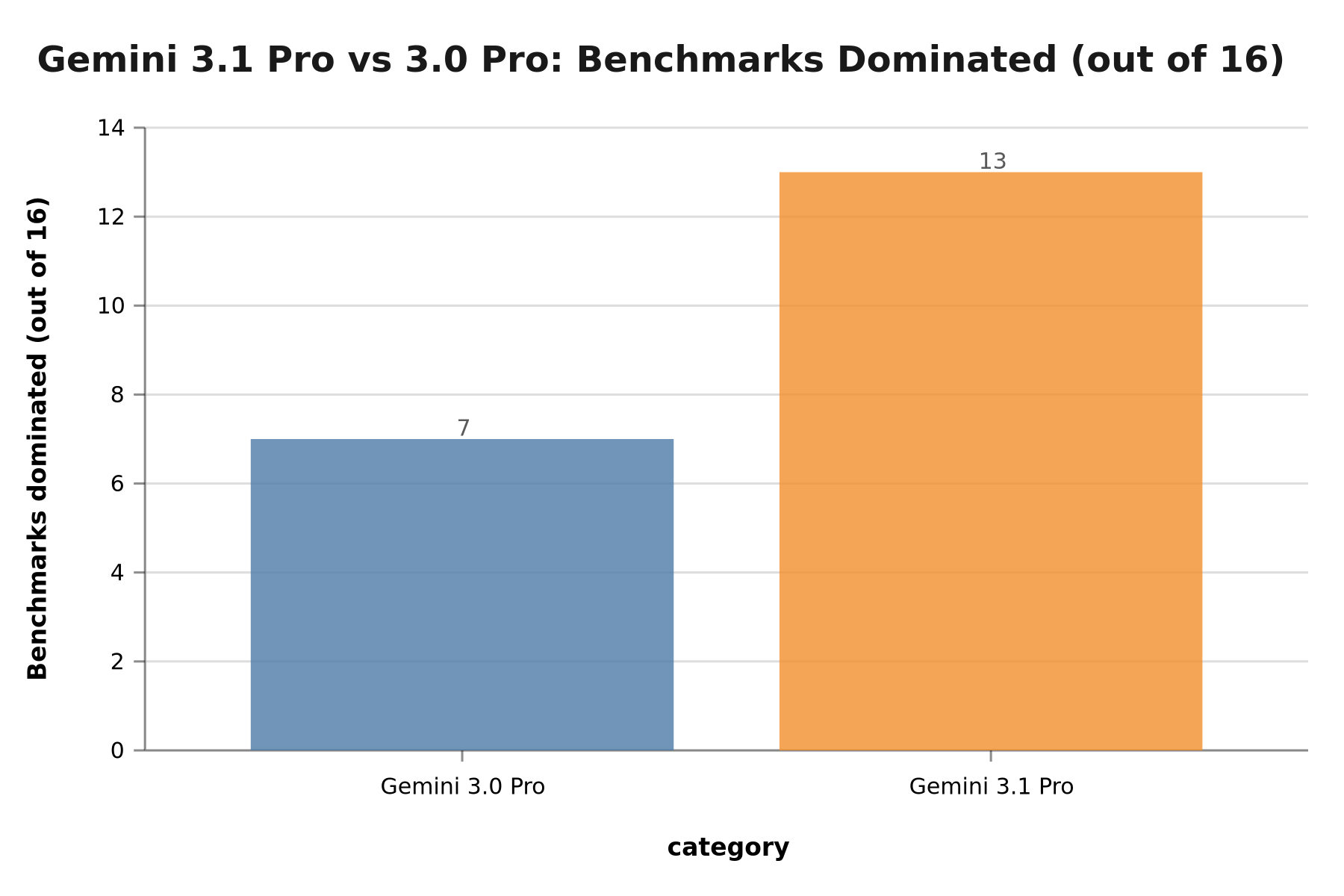 Gemini 3.1 Pro dominates 13/16 benchmarks vs 7/16 for Gemini 3.0 Pro
The 1 Million Token Context Window: Why It Is a Turning Point
The context window is perhaps the most underestimated — yet most decisive — feature of Gemini 3.1 Pro for developers. One million tokens is roughly 750,000 words, equivalent to several thousand source code files simultaneously. For context: most medium-sized Next.js projects contain between 50,000 and 200,000 tokens of source code. Gemini 3.1 Pro can therefore potentially ingest your entire codebase in a single request.
This fundamentally changes what you can ask an AI assistant to do. With short-window models, you had to break your questions into pieces: "analyze this component," then "analyze that one," then "now tell me how they interact." With 1 million tokens, you can directly ask: "analyze our entire component architecture, identify single responsibility principle violations, and propose a prioritized refactoring plan."
In practice, this capability proves especially valuable in three scenarios. First, during migrations: moving from a Next.js Pages Router architecture to App Router requires understanding all components simultaneously to avoid regressions. Second, when debugging systemic issues: some bugs only manifest through the interaction of multiple modules, and identifying them requires a global view that short-context models simply cannot provide. Third, when generating technical documentation: producing coherent documentation covering all modules of a complex project, without internal contradictions, requires seeing everything at the same time.
That said, a caveat is warranted: fully exploiting a million-token context comes at a cost in processing time and billed tokens. In practice, most daily workflows use only 50,000 to 200,000 tokens. But knowing this capacity exists when you need it transforms what you dare ask your AI assistant.
Gemini 3.1 Pro and Multimodal Understanding in Development
The multimodal capability of Gemini 3.1 Pro — now encompassing text, images, and video — opens up unprecedented use cases for web developers. The most immediately useful feature is the ability to submit a UI mockup (Figma screenshot, wireframe, design system) and receive the corresponding HTML/CSS/React code directly, with significantly higher accuracy than text-only models can produce.
Picture this scenario: you have a Figma mockup of a dashboard page. With older workflows, you had to describe it verbally to the model and hope it correctly understood your intent. With Gemini 3.1 Pro, you submit the screenshot directly, and the model generates a React component that faithfully reproduces the visual structure. According to feedback from developers who have tested this functionality, this approach significantly reduces back-and-forth between design and implementation.
Video understanding is still more experimental for development purposes, but it opens perspectives like analyzing recorded bug reproduction sessions, or understanding technical tutorials to extract code patterns. These are emerging use cases, but they signal the direction Google is taking with its ecosystem as a whole.
Integration into IDEs and Development Tools
One of Google's strategic advantages with Gemini 3.1 Pro is the depth of its integration into the existing developer tooling ecosystem. Unlike some models that require complex configurations or custom APIs, Gemini is natively integrated into several surfaces already familiar to developers.
Gemini Code Assist in VS Code offers contextual code completions, inline refactoring suggestions, and the ability to explain selected code in natural language. The extension accesses the context of the entire open project, allowing it to propose completions that are consistent with your naming conventions and existing architectural patterns.
The Google Cloud integration is particularly relevant for teams deploying on GCP: Gemini can analyze Terraform configurations, suggest serverless architecture optimizations, or generate Cloud Run scripts directly from the console. For teams combining Next.js development with cloud infrastructure, this consistency in AI tooling represents a notable improvement in workflow fluidity.
The Gemini API is also configurable in Cursor, the AI IDE favored by many JavaScript/TypeScript developers. This flexibility means you do not have to choose between your preferred work environment and the model you want to use. To learn more about the new Next.js features that benefit most from these assistants, see our article on what changed concretely in Next.js 16.2.
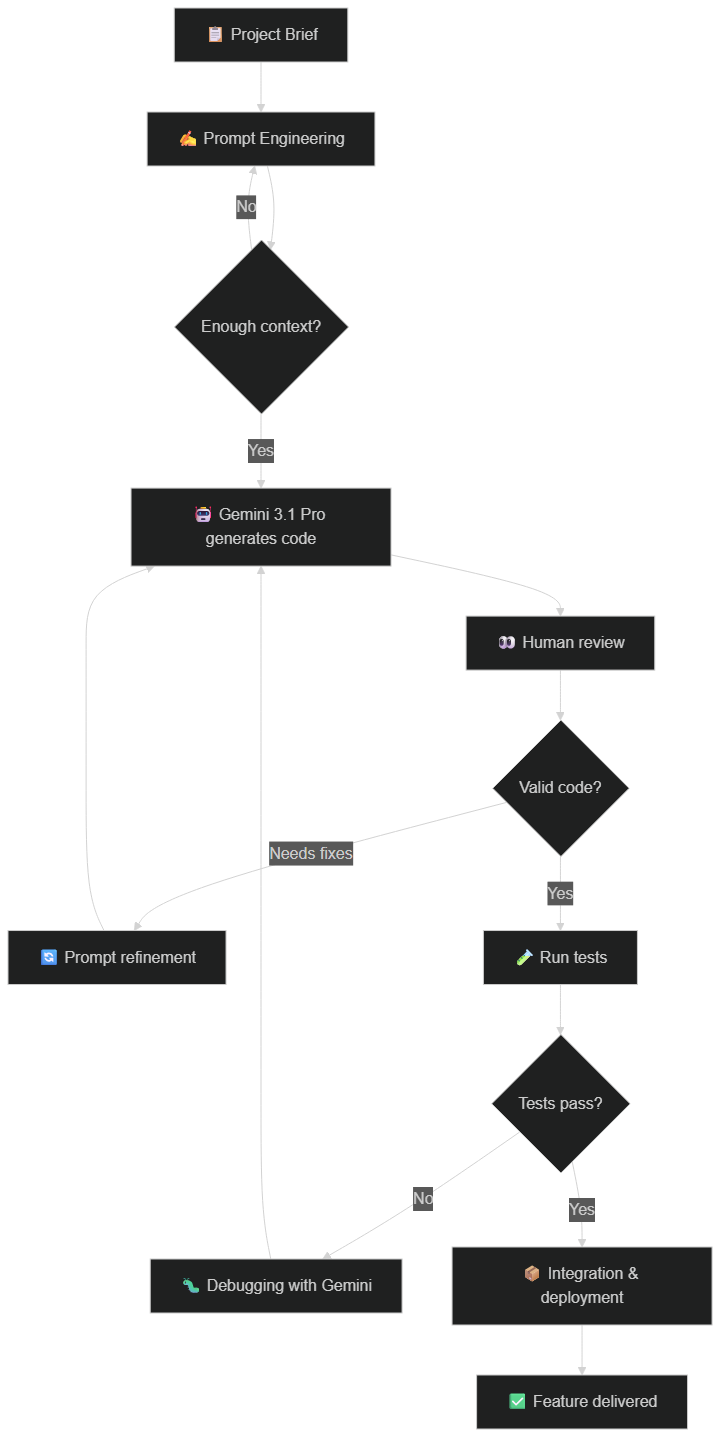 Flowchart: from project brief to delivered feature with Gemini as co-pilot
Gemini 3.1 Pro vs GitHub Copilot vs Claude Code vs Cursor: Which Should You Choose?
The question is not "which tool is best" but "which tool is best for which task." Here is our comparative analysis based on tests conducted in real development conditions.
React/Next.js Code Generation
We tested all three tools on a real case: generating a complete Next.js component with Server Components, TypeScript validation, and error handling.
Prompt: "Create a Next.js 16 Server Component that displays a product list with pagination, uses Suspense for loading, and includes error handling with error boundary."
Gemini 3.1 Pro ⭐⭐⭐⭐⭐
- Functional code on first try
- Correctly uses
use cacheand PPR - Strict TypeScript without errors
- Includes edge cases (empty list, network error)
- Suggests a variant with
useOptimisticfor UX
Claude Code (Opus 4.6) ⭐⭐⭐⭐
- Near-perfect code
- Excellent inline documentation
- Misses
use cachedirective (very recent feature) - Impeccable TypeScript
GitHub Copilot (GPT-4o) ⭐⭐⭐
- Correct but generic code
- Doesn't use the latest Next.js 16 patterns
- Relevant inline suggestions but no big picture
- Requires more iterations
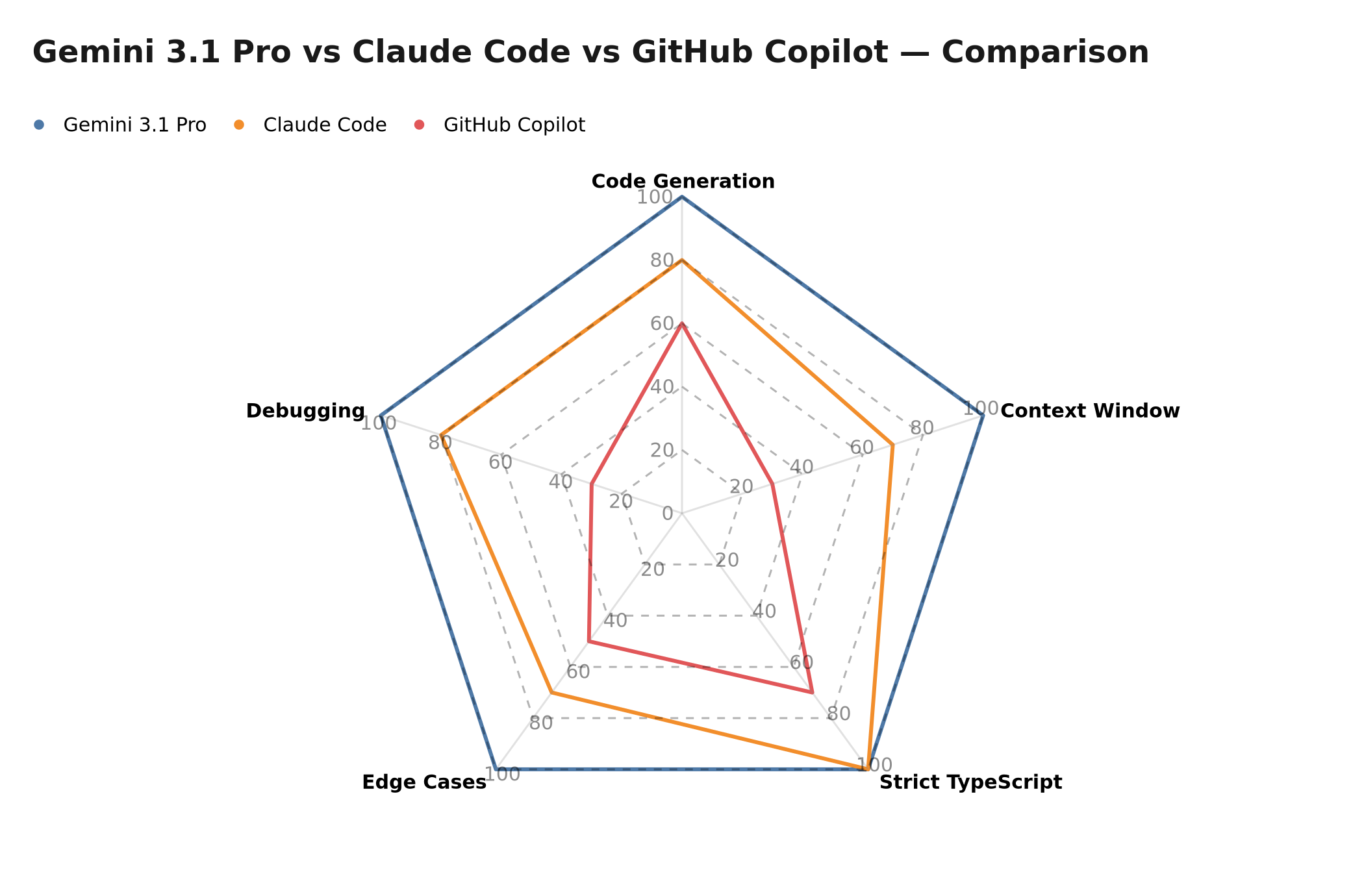 Multi-dimensional radar: code generation, context window, TypeScript, edge cases, debugging
Debugging and Refactoring
Prompt: "Analyze this 500-line React component, identify performance issues, and propose a refactoring."
Gemini 3.1 Pro excels here thanks to its 1 million token window. It can analyze massive files, understand inter-component dependencies, and propose a structured refactoring plan. Where its competitors ask you to copy-paste excerpts, Gemini ingests the entire file — or even the entire directory — and reasons about the global architecture. It identifies unnecessary re-renders caused by unstable references in useCallback, missing memoizations, or side effects that should have been handled server-side.
Claude Code is almost as good, but its context window (200K standard, 1M in beta) is less stable for very large files. Its strength is the quality of explanation — Claude Code systematically documents why it proposes each change, making it an excellent pedagogical tool for teams that want to level up their skills.
Copilot is limited to the current file and a few adjacent files, making architectural analysis impossible. It excels in a different register: fast in-flight completion, snippet suggestions, and GitHub integration for PR review. For teams already in the GitHub ecosystem, this added value should not be overlooked.
Software Architecture and System Design
This is where Gemini 3.1 Pro reveals a qualitative difference from its competitors. Its improved reasoning capability allows it to handle systemic architecture questions with relevance rarely achieved by previous models.
You can submit your complete Prisma schema, your API routes, and your business rules, then ask it to identify inconsistencies in your data model, propose schema optimizations, or design the architecture of a new feature while remaining consistent with the existing codebase. This ability to reason about an entire system — rather than an isolated file — is what distinguishes Gemini 3.1 Pro in real-world projects. To understand how AI is more broadly redefining the developer's role, our analysis of Google and 75% AI-written code is a useful complement.
Concrete Use Cases: Gemini 3.1 Pro in Your Daily Workflow
UI Component Generation
UI component generation is the most immediately accessible use case. Gemini 3.1 Pro understands modern patterns — Server Components, Suspense boundaries, Error Boundaries, data fetching with use cache — and applies them correctly on the first attempt given well-formulated prompts. The time savings are real: a list component with pagination, filters, and loading states that would take an experienced developer 45 minutes can be generated in 5 minutes with Gemini, then reviewed and adapted in an additional 15 minutes. This is not magic — it is intelligent automation of the least creative parts of development.
Writing and Maintaining Tests
Test generation is one of the most time-consuming and least intellectually stimulating development tasks. Gemini 3.1 Pro can analyze a component and automatically generate a Jest/Vitest test suite that covers nominal cases, edge cases, and error scenarios — including cases the developer might not have thought of, such as behavior with slow network responses or malformed data. The TDD approach becomes much smoother when the test writing work is partially delegated to AI.
Legacy Code Refactoring
Legacy code refactoring is perhaps the use case where the 1 million token window makes the greatest difference. Legacy codebases are, by definition, complex, interdependent, and difficult to understand without global context. Gemini 3.1 Pro can ingest a large portion of this codebase, identify obsolete patterns (nested callbacks, React class components, bloated Redux state management), and propose a progressive migration plan that minimizes the risk of regressions.
Automatic Documentation
Documentation is often the first casualty of deadlines — everyone knows they should do more, but nobody wants to take the time. Gemini 3.1 Pro can generate precise JSDoc documentation for each function, module READMEs consistent with the existing code, and even architecture diagrams in Mermaid format directly from your source code. This ability to keep documentation current without additional friction changes teams' relationship to this practice entirely.
Impact on Productivity: What Developers Observe
Productivity gains from AI assistants like Gemini 3.1 Pro are difficult to measure objectively — they depend heavily on the developer's profile, the nature of tasks, and prompt quality. The estimates below are illustrative and based on observations from the developer community, not formally validated benchmarks.
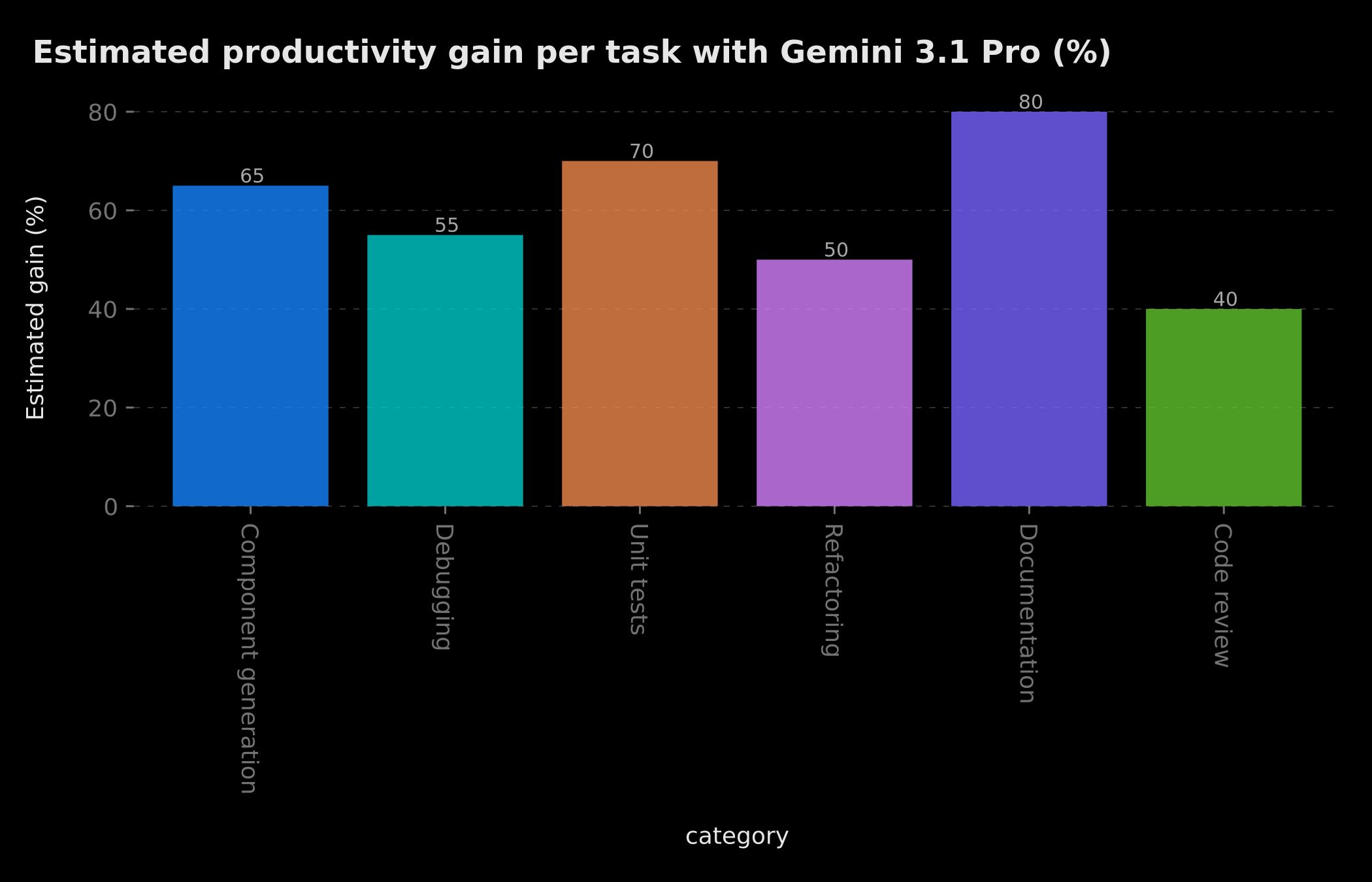 Illustrative estimate of productivity gains by task type — not contractual
Documentation represents the largest gain according to these observations: generating JSDoc, READMEs, and explanatory comments is a task that AI automates very well because it requires no deep creative judgment. Test generation and standardized component generation also show significant gains. By contrast, debugging complex bugs and code review still require heavy human involvement — AI can suggest directions, but the final diagnosis remains the developer's responsibility.
What matters from these indicative figures is less the absolute value than the asymmetry of gains: the most "mechanical" development tasks are where AI adds the most value. This frees up mental bandwidth for tasks where human creativity and judgment are irreplaceable.
It is also important to consider the full cycle: if a developer saves 40% of time on code generation but has to spend more time correcting AI suggestions due to poor prompts, the net gain can be zero. This is why prompt best practices are as important as the choice of model itself.
 Flowchart: Gemini 3.1 Pro integration flow into the CI/CD pipeline
Limitations and Points of Caution
Gemini 3.1 Pro is a powerful tool, but intellectual honesty requires acknowledging its limitations. Ignoring them exposes you to frustration or, worse, production bugs you could have prevented.
API hallucinations. Gemini 3.1 Pro, like all language models, can sometimes invent functions, props, or parameters that do not exist in recent libraries. This risk is higher for very recent technologies whose documentation was not yet stabilized when the model was trained. Always verify suggestions against official documentation before integrating them.
Knowledge cutoff date. The model has a knowledge cutoff. Libraries like Next.js, React, or Prisma evolve rapidly, and patterns recommended six months ago may be outdated today. For fast-moving technologies, combine Gemini's suggestions with systematic consultation of official changelogs.
Implicit organizational context. Gemini does not know your team's undocumented conventions, your past architectural decisions, or your organization's implicit business constraints. It produces technically correct code, but not necessarily aligned with your technical culture. Feeding the model your explicit conventions (via project configuration files, detailed READMEs) considerably improves the relevance of suggestions.
Security remains a human responsibility. Never delegate security validation to an AI model. Code suggestions can introduce subtle vulnerabilities — injections, sensitive data exposure, incorrect session management — that only specialized human review can reliably detect. On this point in particular, AI is an assistant, not an auditor.
Best Practices for Effective Code Prompts
The quality of what you get from Gemini 3.1 Pro is directly proportional to the quality of your prompts. Here are the principles we apply at BOVO Digital to maximize suggestion relevance.
Be explicit about technical context. Do not say "create a React component" — say "create a Next.js 16 Server Component with strict TypeScript 5.4, using Tailwind CSS v4, in a feature-based architecture where UI components live in /components/ui and business components in /features/". The more precise the context, the more directly usable the suggestion.
Include your non-functional constraints. If your component needs to be WCAG 2.1 AA accessible, perform well on 3G mobile, or be compatible with your existing design system, say so explicitly. These constraints have no obvious visual impact on generated code but fundamentally change its real-world quality.
Provide input/output examples. "Generate a function that validates an email" is less effective than "Generate a function that validates an email, with user@example.com → { valid: true } and invalid-email → { valid: false, error: 'Invalid format' } as examples." The example anchors the model in your semantics.
Explicitly ask for edge case handling. By default, models tend to generate the happy path. Systematically add "include handling for errors, null data, timeouts, and loading states" to get robust code on the first try.
Iterate intelligently. If the first suggestion is not exactly what you wanted, do not start over — refine the prompt by specifying what is missing or what needs to change. Gemini 3.1 Pro is particularly effective in multi-turn conversational exchanges where each iteration refines the result. This approach aligns with what we observed in our analysis of the AI war between open and closed models: the best results come from humans piloting the model, not the model working alone.
Android Integration: A Glimpse of the Future
Google is not just improving models — it is integrating Gemini directly into devices. The Pixel 10 and Galaxy S26 include Gemini features that allow automating multi-step tasks (ordering a taxi, booking a restaurant) in secure virtual windows. For mobile app developers, this raises a strategic question that cannot be ignored: how will your apps interact with an AI-augmented operating system where the assistant can take control of the interface without requiring direct user interaction?
The French version of Gemini for Home was also expected around the "Gemini at Work" event on March 19, 2026 in Paris. These hardware integrations are the signal that Google is playing a long-term strategy: making Gemini the omnipresent intelligence layer in the Android ecosystem, just as Microsoft positions Copilot in Windows.
Nano Banana 2: Image Generation Revolutionized
On February 26, 2026, Google also launched Nano Banana 2 (Gemini 3.1 Flash Image), which became the default image engine in the Gemini chatbot. Its main capabilities include faster and more realistic image creation, as well as an unprecedented ability to maintain the likeness of multiple people in the same image — a technical obstacle that most image generation models had struggled to overcome until then.
For content creators and web designers, Nano Banana 2 is particularly useful in rapid prototyping phases. Generating landing page mockups, visual asset variations for A/B tests, or blog article illustrations while remaining consistent with an existing brand identity becomes much more accessible. This is a complementary dimension to code generation — AI now covers both logic and visuals in an integrated web development workflow.
What Multi-Model Strategy to Adopt with Gemini 3.1 Pro?
The temptation is strong to find "the best" AI tool and stick with it. This is a strategic mistake. In 2026, the most effective developers adopt a deliberate multi-model strategy, where each tool is used where it excels.
| Use Case | Recommended Model |
|---|---|
| Development / Code | Gemini 3.1 Pro or Claude Code |
| Writing / Content | Claude Opus 4.6 |
| Conversational assistants | GPT-4o or Claude Sonnet |
| Data analysis | Gemini 3.1 Pro (1M window) |
| Image generation | Gemini (Nano Banana 2) or DALL-E |
This strategy is not fixed — the landscape evolves very quickly, and a model that lags today can catch up in a matter of weeks. What matters more than the choice of a specific model is developing the transferable skills of prompting and critical evaluation of AI suggestions — these skills apply regardless of which model you are using. To keep an eye on performance optimizations that amplify AI gains in your projects, our article on cutting load times by a factor of 10 provides complementary insights.
2026 Trends: Where Is AI for Web Development Going?
The launch of Gemini 3.1 Pro is part of a fundamental trend that goes far beyond Google. In 2026, several dynamics are converging to redefine the web developer profession.
AI is becoming the primary driver of code generation. According to official Google documentation shared internally, an increasing share of newly written code in Google's internal projects is generated or co-generated by AI assistants. This trend is confirmed by statements from other major tech companies. Developers who do not integrate these tools into their workflow risk working at a speed the market will no longer tolerate.
Context windows continue to grow. The jump from 128K to 1M tokens in a single generation suggests this race will continue. Future models could offer even larger windows, making it possible to analyze entire monorepos in a single request. This paves the way for tools capable of understanding not just your code, but also your Git history, your Jira tickets, and your Slack conversations — the complete business context of your project.
Model specialization by domain. Rather than a single generalist model, domain-specialized models are emerging: models optimized for application security, others for accessibility, others still for performance optimization. This specialization makes the multi-model strategy even more relevant, as the right model for the task produces noticeably superior results compared to a generalist.
AI is becoming testable in CI/CD. The most advanced teams are beginning to integrate AI validations into their CI/CD pipelines — automatic accessibility validation, detection of problematic security patterns, verification of architectural consistency. Gemini 3.1 Pro, with its robust API and professional pricing via Vertex AI, is well-positioned to integrate into these automated workflows.
Conclusion
Gemini 3.1 Pro marks Google's entry into a new dimension of AI-assisted development. Doubled reasoning, a million-token window, multimodal understanding, and deep integration into the Google ecosystem make it an essential tool for web developers in 2026. It is not a tool that replaces the developer — it is a tool that makes developers faster, more precise, and capable of tackling higher-complexity problems.
Competition between Google, OpenAI, and Anthropic has never been more intense — and it is we, developers and entrepreneurs, who benefit most. But this abundance of tools also demands discipline: learning to prompt effectively, critically evaluating suggestions, and identifying tasks where AI adds genuine value versus those where it adds friction. To follow all movements in this ecosystem, see our tech recap for February 2026.
Adopt the multi-model strategy. Master the art of prompting. Keep human review for what truly matters.
Need to integrate Gemini 3.1 Pro into your development workflow? At BOVO Digital, we create AI-augmented development environments tailored to your stack and processes. Contact us for an audit of your current workflow.
Tags
FAQ
Is Gemini 3.1 Pro free for developers?
According to official Google documentation, Gemini 3.1 Pro is available via the Google AI Studio API with a limited free quota, and via Google Cloud Vertex AI for professional large-scale usage. Exact pricing should be checked directly in the Google AI documentation, as it evolves regularly. Google frequently offers generous trial periods for individual developers.
Can Gemini 3.1 Pro be integrated directly into VS Code or Cursor?
Yes. According to official Google documentation, integration is done via the Gemini Code Assist extension in VS Code, or directly via the API configurable in Cursor. Google has also developed plugins for JetBrains (IntelliJ, WebStorm). Suggestion quality is optimized when you provide rich context — configuration files, database schemas, project conventions.
What is the concrete difference between Gemini 3.1 Pro and GitHub Copilot?
The main difference lies in the context window: Gemini 3.1 Pro offers up to 1 million tokens compared to a few thousand for standard Copilot. This allows Gemini to analyze an entire codebase, understand cross-file dependencies, and propose coherent architectural refactors. Copilot excels more at fast line-by-line completion and GitHub ecosystem integration.
Can Gemini 3.1 Pro replace a senior web developer?
No. Gemini 3.1 Pro is a productivity tool that significantly accelerates certain repetitive tasks — boilerplate generation, test writing, documentation — but it does not replace architectural judgment, business constraint understanding, or the ability to navigate complex legacy systems. Developers who master these tools multiply their productivity; those who ignore AI risk falling behind in the market.
How do I write effective prompts for code generation with Gemini?
An effective prompt for code generation with Gemini 3.1 Pro includes: precise technical context (framework, version, project conventions), non-functional constraints (performance, accessibility, security), an example of expected input/output, and edge cases to handle. The more precise your prompt about constraints, the fewer iterations you will need. Avoid generic prompts like "create a component" — prefer "create a Next.js 16 Server Component with strict TypeScript that..."
What are the limitations of Gemini 3.1 Pro for development?
Gemini 3.1 Pro has some limitations: it can hallucinate APIs or functions that don't exist in recent libraries, its knowledge has a cutoff date (always verify against the latest official docs), and it doesn't understand the implicit organizational context of your team. For highly specific architectures or critical security constraints, human review remains essential.
Does your site book meetings — or just present you?
We open your URL together, mark the 3 leaks, and tell you whether a fix is enough or a rebuild is required.
- 30 min
- No commitment
- Action plan
Vicentia Bonou
Full Stack Developer & Web/Mobile Specialist. Committed to transforming your ideas into intuitive applications and custom websites.


