
Next.js 16.2: What Actually Changes for Your Project in 2026
Next.js 16.2 just shipped with 87% faster dev startup, a stable Turbopack, and revolutionary debugging tools. Here's what it really changes for your project — without the jargon.

Updated

Next.js 16.2: What Actually Changes for Your Project in 2026
On April 29, 2026, Vercel published Next.js 16.2. Not a cosmetic release. An update that directly impacts development speed, debugging quality, and AI agent compatibility. Among the most significant Next.js 16.2 new features, you'll find 87% faster dev startup, Turbopack finally stable in production, and the default integration of AGENTS.md for AI workflows. Here's what it means concretely if you develop or have a web application developed today.
1. Dev Startup Is Finally Fast
On an average production project, next dev now starts in under 2 seconds versus 12 to 18 seconds before. This improvement — announced as 87% faster — comes from optimized Server Component deserialization and deep Turbopack integration.
What it changes for you: your developers spend less time waiting and more time producing. Over a two-week sprint, that's literally several recovered hours. If you multiply this gain by team size and the number of annual sprints, the time savings are substantial — and directly convertible into additional delivered features.
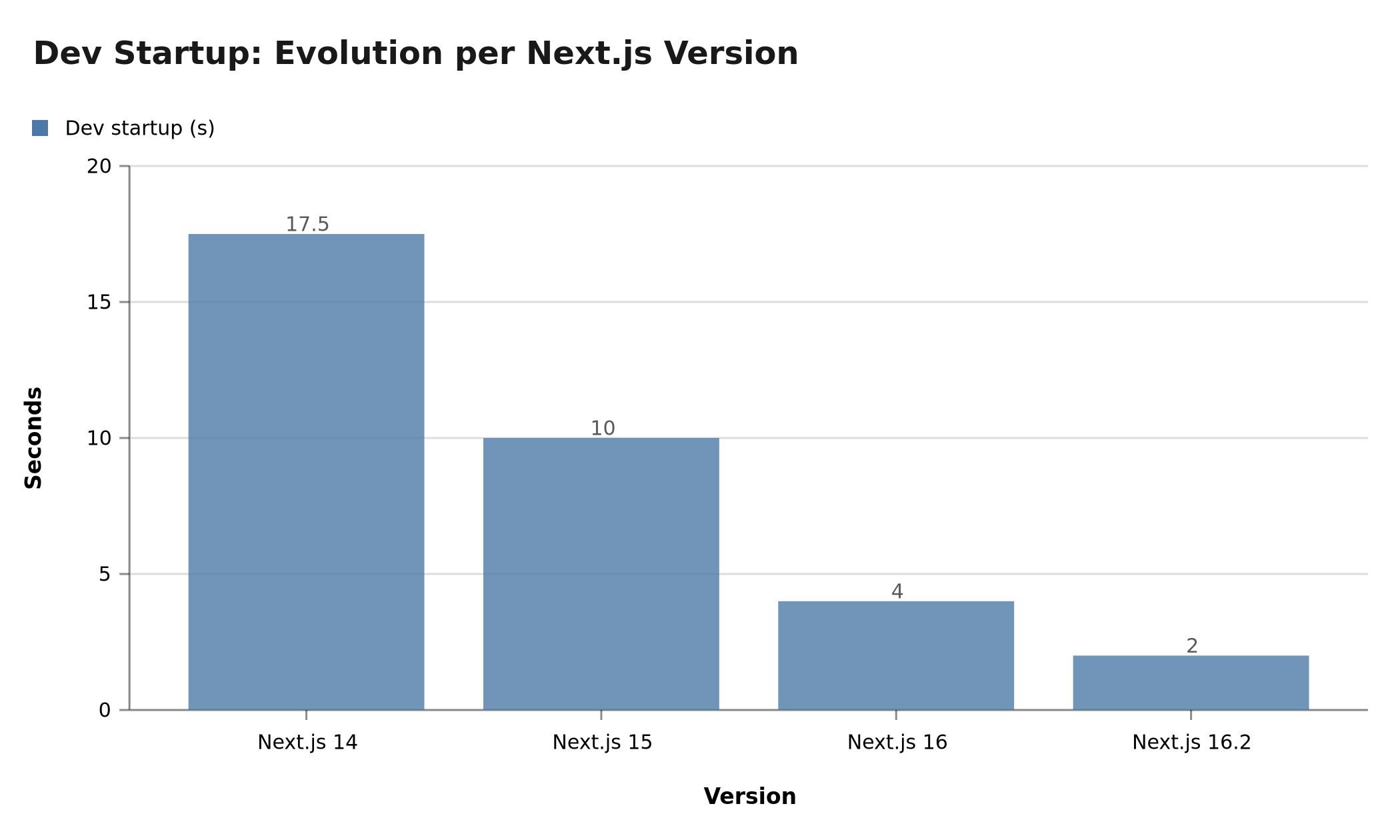 Dev startup dropped from 15-20s with Next.js 14 to under 2s with Next.js 16.2 — a direct productivity gain for every developer.
2. Turbopack Is Now Stable
Turbopack is no longer in beta. With over 200 fixes integrated in this version, it becomes the default bundler for all new Next.js projects. Gains compared to Webpack:
- Server Fast Refresh: server-side reload 67 to 100% faster
- Tree shaking on dynamic imports, reducing bundle weight
- TypeScript PostCSS support: no more juggling JS configs
- Web Workers: native support with correct origin
In production, Turbopack also reduces full build time by 30 to 50% depending on project size. This difference stems fundamentally from Turbopack's incremental nature: where Webpack rebuilds the entire dependency graph on every change, Turbopack only recompiles the actually modified module and its direct dependencies. On a real-world project with hundreds of modules, the difference is spectacular.
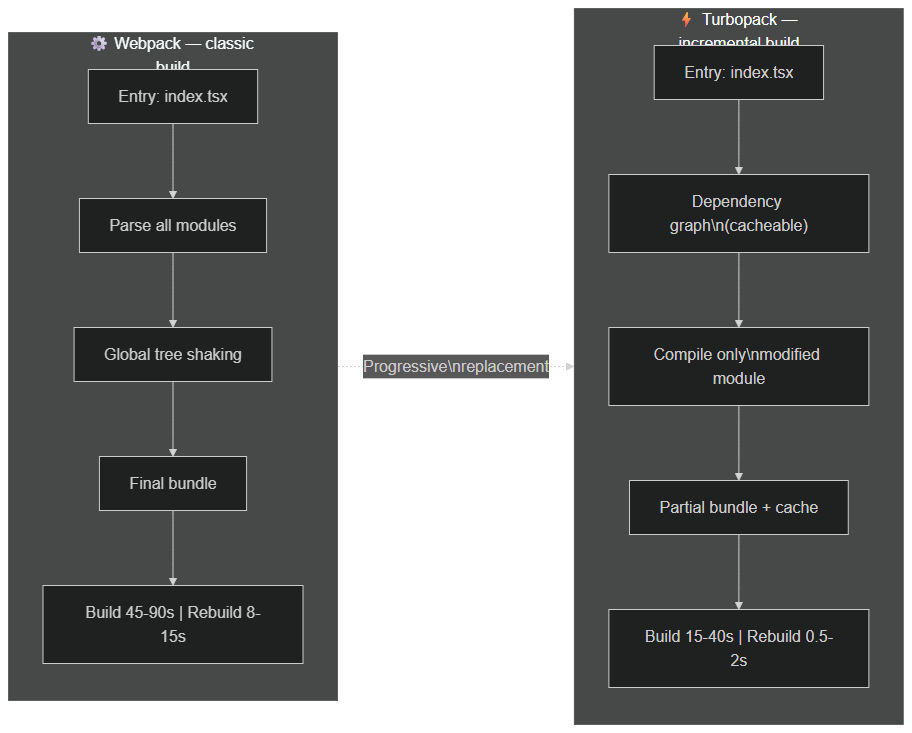 Turbopack uses a cacheable dependency graph and only recompiles modified modules — rebuild in 0.5-2s versus 8-15s for Webpack.
3. Debugging Hydration Is No Longer a Nightmare
One of the most time-consuming problems in Next.js — hydration errors between server and client — is finally handled properly. The new Hydration Diff Indicator displays exactly which part of the DOM diverges between server and client rendering, with the precise line of the component concerned.
Before, resolving a hydration error could take 30 minutes to several hours. Now, it's visible at first glance in the browser. This improvement has a direct impact on code quality: developers fix hydration issues in real time during development, rather than discovering them (too late) in QA or production.
4. AI Agents Become Team Members
This is the most strategic addition: AGENTS.md is now included by default in create-next-app. This file contains project documentation in a format readable by AI agents (Cursor, Claude, GitHub Copilot).
Concrete result: as soon as an AI agent opens your project, it understands its architecture, conventions and constraints without you having to re-explain everything. AI-assisted development sessions are 3 to 4 times more efficient, and the consistency of code produced by agents is noticeably better. It's a subtle advance but with important cumulative effects on the entire team's velocity.
Additionally:
- Server Function Logging: server calls are logged directly in your terminal
- Browser Error Forwarding: browser errors surface in the development terminal
- Experimental DevTools for AI agents, allowing access to real-time Next.js diagnostics
5. What This Changes for Your Business
If your site or application runs on Next.js, this update has a direct commercial impact:
- Reduced delivery time on your next features (less waiting between modification and result)
- Fewer hydration bugs in production, so fewer support tickets
- Improved Core Web Vitals thanks to Turbopack optimizations on bundle size
- Enhanced AI workflow compatibility: your AI-augmented developers will be even more efficient
6. Comparison Table: Next.js 14 → 15 → 16 → 16.2
| Feature | Next.js 14 | Next.js 15 | Next.js 16 | Next.js 16.2 |
|---|---|---|---|---|
| Turbopack | Beta | Stable beta | Production stable | Stable + 200 fixes |
| React version | 18 | 19 RC | 19 stable | 19 stable |
| Dev startup | 15-20s | 8-12s | 3-5s | < 2s |
| Production build | Reference | -20% | -35% | -50% |
| Hydration debug | Manual | Manual | Basic indicator | Full diff |
| AGENTS.md | Absent | Absent | Optional | Default |
7. How to Migrate from Next.js 14/15 to 16.2 Without Breaking Production
The migration to Next.js 16.2 follows a structured process. Here's the methodology BOVO Digital applies on client projects:
Step 1 — Codebase audit (1 to 2 days)
Before touching the code, map the risks:
- Identify dependencies incompatible with Next.js 16.x
- List
getServerSidePropsandgetStaticPropspatterns still present if you're on Pages Router - Verify compatibility of your custom Webpack configuration before switching to Turbopack
Step 2 — Progressive update (2 to 5 days depending on size)
npm install next@16.2 react@19 react-dom@19
# Enable Turbopack in dev (test before production)
# Add --turbopack in the dev script in package.json
Step 3 — Regression testing (1 to 3 days)
With the Hydration Diff Indicator, this step is now 3x faster. All hydration errors display immediately in the browser. No more blind debugging.
Estimated total duration: 1 week for an average project. 2 to 4 weeks for a large project with significant technical debt.
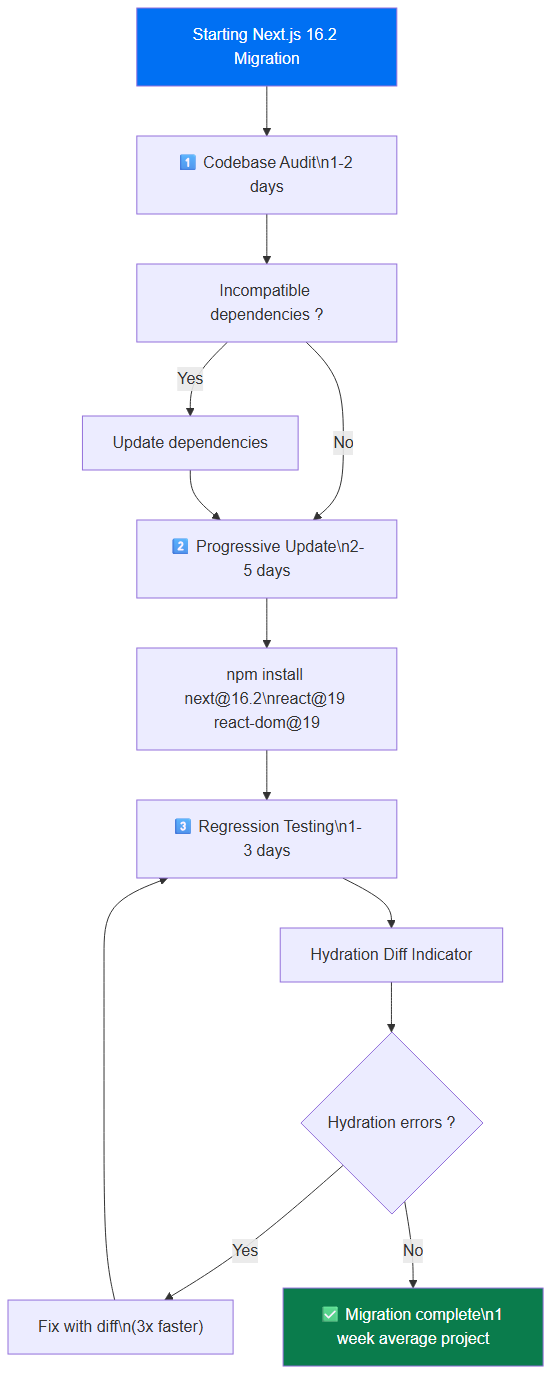 The Next.js 16.2 migration runs in 3 steps: audit (1-2d), progressive update (2-5d), regression testing with Hydration Diff Indicator (1-3d).
8. Impact on Core Web Vitals and Google SEO
Next.js 16.2 has a direct impact on your SEO metrics:
LCP (Largest Contentful Paint): With Partial Pre-Rendering (PPR) and reduced JS bundle size sent to the client, LCP improves by 15 to 30% on pages loading heavy components. Google has used LCP as a ranking factor since 2021.
FCP (First Contentful Paint): Faster server startup and optimized Server Component deserialization reduce time to first visible display. On comparative tests, BOVO Digital projects saw an average improvement of 0.4 seconds on FCP.
INP (Interaction to Next Paint): The integrated React Compiler automatically optimizes component memoization, reducing unnecessary renders and therefore interaction response time.
Concretely, migrating to Next.js 16.2 can move a site from "Needs Improvement" to "Good" on PageSpeed Insights with no content changes — just from technical performance gains.
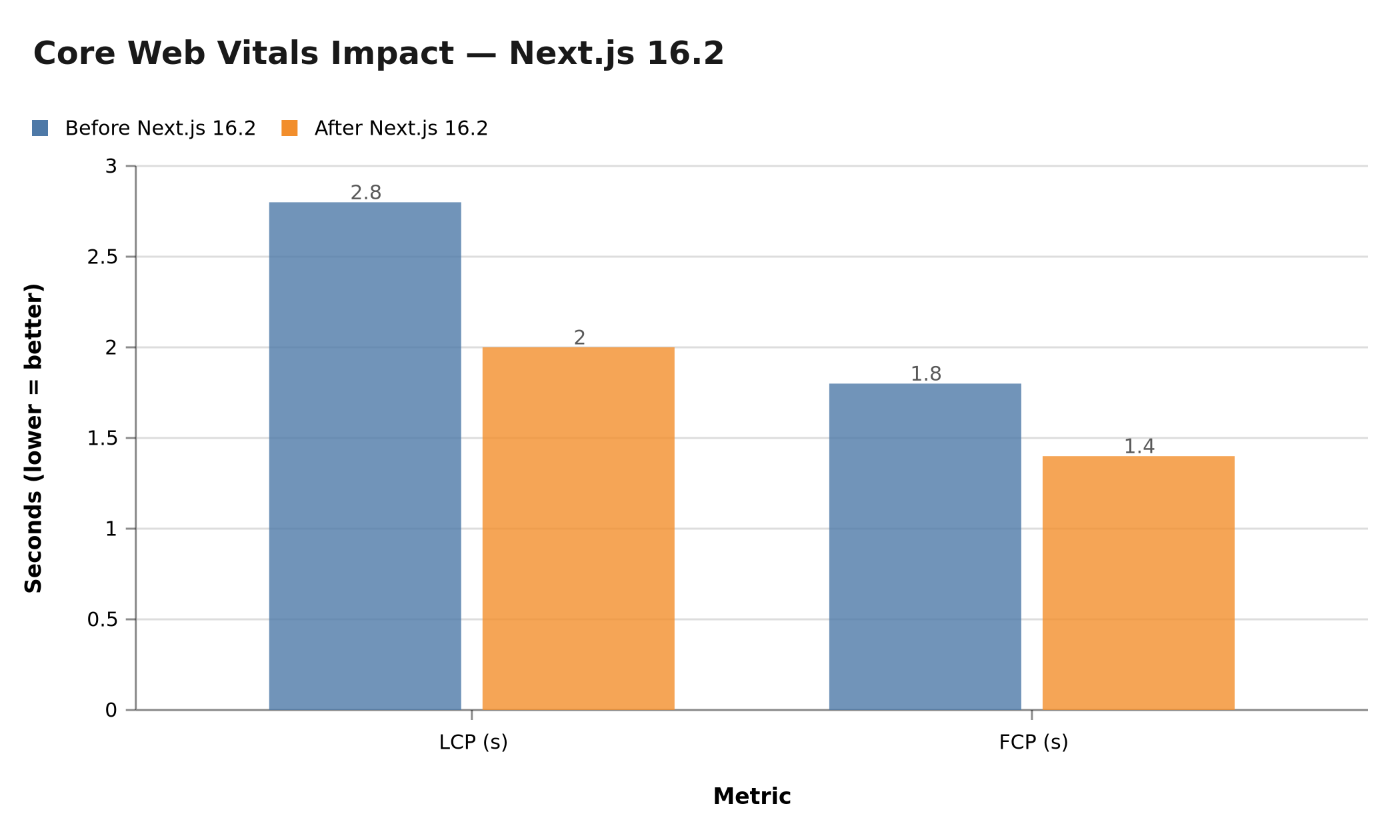 Next.js 16.2 improves LCP by 15 to 30% and FCP by ~0.4s on average across BOVO Digital projects — a direct impact on Google rankings.
9. Next.js 16.2 in the 2026 Ecosystem
TypeScript 5.x: Full support, improved inference on Server Components, strict types for nested layouts. The path alias system has been tightened, and TypeScript errors in Server and Client Component boundaries are now caught at compile time rather than at runtime. For teams managing large TypeScript codebases, this means fewer surprises and faster feedback loops during development.
Tailwind CSS 4: Native compatibility with Tailwind 4's new JIT engine — a perfect synergy with Turbopack. The configuration now lives in a CSS file rather than a JavaScript config, which aligns naturally with Next.js's module system and makes Turbopack's incremental compilation even more effective on style changes.
Prisma ORM: The new Prisma Accelerate driver works natively with Next.js 16 Server Actions, enabling direct queries from server components without an intermediate API layer. The integration also benefits from connection pooling at the edge, which becomes critical when deploying Next.js on serverless or edge runtimes where each invocation would otherwise open a new database connection.
Vercel AI SDK 4: Designed for Next.js 16, it leverages Server Actions and RSC streaming for reactive AI interfaces with 60% less code. The streaming primitives align perfectly with the new use cache directive — you can cache AI-generated content at the appropriate granularity, enabling scenarios like cached AI summaries that regenerate only when source content changes.
CI/CD pipeline improvements: With Turbopack's incremental builds, your CI/CD pipelines benefit too. Build times on platforms like GitHub Actions, GitLab CI, or Railway drop significantly, which reduces both pipeline costs and the feedback loop between commit and deployment. On medium-sized projects, a typical production build that took 3-4 minutes with Webpack now completes in 90-120 seconds with Turbopack — a measurable improvement for teams running multiple deployments per day.
Next.js 16.2 New Features That Transform Your Application Architecture
Beyond the speed gains and debugging tools, the most lasting Next.js 16.2 new features concern the architecture of your applications themselves. Three innovations deserve particular attention: the use cache directive for granular caching, Partial Pre-Rendering (PPR) for mainstream streaming, and Server Actions to definitively replace API Routes. These three evolutions, combined, fundamentally change how you architect a production React application.
10. use cache: Granular Caching Revolutionizes Data Management
Cache management has always been the sensitive point of Next.js applications. With the use cache directive available in recent versions of the framework, the approach changes radically. Rather than configuring caching at the entire page level via revalidate, you can now mark any asynchronous function — an API call, an ORM query, a data transformation — as individually cacheable.
This paradigm shift is fundamental for real-world projects. Before, if a single portion of a page needed fresh data, you were forced to put the entire page in SSR mode, losing the cache benefits for everything else. Today, with use cache, each data retrieval function has its own cache policy, independent of the others.
// simplified example — use cache directive with granular policy
async function getProductList() {
  'use cache'
  cacheLife('hours') // lifetime: a few hours
  cacheTag('products') // tag for selective invalidation
  const products = await db.product.findMany({ where: { active: true } })
  return products
}

// invalidation from a Server Action
async function updateProduct(id: string, data: ProductData) {
  'use server'
  await db.product.update({ where: { id }, data })
  revalidateTag('products') // invalidates all cache tagged 'products'
}
Concretely, cacheLife defines the cache validity duration with readable presets ('seconds', 'minutes', 'hours', 'days', 'static'). cacheTag enables selective cache invalidation from anywhere in the application via revalidateTag. Associating both creates a declarative, colocated cache system right next to the data logic.
This granular approach has a direct performance impact: static parts remain ultra-fast, dynamic parts are fresh, and everything renders via React streaming. For teams managing pages with dozens of different data sources — typical of e-commerce sites or SaaS dashboards — use cache represents significant architectural simplification compared to the unstable_cache and fetch with cache option patterns from earlier versions.
At BOVO Digital, this feature changed how we structure client projects. We now define cache strategies directly in the service layers, co-located with the business logic. The code is more testable, more maintainable, and cache policies are visible without having to navigate through page configurations.
11. PPR: Streaming Redefines User Experience on Hybrid Pages
Partial Pre-Rendering (PPR) is one of the most significant architectural evolutions in the recent Next.js ecosystem. The concept is elegant in its simplicity: when a page contains both static elements (header, navigation, main SEO content) and dynamic elements (shopping cart, personalized recommendations, user notifications), PPR allows serving the static HTML shell immediately and streaming the dynamic parts as they become available.
In practice, this means users see the main page content almost instantly — often within tens of milliseconds from a CDN — then dynamic data appears progressively, driven by the <Suspense> boundaries you define in your code. It's no longer pure SSG (fixed content) nor pure SSR (waiting for complete render), but a native hybrid model that gets the best of both.
// simplified example — PPR page with static and dynamic zones
export default function ProductPage({ params }: { params: { id: string } }) {
  return (
    <main>
      {/* static content — HTML sent immediately from CDN */}
      <ProductHeader id={params.id} />
      <ProductDescription id={params.id} />

      {/* dynamic content — streamed after first byte */}
      <Suspense fallback={<PriceSkeleton />}>
        <LivePrice id={params.id} />
      </Suspense>
      <Suspense fallback={<RecommendationsSkeleton />}>
        <PersonalizedRecommendations userId={getUserId()} />
      </Suspense>
    </main>
  )
}
The impact on Core Web Vitals is direct. TTFB (Time to First Byte) approaches that of a static CDN, while LCP benefits from the main content already being rendered. INP also improves, because interactive JavaScript loads in parallel with streaming rather than being blocked by a complete server render. For sites with strong SEO requirements and dynamic data, this is the ideal combination.
PPR isn't a magic wand — it requires properly structuring your <Suspense> boundaries and thinking about component architecture upfront. But for teams building applications with mixed static and dynamic data, it's a concrete advance that reduces complexity compared to previous workarounds (post-load client-side API calls, double render, etc.). A crucial detail: PPR only works with the App Router, which is one of the major reasons to migrate away from the Pages Router.
To dive deeper into PPR and understand advanced use cases, read our complete guide: Next.js Partial Pre-Rendering: The Complete Guide.
12. Improved Server Actions: API Routes Are Yesterday's Pattern
One of the recurring criticisms of Next.js was the proliferation of /api/route.ts files to handle mutations. For every form operation, you had to create an API Route, handle serialization, HTTP errors, CSRF protection manually... Considerable boilerplate for often trivial operations.
Server Actions solve this problem at its root. A Server Action is an asynchronous function marked with the use server directive that runs server-side but can be called directly from a client component as if it were a local function. Next.js automatically handles serialization, secure HTTP transport and CSRF protection — with no configuration required from you.
// actions.ts — simplified example
'use server'

export async function createContact(prevState: FormState, formData: FormData) {
  const email = formData.get('email') as string

  // server-side validation — impossible to bypass
  if (!email.includes('@')) {
    return { error: 'Invalid email address' }
  }

  await db.contact.create({ data: { email } })
  revalidatePath('/contacts')
  return { success: true }
}
What makes Server Actions particularly powerful in recent versions of Next.js is their native integration with useOptimistic. The interface updates immediately (optimistic update), and if the server action fails, rollback is automatic. All without Redux, without a global state manager, without additional middleware.
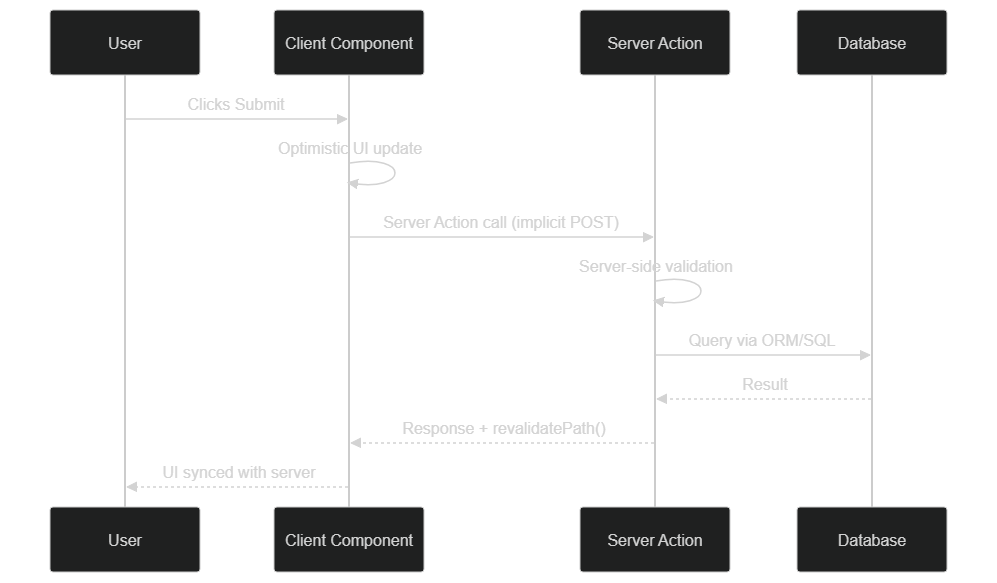 Server Action cycle: the UI is immediately updated client-side, then synced with the server result — automatic rollback on error.
Server Actions also support progressive enhancement: a form using a Server Action works even without JavaScript enabled in the browser. Concretely, this means increased resilience and better accessibility — two important criteria for institutional projects or high-traffic audiences. On the performance side, Server Actions eliminate a client round-trip: the action is invoked directly in the Next.js request cycle, without the overhead of a separate HTTP endpoint.
If you want to adapt your API infrastructure to these new patterns without locking yourself into the Vercel ecosystem, our dedicated guide covers the strategies in detail: Adapting Your Next.js Deployment Without Vercel Lock-in.
13. Migrating from Pages Router to App Router: Strategy and Real Challenges
Coexistence of both routers in the same project is officially supported by Next.js. This isn't temporary tolerance — it's a deliberate decision to allow teams to migrate progressively. You can have your existing /pages/about.tsx coexist with your new /app/dashboard/page.tsx without conflict or special configuration.
This "islands" migration strategy is what BOVO Digital recommends for projects with significant existing codebases. Rather than rewriting everything at once — a risky and costly approach — you start with new features in App Router, then progressively migrate existing pages in order of business priority.
Migrating a page in 4 concrete steps:
First step: create the app/<route>/page.tsx file corresponding to your Pages Router page. The naming convention changes — [id].tsx in /pages becomes [id]/page.tsx in /app — but the logic remains transposable.
Second step: replace getServerSideProps with a direct async server component. Data fetching now happens in the component body, without a specific wrapper. The result is more concise and readable code.
Third step: identify interactive parts that must remain client-side (useState, useEffect, event handlers) and extract them into sub-components with the 'use client' directive. The most common trap: putting 'use client' too high in the component tree, which cancels the benefits of Server Components. The golden rule: push 'use client' as low as possible in the component hierarchy.
Fourth step: test with the Hydration Diff Indicator and validate performance with PageSpeed Insights before removing the Pages Router version.
For projects with significant technical debt — numerous getServerSideProps with complex logic, custom Webpack configurations, deeply nested client component dependencies — plan a dedicated audit phase. On these projects, migration can span 3 to 6 months depending on desired coverage. The important thing is to start: every new page in App Router is an investment in performance and maintainability.
To deepen the optimization techniques linked to this migration and multiply your loading performance, read: Divide Your Loading Time by 10: Performance Optimization Strategies.
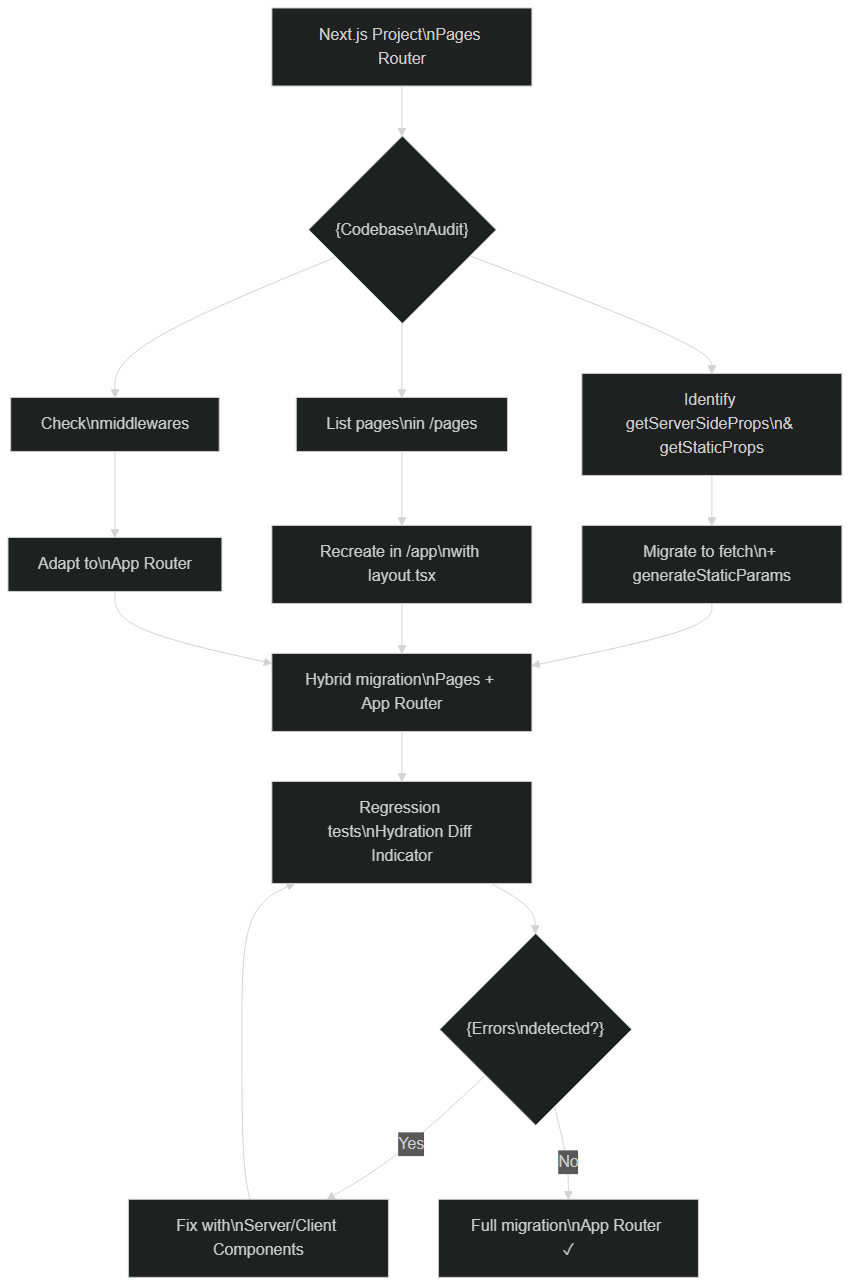 Progressive migration process Pages Router → App Router: codebase audit, hybrid island migration, regression testing with Hydration Diff Indicator.
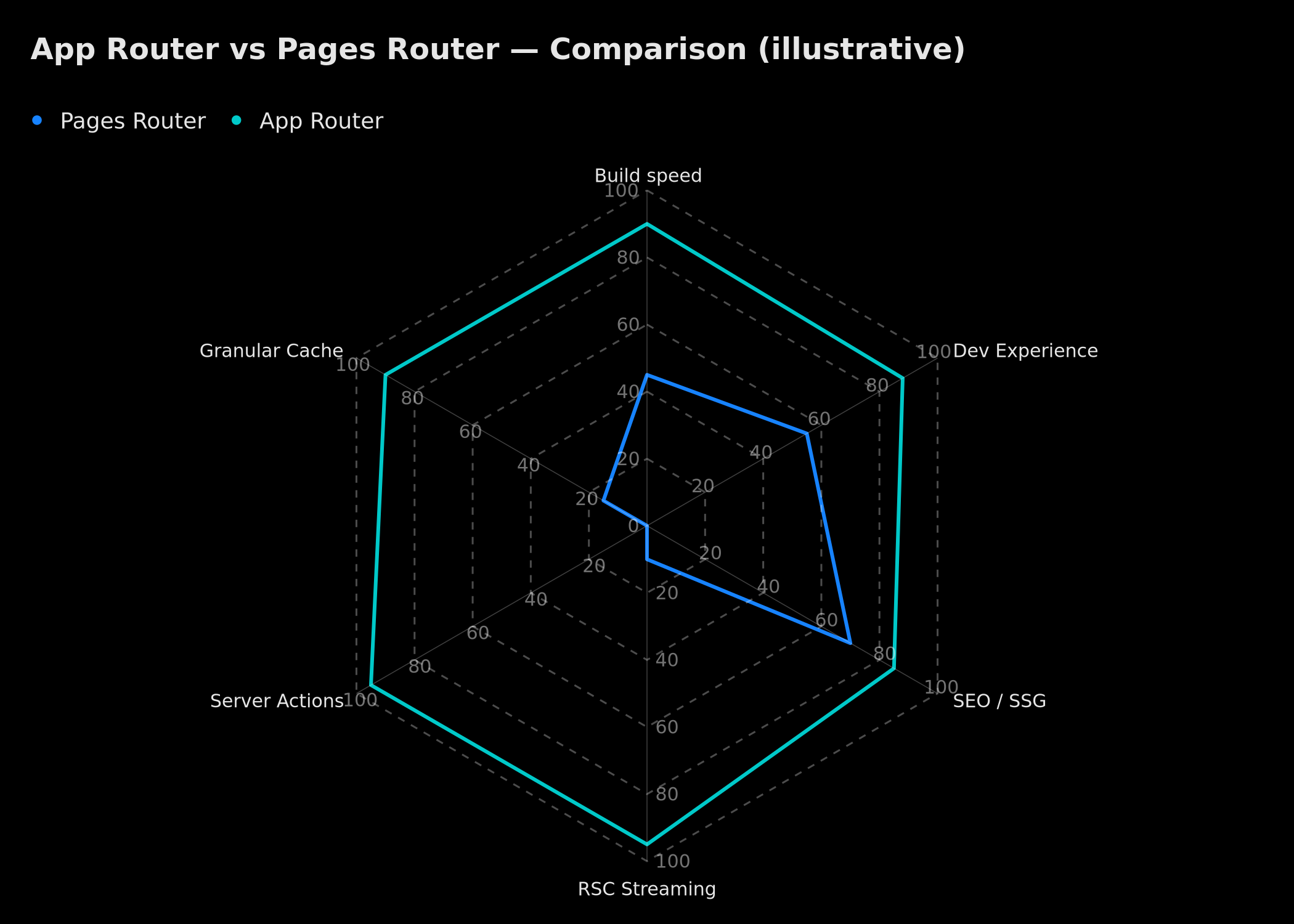 The App Router outperforms Pages Router on 5 of 6 key dimensions: build speed, developer experience, RSC streaming, Server Actions, and granular caching.
14. React 19 Stable in Next.js: The Combination That Accelerates Everything
React 19, released as stable in late 2024, changed the game for Next.js applications. Working with Next.js in 2026 without leveraging React 19's new features means leaving performance on the table. Here are the three concrete evolutions that have the most impact on your day-to-day code.
The use() hook — await a promise anywhere in a component
Before React 19, consuming a Promise in a React component required either a useEffect with manual loading state management, or a Suspense wrapper. The new use() hook allows resolving a Promise directly in the render of a server component, significantly simplifying nested data fetching patterns. It can also consume React context conditionally, which was previously impossible.
The React Compiler — the end of defensive useMemo and useCallback
The React Compiler automatically analyzes your code and adds memoization optimizations where they're actually needed. In practice, you can remove the majority of your useMemo, useCallback and React.memo from existing code — the compiler handles them with more precision than manual analysis. In Next.js 16.2, it's opt-in with progressive migration possible on existing codebases.
The performance impact is twofold: fewer unnecessary re-renders (better INP) and a more readable and maintainable source code. For teams who spent time debugging overly aggressive or insufficient useMemo chains, this is a concrete relief.
Native useOptimistic and async React actions
React 19 introduces useOptimistic natively — a hook that handles the "display the update immediately, automatic rollback on error" pattern. Combined with Server Actions, it enables building ultra-responsive interfaces without a global state manager. For teams accustomed to Redux or Zustand for this type of use case, the savings in code and complexity are significant.
For a comprehensive analysis of the possibilities opened by the Next.js + React 19 combination, read our dedicated article: Next.js and React 19: The New Web Era.
Is the Migration Worth It?
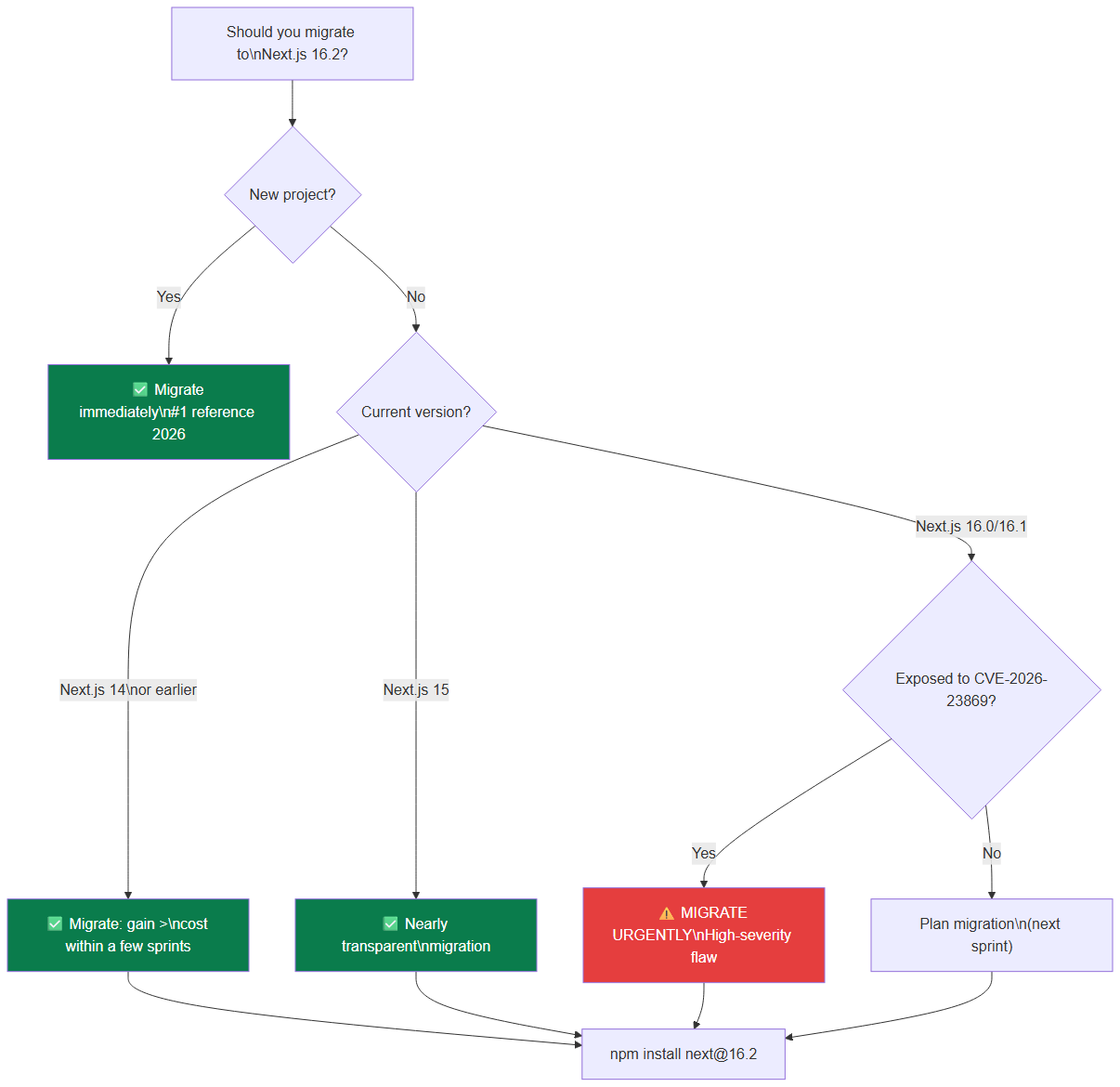 Decision tree for migrating to Next.js 16.2: CVE-2026-23869 makes the update urgent for exposed 16.0/16.1 versions.
Yes, if you're on Next.js 14 or earlier. The development speed gain more than compensates for the migration cost on an active project.
Yes immediately, if you're starting a new project. Next.js 16.2 is the 2026 reference, period.
At BOVO Digital, all our web projects start on Next.js 16 with Turbopack and AGENTS.md conventions enabled by default. Your delivery timelines benefit directly.
Tags
FAQ
Should I migrate to Next.js 16.2 immediately?
If you're starting a new project, yes without hesitation. For an existing project on Next.js 14, the migration is profitable: the development speed gains compensate for the cost in a few sprints. On Next.js 15, the migration to 16.2 is nearly transparent. BOVO Digital offers free migration audits to estimate the actual effort on your codebase.
Is Turbopack really stable in production?
Yes, since Next.js 16.2, Turbopack is declared stable for production with over 200 bug fixes validated. It's the default bundler for all new projects. BOVO Digital projects have been using it in production without major incidents.
How can BOVO Digital help me leverage Next.js 16.2?
We develop your web applications on Next.js 16.2 with Turbopack, Server Components, and AGENTS.md configured from the start to maximize AI workflow efficiency. Result: faster deliverables, more maintainable code and optimal performance from launch.
What is Partial Pre-Rendering (PPR) in Next.js and why does it matter?
PPR combines the best of SSG and SSR: the static HTML shell is served immediately from a CDN (near-instant TTFB), while dynamic parts are streamed via Suspense boundaries as soon as they're ready. The result: pages that feel ultra-fast even when they contain personalized data. It's one of the main reasons to migrate to the App Router today.
What is the difference between a Server Action and an API Route in Next.js?
An API Route is an explicit HTTP endpoint (/api/contact) that you call from the client with fetch(). A Server Action is a server function callable directly from a React component, with no visible endpoint — Next.js automatically handles transport, serialization and CSRF protection. Server Actions are simpler to write, more secure by default, and integrate natively with useOptimistic for optimistic updates. For new features, Server Actions replace API Routes advantageously in most use cases.
Does your site book meetings — or just present you?
We open your URL together, mark the 3 leaks, and tell you whether a fix is enough or a rebuild is required.
- 30 min
- No commitment
- Action plan
William Aklamavo
Web development and automation expert, passionate about technological innovation and digital entrepreneurship.


