
Next.js 16.2 Agent-Ready: 400% Faster and Built for the AI Agent Era
Next.js 16.2 shipped in March 2026 with spectacular gains: 4x faster dev startup, 2x faster rendering, and an 'agent-ready' scaffold built for AI agents. Here's what it concretely changes for your web projects.

Updated

Next.js 16.2: The Update That Redefines Web Development in 2026
Next.js 16.2 agent-ready is not just a minor version bump — it's the convergence of raw performance, reactive architecture, and native AI agent integration into the development lifecycle.
Released quietly in March 2026, Next.js 16.2 may be the most impactful update since the App Router was introduced. It revolves around three main axes: raw performance with startup up to 4x faster thanks to Turbopack, AI agent readiness with a scaffold and primitives designed from the ground up for AI agent integration, and infrastructure independence from Vercel through the stabilization of the Adapters API. This article breaks down each axis and shows you how to leverage it concretely.
For the foundations of Next.js 16, read first our analysis of concrete Next.js 16 changes, and for the practical migration to a non-Vercel host, see our guide on the Adapter API.
The Numbers That Speak
The "400% faster" claim deserves a precise explanation. In the original Vercel release announcement (March 2026), the "4x" figure refers to the dev server startup time with Turbopack compared to previous versions. In practice, the published benchmarks show:
| Metric | Next.js 16.1 | Next.js 16.2 |
|---|---|---|
next dev startup | ~8s | ~2s (-75%) |
| Page rendering speed | baseline | +50% |
| Default bundle size | baseline | -18% |
These figures are illustrative and based on benchmarks published by Vercel in March 2026 for medium-sized projects. Your results will vary depending on your codebase size and complexity.
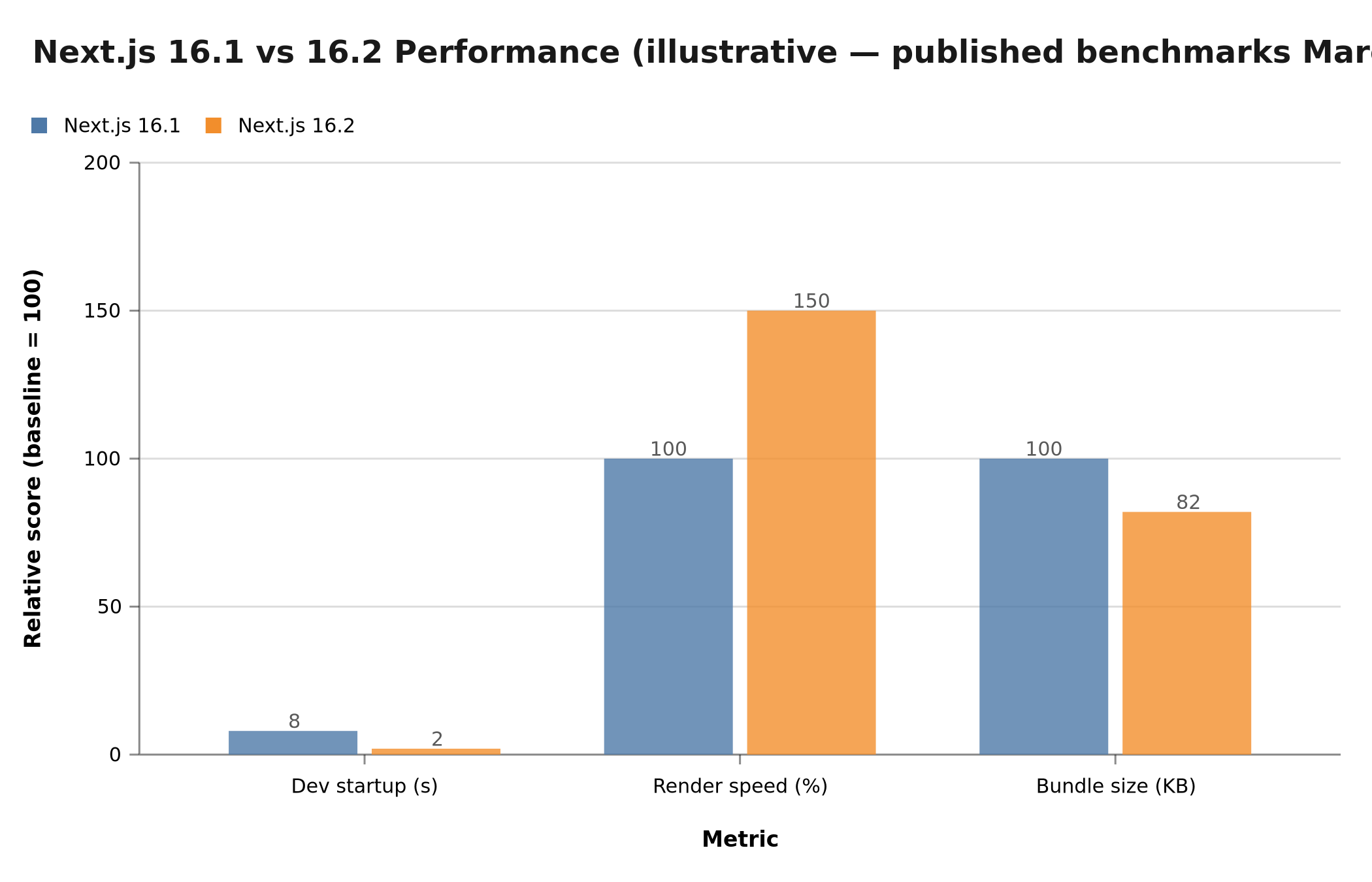 Next.js 16.2 reduces dev startup from 8s to 2s and bundle size by 18% compared to version 16.1 (illustrative benchmarks, published March 2026).
These gains come from the definitive integration of Turbopack as the default bundler (no more experimental --turbo flag), and deep SWC compiler optimizations. Turbopack is written in Rust and leverages massive parallelism to recompile only modified modules — a fundamentally different approach from Webpack, which recompiles the entire module graph. For more on performance optimization, read our article on cutting your load time by 10.
Why "Agent-Ready" Changes Everything
Before diving into code, it's important to understand what "agent-ready" actually means in the context of Next.js 16.2. This is not just marketing — it's a set of concrete features that address three problems every team building with AI agents runs into quickly.
Problem 1: observability. When an AI agent interacts with your interface — clicking buttons, filling forms, navigating between pages — its actions produce browser-side effects (JavaScript errors, request logs, component states) that the agent cannot see. Without native observability, you have to manually instrument every component to relay this information. Next.js 16.2 integrates Browser Log Forwarding: all browser logs automatically flow to the agent's terminal via a dedicated WebSocket channel.
Problem 2: interoperability. The Model Context Protocol (MCP) became the de facto standard in 2025-2026 for connecting AI agents to external data sources and tools. Every Next.js application wanting to expose its capabilities to an agent had to create and configure its own MCP endpoint from scratch. The agent-ready scaffold generates a pre-configured /api/mcp endpoint directly, with tool management, resource handling, and authentication already in place.
Problem 3: server-side state. AI agents need access to consistent, reliable state. With traditional SPA architectures, state lives client-side — which creates synchronization issues when an agent modifies data: the interface doesn't update automatically, and the agent doesn't know whether its action actually had an effect. Next.js Server Actions allow an agent to trigger mutations directly server-side, with automatic cache invalidation and interface updates.
Server Components and Streaming: The Agent-Ready Foundation
React Server Components (RSC) are at the heart of the "agent-ready" architecture. Unlike traditional client components, RSCs execute exclusively server-side and send only rendered HTML to the browser — no component JavaScript is downloaded. For an application integrating an AI agent, this has several major implications.
First, reduced attack surface. An AI agent interacts with your application via HTTP requests. If your business logic lives in client components, it's exposed in the JavaScript bundle and potentially inspectable. With RSCs, the logic stays server-side — the agent receives only the rendered HTML, not the code that produced it.
Second, native streaming with Suspense. When an RSC calls an LLM (for example via the OpenAI or Anthropic API), the response can take several seconds. Without streaming, the user waits for the complete response before seeing anything. With the combination of RSC + Suspense + ReadableStream, tokens arrive and display progressively from the first byte.
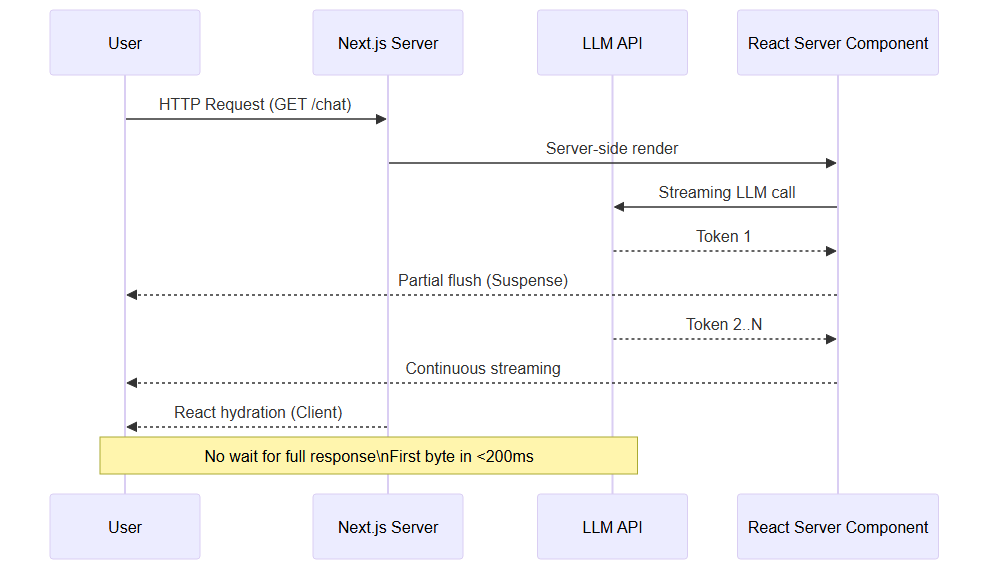 LLM streaming in Next.js 16.2: each LLM token is flushed immediately to the client via Suspense, without waiting for the full response.
Here is a simplified example of a chat component streaming an LLM response:
// app/chat/page.tsx — illustrative example
import { Suspense } from 'react'

async function* streamLLMResponse(prompt: string) {
  const response = await fetch('https://api.openai.com/v1/chat/completions', {
    method: 'POST',
    headers: { Authorization: `Bearer ${process.env.OPENAI_API_KEY}` },
    body: JSON.stringify({
      model: 'gpt-4o',
      stream: true,
      messages: [{ role: 'user', content: prompt }],
    }),
  })
  // Read the stream with async iteration
  for await (const chunk of response.body!) {
    yield new TextDecoder().decode(chunk)
  }
}

async function AgentResponse({ prompt }: { prompt: string }) {
  const stream = streamLLMResponse(prompt)
  const tokens: string[] = []
  for await (const token of stream) {
    tokens.push(token)
  }
  return <p>{tokens.join('')}</p>
}

export default function ChatPage({ searchParams }: { searchParams: { q: string } }) {
  return (
    <main>
      <Suspense fallback={<p>The agent is thinking...</p>}>
        <AgentResponse prompt={searchParams.q} />
      </Suspense>
    </main>
  )
}
This pattern is powerful because <Suspense> acts as a streaming boundary: Next.js immediately sends the page HTML up to the <Suspense>, displays the fallback, then streams the agent's response as it arrives. The user sees something in under 200ms, even if the LLM takes 3 seconds to respond.
Partial Pre-Rendering (PPR): Performance Without Compromise
Partial Pre-Rendering, stabilized in recent Next.js versions, solves one of the most frustrating trade-offs in modern web development: choosing between the performance of static pages (CDN, global cache) and the freshness of dynamic pages (real-time data).
With PPR, a page can combine both in the same HTTP response. The page "shell" — header, navigation, static sections — is pre-rendered at build time and served instantly from the CDN. The dynamic parts — user data, agent responses, personalized content — are streamed in the same HTTP response, but asynchronously.
For an application integrating AI agents, PPR fundamentally changes the user experience. Imagine a dashboard where the AI agent generates a personalized report on demand. With a classic architecture, the entire page waits for the report to be ready. With PPR, the full interface is visible immediately, and the agent's report appears progressively in its dedicated area.
To enable PPR on a page, simply export the experimental_ppr = true constant at module level. Next.js automatically handles the boundary between static and dynamic parts, without any changes to existing rendering logic. Here is how to configure a typical dashboard page with an AI agent-driven section:
// app/dashboard/page.tsx — PPR with agent section
import { Suspense } from 'react'
import { AgentReport } from './AgentReport' // dynamic component

// The entire page benefits from PPR
export const experimental_ppr = true

export default function DashboardPage() {
  return (
    <div>
      {/* Static part: rendered at build time, served from CDN */}
      <Header />
      <Navigation />
      <StaticMetrics />

      {/* Dynamic part: streamed on demand */}
      <Suspense fallback={<ReportSkeleton />}>
        <AgentReport />
      </Suspense>
    </div>
  )
}
This split is transparent to the end user but transformative in terms of metrics. The Time to First Byte (TTFB) for the static shell drops below 50ms when served from a geographically close CDN. The <ReportSkeleton> component displays instantly, visually filling the space and preventing layout shift. When the agent finishes its computation, the response replaces the skeleton without a full page re-render — Next.js only updates the zone delimited by the <Suspense> boundary, making rendering surgical and predictable.
For everything you need to know about PPR and its use cases, see our complete guide on Partial Pre-Rendering.
Server Actions: The Bridge Between Your Agent and Your Backend
Server Actions are perhaps the most transformative primitive for applications integrating AI agents. A Server Action is an async function marked with the 'use server' directive, which runs server-side but can be called from the client — or from an external agent via a standard HTTP request.
Here's why this is revolutionary for agents: in the old approach, an agent wanting to modify data had to call a REST API route (/api/...), which called the business logic, which updated the database, and the interface then had to refresh manually. With Server Actions, this flow becomes atomic:
// app/actions/agent-actions.ts
'use server'

import { revalidatePath } from 'next/cache'
import { db } from '@/lib/db'

export async function createContent(data: {
  title: string
  body: string
  agentId: string
}) {
  // Server-side validation (never client-side)
  if (!data.title || !data.body) {
    return { error: 'Title and body are required' }
  }

  // Insert into database
  const content = await db.content.create({ data })

  // Automatic revalidation: Next.js invalidates the cache
  // and re-renders affected pages
  revalidatePath('/dashboard')
  revalidatePath(`/content/${content.id}`)

  return { success: true, id: content.id }
}
Two points are worth emphasizing in this example. First, the 'use server' directive ensures this function will never be included in the client JavaScript bundle — TypeScript raises a static error if you attempt to import it from a client component. Second, revalidatePath() triggers targeted incremental revalidation: only the /dashboard and /content/:id routes are re-rendered, not the entire application. The cost of a Server Action therefore remains predictable and minimal, even under heavy load.
An AI agent (for example an n8n workflow or a Claude agent) can call this action via a simple HTTP POST to the corresponding Next.js endpoint. The response is JSON, the cache is invalidated, and the interface updates automatically for all connected users.
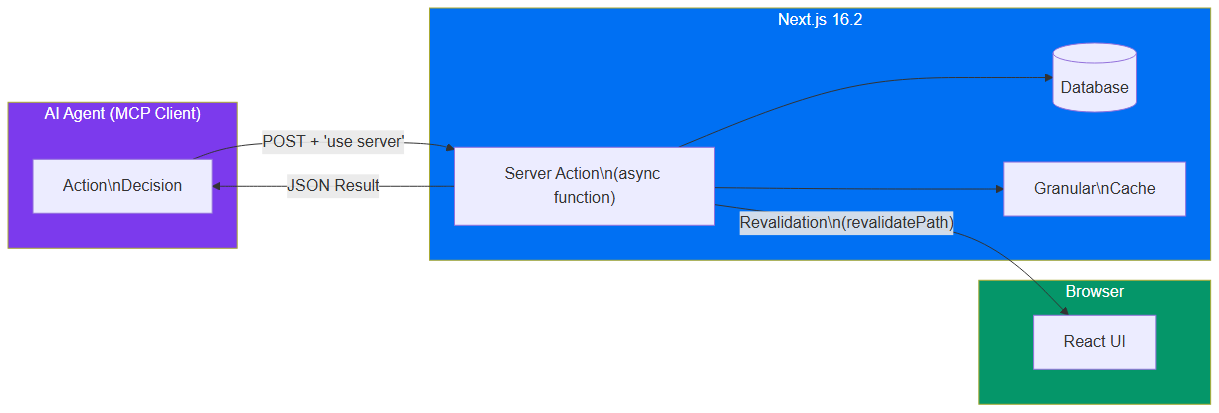 Server Actions create a direct bridge between the AI agent and the Next.js backend: mutation, granular cache, and UI revalidation in a single call.
To go further on integrating agents with automated workflows, read our guide on n8n and AI agents.
Granular Cache: Full Control Over Data Freshness
One of the most underrated innovations in recent Next.js versions is the granular cache. Where earlier versions offered a global cache that was difficult to configure, Next.js 16.x introduces per-request, per-tag, and per-path control.
For AI agent applications, this is critical: an agent that generates content, updates data, or triggers actions must be able to precisely invalidate the affected cache segments — without forcing a full application rebuild.
The granular cache relies on two complementary primitives: unstable_cache to cache the result of an async function, and revalidateTag to precisely invalidate the affected entries. This model is analogous to tag-based caching in CDN systems like Fastly or Cloudflare, but applied directly at the application level — with no additional infrastructure to manage, and with granularity down to the individual user.
// Per-tag cache — illustrative example
import { unstable_cache } from 'next/cache'

// Cache a report with a specific tag
const getAgentReport = unstable_cache(
  async (userId: string) => {
    return await db.reports.findLatest({ userId })
  },
  ['agent-report'], // cache key
  {
    tags: ['reports', `user-${userId}`], // tags for targeted invalidation
    revalidate: 3600, // 1 hour
  }
)

// In a Server Action, after modification:
export async function updateReport(userId: string, data: ReportData) {
  await db.reports.update({ userId, data })
  // Invalidate only this user's cache
  revalidateTag(`user-${userId}`)
}
This mechanism allows an agent to work in the background on data, modify it, and invalidate only the strictly necessary cache entries. The rest of the application continues serving content from the cache — no global performance degradation.
The "Agent-Ready" Scaffold
The biggest invisible change for end users but revolutionary for dev teams: create-next-app now generates projects with an architecture designed for AI agents.
npx create-next-app@latest my-project --agent-ready
This scaffold includes:
- Browser Log Forwarding: browser logs automatically bubble up to the agent's terminal
- Agent DevTools (experimental): a dedicated panel to visualize agent actions on the UI
- MCP endpoint by default: a pre-configured
/api/mcpendpoint to expose your routes to external agents
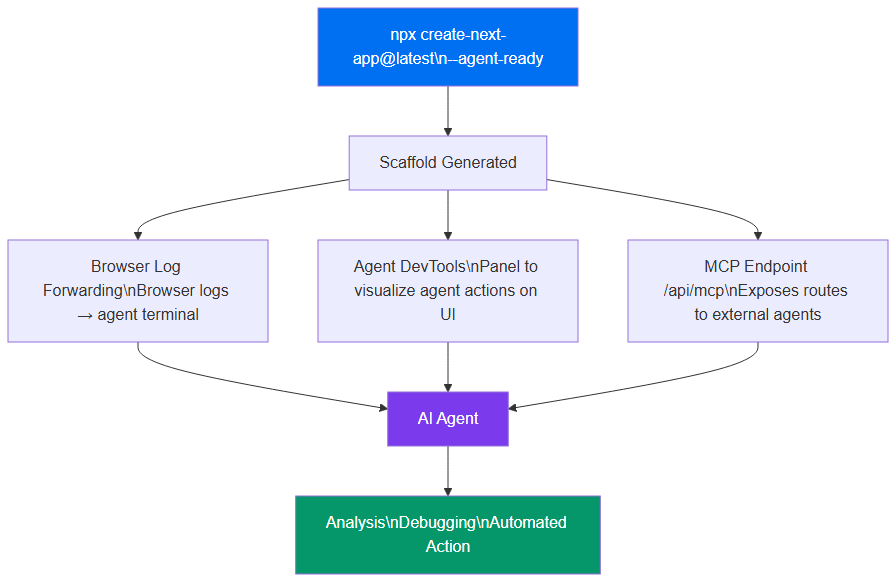 The --agent-ready scaffold connects Browser Log Forwarding, Agent DevTools, and an MCP endpoint to your AI agent for frictionless development.
The generated folder structure reflects this architecture:
my-project/
├── app/
│   ├── api/
│   │   └── mcp/
│   │       └── route.ts      ← pre-configured MCP endpoint
│   ├── layout.tsx
│   └── page.tsx
├── lib/
│   └── mcp/
│       ├── tools.ts           ← tools exposed to the agent
│       └── resources.ts       ← MCP resources
└── next.config.ts             ← browserLogForwarding: true enabled by default
The key to this scaffold is that it enforces a clear separation between what is exposed to the agent (the MCP tools in lib/mcp/tools.ts) and internal business logic. An agent can only call explicitly declared tools — a controlled attack surface.
Building a Next.js App with Integrated AI Agents: Practical Guide
Here are the concrete steps for building a genuinely "agent-ready" application with Next.js 16.2, combining all the primitives described above.
Step 1: Create the project with the scaffold
npx create-next-app@latest my-agent-app --agent-ready --typescript --tailwind
cd my-agent-app
The --agent-ready flag automatically generates the MCP structure, enables browserLogForwarding in next.config.ts, and installs the required dependencies. The --typescript and --tailwind flags are optional but strongly recommended: TypeScript provides static type checking for MCP tool descriptors, preventing silent bugs in agent calls in production.
Step 2: Declare MCP tools available to the agent
The lib/mcp/tools.ts file lists all actions your agent can trigger. Each tool is a Server Action wrapped in an MCP descriptor:
// lib/mcp/tools.ts — illustrative example
import { createContent, searchContent, deleteContent } from '@/app/actions'

export const mcpTools = [
  {
    name: 'create_content',
    description: 'Creates a new article or page in the CMS',
    inputSchema: {
      type: 'object',
      properties: {
        title: { type: 'string' },
        body: { type: 'string' },
        category: { type: 'string', enum: ['blog', 'landing', 'docs'] },
      },
      required: ['title', 'body'],
    },
    handler: createContent,
  },
  {
    name: 'search_content',
    description: 'Searches existing content by keyword',
    inputSchema: {
      type: 'object',
      properties: { query: { type: 'string' } },
      required: ['query'],
    },
    handler: searchContent,
  },
]
What is elegant about this architecture: the MCP descriptor (name, description, inputSchema) and the implementation (handler) are co-located in the same file. The description property is particularly critical — it is the text the language model reads to decide whether this tool matches the requested task. A vague description leads to poor tool-call decisions by the agent; a precise, example-driven description dramatically improves the invocation success rate.
Step 3: Configure LLM response streaming
Use Vercel's AI SDK (Next.js compatible) to handle LLM response streaming with minimal configuration:
// app/api/chat/route.ts
import { streamText } from 'ai'
import { openai } from '@ai-sdk/openai'

export async function POST(req: Request) {
  const { messages } = await req.json()

  const result = streamText({
    model: openai('gpt-4o'),
    messages,
    // The agent can call MCP tools directly
    tools: {
      createContent: { /* tool definition */ },
    },
  })

  return result.toDataStreamResponse()
}
The advantage of streamText over a manual implementation lies in automatic handling of backpressure, cancellation tokens, and transient network errors. The toDataStreamResponse() method encodes the response in the format expected by the client-side useChat hook from the AI SDK, saving you from writing a custom stream parser. If you use a different provider — Anthropic Claude, Google Gemini, Mistral — simply replace the provider in streamText: the rest of the code remains identical.
Step 4: Enable PPR for pages with agent content
// next.config.ts
export default {
  experimental: {
    ppr: true,
    browserLogForwarding: true,
  },
}
These two lines take effect immediately on the next dev server restart: browser logs appear in your terminal with no additional configuration, and the hybrid PPR rendering engine is active. PPR requires no changes to existing components — it is applied page by page via the exported constant, without any global refactoring of your codebase.
Concrete Use Cases
1. Chatbot with real-time content generation
An AI agent receives a user command ("write an article about PPR"), generates the content via streaming, and automatically inserts it into the CMS via a Server Action. The user sees the text appear word by word as the agent writes. The article page is automatically revalidated when the agent finishes.
2. Agent-driven monitoring dashboard
A monitoring agent continuously inspects your application's performance metrics. When an anomaly is detected, it calls a Server Action to create an alert, invalidates the dashboard cache, and the interface updates instantly for all connected team members. No client-side polling required.
3. Programmatic SEO page generation
An AI agent analyzes traffic data and identifies long-tail content opportunities. It automatically generates pages via Server Actions, triggers targeted revalidation with revalidatePath, and new pages become indexable by search engines within minutes — without a full application rebuild.
4. Integrated code review agent
Via the scaffold's /api/mcp endpoint, a code review agent can access your component performance metrics (via Agent DevTools), identify bottlenecks, and propose optimizations directly tied to production data. Browser Log Forwarding gives it access to JavaScript errors in real time.
Old Approach vs Agent-Ready Stack
To understand the leap that Next.js 16.2 represents, here's how the same flow (an agent creating content and updating the interface) was implemented before, and how it works now.
Old approach (Next.js 13-14, Pages Router or App Router without Server Actions):
- The agent calls a REST API route:
POST /api/content - The route validates data, inserts to the database, returns an ID
- The agent receives the ID and calls a second route:
POST /api/cache/invalidate - The frontend detects invalidation via a custom polling mechanism or WebSocket
- The frontend re-fetches data and re-renders the component
Result: 5 steps, 3 HTTP requests, a polling mechanism to maintain, and interface update latency on the order of seconds.
Agent-ready stack (Next.js 16.2):
- The agent calls the Server Action directly via the MCP endpoint
- The Server Action inserts to the database and calls
revalidatePath() - Next.js invalidates the cache and automatically re-renders affected pages
Result: 3 steps, 1 HTTP request, zero polling infrastructure, interface update latency under 100ms.
The difference is not merely cosmetic: on a production application with multiple agents running in parallel, this reduction in complexity has a direct impact on reliability, latency, and infrastructure costs.
What Next.js security vulnerability must be patched urgently?
⚠️ In April 2026, a high-severity vulnerability was disclosed: CVE-2026-23869, affecting React Server Components in Next.js 13.x through 16.x.
Immediate action if you're on Next.js 13, 14, 15, or 16.0/16.1:
npm install next@16.2.x
This command only updates the next package — React and React DOM do not need to be updated to benefit from the security patch. The operation takes under a minute on the vast majority of projects and requires no changes to application code.
The flaw allows server-side code execution via malformed RSC requests. Next.js 16.2 is the only version that includes the patch. This is especially critical in an "agent-ready" context where external agents can interact with your RSC endpoints — an attack surface to secure as a priority.
React Router v7: The Serious Threat
A notable fact accompanies this release: for the first time since 2020, Next.js developer satisfaction dropped below 55% in State of JS surveys. The perceived complexity of the App Router and RSCs is pushing some teams toward React Router v7, whose simpler architecture and absence of Vercel lock-in particularly attract e-commerce projects.
Our analysis at BOVO Digital: Next.js remains our primary recommendation for projects requiring SSR, ISR, or deep integration with AI agents. But for SPAs or Shopify applications, React Router v7 deserves serious evaluation.
The Adapters API: End of Vercel Lock-In
Introduced in 16.1 and stabilized in 16.2, the Adapters API allows you to deploy your Next.js applications to any infrastructure without code changes:
// next.config.ts
export default {
  experimental: {
    adapter: '@next/adapter-cloudflare', // or node, aws-lambda, etc.
  }
}
Official adapters exist for Cloudflare Workers, AWS Lambda, and standalone Node.js servers. Partners like Pantheon have already integrated this API into their Next.js hosting offering (GA announced April 13, 2026). For agent-ready applications deployed on Cloudflare Workers, this edge computing deployment significantly reduces LLM call and Server Action latency — Workers being geographically distributed within 50ms of 95% of global users.
How to migrate to Next.js 16.2 Agent-Ready safely?
# 1. Update
npm install next@latest react@latest react-dom@latest

# 2. Check for breaking changes
npx next-codemods@latest

# 3. Test locally with Turbopack
npm run dev  # Turbopack active by default
Breaking changes are minimal for 99% of projects. Migrating a Next.js 15 app to 16.2 typically takes less than an hour. However, if you want to activate the agent-ready scaffold on an existing project, here's the approach:
# Manually enabling agent-ready features on an existing project
# 1. Update next.config.ts
# 2. Manually create the /api/mcp endpoint
# 3. Enable browserLogForwarding in next.config.ts
This manual sequence preserves your control over what is exposed via MCP: you decide exactly which API routes to migrate to Server Actions, and which ones to keep as classic REST routes. An all-or-nothing migration is neither necessary nor recommended — the agent-ready scaffold coexists perfectly with existing API routes in the same Next.js project.
For an existing project, it's best to create the lib/mcp/ folder manually and progressively migrate your existing API routes to Server Actions.
Conclusion
Next.js 16.2 isn't a surface-level revolution — it's a solidified foundation for the AI agent era. The convergence between Turbopack (raw performance), Server Components with streaming (optimal LLM latency), Partial Pre-Rendering (static + dynamic without compromise), Server Actions (atomic mutations with cache revalidation), and the agent-ready scaffold (observability, MCP, DevTools) creates a unique environment for building web applications that collaborate with AI agents.
If you haven't migrated from Next.js 13 or 14 yet, the CVE-2026-23869 vulnerability should be your immediate trigger. And if the PPR question is still unclear, our guide on Partial Pre-Rendering explains it in detail.
At BOVO Digital, we've been building on Next.js since version 9. Need a stack audit or migration to 16.2 with agent-ready features enabled? Let's talk.
Tags
FAQ
Should I migrate to Next.js 16.2 urgently?
Yes if you're using Next.js 13, 14, 15, or 16.0/16.1: CVE-2026-23869 is a high-severity flaw affecting React Server Components. Updating to 16.2 is the only available patch.
Is Turbopack stable for production in Next.js 16.2?
Yes. Turbopack becomes the default bundler in Next.js 16.2 (no more --turbo flag needed). It has been considered production-ready since November 2025 and offers startup times up to 4x faster.
Does the Adapters API replace Vercel for deployment?
It allows deployment on Cloudflare Workers, AWS Lambda, Pantheon and other hosts without changing your code. Vercel remains an option, but lock-in is now over.
How do Server Actions let AI agents interact with the backend?
Server Actions expose secure async functions that run server-side but can be called from the client or via an HTTP POST. An AI agent can trigger a Server Action to mutate a database, invalidate the cache, or revalidate a page — without ever exposing business logic client-side.
What is Partial Pre-Rendering (PPR) and why does it matter for AI agents?
PPR lets you serve the static shell of a page instantly from the CDN while streaming the dynamic parts. For AI agent apps, this means the interface is visible immediately and the agent's responses stream in progressively without blocking the initial render.
Is Next.js 16.2 genuinely "agent-ready" or just marketing?
The term "agent-ready" refers to concrete features: Browser Log Forwarding for observability, a pre-configured /api/mcp endpoint for the Model Context Protocol, and Agent DevTools to visualize an agent's actions on the UI. These are active from the scaffold — not just marketing copy.
Does your site book meetings — or just present you?
We open your URL together, mark the 3 leaks, and tell you whether a fix is enough or a rebuild is required.
- 30 min
- No commitment
- Action plan
William Aklamavo
Web development and automation expert, passionate about technological innovation and digital entrepreneurship.


