
Next.js: Deploy Anywhere Without Being Locked to Vercel — Adapters, Hosting Options and Strategies 2026
Vercel charges premium prices for ISR, streaming and middleware. Recent versions of Next.js change the game with the Adapter API and the OpenNext ecosystem. Complete guide to lock-in-free hosting options.

Updated

The trap most Next.js teams fall into
You chose Next.js for its flexibility. You admired Server Components, Partial Pre-Rendering, real-time data streaming. Then, when it came time to deploy on your client's infrastructure — AWS, OVH, a self-hosted VPS — you discovered reality: a significant portion of advanced features didn't work properly outside of Vercel.
ISR (Incremental Static Regeneration)? Complex to configure off Vercel. Middleware with revalidation? Partially functional at best. Server Actions with distributed cache? Good luck without the right tooling.
Result: you end up on Vercel, constrained by pricing, bandwidth limits, and terms of service. You didn't choose Vercel — you were pushed into it. And once settled in, migrating becomes difficult: teams build dependencies on Vercel KV, Vercel Blob, Edge Config, and the lock-in deepens month after month.
This guide shows you how to break free. No theory — concrete tools, documented adapters, configurations tested on real projects. Deploying Next.js without Vercel lock-in is not only possible today but often more cost-effective. The keyword here is "Next.js deployment without Vercel," and the solutions are more mature than most developers realize.
Why Vercel lock-in is a structural problem
Vercel is an excellent platform. It's fast to set up, tightly integrated with Next.js (of which Vercel is the author), and delivers a developer experience that's hard to beat. The problem isn't the product quality — it's the pricing model and the dependencies it creates.
The hidden cost of Vercel at scale. Based on Vercel's public pricing (at the time of writing), the Pro plan costs $20/member/month. That's acceptable for a small team. But this figure only tells part of the story: serverless invocation costs, bandwidth, Function Duration charges accumulate quickly on a high-traffic project. An e-commerce site with intensive ISR can easily reach $400-800/month on Vercel Pro, whereas the same application deployed on AWS Lambda via OpenNext or on Railway as containers costs 5 to 10 times less.
Progressive lock-in through proprietary services. Vercel offers attractive proprietary services: Vercel KV (Redis database), Vercel Blob (file storage), Edge Config (distributed configuration). These services are convenient and well-integrated — and that's precisely the trap. Every proprietary feature you adopt increases your migration cost. Six months after launch, your codebase contains imports from @vercel/kv, access to process.env.EDGE_CONFIG, and migrating becomes a project in itself rather than a simple reconfiguration.
Limited control over infrastructure. On Vercel, you don't control your data region, advanced network configurations, or access to raw logs. For projects with data residency constraints (strict GDPR, government clients, financial sector), this lack of control can be a deal-breaker. You also can't enforce custom network egress rules, whitelist IP ranges, or integrate with private VPCs — all standard requirements in enterprise and regulated environments.
Vendor dependency risk. Beyond day-to-day costs, there's a strategic dimension: when your hosting is tied to a single vendor, their pricing changes become your problem. Vercel has revised its pricing structure multiple times over the years. Teams that have built critical products on Vercel's proprietary services have little room to negotiate when those changes happen. Building on portable, open standards is as much a strategic decision as a technical one.
The good news: the open source ecosystem around Next.js has solved these problems. With the right configurations and the right adapters, your Next.js application can run with feature parity on any infrastructure.
The Adapter API: a public contract between Next.js and hosting providers
Historically, Vercel used an internal mechanism to connect Next.js to its infrastructure. This mechanism wasn't publicly documented, making it impossible for third-party hosts to properly support all Next.js features. In recent versions of Next.js, this contract has been progressively standardized and made accessible.
The Adapter API is an interface that defines what a hosting provider must implement to support all advanced Next.js features: ISR, RSC streaming, distributed middleware, cache management. For teams that deliver projects on client infrastructure (AWS, GCP, on-premise), this is a quiet but massive revolution. If you're new to Next.js 15, start with our overview of Next.js 16 and React 19 to understand the framework's foundations.
What the Adapter API unlocks concretely:
ISR outside Vercel: You can now trigger page revalidation from any supported host, with consistency guarantees close to what Vercel offers in production. Today's best practice involves custom cache handlers (cacheHandler) that you configure in next.config.js.
Streaming RSC (React Server Components): Server Components that progressively stream data work on Cloudflare Workers via @opennextjs/cloudflare. Performance is comparable to Vercel's Edge Network for the majority of use cases.
Distributed Middleware: Your redirect, authentication and personalization middleware can run at the edge without being tied to Vercel Edge Network. Cloudflare Workers offers similar latency at lower cost.
PPR ecosystem compatibility: Partial Pre-Rendering is now fully supported through community adapters, meaning you get the best Next.js performance regardless of your target hosting platform.
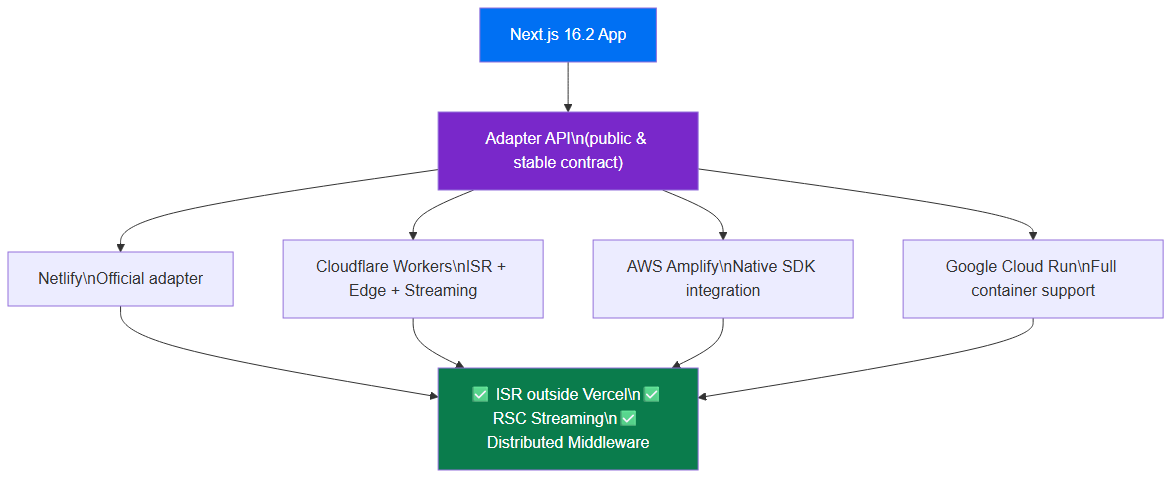 The Adapter API creates a public contract between Next.js and hosting providers: ISR, RSC streaming, and distributed middleware work everywhere.
Available adapters: official and community
The richness of the ecosystem lies in the variety of options available. Here is an honest overview of solutions, with their real strengths and limitations.
Node.js Standalone — the foundation of everything
The output: 'standalone' mode is the simplest and most portable Next.js feature. Available since Next.js 12, it produces a .next/standalone folder containing the minimal Node.js server to run your application, without needing a full node_modules. It's the foundation on which most non-Vercel deployments are built.
// next.config.js — simplified example
const nextConfig = {
  output: 'standalone',
};

module.exports = nextConfig;
This mode is recommended for Docker, Railway, Fly.io, and any infrastructure that accepts container images. The main limitation: it doesn't natively handle distributed ISR or shared cache between multiple instances — you need to add an external cache handler.
Docker — the universal deployment
Docker combined with standalone mode is the most portable option that exists. It works on any infrastructure that supports containers: Google Cloud Run, AWS ECS, Azure Container Apps, Railway, Fly.io, and self-managed VPS via Coolify or Dokku.
The main advantage is total control: you know exactly what's running, in which version, with which environment variables. For projects with compliance constraints or clients who mandate specific infrastructure, Docker is often the only acceptable option.
@opennextjs/cloudflare — Next.js on Workers
The OpenNext project (maintained by SST and the community) provides a Cloudflare Workers adapter that allows deploying a complete Next.js application on Cloudflare's edge network. The @opennextjs/cloudflare adapter transforms your Next.js build into a Worker compatible with Cloudflare's V8 runtime.
What it supports today: Server Components, Route Handlers, Server Actions, middleware, and cache via Cloudflare KV. The main limitation is related to the Edge Runtime (detailed in the next section): no access to Node.js APIs, limited bundle size.
OpenNext for AWS Lambda — the scalable alternative
OpenNext is an open source project that adapts Next.js to run on AWS Lambda. It's used by thousands of teams to deploy Next.js applications on AWS without going through Vercel. The architecture relies on multiple Lambda functions (one for the Next.js server, one for ISR revalidation), S3 for static assets, CloudFront for CDN, and DynamoDB or Redis cache for ISR.
Supported features include on-demand ISR revalidation, Server Actions, Route Handlers, and middleware. This is the most complete option for a sovereign AWS deployment.
Railway, Fly.io — simplicity without sacrifice
Railway and Fly.io are modern platforms that accept Docker images and manage infrastructure for you. They offer an ideal balance between Vercel's simplicity and AWS's flexibility: one deploy command, clear logs, regions of your choice, without AWS's complexity of IAM, VPC, and security groups.
Railway additionally offers native integration with PostgreSQL and Redis databases, which simplifies setting up a persistent ISR cache. For medium-sized projects (SaaS, dashboards, moderate volume e-commerce), Railway or Fly.io often represent the best simplicity/cost/control ratio. Our guide on n8n deployed with Docker gives you an idea of containerized deployment workflows directly applicable to Next.js.
Coolify — self-hosted PaaS
Coolify is an open source alternative to Heroku and Railway, deployable on your own VPS (Hetzner, OVH, DigitalOcean). It manages Docker deployments, SSL certificates, reverse proxies and databases — all from a web interface. For teams wanting total data control at minimal cost, it's a serious option.
 Decision tree for choosing the right Next.js deployment platform based on your technical and budget constraints.
next.config.js configuration by platform
Next.js configuration varies by adapter. Here are the most common patterns, documented and tested.
Standalone mode (Docker, Railway, Fly.io):
// next.config.js — simplified example
const nextConfig = {
  output: 'standalone',
  // Disable image optimization if you manage your own CDN
  images: {
    unoptimized: false,
    remotePatterns: [
      { protocol: 'https', hostname: '*.your-cdn.com' },
    ],
  },
};

module.exports = nextConfig;
Custom cache handler (ISR off Vercel):
For ISR on hosts without native support, Next.js allows defining a custom cache handler via cacheHandler. Here's a simplified Redis example:
// next.config.js — simplified example
const nextConfig = {
  output: 'standalone',
  cacheHandler: require.resolve('./cache-handler.js'),
  cacheMaxMemorySize: 0, // disable in-memory cache, everything goes to Redis
};

module.exports = nextConfig;
OpenNext for AWS Lambda:
OpenNext automatically generates Lambda configuration during the build. You don't need to manually modify next.config.js extensively — the adapter handles transforming the standalone output into compatible Lambda functions.
@opennextjs/cloudflare:
// next.config.js — simplified example
import { initOpenNextCloudflareForDev } from '@opennextjs/cloudflare';

// For local development with the Cloudflare runtime
if (process.env.NODE_ENV === 'development') {
  await initOpenNextCloudflareForDev();
}

const nextConfig = {
  // No standalone output for Cloudflare — the adapter handles the transformation
};

export default nextConfig;
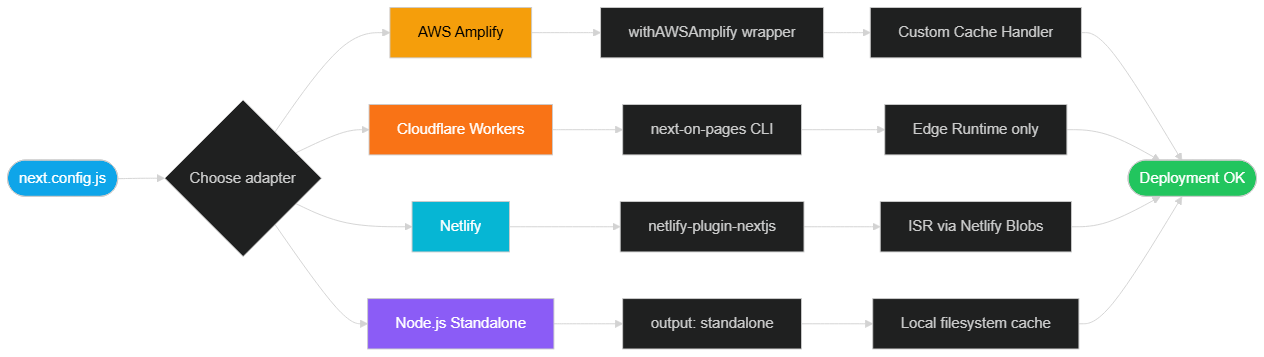 Configuration process for a Next.js adapter based on target platform: standalone, OpenNext AWS or Cloudflare Workers.
Runtime limitations: Edge vs Node.js
Understanding the difference between Edge Runtime and Node.js Runtime is essential for choosing the right architecture. These two execution environments have very different performance profiles and limitations.
Edge Runtime — speed at the cost of restriction
The Edge Runtime is an environment based on Chrome's V8 engine, without standard Node.js APIs. Cloudflare Workers, Vercel Edge Functions and other edge platforms use this model. The advantages are real: instant startup (zero cold start), distributed execution across dozens of global data centers, and ultra-low latency for users.
But the limitations are significant and must be considered from the design phase:
- No filesystem access: you cannot read static files from the runtime. Everything must go through APIs or pre-compiled assets.
- No native Node.js modules: libraries that use
fs,path,child_process, or native bindings (sharp, bcrypt compiled in C++) don't work. - Limited bundle size: Cloudflare Workers imposes a 1 MB limit (or 5 MB on Workers Paid) per compiled script. For complex Next.js applications with many dependencies, this is a real constraint.
- No native TCP sockets: direct connections to PostgreSQL, Redis via raw TCP, or other services requiring native sockets aren't supported. You must use HTTP APIs or specialized connectors (Cloudflare Hyperdrive for Postgres, for example).
Node.js Runtime — power without compromise
The Node.js Runtime gives you access to the full Node.js ecosystem. You can use sharp for image optimization, native PostgreSQL clients, file processing libraries, and any npm package. This is the default runtime for Route Handlers and Server Actions in Next.js.
The trade-off: cold start is longer on serverless environments (AWS Lambda, Google Cloud Functions). Typically 200-800ms for the first call after a period of inactivity, versus a few milliseconds for the Edge Runtime. On applications with regular traffic, this cold start is rare. On applications with spaced traffic spikes, it can affect the user experience of the first visitors after a quiet period.
The practical rule: use the Edge Runtime for middleware (redirects, lightweight authentication, geolocation-based personalization) and the Node.js Runtime for Route Handlers that access databases or perform intensive operations.
Cache strategies by platform
ISR (Incremental Static Regeneration) is one of Next.js's most powerful features — and one of the most difficult to configure correctly off Vercel. The ISR cache must be shared between all instances of your application and must survive redeployments. Here are the recommended strategies by platform.
Cloudflare KV — for Cloudflare Workers deployments
Cloudflare KV is a globally distributed key-value store accessible from your Workers. @opennextjs/cloudflare can use KV as a cache backend for ISR. Configuration is declarative in your project's wrangler.toml file.
# wrangler.toml — simplified example
name = "my-nextjs-app"
main = ".open-next/worker.js"

[[kv_namespaces]]
binding = "NEXT_CACHE_WORKERS_KV"
id = "your-kv-namespace-id"
The advantage of KV: very low read latency (a few milliseconds), automatic global distribution. The limitation: KV is eventually consistent — in the first seconds after a write, some nodes may still return the old value.
Redis — for Node.js deployments
For deployments on Railway, Fly.io, AWS Lambda or any Node.js environment, Redis is the standard solution for shared ISR cache. The @neshca/cache-handler package (or an equivalent you develop) implements Next.js's cacheHandler interface with a Redis backend.
// cache-handler.js — simplified example
const { createClient } = require('redis');

const client = createClient({ url: process.env.REDIS_URL });
client.connect();

module.exports = class CacheHandler {
  async get(key) {
    const data = await client.get(key);
    return data ? JSON.parse(data) : null;
  }

  async set(key, data, ctx) {
    const ttl = ctx.revalidate ?? 3600;
    await client.setEx(key, ttl, JSON.stringify(data));
  }

  async revalidateTag(tag) {
    // Tag-based revalidation logic — simplified example
    const keys = await client.sMembers(`tag:${tag}`);
    if (keys.length > 0) await client.del(keys);
  }
};
Both Railway and Fly.io offer managed Redis instances you can provision in a few clicks from their interface. Redis cache gives your ISR the same consistency guarantees as Vercel, at a fraction of the cost.
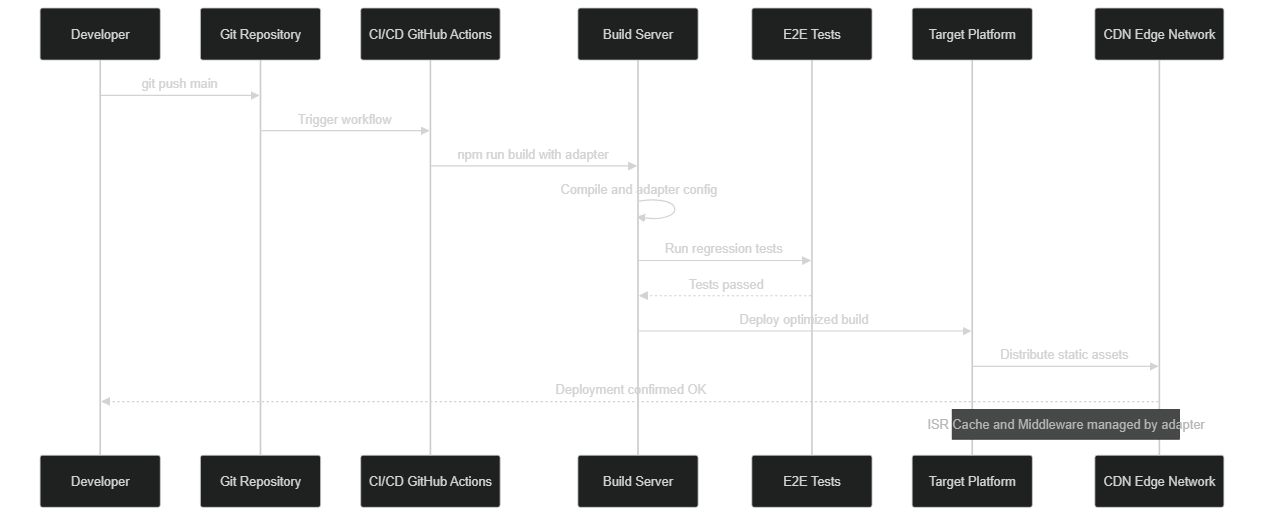 Sequence of a Next.js CI/CD pipeline deploying in parallel to Cloudflare Workers and AWS Lambda, with shared Redis cache for ISR.
Cost comparison: order of magnitude
The figures below are illustrative and based on platform public pricing grids at the time of writing. They represent a typical case: a Next.js application with 50,000 visitors/month, moderate ISR, and 3 team members.
| Platform | Estimated monthly cost | Strengths | Limitations |
|---|---|---|---|
| Vercel Pro | $200-500 | Optimal DX, zero config | Lock-in, high cost at scale |
| Railway | $20-60 | Simple, Redis included, clear logs | Limited regions |
| Fly.io | $15-50 | Multi-region, network control | Learning curve |
| AWS (OpenNext) | $30-100 | Infinite scalability, sovereignty | IAM/VPC complexity |
| Cloudflare Workers | $5-30 | Ultra-low latency, global edge | Edge Runtime limits |
| Coolify (VPS) | $5-25 | Total control, minimal cost | Server maintenance |
These estimates exclude database and asset storage costs, which add up in all cases. The cost gap between Vercel and alternatives widens significantly with traffic: beyond 200,000 visitors/month with intensive ISR, savings can exceed $1,000/month.
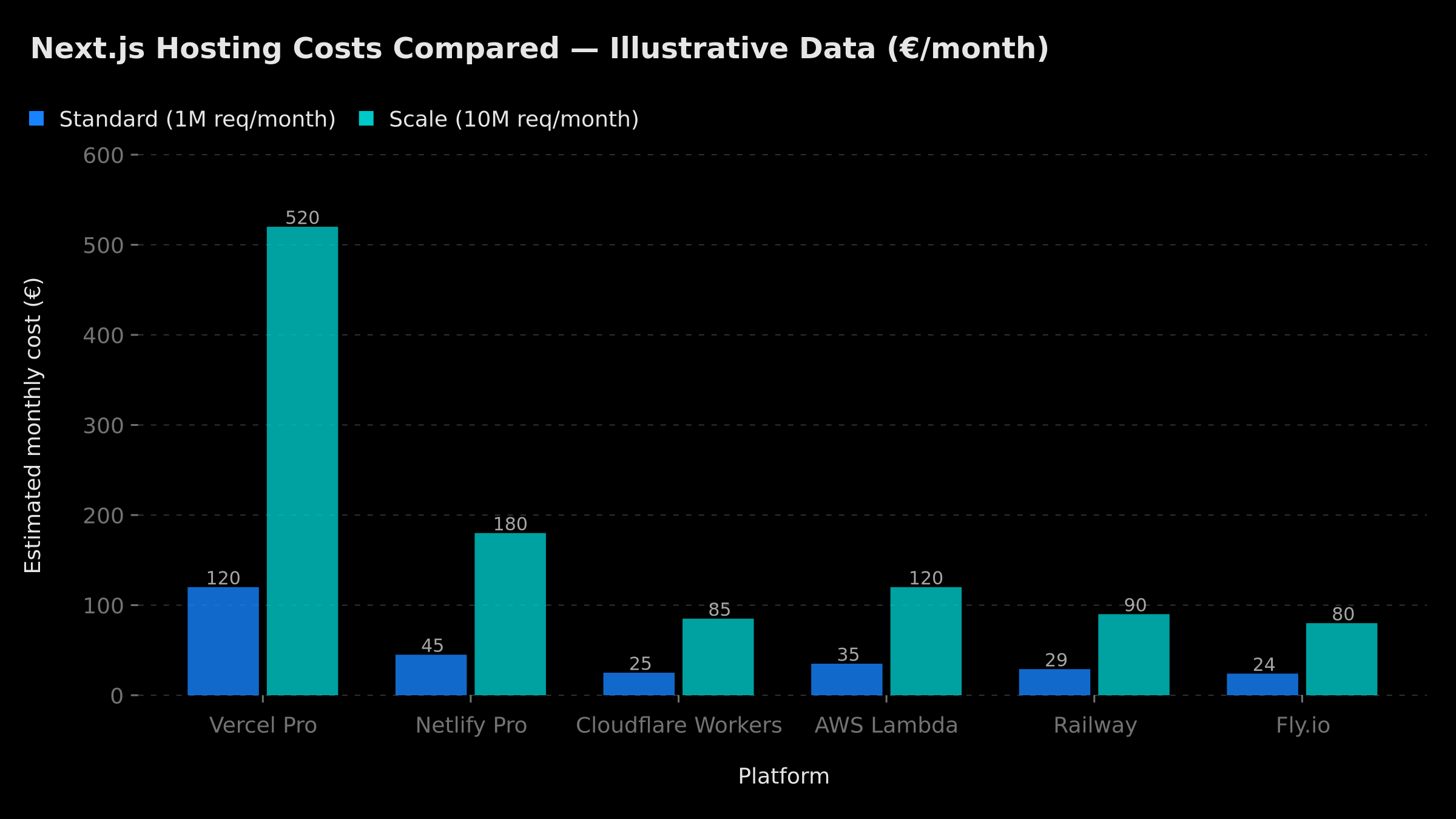 Illustrative estimated monthly Next.js hosting costs for 50,000 visitors/month by platform. Source: public pricing grids, June 2026.
Multi-platform CI/CD: automating deployment
One of the underrated advantages of leaving Vercel is the flexibility in your CI/CD pipeline. Vercel imposes its own deployment mechanism — convenient but opaque. By deploying yourself, you control every step.
For Docker deployment (Railway, Fly.io, Coolify):
Your GitHub Actions pipeline builds the Docker image, pushes it to a registry (GitHub Container Registry, Docker Hub, or AWS ECR), then triggers deployment to your platform. Deployment secrets stay in GitHub Secrets — neither Vercel nor any third party has access to your production tokens.
# .github/workflows/deploy.yml — simplified example
name: Deploy Next.js
on:
  push:
    branches: [main]

jobs:
  deploy:
    runs-on: ubuntu-latest
    steps:
      - uses: actions/checkout@v4
      - name: Build Docker image
        run: docker build -t my-app .
      - name: Push to registry
        run: |
          echo ${{ secrets.REGISTRY_TOKEN }} | docker login ghcr.io -u ${{ github.actor }} --password-stdin
          docker push ghcr.io/${{ github.repository }}:latest
      - name: Deploy to Railway
        run: railway up --service my-app
        env:
          RAILWAY_TOKEN: ${{ secrets.RAILWAY_TOKEN }}
For OpenNext on AWS:
OpenNext integrates with the SST framework or with Terraform/CDK deployment scripts. The CI/CD pipeline looks like this: npm run build, then npx open-next build, then deploying assets to S3 and updating Lambda functions. It's more complex than a vercel --prod command, but it's entirely under your control and transparently documented.
For teams starting with Docker and containers, our guide on n8n with Docker covers the fundamentals of containerized deployment workflows that apply directly to Next.js.
Other improvements that change development speed
Beyond deployment portability, recent versions of Next.js have brought significant improvements to the developer experience. These gains are real and measurable on projects we develop at BOVO Digital.
Reduced Server Components payload: Through improvements to the RSC serialization protocol in Next.js 15, the size of data payloads sent by Server Components has significantly decreased. In production, this translates to shorter LCPs (Largest Contentful Paint) and lower bandwidth consumption.
Faster dev server: Development server cold start has considerably improved since Next.js 13. On medium-sized projects, it drops from several seconds to under a second thanks to lazy compilation and the adoption of Rust/Turbopack in the build chain.
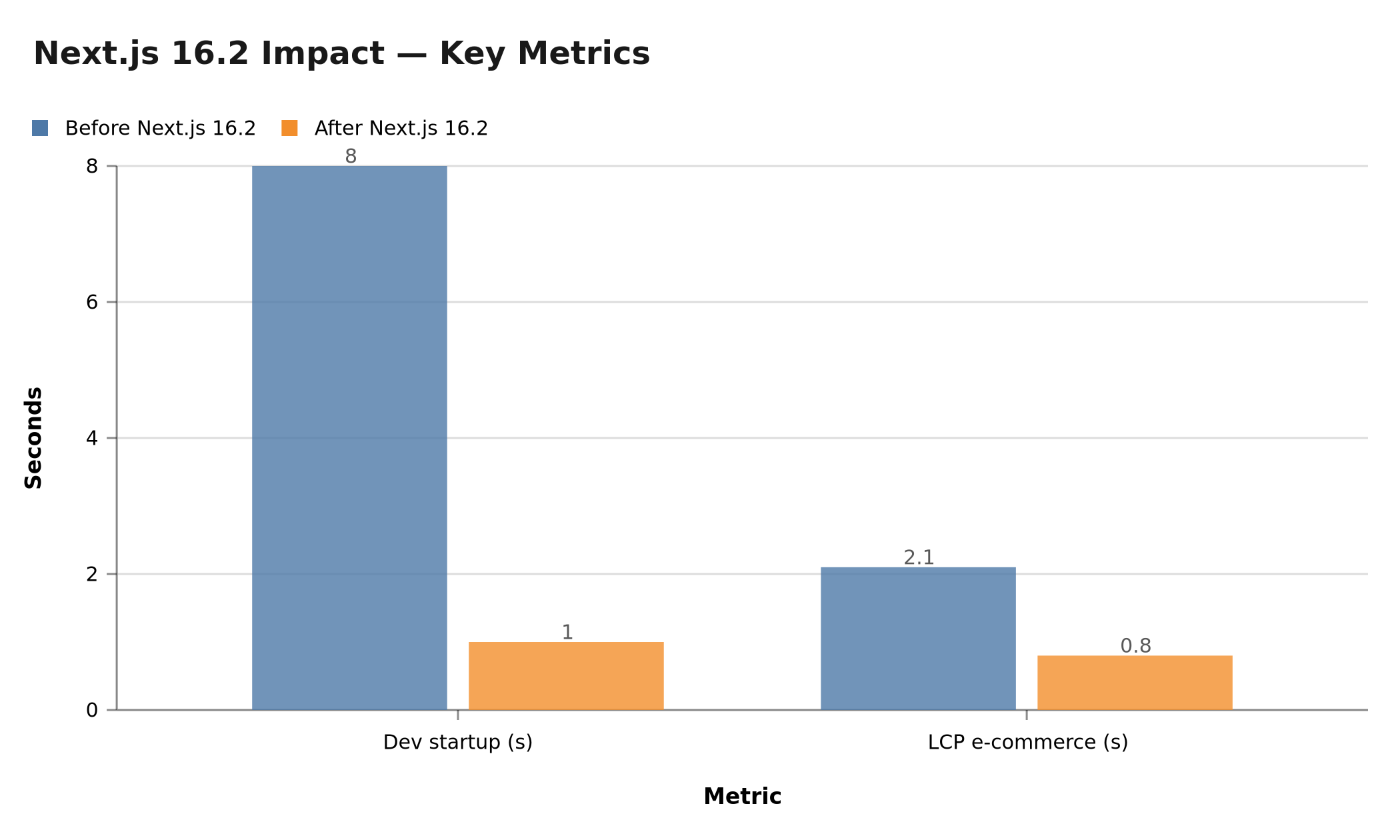 Performance metric improvements with recent Next.js versions: dev startup and e-commerce LCP — directly measurable gains on BOVO Digital projects.
For a comprehensive analysis of changes brought by the latest framework versions, read our article on what concretely changes in Next.js in 2026.
Concrete impact on projects we deliver at BOVO Digital
At BOVO Digital, we've migrated several client projects from Vercel to alternative architectures. Results are consistent:
- 60-80% savings on hosting costs for projects with intensive ISR
- Improved LCP through more refined CDN configurations (CloudFront with custom cache rules vs generic Vercel network)
- Zero application code refactoring in the majority of migrations — Next.js code is portable
- Total data control — no dependency on proprietary third-party cloud services
If you've already experienced how technical debt makes applications 5x more expensive to maintain, you understand the stakes: an architecture that locks you into one provider costs far more to maintain than a portable architecture. Every month spent on Vercel unnecessarily is a month paying a premium for convenience you can find elsewhere.
Practical migration: moving from Vercel to an alternative
Here's the recommended procedure for migrating an existing Next.js project, tested on real projects.
Step 1 — Audit Vercel proprietary dependencies
Before anything else, audit your codebase to identify @vercel/* imports: @vercel/kv, @vercel/blob, @vercel/edge-config. These dependencies must be replaced by portable alternatives (Upstash Redis for KV, AWS S3 or Cloudflare R2 for Blob, a simple HTTP endpoint for Edge Config).
Step 2 — Configure standalone mode
// next.config.js — simplified example
const nextConfig = {
  output: 'standalone',
};

module.exports = nextConfig;
Step 3 — Test locally with Docker
# Dockerfile — simplified example
FROM node:20-alpine AS base
WORKDIR /app

FROM base AS builder
COPY package*.json ./
RUN npm ci
COPY . .
RUN npm run build

FROM base AS runner
COPY --from=builder /app/.next/standalone ./
COPY --from=builder /app/.next/static ./.next/static
COPY --from=builder /app/public ./public

CMD ["node", "server.js"]
Step 4 — Migrate ISR cache
Replace Vercel's native cache with a Redis or Cloudflare KV handler depending on your target platform. Test on-demand revalidations via revalidatePath and revalidateTag — they work identically with a correctly configured cache handler.
Step 5 — Parallel deployment
Keep Vercel active for 2-4 weeks after switching production to the new infrastructure. Compare metrics (LCP, TTFB, Core Web Vitals) and costs. Switch DNS once you're confident in the stability.
For more on recent Next.js features, read our guide on Partial Pre-Rendering (PPR) — also now fully supported through community adapters.
What to take away
Vercel lock-in is no longer inevitable for Next.js teams. The adapter ecosystem — OpenNext for AWS, @opennextjs/cloudflare for Cloudflare Workers, standalone mode for Docker — now covers the vast majority of use cases with feature parity to Vercel.
Migration isn't free: it takes time, a solid understanding of runtime differences, and an adapted cache strategy. But the return on investment is systematically positive once you have a project with significant traffic volume or data sovereignty requirements.
The question is no longer "can I avoid Vercel?" but "what hosting architecture is right for my context?" This is exactly the reflection we lead with each client at BOVO Digital.
Do you have a Next.js project to deliver, or an existing project to migrate?
Explore our custom web and SaaS development services — or discover William Aklamavo's profile to see the architectures he delivers daily.
Tags
FAQ
What is the Next.js Adapter API and why does it matter?
The Adapter API is a standardized contract that allows any hosting provider (AWS, Cloudflare, Netlify) to support all advanced Next.js features: ISR, RSC streaming, distributed middleware. Without it, these features only fully worked in production on Vercel, creating a costly dependency. Today, the OpenNext ecosystem makes this contract accessible on all major platforms.
Can I migrate my existing Next.js project from Vercel to AWS without refactoring?
Yes, in most cases. If your project doesn't use Vercel-proprietary features (Edge Config, Vercel KV, Vercel Blob), application code doesn't change. Only next.config.js is modified to point to your new host's adapter. Server Actions using revalidatePath and revalidateTag are portable without modification via OpenNext.
What is the cost difference between Vercel and alternatives like Railway or AWS?
Vercel Pro charges $20/member/month plus variable bandwidth and serverless invocation costs. An e-commerce project with 2M revalidated pages/week can cost $300-500/month on Vercel Pro versus $30-80/month on Railway or AWS with OpenNext — a 60-80% saving. Savings grow even larger on high-traffic sites with intensive ISR.
What is the difference between Edge Runtime and Node.js Runtime for Next.js?
The Edge Runtime executes your code in isolated V8 environments close to the user (Cloudflare Workers, Vercel Edge). It starts instantly but is limited: no filesystem access, no native Node.js modules, bundle size capped at 1-4 MB. The Node.js Runtime provides all Node.js APIs and the full npm library ecosystem, but with a longer cold start on Lambda/serverless environments.
Can BOVO Digital migrate my Next.js infrastructure?
Yes. We audit your current stack, identify Vercel dependencies to abstract, configure the right adapter for your target infrastructure (AWS via OpenNext, Cloudflare Workers, Docker on Railway or Fly.io), and deliver the migration with a parallel testing period to guarantee zero regression. We have already completed this type of migration with 60-80% savings on hosting costs.
Does your site book meetings — or just present you?
We open your URL together, mark the 3 leaks, and tell you whether a fix is enough or a rebuild is required.
- 30 min
- No commitment
- Action plan
William Aklamavo
Web development and automation expert, passionate about technological innovation and digital entrepreneurship.


