
Partial Pre-Rendering (PPR) in Next.js: The Complete Guide
PPR combines the best of static and dynamic rendering. With the use cache directive, Next.js revolutionizes web rendering. Technical guide with examples.

Updated

Partial Pre-Rendering (PPR) in Next.js: The Complete Guide
What if you no longer had to choose between a fast page and an up-to-date page? That's exactly the promise of PPR.
Partial Pre-Rendering (PPR) in Next.js is arguably the most defining rendering feature since Server Components arrived. For years, building a web page meant resolving a dilemma: static (fast but frozen) or dynamic (fresh but slow). Partial Pre-Rendering in Next.js erases that boundary by letting you serve, on one and the same page, an instant static skeleton alongside dynamic zones streamed on the fly.
In this complete guide, you'll understand precisely what PPR is, which problem it solves compared to SSR, SSG, and ISR, how it works under the hood, how to enable it carefully depending on your Next.js version, and — above all — which pitfalls to avoid in production. The code examples are deliberately simplified to stay focused on the essentials.
What is Partial Pre-Rendering in Next.js?
Partial Pre-Rendering is a hybrid rendering model. The idea fits in one sentence: pre-generate everything that can be at build time, and stream only what is truly dynamic at request time.
Concretely, Next.js builds a static shell at build time — the page's scaffolding, identical for every visitor (header, layout, stable content). That shell is cached and can be served from a CDN with minimal latency. Inside this shell, some zones are marked as dynamic: these are the "holes" that Next.js fills via streaming, at request time.
What the user perceives: the page appears immediately (the shell), then the personalized or real-time parts fill in progressively, without a page reload. You get the speed of static and the freshness of dynamic, without having to classify the whole page into a single category.
It's a fundamental shift in granularity. Before, the page was the unit of decision: static or dynamic. With PPR, the unit becomes the component. Every piece of the React tree can adopt the most relevant mode.
What performance problem does Partial Pre-Rendering solve?
To grasp PPR's value, take a typical e-commerce page. It mixes elements whose nature is radically different:
| Element | Nature | Need |
|---|---|---|
| Header / Logo / Navigation | Static | Same for everyone |
| Product info (title, description) | Semi-dynamic | Rarely changes |
| Price, stock | Dynamic | Real-time |
| Cart, recommendations | Very dynamic | Unique per user |
Before PPR, you had to pick one strategy for the entire page:
- SSG (Static Site Generation): the whole page is generated at build time. Ultra-fast, but the price and cart are frozen at build time — unacceptable for e-commerce.
- SSR (Server-Side Rendering): the whole page is rendered on each request. Always fresh, but the visitor waits for everything to be computed server-side before seeing anything — including the header that never changed.
- ISR (Incremental Static Regeneration): a compromise that regenerates the page in the background at regular intervals. Better, but still page-level, and unsuited to strictly real-time or personalized content.
The underlying problem is that none of these strategies is right for the whole page. Serving the header via SSR is wasteful; freezing the price with SSG is dangerous. PPR resolves this conflict by applying the right strategy to each zone. The header goes into the static shell; the price becomes a streamed dynamic hole. No more sacrificing overall speed because of a single volatile data point.
If you want to dig into the structural causes of a slow application, our article on why your app is slow: the state management problem complements this nicely on the front-end side.
How does PPR work technically?
The mechanism relies on two distinct phases: the build and the request.
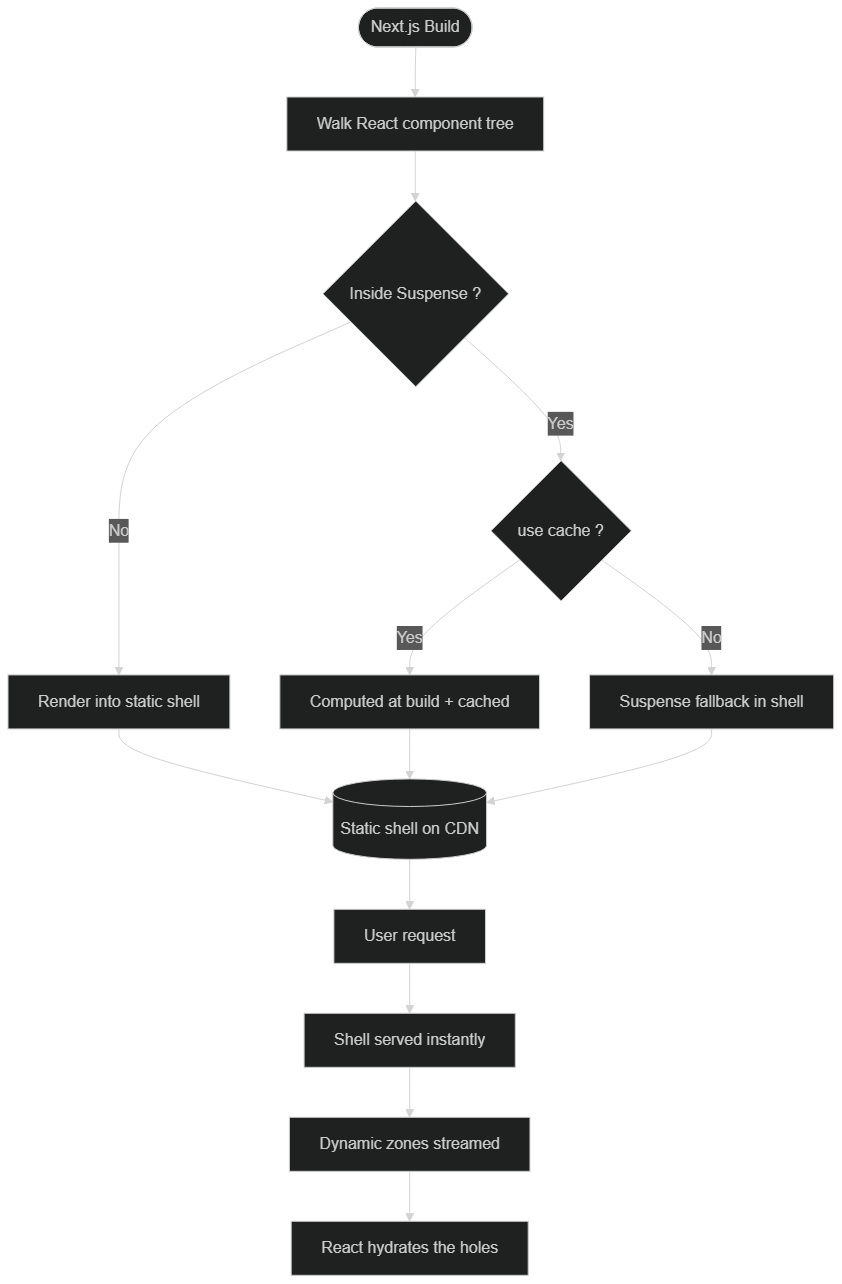 At build time, Next.js pre-renders the static shell and embeds the Suspense fallbacks. At request time, that shell is served instantly from the CDN, then the dynamic holes are streamed from the server.
How does Next.js build the static shell?
At build time, Next.js walks the component tree and pre-renders everything that does not depend on the request: the layout, stable components, and explicitly cached content. Anything inside a <Suspense> boundary that can't resolve at build time is replaced by its fallback (skeleton, spinner). That fallback is part of the static shell: this is why the user immediately sees a structured page, even before the dynamic data arrives.
How are the dynamic holes streamed?
At request time, the shell is sent first, without waiting. In parallel, the server computes the content of the dynamic zones and streams it within the same HTTP response. React then progressively replaces each fallback with the real content as it arrives. This sequence — immediate static response, then progressive hydration of the dynamic parts — is what gives PPR its smooth feel.
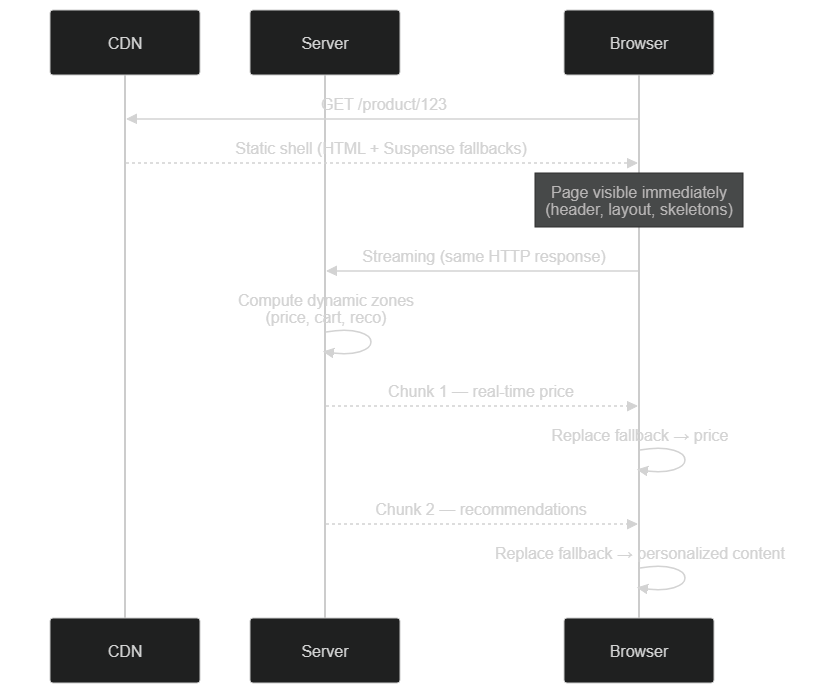 With PPR, the static shell is served instantly from the CDN, then dynamic parts (price, cart) are streamed in parallel from the server and hydrated progressively.
Suspense or use cache: what's the real difference?
This is the most commonly misunderstood point. According to recent Next.js documentation, these two tools do not do the same thing:
<Suspense>handles delivery timing. It tells Next.js: "send this piece later, after the shell." It creates a dynamic hole but caches nothing.use cachehandles computation. It tells Next.js: "don't recompute this result, reuse the memoized value." It avoids re-executing the code.
A crucial point often ignored: the static shell is a delivery optimization, not a computation one. Without use cache, the server still re-executes the full tree on each request to resolve component references — it merely delivers the shell earlier. To actually avoid recomputing the stable parts, you must apply use cache to them. In practice, you combine both: Suspense for instant delivery, use cache to skip redundant work.
How do you enable Partial Pre-Rendering in Next.js?
PPR's status has evolved, and this is essential to understand so you don't follow an outdated tutorial.
The historical approach: experimental.ppr (Next.js 15)
In Next.js 15, PPR was an experimental feature, enabled explicitly through a config flag:
// next.config.ts — Next.js 15 approach (simplified example)
const nextConfig = {
  experimental: {
    ppr: true, // or 'incremental' for page-by-page adoption
  },
};

export default nextConfig;
The 'incremental' value enabled progressive, page-by-page adoption, opting into PPR explicitly on each relevant route — a cautious approach, ideal for migrating an existing site without breaking everything at once.
The modern approach: cacheComponents (recent Next.js)
According to recent Next.js documentation, PPR has been consolidated into a broader primitive called Cache Components. The dedicated experimental.ppr flag is now superseded (kept for backward compatibility), and PPR becomes the default rendering behavior when you enable Cache Components:
// next.config.ts — recent approach (simplified example)
const nextConfig = {
  cacheComponents: true,
};

export default nextConfig;
With this config, you no longer turn on a separate "PPR" flag: routes simply show up as partial prerenders in the next build output (marked by a half-circle symbol). It's the same mental model as before, but folded into a unified caching system. For an overview of this Next.js generation, our article Next.js 16.2: what concretely changes covers the broader context.
The use cache directive and revalidation
Once Cache Components is active, you control rendering zone by zone with use cache:
// Simplified example — cached component
import { cacheLife } from 'next/cache';

async function ProductInfo({ id }: { id: string }) {
  'use cache';
  cacheLife('hours'); // cache validity duration
  const product = await db.product.findUnique({ where: { id } });
  return (
    <div>
      <h2>{product.name}</h2>
      <p>{product.description}</p>
    </div>
  );
}
The cacheLife function defines the validity duration (hours, days, etc.), while tag-based revalidation mechanisms let you expire the cache on demand — for example when a product is updated in the back office. PPR's whole subtlety lies in this balance between what is cached, what is revalidated, and what stays strictly dynamic.
Code examples: Suspense and dynamic components
Let's revisit our product page and see how the pieces fit together. The example below is simplified but illustrates the key pattern: a stable cached component, a real-time component left dynamic, and Suspense boundaries to delimit the holes.
// Simplified example — product page with PPR
import { Suspense } from 'react';

// Cached: product info rarely changes
async function ProductInfo({ id }: { id: string }) {
  'use cache';
  const product = await db.product.findUnique({ where: { id } });
  return <div>{product.name} — {product.description}</div>;
}

// Dynamic: the price must reflect real time
async function LivePrice({ id }: { id: string }) {
  const price = await fetchLivePrice(id);
  return <span>{price} EUR</span>;
}

export default async function ProductPage({ params }) {
  return (
    <div>
      {/* The header (outside Suspense) goes into the static shell */}
      <Suspense fallback={<ProductSkeleton />}>
        <ProductInfo id={params.id} />
      </Suspense>
      <Suspense fallback={<PriceSkeleton />}>
        <LivePrice id={params.id} />
      </Suspense>
    </div>
  );
}
Key takeaways from this pattern:
- Everything outside a
Suspenseand resolvable at build time enters the static shell. - Each
Suspensecreates a hole whosefallbackis rendered instantly, then replaced by the real content. use cacheonProductInfoavoids re-querying the database on every request, unlikeLivePricewhich stays recomputed.
An important point highlighted by the documentation: if a component accesses uncached data without being wrapped in a Suspense or marked use cache, Next.js throws an explicit error at build time ("uncached data accessed outside Suspense"). This guardrail forces you to be explicit about the nature of each zone — a healthy constraint that prevents production surprises.
What are the concrete use cases for PPR?
PPR is not a universal optimization; it shines mostly when a page mixes content of different natures. Here are the scenarios where it adds the most value:
- E-commerce: catalog and product info in the static shell, price, stock, and cart as dynamic holes. The visitor sees the product page instantly, the price updates right after.
- Dashboards: structure, menus, and stable widgets in the shell; user data, real-time metrics, and notifications streamed. The interface feels immediately usable.
- Media and blogs with personalization: the article (static, cached) goes into the shell; "recommended for you" or "recent comments" blocks stay dynamic.
- Booking / availability pages: the service description is static, the available slots are real-time.
The common denominator: a majority of stable content punctuated by a few genuinely volatile zones. In that case, PPR maximizes the share served instantly from the CDN while keeping freshness where it matters. If the whole page is purely static or purely dynamic, PPR adds little — other strategies are enough.
When is PPR not the right choice?
It's just as important to know when not to reach for PPR. A purely editorial page with no personalization — a legal page, an "about" page, a fully cacheable landing page — gains nothing from dynamic holes: plain static generation is simpler and just as fast. Likewise, a heavily authenticated dashboard where almost everything depends on the logged-in user has very little to put in a meaningful static shell; in that case, classic server rendering with good caching is often clearer to reason about.
PPR also adds conceptual overhead. Your team must understand Suspense boundaries, the use cache semantics, and the difference between delivery and computation. On a small project with a tight deadline, that learning curve may not be worth it. The honest rule: adopt PPR when a page genuinely mixes stable and volatile content and the performance gain is measurable — not because it's the newest feature. Choosing the right tool for the right page is what separates a clean architecture from premature complexity.
How do you migrate an existing page to PPR without breaking everything?
The good news is that PPR lends itself particularly well to progressive adoption. There's no need to rewrite your entire application at once: the recommended strategy is incremental, page by page, starting with the ones that will benefit most.
Here is a cautious, experience-tested approach:
- Identify the right candidates. Spot your high-traffic pages that mix a lot of stable content with a few dynamic zones: product pages, articles with personalized blocks, category pages. These offer the best effort-to-gain ratio.
- Map the static and the dynamic. On each page, precisely list what never changes (layout, header, description), what rarely changes (product info), and what is strictly real-time (price, cart, user data). This classification is the heart of the work; everything else flows from it.
- Wrap the dynamic zones. Enclose each real-time zone in a
<Suspense>boundary with a polishedfallback(a realistic skeleton, not a plain "Loading…"). The fallback is part of the shell: it should convey the impression of an already-built page. - Cache the stable parts. Apply
use cacheto components that don't need to be recomputed on every request, tuning the validity duration withcacheLifeaccording to the freshness you can tolerate. - Measure before/after. Compare TTFB, LCP, and the actual perceived experience on production data. Only ship if the numbers confirm the gain.
This approach drastically limits risk: you validate behavior on one page, you measure, then you generalize. It's exactly the philosophy we apply on client projects to make a migration reliable without service interruption. Treat PPR as a surgical tool you point at the pages that deserve it, not a global switch you flip blindly.
Is Partial Pre-Rendering compatible with SEO?
It's a legitimate question: if part of the content is streamed after the shell, do search engines see it? In practice, the answer is reassuring — provided you place the boundary between static and dynamic correctly.
The static shell is, by nature, perfectly indexable: it's pre-rendered HTML, served immediately, containing the bulk of your structuring content (headings, main text, metadata). For SEO, the ideal is therefore that content important for search lives in the shell, not in the dynamic holes. A product title, a description, a blog article: all of these benefit from being pre-rendered or cached via use cache, hence present in the very first HTML response.
Conversely, the zones reserved for dynamic holes — real-time price, cart, personalized recommendations — are generally not critical for ranking. Leaving them streamed doesn't penalize indexing of the page's core. Since streaming via Suspense is a standard technique of the modern web, capable crawlers know how to follow the full response.
So the golden rule is simple: put in the shell what you want indexed, keep in the holes what is volatile or personalized. Well-segmented, PPR is not only compatible with SEO — it serves it: a shell served instantly improves speed signals, which themselves feed into page experience. To go further on overall optimization, combine this approach with the performance levers mentioned above.
What is PPR's impact on performance (TTFB, LCP)?
PPR's main benefit is measured along two axes: TTFB (Time To First Byte) and LCP (Largest Contentful Paint).
Because the static shell is pre-generated and servable from the CDN, the first byte arrives very fast: the server doesn't have to compute the whole page before responding. With the structuring content (often the LCP) sitting in the shell, it shows up early, while the dynamic zones fill in the background. By contrast, in pure SSR, the browser waits for the entire page to be computed before the first render.
For illustration only (the numbers depend heavily on your application, your infrastructure, and your data — this is not a measured benchmark), here is the order of magnitude of the improvement typically targeted on Core Web Vitals when a mixed page moves from purely dynamic rendering to well-segmented PPR:
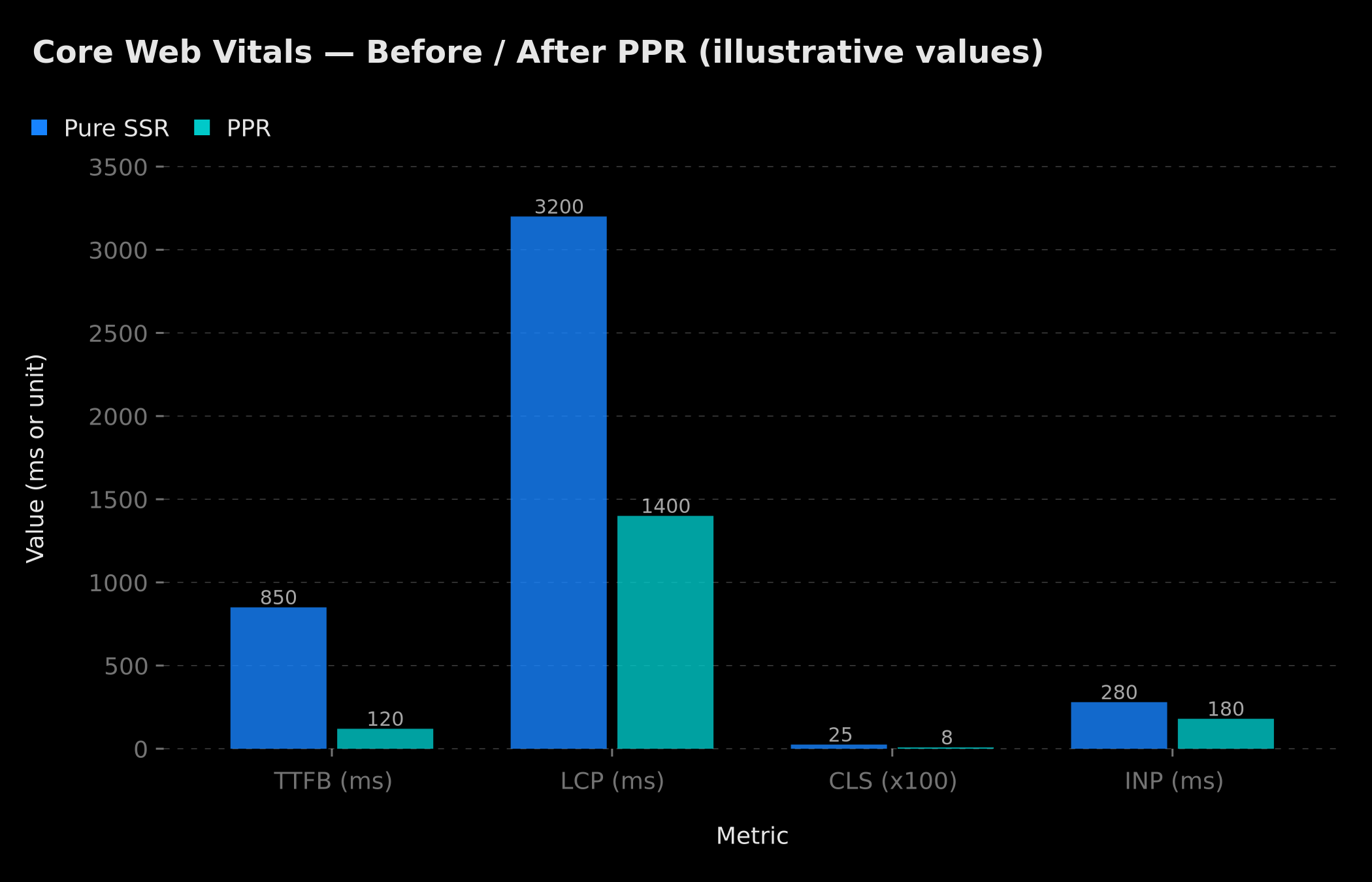 Illustrative: on a mixed page, PPR aims to reduce LCP and CLS by serving a stable shell immediately. Real values depend on your application and do not constitute a measured benchmark.
Be careful not to oversell the effect, though: as explained above, the static shell optimizes delivery, not server computation. If your dynamic zones remain heavy to compute, the total full-render time doesn't necessarily change; what changes is how fast the user sees something useful. For broader performance gains, beyond rendering alone, our guide on cutting load time by 10× through performance optimization covers the other levers (images, bundles, queries).
PPR vs ISR vs SSR: which rendering strategy should you choose?
PPR doesn't make the other strategies obsolete: it composes them. The right reflex is to reason per component, not per page.
| Criteria | SSR | ISR | PPR |
|---|---|---|---|
| Perceived speed | Medium | Fast | Very fast (instant shell) |
| Data freshness | Real-time | Deferred (revalidation) | Real-time on dynamic holes |
| Server load | High | Low to medium | Variable (low on the shell) |
| Granularity | Page | Page | Component |
| Ideal case | All real-time | All semi-static | Mixed static + dynamic page |
To help you decide case by case, here's a synthetic decision tree:
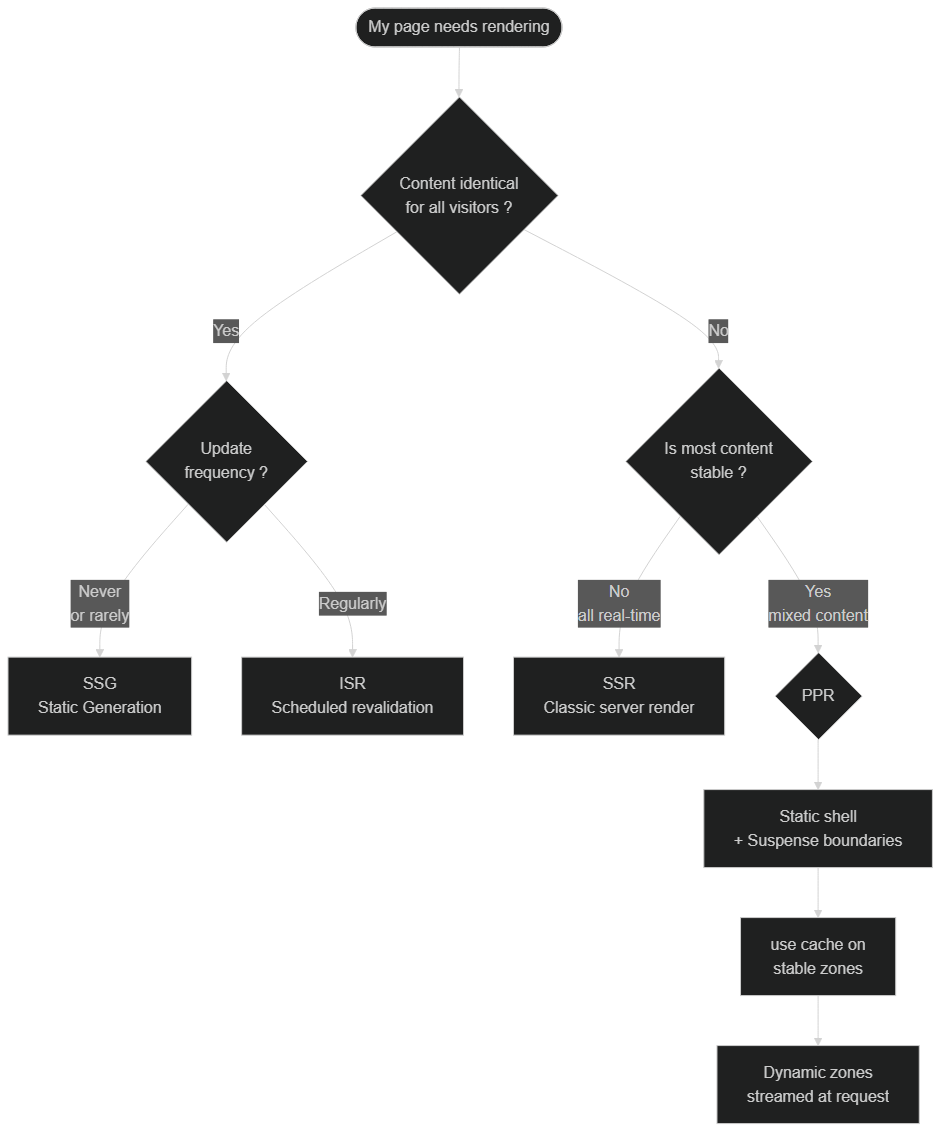 Decision tree: if content is the same for everyone, go for SSG or ISR-style revalidation; if it's partly personalized, PPR combines a static shell with dynamic holes; if it's fully real-time, SSR remains relevant.
In short: if a page is entirely frozen, stay with pure static; if it's entirely real-time and personalized, SSR remains relevant; but as soon as it mixes both — which is the most common case — PPR is generally the best compromise. To see how these choices fit into the framework's recent evolution, also check Next.js 16.2 Agent-Ready.
What are the pitfalls and limitations of PPR?
Adopting PPR without knowing its blind spots leads to disappointment. Here are the most important points of caution.
1. The static shell doesn't avoid server recomputation. This is pitfall #1. As confirmed by Next.js community discussions, the server traverses the full tree on every request to resolve components and figure out what to stream, even with PPR. The shell is delivered earlier, but the layout and page code still runs. To genuinely avoid re-execution, you need use cache.
2. Any uncontrolled dynamic access breaks the build. Reading cookies(), headers(), searchParams, or making an uncached fetch outside a Suspense triggers an error. It's intentional, but it forces you to structure your boundaries rigorously from the start.
3. The status changes fast. Between experimental.ppr (Next.js 15) and cacheComponents (recent versions), the configuration changed. Always check your project's exact version before copying an example — a 2024 tutorial can be misleading.
4. Suspense segmentation requires thought. Too many small boundaries fragment the experience (skeletons everywhere); too few, and you lose the streaming benefit. The right segmentation follows the actual data structure.
5. It's not a "set and forget" feature. PPR must be validated in staging, with real data and real load. Measure before/after rather than assuming a gain.
These limits don't disqualify PPR — they remind you it's an advanced tool. Used well, it delivers the best of both worlds; misunderstood, it can create the illusion of a gain that isn't there.
Conclusion
Partial Pre-Rendering is more than an optimization: it's a shift in granularity in how we think about web rendering. By moving from the page to the component as the unit of decision, Next.js lets you serve an instant static shell while keeping your real-time data exactly where it matters. The result: a markedly improved perception of speed, without sacrificing freshness.
Remember the three key ideas: PPR composes rendering strategies rather than replacing them; Suspense handles delivery while use cache handles computation; and the feature's status evolves — always check your version. To place all this in the platform's bigger picture, read our introduction to Next.js 16 and React 19.
Need help migrating to PPR or optimizing your Core Web Vitals? At BOVO Digital, we design and optimize high-performance web applications with the latest Next.js technologies. Let's talk about your project.
Tags
FAQ
Is Next.js Partial Pre-Rendering stable or experimental?
According to recent Next.js documentation, PPR is no longer a standalone option: it has become the default rendering model when you enable Cache Components (`cacheComponents: true`). The older `experimental.ppr` flag from Next.js 15 is still accepted for backward compatibility but is superseded. PPR should therefore be treated as an advanced feature to validate in staging before any production deployment.
What's the difference between Suspense and the use cache directive?
They are two complementary mechanisms. `<Suspense>` controls delivery timing: it defines the dynamic "holes" streamed after the shell. The `use cache` directive controls computation: it memoizes the return value of a function or component to avoid recomputing it. For maximum performance you combine both: Suspense for instant shell delivery, `use cache` so stable parts aren't re-executed.
Does PPR really replace SSR, SSG, and ISR?
PPR doesn't remove these strategies, it composes them. A single page can contain pre-rendered zones (SSG-like), revalidated zones (ISR-like), and streamed dynamic zones (SSR-like), all in one render. You still pick the right strategy per component; PPR simply lets you mix them on the same page.
How can I improve the Core Web Vitals of my Next.js site?
Key levers: image optimization (WebP/AVIF, lazy loading, explicit dimensions), removing render-blocking resources, deferring third-party scripts, and a suitable rendering model like PPR to serve an instant static shell. BOVO Digital performs PageSpeed audits to identify your priority improvement areas.
How much does custom web application development cost?
A premium showcase website starts at €1,500, a SaaS or complex web app between €8,000 and €30,000 depending on features. BOVO Digital provides free, detailed quotes within 48 hours.
Does your site book meetings — or just present you?
We open your URL together, mark the 3 leaks, and tell you whether a fix is enough or a rebuild is required.
- 30 min
- No commitment
- Action plan
William Aklamavo
Web development and automation expert, passionate about technological innovation and digital entrepreneurship.


