
How to Create a Mobile App in 2026: Complete Guide for Entrepreneurs
Want to create a mobile app but don't know where to start? This complete guide covers the key steps: technology choice, realistic budget, timelines, and mistakes to avoid.

Updated

How to Create a Mobile App in 2026: Complete Guide for Entrepreneurs
Creating a mobile app is more accessible today than in 2020, but also more complex because of the explosion of no-code, AI-assisted development, and cross-platform frameworks like Flutter. Between an idea jotted on the back of a napkin and an app actually published on the App Store and Google Play lies a structured journey that many entrepreneurs underestimate. This guide gives you a clear, honest view of every step: validating the idea, writing a spec, choosing the right technology, estimating a realistic budget, managing development, passing store review, and organizing maintenance.
The goal isn't to sell you a dream, but to spare you the costly mistakes we see again and again. You'll leave with an actionable method, dated budget ranges, and concrete decision criteria.
Why Create a Mobile App in 2026?
Mobile is no longer a secondary channel; it's often the primary one. A few widely documented benchmarks from the industry:
- A large majority of time spent on smartphones happens inside apps, not the browser (data.ai / Sensor Tower, 2024-2025 annual reports).
- A significant share of e-commerce journeys now starts on mobile.
- At equal experience, a well-designed app delivers better re-engagement than a mobile website, thanks to push notifications and presence on the home screen.
But be careful: creating a mobile app only makes sense if it solves a real, recurring problem. An app is not an end in itself; it's a distribution tool. If your need is satisfied by a responsive site or a web app, start there. An app becomes relevant when you need native notifications, offline use, hardware access (camera, biometrics, GPS, payment), or strong retention.
What does the full journey look like?
Before diving into detail, here's the big-picture view of the eight major steps we cover in this guide. Keep it in mind: each step conditions the next, and skipping one (typically validation or testing) is the leading cause of failure.
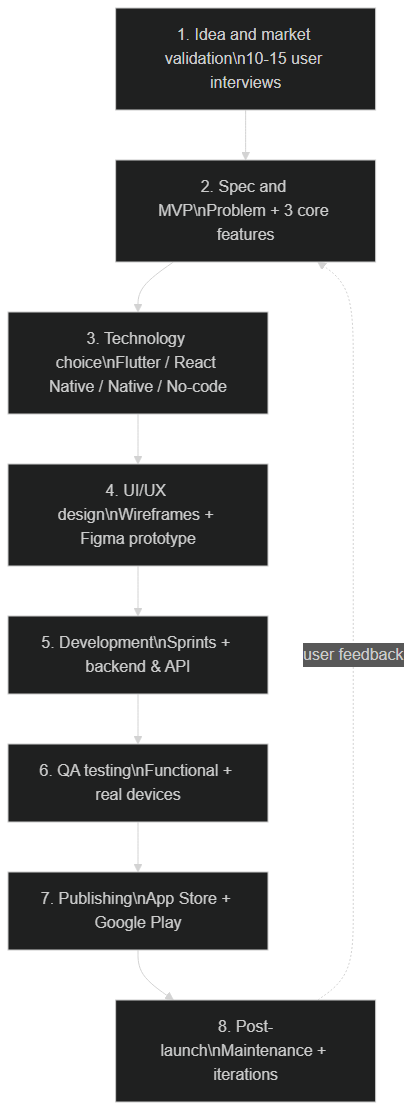 The 8 steps to create a mobile app: idea, spec, tech choice, design, development, testing, publishing, and maintenance
Where Do You Start to Create a Mobile App?
The first step isn't coding, nor even sketching screens. It's proving the problem is worth solving.
How do you validate your app idea before investing?
Market validation is your budget's life insurance. Before writing a single line of code, run 10 to 15 user interviews with people genuinely affected by the problem. Don't present your solution: get them to talk about their daily routine, their frustrations, and what they currently use to cope.
A few strong validation signals:
- People describe the problem spontaneously without you prompting them.
- They already use a clunky workaround (spreadsheet, paper, WhatsApp group) — proof the need exists.
- They'd be willing to pay, or change their habits, for a better solution.
You can reinforce validation with a pre-signup landing page, a small test ad campaign, or a clickable Figma prototype shown to real users. The goal: reduce risk before committing thousands of dollars to development.
What is a spec and an MVP?
Once the idea is validated, formalize it. The spec describes the what (features, user journeys, technical constraints) and the why (business goals). It doesn't need to be fifty pages: one clear page beats a sprawling document no one reads.
The MVP (Minimum Viable Product) is the smallest version of your app that already delivers value. Apply the 80/20 rule: identify the 20% of features that deliver 80% of the value, and defer the rest. An MVP isn't a "budget" app; it's a focused one. Concretely, sum it up in one sentence:
"My app helps [target] to [solve the problem] through [3 key features maximum]."
If you can't fit it in one sentence, your scope is still too broad.
Which Technology Should You Choose to Create a Mobile App?
This is the most structuring decision of the project: it determines cost, timeline, performance, and ease of maintenance for years. There are four main approaches.
Flutter (our 2026 recommendation)
Flutter is an open-source Google framework that lets you write a single codebase deployed to both iOS and Android, with near-native performance thanks to compilation to machine code and its own rendering engine.
- For: single iOS + Android codebase, excellent graphics performance, hot reload that speeds up development, maintained and used by Google.
- Against: a slightly smaller native library ecosystem than Swift or Kotlin for some very specific cases; marginally larger binary size.
- When to choose: the vast majority of business apps, e-commerce, marketplaces, and B2B tools.
React Native
React Native lets you build mobile apps in JavaScript/TypeScript by reusing React skills.
- For: reuse of React skills, massive community, logic sharing with a possible web front end.
- Against: the bridge to native can introduce limits on very complex animations; the New Architecture (Fabric) improves things but adds complexity.
- When to choose: teams already expert in React with an existing JavaScript ecosystem to leverage.
If you're specifically torn between these two frameworks, we published a complete Flutter vs React Native comparison with benchmarks and a decision tree.
Native (Swift / Kotlin)
Native means developing two separate apps: Swift/SwiftUI for iOS, Kotlin/Jetpack Compose for Android.
- For: maximum performance, immediate access to the very latest Apple and Google APIs, an experience perfectly integrated into each platform.
- Against: you develop and maintain two apps — budget and maintenance roughly doubled.
- When to choose: demanding games, graphics-intensive apps, or products where every millisecond and interface detail matters.
No-code (FlutterFlow, Bubble, Adalo)
No-code platforms generate an app through a visual interface, without writing code (or very little).
- For: extreme speed, accessible without a developer, ideal for prototyping or validating an idea.
- Against: vendor lock-in (you depend on the platform), limited customization, recurring subscription costs, difficulty scaling beyond standard cases.
- When to choose: MVP, proof of concept, simple internal tools.
Our recommendation: Flutter offers the best performance / cost / maintainability balance for most projects. The tree below summarizes the decision logic.
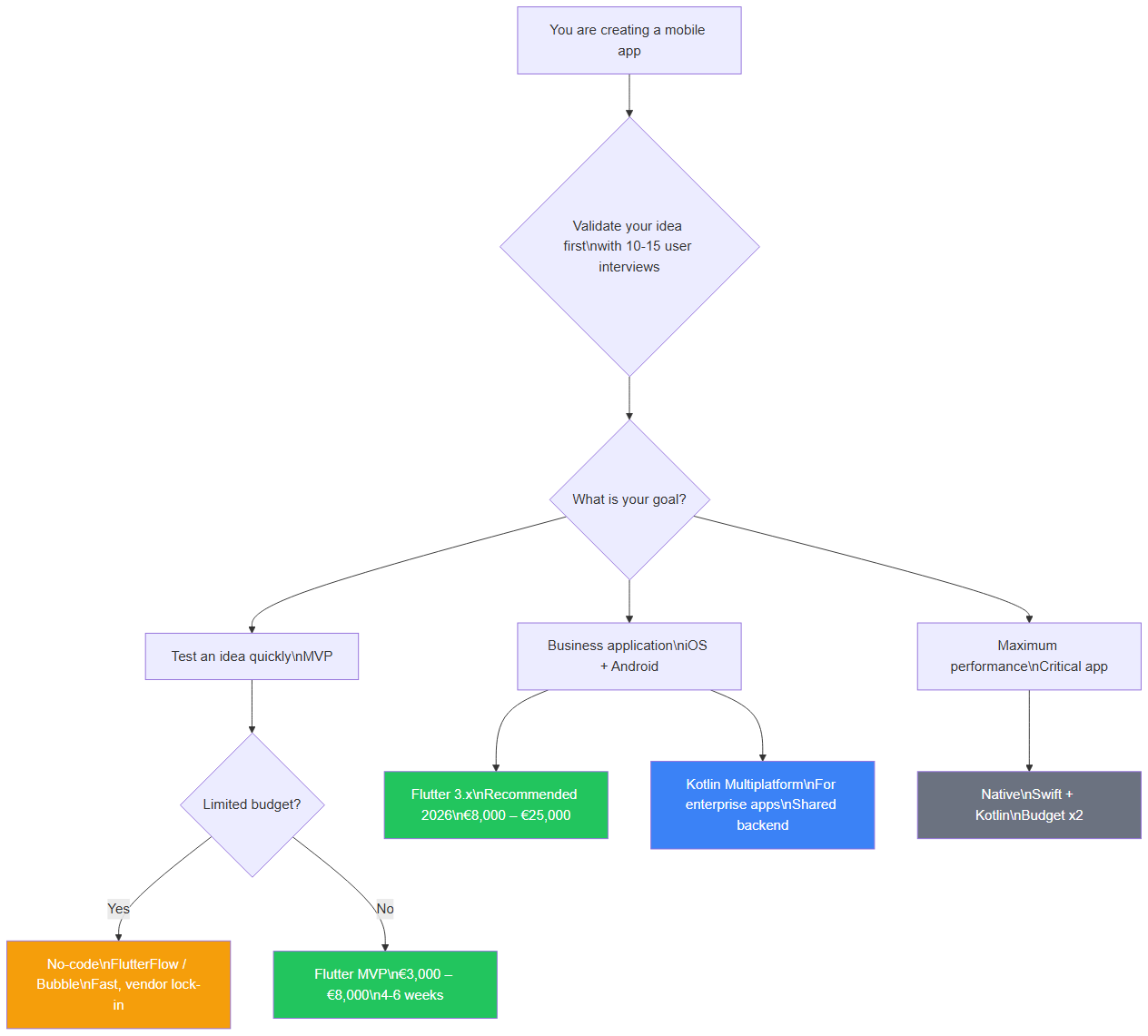 Technology choice guide for your mobile app in 2026: Flutter, React Native, Native, or No-code
How Much Does a Mobile App Cost in 2026?
Budget depends on scope, complexity, and the chosen technical approach. The ranges below are indicative estimates dated June 2026, based on our agency experience and market practices. They are not a quote: only a precise scoping exercise can price a project.
| App type | Duration | Estimated budget (cross-platform) |
|---|---|---|
| Simple MVP (5-7 screens) | 4-6 weeks | $3,500 – $9,000 |
| Business app (15-25 screens) | 2-4 months | $9,000 – $28,000 |
| Complex app (marketplace, AI) | 4-8 months | $28,000 – $90,000 |
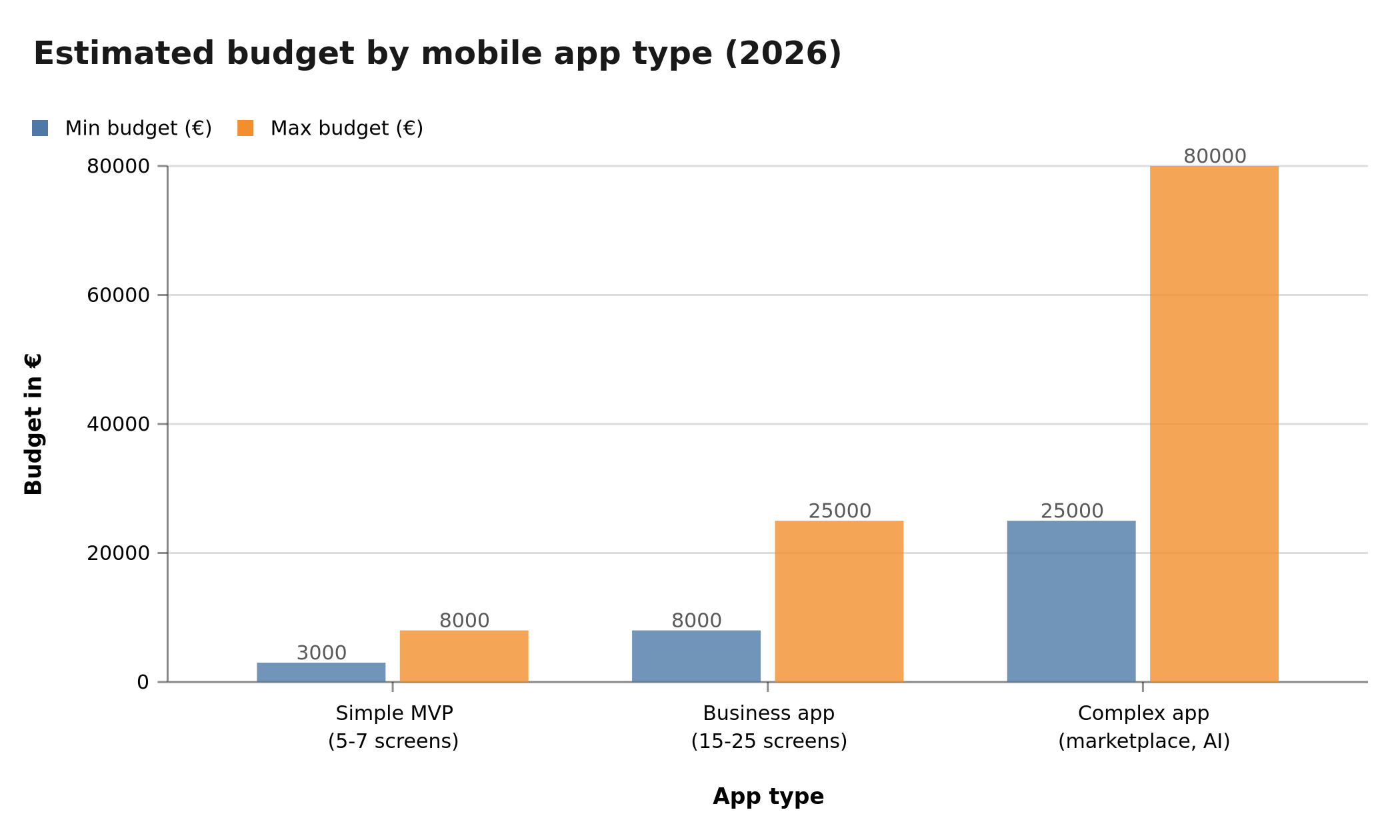 Budget ranges for creating a mobile app in 2026: MVP, business, and complex apps
Why does the technical approach change the budget?
At equal scope, native generally costs more than cross-platform because you build two apps. No-code looks cheaper upfront, but its limits get paid later, when you have to migrate to custom code. The chart below illustrates this gap indicatively.
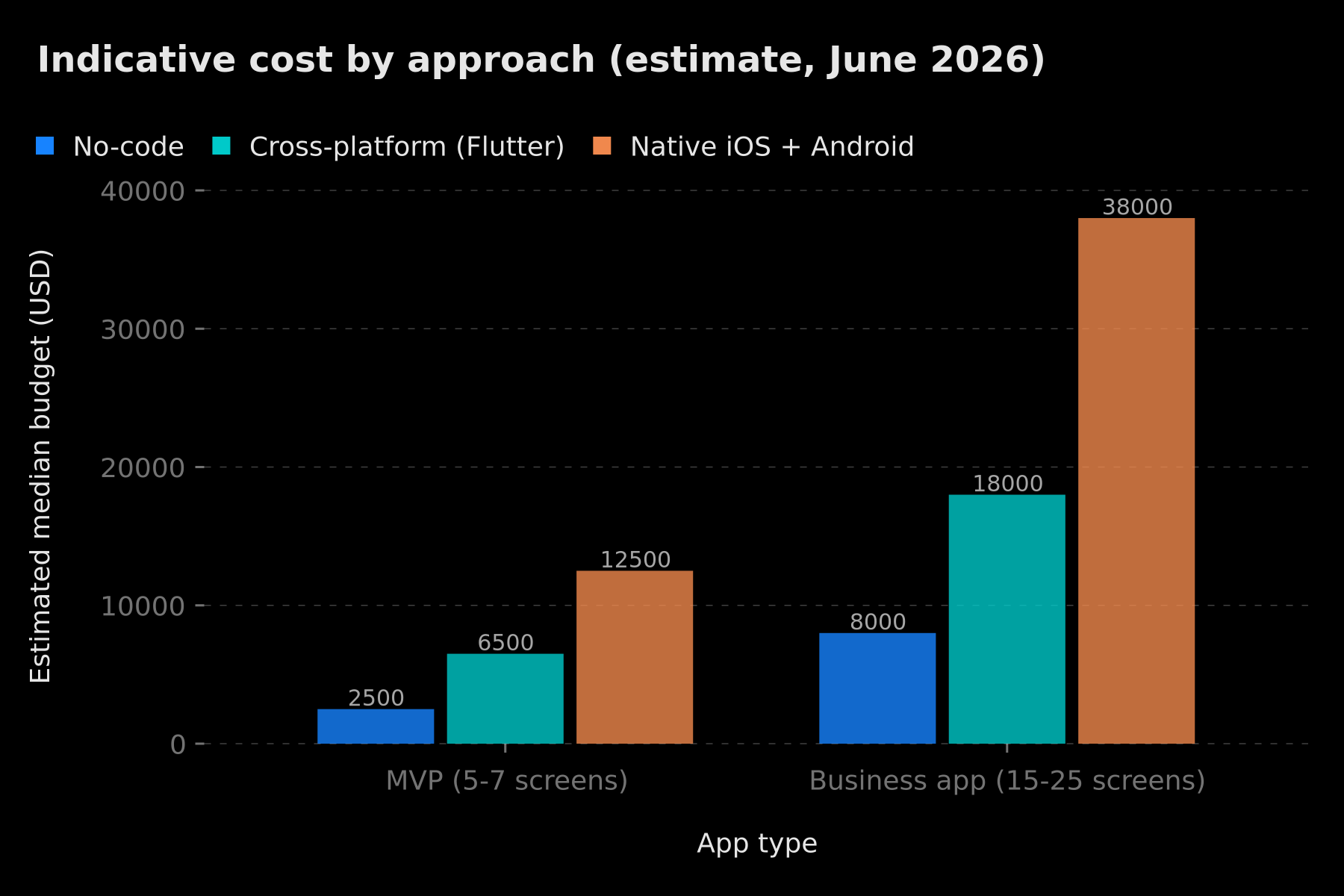 Estimated median cost by approach (no-code, cross-platform Flutter, native iOS + Android) for an MVP and a business app — indicative estimate June 2026
Budget-increasing factors: in-app payments, advanced push notifications, offline mode, AI integration, admin dashboard, multi-device sync, compliance requirements (GDPR, health, finance). For a detailed breakdown of Flutter costs, see our guide on the price of developing a Flutter app.
One point too often ignored: the initial cost is only part of the bill. Maintenance is a significant recurring share, and a poorly designed app can cost up to 5x more to maintain because of technical debt.
How Does App Development Unfold?
A well-run app project follows phases. Here's a realistic timeline for an MVP, from scoping to maintenance.
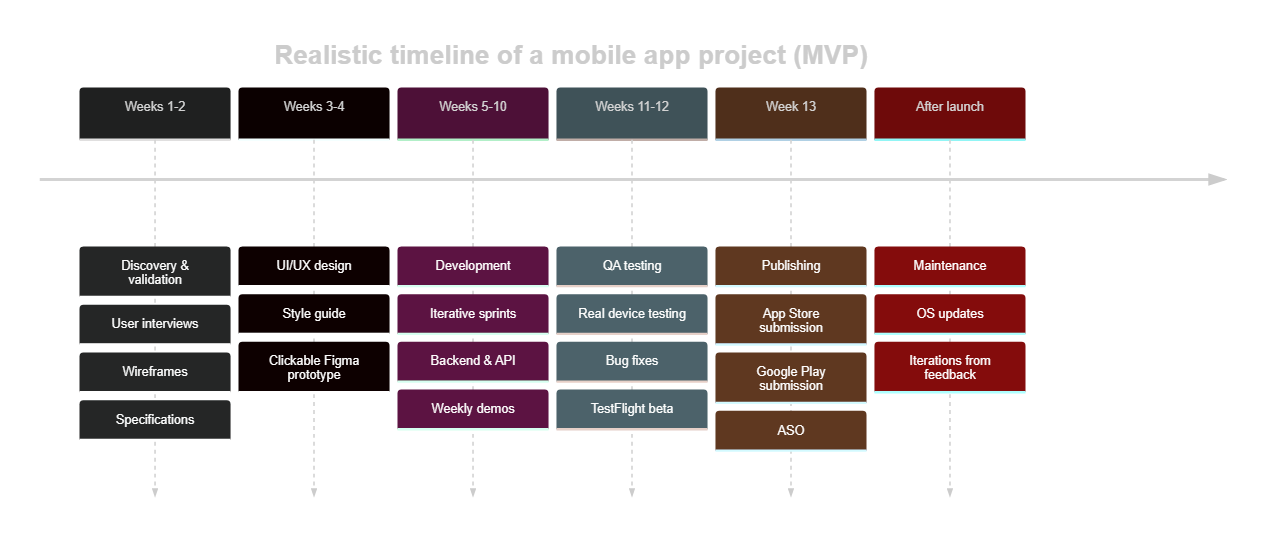 Timeline of an MVP mobile app project: discovery, design, development, testing, publishing, and maintenance
Phase 1: Discovery (1-2 weeks)
We turn the validated idea into concrete specs: wireframes, user journeys, MVP scope, and technical choices. This is the time to settle trade-offs, rather than mid-development, where every change is expensive.
Phase 2: UI/UX Design (1-2 weeks)
Design isn't just "making it pretty." UX organizes information and journeys so users reach their goal without friction; UI dresses those journeys with a consistent style. The typical deliverable is a clickable Figma prototype tested with real users before any development. A confusing interface drives users away as surely as a bug.
Phase 3: Development and backend (4-12 weeks)
Development is run in iterative sprints with weekly demos, to adjust course continuously. It covers two complementary parts:
- The mobile front end: screens, navigation, interactions.
- The backend and APIs: database, authentication, business logic, and services exposed to the app. Many entrepreneurs choose a Backend-as-a-Service (Firebase, Supabase, etc.) to speed up the MVP, then bring it in-house later.
This phase is also where third-party services are integrated: payments, push notifications, maps, analytics.
Phase 4: QA Testing (1-2 weeks)
We test features, performance, security, and behavior on real devices (not just an emulator). Android fragmentation requires covering several screen sizes and OS versions. A beta-test phase (TestFlight on iOS, a closed track on Android) gathers feedback from a first group of users before the public release.
How Do You Publish on the App Store and Google Play?
Publishing is a full step of its own, with its own requirements. Anticipate them from the design stage to avoid a last-minute rejection.
What are the App Store (Apple) requirements?
- Apple Developer Program account: $99/year.
- Review time: often within 24 to 48 hours, sometimes longer depending on complexity and account history.
- Strict rules: Apple is demanding on privacy (privacy nutrition labels, App Tracking Transparency for tracking), on digital goods payments (which must go through in-app purchase), and on overall quality (no thin "brochure" apps).
- To prepare: screenshots in the right formats (including large-screen iPhone), icon, ASO description, and a mandatory privacy policy.
What are the Google Play requirements?
- Google Play Console account: $25 one-time.
- Review time: from a few hours to a few days.
- Important requirement since late 2023: new personal developer accounts must run a closed test with at least 12 testers for 14 days before they can publish to production. Factor this delay into your launch plan.
- To prepare: feature graphic, screenshots, the Data safety form (declaration of collected data), and a privacy policy.
ASO tip: the name, icon, and first screenshots drive a large part of downloads. Polish them as much as the product itself.
What Happens After Launching an App?
Publishing isn't the end of the project, it's the start of its life. An app is a living product that must be maintained:
- OS updates: Apple and Google ship one major version a year and regularly require targeting a recent API level. An unmaintained app eventually gets delisted or stops working.
- Bug fixes: real-world feedback surfaces cases your tests didn't cover.
- Product iterations: by analyzing real usage (analytics, reviews, support) you prioritize the next features.
- Security: dependency updates, vulnerability management, GDPR compliance.
Budget for maintenance from day one. A common rule of thumb is to plan an annual envelope equal to a fraction of the initial development cost. Neglecting this line lets technical debt pile up until any change becomes painful.
Build It Yourself, No-Code, or Agency: What to Choose?
There's no universal answer; it all depends on your situation, budget, and horizon.
- Build it yourself (code): relevant if you (or a cofounder) are a mobile developer available over time. Upside: full control and low cash cost. Risk: the time spent and dependence on a single person.
- No-code: ideal for prototyping, validating an idea, and launching a simple MVP cheaply. Limit: you'll eventually hit a functional or performance ceiling, and migrating to custom code has a cost.
- Agency: the safest choice for an app meant to last. An agency brings scoping, polished design, durable architecture, and organized maintenance. It's also the one that demands the highest upfront budget. To pick the right one, read our guide on choosing a mobile development agency.
A hybrid strategy works well: validate in no-code, then hand the solid version to an agency or an in-house team.
What Mistakes Should You Avoid When Creating an App?
Mistake #1: wanting everything in v1. Thirty broken screens are worth less than six perfect ones. Focus on solving one problem well, then expand.
Mistake #2: not testing with real users. Test from the wireframe stage, not after development, when fixing costs ten times more.
Mistake #3: neglecting maintenance. An unmaintained app loses users, drops out of store search results, and eventually breaks after an OS update.
Mistake #4: choosing no-code only to save money. No-code can end up costing more when you outgrow its limits and have to rebuild everything.
Mistake #5: underestimating the backend. A beautiful interface without a reliable backend is a house without foundations. Data, security, and scalability must be planned from the start.
Do You Also Need a Website Alongside Your App?
This question comes up constantly, and the honest answer is: often, yes — but not always for the same reasons. An app and a website don't play the same role. The website is your storefront for discovery, SEO, and credibility; the app is your engagement and retention tool for users who already know you.
Concretely, three common scenarios:
- App first, minimal site: a simple landing page suffices to present the app, host the privacy policy (mandatory for the stores), and drive downloads. Typical for consumer apps.
- Site and app in parallel: an e-commerce or SaaS business often needs both — a web front for acquisition and the app for loyal customers. Sharing the same backend and APIs avoids duplicating effort.
- Web app instead of a native app: if your need doesn't require native notifications, offline mode, or hardware access, a responsive web app (or PWA) can be enough — and far cheaper to start with.
The key is not to build everything at once. Start with the channel that serves your priority goal, design a backend that can serve both, and add the second channel when traction justifies it. A shared API layer is the single best decision to keep both surfaces in sync without doubling your costs.
Which Monetization Models for a Mobile App?
Creating an app is an investment; it still needs to generate value. The business model must be considered from the scoping stage, because it shapes the architecture (payments, accounts, subscriptions) and the user experience. The main models:
- Paid upfront: the user pays once to download. A declining model, except for professional tools with high perceived value.
- Freemium: the app is free, with paid premium features. This is the dominant model: it maximizes downloads while monetizing the most engaged users.
- Subscription: recurring access (monthly or yearly) to a service or content. Ideal for predictable revenue, but requires continuous value to limit churn.
- In-app purchases: credits, content, or options bought individually. Very common in content and services.
- Advertising: revenue from displaying ads. Profitable only at high active-user volume.
- Commission (marketplace): a percentage taken on each transaction between sellers and buyers.
An important reminder: Apple and Google take a commission on digital goods sold in the app (in-app purchases and subscriptions), with reduced rates for small publishers under certain conditions. By contrast, selling physical goods and services is exempt from this commission. Check this rule early: it can change your project's financial equation.
How Do You Measure Your App's Success?
Without measurement, you can't steer. From launch, track a few key performance indicators (KPIs) that reveal your app's real health — far better than raw download numbers:
- Retention rate (D1, D7, D30): how many users come back after 1, 7, and 30 days. This is the most telling metric: strong retention proves the app delivers real value.
- DAU / MAU: daily and monthly active users, and their ratio (a proxy for engagement).
- Conversion rate: the share of visitors who complete the key action (purchase, signup, subscription).
- Churn: subscriber attrition rate; watch it closely on subscription models.
- Store rating and reviews: they influence both ASO and the download decision.
- Crashes and performance: a high crash rate silently destroys retention.
The right habit: instrument the app with an analytics tool from v1, define two or three priority KPIs, and iterate based on data rather than gut feeling. It's this "measure – learn – improve" loop that turns a decent app into a product that lasts.
Conclusion: Your Action Plan to Create a Mobile App
Creating a mobile app in 2026 is within reach of any methodical entrepreneur. Remember the four habits that make the difference:
- Validate your idea with 10 to 15 user interviews before spending a single dollar on development.
- Write your MVP on one page: one problem, one target, three key features maximum.
- Choose the right technical approach — Flutter for most cases — and get 2 to 3 quotes from agencies with a real portfolio.
- Start small, then iterate based on real usage, and budget for maintenance from day one.
The app that succeeds is almost never the most complete one at launch: it's the one that solves a real problem, simply, and keeps improving.
BOVO Digital builds Flutter mobile apps for iOS and Android, from MVP to enterprise. Free quote within 24h.
Tags
FAQ
What budget should I plan for creating a mobile app?
A simple MVP (5-7 screens) costs between $3,500 and $9,000 in cross-platform. A complete business app between $9,000 and $28,000. Native iOS + Android often doubles these ranges. These are indicative estimates dated June 2026, to be refined based on scope.
How long does it take to create a mobile app?
A simple MVP takes 4 to 6 weeks. A complete app 2 to 4 months. These timelines include discovery, design, development, and testing, but not the store review time or post-launch iterations.
Is Flutter or React Native better in 2026?
Flutter is our main recommendation: a single codebase for iOS and Android, near-native performance, and solid Google support. React Native remains relevant for teams that already have strong React expertise and an existing JavaScript ecosystem.
Can you create a mobile app without coding?
Yes, with FlutterFlow, Bubble, or Adalo. It's recommended for validating an idea quickly and cheaply. For a commercial app with complex features, custom development becomes inevitable in the long run to avoid vendor lock-in.
Should I build my app myself, with no-code, or with an agency?
No-code suits prototyping and simple MVPs. Building in-house assumes an available and lasting technical team. An agency brings structure, polished design, and durable maintenance; it's the safest choice for an app meant to last and evolve.
How much does publishing on the App Store and Google Play cost?
The Apple Developer Program account costs $99/year. The Google Play Console account costs $25 one-time. On top of that, plan for visual assets, the ASO listing, and the privacy policy, which is mandatory on both platforms.
Does your site book meetings — or just present you?
We open your URL together, mark the 3 leaks, and tell you whether a fix is enough or a rebuild is required.
- 30 min
- No commitment
- Action plan
Vicentia Bonou
Full Stack Developer & Web/Mobile Specialist. Committed to transforming your ideas into intuitive applications and custom websites.


