
Automated Deployment Security: The 8 Time Bombs Destroying Your Projects
Exposed secrets, unpinned dependencies, unverified Docker images, weak RBAC, no MFA: 8 time bombs are threatening your CI/CD pipelines. Complete guide with TruffleHog, Snyk, Trivy and CodeQL to secure your automated deployments.

Updated

Automated Deployment Security: The 8 Time Bombs Destroying Your Projects 💣
The automated deployment security risks that cause the most damage aren't hidden inside sophisticated attacks against hardened systems. They lurk in overlooked technical details: a .env file accidentally committed, a GitHub Action referenced by tag instead of commit SHA, a Docker image that hasn't been scanned in three months, a workflow with permissions that give a build job the same rights as an administrator. These vulnerabilities are silent. They wait. And when they detonate, the consequences can be catastrophic.
This guide identifies the 8 most common time bombs in modern CI/CD pipelines. For each one, you'll find a clear explanation of the risk, a concrete documented example, and a practical solution you can integrate directly into your GitHub Actions workflows. We'll also analyze the XZ Utils incident of 2024 — the definitive case study for supply chain attacks — to understand how a vulnerability can hide for two years inside an open source project used by millions of machines. Finally, a comprehensive checklist will help you validate the security posture of your pipeline before every production deployment.
The Story: The 15,000€ Bill
An entrepreneur launches his e-commerce site. He hires a developer who sets up an automated deployment system. Every time there's a change, the site updates automatically. Magic.
For 6 months, everything works perfectly.
And then the disaster:
One morning, he receives a 15,000€ bill from his cloud hosting provider. Someone stole his credentials and used them to mine cryptocurrency. How did it happen? The automated deployment system had security flaws that no one had seen. The Cloudflare outage of November 18, 2025 demonstrated the scale at which this type of flaw can strike entire infrastructures.
This case is not isolated. It illustrates a reality many development teams ignore: setting up a CI/CD pipeline is simple. Securing it is a separate discipline that requires knowing the attack vectors and addressing them methodically. Automation amplifies everything — productivity as much as risk.
Why Are Automated Deployment Security Risks So Often Ignored?
The promise of automation is seductive: less manual work, fewer human errors, faster deployments. Teams naturally focus on what the pipeline does — test, build, deploy — rather than on what it exposes: environment secrets, system permissions, unverified third-party code.
There's also a false sense of security through abstraction. When your deployment triggers from a simple git push, it's easy to forget that the workflow executes hundreds of lines of third-party code with access to your production infrastructure. This distance between the action (pushing code) and its consequences (execution in production) creates a dangerous blind spot.
The reality: every component added to your pipeline — a GitHub Action, a Docker base image, an npm library, a deployment script — is a potential attack surface. The 8 time bombs below are the most documented, most frequent, and most expensive to remediate after the fact.
What Are the 8 Time Bombs in Automated Deployment Security?
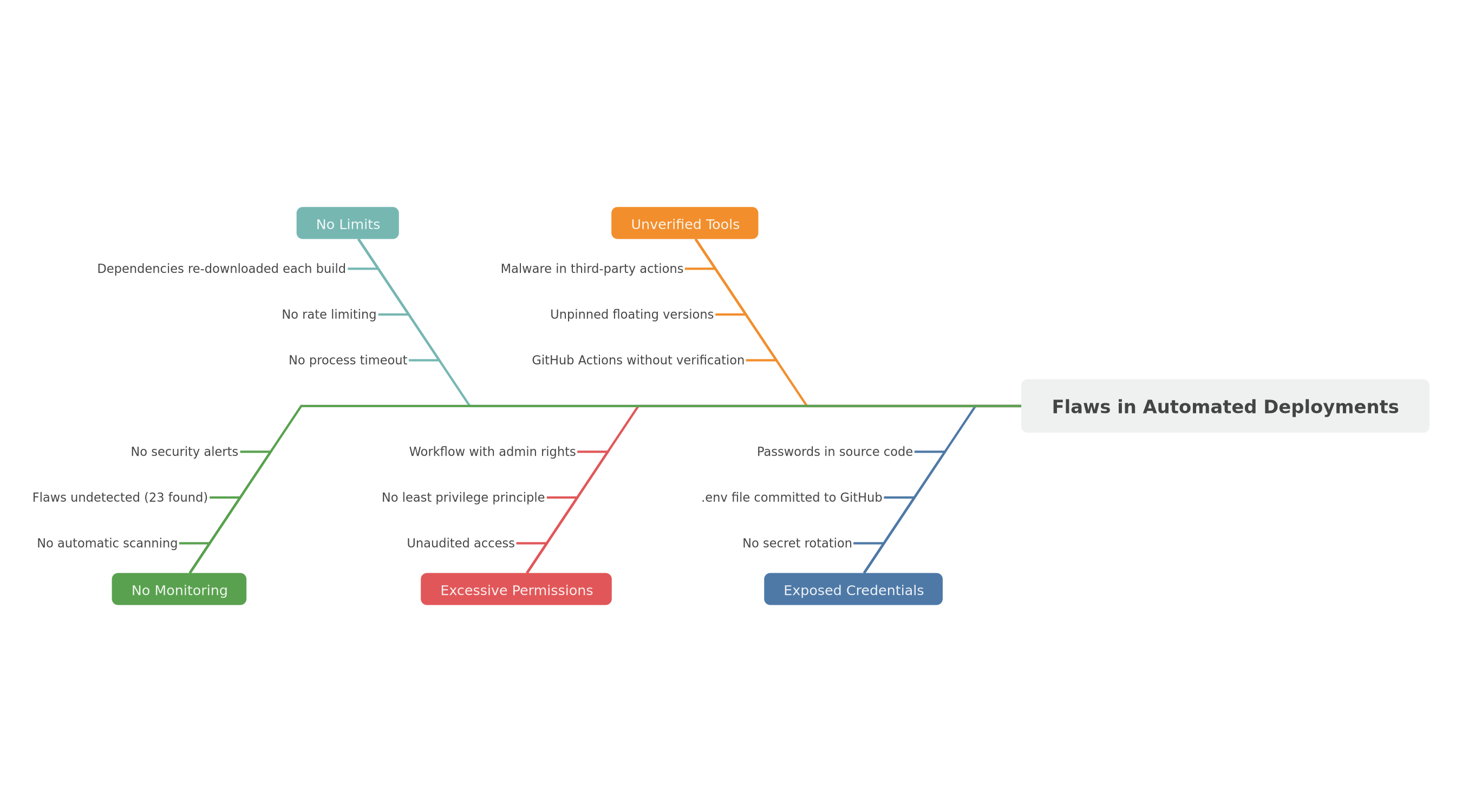 Fishbone diagram: exposed secrets, unpinned dependencies, unverified Docker, weak RBAC, excessive logs, no rollback, no security tests, prod access without MFA
Time Bomb 1: Secrets Stored in Plain Text in Code
This is the most widespread and immediately exploitable vulnerability. A developer commits a .env file containing AWS keys, a Stripe token, or a database password. The repository is public — or accidentally becomes public. Within minutes, automated bots that continuously monitor GitHub detect and exploit these credentials.
This scenario repeats itself thousands of times every year. GitHub has identified and revoked millions of exposed secrets on its platform through its secret scanning program. Stolen AWS keys are almost systematically used to launch cryptocurrency mining instances, billed to the account owner — exactly as in the opening story. The direct financial impact can be enormous, but the indirect damage is even greater: access to customer data, compromise of other connected services, and loss of trust.
What to do: Never store a secret in source code, full stop. Use GitHub Secrets for sensitive variables in your workflows. For production applications, a dedicated secrets manager (HashiCorp Vault, AWS Secrets Manager, or 1Password Secrets Automation) offers automatic rotation and access auditing. Also enable GitHub's native secret scanning, which sends real-time alerts when a secret is detected in a commit.
# simplified example — correct injection via GitHub Secrets
env:
  AWS_ACCESS_KEY_ID: ${{ secrets.AWS_ACCESS_KEY_ID }}
  AWS_SECRET_ACCESS_KEY: ${{ secrets.AWS_SECRET_ACCESS_KEY }}
Time Bomb 2: Unpinned Dependencies
You're using actions/checkout@v4 in your workflow. Convenient — but that v4 tag can point to any commit depending on the maintainer's decision. If the maintainer's GitHub account is compromised, or if an update introduces a vulnerability, your pipeline executes malicious code without your knowledge.
The same logic applies to application dependencies. A popular npm library, an unmaintained transitive dependency, can introduce a critical vulnerability into your application without you having added it deliberately. The event-stream incident in 2018 perfectly illustrates this risk: this npm module, downloaded millions of times per week, was handed over by its original author to a stranger who injected code to steal crypto-wallets targeting a specific Bitcoin wallet. Hundreds of applications embedding this dependency — often unknowingly, through transitive dependencies — were exposed.
What to do: Pin all your GitHub Actions to the full commit SHA (40 immutable hexadecimal characters). Pin your application dependencies to precise versions in your package manager. Use Dependabot or Renovate to automate dependency updates with mandatory review before merge.
# simplified example — action pinned to full SHA (immutable)
- uses: actions/checkout@11bd71901bbe5b1630ceea73d27597364c9af683  # v4.2.2
Time Bomb 3: Unverified Docker Images
Your application runs in a Docker container. The base image you're using — node:20, python:3.12, or a specialized image — was built by someone else. This image may contain vulnerable system packages, outdated libraries with known CVEs, or in the worst cases, deliberately included malware.
In December 2023, security researchers identified several malicious Docker images on Docker Hub that had been downloaded millions of times before detection. These images contained crypto-miners that activated after deployment, consuming host resources without the owners' knowledge. The attack surface is massive: Docker Hub hosts hundreds of thousands of images, the vast majority of which have not been audited.
What to do: Scan all your Docker images with Trivy before every deployment. Prefer lightweight, recognized base images (Google's distroless images, or official images with digest rather than version tag). Systematically block deployment if critical or high vulnerabilities are detected.
# simplified example — Trivy scan integrated in the pipeline
- name: Scan Docker image
  uses: aquasecurity/trivy-action@0.28.0
  with:
    image-ref: myapp:${{ github.sha }}
    exit-code: '1'
    severity: CRITICAL,HIGH
Time Bomb 4: Weak RBAC — Too Many Permissions
RBAC (Role-Based Access Control) applies directly to your CI/CD workflows. The principle of least privilege is straightforward: each workflow should only have the permissions strictly necessary for its execution, and nothing more.
In practice, for the sake of simplicity or through lack of awareness, many workflows run with very broad permissions — or with the maximum permissions granted by default. A build job that simply needs to read code has no reason to have write access to packages or releases. A staging deployment workflow has no reason to have access to production.
The problem is that when a workflow is compromised — through code injection in a dependency, a malicious third-party action, or a vulnerability in your own code — excessive permissions allow the attacker to cause far more damage: modify code, delete branches, access other workflows' secrets, or compromise other repositories in the organization.
What to do: Declare permissions explicitly in each workflow, at the job level, never globally. Start by revoking all permissions (permissions: {} at the workflow level) then grant only what is necessary for each specific job.
# simplified example — minimal permissions, declared explicitly per job
jobs:
  deploy:
    permissions:
      contents: read      # read source code only
      id-token: write     # needed for OIDC (authentication without static key)
Time Bomb 5: Excessive Logs Exposing Sensitive Data
Logs are essential for debugging production problems. But they can also become a vector of unintentional sensitive data exposure. Complete environment variables, dynamically generated temporary tokens, user data included in traces — everything displayed in CI/CD pipeline logs is potentially visible to the entire development team, archived on the CI/CD provider's servers, and sometimes accessible via third-party integrations (Slack, monitoring systems, ticketing tools).
GitHub Actions automatically masks values declared in ${{ secrets.* }}, but not values dynamically constructed from those secrets. If your code builds a connection URL by concatenating a secret with other parameters, this complete URL may appear in plain text in the workflow logs. Similarly, some debugging tools automatically display all environment variables present at the time of an error — potentially including secrets injected into the environment.
What to do: Audit all steps that use echo, print, or automatic logging. Never display tokens, complete connection strings, or personal data in logs. Use GitHub Actions' add-mask command to manually mask sensitive values that are dynamically constructed.
# simplified example — masking a dynamic value built from a secret
- name: Build and mask connection string
  run: |
    DB_URL="postgresql://user:${{ secrets.DB_PASS }}@${{ secrets.DB_HOST }}/prod"
    echo "::add-mask::$DB_URL"
    echo "DB_URL=$DB_URL" >> $GITHUB_ENV
Time Bomb 6: No Automatic Rollback
A deployment that succeeds at the CI/CD pipeline level doesn't guarantee that the application works correctly in production. A failing database migration, a configuration incompatibility between the code and the environment, a regression bug not caught by automated tests — and it's an outage, sometimes without warning.
Without a defined and tested rollback strategy, resolution time depends entirely on manual human intervention. In the most critical scenarios, the team must diagnose the error under pressure, manually rebuild the previous version (if available), re-deploy it without introducing new problems — often in the middle of the night, with customers waiting and alerts accumulating. The human and financial cost of these situations vastly exceeds the preventive cost of setting up automatic rollback.
What to do: Define a rollback strategy for each environment before deploying for the first time. On Kubernetes, kubectl rollout undo restores the N-1 version in seconds. On classic servers, keep the artifacts of the last N versions and automate rollback via a script triggered by health checks.
# simplified example — automatic Kubernetes rollback if deployment fails
- name: Deploy
  id: deploy
  run: kubectl apply -f k8s/deployment.yaml

- name: Rollback on failure
  if: failure() && steps.deploy.outcome == 'failure'
  run: |
    echo "Deployment failed — rolling back to previous version"
    kubectl rollout undo deployment/myapp
    kubectl rollout status deployment/myapp --timeout=120s
Time Bomb 7: No Security Tests in the Pipeline
A CI/CD pipeline that only tests functionality lets security vulnerabilities through with every deployment. Unit and integration tests verify that the application does what it should do. They don't verify that it doesn't do what it shouldn't do: expose sensitive data, accept SQL injections, handle sessions incorrectly, execute arbitrary code through insecure deserialization.
This distinction is fundamental. Security vulnerabilities are often unintentional behaviors that completely escape functional tests. An application can pass 100% of its tests and be deeply vulnerable to XSS attacks, CSRF attacks, or directory traversal exploits. This is why Static Application Security Testing (SAST) tools exist: they examine source code for dangerous patterns, independently of the application's functional behavior.
CodeQL, developed by GitHub, analyzes source code as a queryable database. It can identify complex vulnerability classes that a simple code review might not easily catch: SQL injections dynamically constructed through multiple abstraction layers, insecure deserializations, subtle directory traversals.
What to do: Add CodeQL to your workflows for static analysis. Enable Dependabot for security alerts on dependencies. Integrate Snyk for continuous vulnerability scanning of code and containers. These tools integrate natively into GitHub Actions with just a few lines of configuration.
# simplified example — CodeQL analysis in GitHub Actions
- name: Initialize CodeQL
  uses: github/codeql-action/init@v3
  with:
    languages: javascript,typescript

- name: Analyze
  uses: github/codeql-action/analyze@v3
  with:
    category: "/language:javascript"
Time Bomb 8: Production Access Without MFA
Your pipeline deploys automatically to production — but who can trigger this pipeline manually? Who can modify GitHub Secrets configuration? Who can access the production server directly via SSH, or the console of your cloud hosting provider? If these accesses are not protected by multi-factor authentication (MFA), compromising a single account is enough to provide complete access to your production infrastructure.
Phishing attacks targeting technical teams are well-documented and effective. A seemingly legitimate email, a cloned login page, and the attacker has the credentials of a developer or DevOps engineer with full production access. Without MFA, there's no additional barrier. With MFA, compromising a password alone is insufficient — the attacker also needs the second factor, which they generally don't have.
What to do: Require MFA for all accounts with production access — GitHub organization, AWS/GCP/Azure consoles, secrets manager, private Docker registry. Use time-limited access tokens rather than permanent keys. For automated deployments, prefer OIDC (OpenID Connect): your workflow obtains temporary credentials directly from the cloud provider, without ever storing a static key in GitHub Secrets.
# simplified example — AWS authentication via OIDC (no static key stored)
- name: Authenticate with AWS via OIDC
  uses: aws-actions/configure-aws-credentials@v4
  with:
    role-to-assume: arn:aws:iam::123456789012:role/github-actions-deploy
    aws-region: eu-west-3
The XZ Utils Incident 2024: The Most Sophisticated Supply Chain Attack on Record
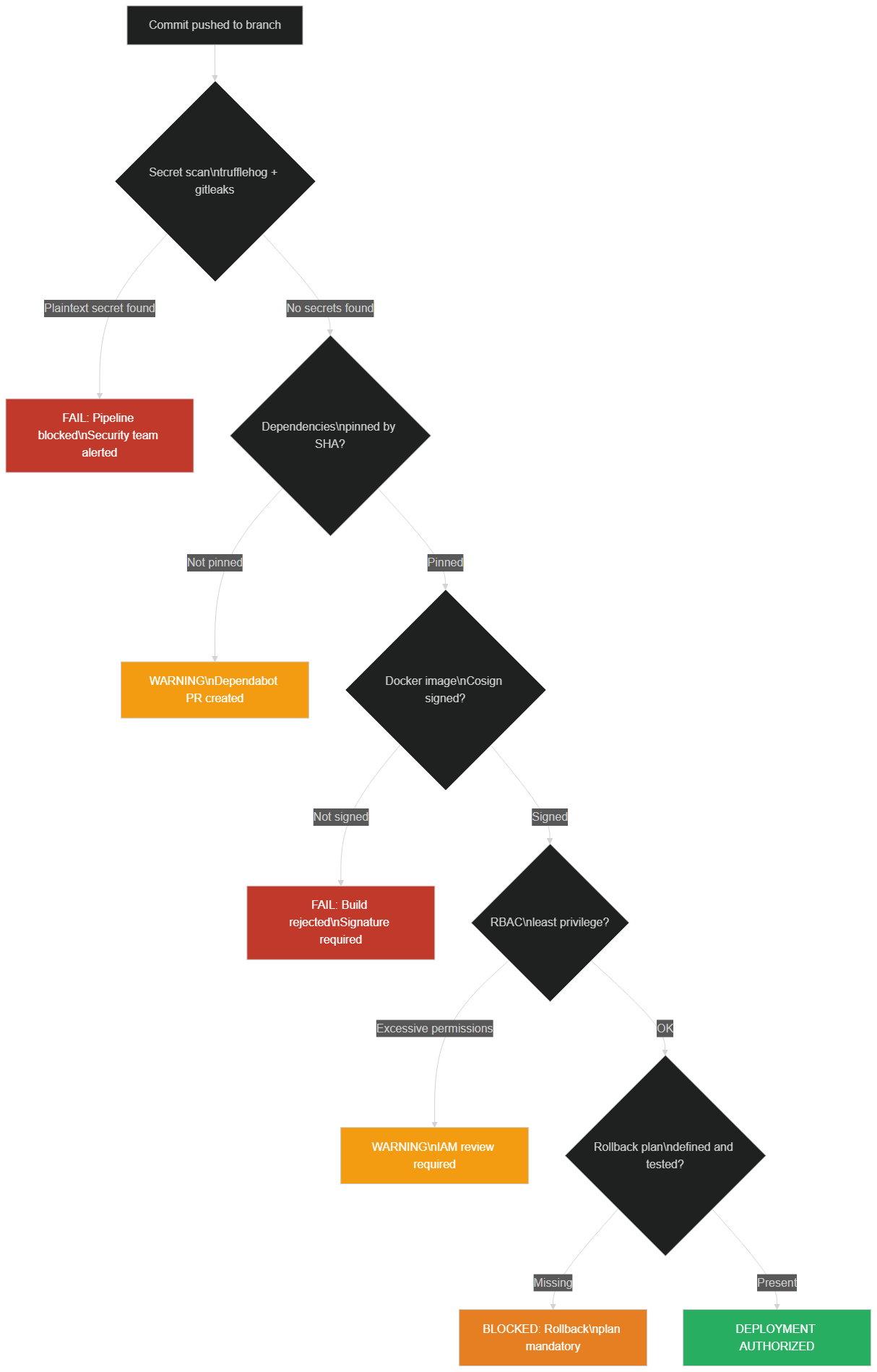 Detection pipeline: each step identifies and blocks a vulnerability category before production deployment
In March 2024, a Microsoft engineer accidentally discovered one of the most sophisticated supply chain attacks ever documented in the history of computer security. The XZ Utils library — a compression tool present in virtually all Linux distributions — contained a backdoor deliberately introduced in versions 5.6.0 and 5.6.1.
What makes this incident remarkable is the attacker's patience and methodology. Under the pseudonym "Jia Tan", they contributed to the XZ Utils project for two years — fixing real bugs, improving performance, writing documentation, responding to issues. They gained the trust of the original maintainer, who was tired and overwhelmed, to the point of obtaining commit rights to the repository. Then, at the opportune moment, they introduced a backdoor into the build script (configure.ac), allowing anyone with a specific private key to execute arbitrary code on machines where the library was installed — particularly via SSH connections on systems using systemd.
The backdoor was only detected because Andres Freund, a Microsoft engineer, noticed a slight performance anomaly during SSH connections on his development machine — a few extra milliseconds of unexpected delay. His curiosity and expertise allowed him to trace back to the cause. Had the backdoor reached the stable repositories of Debian, Ubuntu, Red Hat and Fedora (it was very close at the time of discovery), millions of Linux servers would have been potentially compromised.
Concrete lessons for your pipelines:
Verify the cryptographic checksums of all archives downloaded in your workflows. Pin your dependencies to precise versions and read changelogs — changes to build scripts deserve careful examination. Be vigilant about contributions that apply social pressure to maintainers or that seem artificially urgent. Scan your Docker images and binaries with tools like Trivy to detect abnormal behaviors and known vulnerabilities.
This incident also illustrates why the diversity of the open source ecosystem is a strength: a single observant observer was enough to prevent a global compromise. But your pipeline won't necessarily benefit from that external eye. It's up to you to build the safeguards.
How to Detect These Time Bombs: Essential Tools
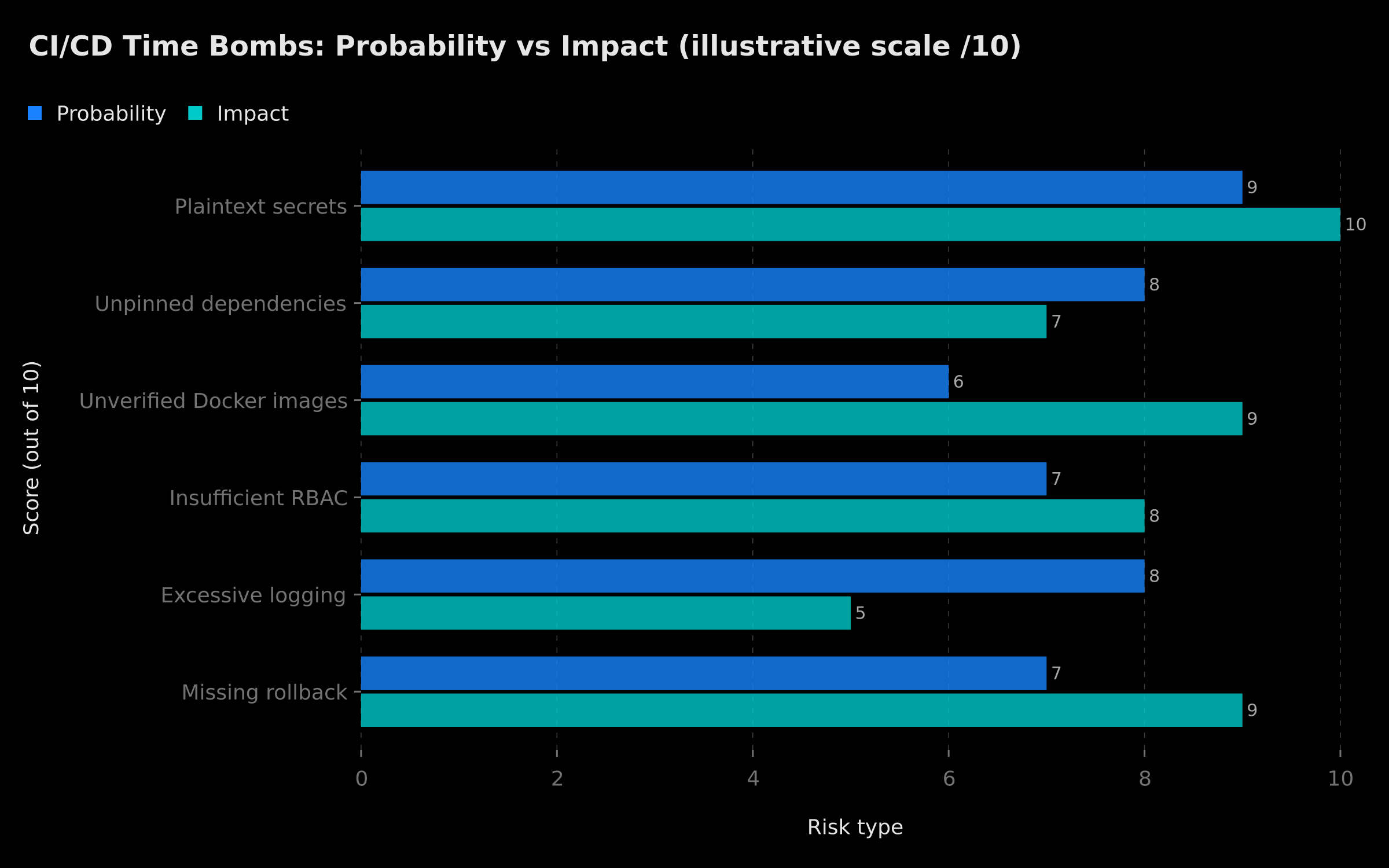 Illustrative chart: exposed secrets and insufficient RBAC show the highest probability × impact combination — data is indicative
Automated detection is your first line of defense. Here are the four tools to integrate in any serious CI/CD pipeline, each covering a distinct attack surface.
TruffleHog — Detect Secrets Exposed in Git
TruffleHog scans the complete Git history for exposed secrets: AWS tokens, Stripe API keys, passwords, certificates, GitHub tokens. It supports over 700 secret types and combines regex patterns with entropy analysis to minimize false positives. Unlike a simple grep, it goes back through commit history — a secret committed and then deleted remains accessible in the history, and TruffleHog will find it.
TruffleHog can integrate as a pre-commit hook (to block secrets before they're pushed) or as a CI/CD pipeline step (to scan incoming commits). It also offers an --only-verified mode that only surfaces secrets that are still active and exploitable.
Snyk — Monitor Application Dependencies
Snyk scans dependency files (package.json, requirements.txt, pom.xml, Gemfile.lock) and Docker images. Its vulnerability database updates continuously from multiple sources (NVD, GitHub Advisory Database, proprietary databases). The GitHub integration generates automatic pull requests for security updates with priority scoring. The free tier covers most of the needs of individual projects and small teams.
Trivy — Scan Docker Images and IaC
Trivy (developed by Aqua Security) is the reference open source scanner for Docker images, filesystems, Git repositories, and infrastructure-as-code files (Terraform, Kubernetes, Helm). Its execution time is fast — a few seconds for a lightweight image — making it perfectly suited for CI/CD integration without significantly extending build duration. It detects CVE vulnerabilities, misconfigurations, secrets exposed in image layers, and problematic licenses.
CodeQL — Static Source Code Analysis
Developed by GitHub and natively integrated into GitHub Actions, CodeQL analyzes source code as a queryable database via a specialized query language. It can identify complex vulnerability classes that manual code review or simple linting rules wouldn't detect: SQL injections dynamically built through multiple abstraction layers, insecure deserializations, subtle directory traversals, stored XSS. CodeQL is free for all public GitHub repositories.
Our guide Automate Your Release Checklist with n8n and GitHub Actions shows how to orchestrate these tools in an automated, reproducible release pipeline.
How to Integrate Security into Your GitHub Actions Pipeline
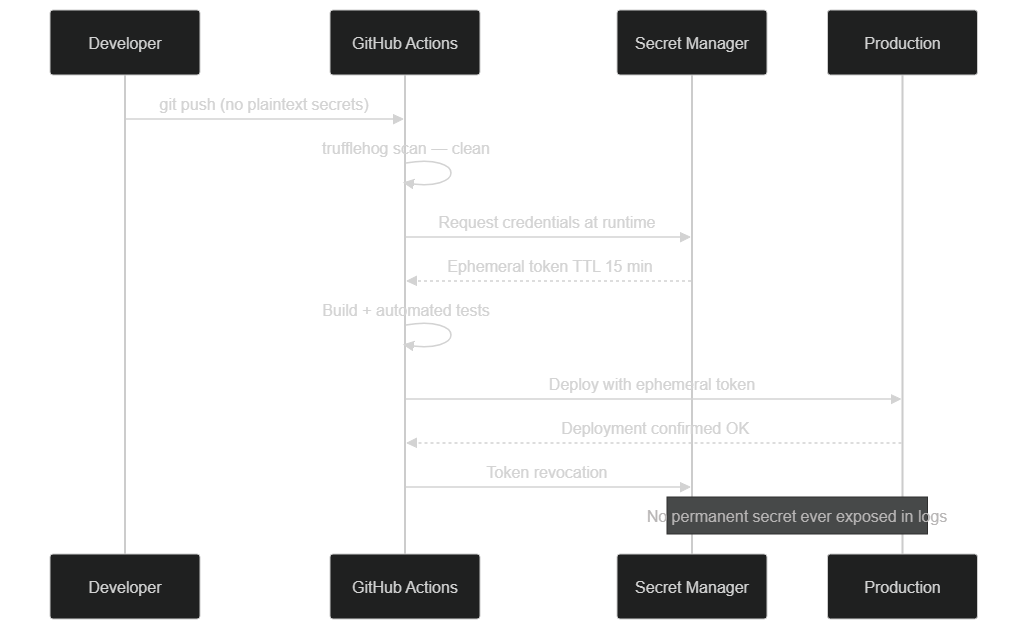 Sequence diagram: the workflow requests an ephemeral OIDC token from GitHub, obtains temporary credentials from AWS, without ever storing a long-term access key
Security isn't added as an afterthought — it's part of the pipeline architecture from the start. Here is an example GitHub Actions workflow that integrates the best practices described in this article: security scans, minimal permissions, OIDC, action pinning, and automatic rollback.
# simplified example — complete secured GitHub Actions workflow
name: Secure Pipeline

on:
  push:
    branches: [main]

permissions: {}  # No permissions by default at workflow level

jobs:
  security-scan:
    name: Security Scans
    runs-on: ubuntu-latest
    permissions:
      contents: read
      security-events: write
    timeout-minutes: 20
    steps:
      - uses: actions/checkout@11bd71901bbe5b1630ceea73d27597364c9af683  # v4.2.2

      - name: TruffleHog scan (exposed secrets)
        uses: trufflesecurity/trufflehog@v3.63.0
        with:
          path: ./
          base: ${{ github.event.before }}
          only-verified: true

      - name: Build Docker image
        run: docker build -t myapp:${{ github.sha }} .

      - name: Trivy scan (Docker image)
        uses: aquasecurity/trivy-action@0.28.0
        with:
          image-ref: myapp:${{ github.sha }}
          exit-code: '1'
          severity: CRITICAL,HIGH

      - name: CodeQL analysis
        uses: github/codeql-action/analyze@v3
        with:
          category: "/language:javascript"

  deploy:
    name: Deploy
    needs: security-scan  # Blocked if any scan fails
    runs-on: ubuntu-latest
    environment: production
    permissions:
      id-token: write
      contents: read
    timeout-minutes: 30
    steps:
      - uses: actions/checkout@11bd71901bbe5b1630ceea73d27597364c9af683  # v4.2.2

      - name: Authenticate with AWS via OIDC (no static key)
        uses: aws-actions/configure-aws-credentials@v4
        with:
          role-to-assume: ${{ secrets.AWS_DEPLOY_ROLE_ARN }}
          aws-region: eu-west-3

      - name: Deploy
        id: deploy
        run: ./scripts/deploy.sh

      - name: Automatic rollback on failure
        if: failure()
        run: |
          echo "Deployment failed — initiating rollback"
          ./scripts/rollback.sh
This workflow enforces the principle of least privilege (explicit permissions per job), pins all actions to full SHAs, blocks deployment if any single security scan fails, and uses OIDC to avoid storing long-term AWS credentials. The deploy job won't start if the scan job failed (needs: security-scan).
For deeper coverage of secure Docker configurations in production, our guide n8n Docker — Installation Guide 2026 covers containerization best practices applicable to any service.
Secure Deployment Checklist
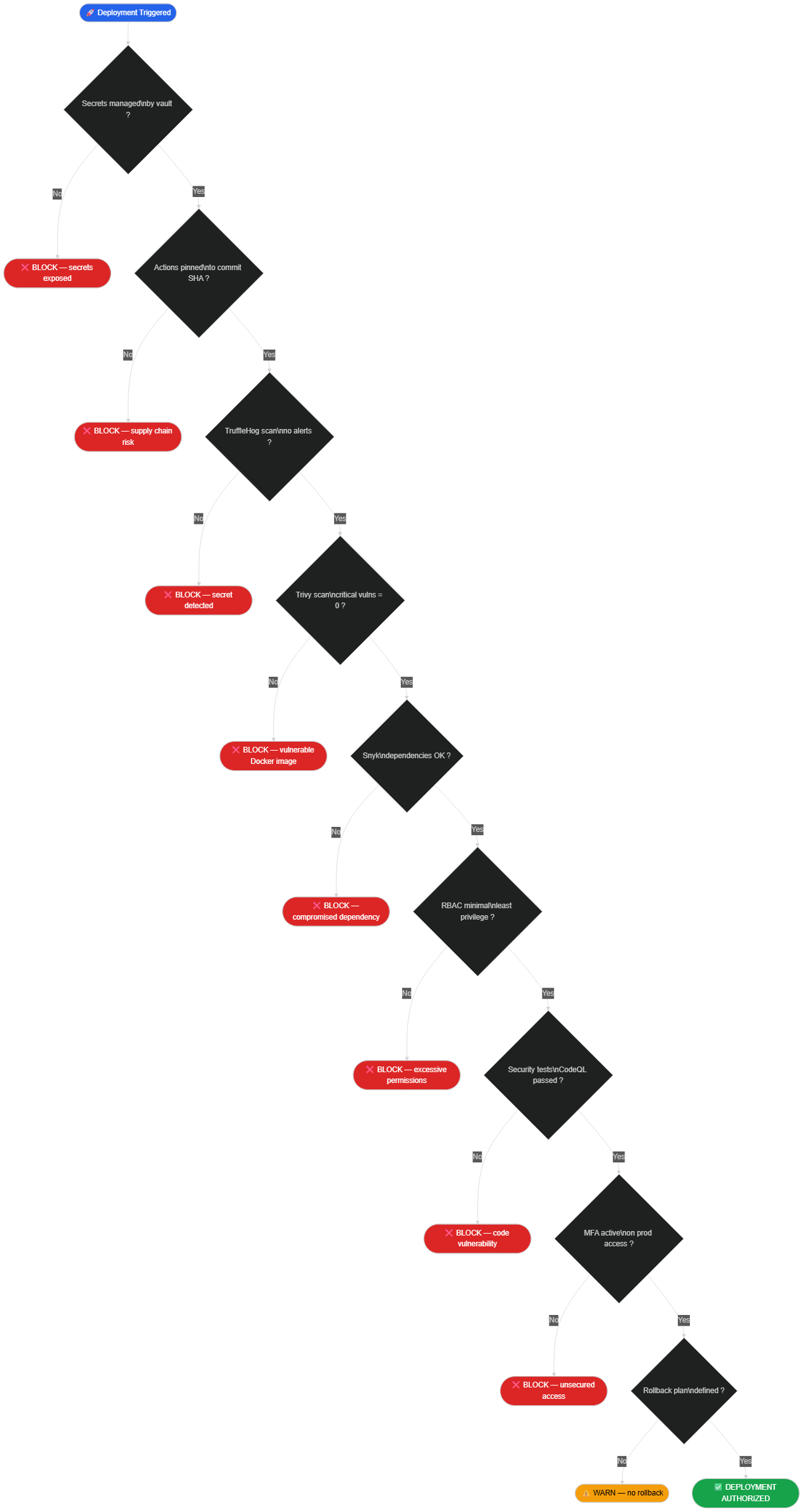 Every security gate must pass before deployment is authorized — a single block stops the pipeline
Before every production deployment, systematically verify these points. A single red item must block the deployment.
Secrets Management
- No secrets in source code — TruffleHog scan with no alerts
- All secrets managed via GitHub Secrets or a dedicated vault
- Secret rotation planned and documented
Dependencies and Images
- All GitHub Actions pinned to full commit SHAs
- Application dependencies pinned to precise versions
- Docker image scanned with Trivy — zero critical or high vulnerabilities
- Docker image from official or verified sources
Access Control
- Minimal RBAC permissions declared explicitly per job
- MFA active on all accounts with production access
- OIDC used instead of static access keys (where possible)
Tests and Quality
- Unit and integration tests: all green
- CodeQL analysis without critical vulnerabilities detected
- Snyk: dependencies without uncorrected critical or high CVE
Continuity Plan
- Previous version retained (artifact or Docker tag)
- Rollback script tested and documented
- Monitoring and alerts active on the production environment
The Professional Solution: What Changes After the Audit
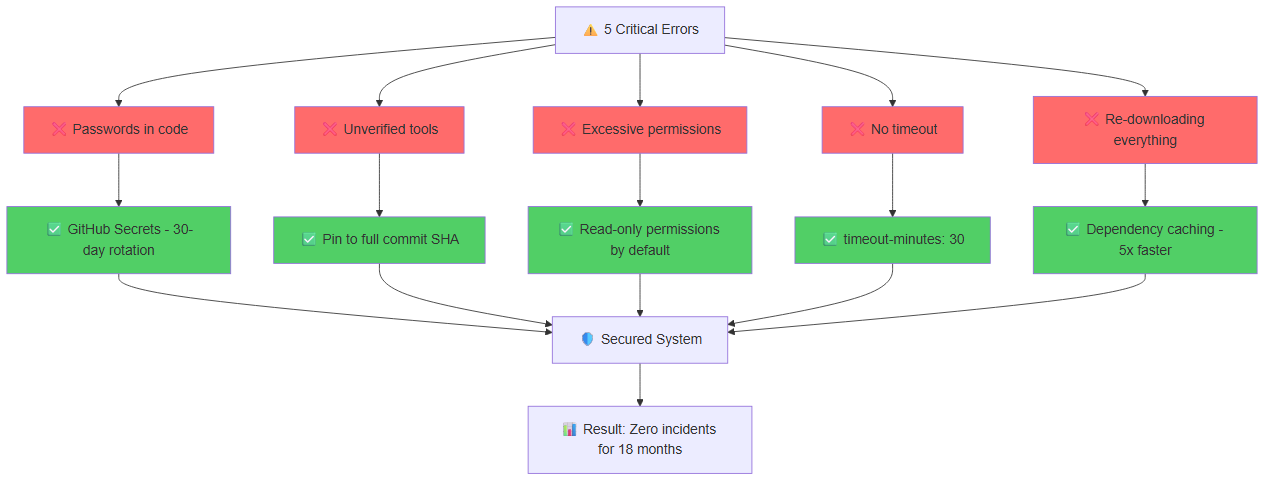 Each time bomb is neutralized by a precise solution: vault for secrets, SHA for actions, Trivy for Docker, minimal RBAC, filtered logs, automatic rollback, CodeQL, and MFA
The entrepreneur had his system audited by a security expert. Result: 23 critical security flaws identified in his automated deployment pipeline.
After complete remediation:
→ Secrets migrated to GitHub Secrets with automatic rotation scheduled every 90 days
→ All GitHub Actions pinned to full commit SHAs, automated updates via Renovate with mandatory review
→ Docker images scanned at every build via Trivy, deployment blocked on critical vulnerabilities
→ Minimal permissions declared explicitly for each job in each workflow
→ MFA mandatory for all production access and CI/CD configuration
→ Complete security pipeline: TruffleHog + Snyk + CodeQL on every push to main
→ Automatic rollback tested and documented, triggered automatically by health checks
Total cost of the incident: 15,000€ fraudulent bill + 8,000€ audit and remediation + 3 weeks partial downtime.
Cost of prevention: a few days of setup, mostly free tools.
Result since remediation: zero security incidents.
The Truth About Automated Deployment Security
The security of a CI/CD pipeline is not a one-time project — it's a continuous practice. Threats evolve, tools improve, and new vulnerabilities are discovered every week. The XZ Utils incident showed that a patient attacker can compromise even the most rigorous and well-maintained open source projects.
But the good news is that the tools exist, they're mostly free, and they can be integrated in a few hours into any existing GitHub Actions pipeline. TruffleHog, Trivy, CodeQL, Snyk — each covers a specific attack surface. Together, they form a solid protective net against the most common threats.
The difference between a secure pipeline and a vulnerable one doesn't lie in the complexity of the setup. It lies in knowing the risks and having the will to address them before they materialize. To understand how seemingly harmless resources can also expose your organization, read our analysis on free template security risks. And for a comprehensive overview of current web vulnerabilities, our article on the OWASP Top Ten 2025 is an essential starting point.
Additional Resources:
🚀 Complete Guide: Pro App Development Discover how to secure your deployment system, avoid beginner mistakes, and use AI to accelerate without sacrificing security. 👉 Access the Complete Guide
Is Your Pipeline Secure? 👇
Tags
FAQ
How do I detect exposed secrets in a Git repository?
TruffleHog is the reference tool: it scans the complete Git history for secrets (API keys, tokens, passwords) using regex patterns and entropy analysis. Install it via pip install trufflehog and run a scan with trufflehog git file://. --only-verified. Also enable GitHub's native secret scanning (Advanced Security → Secret scanning) which sends real-time alerts when a secret is committed.
What is a supply chain attack in a CI/CD pipeline?
A supply chain attack compromises a component in the software supply chain — an npm dependency, a GitHub Action, a Docker image — to inject malicious code into projects that use it. The XZ Utils incident of March 2024 is the most documented example: an attacker contributed to the project for two years before inserting a backdoor in version 5.6.0, targeting SSH connections on Linux systems.
Why pin GitHub Actions to the full commit SHA rather than a tag?
A tag like v4 is mutable: the maintainer can move it to a different commit at any time, intentionally or after an account compromise. A full SHA (40 hexadecimal characters) is immutable and identifies exactly one commit. If the action is compromised after publication, your pipeline stays protected because it references a state frozen in time.
What is the difference between Snyk and Trivy for container security?
Trivy is a lightweight open source scanner that analyzes Docker images, filesystems, Git repositories, and IaC files (Terraform, Kubernetes). Snyk is a commercial platform (with a free tier) specialized in application dependencies with automatic fix suggestions. In practice: Trivy for Docker images in CI/CD (fast, open source, zero configuration), Snyk for application dependencies with continuous tracking and developer-friendly fix PRs.
How do I implement automatic rollback in GitHub Actions?
Define a rollback step with the condition if: failure() that only runs when the deployment fails. For Kubernetes, kubectl rollout undo deployment/<name> restores the N-1 version in seconds. On classic servers, keep the artifacts of the last N versions and automate the rollback via a script triggered by health checks. Test this script regularly — an untested rollback will fail under pressure when you need it most.
Does your site book meetings — or just present you?
We open your URL together, mark the 3 leaks, and tell you whether a fix is enough or a rebuild is required.
- 30 min
- No commitment
- Action plan
William Aklamavo
Web development and automation expert, passionate about technological innovation and digital entrepreneurship.


