
N-Bed - Integrable Chatbot Widget for n8n
N-Bed drops a fully isolated, n8n-powered chatbot onto any website in minutes — Shadow DOM, 100% configurable, CDN-ready, works on WordPress, React, Vue, or plain PHP.
Discuss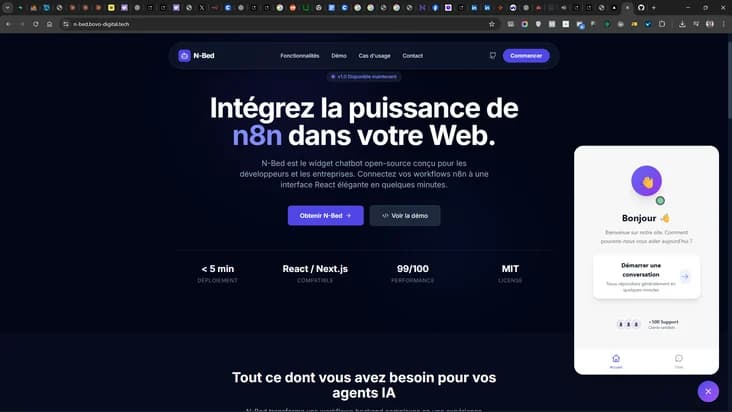
About this project
N-Bed — the drop-in chatbot widget that connects any website to an n8n workflow in minutes
Adding a conversational assistant to an existing website is one of those projects that sounds trivial and turns out to be surprisingly painful. CSS conflicts break the layout. Dependency clashes break the site's JavaScript. The CMS does not play well with modern React. The result is a half-finished chatbot that everyone hates. N-Bed was engineered specifically to end that story. It is a fully configurable, fully isolated chatbot widget that plugs into any website — WordPress, Symfony, Next.js, Vue, plain PHP, static HTML — and connects directly to an n8n workflow as the AI backend.
The widget is production-ready, fully documented, and accessible at https://n-bed.bovo-digital.tech/.
The main features
- Complete CSS isolation via Shadow DOM: the widget renders inside its own Shadow DOM, so your site's CSS can never leak in and the widget's CSS can never leak out. No more "why did my header break after I installed the chat?".
- Standalone bundle: React is included in the widget's own sandbox, so there is no requirement on the host site's stack and no conflict with other React versions running elsewhere.
- 100% configurable: every piece of the user-facing experience — texts, colors, icons, emojis, animations, positioning — is controllable from the outside.
- Compatible with every stack: works as a CDN drop-in on any website, regardless of how it was built.
- Fully responsive: desktop, tablet, and mobile, all tuned and tested.
- Customizable animations: bounce, zigzag, or none — choose what fits the site's tone.
Three integration modes
N-Bed supports three different integration modes so it fits into any team's workflow.
Mode 1 — data- attributes (Simple)* Ideal for quick integrations and CMS-heavy stacks (WordPress, Drupal, Joomla). Just drop a script tag and some HTML attributes, and the widget configures itself. No JavaScript expertise required.
Mode 2 — JavaScript object (Advanced) Full programmatic configuration via a JavaScript object exposed on window. This mode unlocks every option and is ideal for developer-led integrations or dynamic configurations driven by the host application.
Mode 3 — Mix (Recommended) The hybrid approach: data-* attributes for stable base values, JavaScript object for dynamic or advanced overrides. This is the sweet spot between simplicity and full control.
Advanced configuration surface
The widget exposes customization across many dimensions.
- Texts: title, welcome messages, input placeholders, button labels.
- Colors: full palette control — primary, secondary, background, text — for brand consistency.
- Positioning: four possible positions (bottom-right, bottom-left, top-right, top-left) to fit any layout.
- Animations: launcher animation, open and close animations, all fine-tunable.
- Behaviors: auto-open on load, conversation persistence across page navigations, automatic scroll to latest message.
- Features: reactions on messages, Markdown rendering, file attachments, timestamps.
- Custom CSS: injection of arbitrary CSS rules scoped to the widget's Shadow DOM, for teams that want complete visual control.
API and n8n integration
The widget talks to n8n via webhook, with support for every common streaming pattern so the conversational UX feels instant.
- Simple JSON responses for baseline use cases.
- SSE (Server-Sent Events) streaming, for typewriter-style responses.
- NDJSON streaming, for structured progressive payloads.
- Plain Text streaming, for maximum compatibility with any backend.
- File attachment handling via base64, so users can send documents and images straight into the workflow.
Complete documentation
The project ships with a full documentation site covering every aspect of installation and customization.
- Installation guide for both CDN and local hosting scenarios.
- Usage examples for different stacks (WordPress, Next.js, Symfony, vanilla HTML).
- Complete API reference for every configuration option.
- Advanced customization recipes for common visual and behavioral tweaks.
- Troubleshooting checklist and support contact paths.
Why a widget like N-Bed matters
For any agency or internal team building conversational AI products, a reusable, stack-agnostic widget is a force multiplier. Instead of re-implementing the front-end layer for every new client or project, the team ships N-Bed and focuses on the actual intelligence — the n8n workflow, the prompts, the integrations. The front end becomes a solved problem.
Technology stack
- React and TypeScript for the widget internals.
- Shadow DOM for full style isolation.
- n8n as the webhook-based AI backend.
- CDN-first distribution for frictionless installation.
- JavaScript public API surface for programmatic control.
Ready to automate your business? Discover our AI Automation service →
Technologies used
Similar projects
Explore other case studies in the same category.
%2Fuploads%2Fmedia%2Fpicture%2Fb773fffa-0add-4042-97b8-161f859aad9a%2Ftmp%2Fprojects%2Fb773fffa-0add-4042-97b8-161f859aad9a%2Ffrom-notion-to-image-generation-n8n-dev-05-06-2025-06-25-am-68199e9151e01.jpg&w=3840&q=75)
Orchestrated AI Image Workflow
Turn a Notion idea into 3 AI-generated image variations in seconds — a fully automated n8n workflow that eliminates manual image sourcing forever.
View project%2Fuploads%2Fmedia%2Fpicture%2Fb773fffa-0add-4042-97b8-161f859aad9a%2Ftmp%2Fprojects%2Fb773fffa-0add-4042-97b8-161f859aad9a%2Fwoocommerce-vers-pinterest-avec-plusieurs-images-6815dfd654fec.jpg&w=3840&q=75)
WooCommerce to Pinterest Automation
Drive hands-free evergreen Pinterest traffic from your WooCommerce catalog — automated pinning 24/7 with smart duplicate prevention and daily quota management.
View project%3Ano_upscale()%2Fuploads%2Fmedia%2Fpicture%2Fb773fffa-0add-4042-97b8-161f859aad9a%2Ftmp%2Fprojects%2Fb773fffa-0add-4042-97b8-161f859aad9a%2Fgeneration-de-contenu-via-google-docs-et-chatgpt-67fe345907458.jpg&w=3840&q=75)
Multi-Platform Content Automation
One Google Doc, three publishing channels — a Make.com + ChatGPT pipeline that auto-generates a blog article, Instagram post, and LinkedIn post from a single source.
View projectRelated blog articles
Dive deeper into the topic with our guides and tutorials.

Next.js 16.3: Turbopack Cuts Memory by 90%, Makes Room for AI Agents
Next.js 16.3 arrives in preview with a Turbopack that uses 90% less memory, a Rust-based React compiler, and a suite of tools built for AI coding agents. Should you migrate right now?
Read article
Next.js 16.2: What Actually Changes for Your Project in 2026
Next.js 16.2 just shipped with 87% faster dev startup, a stable Turbopack, and revolutionary debugging tools. Here's what it really changes for your project — without the jargon.
Read article
Tutorial: Deploy an AI Agent with MCP on Your Server in 20 Minutes
The Model Context Protocol (MCP) is the standard connecting AI to real-world tools. This step-by-step guide shows you how to create an MCP server, connect it to Claude, and automate complex tasks.
Read article