
Next.js 16.3: Turbopack Cuts Memory by 90%, Makes Room for AI Agents
Next.js 16.3 arrives in preview with a Turbopack that uses 90% less memory, a Rust-based React compiler, and a suite of tools built for AI coding agents. Should you migrate right now?

Next.js 16.3: Turbopack Cuts Memory by 90%, Makes Room for AI Agents
Three announcements in five days, one clear message: Next.js is no longer just optimizing for human developers. It's actively restructuring around the AI agents increasingly writing code on their behalf. Here's what actually changed, and how to decide if your project should follow.
Between June 25 and June 29, 2026, Vercel's Next.js team published the Next.js 16.3 preview in three consecutive parts: "Instant Navigations" on June 25, "AI Improvements" on June 26, and "Turbopack" on June 29. Taken in isolation, each announcement would be just another technical update. Taken together, they draw a clear direction: Next.js is becoming the first mainstream web framework to explicitly design its developer tools for AI coding agents, at the same priority level as for human developers.
For an agency like BOVO Digital, which builds Next.js sites and applications for SMBs in France and French-speaking Africa — and which uses AI agents in its own workflow — this release deserves a precise breakdown beyond a simple changelog. We already published a Next.js 16 production checklist; this article focuses specifically on what version 16.3 changes, and on the question our clients keep asking: should we migrate now?
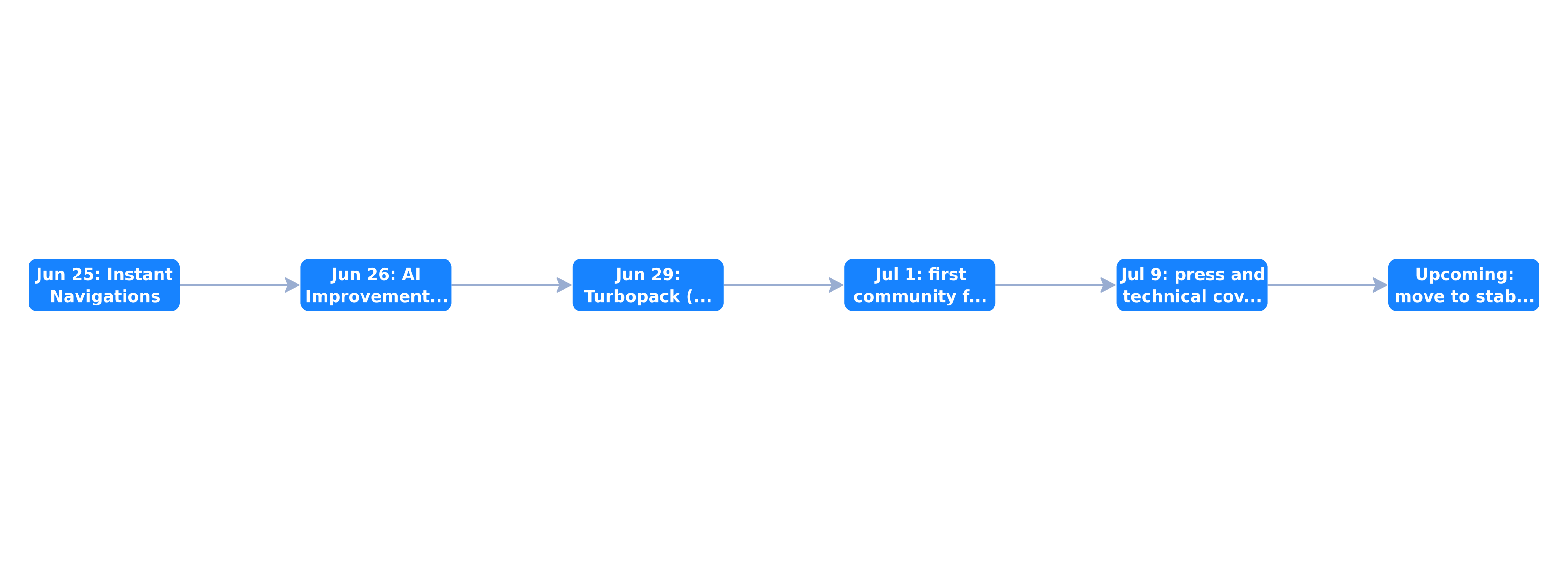 Timeline: Instant Navigations on June 25, AI Improvements on June 26, Turbopack on June 29, community feedback on July 1, press coverage on July 9, stable release upcoming
The problem Turbopack finally had to solve: memory
A growing-pain that frustrated teams
Since its launch, Turbopack, the Rust-based bundler meant to replace Webpack, suffered from a persistent flaw: its memory consumption grew without bound over the course of a long development session. Community reports mentioned development sessions consuming up to 21.5 GB of memory, forcing many teams to fall back to next dev --webpack out of frustration, despite the speed gains Turbopack otherwise brought.
The fix: filesystem-based memory eviction
Next.js 16.3 introduces a memory eviction mechanism that actively frees compiler memory during long development sessions, with zero configuration required. According to figures shared by Vercel and confirmed by several independent technical analyses, the reduction reaches up to 90% on extended sessions.
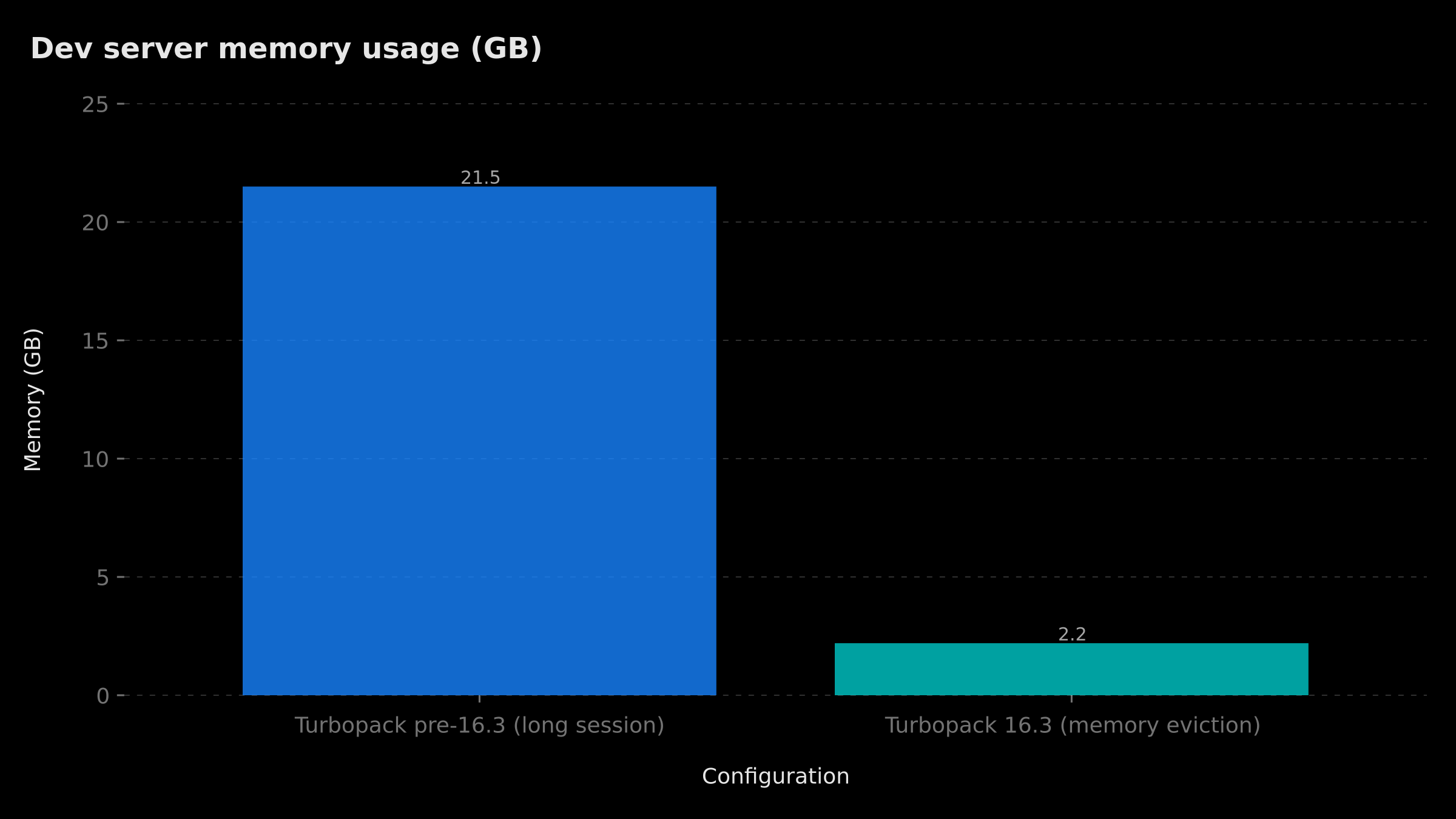 Memory usage: roughly 21.5 GB before Next.js 16.3 on a long session, versus roughly 2.2 GB with the new memory eviction mechanism
This change alone justifies testing the preview for any team that already abandoned Turbopack in development due to memory crashes. It's exactly the kind of operational fix — rather than marketing novelty — that concretely weighs on a development team's day-to-day productivity.
Persistent cache finally extends to production builds
Another long-awaited feature: Turbopack now has a filesystem-based persistent cache that also covers next build, not just development mode. For CI/CD pipelines that frequently rebuild the same codebase with incremental changes, this cache can significantly cut build time — a direct saving on CI infrastructure costs for agencies deploying multiple times a day.
The React compiler goes (partially) Rust
The React Compiler, stable since Next.js 16.0 but previously running as a Babel transform, now has an experimental Rust port integrated directly into the Turbopack pipeline. On large applications, Babel was becoming a bottleneck while Turbopack's Rust pipeline sat idle waiting. Vercel's early internal tests on its own v0 product show compilation gains of 20-50% — a figure to treat as a directional trend rather than a guarantee transferable to any codebase.
This feature is enabled with two configuration flags: reactCompiler: true and turbopackRustReactCompiler: true. It currently only works with Turbopack, not the --webpack path.
Instant Navigations: catching up to client-side SPA responsiveness
The first part of the preview, published on June 25, 2026, deserves attention before diving into AI. Instant Navigations introduces a new suite of rendering and prefetching primitives aimed at giving Next.js the perceived responsiveness of a fully client-driven single-page application (SPA), without sacrificing the benefits of server rendering.
The core mechanism is called Partial Prefetching: a reusable UI shell is prepared client-side, so clicking a link immediately shows this shell while dynamic content loads in the background, rather than displaying a generic loading state or a temporary blank screen. Combined with the layout deduplication introduced in Next.js 16 — which avoids re-downloading a layout shared across several prefetched routes — the navigation experience approaches that of a classic SPA while retaining the SEO and initial-load performance benefits of server rendering.
For an SMB running a storefront or a product catalog with many interlinked pages (product pages, blog articles, category pages), this kind of improvement has a direct impact on bounce rate and time on site — two metrics that indirectly influence SEO and conversion, without requiring any code rewrite from the development team.
The most strategic shift: Next.js designed for AI agents
AGENTS.md: documentation that tracks the installed version
The most strategically significant new feature isn't technical in the strict sense, but organizational: Next.js now embeds AGENTS.md documentation directly synchronized with the installed framework version. The goal is simple but important: prevent an AI coding agent from relying on outdated training knowledge about an API that changed between major versions — a recurring problem with generic AI assistants that don't always know exactly which framework version they're working against.
First-party Skills for multi-step tasks
Three native Skills ship with the release: next-dev-loop, next-cache-components-adoption, and next-cache-components-optimizer. These Skills are designed to guide an AI agent through multi-step workflows — for example, progressively migrating a project to Next.js 16's explicit caching model (the use cache directive), rather than letting the agent improvise an incomplete or incorrect migration.
This choice isn't incidental. Cache Components, introduced with Next.js 16, replace the implicit and often unpredictable caching behavior of previous versions with an explicit model: the developer (or the agent) annotates a component, function, or page with use cache, and the compiler automatically generates the corresponding cache keys. This is a real improvement in predictability, but migrating an existing project to this explicit model means reviewing data-fetching logic component by component — exactly the kind of repetitive, mechanical, error-prone task that the next-cache-components-adoption and next-cache-components-optimizer Skills are meant to automate reliably, with built-in guardrails rather than letting a generic agent guess the right approach.
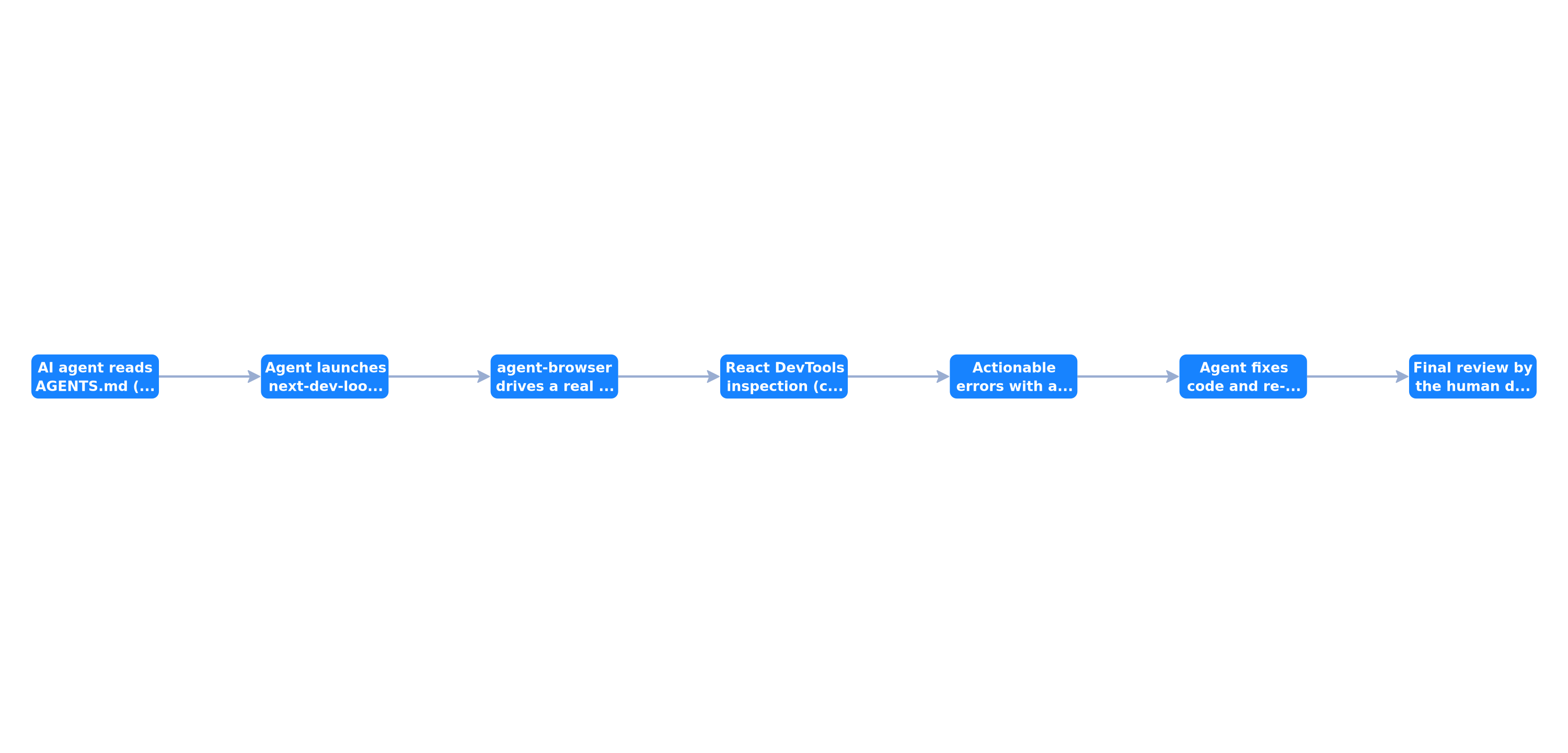 Agent loop: reading AGENTS.md, launching next-dev-loop, driving the browser via agent-browser, React DevTools inspection, actionable errors, fix and re-verification via the MCP server, final human validation
agent-browser: an AI-driven browser with React introspection
The agent-browser command-line tool, already introduced experimentally in Next.js 16.2, gains a key capability in version 0.27: React DevTools introspection, in addition to existing access to the DOM, console, network, and Web Vitals. Specifically, an AI agent can now:
- List the component tree with
react tree - Inspect a specific component with
react inspect <id> - Profile re-renders with
react renders startandstop - Identify what's blocking a render with
react suspense --only-dynamic --json
The next-dev-loop Skill automatically launches agent-browser with React DevTools enabled, making these commands available during an agent's verification phase — with no manual developer intervention needed to set up the debug environment.
Actionable errors instead of generic messages
Errors displayed in the development overlay and terminal now include labeled fix menus for "Instant Insights," with a "copy prompt" button and per-rule documentation specifically written to be read by an agent rather than a human. This last detail is telling: Vercel is now writing part of its error documentation with an explicit AI reader in mind, not just a human one.
A more focused MCP server
Next.js introduced a Model Context Protocol (MCP) server as early as version 16.0. Version 16.3 makes it more focused: new build diagnostic tools (compilation_issues for the whole project, compile_route for a single route) replace knowledge-base tools deemed less useful. The practical benefit: an AI agent that just wants to check whether the code compiles no longer needs to run a full next build, a heavy operation mid-edit — it can query the running dev server directly, which is much faster.
Smaller but meaningful: the rest of the Turbopack changelog
Beyond memory, cache, and the Rust compiler, three smaller Turbopack changes are worth a mention because they solve concrete daily friction points rather than headline features.
Native import.meta.glob support brings Vite-compatible dynamic glob imports to Turbopack, letting you import a whole directory of modules with a single pattern instead of writing (or generating) a manual list of imports. For component libraries, icon sets, or content-driven sites with many small files, this removes a category of boilerplate that teams previously worked around with custom build scripts.
Smaller per-route runtime code reduces the JavaScript shipped for each route, which compounds with Instant Navigations to improve real-world loading times, particularly on sites with many distinct routes rather than a handful of heavy ones.
A monorepo-friendly local PostCSS config resolver fixes a long-standing annoyance for teams running Next.js inside a monorepo with a shared PostCSS configuration at the root: Turbopack now resolves the correct local configuration per package instead of requiring workarounds or duplicated config files. For agencies managing several client projects inside a single monorepo — a pattern we use internally at BOVO Digital to share design system components — this specific fix alone can save real setup time on every new project.
Should you migrate your Next.js project now?
The general rule: preview isn't stable
It's worth repeating clearly: as of this article's publication, Next.js 16.3 only exists as a preview, distributed via the npm @preview tag (npm install next@preview), not as the default version. The current stable release remains Next.js 16.2. Migrating a critical production project to a preview tag, without a proper testing window, is never a decision to take lightly for a site generating revenue for a client.
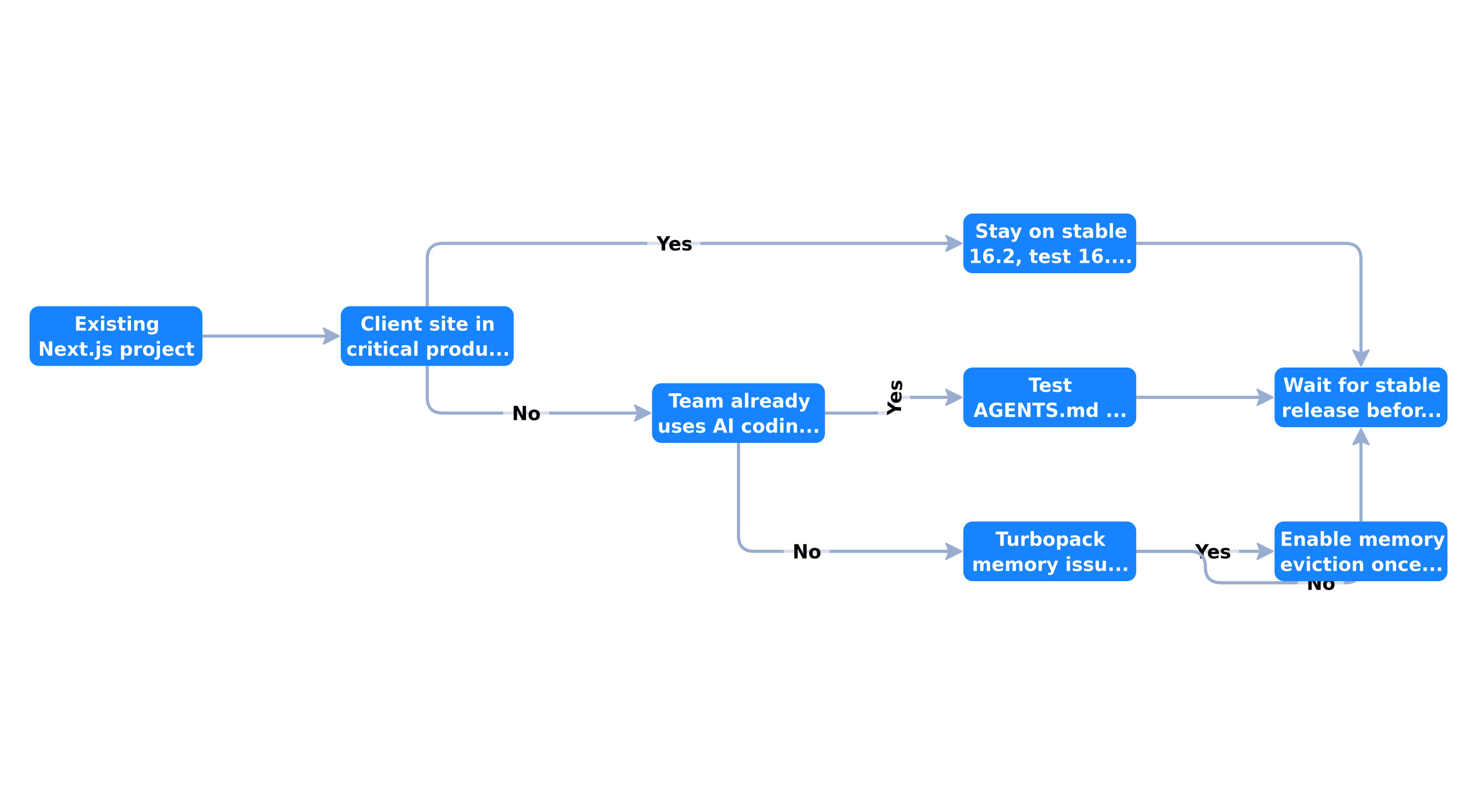 Decision tree: critical production site → stay on stable 16.2, team using AI agents → test AGENTS.md on a branch, Turbopack memory issue → enable memory eviction at stable
Our recommendation, context by context
- Client site in critical production: stay on stable Next.js 16.2. Test 16.3 in an isolated staging environment, without setting a production date before the stable release is announced.
- Team already using AI coding agents daily (Claude Code, Cursor, GitHub Copilot): testing AGENTS.md and agent-browser on a dedicated branch can bring immediate value by reducing human verification time on repetitive tasks.
- Turbopack memory issue in local development: this is probably the best reason to try the preview right now on a non-critical project, given how significant the reported gains are.
- New project with no immediate production constraint: starting directly with 16.3 features in preparation for stable is a reasonable option, provided you clearly document in the project that you depend on a preview tag.
Objectively comparing the last three versions
To put 16.3 in context, we compared the last three major/minor Next.js releases across four dimensions that genuinely matter for a production team.
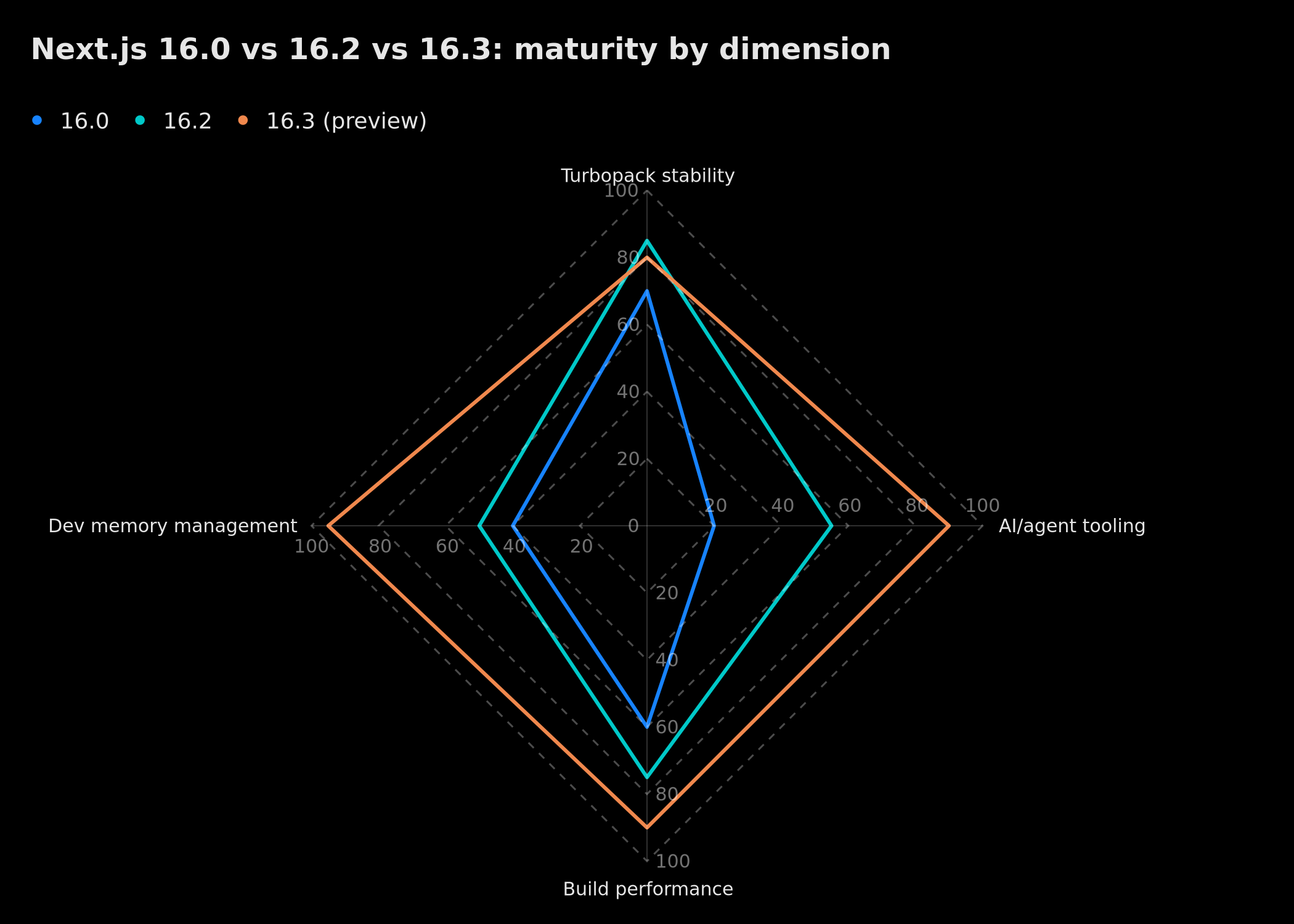 Comparison: Next.js 16.3 (preview) leads on AI agent tooling (90) and dev memory management (95), while 16.2 remains slightly more stable on pure Turbopack stability (85) than the 16.3 preview (80)
This chart illustrates a fairly classic trade-off for a preview release: 16.3 makes strong progress on AI tooling and memory management, but stays very slightly below 16.2 on pure Turbopack stability — consistent with its status as a still-experimental version.
What this means for your technical strategy in 2026
AI coding compatibility becomes a framework selection criterion
This shift at Next.js isn't isolated. We documented a similar movement at Google with agents-cli in our AI agent deployment guide, and the broader JavaScript ecosystem is moving in the same direction. For an SMB choosing its tech stack in 2026, how well a framework integrates with AI coding agents is becoming a selection criterion almost as important as raw performance or plugin ecosystem — a point we explore more broadly in our analysis of web frameworks redesigned for AI agents.
A direct impact on development cost
A 90% reduction in development memory usage isn't just a technical comfort: it directly reduces your developers' hardware needs, the frequency of work-interrupting crashes, and — for teams developing in cloud environments (Codespaces, Gitpod, dev VPS) — the direct cost of the compute instances used. For an agency billing by time or by fixed fee, every crash-free minute is a minute of recovered productivity.
Limits worth keeping in mind before generalizing
Three caveats are worth raising before broadly adopting these features. First, the React Rust compiler's compilation gains (20-50%) come from Vercel's internal tests on a single dogfooded product, v0 — not an independent benchmark suite covering a diversity of codebases; treat them as a directional trend, not a contractual promise. Second, the persistent cache for next build remains experimental: on a CI pipeline shared across multiple projects, test its behavior under cache invalidation before relying on it for a critical deployment. Third, the agent-native tooling (AGENTS.md, Skills, agent-browser) assumes your team already uses a coding agent compatible with these conventions — for a team still coding mostly without AI assistance, the immediate value of this part of the release is more limited, even though the underlying trend is worth watching.
A practical checklist for testing Next.js 16.3 safely
If you decide to test the preview, here is the procedure we apply internally before any client-project testing:
- Create a dedicated branch, never directly on
main, and install the preview withnpm install next@previewin that isolated environment. - Measure your current memory usage before migrating, over a representative development session of at least two hours, so you can objectively compare the real gain rather than relying solely on the announced 90% figure.
- Enable flags one at a time (
turbopackFileSystemCacheForBuild,reactCompiler,turbopackRustReactCompiler) rather than all at once, to precisely identify which one brings a gain and which one introduces a potential regression on your specific codebase. - Test agent-browser and AGENTS.md with the coding agent your team already uses daily, on a real task rather than a synthetic demo, to evaluate whether the announced productivity gain materializes in your context.
- Don't set a production date until Vercel publishes the stable 16.3 release, and explicitly document in your README that the project depends on a preview tag if you choose to move forward anyway.
What Next.js's competitors are watching closely
This shift toward AI agents isn't going unnoticed across the rest of the ecosystem. On Hacker News, several experimental new frameworks have emerged in recent weeks with a similar ambition to simplify the relationship between client and server — some in Rust, others in Zig — even though none yet has the adoption or plugin ecosystem of Next.js. The most interesting signal isn't head-on competition for market share, but the convergence of an entire generation of development tools toward a shared principle: shrinking the distance between a developer's (or an AI agent's) natural-language intent and the final code running in production, with verifiable guardrails at every step. It's a trend we analyze more broadly in our article on web frameworks redesigned for AI agents, which places Next.js 16.3 within this larger movement.
Our support at BOVO Digital
At BOVO Digital, we track every Next.js release cycle for our clients, systematically distinguishing what's experimental from what's production-ready. If you're planning a new web project and want a Next.js architecture designed from the start to stay performant and scalable without excessive lock-in to a single cloud vendor, our SaaS development offering systematically factors in this kind of technical trade-off. For a showcase site or a custom business application, our website expert page details our Next.js approach for French-speaking SMBs.
And if your development team already uses AI coding agents daily and wants to structure that usage professionally rather than ad hoc, our AI agent creation offering can also apply to your own internal development workflows, not just your customer-facing products. We also run a lightweight technical audit before recommending any framework upgrade to a client, covering current bundle size, build time, memory footprint, and dependency freshness — the same due-diligence checklist we described above, just applied by a second pair of eyes before a migration decision is finalized.
A note on measuring success beyond the marketing figures
One recurring mistake we see teams make when evaluating a preview release is anchoring entirely on the headline number — in this case, "90% less memory." That figure describes a specific scenario (a long-running development session on a codebase large enough to previously hit the memory ceiling). A small marketing site with a handful of routes may never have hit that ceiling in the first place, meaning the practical gain for that project could be negligible even though the number is technically accurate. Before presenting a migration recommendation to a client, translate the release notes into a metric that matters to their specific project: build time in your actual CI pipeline, memory usage on your actual development session length, or compilation time on your actual component count. This is standard due diligence, but it's easy to skip when a release is accompanied by an impressive round number.
Conclusion
Next.js 16.3 isn't a simple incremental update. It's confirmation that one of the world's most widely used web frameworks now treats AI coding agents as first-class users, on par with human developers. The 90% reduction in Turbopack's memory usage solves a real, immediate operational problem; the agent-native tooling (AGENTS.md, Skills, agent-browser) prepares for a future where a growing share of code is written, verified, and fixed by agents supervised by humans rather than typed line by line. For French-speaking SMBs and agencies, the best approach remains the same at every release cycle: test in staging, measure the real gains on your own codebase, and migrate only once the stable release ships — never giving in to the urgency that "preview" marketing can create, and always translating headline numbers into metrics that actually matter for your own codebase before making a call.
Tags
FAQ
Is Next.js 16.3 already stable?
No. As of this article's publication, Next.js 16.3 is distributed only as a preview via the npm `@preview` tag (install with `npm install next@preview`), released in three parts between June 25 and June 29, 2026: Instant Navigations, AI Improvements, and Turbopack. The current stable release remains Next.js 16.2. It's recommended not to migrate a client site in critical production until the stable release of 16.3 ships.
What's the real gain from Turbopack's memory reduction?
According to figures shared by Vercel and confirmed by several independent technical analyses, some development instances reached up to 21.5 GB of memory usage on long sessions before Next.js 16.3. The new filesystem-based memory eviction mechanism reduces this usage by up to 90% with zero configuration, eliminating the main reason teams were reverting to `next dev --webpack`.
What does the Rust React compiler actually bring?
The React Compiler, stable since Next.js 16.0 but previously running as a Babel transform, now has an experimental Rust port integrated directly into Turbopack. On large apps, Babel was becoming a bottleneck while Turbopack's Rust pipeline sat idle waiting. Vercel's early internal tests on its own v0 product show compilation gains of 20-50%, a figure to verify on your own codebase before treating it as guaranteed.
How is Next.js 16.3 designed for AI coding agents?
Next.js 16.3 introduces embedded documentation via AGENTS.md synchronized with the installed code version, three first-party Skills (next-dev-loop, next-cache-components-adoption, next-cache-components-optimizer) to guide agents through multi-step workflows, an agent-browser command-line tool that can drive a real browser and inspect React state via DevTools, and actionable error messages with a "copy prompt" button. The Next.js team's stated goal is to treat coding agents as first-class users of the framework.
Should I migrate my Next.js project to 16.3 right now?
It depends on context. For a client site in critical production, it's safer to stay on the stable 16.2 release and test 16.3 in a staging environment. If your team already uses AI coding agents daily (Claude Code, Cursor, Copilot), testing AGENTS.md and agent-browser on a dedicated branch can bring immediate value. If your main pain point is Turbopack's memory usage in development, it's reasonable to wait for the stable release, usually published a few weeks after the preview cycle ends.
Does your site book meetings — or just present you?
We open your URL together, mark the 3 leaks, and tell you whether a fix is enough or a rebuild is required.
- 30 min
- No commitment
- Action plan

Singbo Davy AGONMA
Fullstack Developer & AI Expert. n8n automation specialist, Laravel/Flutter development and AI agent integration. Master CS — IFRI.


