
Next.js 16 Production Checklist: Security, FinOps & OpenNext (2026)
After the Microsoft supply chain attack and WWDC week, here is the complete checklist to deploy Next.js 16 in production without depending on Vercel.

Next.js 16 Production Checklist: Security, FinOps & OpenNext (2026)
On June 9, 2026, a supply chain attack hits the Microsoft/GitHub ecosystem while WWDC redefines AI assistants. For SMEs deploying Next.js 16, the question is no longer "where to host?" but "how to deploy without exposing our secrets?"
The first week of June 2026 concentrated two signals that web teams can no longer ignore. On one side, the supply chain attack that compromised roughly 70 Microsoft/Azure GitHub repos reminds us that the developer workstation has become the cloud infrastructure entry point. On the other, WWDC week and the Siri AI / Gemini announcements push SMEs to accelerate deployments of web apps connected to AI APIs — often through fragile GitHub Actions pipelines and secrets shared across client projects.
If you maintain a Next.js 16 site for an SME, agency, or early-stage SaaS, this checklist gives you a concrete path: deploy to production without Vercel lock-in, while hardening your delivery chain after June 2026 incidents. No abstract theory — ordered steps, tested on real projects, with the pitfalls we see every week at BOVO Digital.
Why June 2026 Changes the Game for Next.js SMEs
Francophone SMEs adopt Next.js 16 for three recurring reasons: native SEO with Server Components, development speed with Turbopack, and easy integration with AI APIs (OpenAI, Anthropic, Azure). The problem appears at production time.
Historically, many teams discovered that advanced features — ISR, distributed middleware, revalidation cache — only worked fully on Vercel. Result: progressive lock-in, bills that explode with traffic, and dependency on proprietary services (Vercel KV, Edge Config) that are hard to migrate away from.
Meanwhile, the attack surface has widened. Developers using Cursor, Claude Code, or Copilot clone example repos, install npm packages, and export cloud tokens in their terminal. When a campaign like June 2026's injects malicious code into "official" repos, the Next.js deployment pipeline becomes an exfiltration vector — not because Next.js is vulnerable, but because production secrets flow through insufficiently protected dev machines.
The good news: the ecosystem has caught up. The Adapter API, OpenNext, and Docker adapters now enable feature-parity deployment outside Vercel. The bad news: most online guides predate these advances and do not integrate 2026 security lessons.
Overview: The 8 Production Checklist Steps
Before diving into details, here is the thread. Each step is developed in the following sections.
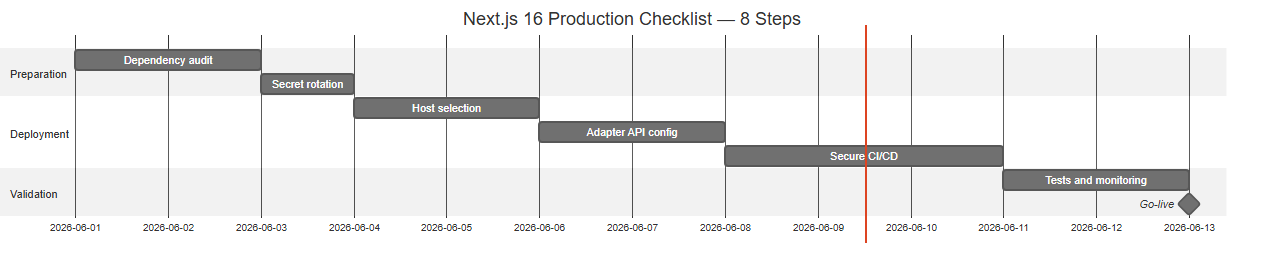 The eight checklist steps: dependency audit, secret rotation, host choice, Adapter API, secure CI/CD, tests, monitoring, go-live
| Step | Goal | Estimated time |
|---|---|---|
| 1. Dependency audit | Remove compromised or obsolete packages | 1–2 h |
| 2. Secret rotation | Invalidate potentially exposed credentials | 30 min – 2 h |
| 3. Host selection | Choose a lock-in-free target | 1–4 h |
| 4. Adapter API config | Port ISR/RSC to chosen host | 2–8 h |
| 5. Secure CI/CD pipeline | Block risky deployments | 2–4 h |
| 6. Smoke tests + rollback | Guarantee fast rollback | 1–2 h |
| 7. Monitoring | Detect post-deployment anomalies | 1–3 h |
| 8. Production go-live | Atomic deployment and documentation | 1 h |
This checklist applies whether you start from scratch or migrate from Vercel. Order matters: do not configure a new host until secrets are rotated if you cloned Microsoft/Azure repos between May and June 2026.
Step 1: Audit npm Dependencies Before Any Deployment
The June 2026 supply chain attack does not go through a Next.js 16 vulnerability. It goes through altered postinstall scripts, modified npm hooks, and un-audited transitive dependencies. Your first line of defense is a systematic audit of package-lock.json.
Run these commands on a dedicated branch, never directly on main:
npm audit --audit-level=high
npm ls --depth=0
npx lockfile-lint --path package-lock.json --allowed-hosts npm
What you are looking for concretely: packages added recently without business justification, versions that do not match the official npm registry, preinstall/postinstall scripts in dependencies that did not have them before. If you integrated Azure SDKs or Microsoft examples to connect your AI agents, compare checksums with officially tagged releases — not with unverified main.
For teams without an internal SOC, we recommend enabling Dependabot or Renovate with strict rules: no auto-merge on critical dependencies (next, react, @opennextjs/*), mandatory human review. The time bombs of automatic deployment — auto-merge without review, secrets in CI logs, unscanned Docker images — are exactly what attackers exploit in 2026.
Document every suspicious dependency removed. This log will serve in case of client audit or GDPR questions about the software supply chain.
Step 2: Immediate Secret Rotation
If you or a team member cloned a compromised Microsoft/Azure repo, or if you are unsure about your dev machine state, consider all secrets created before June 9, 2026 as potentially exposed.
Recommended revocation order:
- GitHub Personal Access Tokens — scopes
repo,workflow,read:packages. Create minimally scoped PATs per project, never a shared "god mode" PAT across clients. - Cloud tokens — Azure, OpenAI, AWS. Revoke via respective consoles, not just by removing the environment variable.
- npm/pypi keys if you publish packages.
.env.localvariables — regenerate, do not copy the old file.
On Vercel, Railway, or any other host, update environment variables after revoking on the provider side. Otherwise, the old token remains valid until natural expiration.
To automate this discipline long-term, the n8n and GitHub Actions pipeline hardening tutorial post-incident details a reproducible secure-release workflow: TruffleHog scan, block on critical vulnerabilities, Slack notification before each production release.
Step 3: Choose a Host Without Vercel Lock-In
Hosting choice depends on three criteria: required Next.js features, monthly budget, and data residency constraints. Here is the decision tree we apply at BOVO Digital for SMEs.
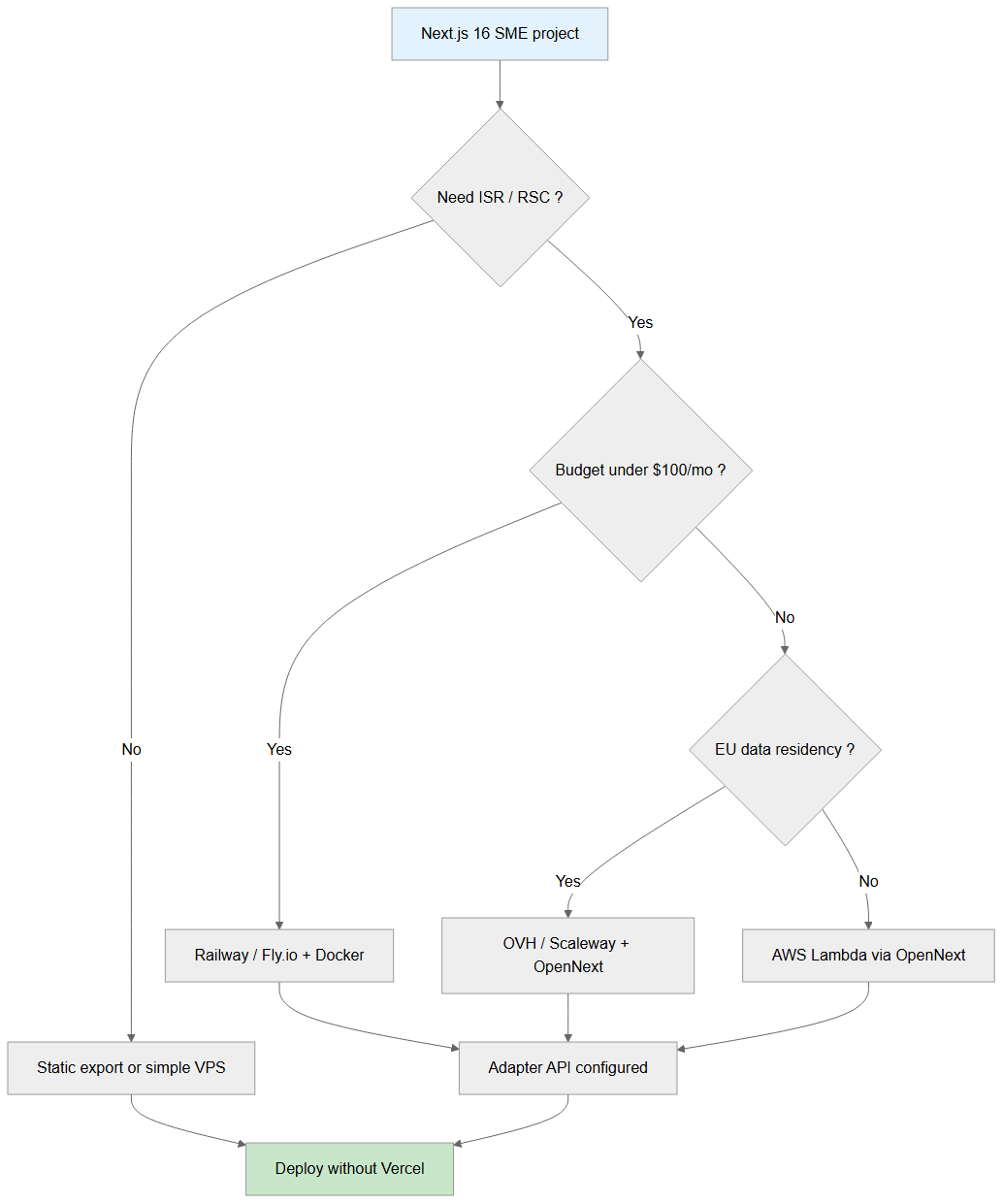 How to choose between static export, Railway, OVH/Scaleway, or AWS Lambda based on ISR, budget, and data residency
Static export or simple VPS — If your site does not use ISR, Server Actions with revalidation, or complex edge middleware, output: 'export' or a basic Node.js server on a $5–15/month OVH VPS is enough. This is the most predictable cost solution.
Railway / Fly.io + Docker — Ideal for SMEs with budget under $100/month that need moderate ISR and simple deployment. You containerize the application, keep control of the Dockerfile, and avoid unpredictable serverless invocation billing.
OVH / Scaleway + OpenNext — When EU data residency is non-negotiable (public sector clients, healthcare, finance), OpenNext on European infrastructure offers a solid compromise. Configuration requires more initial work than a Vercel click, but scale cost stays manageable.
AWS Lambda via OpenNext — For projects with traffic spikes, heavy ISR, or multi-region needs. Most flexible and most complex option. Reserve it for teams with AWS experience or a dedicated provider.
Whatever the target, avoid importing @vercel/kv, @vercel/blob, or Edge Config if you want portability. Replace with managed Redis (Upstash, ElastiCache), S3-compatible storage, or encrypted environment variables. The complete Adapter API and deployment without Vercel guide details configurations per host.
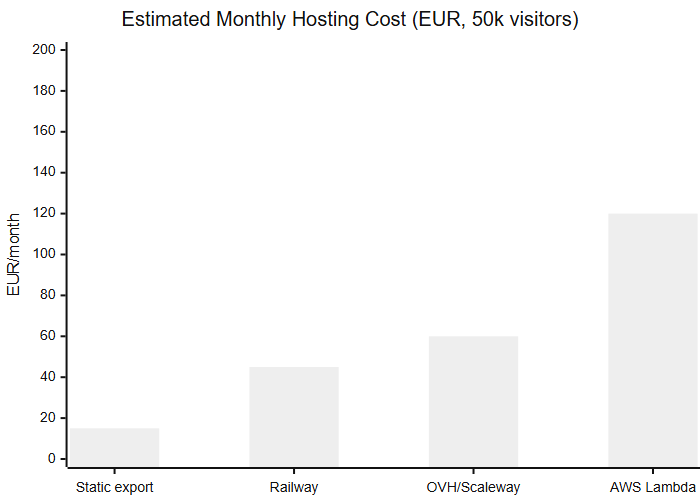 Illustrative orders of magnitude for 50,000 visitors/month: static export cheapest, AWS Lambda highest — public pricing grids June 2026
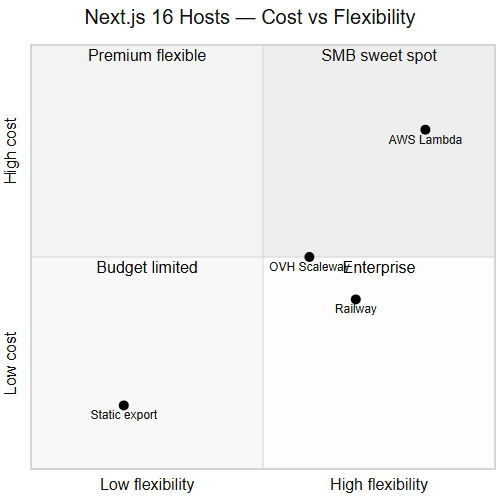 Railway and OVH/Scaleway in the SMB sweet spot; AWS Lambda in the premium flexible quadrant
Step 4: Configure Next.js 16 for Multi-Host Production
Next.js 16.2 brings concrete production changes: stabilized Turbopack, refined Partial Pre-Rendering, and a more documented Adapter API contract. Before deploying, verify that your next.config.ts does not encode Vercel-only dependencies.
Essential checkpoints:
Node.js runtime by default — Unless you have explicit edge needs (geolocation, A/B testing closest to user), prefer runtime: 'nodejs' on API routes and Server Actions. You gain npm compatibility and reduce surprises when changing hosts.
Custom cache handler — For ISR outside Vercel, configure a cacheHandler compatible with your storage (Redis, filesystem on persistent container). OpenNext provides implementations for AWS and Cloudflare; on Docker, a mounted volume or external Redis works.
Environment variables — Separate NEXT_PUBLIC_* (exposed to client) from server secrets. Never commit .env.production. Use native host secrets or a manager like Doppler / Vault for multi-client agencies.
Reproducible build — Pin Node.js version in .nvmrc or Dockerfile, and use npm ci in CI — not npm install — to guarantee identical builds between dev and production.
To understand 16.2 branch novelties before configuring, see what concretely changes in Next.js 16.2. SMEs migrating from Next.js 14 or 15 must also check breaking changes on dynamic imports and cache behavior.
Minimal portability-oriented next.config.ts example:
import type { NextConfig } from 'next';

const nextConfig: NextConfig = {
  output: 'standalone', // optimal for Docker
  experimental: {
    // Adapt per host — see OpenNext docs
  },
  images: {
    remotePatterns: [
      { protocol: 'https', hostname: 'images.unsplash.com' },
    ],
  },
};

export default nextConfig;
standalone mode produces a self-contained bundle ideal for Railway, Fly.io, or any container orchestrator. It is the starting point we use on most SME migrations.
Step 5: Secure CI/CD Pipeline
A Next.js 16 production deployment without CI/CD guardrails reintroduces supply chain risk on every git push. Here is the flow we recommend.
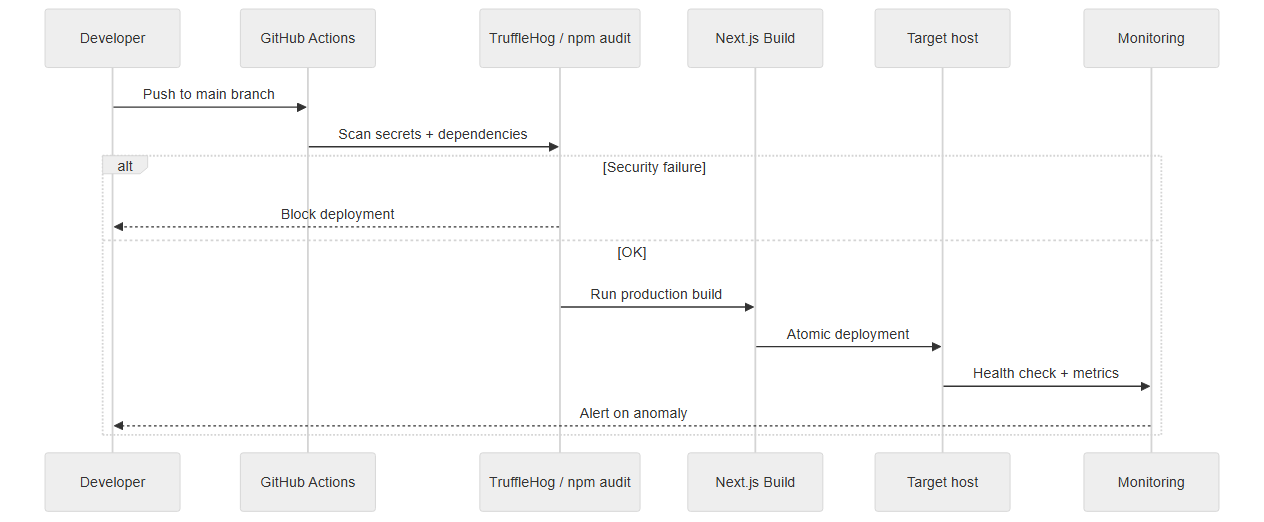 From GitHub push to atomic deployment: secret scan, build, health check, and monitoring alerts
Phase 1 — Pre-build scan. On push to main, GitHub Actions runs TruffleHog or GitLeaks on the diff, then npm audit with failure on critical vulnerabilities. No build starts if this phase fails.
Phase 2 — Reproducible build. npm ci, npm run build, unit tests and smoke tests on critical routes (/, /api/health, main dynamic pages). Store the artifact (Docker image or .next/standalone bundle) in a versioned registry.
Phase 3 — Atomic deployment. Deploy the new version alongside the old one (blue-green or rolling update). Cut the old version only after successful health check on the new one.
Phase 4 — Post-deployment monitoring. For at least 30 minutes, watch 5xx error rate, p95 latency, and exception logs. Configure an alert that triggers automatic rollback if error rate exceeds a threshold (typically 1% over 5 minutes).
Minimal GitHub Actions job example:
name: Secure Release
on:
  push:
    branches: [main]

jobs:
  security:
    runs-on: ubuntu-latest
    steps:
      - uses: actions/checkout@v4
      - run: npm ci
      - run: npm audit --audit-level=critical
      - uses: trufflesecurity/trufflehog@main
        with:
          extra_args: --only-verified

  deploy:
    needs: security
    runs-on: ubuntu-latest
    steps:
      - uses: actions/checkout@v4
      - run: npm ci && npm run build
      # Deploy to your target host
Agencies managing multiple clients can orchestrate this checklist via n8n: GitHub webhook → Slack human validation → conditional deployment. Slower than auto-deploy, but incomparably safer after June 2026 incidents.
Step 6: Smoke Tests and Rollback Strategy
Before go-live, define three mandatory test scenarios:
SSR/RSC rendering — Verify Server Components display correctly and HTML source contains expected content (not an empty shell). Production hydration errors are often linked to timezone or locale differences between build and runtime.
ISR and revalidation — Trigger manual revalidation (revalidatePath or webhook) and confirm the updated page appears within 60 seconds. On OpenNext, delays vary per cache configuration — document expected behavior.
Rollback — Simulate failure: deploy a deliberately broken version on staging, confirm rollback to version N-1 takes under 5 minutes. If this exceeds 15 minutes, your deployment strategy is not production-ready.
Always keep version N-1 accessible (tagged Docker image, versioned S3 artifact). SMEs without staging should at minimum have a preview environment per branch — Railway and Fly.io support this natively.
Step 7: Post-Incident — What to Do After the Supply Chain Attack
Even if your Next.js application was not directly compromised, the June 2026 Microsoft incident imposes a post-incident procedure if your developers handle AI tools and cloud repos.
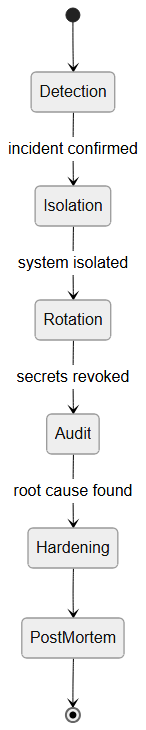 Response states: detection, isolation, rotation, audit, hardening, and post-mortem
Day 0 (immediate) — Revoke all tokens, change GitHub passwords, audit repos cloned since May 2026. No deployment until this phase is complete.
Day 1–3 — Scan dev machines (antivirus + manual search for suspicious scripts in node_modules/.hooks). Force lockfile updates. Full rebuild of Docker images from verified base image (node:22-alpine with pinned digest).
Week 1 — Redeploy from rebuilt artifacts. Enable full secure-release pipeline. Internal communication: who accesses which secrets, minimal-scope PAT policy.
Week 2+ — Documented post-mortem, quick team training on alert signals (unknown postinstall scripts, unmaintained dependencies, un-audited forked repos). Integrate checklist into new developer onboarding.
This procedure is not paranoia. It is a proportionate response to a campaign that targeted precisely the "AI developer" profile — the one who clones fast, deploys fast, and rarely audits.
Step 8: Monitoring and Continuous Maintenance
A successful Next.js 16 deployment is not an end. It is the beginning of a maintenance discipline.
Essential metrics — 5xx error rate, p95 latency on critical pages, Server Action response time, container memory consumption. On AWS Lambda, also watch cold starts that degrade user experience.
Alerts — At minimum: 5xx error > 1%, p95 latency > 3s, health check failure, SSL certificate expiring within 14 days. SMEs often forget the last point until outage.
Updates — Plan a monthly window for npm audit + minor Next.js update. CVEs on React/Next.js frameworks follow one another; the April 7, 2026 security recap already stressed patching RSC vulnerabilities quickly.
Costs — Compare monthly host bill with actual traffic monthly. An unanticipated ISR spike can double AWS or Vercel bill in 48 hours. Native cost dashboards (AWS Cost Explorer, Railway usage) should be checked at least once a month.
Docker Production Template for Railway and Fly.io
For SMEs choosing containerized deployment, a reproducible Dockerfile eliminates an entire class of "works on my machine" incidents. Here is the template we use as a starting point for Next.js 16 standalone builds:
FROM node:22-alpine AS base
WORKDIR /app

FROM base AS deps
COPY package.json package-lock.json ./
RUN npm ci --omit=dev

FROM base AS builder
COPY --from=deps /app/node_modules ./node_modules
COPY . .
ENV NEXT_TELEMETRY_DISABLED=1
RUN npm run build

FROM base AS runner
ENV NODE_ENV=production
ENV NEXT_TELEMETRY_DISABLED=1
RUN addgroup --system --gid 1001 nodejs && adduser --system --uid 1001 nextjs
COPY --from=builder /app/public ./public
COPY --from=builder --chown=nextjs:nodejs /app/.next/standalone ./
COPY --from=builder --chown=nextjs:nodejs /app/.next/static ./.next/static
USER nextjs
EXPOSE 3000
CMD ["node", "server.js"]
Why multi-stage matters: the final image contains only the standalone output — no source code, no dev dependencies. Attack surface shrinks dramatically compared to copying the entire repository into a single-layer image.
Pin the base image digest in production. Replace node:22-alpine with node:22-alpine@sha256:... after verifying the digest on Docker Hub. This prevents surprise updates during rebuilds — especially critical after supply chain incidents when you need deterministic artifacts.
On Railway, connect the Dockerfile to your GitHub repo and set environment variables in the dashboard — never in the Dockerfile itself. On Fly.io, use fly secrets set for sensitive values and keep fly.toml in version control with non-secret configuration only.
WWDC Week Implications for Your Next.js Deployment Strategy
The June 2026 WWDC recap is not directly about Next.js hosting, but it affects how SMEs architect their web stacks. Three takeaways matter for production planning:
EU exclusion from Siri AI at launch means Francophone SMEs cannot rely on Apple's on-device AI for customer-facing features in 2026. Your Next.js app must call third-party APIs (OpenAI, Anthropic, Gemini) through server-side routes — which means more secrets in your deployment pipeline, not fewer. Every API key in your CI/CD chain is now a higher-value target post-Microsoft incident.
Apple-Google Gemini partnership accelerates the expectation that web apps will offer conversational interfaces. SMEs rushing to add chat widgets to Next.js sites often skip security review on the webhook layer. Server Actions that proxy to LLM APIs must validate input server-side, rate-limit per IP, and never expose raw API keys to the client bundle.
Fragmented device requirements (iPhone 17 Pro for full Siri AI) mean your Next.js frontend must degrade gracefully on older devices. Test Server Component hydration on Safari iOS versions your clients actually use — not just the latest beta Apple demoed at WWDC.
The production checklist in this article was designed with this context: secure the pipeline first, then add AI features — not the reverse.
The Real Cost of Lock-In: Why FinOps Dictates OpenNext in 2026
Leaving Vercel is not just a technical choice to "have control", it is primarily a financial choice. With Serverless and bandwidth costs skyrocketing, many SMEs find themselves stuck with disproportionate monthly bills. Adopting OpenNext and deploying on AWS Lambda or a classic VPS often allows you to cut costs by 3 or 4. FinOps (cloud cost optimization) is now inseparable from the Next.js deployment strategy.
Practical Case: Agency SME with 3 Next.js Clients
Imagine a 4-developer agency maintaining three Next.js 16 sites for e-commerce, SaaS, and marketing clients. Target hosting budget: under $200/month total.
E-commerce client (heavy ISR, 500K page views/month) — Migration from Vercel Pro (~$350/month) to AWS Lambda + OpenNext + Redis ElastiCache. Final cost: ~$70/month. Savings: 80%. Migration effort: 3 days.
SaaS client (Server Actions, auth, AI API) — Railway in Docker standalone, preview per branch, Doppler secrets per project. Cost: $35/month. secure-release pipeline via GitHub Actions + n8n webhook for project lead validation.
Marketing client (marketing, blog, contact form) — Static export on Cloudflare Pages. Cost: $0 (free plan). CI build on main push, automatic deployment after TruffleHog scan.
Total: ~$105/month for three clients, versus over $500/month if everything were on Vercel Pro with ISR. The key: match hosting to real need, not impose the same stack everywhere.
Common Mistakes We Fix During Migration
Mistake 1 — Migrating host before rotating secrets. You move the problem, you do not solve it. Always rotation first.
Mistake 2 — Using npm install in CI. Floating versions between builds create undebuggable "it worked yesterday" situations. npm ci only.
Mistake 3 — Ignoring edge middleware. If your middleware.ts uses edge-only APIs, test it explicitly on the target. OpenNext Cloudflare and Vercel Edge do not behave identically.
Mistake 4 — No health check. A "successful" deployment serving 500s on half the routes is worse than a blocked deployment. Health check must test business routes, not just /api/health.
Mistake 5 — Secrets shared across clients. A GitHub PAT or OpenAI key shared across three projects triples compromise impact. Isolate per client, per environment.
Conclusion: Deploying Next.js 16 in Production Means Choosing Your Dependency
The week of June 9, 2026 showed two sides of the same reality: AI acceleration (WWDC, Gemini, conversational assistants) and supply chain fragility (Microsoft/GitHub). For an SME deploying Next.js 16, the answer is not to stop coding or deploying. It is to structure a reproducible process: audit, rotation, portable host, hardened CI/CD, tested rollback.
Vercel lock-in is no longer a technical inevitability in 2026. It is a business choice you can consciously accept — or avoid with OpenNext, Docker, and documented adapters. This article's checklist gives you the steps. Adapt them to your context: budget, GDPR constraints, DevOps maturity.
To go further, start with the Adapter API guide, harden your pipeline with the n8n/GitHub post-incident tutorial, and keep in mind the automatic deployment time bombs most SMEs discover too late.
Entrust Your Next.js 16 Infra to Our DevSecOps Experts
Don't have the internal expertise to carry out this migration securely? At BOVO Digital, we support SMEs and agencies in these migrations to OpenNext or managed VPS. We apply DevSecOps best practices to guarantee the security of your CI/CD pipeline, with zero regression and measurable hosting savings from the first month. The right time to structure your deployment was before June 2026. The second best time is now. Schedule an infrastructure audit.
June 2026 series — read by category
| Category | Related article |
|---|---|
| Tech news | Microsoft GitHub supply chain attack · June 2026 WWDC recap |
| Automation | 5 n8n workflows for clients |
| Entrepreneurship | Outsource or hire ops |
| Tutorials | Secure n8n + GitHub pipeline |
Tags
FAQ
Should I stop using Vercel after the June 2026 Microsoft supply chain attack?
No. The attack documented on June 9, 2026 targets locally cloned Microsoft/Azure open source repos, not Vercel directly. However, if your GitHub or Azure tokens passed through a compromised machine, revoke them before any deployment — including on Vercel. This article's checklist applies regardless of host.
Can you deploy Next.js 16 to production without Vercel in 2026?
Yes. Thanks to the Adapter API and the OpenNext ecosystem, ISR, RSC streaming, and Server Actions work on AWS Lambda, Cloudflare Workers, Railway, Fly.io, or Docker on OVH/Scaleway. Application code stays the same; only hosting configuration changes.
What is the first action after a supply chain incident?
Immediately revoke all GitHub Personal Access Tokens, cloud tokens (Azure, OpenAI), and npm keys created before the disclosure date. Then audit cloned repos, update lockfiles, and redeploy from a clean rebuild artifact — without reusing potentially exposed secrets.
How much does Next.js 16 hosting outside Vercel cost for an SME?
For a marketing site or light SaaS (50,000 to 200,000 page views/month), Railway or Fly.io in Docker runs around $20–80/month. AWS Lambda via OpenNext can drop below $30/month with moderate traffic. Vercel Pro stays competitive for small teams, but heavy ISR can multiply the bill by five to ten.
How do you secure a Next.js CI/CD pipeline without a DevSecOps team?
Integrate TruffleHog or GitLeaks in GitHub Actions, block deployments when npm audit reports critical vulnerabilities, and orchestrate a release checklist with n8n. Our dedicated tutorial details a reproducible post-supply-chain incident workflow.
Does Next.js 16.2 change anything in this checklist?
Yes. Version 16.2 stabilizes Turbopack in production, improves Partial Pre-Rendering, and strengthens the Adapter API contract. SMEs migrating now benefit from a more mature multi-host deployment ecosystem than in early 2025.
Does your site book meetings — or just present you?
We open your URL together, mark the 3 leaks, and tell you whether a fix is enough or a rebuild is required.
- 30 min
- No commitment
- Action plan

William Aklamavo
Web development and automation expert, passionate about technological innovation and digital entrepreneurship.


