
n8n Workflows for Business: the 5 SMEs Ask Us For
Leads, follow-ups, WhatsApp, content and catalog: the 5 n8n workflows SMEs ask us for, with connected tools, timelines and a budget from €2,000 to €5,000.

Updated

n8n Workflows for Business: the 5 SMEs Ask Us For
An SME does not need 50 automations. It needs the two or three that stop it losing customers.
Looking for n8n workflows for business that actually get used, not a library of templates to import? Here are the five SMEs ask us for most often: lead capture, follow-ups, WhatsApp, content and an e-commerce catalog. For each one you get the starting problem, what the workflow does, the connected tools, the timeline and the matching offer.
This guide is based on the automation projects in our public portfolio. BOVO Digital has delivered 118 projects and holds 82 five-star reviews on ComeUp. We do not publish invented gains: when a number appears, it comes from a documented project.
One useful point: these five workflows are not a pack. Most of our clients start with one, then add the next once the first one is running.
Which n8n workflows should a business automate first?
The right question is not "which tool?". It is "where are we already losing time or sales?". A workflow that answers a visible loss pays for itself. A workflow built "because it is possible" often ends up switched off.
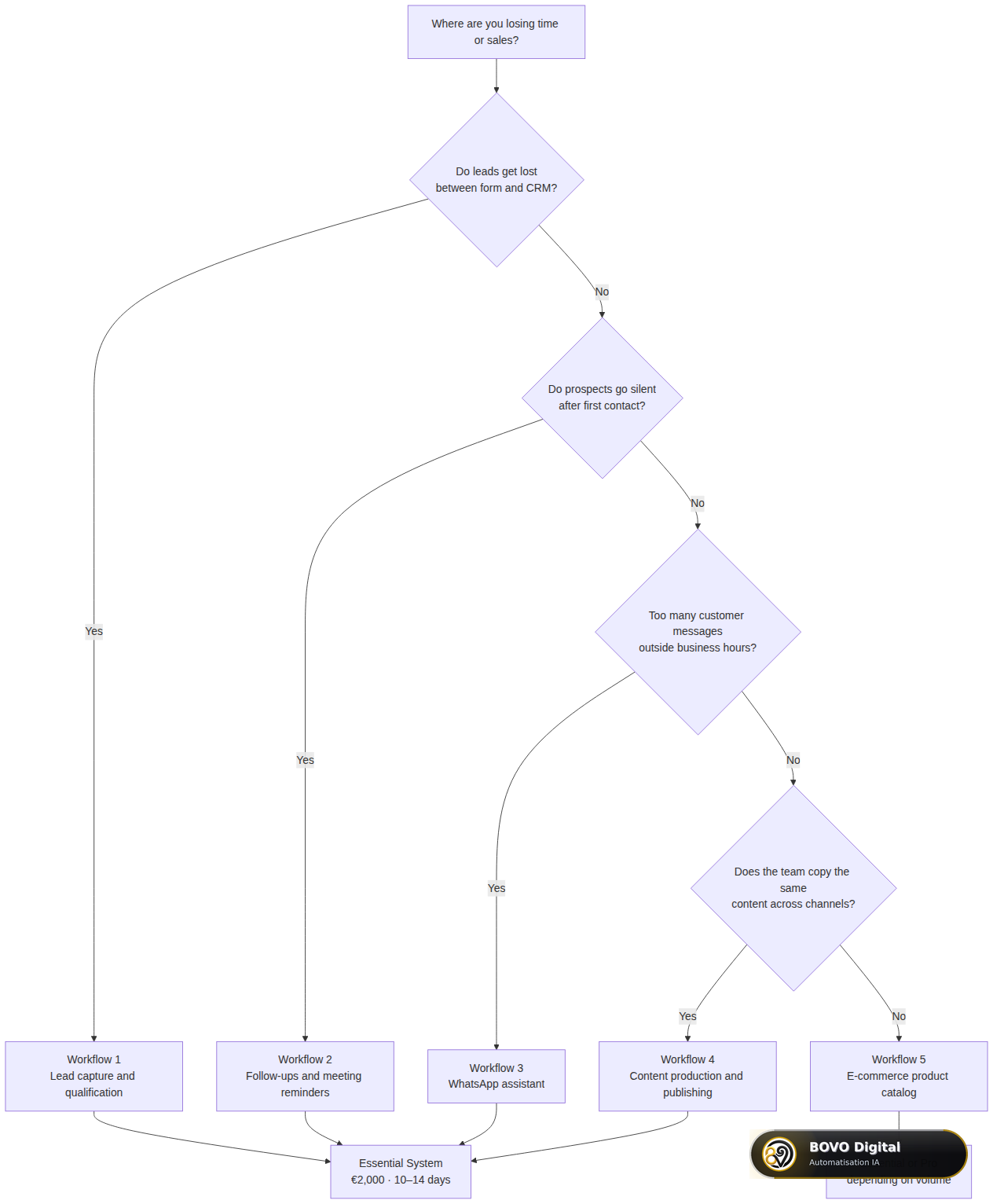 Start from the loss you can see: each answer leads to one of the five workflows and a starting offer
Three simple signs to decide:
- Your salespeople say "that lead never reached the CRM": start with workflow 1.
- Prospects fill in the form and then disappear: look at workflow 2.
- Your team retypes the same information by hand every week: that is workflow 4 or workflow 5.
Workflow 1: how do you capture and qualify leads automatically?
The client problem. Requests arrive through a form, a landing page or an ad. Someone has to copy them into the CRM. Duplicates pile up, hot leads wait, some get lost.
What the workflow does. It receives the form through a webhook (a URL that starts the workflow on every submission). It deduplicates the contact, scores it (hot, warm, cold), creates or updates the CRM record, then sends a first message to the prospect. The salesperson gets an alert when a hot lead arrives.
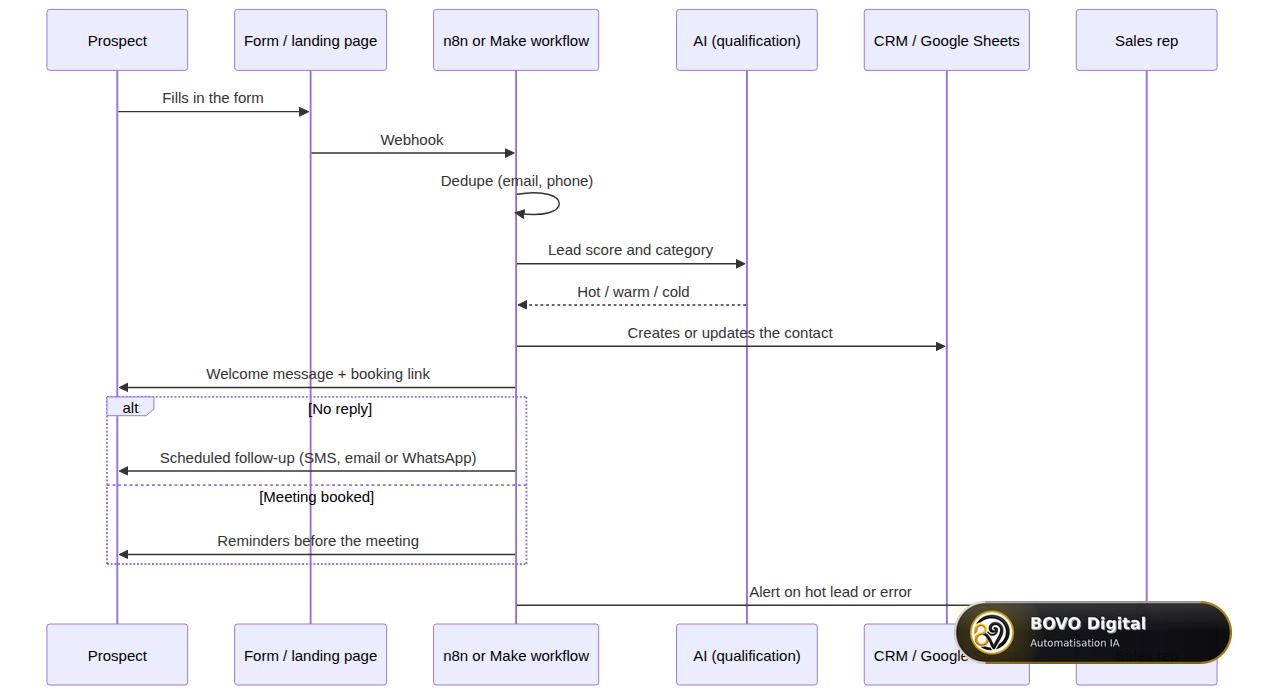 From the form to the CRM: deduplication, AI qualification, first message, follow-up or reminders, alert to sales
Tools connected in our projects. Systeme.io, ActiveCampaign, Google Sheets, Calendly, Twilio (SMS and WhatsApp), OpenAI for qualification, Telegram for internal alerts.
A delivered example. A multi-channel funnel with AI qualification: capture on Systeme.io, qualification with GPT, follow-ups on WhatsApp, SMS and email, Calendly booking handled automatically.
Timeline and offer. A simple capture into the CRM, with an alert and error handling, fits the Essential System (€2,000, 10 to 14 days). A full funnel on three channels, with AI qualification and a calendar, is more like 5 workflows or more: that is the scope of the Pro System (€3,500, 3 to 4 weeks).
What we always check. The same form submitted twice must not create two contacts. Consent must be stored before the record enters the CRM. And if the CRM API does not answer, someone must be told.
Workflow 2: how do you automate prospect follow-ups and meeting reminders?
The client problem. The lead is in the CRM, but nobody follows up at the right time. Or the meeting is booked, and the prospect does not show up.
What the workflow does. It watches the status of each contact and triggers a follow-up when nothing happens. In our documented projects, the cadences were set with the client:
- silent leads: follow-up at 6 h then 12 h, with a Telegram alert to the team;
- Calendly link not clicked: follow-up at 24 h then 48 h, then escalation to sales;
- meeting booked: reminders 24 h, 6 h and 15 minutes before, by SMS and WhatsApp.
These delays are not a standard. They depend on your sales cycle: a follow-up at 6 hours makes sense for a webinar, not for an industrial quote.
Connected tools. Make.com or n8n, Google Sheets, Calendly, Twilio, Telegram.
Timeline and offer. Follow-ups are rarely delivered alone. They complete workflow 1 in the same Essential System batch: capture, follow-up and reminders make three workflows.
The mistake we often see. A follow-up sent to a prospect who has already replied. The workflow must check the status just before each send, not only at the start.
Workflow 3: can WhatsApp Business be automated with n8n?
Yes. In our experience, this is a frequent request from our French-speaking African clients, for whom WhatsApp is often the first contact channel.
The client problem. Messages arrive in the evening and at the weekend. The same questions come back (price, hours, availability). Prospects wait for a reply and go elsewhere.
What the workflow does. Depending on the need: it sorts incoming replies by intent (interest, objection, question) and starts the right scenario; it sends personalised campaigns to a list that has opted in; or it feeds an AI assistant that replies around the clock.
Delivered examples. An AI WhatsApp assistant available 24/7 that qualifies prospects, books meetings and answers frequent questions. A personalised WhatsApp campaign agent with Gemini, tracking in Google Sheets and a Telegram report.
Connected tools. WhatsApp Business API, Twilio or Evolution API, Google Sheets, GPT-4 or Gemini, Telegram.
Timeline and offer. Routing incoming messages fits the Essential System. If you want a real conversational assistant, that is a chatbot project (Essential Chatbot at €2,000, 2 to 3 weeks): see our pages on WhatsApp Business automation and the AI chatbot agency.
The non-negotiable condition. Opt-in. Meta's WhatsApp Business policy requires the contact to have agreed to receive your messages. Our guide on WhatsApp opt-in and the CNIL explains how to collect it.
Workflow 4: how do you automate content creation and distribution?
This is the family most represented in our automation projects.
The client problem. The team writes an article, then rewrites it for LinkedIn, then for Instagram, then lays it out on WordPress. The same content is reworked four times.
What the workflow does. It starts from a single source (Google Doc, Notion or Airtable) and produces the variants for each channel with AI. It can publish directly or drop drafts for approval.
Delivered examples.
- A Google Doc turned into 3 channels: a blog post, an Instagram post and a LinkedIn post in under 2 minutes (Make.com + ChatGPT).
- A daily WordPress publish at 8 a.m., from Airtable, with Divi layout and Yoast SEO.
- An n8n workflow that generates three visuals from an idea noted in Notion (Gemini + Together AI).
- An n8n engine that writes and publishes articles through the CMS API.
Timeline and offer. One source-to-channels chain fits the Essential System. Several chains (blog, social, visuals, newsletter) with a human review move to the Pro System.
Our advice. Keep a human review step at the start. Content published automatically with a mistake stays online until someone sees it.
Workflow 5: how do you automate an e-commerce catalog?
The client problem. Hundreds or thousands of products to create, translate, optimise for SEO or push to other channels. By hand, that is weeks of data entry.
What the workflow does. It reads the source catalog (supplier file, WooCommerce, Shopify or PrestaShop API), transforms the data (price, margin, translation, SEO copy) and pushes it to the store or an external channel.
Delivered examples.
- WooCommerce to Pinterest: 75 pins a day, with no duplicates thanks to a Data Store (Make.com).
- Import of 1,400 references into PrestaShop, with translation and a 45% margin applied automatically.
- SEO optimisation of PrestaShop product pages with n8n, GPT and Gemini.
- Import of more than 10,000 product records into Shopify, with API rate-limit handling.
For large volumes, we sometimes complete the workflow with a Python script. That is more reliable than a visual workflow for thousands of rows.
Timeline and offer. A simple sync fits the Essential System. A mass import with translation, SEO and multi-channel distribution is Pro System scope. A connection to an ERP or several stores is Enterprise System scope.
The 5 workflows at a glance
| Workflow | Problem solved | Frequent tools | Starting offer | Published timeline |
|---|---|---|---|---|
| 1. Lead capture and qualification | Lost or duplicate leads | Form, CRM, OpenAI, Telegram | Essential System | 10–14 days |
| 2. Follow-ups and reminders | Prospects who disappear, missed meetings | Calendly, Twilio, Google Sheets | Essential System (with 1) | 10–14 days |
| 3. WhatsApp | Unanswered messages outside hours | WhatsApp API, Twilio, GPT | Essential System | 10–14 days |
| 4. Content | The same content rewritten for every channel | Google Docs, Notion, WordPress, AI | Essential or Pro | 10–14 days to 4 weeks |
| 5. E-commerce catalog | Manual product entry | WooCommerce, Shopify, PrestaShop | Essential, Pro or Enterprise | 10 days to 6 weeks |
How much does an agency-built n8n workflow cost?
We do not sell a workflow by the unit. A standalone workflow, with no alert and no documentation, breaks at the first API change. Our automation offers are therefore systems:
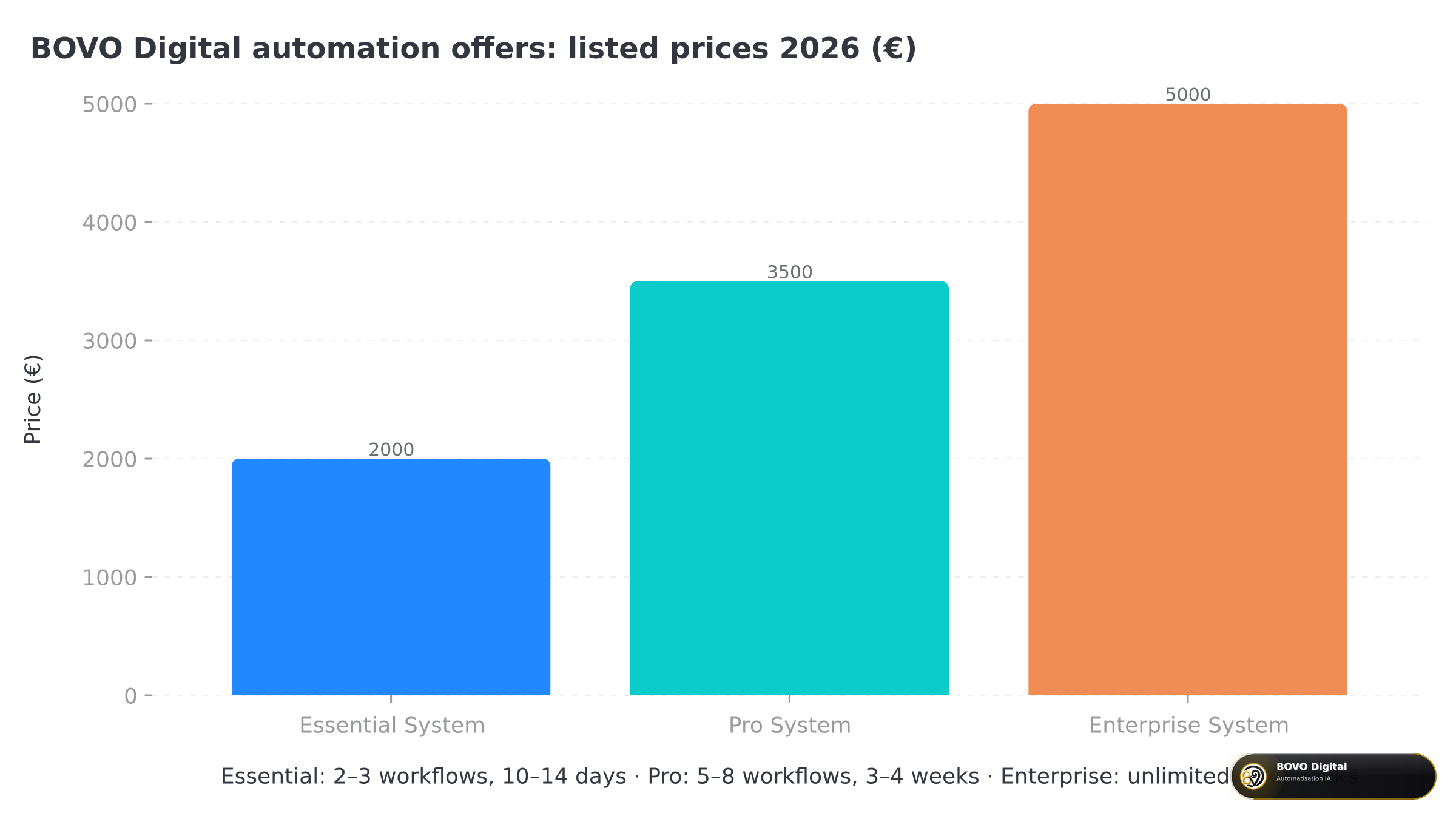 Essential System €2,000, Pro System €3,500, Enterprise System €5,000: the price follows the number of workflows and the level of reliability
| Offer | Price | Workflows | Timeline | Support included |
|---|---|---|---|---|
| Essential System | €2,000 | 2 to 3 | 10–14 days | 30 days |
| Pro System | €3,500 | 5 to 8 | 3–4 weeks | 60 days |
| Enterprise System | €5,000 | unlimited, custom | 4–6 weeks | 90 days |
What moves the final price: the number of tools to connect, whether a proper API exists, the data volume and the reliability you expect. An import of 10,000 products or a three-channel funnel can exceed an offer's scope. We say so during the audit, before we start.
To compare with market prices, our n8n and Make automation pricing guide details the usual ranges.
What does an agency workflow delivery include?
This is the point free template libraries do not cover. An imported template shows the happy path. A delivered workflow has to handle what happens when something breaks.
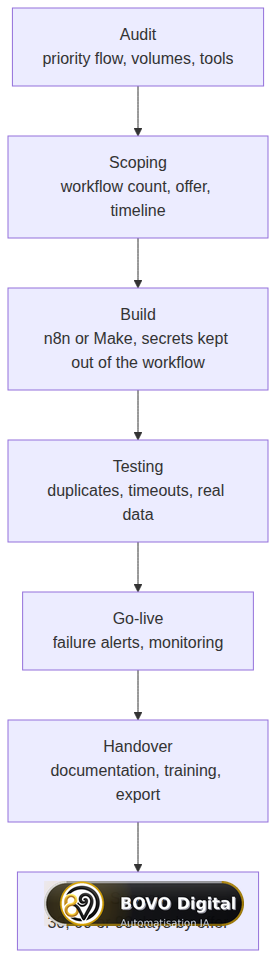 From audit to support: each workflow is tested on real data, monitored and documented before handover
In practice, each offer includes:
- documented architecture: you know what each workflow does;
- error handling: automatic retry, and on the Pro System a failed-item queue with escalation;
- alerts: email on Essential, email, Slack or SMS on Pro;
- an execution dashboard;
- training for your team and full documentation;
- a support period of 30, 60 or 90 days.
On security, we apply three rules: API keys stay out of the exported workflow, webhooks are protected, and the client keeps an export of their workflows. n8n also provides a node dedicated to error workflows (Error Trigger, official n8n documentation) that we use to centralise alerts.
n8n or Make: which tool for these workflows?
Both. In our portfolio, a good share of lead and follow-up projects run on Make.com, and several content and catalog projects run on n8n.
- n8n fits if you want to host your data yourself, if you run many executions or if you need custom code.
- Make fits if your team wants to edit scenarios themselves with a very visual interface.
We decide during the audit. To go further: our n8n vs Make comparison and our n8n automation guide for SMEs.
Which mistakes should you avoid when automating an SME?
Here is what we see most often when a client arrives with existing workflows:
- Automating everything at once. Five workflows launched together, none of them really stable. Start with one.
- No failure alert. The workflow stops on a Friday, and nobody sees it until Tuesday.
- Duplicates in the CRM. The same lead created three times because the form was submitted three times.
- API keys inside a shared workflow. An export sent to a vendor contains your access.
- No internal owner. Nobody knows who can edit the workflow when a tool changes.
Should you use an agency or build the workflows yourself?
If the need is simple and someone on the team has time, n8n's free templates are a good starting point. If the workflow touches your sales or your customer data, an n8n automation agency saves you the time of the mistakes above: error handling, security, documentation and support are included.
To compare providers, our guide on how to choose an n8n agency lists the questions to ask before you sign.
You already know which workflow is costing you time? Book a free 30-minute review. We identify the priority workflow, the right tool and the matching offer, from the Essential System at €2,000 to the Enterprise System. Prefer to write? Contact us.
Methodology: how we built this guide
This guide is based on the automation projects published in our portfolio, grouped by family (leads, follow-ups, WhatsApp, content, catalog). Sample limits: one project can combine several families, and the WhatsApp and catalog families have fewer projects than content and leads. The cadences and volumes cited are those of the documented projects, not averages. Prices and timelines are those of our offers as published in October 2026.
Conclusion
The five n8n workflows SMEs ask us for most are lead capture, follow-ups, WhatsApp, content and the e-commerce catalog. None of them needs to be launched at the same time as the others. The right starting point is the one that matches a loss you can already see.
Next step: name that loss, then book your free review or see our n8n automation agency.
Tags
FAQ
Which n8n workflows should an SME automate first?
The one that is already losing sales or hours every week. For most SMEs we work with, that is lead capture into the CRM or prospect follow-ups. They are easy to measure and they fit a first batch of 2 to 3 workflows (Essential System).
How much does an agency-built n8n workflow cost?
At BOVO Digital we do not sell a standalone workflow. We sell a system: Essential System €2,000 (2 to 3 workflows), Pro System €3,500 (5 to 8 workflows), Enterprise System €5,000 (unlimited workflows, custom integrations). The final price is set after the audit, based on tools and volume.
How long does it take to deliver an n8n workflow?
The published timelines are 10 to 14 days for the Essential System, 3 to 4 weeks for the Pro System and 4 to 6 weeks for the Enterprise System. The delay depends mostly on access to the tools (APIs, accounts) and on the quality of the starting data.
n8n or Make: which should I use to automate my business?
Both work for these five workflows. n8n is a good fit if you want to host your data yourself or run a high number of executions. Make is more visual and faster to learn. We choose the tool during the audit, not before.
Can WhatsApp Business be automated with n8n?
Yes, through the WhatsApp Business API or a provider such as Twilio. The non-negotiable condition is opt-in: the contact must have agreed to receive your messages. Without consent, we do not build the workflow.
Who maintains the workflows after delivery?
Each offer includes documentation, training and a support period: 30 days (Essential), 60 days (Pro) or 90 days (Enterprise). After that, your team can edit the workflows or leave maintenance with us.
We scope one workflow — not a generic demo
You describe a repeated task. We tell you what n8n would ship, the timeline, and what stays out of scope.
- 30 min
- 1 scoped workflow
- No commitment
William Aklamavo
Web development and automation expert, passionate about technological innovation and digital entrepreneurship.


