
Make Next-Gen AI Agents: The Reasoning Panel Explained
Make launches next-gen AI agents with a revolutionary Reasoning Panel. Explore the technical workings, real-world use cases, and a full Make vs n8n comparison for 2026.

Updated

Make Next-Gen AI Agents: The Reasoning Panel Explained
Intelligent automation enters a new era: Make AI agents can now reason out loud. Here is what that concretely changes for your workflows.
Make (formerly Integromat) took a decisive step forward in early 2026 with the launch of its Make Next-Gen AI Agents: a generation of automations powered by language models that no longer simply execute pre-programmed tasks, but reason their way toward a goal. At the heart of this innovation lies the Reasoning Panel, an interface that displays the agent's thought process in real-time. For business teams, developers, and automation consultants alike, this shift is not cosmetic — it fundamentally changes how complex workflows are designed, debugged, and trusted.
In this article, we break down the technical workings of the Reasoning Panel and Chat In-Canvas, compare Make and n8n in depth for 2026, and walk you through a step-by-step guide to creating your first Make AI agent — complete with concrete use cases drawn from real-world scenarios.
What Is an AI Agent in 2026?
Before diving into Make's specifics, it is important to clarify what "AI agent" actually means in 2026. The term is overused and applied to very different realities across platforms. In the context of Make and no-code automation tools, an AI agent refers to a system that:
- Receives a goal expressed in plain language (for example: "qualify this lead and create a HubSpot task if the score exceeds 70").
- Breaks that goal into steps using a language model as an orchestrator.
- Selects and uses tools (Make modules, HTTP APIs, third-party services) to gather the information it needs.
- Adapts its strategy based on intermediate results, without following a pre-programmed decision tree.
- Produces a result accompanied by a complete reasoning trace.
This represents a fundamental break from classical automation. A traditional Make scenario is deterministic: you define exactly what happens at each step. An AI agent is probabilistic and adaptive: you define the goal, and the agent decides how to achieve it. This flexibility is valuable for use cases where situations vary — a customer email that can contain ten different types of requests, a lead that can come from ten sources with heterogeneous data, a report that must be adapted based on that week's business context.
The trade-off of this flexibility is opacity. How do you know what the agent is actually doing? How do you debug unexpected behavior? That is precisely the problem the Reasoning Panel was built to solve.
The Reasoning Panel: A Window into the Agent's Brain
The Reasoning Panel is the most innovative feature of Make Next-Gen AI Agents. It is a visual interface, built directly into the Make editor, that displays the agent's "thoughts" in real-time during execution. Concretely, you can see:
- Initial context analysis: the agent begins by evaluating the received goal and available data, identifying what it knows and what it is missing.
- Tool selection reasoning: before each action, the agent explains why it is choosing one tool over another. "I need to check this contact's email history — I'll use the Gmail module."
- Result interpretation: after each tool call, the agent analyzes what it received and how that shapes its next decision.
- Final decision: the agent justifies its result by summarizing the reasoning chain that led it there.
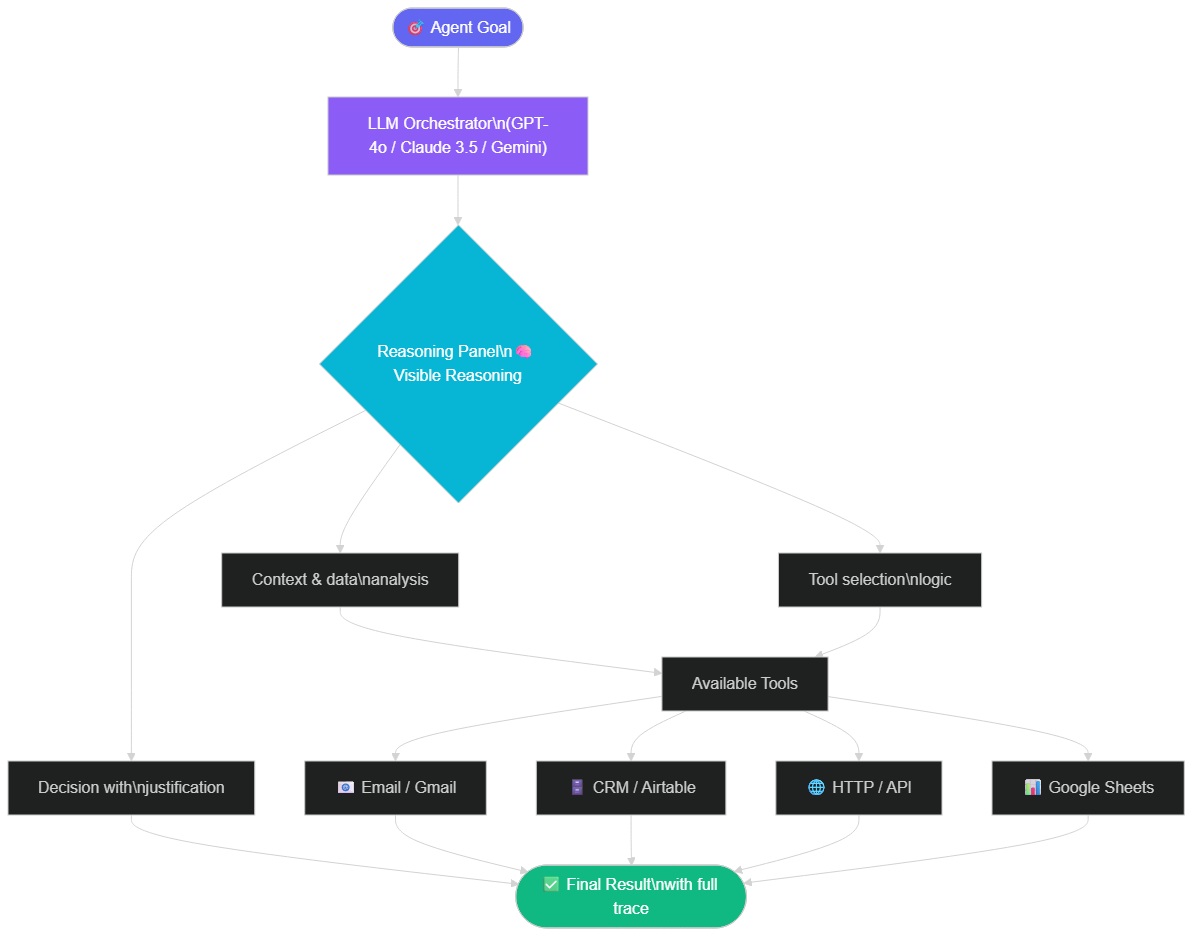 The Make AI agent orchestrates LLM, tools, and Reasoning Panel to produce transparent and auditable results
Why This Is a Major Advancement
Before the Reasoning Panel, AI-powered automations on Make resembled black boxes. You sent an input, received an output, but if the result was incorrect or unexpected, pinpointing the cause was laborious — was the prompt at fault? The input data? The module configuration? The branching logic?
With the Reasoning Panel, debugging becomes a conversation. You see exactly when the agent made a poor decision, and why. You can intervene, refine the prompt or tool configuration, and relaunch execution with precise knowledge of what you changed.
This transparency also has a direct impact on stakeholder confidence. In a professional context, it is far easier to convince a sales director to adopt an automated lead qualification system when you can show them, for each lead, the complete reasoning that led to the score. The AI is no longer opaque magic — it becomes a collaborator whose work you can follow.
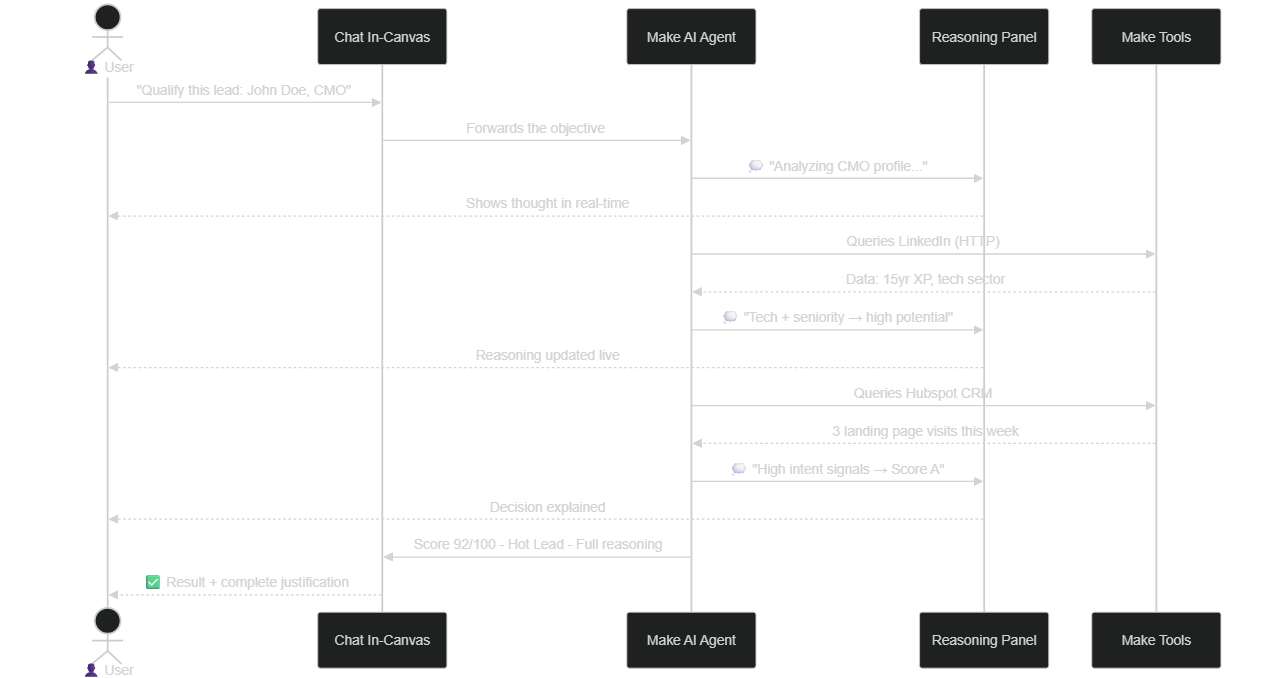 Full sequence: from a plain-language goal to a final decision with visible justification in the Reasoning Panel
The Underlying ReAct Model
From a technical standpoint, the Reasoning Panel is the visible expression of a reasoning cycle called ReAct (Reasoning + Acting), popularized in LLM agent research. This cycle alternates between a reflection phase (the LLM analyzes the situation and plans the next action) and an acting phase (the agent calls a tool and observes the result). This cycle repeats until the goal is achieved or a stopping condition is met. The Reasoning Panel exposes this iterative cycle in a readable, chronological format, making it as much a pedagogical tool as an operational one.
Chat In-Canvas: Controlling the Agent in Plain Language
Chat In-Canvas is the second major innovation of Make Next-Gen AI Agents. It is a dialogue interface built directly into the Make scenario editor, allowing you to interact with your agent — and with your scenario itself — in plain language.
The Chat In-Canvas serves multiple use cases:
Scenario creation through dialogue. Instead of drag-and-dropping modules and manually configuring each parameter, you simply describe what you want: "Create an agent that receives a Gmail email, extracts the sender's name and email, checks whether they exist in HubSpot, and if not, creates a contact." Make automatically generates the corresponding modules.
Conversational debugging. When an agent behaves unexpectedly, you can ask it questions directly: "Why did you choose to escalate this ticket rather than respond automatically?" The agent explains its reasoning in the chat, allowing you to refine instructions without touching the technical configuration.
Scenario modification by prompt. You can change agent behavior by simply writing: "Add a condition: if the lead score is below 50, archive the lead instead of creating a task." Make interprets the instruction and modifies the scenario accordingly.
Conversational testing. During development, you can submit test cases directly in the chat: "Test with this email content: [text]." The agent runs, the Reasoning Panel appears, and you evaluate the behavior without needing to trigger a webhook or wait for a real email.
This conversational approach significantly reduces the learning curve for non-technical users, while giving developers a faster way to iterate on complex configurations.
Technical Architecture of Make AI Agents
To get the most out of Make Next-Gen AI Agents, it helps to understand their internal architecture. A Make agent consists of three main layers:
The LLM Orchestrator
This is the agent's brain. According to Make's documentation, several LLMs can be connected: OpenAI (GPT-4o, GPT-4o mini), Anthropic (Claude 3.5), and depending on available updates, additional models through custom integrations. The LLM receives the goal, the current context, the list of available tools, and generates instructions for successive tool calls. The choice of LLM directly influences the quality of reasoning, the cost per execution, and response speed.
Tools
Tools are the Make modules the agent can call during its reasoning. Virtually any Make module can be exposed as an agent tool: Gmail, HubSpot, Airtable, Google Sheets, HTTP modules for custom APIs, and more. Each tool is described to the LLM via a text description that helps it understand when and how to use it. The quality of these descriptions is critical: a vague description will lead the agent to use the wrong tools or use them incorrectly.
Memory and Context
Make Next-Gen AI agents have session memory: they retain the context of the current execution (tool results, decisions made) to inform subsequent actions. For use cases requiring persistent memory across multiple sessions — for example, a support agent that must remember past interactions with a customer — you need to connect an external data source (Airtable, Notion, Supabase, etc.) and configure it as a memory tool.
Make vs n8n in 2026: Full Comparative Analysis
The comparison between Make and n8n is unavoidable for anyone exploring AI agents. Both platforms have made significant advances in 2025-2026, but their philosophies remain fundamentally different.
| Feature | Make (Early 2026) | n8n 2.0 |
|---|---|---|
| AI Agents | ✅ Reasoning Panel | ✅ Native AI Agent |
| Editor chat | ✅ In-Canvas | ❌ Not available |
| MCP support | ⚠️ Planned Q2 2026 | ✅ Native since late 2024 |
| Self-hosting | ❌ Cloud only | ✅ Docker, self-hosted |
| Starting price | From $9/month | Free (self-hosted) |
| Number of integrations | 1,800+ apps | 400+ apps (+ custom) |
| Ease of use | ★★★★★ | ★★★☆☆ |
| Reasoning transparency | ★★★★★ Reasoning Panel | ★★★☆☆ Basic logs |
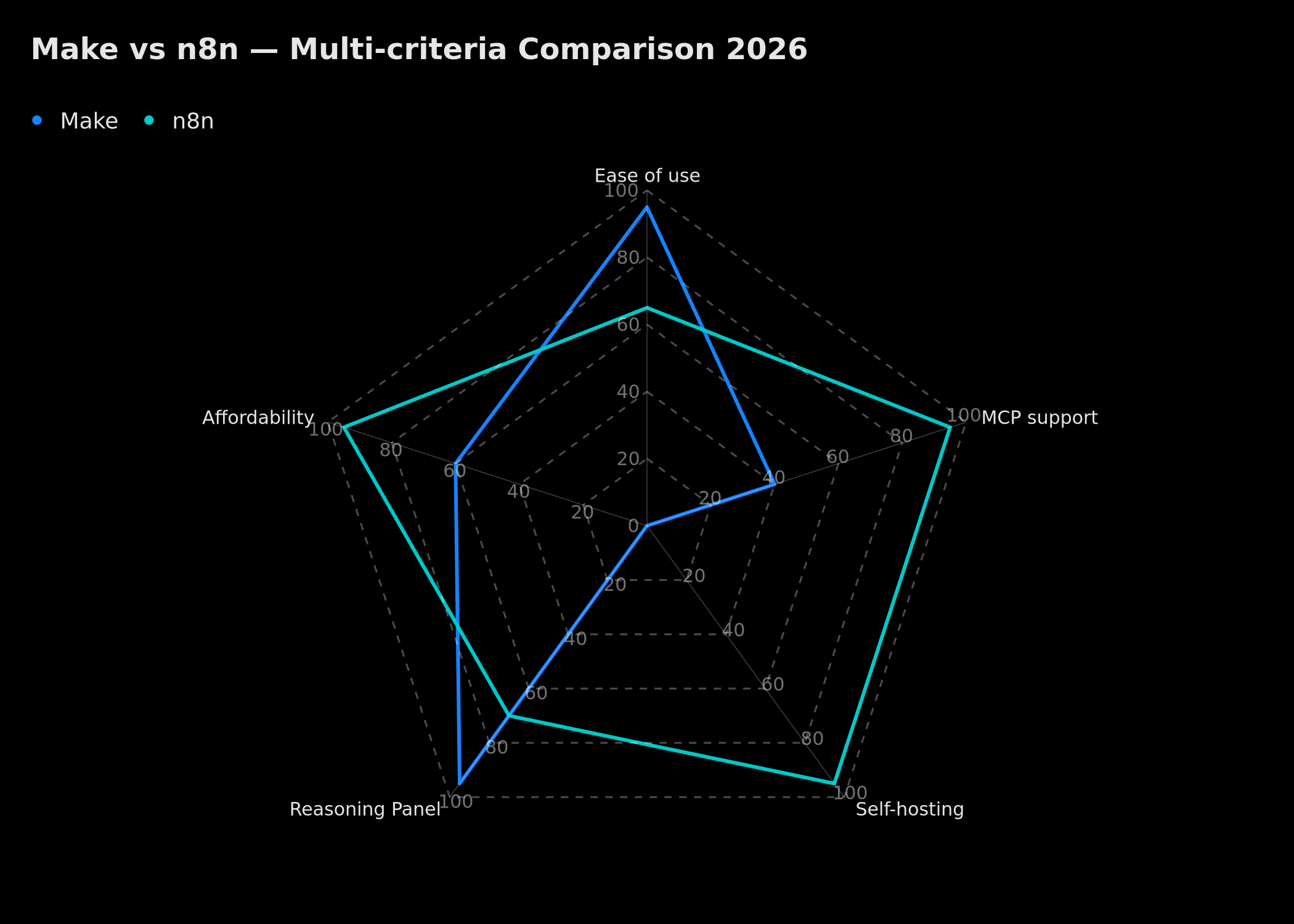 Make leads on ease of use and Reasoning Panel; n8n leads on MCP support, self-hosting, and affordability
When to Choose Make?
Make is the best choice when you prioritize ease of adoption and reasoning transparency. Business teams without a dedicated developer, agencies building automations for non-technical clients, and use cases where AI auditability is critical (lead qualification, content generation, customer service) will benefit directly from the Reasoning Panel and Chat In-Canvas. Make also offers an exceptionally broad native integration catalog — over 1,800 apps according to Make's documentation — which reduces the need for custom development.
When to Choose n8n?
n8n is superior if you have data sovereignty requirements (self-hosting), if you need the MCP protocol right now to connect agents to standardized tool servers, or if you have developers capable of deeply customizing workflows. n8n is also better suited for companies with sensitive data that cannot flow through Make's cloud infrastructure. To learn more about n8n's MCP capabilities, see our article Connecting n8n to an MCP Server for Your AI Agents.
The Practical Verdict
In practice, the two tools are complementary rather than direct competitors. At BOVO Digital, we use Make for business-oriented workflows — CRM integrations, lead qualification, reporting — and n8n for technical architectures where full control and MCP are required. For a detailed side-by-side comparison across all decision criteria for 2026, see our full analysis Make AI Agents vs n8n: Which to Choose in 2026?.
Step-by-Step Guide: Creating Your First Make AI Agent
Here is how to set up a Make AI agent from scratch. This guide is based on the Make interface as documented in early 2026 — the Beta may evolve.
 The 6 steps to create and deploy your first Make AI agent, from prerequisites to deployment
Prerequisites
Before starting, you need an active Make account (Core plan minimum to access Beta AI modules) and an API key for your LLM of choice — OpenAI, Anthropic, or other depending on what integrations are available in your region.
Step 1: Create a New Scenario
In your Make dashboard, create a new blank scenario. Give it a descriptive name that reflects the agent's goal — for example: "Inbound Lead Qualification Agent."
Step 2: Add the AI Agent Module (Beta)
In the scenario editor, click the "+" button to add a module. Search for "AI Agent" in the search bar. If the Beta feature is enabled on your account, the module will appear. Add it as an entry point or as an intermediate step depending on your architecture.
Step 3: Configure the LLM
In the AI Agent module settings, select the LLM you want to use. Enter your API key and choose the model. For qualification agents, GPT-4o offers a good balance between reasoning quality and cost. For simpler agents, GPT-4o mini or less expensive models may be sufficient.
Step 4: Define the Available Tools
This is the most critical step. You must tell the agent which Make modules it can call during its reasoning. For each tool, write a clear and precise description: "Use this tool to search for a contact in HubSpot by email address and retrieve their interaction history." The quality of these descriptions directly determines the quality of the agent's reasoning.
Step 5: Define the Goal via Chat In-Canvas
Open the Chat In-Canvas and write the agent's goal in plain language. Be specific but not overly prescriptive — give the agent room to decide how to reach the goal. A good goal prompt looks like: "Analyze this lead's data (email, industry, company size) and assign a score from 0 to 100, justifying each criterion. If the score exceeds 70, create an urgent HubSpot task for the sales team."
Step 6: Watch the Reasoning Panel and Iterate
Run a first test execution and observe the Reasoning Panel carefully. Note moments where the agent hesitates, uses an unexpected tool, or makes a decision you did not anticipate. Each deviation is an opportunity to refine your configuration. Adjust tool descriptions, clarify the goal, or add explicit constraints to the prompt.
Real-World Use Cases
Make Next-Gen AI Agents adapt to a wide variety of use cases. Here are five detailed scenarios illustrating their tangible value.
1. Intelligent Lead Qualification
The classic problem: your contact form receives 50 submissions per week. The sales team spends hours manually sorting leads, without consistent or objective criteria.
The Make solution: an agent receives each new submission, queries LinkedIn via HTTP to verify the contact's professional profile, checks HubSpot for any past interactions, analyzes the industry and company size, and produces a score from 0 to 100 with detailed justification visible in the Reasoning Panel. A-tier leads (score > 80) automatically trigger an urgent HubSpot task. B-tier leads (50–80) receive a personalized nurturing email. C-tier leads (< 50) are archived.
Reasoning Panel value: the sales director can see, for each lead, exactly why the agent assigned that score. If an important lead was misclassified, they can identify the reasoning error and refine the criteria.
2. Intelligent Multichannel Support Management
The problem: customers reach support via email, WhatsApp, and Zendesk. Support agents spend significant time triaging tickets, identifying the issue, and finding the right response in the knowledge base.
The solution: a Make agent unifies all incoming channels, analyzes each message to identify its category (bug, billing question, refund request, etc.), searches the knowledge base for relevant answers, drafts a response adapted to the customer's tone, and escalates to a human if the issue exceeds its capabilities. The Reasoning Panel shows why the agent chose to escalate or respond automatically — which is critical for auditing service quality.
3. Automated Executive Reporting
The problem: preparing the weekly report takes 3 to 4 hours — extracting data from Google Analytics, Google Ads, HubSpot, formatting it, identifying trends, writing a summary.
The solution: a Make agent triggered every Monday morning collects all data sources, identifies rising and falling indicators, contextualizes variations (specific campaign, seasonality, technical incident), and drafts a plain-language executive summary sent directly by email to the leadership team. The Reasoning Panel documents the agent's interpretations, allowing the team to validate or correct its analysis.
4. Continuous Competitive Intelligence
A Make agent monitors your competitors' daily publications (blog RSS, Product Hunt, LinkedIn), identifies newly launched features or offerings, evaluates their potential impact on your positioning, and sends a weekly brief to the product manager. This use case is particularly well-suited to Make thanks to its broad catalog of native integrations.
5. HR Onboarding Automation
When a new employee is added to your HRIS, a Make agent orchestrates the entire onboarding process: Google Workspace account creation, Slack invitations to the right channels, generation of the first week's schedule, personalized welcome email, and task creation in the project management tool. This type of automation frees HR teams from repetitive tasks to focus on human accompaniment. To go even further in automating your working time, see our guide Automate 40 Hours of Work Per Week with AI Agents.
Best Practices for Reliable Agents
Field experience across dozens of automation projects reveals several best practices for building robust and predictable Make agents.
Write precise tool descriptions. This is the golden rule. The LLM can only use a tool correctly if it understands exactly what the tool does, when to use it, and what data it returns. A vague description like "Search HubSpot" is insufficient. Prefer: "Search for a contact in HubSpot by email address. Returns the full name, company, title, lead score, and date of last contact. Use this tool when you need to verify whether a contact already exists in the CRM before creating a new one."
Define clear stopping conditions. LLM agents can theoretically loop indefinitely if they cannot find a satisfactory stopping condition. Always configure a maximum number of iterations (Make allows this in the AI Agent module settings) and define explicit success and failure criteria in your goal prompt.
Test with edge cases. An agent that works perfectly on clean inputs may fail on real-world inputs — poorly formatted emails, missing data, unexpected API responses. Plan test scenarios that include degraded cases and verify agent behavior through the Reasoning Panel.
Monitor LLM costs. Each LLM call has a token cost. A complex agent with many tool calls can generate significant costs at high volumes. Use the Make dashboard to monitor consumption, and consider using less expensive models (GPT-4o mini) for simpler reasoning steps.
Document expected reasoning. For each agent deployed in production, document the expected behavior for the main cases — a sort of "agent policy." This documentation facilitates team onboarding and serves as a reference for identifying behavioral deviations during reviews.
Limitations and Cautions
Like any Beta technology, Make Next-Gen AI Agents have limitations that are important to consider before deploying them in production.
Cloud-only availability. Make does not offer a self-hosted option, unlike n8n. All your data flows through Make's servers and third-party LLM APIs. For use cases involving sensitive data (medical data, regulated financial data, confidential HR data), this constraint may be a dealbreaker depending on your sector and applicable regulation.
Beta status. The AI Agent and Chat In-Canvas features were in Beta as of early 2026. This means the API may evolve, unexpected behavior is possible, and customer support for issues related to these features may be limited. Avoid deploying them for critical business processes without a fallback plan.
No native MCP support. The Model Context Protocol has become an important standard for AI agent interoperability. Make does not support it natively as of early 2026 — support is planned for Q2 2026 according to the roadmap. If you need MCP now, n8n is the solution. To create AI agents in natural language with Make MAIA, a complementary alternative, see our tutorial Creating an AI Agent in Natural Language with Make MAIA.
Variable costs depending on usage. AI agents potentially make many LLM calls and Make operations (each tool call consumes Make operations). The total cost of an agent in production depends on processing volume and the chosen LLM model. Establish a realistic estimate before scaling up.
Reasoning reliability not guaranteed. Even with the Reasoning Panel, the LLM can sometimes make suboptimal decisions — this is an inherent property of probabilistic models. The Reasoning Panel helps you identify these cases but does not eliminate them. Regular human review remains essential for high-stakes decisions.
Outlook: Make's Roadmap and the Future of AI Agents
The arrival of Make Next-Gen AI Agents is part of a fundamental trend transforming the entire automation landscape. The convergence of no-code platforms and powerful LLMs is redefining what is possible without coding.
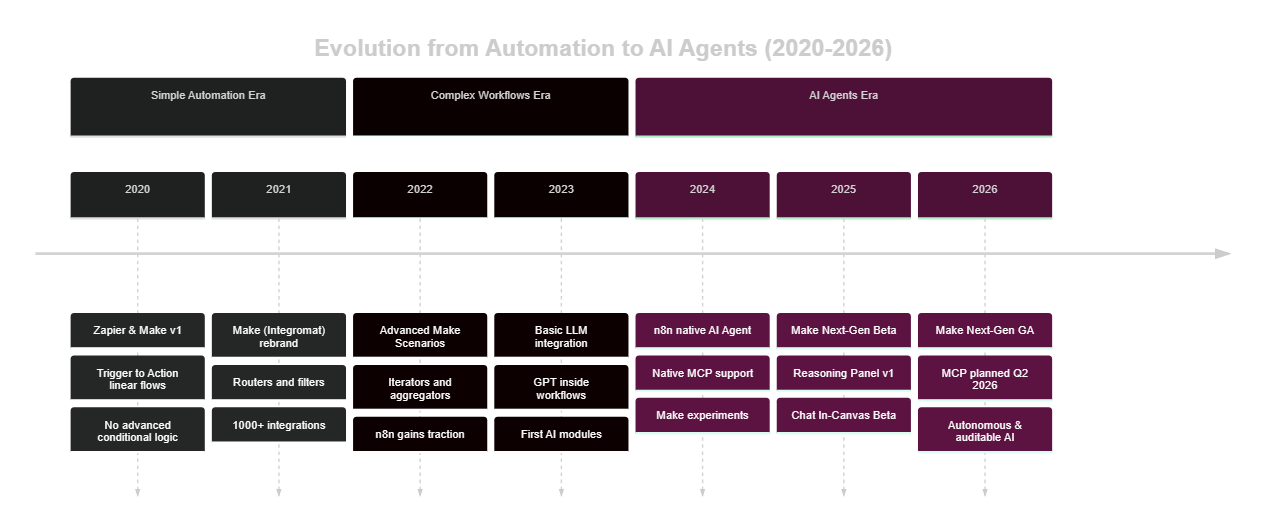 From Zapier and Integromat in 2020 to autonomous AI agents with Reasoning Panel in 2026: six years of accelerated evolution
Based on available information from the Make community and public announcements, several evolutions are anticipated:
MCP support (Q2 2026, according to the roadmap). Integrating the Model Context Protocol would allow Make agents to connect to the growing ecosystem of MCP servers — development tools, databases, business services — in a standardized way. This would be a major advancement for compatibility with the broader AI ecosystem.
Multi-agent orchestration. The orchestration of specialized agents by a supervisor agent (multi-agent pattern) is a strong trend in AI research. Make could allow agents to delegate sub-tasks to other agents, each with their own tools and competencies.
Native persistent memory. Today, persistent memory between sessions requires an external solution. Native integration of long-term memory into the AI Agent module would considerably simplify customer support and personal assistant use cases.
Improved reliability. Future versions of the Reasoning Panel could include automatic reasoning validation mechanisms, prompt improvement suggestions, and proactive alerts when the agent deviates from expected behavior.
Intelligent automation is moving from a competitive advantage reserved for large enterprises to a skill accessible to all SMEs and freelancers. Make's agents are a concrete example of this democratization.
Conclusion
The Reasoning Panel of Make Next-Gen AI Agents represents a significant advance in the maturity of no-code automation tools. By making the agent's thought process visible, Make solves one of the main obstacles to AI adoption in business: the distrust toward opacity. Chat In-Canvas, on the other hand, considerably lowers the barrier to entry for creating and maintaining complex agents without advanced technical skills.
These two innovations do not make Make a universal solution. The absence of self-hosting, the Beta status of the feature, and the lack of native MCP support make it a choice to evaluate carefully based on your context. n8n remains superior for demanding technical architectures. But for business teams that want to adopt AI in their processes with minimal friction, Make Next-Gen AI Agents is currently one of the most accomplished solutions on the market.
If you want to deploy AI agents in your organization — on Make, n8n, or a combination of both — BOVO Digital can guide you from architecture to training. Contact us for a free audit of your automatable processes.
Sources: Make.com documentation (make.com/help), Make Community announcements, OpenAI API documentation, ReAct research (Yao et al., 2022). Information on Beta features and the roadmap reflects the state of the platform in early 2026.
Tags
FAQ
What exactly is Make's Reasoning Panel?
The Reasoning Panel is a visual interface built into the Make editor that displays in real-time each step of the AI agent's reasoning: context analysis, tool selection, decision justification, and final result. It acts as a transparent window into the AI's "black box," making debugging easier and building trust in complex automations.
Is Make Next-Gen AI Agents available on all plans?
As of early 2026, the AI Agent feature is in Beta on Make. It is accessible on Core plans and above, but usage quotas and available LLMs may vary by plan. Check the official Make documentation for up-to-date pricing and availability details.
Does Make support the MCP protocol for its AI agents?
As of February 2026, native Model Context Protocol (MCP) support was planned for Q2 2026 according to Make's public roadmap. n8n, by contrast, has supported MCP natively since late 2024. If MCP is critical to your use case, n8n remains the more advanced option as of this writing.
What is the difference between a Make AI agent and a classic Make scenario?
A classic Make scenario follows a predefined, rigid flow: if A then B, else C. A Make AI agent is driven by an LLM that decides which tools to use, in what order, and how to interpret results to reach a goal defined in plain language. The agent can adapt to unexpected situations without requiring you to reprogram every edge case.
How much does a custom Make or n8n automation cost?
Costs vary by workflow complexity: between €500 and €5,000 for a turnkey project. BOVO Digital offers a free audit to estimate your project before any commitment.
How quickly can I see ROI from automation?
Most of our clients see a return on investment within 1 to 3 months. An automation saving 10 hours per week at €40/h generates €1,600/month in value — the investment is typically recouped within a few weeks.
We scope one workflow — not a generic demo
You describe a repeated task. We tell you what n8n would ship, the timeline, and what stays out of scope.
- 30 min
- 1 scoped workflow
- No commitment
William Aklamavo
Web development and automation expert, passionate about technological innovation and digital entrepreneurship.


