
n8n 2.0: Persistent Memory, Native RAG and Human-in-the-Loop — What Changes Everything for Your Agents
Your n8n agent forgets everything after each execution. It answers the same thing twice. It escalates already-resolved cases. n8n 2.0 introduces persistent memory and native RAG to transform your workflows into truly intelligent agents.

Updated

The problem n8n 2.0 persistent memory for AI agents actually solves
You followed the tutorial. You built your first n8n agent. It works in the demo. You deploy it to production. And then you realize something the tutorial never told you:
Your agent has total amnesia.
Every time it runs, it starts from zero. It doesn't know this customer already wrote yesterday. It doesn't know it processed 47 orders this morning. It can't reference a document you provided three days ago. It can't learn from its mistakes. It answers the same questions the same way, over and over, without ever building on what it has experienced.
That's not an agent. That's a glorified workflow.
This fundamental limitation is why the majority of AI automation projects stagnate at the prototype stage and never truly reach production. A workflow that forgets everything at the end of each execution cycle cannot make informed decisions. It can't personalize its responses based on a customer's history. It can't reason over a 500-page document corpus because it has retained nothing from it. And it certainly can't know that an action is too risky to execute without human oversight.
This is exactly what n8n 2.0 solves with three major architectural innovations: persistent memory that survives across executions, native RAG to ground responses in your real data, and the Human-in-the-Loop pattern to introduce human validation where it matters most. Combined, these three mechanisms transform a simple automation workflow into a genuine AI agent capable of operating reliably in production.
What n8n 2.0 changes in agent architecture
Volatile vs persistent memory: the fundamental difference
Before diving into configuration, it's critical to understand why the volatile memory of classic LLM agents creates a structural problem in production. When you execute an LLM node in an n8n workflow without configured memory, all the exchange context is stored only in RAM during the execution. As soon as the workflow ends — or the server restarts — that memory disappears completely. For a demo, this is sufficient. For a support agent handling thousands of customers, it's a showstopper.
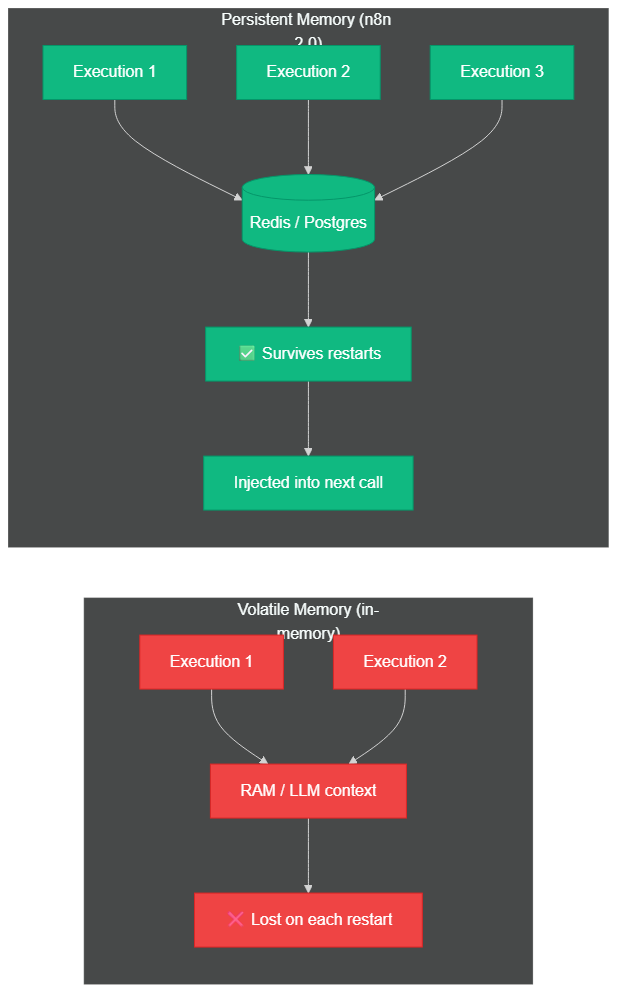 Volatile memory disappears on every restart; persistent memory (Redis/Postgres) survives indefinitely and is automatically injected into the next LLM call
n8n 2.0 introduces an externalized memory system that survives executions by relying on dedicated databases (Redis or Postgres depending on the memory type). This architectural shift is fundamental: the agent is no longer a black box without a past, but a system that accumulates context over time.
Window Buffer Memory: sliding-window conversational memory
The most immediately useful memory type is Window Buffer Memory. Concretely, the agent retains the last N exchanges of a conversation — the window size is configurable based on your LLM model and token budget. For a model with a 128,000-token context window like GPT-4o, a window of 50 exchanges is reasonable. For more economical models with 8,000-token contexts, limiting to 10-15 exchanges is prudent.
What distinguishes this approach from simply copy-pasting a transcript is that n8n stores exchanges in Redis or Postgres with a unique session key per conversation. When the agent resumes a conversation after several hours — or even several days — it automatically reloads the history window from the database and injects it into the system prompt. For customer support agents managing dozens of simultaneous conversations, this automatic state management is a significant operational gain.
Ideal use case: customer support agent, commercial qualification chatbot, personal assistant that resumes conversations where they left off.
Summary Memory: handling thousands-of-token histories
For long conversations or agents operating over multi-week cycles, Window Buffer Memory hits its limits: the history window eventually exceeds the maximum LLM context size. Summary Memory solves this elegantly. Instead of retaining raw exchanges, n8n automatically generates a condensed summary of past exchanges once the history exceeds a configured threshold.
In practice, if a conversation ran for 200 exchanges over 3 weeks, the automatic summary distills the key points — the customer's preferences, issues raised, decisions made — into roughly 500 tokens. This lets the agent maintain the thread of a long relationship without blowing the API budget. The summary itself is stored in Postgres and reloaded at each new interaction.
Ideal use case: multi-week project management agent, coaching or therapeutic follow-up assistant, BtoB customer relationship agent for strategic accounts.
Entity Memory: semantic memory for entity profiles
Entity Memory is the most sophisticated and least documented memory type. It allows the agent to maintain a structured profile for each entity it encounters: a customer, a product, a support ticket, a sales prospect. This profile is enriched with each interaction.
For example, after three exchanges with a customer, the agent knows that this customer prefers short answers, that they're based in Germany (timezone to respect), that their company uses Salesforce, and that they've already reported a billing issue twice. This knowledge is stored as structured JSON in Postgres, retrieved at each new interaction with that specific customer, and automatically updated when new information emerges.
Configuration in n8n 2.0 goes through the "Memory Manager" node with the "Entity" type, where you define the schema for entities to track and the identification key (often email or customer ID).
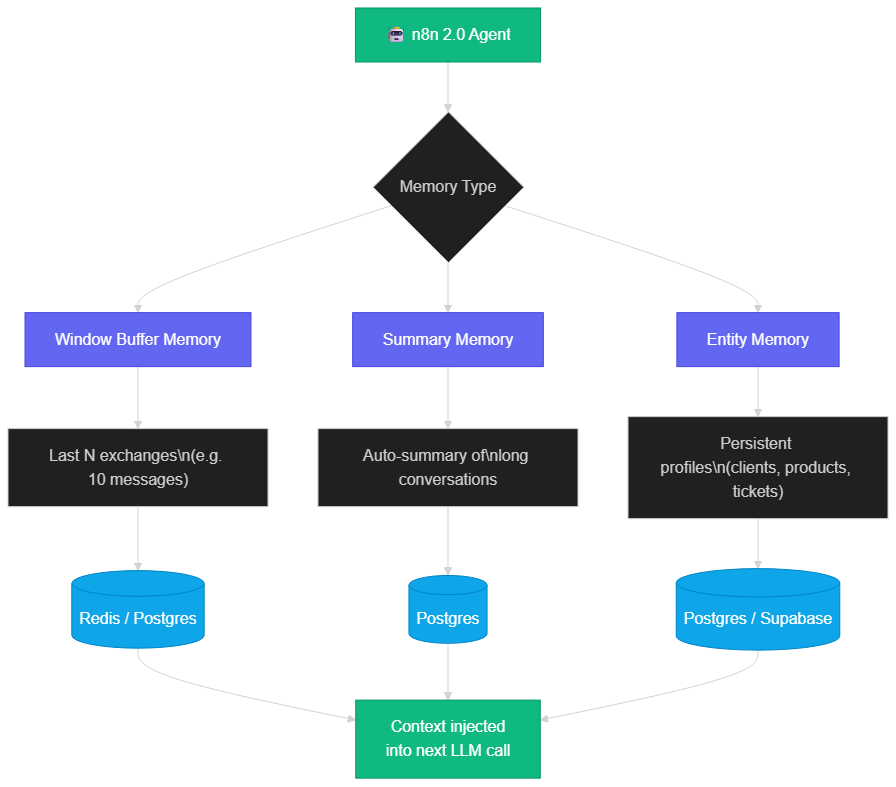 Window Buffer, Summary, and Entity Memory: the three memory layers in n8n 2.0, each suited to a different context
How to configure the memory backend: Redis vs Postgres
n8n 2.0 supports two persistent memory backends, and the choice depends on your use case.
Redis is optimized for ultra-fast reads and writes. It stores data in memory with optional disk persistence. It's ideal for Window Buffer Memory where you need to retrieve and update conversation history with minimal latency. Its limitation: it's not suited to very large data volumes over the long term, and managing complex structures (nested JSON) is less natural than in Postgres.
Postgres (often via Supabase in production) is the recommended choice for Summary Memory and Entity Memory. Its ability to store complex JSON objects, perform relational queries, and scale horizontally makes it the ideal long-term memory backend. In an n8n 2.0 setup with Supabase, you also benefit from Row Level Security authentication, which lets you compartmentalize agent memory by customer or project with fine granularity.
For production environments running multiple agents in parallel, the recommended setup is Redis for short-term memory (Window Buffer) and Postgres for long-term memory (Summary + Entity). This hybrid architecture optimizes both latency and durability.
To deploy your n8n infrastructure in production, the n8n Docker installation guide for 2026 covers the configuration of Redis and Postgres backends, including the necessary environment variables (QUEUE_BULL_REDIS_HOST, DB_POSTGRESDB_*).
Native RAG in n8n 2.0: your documents become the agent's memory
RAG (Retrieval-Augmented Generation) was until recently reserved for teams with dedicated vector infrastructure: a Pinecone instance, a Weaviate cluster, custom Python-written embedding pipelines. This level of technical complexity was a real barrier for most organizations.
n8n 2.0 changes this by integrating the entire RAG pipeline natively via dedicated nodes, without writing a single line of code. The basic idea behind RAG is simple: rather than fine-tuning an LLM on your data (slow, expensive, rigid), you build a vector index of your documentation, and with each question you retrieve the most relevant passages to inject into the LLM's context. Result: precise answers grounded in your real data, without hallucinations. To understand why this mechanism is fundamental, our article on why your AI makes mistakes without RAG explains the problem in depth.
The nodes available in n8n 2.0 for building a RAG pipeline are:
- Document Loader — loads your data sources: PDFs, Notion, Google Drive, web pages, CSV, text files
- Text Splitter — splits documents into chunks of 200 to 500 tokens, with configurable overlap to preserve context at boundaries
- Embeddings — generates vector representations of chunks via OpenAI (
text-embedding-3-smallortext-embedding-3-large), Cohere, or local models via Ollama - Vector Store — stores and indexes vectors in Pinecone, Supabase pgvector, Qdrant, or an in-memory store for testing
- Retriever — performs semantic search at each request and injects the top-K passages into the agent's context
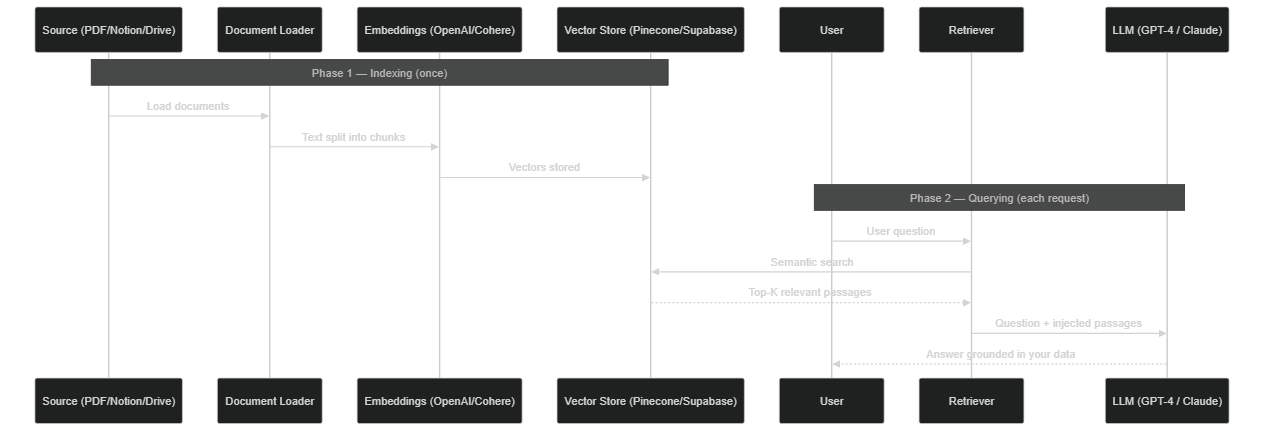 Indexing phase (once): Document Loader → Embeddings → Vector Store. Query phase: the Retriever injects relevant passages into the agent's context
Vectorization pipeline: steps and configuration best practices
The quality of a RAG system is determined primarily during indexing, not querying. Several parameters have a direct impact on result relevance.
Chunk size is the first lever. Chunks that are too small (50 tokens) lose context: a sentence isolated from its paragraph often makes no sense. Chunks that are too large (1,000 tokens) dilute semantic relevance and waste tokens in the prompt. The well-established rule of thumb: 200-300 tokens for FAQs and short texts, 400-500 tokens for technical and legal documents, with 15-20% overlap to avoid mid-idea cuts.
Overlap (chunk overlap) is often overlooked. If your document explains a process in multiple steps and you cut between steps 2 and 3, you get two chunks that are incomprehensible in isolation. An overlap of 50-100 tokens ensures that boundary context is preserved in both adjacent chunks.
The embedding model choice influences the semantic precision of the search. OpenAI text-embedding-3-small offers an excellent quality/cost ratio for most cases (1,536 dimensions, ~$0.02 per million tokens). text-embedding-3-large (3,072 dimensions) is justified for highly specialized corpora (medical, legal, technical) where semantic nuance is critical.
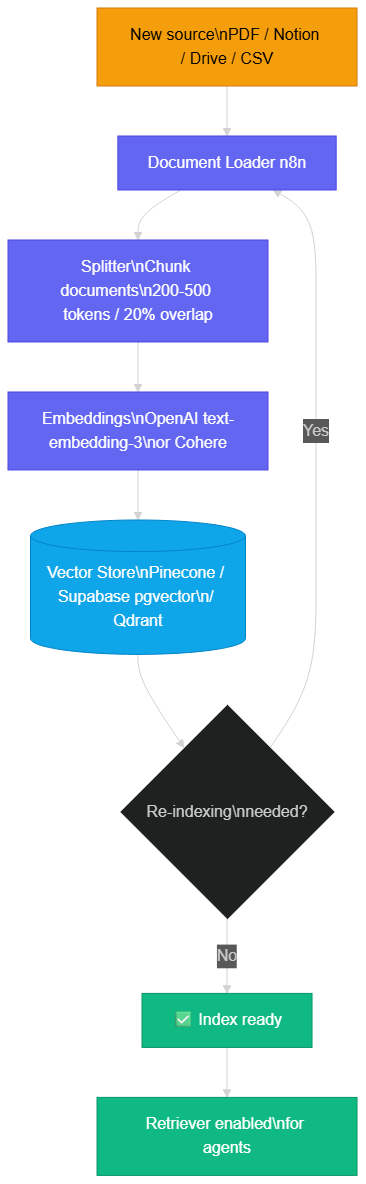 Chunking → embedding generation → vector storage → coherence check → index ready for agents
Which vector store to choose: Supabase pgvector, Pinecone, or Qdrant?
The three solutions natively integrated into n8n 2.0 address different needs.
Supabase pgvector is the recommended choice for teams already using Supabase as their primary database. The pgvector extension transforms your Postgres into a vector database directly. Advantages: a single tool for both relational and vector data, Postgres Row Level Security for multi-tenant access, hybrid SQL queries (filter by department then search by similarity). Ideal up to a few million vectors.
Pinecone is the market reference for large scales. Its serverless infrastructure scales automatically, and it offers very performant metadata filters. For millions of documents or strict SLA requirements, it's the natural choice. Cost: from $0.096 per million read operations (starter plan).
Qdrant is open-source and can be self-hosted (notably on your n8n VPS). It's particularly appreciated for performance with medium-sized collections (100k to 10M vectors) and its very clean REST API. For teams wanting full control of their data without external cloud dependencies, it's the preferred option.
For projects integrating n8n with MCP servers to further enrich agent context, the article on connecting n8n to an MCP server for AI agents shows how to combine RAG and the MCP protocol.
Human-in-the-Loop: validation architecture and automatic escalation
The most underrated pattern in n8n 2.0 isn't memory. It's Human-in-the-Loop.
The principle is simple: the agent is capable of pausing and requesting human validation before performing a high-impact action. This isn't a limitation of the agent — it's a deliberate feature that enables deploying agents on critical domains (finance, HR, published content, orders) without the risk of uncontrolled autonomous action.
The "Wait for Approval" node can be inserted at any point in a workflow. When the agent reaches this node, it suspends execution, generates a structured notification (with the context of the proposed action, its amount, its justification), and waits for a human response via a unique link in the notification. The human approves or rejects from any device, without needing to access the n8n interface.
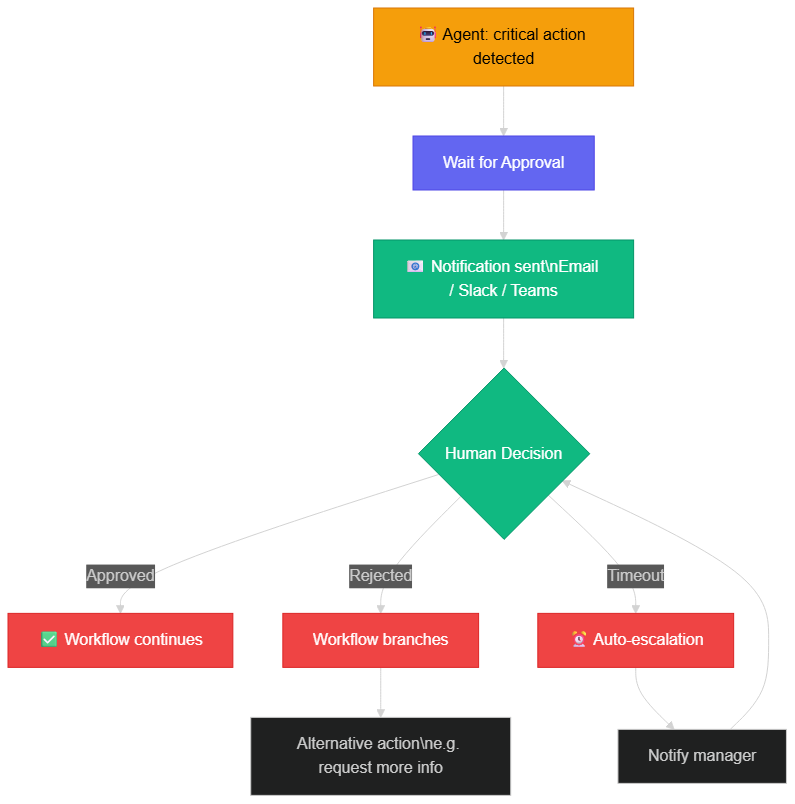 The Wait for Approval node suspends execution, notifies a human, then resumes or branches based on the decision — with automatic escalation if no response is received
Configuring timeouts and automatic escalation
A detail often forgotten in basic Human-in-the-Loop implementations: what happens if no one responds? n8n 2.0 allows you to configure a timeout on the "Wait for Approval" node. If no response is received within the allotted time (configurable: 30 minutes, 2 hours, 24 hours), the workflow can branch toward escalation logic:
- First attempt: Slack notification to the direct manager
- 1-hour timeout: email escalation to the department manager
- 4-hour timeout: escalation to the department director with a situation summary
- 24-hour timeout: action placed on hold with a critical alert in the ticketing system
This escalation chain is entirely configurable in n8n via "If" nodes combined with "Wait" nodes. It ensures that no critical action remains blocked indefinitely, and that urgent decisions escalate to the right hierarchical level.
Concrete use cases:
- Invoice management agent: handles invoices under €500 autonomously, requests validation for higher amounts, escalates to CFO for amounts over €10,000
- Content publication agent: writes and schedules articles, but waits for editorial manager validation before any site publication
- Recruitment agent: sorts CVs, sends first-contact emails, but submits finalists for human decision before sending offers
- Supplier management agent: negotiates terms, drafts purchase orders, but never commits without validation — threshold set at €2,000
This is the difference between an agent that blindly automates and one that amplifies your decision-making capacity.
Combining memory + RAG + Human-in-the-Loop: the complete AI agent
The real power of n8n 2.0 appears when you combine all three patterns in a single workflow. Take the example of a production-level e-commerce customer support agent.
For each new customer message, the agent begins by retrieving the customer's Entity Memory profile (purchase history, preferences, previous tickets). It then enriches this context with a RAG query on the product documentation: if the customer asks about return deadlines, the Retriever finds the 3-5 most relevant passages from your return policy. With this complete context (memory + documentation), the agent generates a personalized and precise response.
Now, if the agent detects that the customer is requesting an exceptional refund above €200 — beyond the standard return policy — the workflow branches to a "Wait for Approval" node. The e-commerce manager receives a Slack notification with the context: customer history, the exact request, and a draft response pre-written by the agent. They approve with one click, and the agent immediately sends the confirmation.
This workflow illustrates an agent architecture that few tools allow building without code: contextual (memory), informed (RAG), and responsible (Human-in-the-Loop). For a deeper dive into building autonomous AI agents, our guide on transforming your n8n workflows into intelligent systems details the complete production agent architecture.
The real economic argument: execution-based pricing
AI workflows are "loopy" — they run frequently, sometimes thousands of times per day. An agent with persistent memory and RAG is particularly intensive: each execution involves a memory read, a vector search, an LLM call, and potentially a memory update. On per-task platforms like Zapier, every step counts.
For an agent checking your inbox every 5 minutes and processing each email in 5 steps (memory read, RAG, response generation, email send, memory update), that's 1,440 tasks/day on Zapier. On the Professional plan with 750 tasks/month included, you're over your limit after 12 hours. The actual monthly cost for this single workflow exceeds €400.
On self-hosted n8n, that same workflow costs the price of your VPS: between €8 and €15/month for a server capable of handling several dozen parallel agents, with unlimited execution volume. On n8n Cloud, the Starter plan at €20/month includes 2,500 active executions — more than enough to get started.
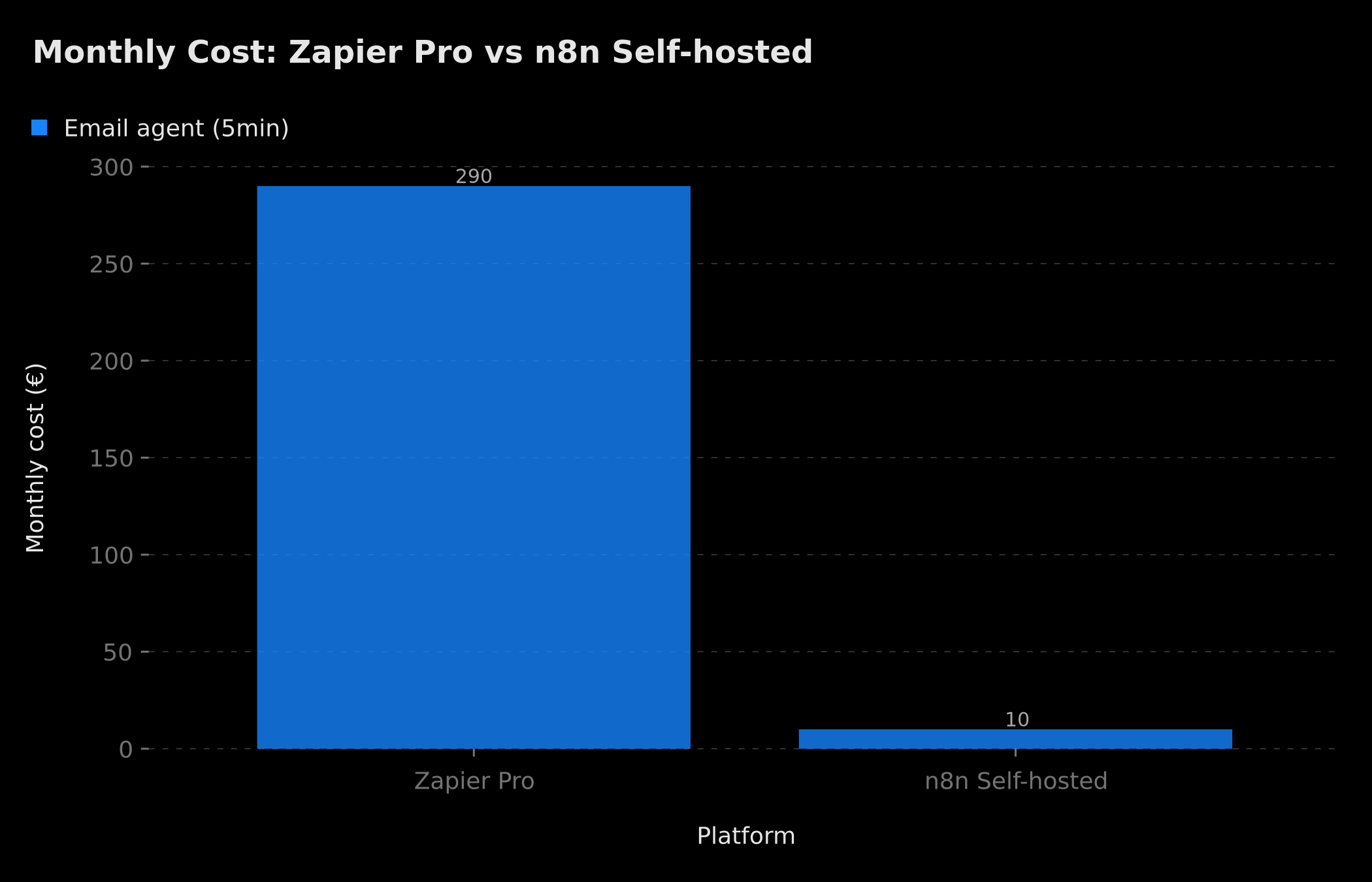 An agent checking your inbox every 5 minutes costs ~€290/month on Zapier Pro versus ~€10/month on self-hosted n8n — the gap grows with execution frequency
For AI agents with persistent memory and RAG, the economic equation is even more favorable: these are the "loopiest" patterns of all, with reasoning loops that can trigger dozens of tool executions for a single task. It's on these cases that the difference between per-task and infrastructure pricing is most dramatic.
Best practices and pitfalls to avoid
After several months of production experience with n8n 2.0 patterns, here are the most frequent mistakes and how to avoid them.
Not versioning your RAG index. When your documentation evolves (new policies, new products), you need to reindex the vector store. If you don't track your index versions, your agent can respond based on outdated documentation for weeks. The best practice is to include a timestamp in each indexed document's metadata and automatically trigger reindexing at each source update.
Undersizing the memory window. A window of 3 exchanges is insufficient for most support use cases: customers often reference something said 6 or 7 exchanges earlier. Start with a window of 20 exchanges and adjust based on your LLM model.
Forgetting chunking overlap. Chunks without overlap produce incoherent RAG results at boundaries. Always configure a 15-20% overlap on your Text Splitter.
Deploying Human-in-the-Loop without a timeout. A workflow waiting indefinitely can block resources and create deadlock situations. Always configure a maximum timeout with escalation logic.
Not monitoring RAG latency. Vector search adds 50-200ms of latency per request depending on the vector store and index size. If your agent responds too slowly, measure this latency first before optimizing.
For companies already dealing with hallucination problems in their production AI agents, our guide on avoiding AI hallucinations in enterprise covers these issues in depth with concrete solutions.
What we've been deploying at BOVO Digital since n8n 2.0
Since n8n 2.0 launched, William Aklamavo has delivered several agent projects with these patterns in production. Here are four representative examples with measurable results.
E-commerce support agent: Window Buffer conversational memory (20 exchanges) + Entity Memory per customer + RAG on 240 pages of product documentation and return policy indexed in Supabase pgvector. The workflow handles 340 tickets per week with a 78% resolution rate without human escalation. The client saved the equivalent of 2.5 days of work per week for their support team.
Lead qualification agent: Entity Memory enriched with each interaction (budget, sector, timing, objections). The sales rep receives a complete sheet before each call with the full interaction history, interest signals, and identified friction points. The call conversion rate increased by 34% according to client feedback.
Regulatory monitoring agent: RAG on 800 pages of sector-specific regulations in Qdrant (self-hosted on the same n8n VPS). Answers legal team questions with exact articles and their official numbering, without hallucination. Human validation is triggered for all questions involving interpretation, not just text extraction.
Supplier management agent: Human-in-the-Loop on all orders above €2,000, with automatic escalation to the CFO for amounts exceeding €10,000. The agent negotiates terms, drafts purchase orders, and maintains the supplier profile (lead times, pricing conditions, history), but never commits without validation.
Where to start?
If you already have an n8n workflow in production and want to add persistent memory, the first step is identifying which memory type matches your use case. For a conversational agent, start with Window Buffer Memory on Redis — it's the simplest configuration and the one where you'll see benefits most immediately. Memory is added with just two additional nodes (Memory Manager + Redis connection) once the base structure is in place.
If you want to ground your agent's responses in your existing documentation, start by building your RAG index in Supabase pgvector (if you already use Supabase) or in-memory for testing. The initial indexing phase for a corpus of 100 PDFs typically takes between 10 and 30 minutes depending on document size and embedding model throughput.
If you're starting from scratch and want a robust agent with persistent memory, RAG, and human supervision from day one, that's a one-to-two week project depending on the complexity of your documentation and business rules.
Do you want an agent that remembers, learns, and asks before acting?
Discover our AI automation and intelligent agent services — or explore William Aklamavo's profile to see delivered projects.
Tags
FAQ
What is persistent memory in n8n 2.0?
It's the ability of an agent to remember information between multiple executions. n8n 2.0 offers 3 memory types: Window Buffer (last N exchanges), Summary (auto-summary of long conversations), and Entity (profiles of encountered entities). Configuration is done via dedicated nodes, without a custom backend. Storage relies on Redis (short sessions) or Postgres/Supabase (long-term memory).
How does native RAG work in n8n 2.0?
n8n 2.0 includes nodes for connecting to vector stores (Pinecone, Supabase pgvector, Qdrant), generating embeddings, loading documents (PDF, Notion, Google Drive), and performing semantic search. The agent automatically retrieves relevant passages from your documentation and injects them into its context. The pipeline has two phases: indexing (once) and querying (each request).
What is the Human-in-the-Loop pattern?
It's a mechanism where the agent pauses and requests human validation before performing a critical action. In n8n 2.0, a 'Wait for Approval' node suspends the workflow, sends a notification (email, Slack, Teams) to a human, and resumes based on their decision. You can configure a maximum wait time and automatic escalation if no response is received.
Is n8n 2.0 really cheaper than Zapier for AI agents?
For 'loopy' AI workflows (running frequently), yes, massively. An agent checking your inbox every 5 minutes consumes 864 tasks/day on Zapier (approx. €290/month). On self-hosted n8n, the cost is a VPS: €8-12/month, unlimited volume. The gap grows with frequency and workflow complexity.
Can BOVO Digital configure these patterns for my project?
Yes. We analyze your use case, design the right memory architecture (buffer, summary, entity), configure RAG on your existing documentation, and integrate Human-in-the-Loop checkpoints on critical actions. Typical timeline: 1-2 weeks depending on complexity.
We scope one workflow — not a generic demo
You describe a repeated task. We tell you what n8n would ship, the timeline, and what stays out of scope.
- 30 min
- 1 scoped workflow
- No commitment
William Aklamavo
Web development and automation expert, passionate about technological innovation and digital entrepreneurship.


