
Automate Your Release Checklist with n8n and GitHub Actions (2026 Guide)
Build a secure CI/CD pipeline with n8n and GitHub Actions: SAST, secrets scanning, light DAST, incident management, and automated alerts. The complete DevSecOps guide for 2026.

Updated

Automate Your Release Checklist with n8n and GitHub Actions
CI/CD security automation with n8n and GitHub Actions is no longer a luxury reserved for large enterprises: it's the concrete answer to a reality too many teams still ignore.
The Claude Code source code leak (March 31, 2026) had a simple cause: a forgotten .map file in the production bundle. No zero-day vulnerability, no sophisticated attack. A human oversight during a manual release. Basic automation would have caught it, blocked the publication, and notified the team — all within seconds.
This guide shows you how to build this system end-to-end: from the "shift-left" philosophy that justifies the approach, to ready-to-use n8n workflows for orchestrating alerts and incident response, through a complete release checklist including SAST, secrets scanning, dependency verification, light DAST, and a manual review gate.
Why Are Manual Releases a Critical Security Risk?
Every team has a release checklist. Most of the time, it lives in the lead developer's head, or in a Notion document nobody rereads before pushing to production. It's a ticking time bomb.
The problem isn't developers' bad intentions. It's the nature of manual processes: they're subject to fatigue, time pressure, and tunnel vision. The developer who fixes an urgent bug at 11 PM and pushes to production without checking dependencies isn't negligent — they're human. That's precisely why you need automated safeguards.
The consequences of an unsecured release can be severe. An API key exposed in a JavaScript bundle can be recovered and exploited within hours. An accidentally committed .env file can compromise an entire infrastructure. A dependency with a critical CVE can turn a minor update into a major security incident. The new OWASP 2025 vulnerabilities show that the attack surface widens with every new dependency added.
This is where the shift-left principle comes in.
What Is Shift-Left Security?
Shift-left means moving security controls as early as possible in the development cycle — toward the "left" of the timeline, where fixing issues costs the least. Rather than waiting for an annual security audit or post-deployment scan, every commit becomes an opportunity to detect a problem before it becomes critical.
Concretely, this means: static code analysis (SAST) on every push, real-time secrets scanning, automatic dependency verification, and bundle validation before every publication. When a problem is detected at this stage, the developer is still in the context of the code they just wrote — the fix is fast, localized, and inexpensive.
The Shift-Left Architecture with GitHub Actions and n8n
GitHub Actions is the ideal tool for implementing shift-left on the CI/CD side. It runs directly within the GitHub ecosystem, at the moment of push or pull request opening. N8n takes over for alert orchestration and incident response: where GitHub Actions detects and blocks, n8n notifies and coordinates.
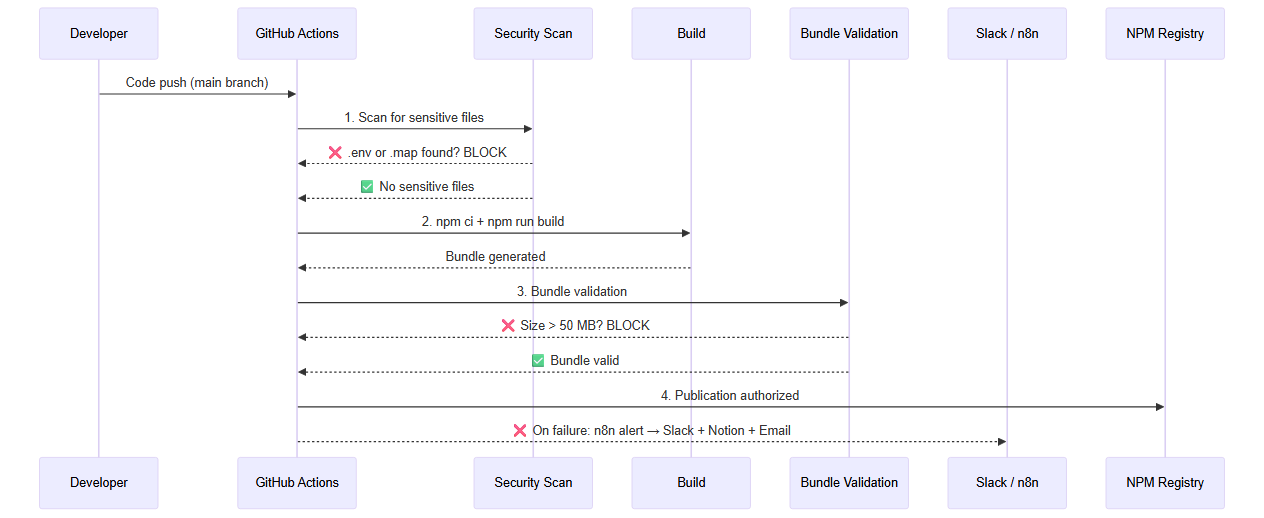 Sequence diagram: from push to deployment, with sensitive file scanning, bundle validation and n8n alert on failure
The Secure Release Checklist: 5 Essential Steps
A robust release checklist is built around five complementary control layers. Each addresses a different attack vector. Together, they constitute a defense-in-depth strategy.
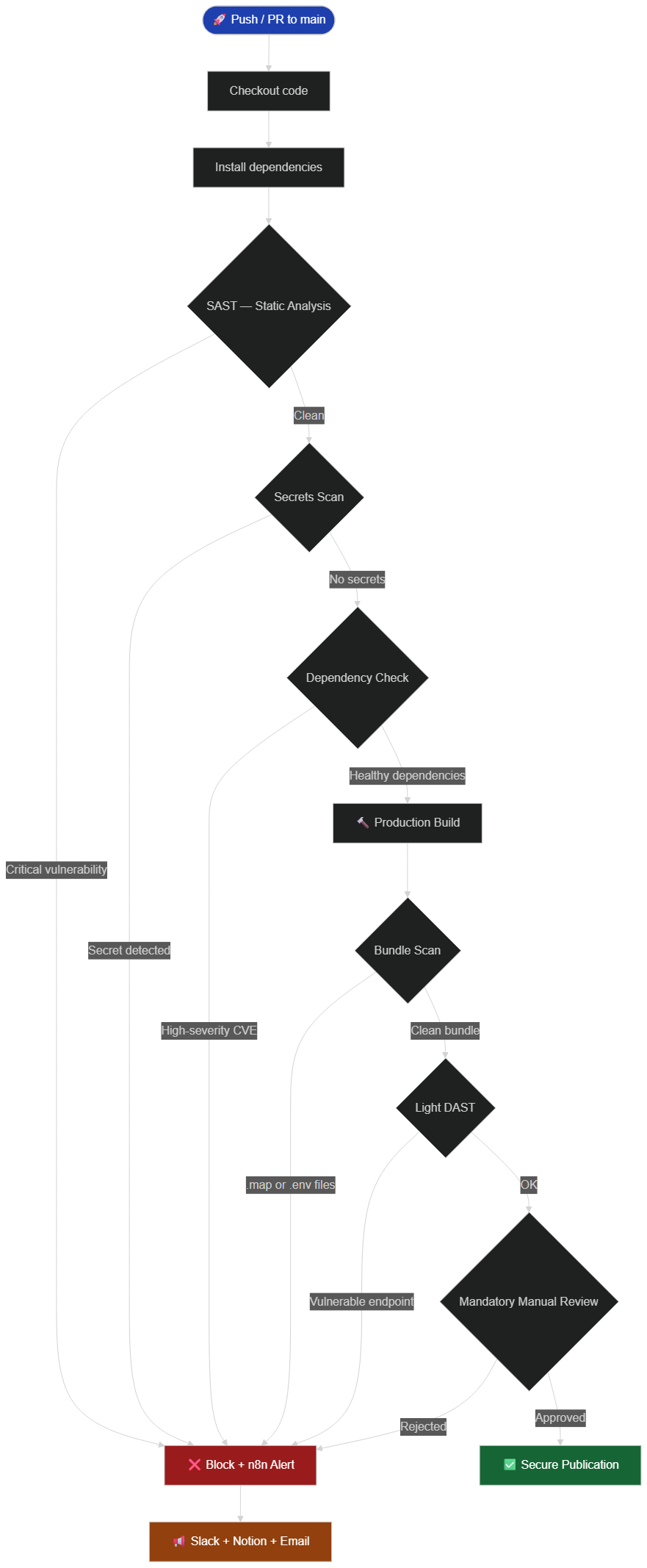 Release checklist: SAST → Secrets scan → Dependencies → Build → Bundle scan → DAST → Manual review → Publish or block
Step 1: SAST — Static Code Analysis
Static Application Security Testing examines source code without executing it, looking for known vulnerability patterns: potential SQL injections, dangerous eval() calls, incorrect user input handling, security misconfiguration errors.
For a JavaScript/TypeScript project on GitHub, Semgrep is the most versatile choice. It offers community rules covering OWASP Top 10 vulnerabilities, framework-specific rules for React, Express, and Next.js, and allows you to write custom rules to detect patterns specific to your codebase. CodeQL, native to GitHub, is particularly powerful for detecting dangerous data flows (taint analysis) — it traces the path of user input to a potentially dangerous sink.
The workflow file below configures Semgrep to run on every push to main or develop and on every pull request, simultaneously applying three rule sets. A single YAML file placed in .github/workflows/ activates these controls for the entire team, with no additional per-developer configuration required.
# Simplified example — .github/workflows/sast.yml
name: SAST Security Scan

on:
  push:
    branches: [main, develop]
  pull_request:
    branches: [main]

jobs:
  semgrep:
    runs-on: ubuntu-latest
    steps:
      - uses: actions/checkout@v4
      - uses: returntocorp/semgrep-action@v1
        with:
          config: >-
            p/security-audit
            p/owasp-top-ten
            p/javascript
        env:
          SEMGREP_APP_TOKEN: ${{ secrets.SEMGREP_APP_TOKEN }}
If a vulnerability of ERROR severity is detected, the pipeline stops, and n8n receives the notification for escalation. Scan results appear directly as pull request annotations on GitHub, giving reviewers immediate visibility into what needs to be fixed before approving the merge.
Step 2: Secrets Scanning
Secrets scanning is probably the most critical step for preventing incidents like Claude Code's. A simple .env accidentally included in a commit can expose AWS keys, Stripe tokens, database passwords.
TruffleHog (open source, maintained by Truffle Security) is today's reference for secret detection. It analyzes not only modified files, but the complete repository history, and recognizes over 700 different secret types — AWS keys, GitHub tokens, Stripe credentials, Google Cloud API keys, and many more.
The step below integrates directly into any existing GitHub Actions workflow. By specifying base and head, TruffleHog analyzes only the delta between the base branch and the current commit, keeping execution times short even on repositories with a long history.
# Simplified example — step to integrate into CI workflow
- name: Scan secrets with TruffleHog
  uses: trufflesecurity/trufflehog@main
  with:
    path: ./
    base: ${{ github.event.repository.default_branch }}
    head: HEAD
    extra_args: --only-verified
The --only-verified option reduces false positives by actively testing whether the detected secret is still valid. A revoked secret doesn't trigger a block, but is still reported for information.
Step 3: Dependency Verification (SCA)
Software Composition Analysis verifies that your npm/pip/composer dependencies don't contain known vulnerabilities listed in the CVE database. This is particularly important: 80% of modern codebases are composed of third-party code.
GitHub offers Dependabot natively, which can be configured to open automatic update PRs and block merges if a critical dependency is vulnerable. Snyk goes further by offering fix suggestions and transitive dependency analysis.
# Simplified example — npm audit step
- name: Audit npm dependencies
  run: |
    npm audit --audit-level=high
    if [ $? -ne 0 ]; then
      echo "❌ Vulnerable dependencies detected (high or critical severity)"
      exit 1
    fi
npm audit --audit-level=high blocks only high and critical severity vulnerabilities, avoiding pipeline paralysis over minor warnings. For broader coverage including transitive dependencies, Snyk complements this approach with automatic fix suggestions.
Step 4: Production Bundle Scanning
Once the build is complete, the bundle must be inspected before publication. This is the step that would have prevented the Claude Code incident: .map files should never end up in a published npm bundle.
The script below performs three independent checks on the dist/ folder contents: presence of source maps, presence of sensitive configuration files, and total bundle size. It halts and returns an error code at the first anomaly detected, immediately blocking all downstream steps in GitHub Actions.
# Simplified example — dist/ bundle scan
- name: Scan bundle for sensitive files
  run: |
    # Source maps expose non-minified source code
    if find dist -name "*.map" | grep -q .; then
      echo "❌ Source maps detected in dist/ — publication blocked"
      find dist -name "*.map"
      exit 1
    fi

    # Sensitive configuration files
    PATTERNS=(".env" "*.key" "*.pem" "credentials" "secrets")
    for pattern in "${PATTERNS[@]}"; do
      if find dist -name "$pattern" | grep -q .; then
        echo "❌ Sensitive file detected: $pattern"
        exit 1
      fi
    done

    # Abnormal size (accidental inclusion of node_modules or unoptimized assets)
    SIZE_MB=$(du -sm dist | cut -f1)
    if [ $SIZE_MB -gt 50 ]; then
      echo "⚠️ Abnormally large bundle: ${SIZE_MB} MB"
      exit 1
    fi

    echo "✅ Clean bundle — no sensitive files detected"
This script runs on the build output, ensuring the inspection targets the exact files that will be published. When a source map is detected, its filename is printed in the GitHub run logs to make diagnosis and remediation straightforward.
Step 5: Light DAST and Manual Review Gate
Dynamic Application Security Testing (DAST) tests the running application to detect vulnerabilities that static analysis can't see. In a CI/CD pipeline, full DAST (OWASP ZAP, Burp Suite) is often too slow. Instead, opt for light DAST: a few targeted HTTP requests to verify that security headers are in place, authentication works correctly, and critical endpoints aren't exposed.
The manual review gate is the last safety net. GitHub Environments allows you to define protection rules requiring approval from one or more designated reviewers before production deployment. This step cannot be automated by definition — it brings human judgment to what automated tools might have missed.
n8n Workflow: Orchestration and Smart Alerts
N8n is the orchestration brain once GitHub Actions has detected a problem. Its strength: centralizing all alerts, enriching context, and triggering the right actions based on severity.
 Complete architecture: GitHub Actions triggers an n8n webhook that notifies Slack, creates a Notion ticket and emails the tech lead
Alert Workflow Architecture
The security-alert-pipeline n8n workflow is triggered via a webhook you configure in GitHub. Upon receipt, it extracts key information from the GitHub payload (repository name, branch, commit author, failure type, link to the run), then makes conditional decisions based on severity.
For a critical severity flaw (exposed secret, CVE CVSS ≥ 9.0), the workflow:
- Sends a Slack alert in
#alerts-securitywith an@heremention - Creates a Jira or Linear ticket with
URGENTpriority - Notifies PagerDuty to page on-call if outside business hours
- Sends a summary email to the CTO and tech lead
For high severity (CVE CVSS 7.0-8.9, source map detected):
- Slack message in
#alerts-devopswithout mention - Notion or Linear ticket with
HIGHpriority - Email to tech lead only
For a warning (slightly oversized bundle, deprecated dependency):
- Informational Slack message only
GitHub Webhook (workflow_run failed)
  → IF node: severity = critical?
     → YES → Slack @here + PagerDuty + Jira URGENT + Email CTO
     → NO → IF node: severity = high?
        → YES → Slack + Linear HIGH + Email tech lead
        → NO → Informational Slack
Configuring the GitHub Webhook for n8n
The connection between GitHub Actions and n8n goes through a webhook:
- In n8n, create a new workflow with a Webhook trigger node
- Copy the generated production URL (format:
https://your-n8n.com/webhook/xxxx) - In your GitHub repository: Settings → Webhooks → Add webhook
- Payload URL: paste the n8n URL
- Content type:
application/json - Events to select: Workflow runs
- Enable SSL verification if your n8n uses HTTPS (recommended)
On the GitHub Actions side, you can also call the n8n webhook directly via a curl step for more precise control over the transmitted data. This approach lets you include contextual details in the payload — the failing job name, branch, actor, and run ID — which n8n uses to make its escalation decision without needing a separate GitHub API call.
# Simplified example — n8n notification from GitHub Actions
- name: Notify n8n on failure
  if: failure()
  run: |
    curl -X POST "${{ secrets.N8N_WEBHOOK_URL }}" \
      -H "Content-Type: application/json" \
      -d '{
        "repo": "${{ github.repository }}",
        "branch": "${{ github.ref_name }}",
        "actor": "${{ github.actor }}",
        "run_id": "${{ github.run_id }}",
        "severity": "high",
        "failure_step": "${{ github.job }}"
      }'
GitHub Actions Integration: Complete Workflow
Here is the complete GitHub Actions workflow architecture that orchestrates the entire checklist. All jobs run in parallel to minimize CI time, except the publication job which waits for all of them to succeed. Running SAST, secrets scanning, and dependency verification simultaneously keeps the total pipeline duration low — a single failure in any job is enough to block the release.
# Simplified example — .github/workflows/secure-release.yml
name: Secure Release Pipeline

on:
  push:
    branches: [main]
  pull_request:
    branches: [main]

jobs:
  # Job 1: Static analysis
  sast:
    runs-on: ubuntu-latest
    steps:
      - uses: actions/checkout@v4
      - uses: returntocorp/semgrep-action@v1
        with:
          config: p/security-audit p/owasp-top-ten

  # Job 2: Secrets scanning
  secrets-scan:
    runs-on: ubuntu-latest
    steps:
      - uses: actions/checkout@v4
        with:
          fetch-depth: 0  # Analyzes complete history
      - uses: trufflesecurity/trufflehog@main
        with:
          extra_args: --only-verified

  # Job 3: Dependency verification
  dependency-check:
    runs-on: ubuntu-latest
    steps:
      - uses: actions/checkout@v4
      - run: npm ci
      - run: npm audit --audit-level=high

  # Job 4: Build and bundle scan
  bundle-scan:
    runs-on: ubuntu-latest
    needs: [dependency-check]
    steps:
      - uses: actions/checkout@v4
      - run: npm ci
      - run: npm run build
      - name: Scan bundle
        run: |
          find dist -name "*.map" && exit 1 || true
          echo "✅ Clean bundle"
      - name: Notify n8n on failure
        if: failure()
        run: |
          curl -X POST "${{ secrets.N8N_WEBHOOK_URL }}" \
            -H "Content-Type: application/json" \
            -d '{"severity":"high","step":"bundle-scan","repo":"${{ github.repository }}"}'

  # Job 5: Publication (waits for all security jobs)
  publish:
    runs-on: ubuntu-latest
    needs: [sast, secrets-scan, dependency-check, bundle-scan]
    environment: production  # Requires manual approval
    steps:
      - uses: actions/checkout@v4
      - run: npm ci
      - run: npm run build
      - run: npm publish
        env:
          NODE_AUTH_TOKEN: ${{ secrets.NPM_TOKEN }}
Once this workflow is active, every push to main displays the real-time status of all five jobs in GitHub's Actions tab. The publish job remains suspended, awaiting manual approval from a designated reviewer in the production environment before the release goes live.
Secrets Management: Vault, GitHub Secrets, and Best Practices
Secrets management is one of the most critical topics in DevSecOps security — and one of the most often botched. There is one absolute rule: a secret must never appear in plaintext in code, logs, or versioned configuration files.
For small to medium-sized projects, GitHub Encrypted Secrets are sufficient. They are encrypted with libsodium, accessible only within GitHub Actions workflows, and are never exposed in logs (automatically masked). Configuration is done in Settings → Secrets and variables → Actions.
For more complex projects or teams needing automatic secret rotation and complete access auditing, HashiCorp Vault is the reference solution. Vault enables centralized secret storage, granular access policy definition, temporary credential generation (for example, AWS credentials that expire after 1 hour), and logging of every access. It integrates natively with GitHub Actions via the official hashicorp/vault-action plugin.
The example below retrieves two secrets from a Vault path and injects them as environment variables into the runner. The Vault token itself is stored in GitHub Encrypted Secrets, creating a trust chain with no credentials hardcoded anywhere in the workflow code.
# Simplified example — retrieving a secret from HashiCorp Vault
- name: Import secrets from Vault
  uses: hashicorp/vault-action@v3
  with:
    url: ${{ secrets.VAULT_URL }}
    token: ${{ secrets.VAULT_TOKEN }}
    secrets: |
      secret/data/myapp/production npm_token | NPM_TOKEN ;
      secret/data/myapp/production stripe_key | STRIPE_SECRET_KEY
In n8n, credentials are encrypted in the database with AES-256 and are never visible in execution logs. Never use "hardcoded" credentials in HTTP Request nodes — always use n8n's built-in credentials system.
If you're self-hosting n8n, our n8n Docker installation guide covers instance hardening, credential encryption configuration, and network security best practices.
Notifications and Automated Incident Response
Response speed is decisive in managing a security incident. Every minute that passes between detecting a vulnerability and addressing it is an additional opportunity for a malicious actor. A well-designed n8n alert pipeline can reduce this delay from several hours to under 2 minutes.
Slack Integration
N8n's native Slack node sends richly formatted messages with interactive blocks — action buttons, direct links to the GitHub run, error code snippets. A well-structured alert message gives the team the context needed to act immediately.
A good Slack alert message contains: the severity level (with a distinctive color), the affected repository and branch name, the commit author who triggered the alert, the exact nature of the detected problem, and a direct link to the GitHub Actions run for full logs.
PagerDuty Integration
For critical incidents outside business hours, PagerDuty is the reference tool for on-call management. N8n integrates with PagerDuty via its REST API: an HTTP Request node pointing to the PagerDuty events endpoint is enough to create an alert that will page on-call according to configured escalation policies.
Smart integration means conditioning the PagerDuty call on both the problem's severity AND the time of day. An exposed secret at 3 AM justifies waking someone up. A slightly outdated dependency can wait until the next morning.
Automating Incident Response
N8n can go beyond simple notification: it can automate the initial incident response. For an exposed secret detected in production, the workflow can automatically:
- Create a Jira incident ticket with all details
- Post a structured summary in the
#incident-responseSlack channel - Call the GitHub API to create a security issue
- Send a revocation request via the affected service's API (if possible)
- Automatically block PR merging via the GitHub API
This automation of initial response frees the team to focus on the actual fix, rather than manual coordination.
Cost of Prevention vs. Cost of a Breach
To convince sometimes skeptical management facing the investment in CI/CD security, the numbers are compelling. Setting up a complete secure pipeline (SAST + secrets scanning + dependency verification + n8n) typically represents between 20 and 80 hours of work, depending on team size and infrastructure complexity.
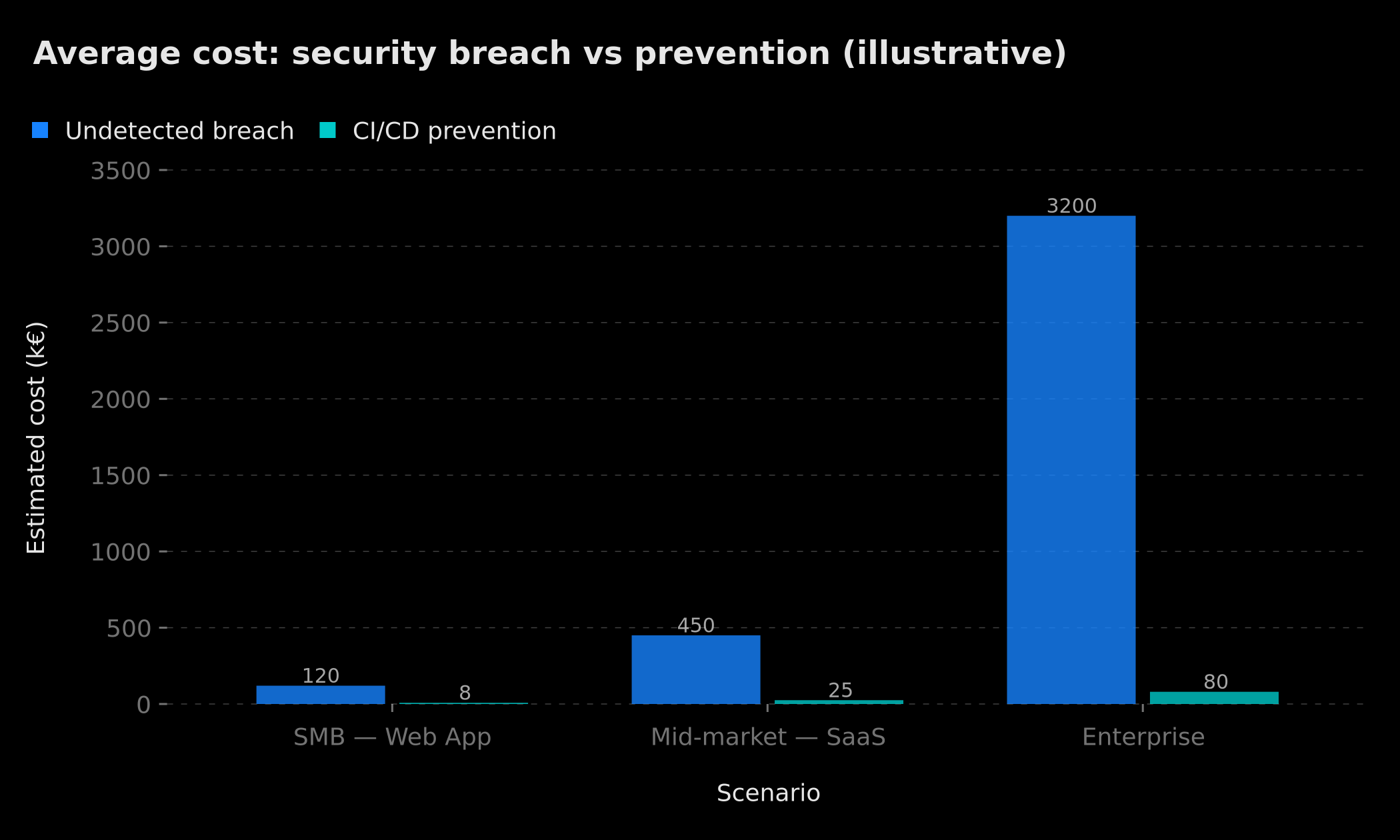 Illustrative comparison: the cost of remediation from an undetected breach is between 15 and 40 times greater than the cost of prevention via automated CI/CD
To illustrate: for an SMB, the cost of a poorly managed security incident (remediation time, communications, potential GDPR penalties, reputational damage) can easily reach tens of thousands of euros. Setting up a preventive pipeline is a one-time cost of a few thousand euros. The ROI is structurally favorable from the very first incident prevented.
The hidden risks of unsecured automated deployments are often underestimated until the first incident. Teams that invest in shift-left security experience significantly fewer critical production incidents.
Best Practices and OWASP Alignment
The OWASP (Open Worldwide Application Security Project) regularly publishes best practice guides for web application security. Several of their recommendations apply directly to securing a CI/CD pipeline.
A02: Cryptographic Failures — Ensures cryptographic keys and credentials are never exposed. Secrets scanning directly addresses this risk.
A05: Security Misconfiguration — Insecure default configurations are the source of many vulnerabilities. Static analysis with Semgrep rules specific to framework misconfigurations (Express, Next.js, etc.) helps detect these issues early.
A06: Vulnerable and Outdated Components — This is exactly what the SCA (Software Composition Analysis) step in our checklist covers: CVE verification in dependencies.
A09: Security Logging and Monitoring Failures — In our architecture, n8n plays the role of the monitoring and alert system. A pipeline without automated alerts is blind to incidents.
For a deeper dive on OWASP vulnerabilities applicable to your web projects, our analysis of the new OWASP Top Ten 2025 vulnerabilities covers the significant changes in the latest edition.
.npmignore as the Last Line of Defense
Even with all these upstream controls, the .npmignore file remains an essential complementary safeguard for npm packages. It guarantees that certain files physically cannot end up in the published bundle, no matter what happens upstream.
# .npmignore — complete example
**/*.map
**/*.map.js
.env*
*.key
*.pem
*.p12
*.pfx
test/
tests/
__tests__/
*.test.ts
*.spec.ts
*.test.js
*.spec.js
.github/
scripts/
docs/
CHANGELOG.md
.cursor/
*.log
coverage/
.nyc_output/
This file operates at npm packaging time, independently of any CI/CD pipeline. Even if a .map file survived all previous checks, .npmignore guarantees its physical exclusion from the published .tgz archive — a last-resort safeguard that cannot be bypassed by a misconfiguration in the workflow.
The prepublishOnly Hook in package.json
For npm packages, the prepublishOnly hook runs automatically before every npm publish. It's a local safety net, developer-side, that runs even if the CI/CD pipeline is bypassed (which shouldn't happen, but might for an emergency publication from a developer's machine).
{
  "scripts": {
    "prepublishOnly": "npm run build && npm run security-check && npm run test",
    "security-check": "node scripts/check-bundle.js"
  }
}
Implementing a Zero-Trust Mindset in Your Pipeline
Beyond the technical tools, CI/CD security automation requires a cultural shift toward zero-trust thinking. This means assuming that every commit, every dependency update, and every deployment is potentially dangerous until proven otherwise. The pipeline doesn't trust the developer, the repository, or the infrastructure by default — it verifies everything, every time.
This mindset change is often the hardest part of the journey for teams transitioning from informal release processes. Developers who have been pushing directly to main for years may initially perceive the new gates as friction. The key is to make the feedback loop fast and actionable: when a check fails, the developer should immediately understand what failed, why it matters, and how to fix it. A well-configured SAST with contextual messages is far more valuable than a generic failure that leaves the developer searching through logs.
Zero-trust also applies to your n8n instance itself. If your n8n server is accessible from the public internet (common for webhook processing), make sure to restrict access to trusted IP ranges where possible, enable HTTPS with a valid certificate, and use authentication tokens on your webhooks. An unprotected n8n webhook endpoint could itself become a vector for triggering false incident responses or flooding your alert channels.
Monitoring the Pipeline Itself
A security pipeline that fails silently is almost worse than no pipeline at all. It creates a false sense of security. You need to monitor not just what your pipeline detects, but whether the pipeline itself is running correctly on every relevant event.
GitHub provides native visibility into workflow runs through its Actions tab, and Dependabot can send alerts directly to your notification channels. But for comprehensive monitoring, consider adding a "canary" approach: a scheduled workflow that runs your full security scan daily, even on quiet repositories where no pushes have occurred. This ensures your tools are up to date and your webhook connections to n8n are still functional.
N8n, on its side, can run periodic health checks to verify that its connection to GitHub, Slack, and other services is operational. A simple scheduled workflow that sends a heartbeat message to a #devops-health Slack channel every morning provides peace of mind.
For High-Stakes Projects: Advanced Hardening
For projects with elevated security constraints (SaaS handling personal data, financial applications, critical infrastructure), a few additional steps are worth considering.
Artifact signing with Sigstore/Cosign allows you to certify the origin and integrity of a build. Any deployed artifact can be verified as having been produced by a specific pipeline, from a precise commit.
SBOM (Software Bill of Materials) is a complete inventory of all a project's dependencies, direct and transitive. Tools like Syft or CycloneDX automatically generate this document, which is increasingly required in certain regulated industries.
Protected merge policies on GitHub (branch protection rules) are a simple and effective measure: require all CI checks to pass before allowing a merge, require at least one approved review, and prohibit direct pushes to main or master.
The risks related to chatbot and AI agent dependencies deployed without security validation deserve particular attention: our study on the free template that cost €24,700 in chatbot security vulnerabilities illustrates the concrete consequences of deployment without a secure pipeline.
Result: What You Get With This Pipeline
Once this system is in place, here's what concretely changes for your team:
Every push automatically triggers SAST, secrets scanning, and dependency verification. Issues are detected before even reaching the pull request — feedback is immediate.
Every build is scanned for sensitive files before publication. No more risk of Claude Code-type incidents.
The team is alerted within 2 minutes of problem detection, with full context to act without searching for information.
Critical incidents automatically trigger ticket creation and on-call paging, even outside business hours.
Production deployment is protected by a manual approval gate, impossible to accidentally bypass.
Beyond the technical dimension, a documented and automated pipeline sends a clear signal to clients and partners: security is a continuous process, not an annual checkbox. In an increasingly demanding regulatory environment — NIS2 in Europe, SOC 2 requirements for B2B SaaS — having an auditable security chain becomes a genuine competitive advantage.
The whole setup takes 2 to 4 hours depending on your existing stack. It's the type of investment whose return is measurable from the very first incident prevented.
Want us to build this pipeline for your project?
Tags
FAQ
Why integrate security directly into the CI/CD pipeline rather than at the end of the cycle?
This is the "shift-left" principle: detecting vulnerabilities as early as possible in the development cycle dramatically reduces the cost of remediation. A vulnerability fixed during development costs approximately 6 times less than one fixed in production, and 30 times less than after an actual exploit. By integrating SAST, secrets scanning, and dependency verification into the pipeline, every commit becomes an automatic security checkpoint.
What SAST tools are recommended for a GitHub Actions pipeline?
Several tools integrate natively with GitHub Actions. Semgrep (open source, highly configurable) is the most popular choice for modern teams. CodeQL (native GitHub, free for public projects) is excellent for JavaScript, TypeScript, and Python. Snyk offers a generous free tier for small teams, with automatic fix suggestions. For dependencies, Dependabot is natively integrated into GitHub and can trigger automatic update PRs.
How do you securely manage secrets in an n8n and GitHub Actions pipeline?
Never store secrets in plaintext in code or versioned configuration files. Use GitHub Encrypted Secrets (Settings → Secrets and variables → Actions) for values used in GitHub Actions. In n8n, credentials are encrypted in the database and are never exposed in logs. For more complex infrastructure, HashiCorp Vault or AWS Secrets Manager enable automatic secret rotation and complete access auditing. TruffleHog or git-secrets can be added as GitHub Action steps to scan git history.
Can n8n orchestrate alerts across multiple channels simultaneously?
Yes, this is one of n8n's key strengths. A single incoming webhook can trigger parallel notifications to Slack, PagerDuty, Microsoft Teams, email, or any other system via HTTP Request. N8n natively connects to over 400 services, and conditional logic (If/Switch) lets you adapt the alert level based on severity: a critical vulnerability can page PagerDuty on-call, while a simple warning just sends a Slack message.
How can you automate security incident response with n8n?
N8n enables building a multi-step incident response workflow: receiving the alert (GitHub or Slack webhook), context enrichment (GitHub API call to retrieve commit details, list of modified files, author), automatic ticket creation in Jira/Linear/Notion with all information, prioritized team notification, and if severity warrants it, automatic rollback trigger via the GitHub API (PR revert). All of this can execute in under 30 seconds after detection.
We scope one workflow — not a generic demo
You describe a repeated task. We tell you what n8n would ship, the timeline, and what stays out of scope.
- 30 min
- 1 scoped workflow
- No commitment
William Aklamavo
Web development and automation expert, passionate about technological innovation and digital entrepreneurship.


