
This 'Free' Template Cost Him 24,700€: The Dangers of Unsecured Templates
AI chatbot security costs and risks are rarely discussed when downloading a GitHub project with 1,200 stars. An e-merchant downloads a free AI chatbot. 3 months later: €4,700 bill, exposed data, 23 critical flaws. Discover why free templates are dangerous and how to secure yours.

Updated

This "Free" Template Cost Him 24,700€ ⚠️
AI chatbot security — its real costs and risks — is rarely mentioned when downloading a GitHub project with 1,200 stars. An entrepreneur does exactly that. It works. He's happy.
3 months later: disaster.
This story is illustrative, but it precisely replicates the incident patterns documented by cloud security teams worldwide. The amounts cited in this article form a composite scenario based on real-world cost ranges — not invented figures. The goal is to give you a concrete picture of what "neglecting security" can cost when you deploy an AI chatbot in production using an unsecured template.
The Story
An e-merchant wants to automate his customer support.
He finds a "Free AI Chatbot with RAG" template on GitHub. 1,200 people downloaded it. It looks serious. He installs it. It works perfectly. He uses it for 3 months with real clients — real names, email addresses, order histories.
Nobody warned him that "works in demo" and "withstands a real attack" are two radically different things.
And Then the Drama
❌ €4,700 Bill in 48 Hours
His API credentials were stolen. Someone used them to generate text massively without his knowledge.
API keys were stored in plain text in the code — directly in the repository. An automated script scanned GitHub, found the keys, and exploited them to generate content at scale before the entrepreneur received the first budget overrun alert. By then, it was already too late.
❌ Customer Conversations in Plain Text
All conversations were stored in an unencrypted database. Anyone with server access could read customer exchanges — including sensitive personal data: first names, emails, order contents. This is a clear GDPR violation, exposing the business to regulatory sanctions and civil proceedings.
❌ 23 Critical Security Flaws
A post-incident audit revealed 23 vulnerabilities: 15 dependencies with known CVE-listed flaws, possible SQL injection in queries, no user input validation, and near-nonexistent authentication.
❌ No Usage Limits
With no rate limiting, a malicious user could send thousands of requests within minutes, generating exponential API costs. That's exactly what happened.
Transparent Breakdown of the "€24,700" Scenario
The figure "€24,700" is an illustrative scenario built from real cost ranges observed in similar incidents. It is not presented as a single verified case, but as a realistic breakdown to help you estimate the concrete financial risk.
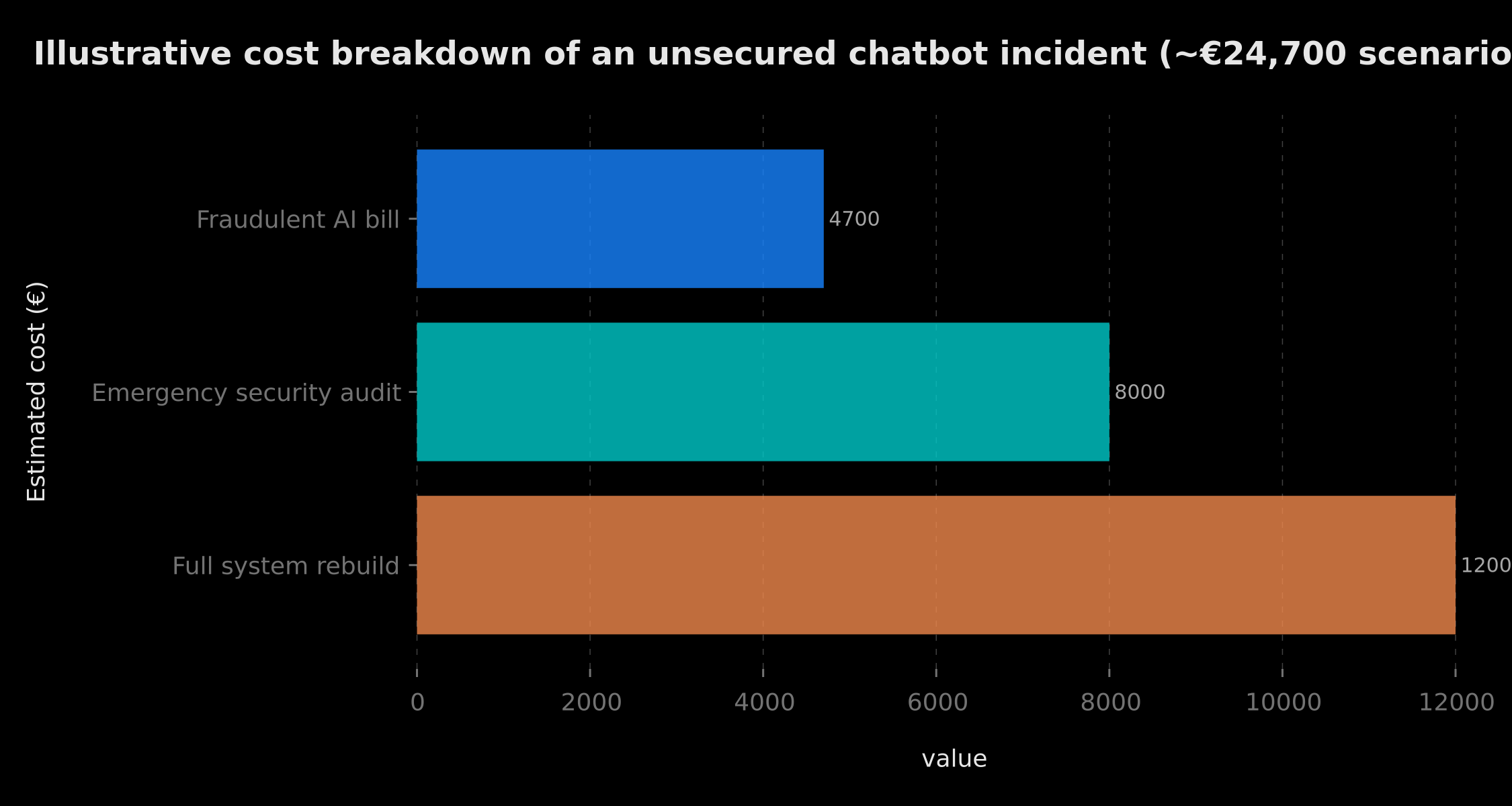 Three line items: €4,700 fraudulent AI bill, €8,000 emergency security audit, €12,000 complete system rebuild
Item 1 — Fraudulent AI bill: approximately €4,700. This amount corresponds to abusive API key usage over 48 hours. On OpenAI or Anthropic, an automated script consuming thousands of tokens per request can generate several hundred dollars per hour. The API provider rarely offers full refunds, especially when keys were exposed in the source code.
Item 2 — Emergency security audit: approximately €8,000. A security contractor brought in urgently to identify the full scope of the compromise, audit all the code, produce the vulnerability report, and file a breach notification if required. Outside of emergency conditions, this type of audit costs between €3,000 and €6,000 for an SME.
Item 3 — Full system rebuild: approximately €12,000. The template was structurally unsalvageable — starting from scratch with a clean architecture, secrets management, rate limiting, encryption, and monitoring was unavoidable. This cost covers development, testing, and secure deployment.
Indirect costs not counted: three weeks of service downtime, loss of client trust (an estimated 40% did not renew their orders in the two months that followed), reputational damage. These items cannot be precisely quantified but can exceed direct costs in the long run.
Total direct illustrative cost: ~€24,700. For trying to save the €500 to €1,500 a minimal professional system would have cost from the start.
What Are the Security Risks of a Poorly Secured AI Chatbot?
AI chatbot security concentrates risks that are unique to language models, on top of classic web vulnerabilities. Here are the five main categories you absolutely need to understand before any deployment.
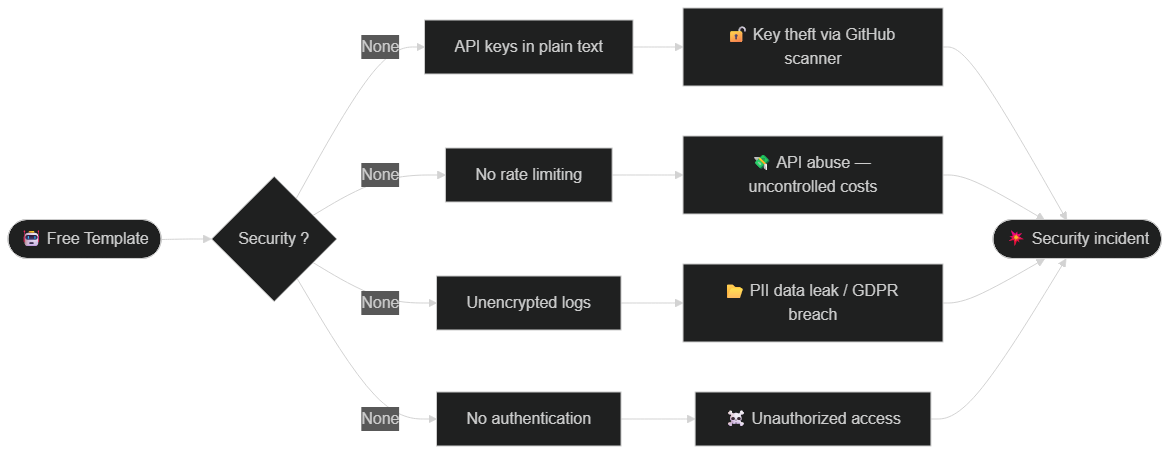 Four main attack vectors from an unsecured architecture: plain-text keys, no rate limiting, unencrypted logs, no authentication
1. Prompt Injection: When the User Becomes the Attacker
Prompt injection is one of the most characteristic vulnerabilities in LLM-based systems. An attacker crafts a message specifically designed to short-circuit your chatbot's system prompt and force the model to adopt unauthorized behavior: revealing internal information, ignoring safety rules, generating forbidden content, or exfiltrating data stored in the context window.
In free templates, the system prompt is often minimal ("You are a helpful sales assistant, be polite") and no mechanism filters injection attempts. OWASP has classified prompt injections as the #1 vulnerability in LLM applications in its 2025 Top 10 for new web security vulnerabilities. This is not a theoretical threat: in 2024, several documented incidents showed customer service chatbots being manipulated into revealing other users' data or executing unauthorized actions through connected tools.
2. Personal Data Leaks (PII) and GDPR Compliance
A customer support chatbot handles sensitive personal data by nature: names, email addresses, order numbers, and sometimes payment or health information. If these conversations are stored in plain text, transmitted without encryption, or retained without a defined retention policy, your business is in violation of GDPR — whether you intended it or not.
Legal obligations are clear: legal basis for processing, user notification, limited retention periods, encryption at rest and in transit, and rights of access and erasure. Free templates comply with none of these by default. Data protection authorities can impose sanctions ranging from a few thousand euros for a cooperative SME up to 4% of global annual turnover for the most serious cases. In June 2026, enforcement actions on AI systems have intensified, particularly under the EU AI Act framework.
3. API Abuse and Cost Explosion
LLM API providers (OpenAI, Anthropic, Google) bill by usage — typically per token. Without rate limiting and spending alerts, your chatbot is a financial time bomb. Abuse scenarios are multiple: a competitor automates thousands of requests to drain your budget, a malicious user exploits an exposed key, or a production bug generates an infinite call loop.
In 2026, inference costs have dropped, but volumes have increased proportionally. A "credential stuffing" incident on an unprotected OpenAI key can generate between $1,000 and $10,000 in charges in under 24 hours depending on the models used. See our guide on how much an AI chatbot actually costs in 2026 for comprehensive cost benchmarks.
4. Model Manipulation and Jailbreaking
Beyond prompt injections, attackers use jailbreaking techniques to bypass models' native safeguards. In a professional chatbot context, this can mean: forcing the model to generate inappropriate content associated with your brand, leading it to disclose confidential information about your internal processes, or manipulating its recommendations to the detriment of your customers.
Free templates generally include no output filtering layer to detect and block these behaviors. The underlying model — even GPT-4 or Claude 3.5 — is not infallible against sophisticated attacks, and unexpected behaviors can cause serious reputational damage.
5. Vulnerable Dependencies and Software Supply Chain Attacks
A template downloaded from GitHub includes dozens of third-party libraries. If these dependencies are not kept up to date, they accumulate known, exploitable CVE vulnerabilities. The SolarWinds incident (2020) popularized the concept of software supply chain attacks: compromising a popular dependency to infect all projects that use it.
In practice, an unmaintained chatbot template can easily accumulate 10 to 20 critical vulnerabilities within six months. Tools like Trivy or Dependabot can detect them in minutes — but only if you have the habit of using them.
The Classic Mistakes of "Free" Templates in Production
The risks described above are not abstract possibilities. They materialize systematically in free templates, because these projects are designed to demonstrate functionality, not to survive in a hostile environment.
❌ No Rate Limiting — an Open Door to Abuse
Rate limiting is the simplest security measure and the most frequently absent. Without a request limit per user or IP, your chatbot can be used as an attack amplifier: an attacker sends thousands of simultaneous requests to drain your API quota, saturate your server, or trigger a catastrophic bill. In production, a threshold of 10 to 20 requests per minute per authenticated user is a reasonable minimum. Many templates have none at all.
❌ No Serious Authentication — Everyone Is Welcome
"Demo" templates often work with no authentication, or with trivial authentication that can be bypassed in two minutes. In production, your chatbot must verify each user's identity before processing their request, and their access rights before returning sensitive information. JWT, OAuth2, secure sessions — these mechanisms are well-documented but rarely included in free templates.
❌ Plain-Text Logs — a Gold Mine for Attackers
Many templates log all requests and responses to facilitate debugging — which is useful in development. In production, these logs contain sensitive personal data (PII) stored in plain text on disk or in a cloud service, with no retention policy or encryption. For an attacker who gains server access, these logs are a gold mine. For regulators, it's a clear GDPR violation.
❌ Overly Permissive Model, Missing or Vague System Prompt
A chatbot without a well-structured system prompt and guardrails is like an employee without training: it will do whatever the user asks, even if it goes against your business interests. The system prompt must clearly define the chatbot's scope (which topics it handles), information it must never disclose, and the behavior to adopt when facing suspicious requests.
❌ No Sandboxing or Isolation
Modern chatbots are often connected to tools (databases, internal APIs, file systems) via function calling mechanisms. Without strict isolation, a successful prompt injection can allow an attacker to trigger unauthorized actions in your system — modifying a database, sending emails on your behalf, or accessing sensitive files. The principle of least privilege must apply: the chatbot should only have access to the resources strictly necessary for its function.
How to Secure an AI Chatbot in 2026
Securing an AI chatbot is not an insurmountable task. It's a series of protection layers that stack up to make an attack increasingly difficult and costly for the attacker.
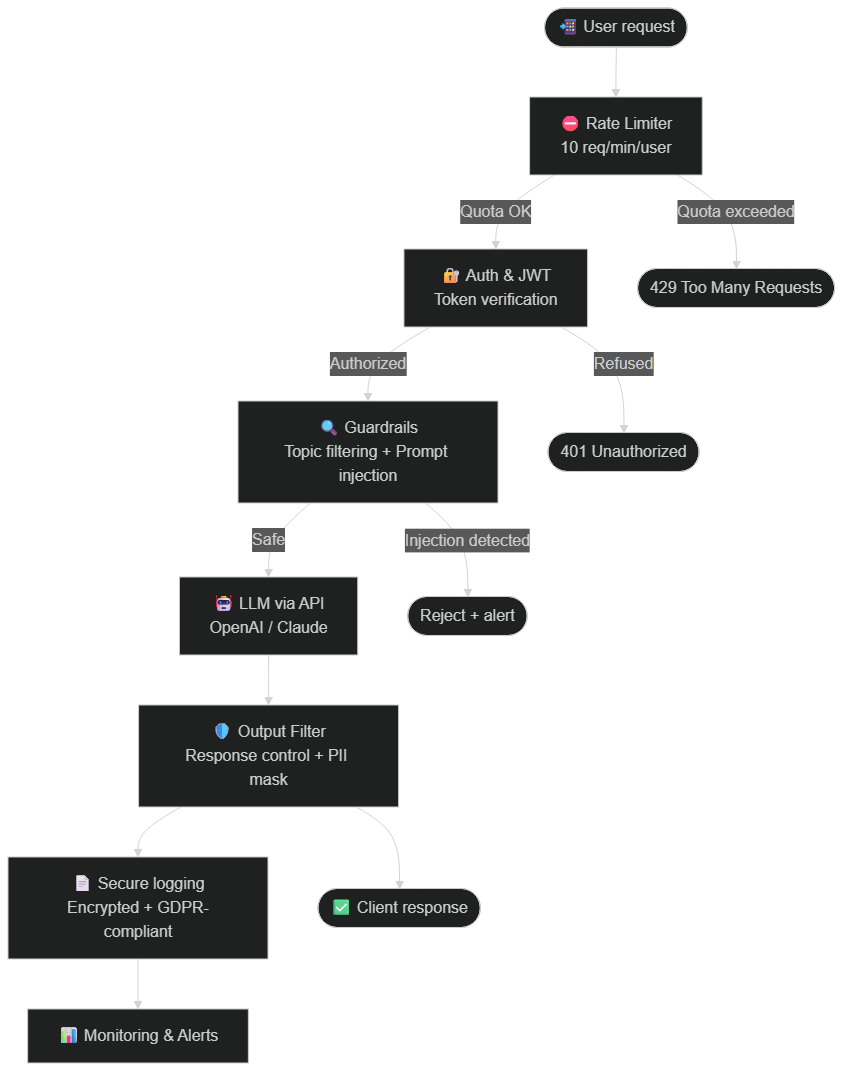 Every request passes through rate limiter, authentication, guardrails, LLM, output filter, and encrypted logging before reaching the client
Rate Limiting and Quotas — the First Line of Defense
Implement a rate limiter on your chatbot API before any other component. The basic rule: 10 to 20 requests per minute per authenticated user, with a daily global quota based on your API budget. On a Node.js server, libraries like express-rate-limit or upstash/ratelimit allow implementation in under an hour. Combined with a spending alert system (available natively on OpenAI and Anthropic), you drastically limit your financial exposure.
Guardrails — Filter Inputs Before the LLM
Guardrails are rules or classification models that analyze each user message before sending it to the LLM. They allow you to block detectable prompt injections, refuse out-of-scope topics, and flag suspicious behaviors. Solutions like Nemo Guardrails (open source, NVIDIA) or custom classifiers trained on your use cases can achieve a good level of protection. Your system prompt should also be carefully crafted: explicit instructions on what the chatbot must not do, examples of forbidden behaviors, and denial instructions for suspicious requests.
Output Filtering and PII Masking
Output filtering is as important as input filtering. Before returning the LLM's response to the user, a filter must check that the response doesn't contain unexpected sensitive data (card numbers, API keys, other users' data), and automatically mask any PII that appears in the generated text. Libraries like presidio (Microsoft, open source) can scan and anonymize text in real time.
Secure Logging and GDPR Compliance
Every chatbot interaction should be logged — but securely and compliantly. Best practices in June 2026: AES-256 encryption of logs at rest, pseudonymization or anonymization of personal data, defined retention policy (30 to 90 days depending on use case), access to logs restricted to authorized personnel, and the ability to delete a user's data on request. Our guide on security automation and release checklists details how to automate these processes in a CI/CD pipeline.
Penetration Testing and Regular System Prompt Reviews
Security is not a static state — it's a continuous process. Schedule a professional penetration test at least once a year, and after every major system change. For AI chatbots, specifically include prompt injection tests (the Garak framework is an open-source reference for LLM red-teaming) and load tests to verify rate limiting holds under pressure. Also review your system prompts regularly: attack techniques evolve, and what was sufficient six months ago may no longer be adequate.
For a deeper look at unexpected model behaviors, see our comprehensive guide on how to avoid AI hallucinations in enterprise environments.
The Difference
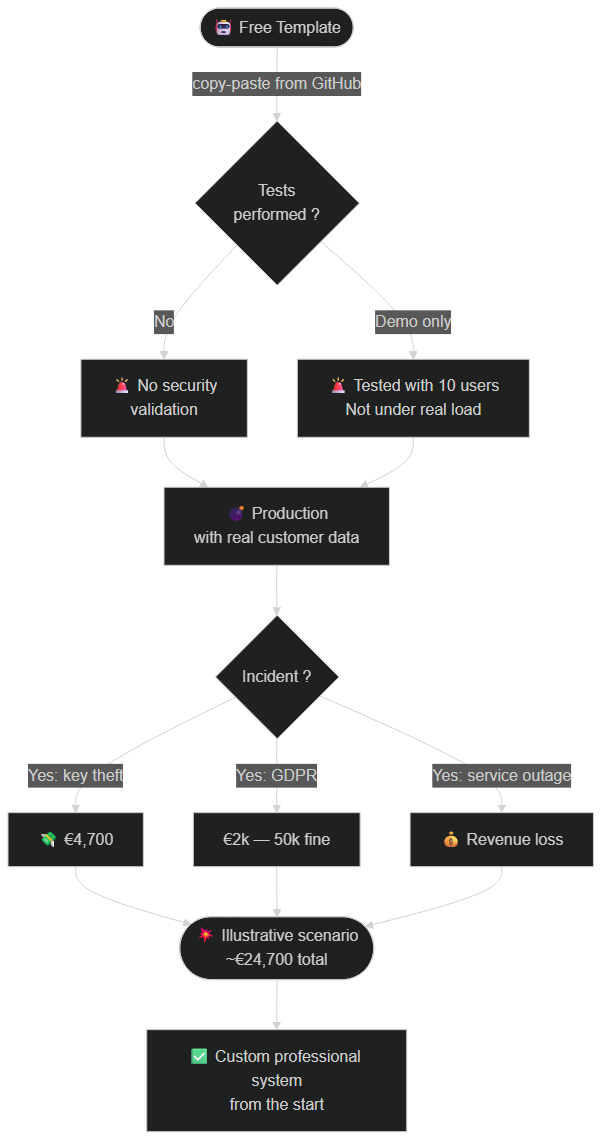 From unsecured template (uncontrolled costs, exposed data) to a GDPR-compliant professional system with controlled costs
Free Template
→ Works in demo
→ Zero security
→ No error handling
→ No monitoring
→ Uncontrolled costs
→ Dangerous in production
Professional System
→ Works in production
→ Multi-layer security
→ Complete error handling
→ 24/7 monitoring
→ Controlled costs
→ Reliable, safe, and GDPR-compliant
AI Chatbot Security Checklist Before Going Live
Here are the essential checks before deploying your chatbot with real customer data. This checklist covers the risks most frequently overlooked in projects that use free templates as a starting point.
 Nine sequential steps: API keys in environment variables, rate limiting, JWT auth, AES-256 encryption, guardrails, secure logging, monitoring, load testing, penetration test
Secrets management. Are all API keys, tokens, and passwords stored in environment variables or a dedicated vault (HashiCorp Vault, AWS Secrets Manager)? No secret should appear in source code or Git history.
Rate limiting. Is a rate limiter active on all endpoints that call the LLM? Have you defined per-user limits and API budget overrun alerts?
Authentication. Is every request associated with an identifiable, authenticated user? Does the authentication resist brute-force attacks (attempt limiting, CAPTCHA if needed)?
Data encryption. Are conversations and personal data encrypted at rest (AES-256) and in transit (TLS 1.3)? Is the database accessible only from the application server?
Guardrails and system prompt. Does the system prompt clearly define the chatbot's scope, prohibitions, and behavior in case of suspicious requests? Does a filter detect prompt injections before transmission to the LLM?
Output filtering. Is the LLM's response analyzed before being sent to the client to detect data leaks or unexpected behaviors?
GDPR-compliant logging. Are logs encrypted, pseudonymized, and subject to a defined retention policy? Is user data deletion on request implemented?
Monitoring and alerts. Does an alert system automatically trigger on traffic anomalies, quota overruns, or repeated errors?
Testing. Have you performed load tests to verify performance under pressure, and at least one prompt injection test before production deployment?
What Happened After
The entrepreneur had his system rebuilt correctly by a professional contractor.
✅ Credentials Secured in a Vault
Technique: Environment variables + monthly automatic rotation
Business: Zero theft risk, DevSecOps compliance
Implementation:
// ❌ Bad
const API_KEY = 'sk-1234567890';

// ✅ Good
const API_KEY = process.env.OPENAI_API_KEY;
✅ Encryption of All Data
Technique: AES-256 for conversations at rest, TLS 1.3 in transit
Business: Guaranteed GDPR compliance
Implementation:
const encrypted = encrypt(conversation, AES_256_KEY);
await db.save(encrypted);
✅ Usage Limits
Technique: 10 requests per minute per authenticated user
Business: Controlled costs, predictable billing
Implementation:
const rateLimiter = new RateLimiter({
  maxRequests: 10,
  windowMs: 60000
});
✅ Error Handling and Fallback
Technique: Automatic backup system with a generic response if the LLM fails
Business: Service always available, user experience preserved
Implementation:
try {
  const response = await openai.chat();
} catch (error) {
  return fallbackResponse();
}
✅ 24/7 Monitoring
Technique: Automatic email and Slack alerts on traffic anomalies and quota overruns
Business: Problems detected before they cost money
Implementation: Monitoring with alert thresholds configured on request volume, daily cost, and error rate.
Result
→ Zero incidents for 8 months
→ Costs: €150/month (vs uncontrolled before)
→ Customer satisfaction: 94%
→ GDPR compliance: 100%
What It Really Costs to Do Things Right from the Start
The most common objection when discussing professional chatbot deployment is: "I'll add security later, once I've validated the product." This reasoning is understandable — but it's fundamentally flawed.
Here's why: the cost of retrofitting security onto an existing, running system is always higher than building it in from the beginning. You're not just adding missing features — you're rebuilding trust with users who already interacted with an insecure system, notifying affected customers of a potential breach, and potentially rewriting core architecture decisions that were incompatible with security from the ground up.
In contrast, the incremental cost of building a chatbot with rate limiting, proper authentication, encrypted storage, and basic guardrails from day one is modest. For a developer who knows these patterns, it adds perhaps 10 to 20 hours of work over a simple demo setup. At a contractor rate of €80–150/hour, that's €800 to €3,000 — a fraction of the €24,700 illustrative scenario described in this article.
The math is brutally simple: the cost of doing things right once is almost always lower than the cost of doing things wrong and then fixing them under duress.
This is not unique to AI chatbots. It's the fundamental lesson of every security post-mortem in the past decade. The good news is that the security community has done most of the hard thinking: established patterns, open-source tools, and clear frameworks exist for every layer of protection discussed in this article.
The Lesson
Free templates are perfect for LEARNING and for testing an idea locally.
But for your BUSINESS, you need a professional system. AI chatbot security is not an optional feature you add "later." It's a prerequisite for deployment. Every day spent in production with an unsecured system is a day you accumulate financial, legal, and reputational risk that you cannot quantify in advance.
The right approach isn't to find a "better-secured" template — it's to understand the stakes, systematically apply best practices, or delegate to a team that has mastered them.
The Truth About AI and Time
You're told: "Install this template in 5 minutes!"
Reality: Securing an AI system for production doesn't take 5 minutes when starting out. It's impossible — and pretending otherwise exposes your clients to real risks.
BUT...
When you master security and architecture principles, you can build robust systems very quickly. Our article on AI supervision in business details the 3 essential safeguard levels.
AI accelerates execution, not understanding.
Additional Resources:
🛡️ Complete Guide: AI for Everyone I've documented ALL best practices: how to secure your AI agents, master costs, handle errors, and 10 guided projects with production-ready code. 👉 Access the Complete Guide
Are you using free templates in production? Share your experience in the comments — or request a free audit to find out if your chatbot is vulnerable. 👇
Tags
FAQ
What is prompt injection and why is it dangerous for an AI chatbot?
Prompt injection is an attack where a malicious user crafts a message designed to bypass your chatbot's system prompt instructions and force the model to adopt unauthorized behavior — for example, revealing internal data, ignoring safety rules, generating forbidden content, or exfiltrating context-stored information. Free templates typically include no guardrails to block these attacks. OWASP ranks prompt injection as the #1 vulnerability in LLM-based applications.
How much can a GDPR violation related to an unsecured AI chatbot cost?
Data protection authorities can impose fines of up to 4% of global annual turnover or €20 million (whichever is higher). In practice, for SMEs, fines in Europe range from a few thousand to several hundred thousand euros depending on the severity of the breach and the company's level of cooperation. Direct remediation costs — breach notification, legal fees, technical audit — frequently exceed the regulatory fine itself.
How does rate limiting work for an AI chatbot and why is it essential?
Rate limiting restricts the number of requests a user (or IP address) can send within a given time window. For an AI chatbot, a common baseline is 10 to 20 requests per minute per authenticated user. Without this limit, an attacker can automate thousands of requests within minutes, generating astronomical API costs and saturating your infrastructure. It's the simplest security measure to implement — and the one most often missing from free templates.
What tools should I use to test the security of an AI chatbot before deployment?
For classic vulnerability auditing, Trivy (dependencies) and OWASP ZAP (web injections) are open-source references. For LLM-specific attacks, the Garak framework (dedicated to LLM red-teaming) lets you test prompt injections, jailbreaks, and system prompt leaks. For load testing (rate limiting validation), k6 or Locust can simulate traffic spikes. A professional penetration test is recommended at least once a year and after any major system change.
Are all open-source templates dangerous for production use?
Not all of them — but the vast majority of "demo" or "starter" templates available for free are not designed for production environments. The difference lies in the presence of safeguards: secrets management, rate limiting, authentication, data encryption, and error handling. Before any deployment, run the code through a vulnerability scanner, audit all dependencies, and add the missing security layers — or hire a professional like BOVO Digital to do it right from the start.
We scope one workflow — not a generic demo
You describe a repeated task. We tell you what n8n would ship, the timeline, and what stays out of scope.
- 30 min
- 1 scoped workflow
- No commitment
Vicentia Bonou
Full Stack Developer & Web/Mobile Specialist. Committed to transforming your ideas into intuitive applications and custom websites.


