
n8n Self-Hosted: Complete Guide to Install on VPS (2026)
Self-hosted n8n on a VPS: EU data, GDPR, infra offer. Docker guide. VPS 20-50 EUR/month as a market order of magnitude, not an invented fee. EU datacenter.

Updated

n8n Self-Hosted: Complete Guide to Install on VPS (2026)
Take back control of your automations: your data, your workflows, your infrastructure.
Running n8n self-hosted on a VPS is the choice of teams that refuse to hand their critical automations to a SaaS they don't control. Instead of a cloud subscription that climbs with volume, you get unlimited executions, 100% private data, and a fixed cost you control to the penny. This guide walks you from picking the server to a secure production deployment: Docker install, reverse proxy, HTTPS, backups, scaling, and day-to-day maintenance.
The goal isn't to sell you a magic bullet, but to give you a realistic procedure with its benefits and its trade-offs. If you want infra delivered (EU, GDPR, backups): n8n automation agency.
Method and sample limits
Collection date: 13 September 2026. Source: 44 files. Filter: Automation → 25 cases, of which 6 name n8n. Infra / security family → 1 case (id 27). Out of scope: CRM, named quotes, ComeUp prices. Threshold: 5 cases before an aggregate.
We do not aggregate “BOVO self-host”. One infra file. The 6 n8n tags are a cited stack, not market share. “40 hours/month”, “−95% errors” or “ROI in 2–3 months” remain marketing copy.
A production VPS sits, market order of magnitude, between €20 and €50/month. We do not invent a €5 or €6 tier.
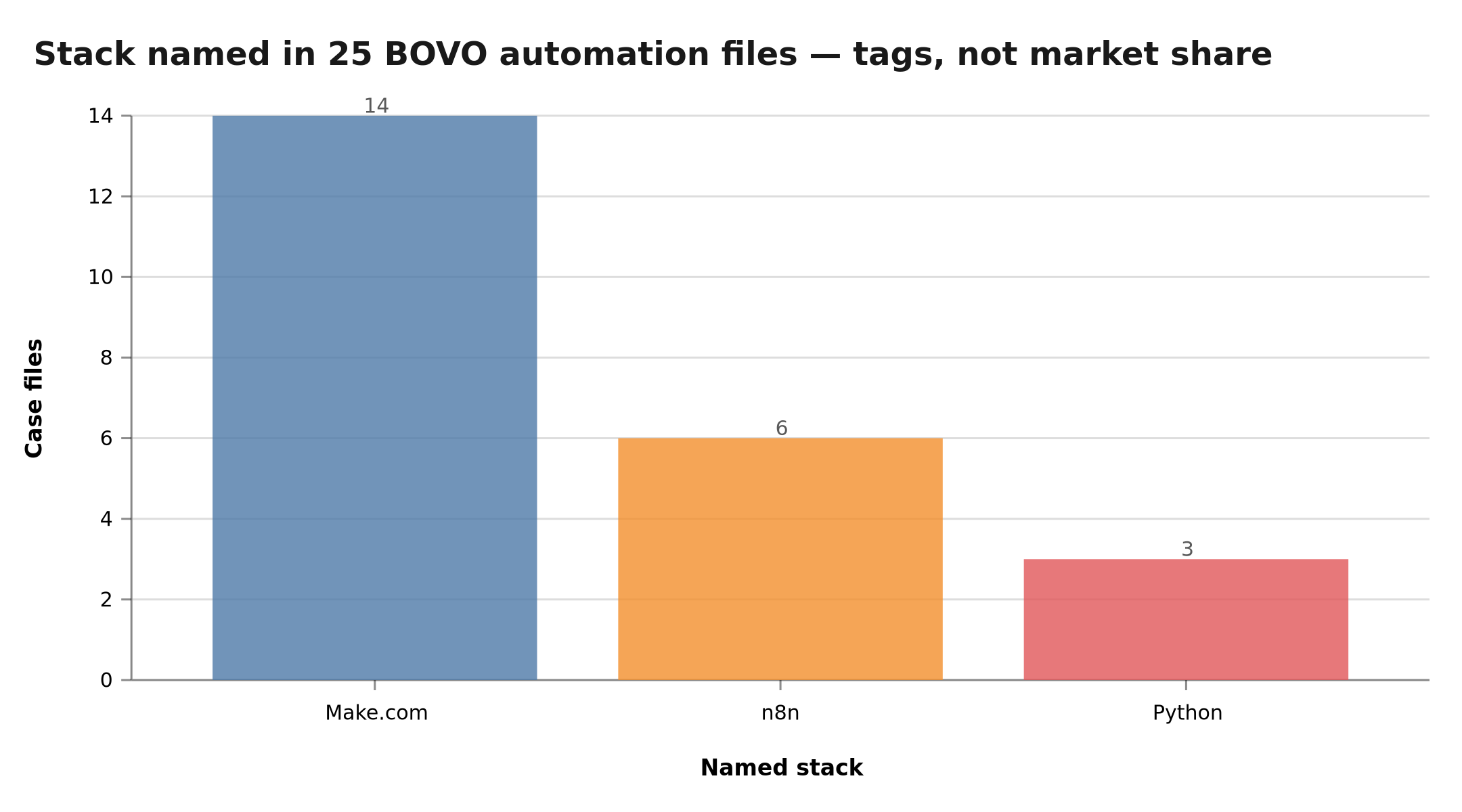 6 n8n files out of 25 — tags, not market share. Documented infra is 1 file
Mini-cases: when self-host enters the quote
1. SaaS access control (id 27, n8n + JWT). Credits, IP, authentication. Only infra file. Illustration. Secrets and quotas should not transit a third-party SaaS.
2. Visuals from Notion (id 1, n8n). Prompts and image outputs. Self-host if the internal Notion base must not go through n8n Cloud. File: AI image workflow.
3. PrestaShop SEO (id 17, n8n). Sheet export / re-import. Volume and catalogue: often simpler behind your firewall. File: PrestaShop SEO.
4. Internal chatbot (id 24, n8n). FAQ + booking. Conversation data: a GDPR argument for an EU VPS. File: BOVO chatbot.
These four files are not an average hosting cost.
Why self-host n8n on a VPS?
n8n is a "fair-code" automation tool: its source is open and its Community edition can be self-hosted for free. That distinction changes everything compared to a Zapier or a Make, which bill per task. When self-hosting, you only pay for your server, regardless of how many executions you run.
What is the economic case for self-hosting?
This is the most immediate argument. On the official cloud, the bill follows your execution volume. Self-hosted, it follows the power of your VPS — and a small server already absorbs a lot.
| Volume | n8n Cloud | Self-hosted n8n |
|---|---|---|
| Low | Entry plan (see n8n.io) | VPS €20–50/month (market) |
| High | The bill follows executions | Same VPS band while the machine holds |
Cloud: read the official page, the model changes. VPS: market order of magnitude, not a BOVO quote and not a €5 tier.
A VPS bills capacity, not usage. Extra executions do not change the host line while the server holds. Tool comparison: n8n and Make pricing 2026.
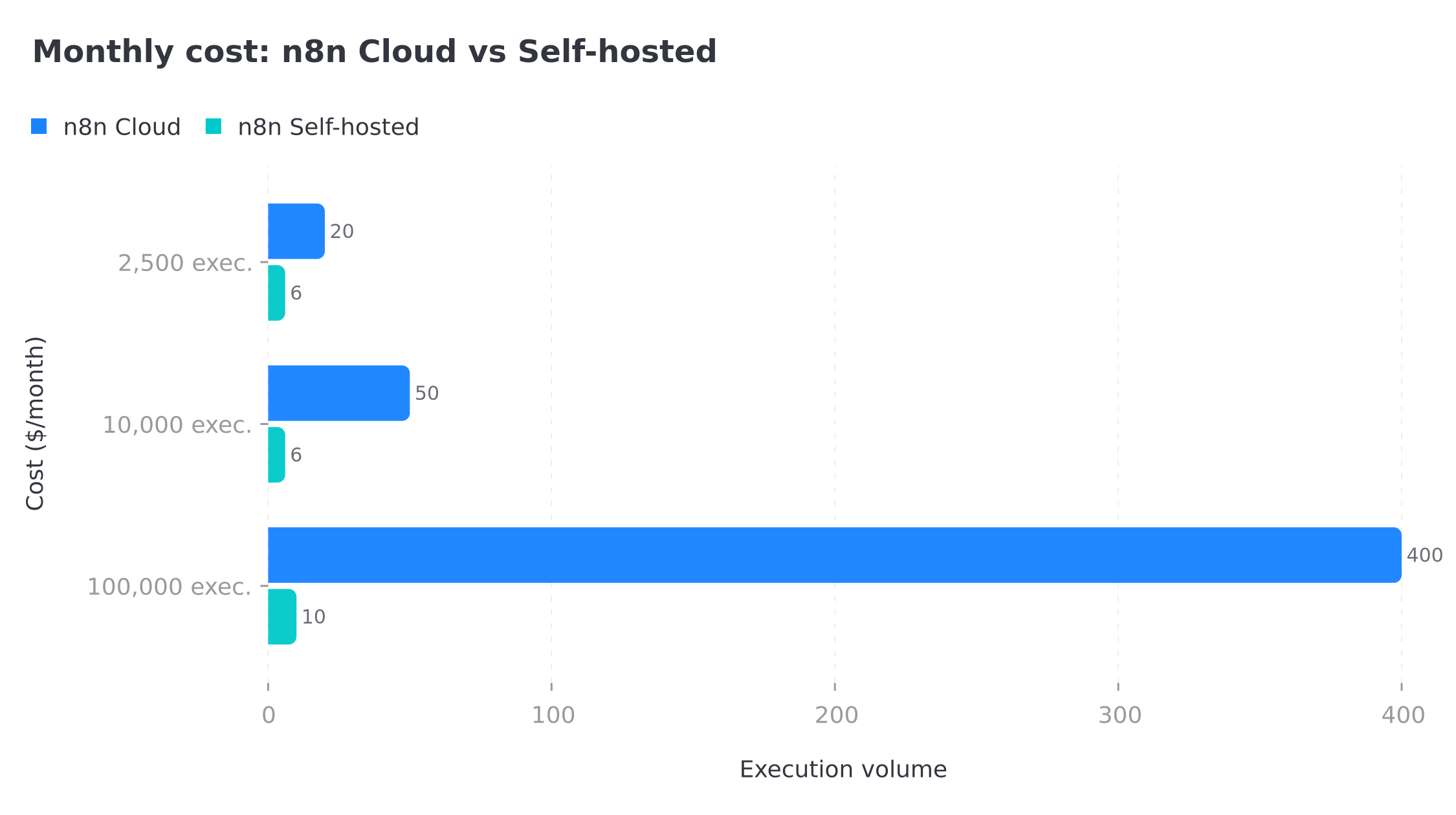 Illustration of the Cloud vs VPS gap: chart amounts are not BOVO quotes. VPS landmark: €20–50/month
What are the benefits beyond price?
Cost is only the visible part. Self-hosting mainly unlocks capabilities no cloud plan offers easily:
- No execution limits — process thousands of operations per hour at no extra cost and without imposed throttling.
- Data sovereignty — your credentials, payloads, and logs stay on your server. A decisive argument for GDPR and regulated sectors (healthcare, finance, legal).
- Lower latency — if your VPS sits in the same region as your APIs, network round-trips shrink.
- Internal system access — an internal database, a file server, a private API not exposed to the internet: your self-hosted instance can reach them, unlike the public cloud.
- Full configuration freedom — environment variables, community nodes, custom code execution: you decide everything.
What limits should you be aware of?
Let's be honest: self-hosting isn't free in time. You become responsible for updates, backups, security, and uptime. A poorly configured instance exposed without authentication is an open door to your credentials. An undersized VPS that crashes overnight means missed workflows. Self-hosting therefore demands a minimum of operational discipline — which this guide aims to give you.
n8n self-hosted or n8n Cloud: how to decide?
The right answer depends on your volume, your data sensitivity, and your technical capacity. Rather than an ideological debate, follow a concrete decision tree.
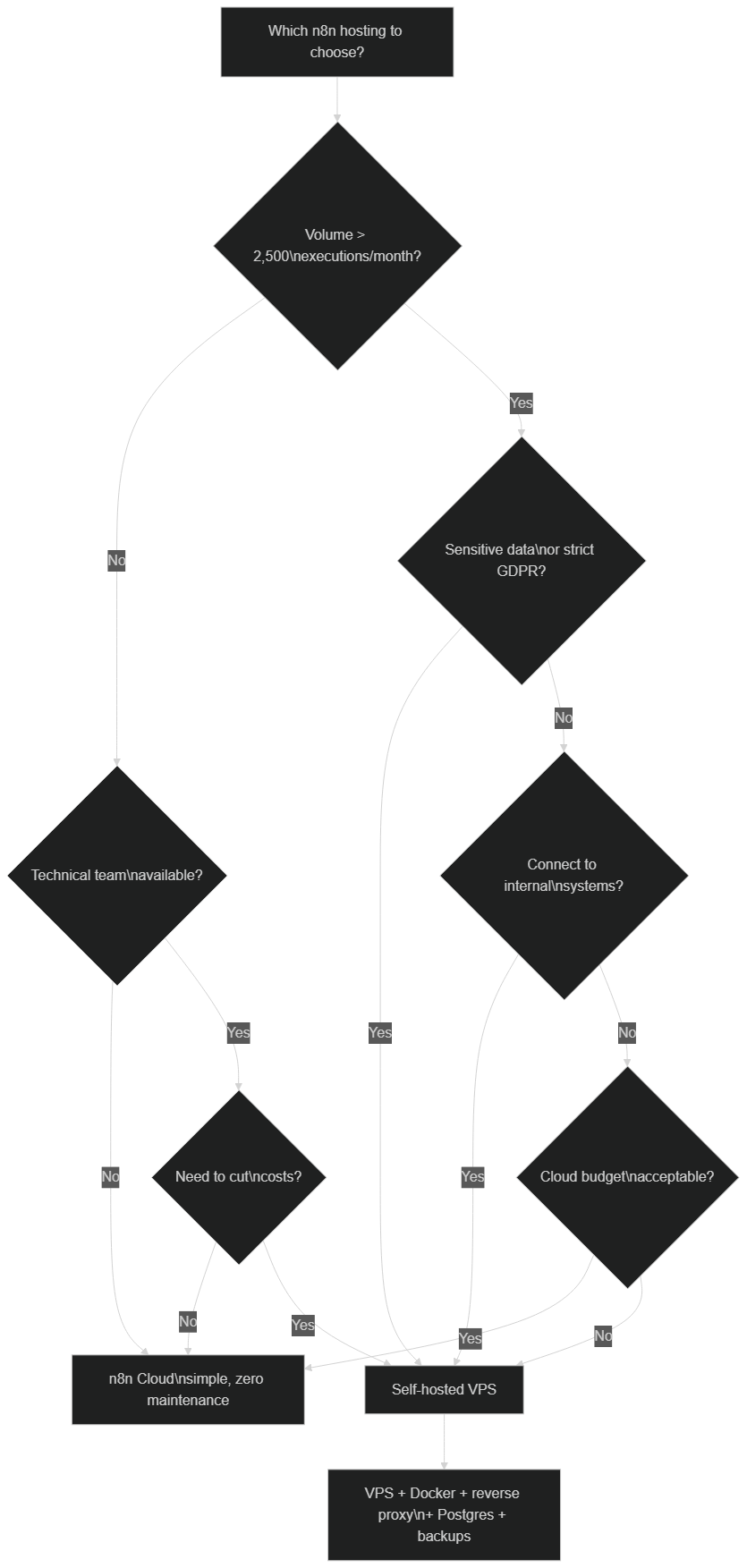 Above 2,500 executions/month, with sensitive data or a connection to internal systems, self-hosted on a VPS becomes the rational choice
In short: choose self-hosted if your volume exceeds a few thousand executions per month, if your data is sensitive, if you need to reach internal systems, or if you have a minimum of DevOps skills. Stay on the cloud if you're just starting, if your volume is low, and you'd rather manage zero infrastructure. Many teams actually start on the cloud, then migrate to a VPS once the monthly bill exceeds the cost of a server.
Which VPS should you choose to host n8n?
Sizing mostly depends on your workflows. Lightweight automations (webhooks, API calls, data transforms) consume little. AI agents, heavy file processing, or queue mode with workers demand more resources.
What is the minimum configuration?
- CPU: 1 vCPU to start, 2 vCPU as soon as you use AI agents or several workers.
- RAM: 1 GB at the strict minimum, 2 GB recommended to breathe. The n8n editor and Node.js appreciate the headroom.
- Storage: 20 GB SSD is enough at first. Watch the growth of execution logs and binary data.
- OS: Ubuntu 22.04 LTS or 24.04 LTS — stable, well-documented, long-term-support distributions.
A tip: start small, but pick a provider that lets you scale resources in a few clicks. Upgrading a VPS is usually far simpler than migrating to a new server.
Which VPS providers should you consider?
| Criterion | Landmark |
|---|---|
| Location | EU datacenter (GDPR): France or Germany depending on the host |
| Sizing | 2 vCPU / 4 GB as soon as you add AI agents or workers |
| Machine budget | €20–50/month 2026 market order of magnitude |
| Scale | A provider that can raise RAM/CPU without a migration |
No invented SKU prices. Read the Hetzner, OVH or equivalent grid on the day.
EU / GDPR recommendation: stay in the Union. OVH (France) or Hetzner (Germany) are common options, not a partnership. The criterion is not “cheapest at €5”, it is jurisdiction + backups.
What does a self-hosted n8n architecture look like?
Before typing a single command, picture the target. A production n8n instance never boils down to the n8n container alone. You need a reverse proxy for HTTPS, a PostgreSQL database for persistence, volumes for data, and ideally Redis if you move to queue mode.
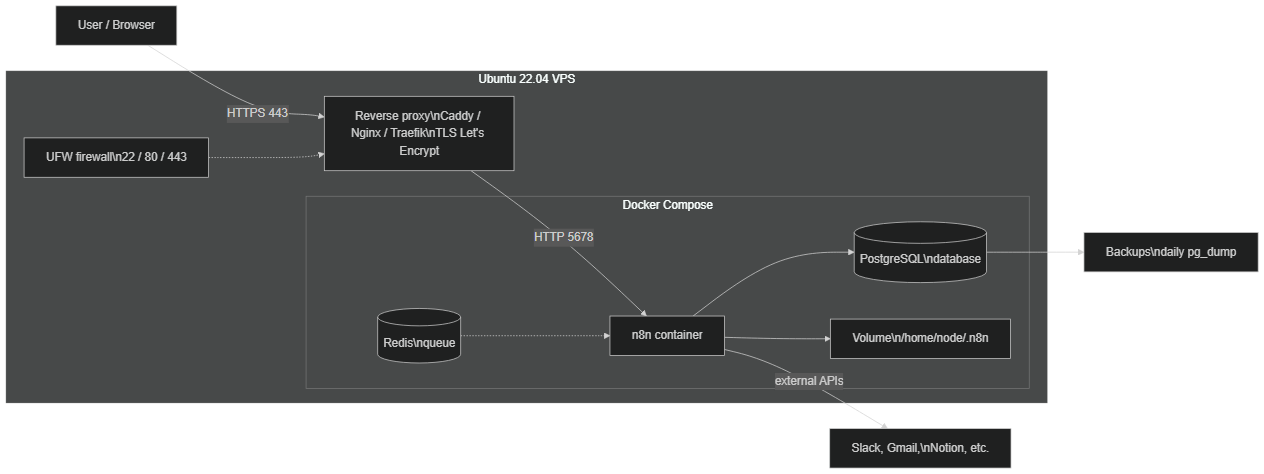 The browser goes through the reverse proxy (HTTPS), which relays to the n8n container; n8n relies on PostgreSQL, a persistent volume, and optionally Redis for the queue
This separation of responsibilities is the key to a robust instance. The reverse proxy handles TLS encryption and exposes only ports 80 and 443. n8n listens internally on port 5678, never directly on the internet. PostgreSQL stores workflows, executions, and encrypted credentials. The volume keeps the encryption key and files. Each brick is independently replaceable — which is exactly what keeps the whole thing maintainable.
How to install n8n on a VPS step by step?
Here is the recommended procedure, based on Docker Compose. Docker isolates n8n and its dependencies, makes updates trivial, and guarantees reproducibility. The commands below are simplified examples: adapt the usernames, domains, and passwords to your context.
 Four steps to a production-ready instance: harden the VPS, install Docker, deploy n8n behind a reverse proxy, then automate monitoring
1. How to harden the VPS before installing n8n?
The very first step isn't n8n, it's hardening the server. Update the system, create a non-root user, disable SSH password login in favor of keys, and close everything but the essentials with the firewall.
# Simplified example — adapt as needed
apt update && apt upgrade -y

# Dedicated user with sudo rights
adduser n8nadmin
usermod -aG sudo n8nadmin

# Harden SSH: no direct root login
sed -i 's/#PermitRootLogin yes/PermitRootLogin no/' /etc/ssh/sshd_config
systemctl restart ssh

# Firewall: only SSH, HTTP and HTTPS
ufw allow OpenSSH
ufw allow 80
ufw allow 443
ufw enable
To go further, install fail2ban to block repeated login attempts, and prefer SSH key authentication over passwords. Those two measures dramatically reduce the attack surface.
2. How to install Docker and Docker Compose?
n8n is best deployed in a container. Docker's official script installs the engine and the Compose plugin in one command.
# Simplified example
curl -fsSL https://get.docker.com | sh
usermod -aG docker n8nadmin
systemctl enable docker
Log out and back in for the docker group membership to take effect. Verify with docker compose version that the Compose plugin responds.
3. How to configure the domain and reverse proxy?
Point a DNS A record (for example n8n.your-domain.com) to your VPS IP address. The reverse proxy will then handle obtaining a TLS certificate and relaying traffic to n8n.
Caddy is the simplest: it manages HTTPS automatically through Let's Encrypt, with no manual certificate handling. A minimal Caddyfile is enough:
# Simplified example — Caddyfile
n8n.your-domain.com {
    reverse_proxy n8n:5678
}
Caddy requests, renews, and installs the certificate on its own. If you prefer Nginx or Traefik, both work perfectly, but require more verbose configuration (Certbot for Nginx, or Docker labels for Traefik). For a first deployment, Caddy saves precious time.
4. How to deploy n8n with docker-compose?
Here is an example docker-compose.yml combining n8n, PostgreSQL, and Caddy. It illustrates the structure; adapt the secrets and domain.
# Simplified example — docker-compose.yml
services:
  postgres:
    image: postgres:16
    restart: always
    environment:
      - POSTGRES_USER=n8n
      - POSTGRES_PASSWORD=strong_password
      - POSTGRES_DB=n8n
    volumes:
      - postgres_data:/var/lib/postgresql/data

  n8n:
    image: docker.n8n.io/n8nio/n8n
    restart: always
    environment:
      - DB_TYPE=postgresdb
      - DB_POSTGRESDB_HOST=postgres
      - DB_POSTGRESDB_USER=n8n
      - DB_POSTGRESDB_PASSWORD=strong_password
      - N8N_HOST=n8n.your-domain.com
      - N8N_PROTOCOL=https
      - WEBHOOK_URL=https://n8n.your-domain.com/
      - N8N_ENCRYPTION_KEY=long_unique_encryption_key
      - GENERIC_TIMEZONE=Europe/London
    volumes:
      - n8n_data:/home/node/.n8n
    depends_on:
      - postgres

  caddy:
    image: caddy:2
    restart: always
    ports:
      - "80:80"
      - "443:443"
    volumes:
      - ./Caddyfile:/etc/caddy/Caddyfile
      - caddy_data:/data

volumes:
  postgres_data:
  n8n_data:
  caddy_data:
Start everything with docker compose up -d, then watch the boot via docker compose logs -f n8n. Once the certificate is issued, your instance is reachable over HTTPS. For a more detailed Docker setup (advanced variables, healthcheck, network options), our complete n8n Docker installation guide digs into each parameter.
Which environment variables are essential for n8n?
n8n is configured almost entirely through environment variables. Mastering a handful of them spares you most production mistakes. Always refer to the official documentation for the up-to-date list, but here are the must-knows:
N8N_ENCRYPTION_KEY— the key that encrypts your credentials in the database. Back it up carefully: without it, your credentials are unrecoverable after a restore.DB_TYPE/DB_POSTGRESDB_*— switch n8n from SQLite (default) to PostgreSQL, recommended in production.N8N_HOST,N8N_PROTOCOL,WEBHOOK_URL— tell n8n its public address. An incorrectWEBHOOK_URLis the number-one cause of webhooks that fail to trigger.GENERIC_TIMEZONE— sets the timezone for scheduled nodes (Cron, Schedule). Essential for triggers to fire at the right time.N8N_SECURE_COOKIE— set totruebehind HTTPS to secure session cookies.EXECUTIONS_MODE—regularby default, orqueueto enable queue mode with Redis and workers (see below).
A ground rule: never hard-code secrets in a versioned docker-compose.yml. Use a .env file excluded from Git, or a secrets manager.
How to back up and restore a self-hosted n8n instance?
This is the point too many teams neglect — until the day they lose their workflows. A proper backup strategy covers three elements:
- The PostgreSQL database — workflows, executions, encrypted credentials. Back it up with
pg_dump. - The n8n data volume (
/home/node/.n8n) — notably holds the encryption key and some files. - The
N8N_ENCRYPTION_KEY— keep it off the server, in a secrets manager. Without it, a restored database shows unreadable credentials.
A simple but effective daily backup script:
# Simplified example — backup-n8n.sh
DATE=$(date +%F)
docker compose exec -T postgres pg_dump -U n8n n8n > ~/backups/n8n-db-$DATE.sql
tar czf ~/backups/n8n-data-$DATE.tar.gz -C ~/n8n n8n_data
# Keep 14 days of backups
find ~/backups -type f -mtime +14 -delete
Automate it via cron (0 3 * * * /bin/bash ~/backup-n8n.sh) and, ideally, replicate backups to external storage (S3, Backblaze, another VPS). A backup that stays on the same server doesn't protect you from a disk failure. Regularly test a restore: a backup that's never been restored is a backup you don't know works.
How to scale with n8n workers?
By default, n8n executes everything in a single process (regular mode). That's enough for dozens of lightweight workflows. But if you launch many simultaneous executions or long-running jobs, that single process becomes a bottleneck.
n8n then offers queue mode (EXECUTIONS_MODE=queue). The principle: the main instance receives triggers and pushes executions into a Redis queue; dedicated "worker" containers consume that queue and run workflows in parallel. You can add or remove workers depending on load.
Concretely, this means adding a Redis service to your docker-compose.yml, configuring the queue variables, and launching one or more n8n worker services. It's a native, documented n8n feature, particularly useful for high-throughput workflows or resource-hungry AI agents. As long as your load stays modest, stay in regular mode: only add the complexity of workers when metrics justify it.
How to monitor and maintain n8n day to day?
A self-hosted instance must be watched. The good news: n8n exposes a health endpoint (/healthz) that returns 200 when all is well. A simple cron script can check it and restart the container if something goes wrong.
# Simplified example — healthcheck-n8n.sh
STATUS=$(curl -s -o /dev/null -w "%{http_code}" https://n8n.your-domain.com/healthz)
if [ "$STATUS" != "200" ]; then
    cd ~/n8n && docker compose restart n8n
    curl -X POST "https://hooks.slack.com/..." -d '{"text":"⚠️ n8n restarted"}'
fi
Scheduled every 5 minutes (*/5 * * * * /bin/bash ~/healthcheck-n8n.sh), this check catches most incidents before your users do. For fuller supervision, also monitor disk space, memory, and database size. Tools like Uptime Kuma (self-hostable) or a free external monitor add an alert independent of the server itself.
On the updates side, the routine stays light:
# Simplified example — monthly update
./backup-n8n.sh                # always back up first
docker compose pull n8n        # pull the latest image
docker compose up -d n8n       # restart on the new version
docker compose logs n8n | tail -50
Read the release notes before any major version bump: n8n clearly documents possible breaking changes. A monthly update, backup first, is enough to keep an instance healthy and current on security.
Troubleshooting: what are the common errors?
A few traps come up systematically during a first self-hosted deployment:
- Webhooks don't trigger — almost always a misconfigured
WEBHOOK_URL. It must exactly match your public HTTPS domain. - "Encryption key mismatch" after restore — you restored the database without the original
N8N_ENCRYPTION_KEY. Put the correct key back in the config. - Editor won't load / cookie errors — check
N8N_SECURE_COOKIEand thatN8N_PROTOCOL=httpsmatches your reverse proxy. - TLS certificate not issued — DNS doesn't (yet) point to the VPS, or ports 80/443 are blocked by the firewall. Let's Encrypt needs port 80 for validation.
- Container restart loop — often a lack of RAM. Check
docker compose logsand consider a more generous VPS.
When you're stuck, docker compose logs -f n8n is your best ally: the cause is almost always written there in plain sight.
How to strengthen the security of your n8n instance?
An n8n instance holds precious secrets: API keys, OAuth tokens, database credentials. Compromising it means handing direct access to every connected service. Security is therefore not optional — it's structural.
Lock down access to the editor. n8n requires creating an Owner account on first boot: choose a long, unique password, and enable two-factor authentication if your version offers it. Never leave an instance reachable without authentication — an automated scan will find it within hours.
Expose only the strict minimum. Thanks to the reverse proxy, only port 443 (HTTPS) should be open to the internet. n8n's port 5678 and PostgreSQL's port 5432 stay internal to the Docker network, invisible from outside. Check your UFW firewall: if 5678 or 5432 appear in ufw status, close them.
Keep everything updated. Security flaws affect n8n as much as the system, Docker, or base images. Beyond the monthly n8n update, apply system patches (apt upgrade) regularly and rebuild your containers to pick up the latest patched images. A server that's never updated becomes an easy target.
Isolate code execution. If your workflows use the Code node, note that n8n provides isolation mechanisms (task runners) to run code in a separate environment. Enable them per the official documentation if you execute untrusted code, and limit community nodes to trusted sources.
Encrypt and rotate your secrets. The N8N_ENCRYPTION_KEY variable protects your credentials in the database. Store it in a secrets manager, never in a Git repository. If you suspect a leak, revoke the affected third-party API keys and regenerate tokens from the source services.
These measures take only a handful of hours to set up and spare you the overwhelming majority of incidents. Securing a self-hosted instance isn't a one-off project but an ongoing hygiene: a few good reflexes, applied consistently.
What checklist should you follow before going live?
Before opening your instance to users, validate these points:
- Hardened VPS: non-root user, SSH by key,
fail2ban, UFW firewall active. - Domain pointed in DNS and working HTTPS (valid certificate).
- PostgreSQL as the database (not SQLite) for production.
-
N8N_ENCRYPTION_KEYset and backed up off the server. -
WEBHOOK_URL,N8N_HOST,N8N_PROTOCOLconsistent with your domain. - Automated daily backups and a restore tested at least once.
- Healthcheck cron + alert (Slack, email) configured.
- Authentication enabled (Owner account protected by a strong password).
- A monthly update plan agreed on.
Tick everything, and you have a production-grade instance. If you plan to run AI agents connected to external tools, our guide on connecting n8n to an MCP server is the ideal complement to this foundation.
How much does n8n self-hosted really cost?
Two distinct lines.
Machine. €20–50/month as a market order of magnitude, depending on RAM, snapshots and bandwidth. Check the host.
Delivery. If you delegate hardening, Docker, HTTPS, Postgres and tested backups, that is the n8n automation agency offer (public card 2,000 / 3,500 / 5,000 € — offer, not a median). We do not publish “half a day at €5” as an observed average.
Cloud still makes sense to prototype. An EU VPS enters the quote as soon as payloads (leads, conversations, JWT) must stay inside the perimeter.
Who gets the most out of n8n self-hosting?
Self-hosting isn't for everyone, but certain profiles benefit disproportionately. Agencies and consultancies that run automations for multiple clients avoid per-seat or per-task billing exploding across accounts — one VPS can host workflows for a whole portfolio. Product teams that embed automation deep in their stack gain the freedom to connect internal databases and private APIs no cloud node could reach. Regulated organizations in healthcare, finance, or legal keep every payload inside their own perimeter, which simplifies compliance reviews.
There's also a productivity angle that's easy to underestimate. When executions are free and unlimited, your team stops rationing automations. Instead of asking "is this workflow worth the quota?", you simply build whatever saves time. That mental shift often leads to more automation, not less — and that's where the real return on a self-hosted instance shows up. Teams frequently report that the freedom to experiment, more than the raw cost saving, is what justifies the move.
The flip side: if you have no one comfortable with a terminal, or if a few hours of downtime would seriously hurt your business and you can't staff an on-call, the managed cloud removes that operational risk for a predictable fee. Be honest about your team's capacity before committing. A self-hosted instance that no one maintains is worse than a cloud plan that just works.
In practice, the sweet spot is a team with at least one technically comfortable member, a meaningful and growing automation volume, and either cost pressure or data-sovereignty requirements. If that describes you, the procedure in this guide turns the decision into a single afternoon of setup followed by minimal upkeep.
Conclusion: should you take the self-hosting plunge?
Running n8n self-hosted on a VPS is now within reach of any team with a developer comfortable with Docker. You gain unlimited executions, data sovereignty, and an unbeatable fixed cost, in exchange for modest but real operational discipline: backups, updates, monitoring. Follow this guide's procedure — hardening, Docker, reverse proxy, Postgres persistence, tested backups — and your instance will hold production without surprises.
Prefer to delegate EU / GDPR infra? n8n automation agency: install, harden, back up, document. 30-min call · contact.
Tags
FAQ
Is n8n self-hosted difficult to maintain?
With Docker Compose, maintenance comes down to a monthly update command and an automated daily backup. A junior developer can manage a self-hosted instance without particular difficulty.
Which VPS should I choose for n8n self-hosted?
An EU datacenter (OVH, Hetzner or equivalent) simplifies GDPR. On price we only publish a market order of magnitude of €20–50/month depending on vCPU, RAM and extras. No invented VPS fee below that. Check the host grid.
Which database should I use for n8n in production?
PostgreSQL is recommended by the n8n documentation for production. SQLite (the default) is fine for testing, but Postgres handles concurrent writes better and makes backups easy via pg_dump.
How do I back up a self-hosted n8n instance?
Back up three things: the PostgreSQL database (pg_dump), the n8n data volume, and your N8N_ENCRYPTION_KEY. Without that key, your encrypted credentials become unreadable after a restore.
Does n8n self-hosted support multiple users?
Yes. n8n offers multi-user management with roles (Owner, Admin, Member) and workflow sharing, available in the self-hosted Community Edition according to the official documentation.
Stuck on a step? We take it to production
Tutorials stop where production starts: secrets, GDPR, no-shows, CRM. A 30-min call to scope the delivery.
- 30 min
- Scoped delivery
- No commitment
William Aklamavo
Web development and automation expert, passionate about technological innovation and digital entrepreneurship.


