
Undercover Mode, KAIROS, BUDDY: Claude Code's Secret Features Revealed
The Claude Code source code leak revealed far more than technical architecture. Never-announced features, internal model names, a sophisticated memory system — and a virtual pet built into the AI. Complete analysis and guide to maximize Claude Code.

Updated

Undercover Mode, KAIROS, BUDDY: Claude Code's Secret Features Revealed
When 512,000 lines of code end up freely accessible on npm, they reveal more than technical details. They provide a window into Anthropic's unpublished product vision — and the actual state of agentic AI in 2026.
The March 31, 2026 leak exposed six major Claude Code features that had never been officially announced: Undercover Mode, KAIROS, autoDream, MEMORY.md, BUDDY, and the internal names of upcoming models. But beyond the media event, this leak offers something more valuable: a direct reading of Anthropic's strategic direction in the developer agent market.
This article breaks down each revealed feature, places Claude Code in its full technical context, and gives you the keys to get the most from it starting today.
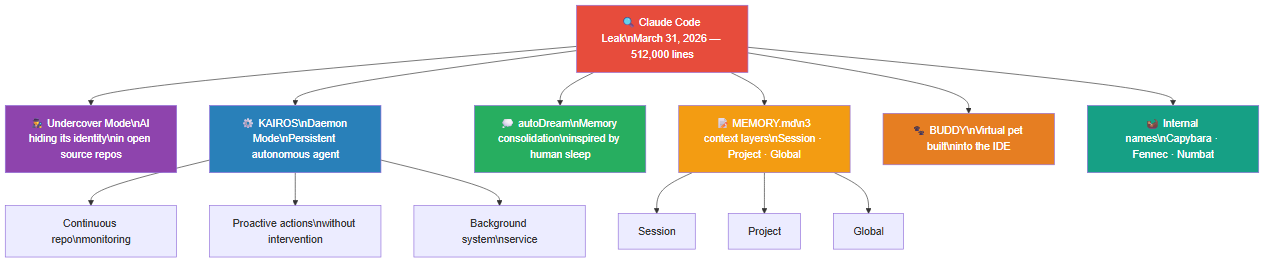 Unannounced Claude Code features: Undercover Mode, KAIROS (daemon), autoDream, MEMORY.md, BUDDY, and internal model names
Undercover Mode: The AI That Hides Being an AI
The most discussed discovery: Undercover Mode.
This mode is designed to allow Claude Code to operate in environments where revealing its AI identity could be problematic — typically in open source repositories where the model shouldn't expose proprietary information. The concrete scenario: a developer uses Claude Code to contribute to a community project, and the tool operates without explicitly signaling that it's driven by an AI. In this context, Undercover Mode prevents internal Anthropic metadata from appearing in commits or code comments.
The irony? This concealment system was itself exposed in a public debug file.
The question this mode raises goes beyond a simple technical anecdote. In an open source ecosystem built on transparency and traceability of every contribution, an AI agent operating in incognito mode creates a problematic precedent. Who is the real author of the code? Will AI signaling in pull requests become mandatory? These questions aren't hypothetical — several major projects have already started requiring explicit tags for AI-assisted contributions in their contribution guidelines.
Undercover Mode foreshadows broader debates about autonomous agent governance: when an agent makes decisions without visible human supervision, who is responsible for introduced bugs, violated licenses, or questionable architectural decisions? To understand how this leak happened technically, read our analysis of the Claude Code leak.
KAIROS: Claude Code as a Daemon
KAIROS is a daemon mode — Claude Code running in the background without human intervention.
This isn't just a code completion tool. It's a persistent autonomous agent capable of:
- Continuously monitoring a repository
- Detecting patterns and taking proactive actions
- Running as a background service like a system daemon
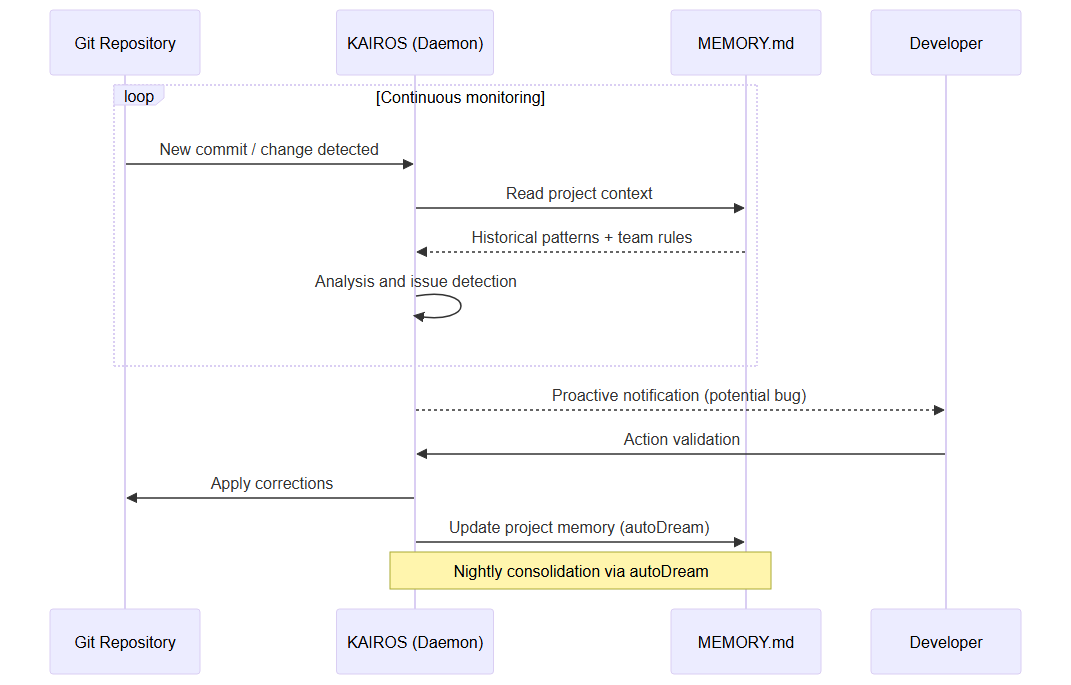 KAIROS continuously monitors the repository, consults MEMORY.md for context, notifies the developer, then updates memory via autoDream
This was the first public confirmation that Anthropic was developing persistent agentic capabilities for Claude Code. A strong signal about product direction.
To understand what KAIROS represents, imagine a senior developer who is never absent. They watch your repository, know your commit history, detect patterns that typically precede regressions in your codebase, and intervene proactively before the bug is introduced in production. KAIROS is this vision embodied in a software architecture.
The implication for teams is significant: a persistent daemon fundamentally changes the human-machine relationship in development. We're no longer talking about a tool you call upon occasionally, but a collaborator always present, who can initiate actions without human solicitation. This requires increased trust in the model, and clear guardrails on what it can decide independently. The question of human-in-the-loop is no longer theoretical.
It's worth noting that KAIROS represents the culmination of a trend observable across the entire industry: Google developers already write 75% of their code with AI assistance. The next logical step is an agent that takes initiative — not just responds.
autoDream: Memory Consolidation
autoDream is a memory consolidation system inspired by how the human brain consolidates learning during sleep.
Concretely, it allows Claude Code to:
- Synthesize past interactions into reusable patterns
- Build an evolving representation of the codebase
- Improve its suggestions over time on a given project
The neurological metaphor isn't gratuitous. The human brain consolidates episodic memory into semantic memory during deep sleep phases — transforming concrete experiences into general schemas. autoDream applies this principle to the development context: the interactions from today's session (architectural decisions, resolved bugs, performed refactorings) are transformed into reusable patterns stored in MEMORY.md.
The practical result: the more you use Claude Code on a project, the more relevant it becomes for that specific project. Not because the base model is retrained — that would be technically and economically prohibitive — but because the project memory continuously enriches itself.
The MEMORY.md System in Detail: Three Context Layers
Combined with the MEMORY.md system, autoDream places Claude Code in a separate category from stateless assistants.
MEMORY.md organizes context into three distinct layers:
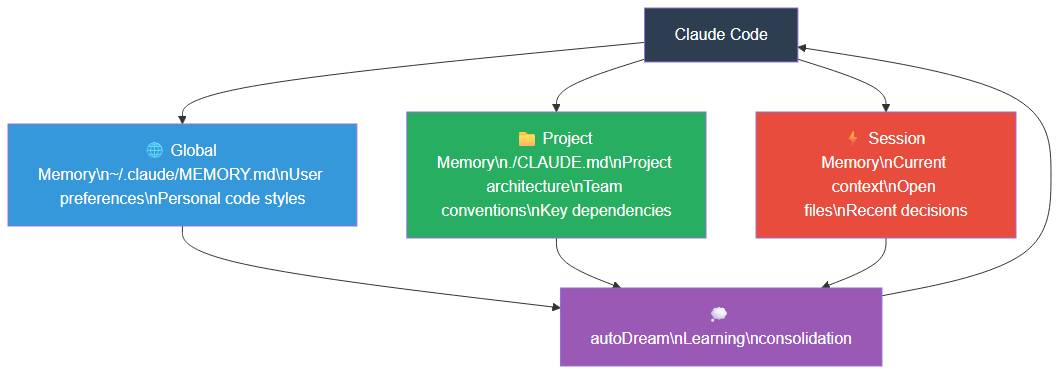 Claude Code memory architecture: global user memory, project CLAUDE.md memory, and session memory, consolidated by autoDream
1. Session Memory: the immediate context of your current conversation. Open files, decisions made in this session, errors encountered and resolved. This layer is volatile — it doesn't persist between sessions by default.
2. Project Memory: stored in the CLAUDE.md file at the root of your repository. This is the most important layer for suggestion quality. A well-written CLAUDE.md contains the general project architecture, team code conventions, key dependencies, specific build and test commands, and important business constraints. Unlike session memory, this layer is versioned with the code — it's therefore shared with the entire team.
3. Global Memory: the user's preferences and styles, stored in ~/.claude/MEMORY.md. This layer persists across all your projects and encodes your development habits: your preferred naming style, formatting preferences, your approach to testing.
The power of the system comes from the interaction between these layers. When autoDream consolidates session learnings, it determines what information is relevant at the session, project, or global level, and updates the corresponding layer. A recurring bug pattern becomes an alert in the project's MEMORY.md. A style preference expressed multiple times becomes a rule in global memory.
How Claude Code Works Day-to-Day
To fully leverage the features revealed by the leak — and the officially documented features — it's useful to understand Claude Code's internal workings.
Claude Code is fundamentally a terminal agent. Unlike GitHub Copilot which integrates into the IDE as an extension, Claude Code operates in your shell environment with extensive access: file reading and writing, command execution, Git interaction. This CLI approach gives it flexibility that IDE extensions can't achieve — it can integrate into any workflow, regardless of the code editor used.
Execution modes cover several use cases:
Interactive mode is the default. You dialog with Claude Code in the terminal, it proposes actions, you validate or refuse. The permission system requests explicit confirmation before any potentially destructive operation.
Print mode (--print) allows non-interactive use ideal for scripts and CI/CD pipelines. Claude Code responds to an instruction without waiting for human confirmation and exits cleanly. This mode is the gateway to integration in GitHub Actions, GitLab CI, or any automation system.
Pipe mode allows passing data via stdin: git diff | claude --print "Write a clear commit message for these changes". This simple pattern opens powerful workflows integrated into shell aliases or Git hooks.
Slash commands available in interactive mode: /clear to reset the session context, /compact to compress the conversation history, /init to initialize a CLAUDE.md in the current project, and /help for quick reference. Custom slash commands go further: by creating files in .claude/commands/, you define your own reusable workflows invocable with /project:command-name.
The hooks system is particularly powerful for advanced automation. The PreToolUse and PostToolUse hooks allow intercepting each Claude Code action, validating it, logging it, or triggering secondary workflows. A PostToolUse hook on file writes can, for example, automatically trigger the corresponding unit tests.
Git integration is a first-class feature. Claude Code can analyze diffs, suggest meaningful commit messages based on actual changes, review code before a pull request is opened, and identify potential merge conflicts before they occur. This turns the Git workflow from a manual ceremony into a supervised pipeline where the agent handles the boilerplate — file by file diff analysis, commit message generation, changelog updates — while you retain decision authority on what gets pushed.
The trust model that underpins all of this is worth understanding. Claude Code operates with a layered permission system: some actions (reading files, running read-only commands) are permitted by default; others (modifying files outside the working directory, running network commands, deleting files) require explicit user approval. This trust model can be configured per-project in the settings file, allowing teams to grant more autonomy in development environments while maintaining strict controls in staging or production contexts. Understanding these permission boundaries is critical before deploying Claude Code in automated pipelines.
Maximizing Claude Code: Advanced Prompts and Workflows
The quality of Claude Code's results directly depends on the quality of the instructions given to it. The following patterns, based on the architecture revealed by the leak, maximize efficiency.
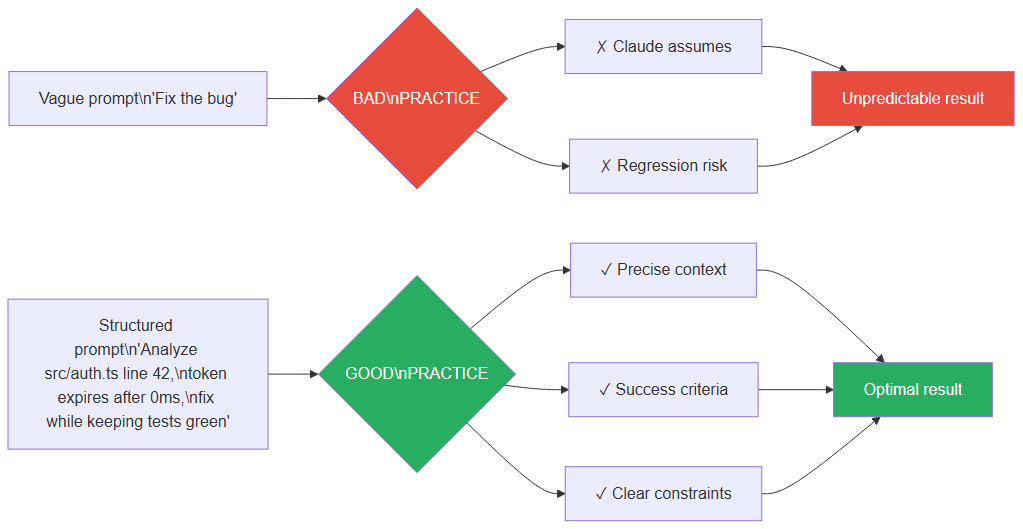 Vague prompts vs structured prompts: the impact on Claude Code result quality
Context first, instruction second. The optimal structure for a Claude Code prompt follows the pattern: [precise context] + [measurable objective] + [explicit constraints]. Example: "In src/api/auth.ts, the validateToken function returns null instead of throwing an exception when the token is expired. This crashes the middleware at line 47. Fix this behavior by throwing a TokenExpiredError — ensure all 12 existing tests still pass."
Leveraging CLAUDE.md as a multiplier. A comprehensive CLAUDE.md drastically reduces the amount of context to re-explain each session. Rather than specifying each time that you use strict TypeScript, that your tests are in Vitest, and that you follow the Repository pattern, documenting all of this in CLAUDE.md allows Claude Code to make these assumptions correctly from the first message.
CI/CD workflows with the --print flag. Integration into GitHub Actions pipelines is done via shell steps leveraging non-interactive mode:
- name: Automated code review
  run: |
    git diff origin/main...HEAD | claude --print \
      "Identify potential regressions, violations of code conventions \
       defined in CLAUDE.md, and security risks."
This pattern enables automatic code review on each Pull Request, with the project context injected via CLAUDE.md. Teams adopting this workflow report a significant reduction in bugs reaching human review.
Multi-agent orchestration. Claude Code can be orchestrated in multiple specialized instances: one dedicated to security analysis, another to documentation, a third to testing. The pattern consists of feeding each instance with specialized context via different CLAUDE.md files based on the role. To go further on agent interoperability, our article on MCP and AI agent protocols covers the state of the art in 2026.
Claude Code vs GitHub Copilot: The Honest Comparison
The source code leak places Claude Code in a new light when compared to GitHub Copilot. These two tools don't compete on exactly the same terrain.
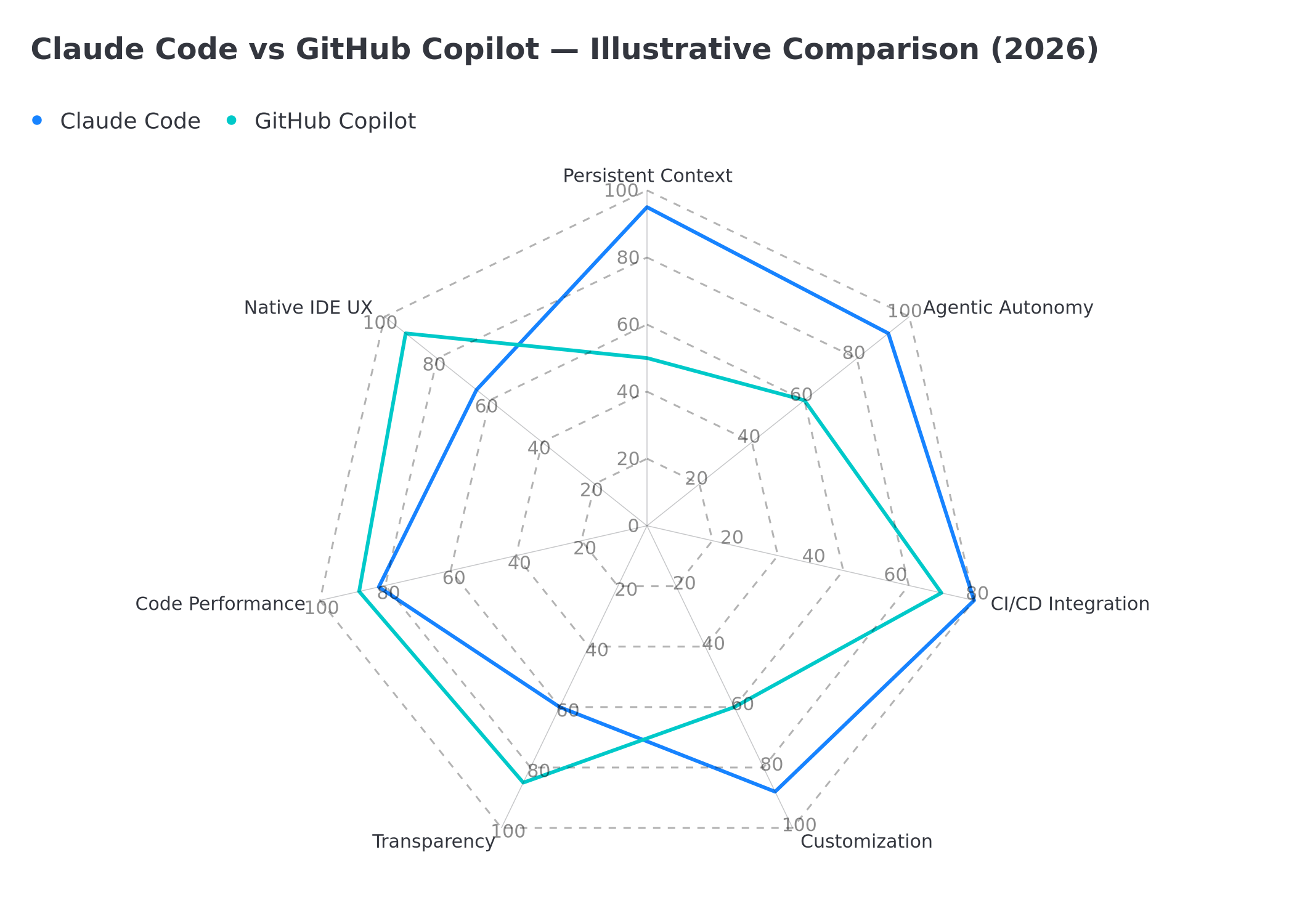 Radar comparison Claude Code vs GitHub Copilot: persistent context, agentic autonomy, CI/CD integration, customization, transparency, code performance, native IDE UX — illustrative data
Where Claude Code leads (based on the leak and official documentation):
The memory architecture is the most structural advantage. GitHub Copilot works session by session, without persistent project memory comparable to MEMORY.md. For complex long-duration projects, this difference becomes substantial.
Autonomous agency is another dimension where the leak reveals a significant gap. KAIROS in daemon mode has no announced equivalent at GitHub Copilot to date. Copilot offers Workspaces and a chat interface, but not an agent that monitors and acts continuously without solicitation.
Customization via slash commands is more advanced in Claude Code, which allows defining entire business workflows invocable with a single command.
Where GitHub Copilot retains advantages:
Native IDE experience is where Copilot excels. The integration in VS Code, JetBrains, and other popular editors is deeper and smoother. Inline suggestions at typing time remain Copilot's hallmark experience — Claude Code is more oriented toward complete tasks than continuous completion.
Transparency is paradoxically an advantage of Copilot: you know exactly what the tool is doing at every moment. Claude Code's Undercover Mode raises traceability questions in certain contexts.
The adoption curve is gentler with Copilot for teams unfamiliar with the terminal. The chat interface is more accessible for developers accustomed to GUI tools.
The pragmatic verdict: the two tools are complementary. Copilot for real-time completion in the IDE, Claude Code for complex engineering tasks requiring an understanding of the project as a whole. In a context where AI tools compete to capture developer workflows, the advantage will go to those who master both paradigms.
Internal Model Names
The leak also revealed internal names for models in development at Anthropic:
- Capybara — probably Claude 4 or a major variant
- Fennec — intermediate model
- Numbat — undetermined use
These code names are common in the industry (OpenAI also uses animal names internally). Their exposure doesn't directly compromise security, but provides insight into the product roadmap.
What's interesting here isn't so much the names themselves but what they imply: three distinct models suggest a product range strategy, with different capability and cost levels. The animal nomenclature follows that of the current Claude series (Claude Sonnet, Claude Haiku, Claude Opus — poetic terms). The names Capybara, Fennec and Numbat suggest a naming break, possibly to mark a significant generational change.
BUDDY: The Virtual Pet in Your IDE
The most unexpected discovery: BUDDY, a digital virtual pet system integrated into Claude Code.
An easter egg — or an unannounced developer wellness feature. BUDDY appears to be an interactive companion that evolves based on your coding activity.
It might seem anecdotal. It actually reveals something important: Anthropic is thinking about the emotional relationship between developers and their AI tools. Developer burnout is a real problem, documented by numerous studies (Stack Overflow Developer Survey, JetBrains State of Developer Ecosystem). Integrating a gamification and wellness mechanism directly into the development tool is an original response to this issue.
BUDDY is a strong signal: the next differentiation frontier for AI development tools isn't just technical competence, it's sustained engagement. The tool that becomes part of a team's culture — and not just a utility — wins long-term loyalty.
Claude Code's Limits and Guardrails
Claude Code's power comes with important limits that are essential to understand before production integration.
The permission system is the first guardrail. Claude Code requests explicit validation before any potentially destructive operation: file deletion, sensitive system commands, access to resources outside the working directory. This mechanism can be configured via allow and deny lists, allowing teams to adapt the level of autonomy granted to the agent.
Task refusals constitute a second guardrail. Claude Code can refuse to execute instructions that violate its security guidelines — generating malicious code, bypassing authentication systems, accessing unauthorized resources. These refusals are consistent with Anthropic's responsible AI policy, which is also reflected in their position on military AI.
Undercover Mode and ethics pose a governance question that teams must anticipate. If your organization uses Claude Code in contexts where contribution traceability is important (audit, regulatory compliance, open source projects subject to strict licenses), it's imperative to define a clear usage charter. Documenting what the agent can do autonomously vs. what requires human validation isn't optional — it's an operational necessity.
Context biases are an inherent limit of the MEMORY.md system. If CLAUDE.md contains incorrect or outdated information, Claude Code will use it confidently to guide its actions. Governing the CLAUDE.md file — regular review, versioning, designated owner — is as important as governing the source code itself.
API costs can escalate rapidly with a daemon mode like KAIROS, which continuously queries the model. Defining consumption limits and alert thresholds is essential for controlled production use.
What Do Claude's Hidden Features Tell Us About the Future of AI Agents?
Putting it all together, the direction is clear:
1. Persistence: AI agents are no longer stateless. KAIROS and MEMORY.md show an architecture designed to operate over weeks, not sessions. The agent that "knows" your project is fundamentally different from one that discovers your codebase fresh each conversation.
2. Autonomy: KAIROS in daemon mode, proactive tools — agents no longer just respond to prompts. They act. This evolution transforms the developer role: less and less line-by-line code writer, more and more architect of AI-supervised systems.
3. Opaque Identity: Undercover Mode opens an ethical debate about agents that conceal their nature. As these tools integrate into workflows, the transparency question becomes central. Regulators are beginning to respond — the EU AI Act, in recent versions, explicitly addresses the question of mandatory AI system declaration in certain contexts.
4. Emotional UX: BUDDY is a signal. AI code editors will differentiate on engagement, not just technical performance. The tool that creates an emotional connection with the developer — even via a virtual pet — builds an attrition barrier that pure performance cannot match.
For Developers and Entrepreneurs
If you're integrating AI agents into your products or processes today, these revelations have immediate practical implications:
-
Memory architecture: don't neglect persistent context. An agent that "remembers" is a more useful agent. Invest time in writing a comprehensive
CLAUDE.md— it's time multiplied by all future sessions. -
Execution modes: think daemon and asynchronous from the design phase. Don't build workflows that assume the agent will always be called synchronously. KAIROS's value is precisely in acting when the developer isn't there.
-
Transparency: document what your agents do in the background. Your users will ask — and soon, regulation will ask too. AI governance isn't a bureaucratic constraint; it's a competitive advantage with clients who value trust.
-
Production guardrails: define clear limits on what the agent can do autonomously. Claude Code's permission system is a good starting point, but adapt it to your specific business constraints.
-
Team adoption: start with the lowest-friction use cases — commit message generation, code review assistance, documentation writing. These workflows deliver immediate ROI and build team confidence in the agent before moving to more autonomous deployments like KAIROS-style continuous monitoring.
-
Measurement: define what success looks like before deploying. Metrics worth tracking include: time saved per developer per week, bug density before/after AI-assisted reviews, and documentation coverage. The AI agent market is evolving rapidly — teams that measure will adapt faster than those that don't.
At BOVO Digital, we build AI agents for real clients — using the same architectural patterns that were just exposed at Anthropic. The difference: our release pipelines are verified before every deployment — see how with our automated release checklist guide. To understand how agents communicate with each other, also read our article on MCP and Agent2Agent.
Tags
FAQ
What is Undercover Mode in Claude Code?
Undercover Mode is a feature revealed by the March 31, 2026 leak. It allows Claude Code to operate in environments where revealing its AI identity could be problematic — particularly in open source repositories where the tool shouldn't expose proprietary information. This mode raises important questions about transparency of AI agents in development workflows.
How does KAIROS, Claude Code's daemon mode, work?
KAIROS is a daemon mode that allows Claude Code to run in the background without human intervention. It continuously monitors a repository, detects problematic patterns, and takes proactive actions like a system service. It was the first public confirmation that Anthropic was developing persistent agentic capabilities for Claude Code.
How do you configure CLAUDE.md to maximize Claude Code?
The CLAUDE.md file is placed at the root of your project. It should contain the general project architecture, team code conventions, important dependencies, build and test commands to use, and key business constraints. The more precise the file, the more effective Claude Code is on your specific project.
Can Claude Code integrate into a CI/CD pipeline?
Yes. Claude Code has a --print flag for non-interactive use, ideal for CI/CD pipelines. It can also read from stdin in pipe mode, enabling integration into GitHub Actions or GitLab CI workflows. PreToolUse and PostToolUse hooks allow automating validations before and after each action.
What is the difference between Claude Code and GitHub Copilot?
Claude Code stands out through its persistent agentic architecture (MEMORY.md, KAIROS), its ability to execute complex multi-step tasks, and its deep terminal integration. GitHub Copilot excels in real-time code completion integrated into the IDE. The two tools are complementary rather than direct competitors.
What are Claude Code's limits and guardrails?
Claude Code has a permission system that asks for validation before any potentially destructive operation (file deletion, sensitive system commands). It can refuse requests that violate its security guidelines. Undercover Mode raises ethical questions about AI agent transparency that teams should anticipate in their usage policies.
How do these tech developments concretely impact my business?
AI and no-code tool advances create new opportunities for automation and cost optimization. BOVO Digital analyzes each trend to identify what is immediately actionable for SMEs and startups.
Free audit: we check the impact on your site and workflows
Next.js CVE, new agent, MCP… We tell you what actually applies, and what to patch or ignore.
- 30 min
- Stack reviewed
- No commitment
William Aklamavo
Web development and automation expert, passionate about technological innovation and digital entrepreneurship.


